
Integration of Monotype
This section provides an overview of the Monotype integration.
The current integration is a hardwired solution. Therefore, the choice of which engine shall be used, has to be made at precompile-time (CMake decision).
The following features have been integrated:
- Font engine: iType
The font engine: iType
iType is a font engine which main purpose is fast and qualitative rasterization of fonts.
To see, which version of iType is currently supported, please have a look at the [3rd Party Software section].
There are two different approaches to integrate the third party code iType into CGIStudio:
- adding prebuilt libraries
- add the third party code into the build process
CGIStudio supports both by CMake settings.
Monotype/iType has a special porting API with which target and OS specifics can be overridden.
CGIStudio provides a single solution for all targets. For this, the framework links the API to the device and operating system layers.
It is also possible to use an own customized port instead of the CGIStudio solution.
Cache support
The iType integration concentrates on the most performant cache types: BitmapCache and GlyphAtlas. Therefore, only these two cache types are fully supported.
Overview: CMake settings
Currently CMake supports general iType integration flags to include Monotype.
To switch to the font engine the following CMake flag has to be set:
| Flag | Value |
|---|---|
| CANDERA_FONTENGINE | Monotype |
If HarfBuzz is selected as the current TextShaper, the flag CANDERA_TEXTSHAPER automatically will change to WorldType-Shaper. Shaping can also be disabled.
-
HarfBuzz requires Freetype and is not available for iType.
This flag is called Monotype to switch to the available Monotype engines. The concrete font engine will be iType.
By enabling Monotype, several CMake flags become available.
The flag MONOTYPE_USE_BINARIES can be used to switch between the different building modes.
They have their own flags which will be described within the corresponding build process description.
Build process: iType as source code
For this mode, MONOTYPE_USE_BINARIES has to be disabled.
- ONOTYPE_FONT_ENGINE_SRC_PATH - This path defines the location where to find the source code for iType. By default this will be cgi_studio_3psw/src/Monotype/iType and the folder structure may look like the following:

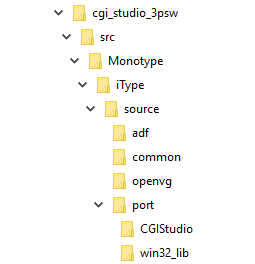
The FileList.txt which defines all the files should contain the following three Lists:-
- MONOTYPE_PUBLIC_HEADERS
- MONOTYPE_PRIVATE_HEADERS
- MONOTYPE_SOURCES
-
It does not matter how the source code is distributed on these lists. Only the names should be in use
MONOTYPE_FEATSTD_PORT_ENABLED - This flag toggles the port API implementation between a CGIStudio version and the default win32_lib including the settings which are required for Candera. The win32_lib represents a default implementation of the framework, separated from any Candera relations. This enables an easy possibility to build iType in a separated environment and link it to Candera. MONOTYPE_FONT_ENGINE_PORT_PATH - This path is directly links to the port API which shall be used for the build. By default it links to the default location of the default CGIStudio implementation: cgi_studio_3psw/src/Monotype/iType/source/port/CGIStudio However, this can be changed to different implementations, too. If MONOTYPE_FEATSTD_PORT_ENABLED is false, this will link to the win32_lib definition.
Build process iType as prebuilt library
For this mode, MONOTYPE_USE_BINARIES has to be enabled.
In general using the prebuilt library is similar to the source code version.
The flags MONOTYPE_FEATSTD_PORT_ENABLED, MONOTYPE_FONT_ENGINE_PORT_PATH and MONOTYPE_FONT_ENGINE_SRC_PATH are equal in usage as in the source code version. The only difference is, that the prebuilt library only requires header files.
The port files and header have to match with the build settings of the prebuilt library.
MONOTYPE_ITYPE_LIBRARY_FILEPATH is the path to the prebuilt library. And has to be defined by the user.
Monotype – Prepopulated font engine cache
This feature shall be used to load font bitmap data into the font engine cache.
CMAKE Configuration
- Set CANDERA -> CANDERA_FONTENGINE to Monotype
- Configure
- Check MONOTYPE -> MONOTYPE_PREPOPULATED_CACHE_ENABLED
Usage
- Include the previously created cache dump header file.
- Include the “MtInclude” header
#include <Candera/TextEngine/Monotype/MtInclude.h> - Create an instance of a font that is present in the asset. The name of the font must match the “Candera Name” property of the font resource in the scene composer. The font size parameter of the Setup call is irrelevant.
Candera::TextRendering::Font font;
font.Setup("ConstructionKit##ConstructionKit#Resources#Fonts#Open Sans Light", 20); - Call FontEngine::InitPrepopulatedCache with the font and a reference to the utilCache variable from the cache dump file.
Candera::TextRendering::FontEngine::Instance().InitPrepopulatedCache(font, &utilCache);
Possible Pitfalls
- The cache should be prepopulated during startup of the application. Thus, the above methods shall be called when the Courier::StartupMsg is received.
- The “faceName” property of the Font::Setup call must match the “Candera Name” property of the font in the composer.
- The font size used when displaying the text, e.g. with a TextNode, must match the font size used when generating the cache dump file.
- While generating the cache dump file, the glyph maps must be retrieved as GRAYMAP’s by calling
map = FS_get_glyphmap(FS_state_ptr, glyphIDs[i], FS_MAP_GRAYMAP8); - When generating the cache dump file, fs_config.h should match the configuration in cgi_studio_3psw\src\Monotype\iType\source\common\fs_config.h