
General Overview
Functional overviewOverview
Fusion hasis an editor that seamlessly combines the behavior tree and the properties panel in a featurepowerful, thatyet combinesintuitive interface.
This integrated approach provides flexibility and aenhances the efficiency of managing behaviors and properties panel for the selected node. This provides an alternative way to manage behaviors. As a result, Fusion allows you to structurein your scene interactions in a more graphical and intuitive way.scene.
Please refer to Behaviors forFor more information on using behaviors.behaviors, see Behaviors.
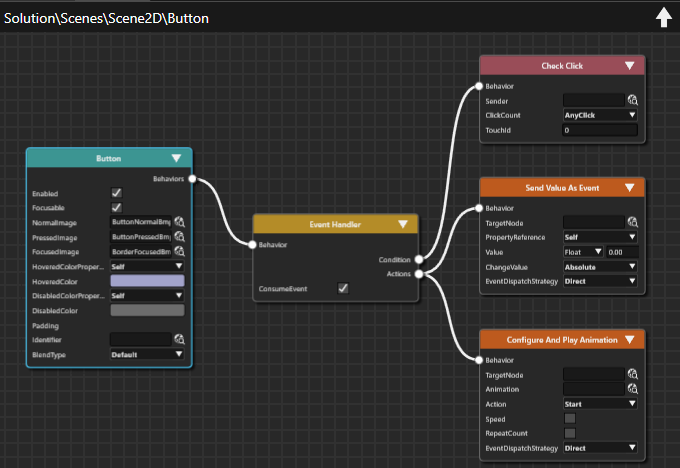
Benefits of using Fusion Editor
TheClear Visualization
Fusion Nodes thatmake up thecompose increasingly complex HMI elementscanarebepresentedseen atin aglanceclear,(usefulconsolidated view, making it ideal forpresentations,presentationsetc.)and design reviews.- Comprehensive Information
All relevantinformationdetails arevisible,visible in one place, significantly reducing man-hoursrelatedrequiredtofor reviews and analysis CanSeamless Integration
Fusion diagrams can beintegratedincorporated into solutionreportsreports,(usefulsupportingforthecreatingcreation of detailed designdocuments, etc.)documents.
Main features
- Visual
managementManagementof
Providesthea graphical interface for managing Fusion Nodescontainedandintheir interactions within the scene FusionEditoroperationsOperations
Includes(essential functions such as automatic alignment, magnification adjustment, zoom in/zoomout,out and Undo/Redo)Redo.- Color-
codedCodeddisplayDisplayof each
Each Fusion Node is visually distinguished through color coding for improved clarity. - Automatic
filterFiltering
Fusionofdisplays only attachable FusionNodesNodes, streamlining workflow. - Properties Panel Synchronization
Fusion ensures that Fusion Node properties remain synchronized with the properties displayed in the PropertiesPanelPanel. - Context Menu Support
Offerscontextquickmenuaccess to relevant actions via a context-sensitive menu.