
Modules
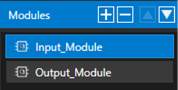
Modules are used to group a set of interfaces which usually belong logically together.
It is possible to add, remove and reorder them using the corresponding buttons at the top of the module list.

Properties
In general, these offer a few basic options. However, depending on the targeted tool, different tool-specific options might be available. For more information about tool specific options and limitation refer to the specific target tool chapter.


| Property Name | Description |
| Name | Name of the module. Only characters from ‘a’-‘z’, ‘A’-Z’, ‘0’-‘9’, ‘ ‘ , ‘-‘ and ‘_’ are allowed, though the name must start with a character. |
| UId | The UId is used to identify the module. It can be seen as the tooltip of the ‘UId’ button. When the button is clicked a new UId will be generated. |
| Type | Defines the type of module. The available options depend on the specific target tool. |