# CGI Studio 3.12
#### CGI Studio 3.12 - What's New:
Welcome to CGI Studio 3.12, Candera's software development platform for hybrid 2D and 3D graphical interfaces for automotive systems.
This page provides information regarding the most recently added features and updates since our last release.
---
#### Smart Importer
- Figma format support
- Expanded control mapping functionality with AI
- And many other smaller improvements
For more information regarding the full functionality of this tool, please reference the [Smart Importer](https://doc316en.candera.eu/books/import-of-resources/chapter/smart-importer) article.
---
#### Vector Graphics Support
- Support of vector graphics in CGI Studio
- Import of SVG into yours
For more information regarding this feature, please reference the [SVG](https://doc316en.candera.eu/link/1101#bkmrk-svg-files) article.
---
#### Fusion Editor
- Design your applications without writing any code and create your own HMI logic via drag and drop
For more information about the [Fusion Editor](https://doc316en.candera.eu/books/fusion), please see the documentation about [Fusion](https://doc316en.candera.eu/books/fusion).
---
#### 3D Shapes Control
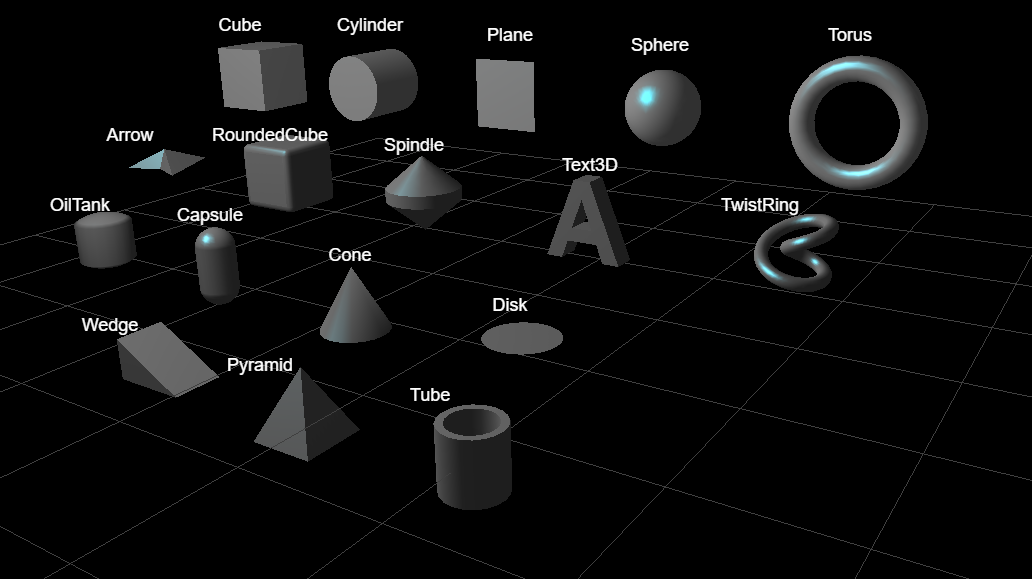
Many new 3D Shapes controls have been added, such as Arrow, Capsule, Cone, Disc and so on. They are available from the toolbox Controls>3D Shapes.
---
#### Scene Composer Improvements
- Updated and added [sample solutions](https://doc316en.candera.eu/books/sample-solutions)
- 2D Basic, 3D Basic, 3D Getting Started, MenuScreen updated
- Industrial added
- Added URI functionality for requirement tracking
- [Automatic import](https://doc316en.candera.eu/books/import-of-resources/page/automatic-imports) feature improved
- Improved Properties panel
- [Referencing external resource](https://doc316en.candera.eu/books/scene-design/page/referencing-external-resource) functionality (Android Platform only)
- [State machine editor](https://doc316en.candera.eu/books/state-machine/page/basic-operation) functionality added
- [Pseudo state machine](https://doc316en.candera.eu/link/204#bkmrk-entry%2Fexit-point) functionality
- Improved [HMI report](https://doc316en.candera.eu/books/solution-handling/page/hmi-report) function
- [Display Preview](https://doc316en.candera.eu/link/3#bkmrk--7) support
- [HMI Rotation](https://doc316en.candera.eu/books/display-configuration/page/cgi-studio-hmi-rotation) support
---
#### Rotation and zoom functions in the Player Panel
Rotation and zoom functions have been added to the Player Panel. For details of the functions, please click [here](https://doc316en.candera.eu/books/player/page/overview).
---
#### Help system (This document) updated
A new UI help system with search and browsing history functions has been implemented. Tutorial videos previously accessed from external sites have been integrated into this help system. For more information on how to use the new help system, please click [here](https://doc316en.candera.eu/books/about-this-document).
CGI3.16 release and later, tutorial videos are no longer included in this documentation.
---
#### New Behaviors
- [Set External Bitmap](https://doc316en.candera.eu/books/controls-and-behaviors/page/external-resource#bkmrk-set-external-bitmap)
Retrieves a bitmap and sets the bitmap of the associated Render Node when its action is triggered.
- [Check External Resource Change](https://doc316en.candera.eu/books/controls-and-behaviors/page/external-resource#bkmrk-check-external-resou)
Reacts on ExternalResourceChangedEvents, reloading the resource and invoking an update if ExternalResourceMangerId and ExternalResourceId match.
- [External Bitmap Provider](https://doc316en.candera.eu/books/controls-and-behaviors/page/external-resource#bkmrk-external-bitmap-prov)
Retrieves an external bitmap with ExternalResourceId from an external resource provider with ExternalResourceManagerId and provides the bitmap to an associated bitmap node.
---