# What's new

This section highlights the most important new features of new Releases.

# CGI Studio 3.16 - Community Edition

#### CGI Studio 3.16 Community Edition - What's New

Welcome to CGI Studio 3.16 Community Edition, Candera's first free software development platform for hybrid 2D and 3D graphical interfaces for embedded systems.

Along with this new release a few new implementations have been added to our package:

##### New Community Edition Samples

- New Sauna Screen solution <span style="color:rgb(0,0,0);">sample</span>
- <span style="color:rgb(0,0,0);">New Coffee Machine solution sample</span>
- <span style="color:rgb(0,0,0);">New Pollen Infoscreen sample</span>

##### <span style="color:rgb(0,0,0);">Scene Composer / Hardware Deployment</span>

- <span style="color:rgb(0,0,0);">Solutions and assets created with our Community Edition are not compatible with our Professional and Enterprise Editions.</span>
- <span style="color:rgb(0,0,0);">Runtime Limitation and Watermark will take effect in hardware deployments.</span>
    - <span style="color:rgb(0,0,0);">Every new user will get 3 free vouchers upon registering in our <span style="color:rgb(230,126,35);">[Community Forum](https://community.candera.eu/)</span>. These vouchers can be used to unlock 3 hardware deployments without any of above mentioned limitations.</span>

##### <span style="color:rgb(0,0,0);">Field of Usage</span>

- <span style="color:rgb(0,0,0);">The Community Edition is for private usage and educational purposes only. All aspects or commercial usage are prohibited.</span>

<p class="callout info">If you want to upgrade to the Professional Edition please send an e-mail with the subject ***Community Edition Upgrade*** to<span style="color:rgb(230,126,35);"> <sales@candera.eu></span>. Please include the following information to speed up the process: name, company name, e-mail, phone number, country, optional: job title.</p>

##### Documentation

- Online documentation (<span style="color:rgb(230,126,35);">[Link](https://doc316en.candera.eu/shelves)</span>)
- Updated video tutorials including solutions (<span style="color:rgb(230,126,35);">[Link](https://doc316en.candera.eu/books/tutorial-videos)</span>)

This page provides information regarding the most recently added features and updates since our last release.

# CGI Studio 3.16

#### CGI Studio 3.16 - What's New

Welcome to CGI Studio 3.16, Candera's software development platform for hybrid 2D and 3D graphical interfaces for embedded systems.

##### Scene Composer

- <div>Introduced **View Editor** for easier and more intuitive scene composition</div>
- <div>**Embedded Player** option to launch the player directly within Scene Composer</div>
- <div>**Multi‑view** support enabling enhanced 3D authoring with up to four camera views</div>
- <div>**Smart Importer** with improved **Figma** import handling and better user feedback</div>
- <div>Enhanced **HASP licensing** integration for simplified license management</div>
- <div>Added **XLIFF** support for streamlined localization workflows</div>
- <div>Updated **Monotype Spark Engine** and added **outer glow effect** </div>
- <div>General stability and performance improvements</div>
- Streamlined behavior set via Scene Composer Plug-in
- <div>Ricoh fonts removed</div>

##### Samples

- New Instrument Cluster solution template
- New In-Vehicle-Infotainment solution template
- New glTF 3D effects sample
- Minor improvements to several solutions

##### Engine and Player

- added effect support for various glTF 2.0 extensions 
    - Light punctual
    - Unlit extension
    - Clearcoat
    - Anisotropy
    - Specular
    - Iridescence
    - IOR (index of refraction)
    - Sheen
    - Emissive strengh
- iOS support
- Vulkan support
- Software Renderer
- Improved picking performance
- Traveo II MJPEG support

##### CGI Studio Connector

- The CGI Connector has been enhanced to improve stability and usability of the tool.

##### Documention

- AI based chatbot for documentation
- removed outdated video tutorials

This page provides information regarding the most recently added features and updates since our last release.

---

# CGI Studio 3.15.1

#### CGI Studio 3.15.1 - What's New:  


Welcome to CGI Studio 3.15.1, Candera's software development platform for hybrid 2D and 3D graphical interfaces for embedded systems.

This page provides information regarding the most recently added features and updates since our last release.

---

#### Scene Composer

- Performance improvements.
- Added Core controls to the <span style="color:rgb(230,126,35);">[GettingStartedControls sample solution](https://doc316en.candera.eu/books/best-practice/chapter/gettingstartedcontrols-solution)</span>.
    
    
    - Added “<span style="color:rgb(230,126,35);">[Set the "Is Indexed" property of the vertex buffer to enabled](https://doc316en.candera.eu/books/import-of-resources/page/import-dialog-options)</span>” which can be used when importing FBX files.
- Automatic Invalidation Dependency calculation for <span style="color:rgb(230,126,35);">[Dirty Area Management](https://doc316en.candera.eu/books/courier/page/dirty-area-management "Dirty Area Management")</span>
- Improved import procedures for 3d Models (glTF and FBX)
- Added upgraded [post-processing sample](https://doc316en.candera.eu/books/sample-solutions/page/post-processing-solution "Post Processing Solution")
- Improved connection handling to target when using Text Size Report
- and many smaller improvements

---

#### Smart Importer

- Adjusted default values for <span style="color:rgb(230,126,35);">[Pivot Point](https://doc316en.candera.eu/link/1148#bkmrk-configure-the-pivot-)</span> settings.
- Added "<span style="color:rgb(230,126,35);">[Freehand dialog background color](https://doc316en.candera.eu/books/preferences/page/configure-the-smart-importer)</span>" setting to the Freehand dialog.

---

#### Candera Engine

- Added support for [Traveo II hardware JPEG decoder](https://doc316en.candera.eu/books/target-setup-for-traveo2/chapter/jpeg-decoder "JPEG Decoder")
- New scene and camera invalidation relying on Invalidation Dependencies stored in the asset for <span style="color:rgb(230,126,35);">[Dirty Area Management](https://doc316en.candera.eu/books/courier/page/dirty-area-management "Dirty Area Management")</span>
- Bitmap Stride information is automatically set on supported platforms.

---

#### Core Controls

A new set of [Core Controls](https://doc316en.candera.eu/books/controls-and-behaviors/page/core "Core") has been introduced. These controls are designed to minimize functionality to achieve smaller memory footprints and improved performance. They are particularly suitable for low-end platforms or as a foundation for custom control development. For more details, please refer to <span style="color:rgb(230,126,35);">[this page](https://doc316en.candera.eu/books/controls-and-behaviors/page/core)</span>.

---

#### Control Behaviors CMake Flags

Within the new CMake environment, several CMake flags have been introduced to tailor the Control Behaviors included in the build. For more details, please refer to [this page](https://doc316en.candera.eu/books/appendix-WCP/page/control-behaviors-flags).

---

#### Professional Edition

- Improved CGI Studio Professional Edition installer
- Improved user onboarding with easier setup for supported hardware platforms

---

#### Documentation

- Added a comprehensive [Traveo II best practices guide](https://doc316en.candera.eu/books/target-setup-for-traveo2/chapter/candera-graphics-programming-best-practices-for-traveo-ii "Candera Graphics Programming - Best Practices for Traveo II")
- Overhaul of several sections in the user documentation

# CGI Studio 3.15

#### CGI Studio 3.15 - What's New:  


Welcome to CGI Studio 3.15, Candera's software development platform for hybrid 2D and 3D graphical interfaces for embedded systems.

This page provides information regarding the most recently added features and updates since our last release.

---

#### Solution Creation Improvements

- The <span style="color:rgb(230,126,35);">[Scene tree UI/UX](https://doc316en.candera.eu/books/scene-design/page/scene-tree-ui)</span> improvement
- Improved usability of <span style="color:rgb(230,126,35);">[Solution Wizard dialog](https://doc316en.candera.eu/books/solution-handling/page/new-solution-wizard)</span>
- Enhanced data binding dialog (added <span style="color:rgb(230,126,35);">[filter function](https://doc316en.candera.eu/link/100#bkmrk-you-can-also-filter-)</span>)
- Enhanced 3D functions 
    - Implementation of <span style="color:rgb(230,126,35);">[wireframe switching function](https://doc316en.candera.eu/link/130#bkmrk-wireframe-line-width)</span>
    - Added mask support for blur effect
- Enhanced import function 
    - Support for importing <span style="color:rgb(230,126,35);">[FBX files with multiple animation tracks](https://doc316en.candera.eu/link/1101#bkmrk-fbx-files-with-multi-1)</span>
    - [<span style="color:rgb(230,126,35);">Original image file retention function</span>](https://doc316en.candera.eu/link/74#bkmrk-original-image-file-)
    - FBX can be imported as <span style="color:rgb(230,126,35);">[wireframe mesh](https://doc316en.candera.eu/books/import-of-resources/page/import-dialog-options)</span>
    - Create and set <span style="color:rgb(230,126,35);">[sharable IBL textures](https://doc316en.candera.eu/link/1101#bkmrk-shared-ibl-textures)</span> when importing glTF files

#### Smart Importer

- <span style="color:rgb(230,126,35);">[Figma Layout](https://doc316en.candera.eu/link/1075#bkmrk-%C2%A0-3)</span> support
- Added a function to set the default value of the <span style="color:rgb(230,126,35);">[FormatText property](https://doc316en.candera.eu/link/105#bkmrk-ai-detection-ranges%C2%A0)</span>
- Improved the <span style="color:rgb(230,126,35);">[font selection dialog](https://doc316en.candera.eu/link/1149#bkmrk-textstyle)</span>
- Applied custom controls to the <span style="color:rgb(230,126,35);">[Smart Importer dialog](https://doc316en.candera.eu/books/import-of-resources/page/smart-importer-ui)</span> and improved the UI

#### CGI Studio Connector

CGI Studio Connector has been implemented as a tool for connecting the CGI Studio Courier application to other systems. For more information, please refer to <span style="color:rgb(230,126,35);">[here](https://doc316en.candera.eu/books/cgi-studio-connector)</span>.

#### Monotype

This feature to load font bitmap data into the font engine cache has been implemented. For details, please refer to <span style="color:rgb(230,126,35);">[here](https://doc316en.candera.eu/link/294#bkmrk-monotype-%E2%80%93-prepopula)</span>.

#### New Behaviors

- <span style="color:rgb(230,126,35);">[Orbit Camera Transform](https://doc316en.candera.eu/link/598#bkmrk-orbit-camera-transfo)</span>  
    he functions have been expanded to enable the definition of unnecessary areas where the camera cannot move, for example underground.
- <span style="color:rgb(230,126,35);">[Demonstration](https://doc316en.candera.eu/books/controls-and-behaviors/page/demonstration)</span>  
    The behaviour set has been implemented for the purpose of automatically looping without user operation at exhibitions and presentations for example.
- <span style="color:rgb(230,126,35);">[IdentifierValueMap](https://doc316en.candera.eu/books/controls-and-behaviors/page/identifiervaluemap)</span>  
    The behaviour allows reacting on specific keywords. It is introduced with the Soundhound integration, which allows reacting the solution, when the user inputs a specific voice command.


#### CGI Studio Professional Edition 

Next to the CGI Studio Enterprise Edition, a newly introduced <span style="color:rgb(230,126,35);">[Professional Edition](https://doc316en.candera.eu/books/cgi-studio-editions/page/what-cgi-studio-editions-are-existing "What is the Professional Edition")</span> is available. Its purpose is to create HMIs easier and faster, with fewer steps required to finalize the HMI (e.g. no compiling of the player and easier Python based data binding).

#### Help system (This document) updated  


- Enhanced search function (Supports regular expression searches)

For more information on how to use the new help system, please click <span style="color:rgb(230,126,35);">[here](https://doc316en.candera.eu/books/about-this-document/page/document-usage)</span>.

# CGI Studio 3.14

#### CGI Studio 3.14 - What's New:  


Welcome to CGI Studio 3.14, Candera's software development platform for hybrid 2D and 3D graphical interfaces for embedded systems.

This page provides information regarding the most recently added features and updates since our last release.

---

#### Solution Creation Improvements

- 3D Feature Enhancements 
    - Import 3D models with <span style="color:rgb(230,126,35);">[skinning](https://doc316en.candera.eu/books/import-of-resources/page/skinning)</span>
    - Support for custom OpenGL shaders in 2D scenes
- Implementation of "<span style="color:rgb(230,126,35);">[Fit to Screen](https://doc316en.candera.eu/link/151#bkmrk-fit-to-screen)</span>" (2D scene)
- <span style="color:rgb(230,126,35);">[Courier Editor](https://doc316en.candera.eu/books/courier/page/courier-editor)</span> Feature Improvements 
    - Easier access from Scene Composer
    - Improved usability when configuring your data-binding source files (See <span style="color:rgb(230,126,35);">[here](https://doc316en.candera.eu/books/courier/page/examples-of-using-data-binding)</span> for examples of use)
- Updated Sample Solutions (<span style="color:rgb(230,126,35);">[3DEffect](https://doc316en.candera.eu/books/sample-solutions/page/3d-effects-solution)</span>, <span style="color:rgb(230,126,35);">[2DEffect](https://doc316en.candera.eu/books/sample-solutions/page/2d-effects-solution)</span>, <span style="color:rgb(230,126,35);">[OpenGL 2D Effects](https://doc316en.candera.eu/books/sample-solutions/page/opengl-2d-effects-solution)</span>)

#### Usability Improvements

- High Resolution Support 
    - Scene Composer and Control Center user interface now supports high resolution settings on Windows
    - Newer and sharper icons are available, independent of your Windows DPI settings
- New <span style="color:rgb(230,126,35);">[Patch Application Process](https://doc316en.candera.eu/books/getting-started/page/patch-installation-procedure)</span>
    - an easier and safer way to update your CGI Studio
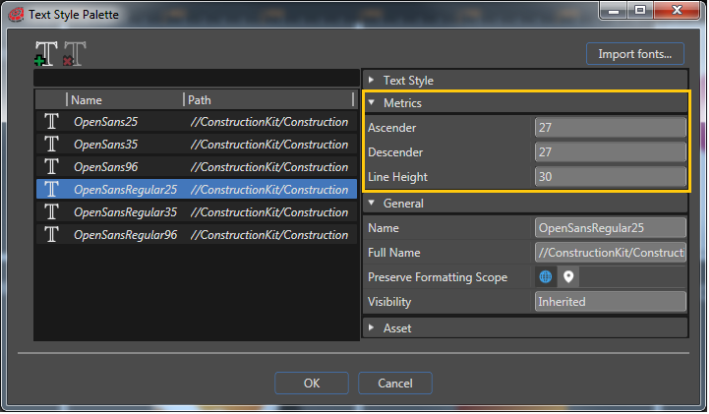
- Easier handling with Scene Composer's <span style="color:rgb(230,126,35);">[Text Style Editor](https://doc316en.candera.eu/books/solution-handling/page/text-style-palette)</span>
    - Setting Ascender and Descender properties for fonts now possible
- <span style="color:rgb(230,126,35);">[Extended drag &amp; drop functionality](https://doc316en.candera.eu/link/118#bkmrk-%C2%A0)</span> incl. duplication of objects in Scene Tree

#### New CMake Environment and starting points

- <span style="font-size:10pt;line-height:1.5;">A new CMake system was introduced to CGI Studio. This approach has several advantages:  
    it is based on newer CMake versions (CMake 3.19.0 or higher is required): some newer CMake features allow for a much simpler configuration </span>
- <span style="font-size:10pt;line-height:1.5;">cleaner and idiomatic overall implementation: everything is implemented in a way following guide-lines from CMake.org. This makes it also easier to use it, as there is a lot of community documentation available.</span>
- <span style="font-size:10pt;line-height:1.5;">better structure and order of the configuration: with the old system it is often quite difficult to find the correct place where all necessary information is available (such as target or OS information)</span>

<span style="font-size:10pt;line-height:1.5;">See <span style="color:rgb(230,126,35);">[Build System Setup](https://doc316en.candera.eu/books/build-system-setup)</span> for more details.</span>

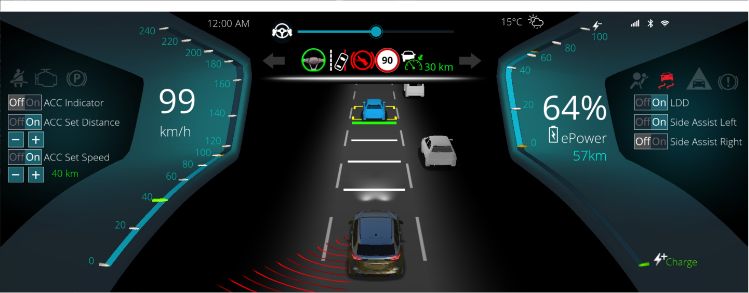
#### 3D ADAS template scene  


Template of an instrument cluster containing a modifiable 3D ADAS control.

<div drawio-diagram="6160"><img src="https://doc316en.candera.eu/uploads/images/drawio/2024-06/drawing-7-1718347337.png" alt="drawing-7-1718347337.png"/></div>


#### Help system (This document) updated  


- Enhanced search function
- Implementation of bookmark function

For more information on how to use the new help system, please click <span style="color:rgb(230,126,35);">[here](https://doc316en.candera.eu/books/about-this-document/page/document-usage)</span>.

# CGI Studio 3.13

#### CGI Studio 3.13 - What's New:  


Welcome to CGI Studio 3.13, Candera's software development platform for hybrid 2D and 3D graphical interfaces for automotive systems.

This page provides information regarding the most recently added features and updates since our last release.

---

#### Scene Composer improvements

- Improved [<span style="color:rgb(230,126,35);">Zoom Display Preview</span>](https://doc316en.candera.eu/link/3#bkmrk-zoom-display-preview) in the display panel
- Toolbar improvements to reduce clutter (main screen, 2D/3D scene editor and animation timeline)
- Improved <span style="color:rgb(230,126,35);">[Text Style Editor](https://doc316en.candera.eu/link/54#bkmrk-text-style-editor)</span> feature
- Improved <span style="color:rgb(230,126,35);">[Search Panel UI](https://doc316en.candera.eu/books/solution-handling/page/searching)</span>
- <span style="color:rgb(0,0,0);">Added a rendering-based <span style="color:rgb(230,126,35);">[Text Size Report](https://doc316en.candera.eu/books/solution-handling/page/text-size-report-KPG)</span> feature</span>
- Long path name support  
    Windows 10 version 1607 or later supports paths of up to 32767 characters (previously 260 characters)
- 64 bit support

##### Import feature improvements

- Improved import dialog UI
- Integrated file format import menu into \[ Import Resources \] and improved UI transition when import is executed.
- Support for drag-and-drop glTF import into Solution Explorer
- Disabled 3D model import on OpenGLES1.1 platforms
- Other minor modifications

For more information on the above points, please see the article in <span style="color:rgb(230,126,35);">[Import of Resources](https://doc316en.candera.eu/books/import-of-resources)</span> chapter.

##### Diagram Bird's Eye

The feature to get a bird's eye view of the entire Fusion diagram or State Machine Editor has been added. For more information on this feature, please see <span style="color:rgb(230,126,35);">[Diagram Bird's Eye](https://doc316en.candera.eu/books/solution-handling/page/diagram-birds-eye)</span> article.

##### Easy Mode 

Easy Mode has been implemented as a standard feature to customize the properties of each element. Until CGI3.12, it was necessary to generate an Easy Mode configuration file using the "SceneComposerConfigurator.exe" file, but now customization is possible from the preferences. Its configuration can still be exported or imported to easily sync between many users. For more information on this feature, please see <span style="color:rgb(230,126,35);">[Easy Mode](https://doc316en.candera.eu/books/preferences/page/easy-mode)</span> article.

#### Fusion

- Additional context menu on Fusion diagrams
- <span style="color:rgb(230,126,35);">[Diagram Bird's Eye](#bkmrk-diagram-bird%27s-eye)</span> feature support

For more information on this feature, please see <span style="color:rgb(230,126,35);">[Fusion&gt;Basic Operation](https://doc316en.candera.eu/books/fusion/page/basic-operations)</span> article.

#### State Machine

- Undo/Redo functionality
- Additional context menu on State Machine Editor 
    - Priority setting for Transitions
    - Alignment of multiple items
- Shortcut key features for fast state machine modifications
- Zoom operation support
- <span style="color:rgb(230,126,35);">[Diagram Bird's Eye](#bkmrk-diagram-bird%27s-eye)</span> feature support
- Improved the state machine data in the solution file (SCML).

For more information on this feature, please see <span style="color:rgb(230,126,35);">[State Machine&gt;Components in State Machine](https://doc316en.candera.eu/books/state-machine/page/components-in-state-machine)</span> and <span style="color:rgb(230,126,35);">[State Machine&gt;Basic Operation](https://doc316en.candera.eu/books/state-machine/page/basic-operation)</span> articles.

#### Improved control/behavioral

- Added List Editor functionality to <span style="color:rgb(230,126,35);">[BarGraph](https://doc316en.candera.eu/link/1166#bkmrk-bargraph)</span> and [<span style="color:rgb(230,126,35);">LineGraph</span>](https://doc316en.candera.eu/link/1166#bkmrk-linegraph) controls
- Added <span style="color:rgb(230,126,35);">[Snap List Item Extension](https://doc316en.candera.eu/books/controls-and-behaviors/page/list-control-snapping-mechanism)</span> behavior

#### Monotype

Supported versions have been updated for iType and WT-Shaper. For more information, see [<span style="color:rgb(230,126,35);">CGI Studio 3PSW</span>](https://doc316en.candera.eu/link/211#bkmrk-cgi-studio-3psw) on CGI Studio Components page.

#### Help system (This document) updated  


- Browse through history with forward/backward feature
- Improved search function and additional in-page search function (Ctrl+F)
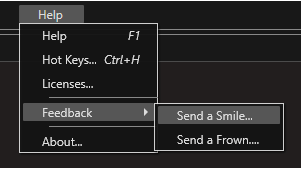
- New feedback feature to communicate with Candera team

For more information on how to use the new help system, please click <span style="color:rgb(230,126,35);">[here](https://doc316en.candera.eu/books/about-this-document/page/document-usage)</span>.

# CGI Studio 3.12

#### CGI Studio 3.12 - What's New:  


Welcome to CGI Studio 3.12, Candera's software development platform for hybrid 2D and 3D graphical interfaces for automotive systems.

This page provides information regarding the most recently added features and updates since our last release.

---

#### Smart Importer  


- Figma format support
- Expanded control mapping functionality with AI
- And many other smaller improvements

For more information regarding the full functionality of this tool, please reference the <span style="color:rgb(230,126,35);">[Smart Importer](https://doc316en.candera.eu/books/import-of-resources/chapter/smart-importer)</span> article.

---

#### Vector Graphics Support

- Support of vector graphics in CGI Studio
- Import of SVG into yours

For more information regarding this feature, please reference the <span style="color:rgb(230,126,35);">[SVG](https://doc316en.candera.eu/link/1101#bkmrk-svg-files)</span> article.

---

#### Fusion Editor

- Design your applications without writing any code and create your own HMI logic via drag and drop

For more information about the [Fusion Editor](https://doc316en.candera.eu/books/fusion), please see the documentation about [Fusion](https://doc316en.candera.eu/books/fusion).

---

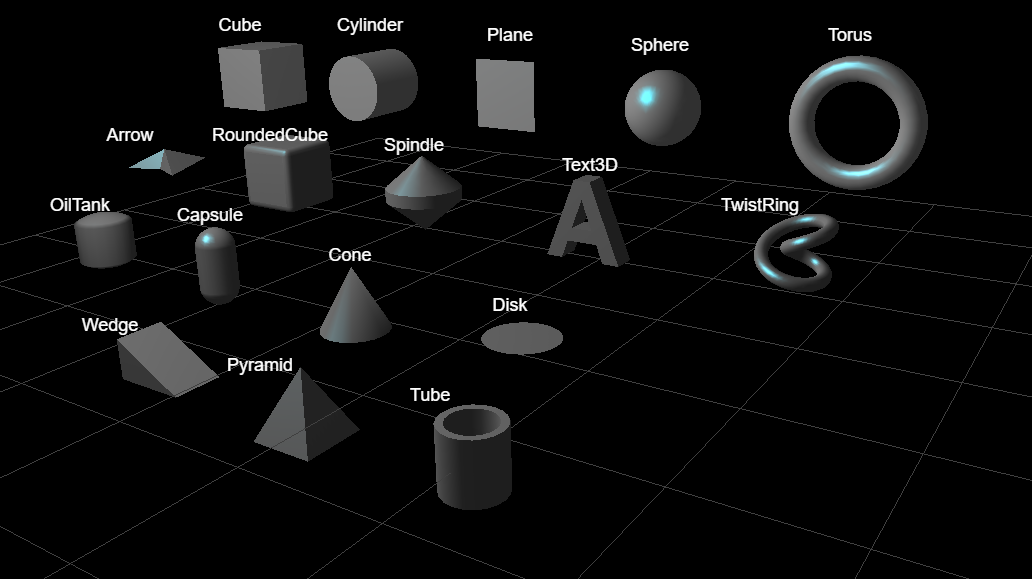
#### 3D Shapes Control  


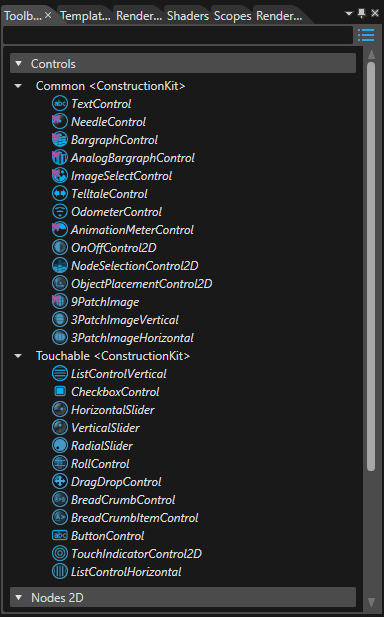
Many new 3D Shapes controls have been added, such as Arrow, Capsule, Cone, Disc and so on. They are available from the toolbox Controls&gt;3D Shapes.

<div drawio-diagram="3782"><img src="https://doc316en.candera.eu/uploads/images/drawio/2023-06/drawing-4-1686300615.png" alt="drawing-4-1686300615.png"/></div>

---

#### Scene Composer Improvements  


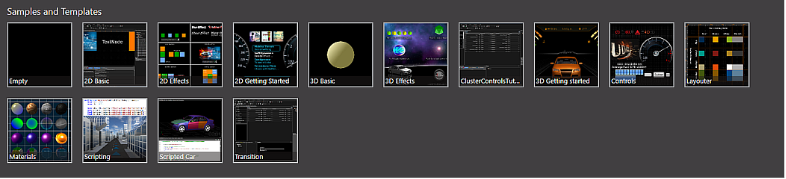
- Updated and added <span style="color:rgb(230,126,35);">[sample solutions](https://doc316en.candera.eu/books/sample-solutions)</span>   
    
    - 2D Basic, 3D Basic, 3D Getting Started, MenuScreen updated
    - Industrial added
- Added URI functionality for requirement tracking
- <span style="color:rgb(230,126,35);">[Automatic import](https://doc316en.candera.eu/books/import-of-resources/page/automatic-imports)</span> feature improved
- Improved Properties panel
- <span style="color:rgb(230,126,35);">[Referencing external resource](https://doc316en.candera.eu/books/scene-design/page/referencing-external-resource)</span> functionality (Android Platform only)
- <span style="color:rgb(230,126,35);">[State machine editor](https://doc316en.candera.eu/books/state-machine/page/basic-operation)</span> functionality added
- <span style="color:rgb(230,126,35);">[Pseudo state machine](https://doc316en.candera.eu/link/204#bkmrk-entry%2Fexit-point)</span> functionality
- Improved <span style="color:rgb(230,126,35);">[HMI report](https://doc316en.candera.eu/books/solution-handling/page/hmi-report)</span> function
- <span style="color:rgb(230,126,35);">[Display Preview](https://doc316en.candera.eu/link/3#bkmrk--7)</span> support
- <span style="color:rgb(230,126,35);">[HMI Rotation](https://doc316en.candera.eu/books/display-configuration/page/cgi-studio-hmi-rotation)</span> support

---

#### Rotation and zoom functions in the Player Panel

Rotation and zoom functions have been added to the Player Panel. For details of the functions, please click <span style="color:rgb(230,126,35);">[here](https://doc316en.candera.eu/books/player/page/overview)</span>.


---

#### Help system (This document) updated  


A new UI help system with search and browsing history functions has been implemented. <span style="color:rgb(0,0,0);">Tutorial videos</span> previously accessed from external sites have been integrated into this help system. For more information on how to use the new help system, please click <span style="color:rgb(230,126,35);">[here](https://doc316en.candera.eu/books/about-this-document)</span>.

<p class="callout info">CGI3.16 release and later, tutorial videos are no longer included in this documentation.</p>

---

#### New Behaviors

- <span style="color:rgb(230,126,35);">[Set External Bitmap](https://doc316en.candera.eu/books/controls-and-behaviors/page/external-resource#bkmrk-set-external-bitmap)</span>  
    Retrieves a bitmap and sets the bitmap of the associated Render Node when its action is triggered.
- <span style="color:rgb(230,126,35);">[Check External Resource Change](https://doc316en.candera.eu/books/controls-and-behaviors/page/external-resource#bkmrk-check-external-resou)</span>  
    Reacts on ExternalResourceChangedEvents, reloading the resource and invoking an update if ExternalResourceMangerId and ExternalResourceId match.
- <span style="color:rgb(230,126,35);">[External Bitmap Provider](https://doc316en.candera.eu/books/controls-and-behaviors/page/external-resource#bkmrk-external-bitmap-prov)  
    <span style="color:rgb(0,0,0);">Retrieves an external bitmap with ExternalResourceId from an external resource provider with ExternalResourceManagerId and provides the bitmap to an associated bitmap node.</span>  
    </span>

---

# CGI Studio 3.11

#### CGI Studio 3.11 - What's New:  


Welcome to CGI Studio 3.11, Candera's software development platform for hybrid 2D and 3D graphical interfaces for automotive systems.

This page provides information regarding the most recently added features and updates since our last release.

---

#### Smart Importer  


CGI Studio’s Smart Importer supports now

- Adobe XD format
- Direct import without converters of Adobe XD, Adobe Photoshop, Axure RP and Sketch
- Automatic sizing support
- Selection of empty bitmaps
- And many other smaller improvements

For more information regarding the full functionality of this tool, please reference the <span style="color:rgb(230,126,35);">[Smart Importer](https://doc316en.candera.eu/books/import-of-resources/chapter/smart-importer)</span> article.

---

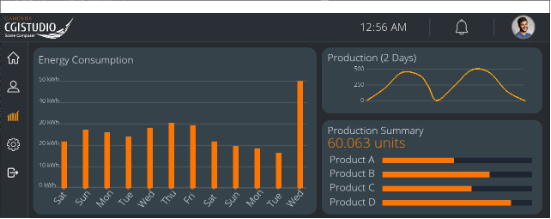
#### Chart Control  


A bar graph and a line graph got added.

A bar graph is a graph that presents categorical data with rectangular bars with heights proportional to the values that they represent. A line graph or curve graph is a type of chart which displays information as a series of data points connected by straight line or spline segments.

<div drawio-diagram="624"><img src="https://doc316en.candera.eu/uploads/images/drawio/2023-02/drawing-7-1676365481.png" alt="drawing-7-1676365481.png"/></div>

For more information regarding the full functionality of this tool, please reference the BarGraph and LineGraph articles in the <span style="color:rgb(230,126,35);">[Predefined Controls](https://doc316en.candera.eu/books/controls-and-behaviors/chapter/predefined-controls)</span>.

---

#### Scene Composer Improvements  


- Support for multiple global state machines
- Improved support for color palette
- Support of partial execution of animations
- State Machine usability and performance improvements
- Dynamically changing text style behavior
- Improved HMI Report interface

---

#### Documentation and Sample Updates  


Newly added and reworked documentation about

- <span style="color:rgb(230,126,35);">[Axure RP Guide](https://doc316en.candera.eu/books/import-of-resources/page/axure-rp-importing-example)</span>
- <span style="color:rgb(230,126,35);">[Multiple global State Machines tutorial ](https://doc316en.candera.eu/books/best-practice/chapter/state-machine-solution)</span>
- <span style="color:rgb(230,126,35);">[New IVI sample &amp; tutorial ](https://doc316en.candera.eu/books/best-practice/chapter/ivi-sample-solution)</span>
- Updated Smart Importer best practices document  
    
    - &lt;CGI Studio root folder&gt;\\cgi\_studio\_docs\\

---

#### MATLAB Connector (MLC) Improvements  


Added IPC integration to allow running the CGI Application independently from the MATLAB state machine.

**Tool Improvements**:

- Changed dialog windows to appear on the same screen as the main window.
- Changed generated code to use the MLC namespace.
- Changed HMI-Signal-Buffer to separate Output-Signal and Input-Signal processing to allow reduction of delays in specific use cases.
- Changed HMI-Signal-Buffer methods to be virtual to support custom modifications.
- Changed default compiler to Visual Studio 2017 (previously Visual Studio 2010)
- Added support for Toggle-Buttons to the Input-Panel.
- Added new “Generate Code” build option.
- Added build flags to configure MEX (MATLAB Executable) compiler settings.
- Added generation of additional meta-info for signals (Signal-Type, Data-Type) for enhanced logging capabilities.
- Fixed an issue where the port-type setting is being reset when the signal type is changed.
- Fixed Input-Panel build issues for 64-Bit systems.

**Templates**:

- Changed templates to support changes related to generated code.
- Added IPC integration. This allows the CGI-Application to run independently from the MATLAB state machine offering multiple benefits:  
    
    - Improved stability due to separated processes.
    - Improved diagnostics as the console window of the CGI-Application is now visible.
    - Easier debugging as the CGI-Application can now be debugged normally.
    - Faster testing on target as target device can connect directly to MATLAB simulation.
    - Easy to integrate additional features like recording and replaying of signal data.

**Documentation**:

- Added “MLC IPC” chapter.

---

#### Cybersecurity - ISO/SAE 21434:2021  


Candera has developed a guideline to integrate CGI Studio into a cybersecurity-relevant software stack. The document, available on demand, aids cybersecurity managers and engineers to accurately assess the risks and vulnerabilities of CGI Studio, and integrate it properly into their product and their Cybersecurity Management System.

---

#### Platform Support  


- Extended platform support for NXP iMX8 Nano
- Extended platform support for STMicroelectronics STM32MP1 series
- Multiple display support for DRM/KMS devices

---

# CGI Studio 3.10

#### CGI Studio 3.10 - What's New:  


Welcome to CGI Studio 3.10, Candera's software development platform for hybrid 2D and 3D graphical interfaces for automotive systems.

This page provides information regarding the most recently added features and updates since our last release.

---

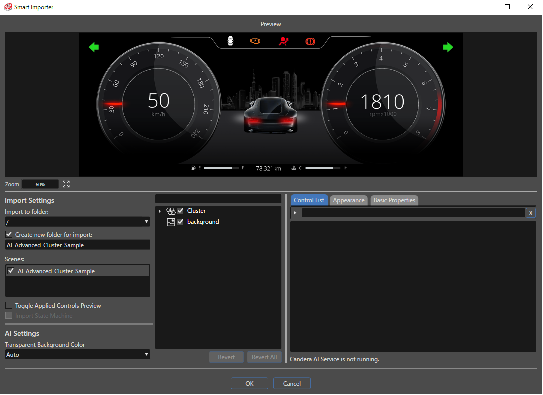
#### Smart Importer  


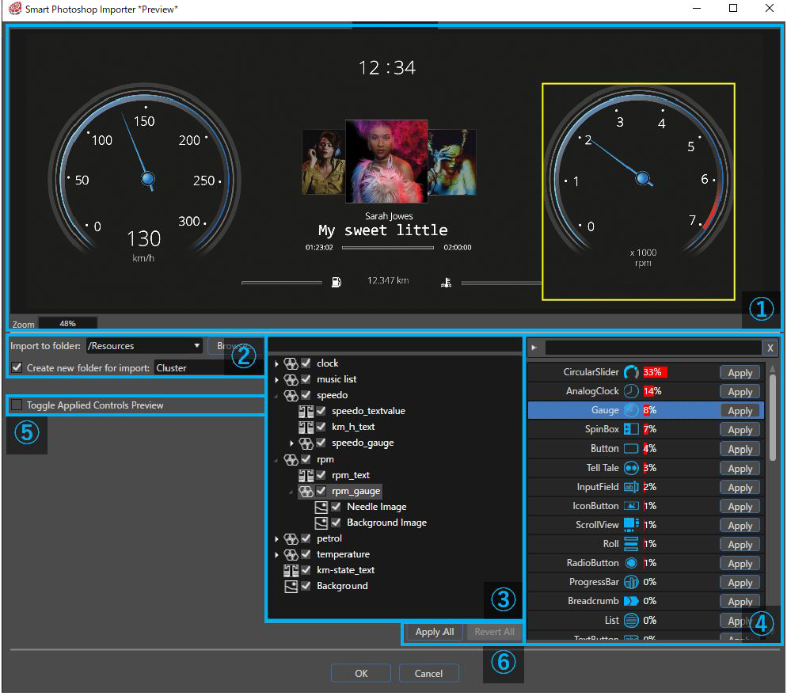
The new Smart Importer function will allow you to import files from Photoshop, then directly map elements within the file to CGI Studio controls using a built in AI service.

<div drawio-diagram="634"><img src="https://doc316en.candera.eu/uploads/images/drawio/2023-02/drawing-7-1676366631.png" alt="drawing-7-1676366631.png"/></div>

For more information regarding the full functionality of this tool, please reference the <span style="color:rgb(230,126,35);">[Smart Importer](https://doc316en.candera.eu/books/import-of-resources/chapter/smart-importer)</span> article.

---

#### Multilanguage Support (Japanese)  


CGI Studio now provides Japanese language support for the following applications,

- Scene Composer
- CGI Player
- CGI Studio Control Center

---

#### Documentation and Sample Updates  


- New documentation for the Smart Importer.
- Visually updated Getting Started Controls sample.
- Quick Start Guide for the Smart Importer function, which can be found in the following location:  
    
    - &lt;CGI Studio root folder&gt;\\cgi\_studio\_docs
- Small updates to several articles to remove outdated information or images.

---

#### Monotype Spark Engine  


Monotype’s Spark font engine has been integrated into this latest version of CGI Studio.

For more information regarding this topic, please reference the <span style="color:rgb(230,126,35);">[Spark Engine](https://doc316en.candera.eu/books/general-concepts/page/monotypes-spark-engine)</span> article.

---

#### New Sublist Control  


A new sub-list control has been added. This control will allow you to embed submenus within lists which can be conveniently expanded or collapsed. For more information regarding this control, please reference the <span style="color:rgb(230,126,35);">[Predefined Controls](https://doc316en.candera.eu/books/controls-and-behaviors/chapter/predefined-controls)</span> section for more information.

---

#### Candera LINK Remote Rendering  


- Allows you to share data and services between multiple clients (for example, dashboard, HUD, smart devices, PC applications).
- Supports remote rendering and streaming services.
- Link Hub allows you to verify that clients are receiving the fastest service in close proximity to their location.

---

#### MATLAB Connector (MLC) Improvements  


**Tool Improvements**:

- Added support for Visual Studio 2017 &amp; 2019 to build scripts.
- Added support for up-to-date CMake version with architecture flag support to build scripts.
- Added support for build folders on different drives to build scripts.
- Added option to change the “Default Signal Port Type” for new signals.
- Signal generator generates additional name and data-type information for each signal. This can be used for debugging/logging purposes.
- Model &amp; Signal generator now supports namespaces and using parameters. This provides more flexibility for application development.
- Fixed error for Input-Panel signals when using “Auto” port type before setting a data-type for the signal.

**Templates**:

- Application templates will initialize the display with the size specified inside that asset file instead of a hard coded value.
- Improved continuous invalidation implementation (reduces messages sent).
- Default-Construction-Kit Template has its “Default Signal Port Type” set to “Auto”.
- Default-Construction-Kit Template now includes a “MLC-Event Action Behavior”which can be used in conjunction with
- Controls/Behaviors to receive react to control events in MATLAB.
- Templates now generate Model into the “MLC” namespace.
- Various code cleanups.

**Documentation**:

- Updated “Prerequisites” and “Compiler Setup” chapters.
- Added “Debugging” chapter.
- Added “MLC-Event Action Behavior” chapter.

---

#### Extended Target Hardware Support  


- Traveo II
- NXP iMX8
- STMicroelectronics STM32

---

#### Updated and extended RICOH fonts  


Updated and extended RICOH fonts have been provided by RICOH for CGI Studio 3.10.

- Japanese (HGSHeiseiMarugothictaiW4)
- Simplified Chinese (HGJHeiM Simplified)
- Arabic (HG RTSans Arabic)
- Korean (HGNewGothicM Korean)
- Thai (Five typefaces)
- Vietnam (Five typefaces)

---

# CGI Studio 3.9

#### CGI Studio 3.9 - What's new:  


Welcome to CGI Studio 3.9, Candera's software development platform for development of hybrid 2D and 3D graphical interfaces for Automotive Systems.

This page provides information about the most important features added since the last Release.

---

#### Control Center  


In CGI Studio Release 3.9.0 we are proud to announce the Control Center - a new tool that integrates all tools of the CGI Studio product chain.  
For new users, it provides a dashboard from which the Scene Composer, the Player, the Analyzer and the SCHost/application builds can be done with a button click.  
For advanced users it also allows them to edit and build the CGI Panel, edit data bindings and Courier definitions. For clients with complex processes, it allows changing the scripts used for the operations above and customizing them to fit their needs.  
All this information is stored in a Control Center solution that is specific to a certain application/Scene Composer solution, making it easy to share it between multiple users. <span style="color:rgb(230,126,35);">[\[More...\]](https://doc316en.candera.eu/books/control-center)</span>

---

#### Android Improvements  


- *NativeViewLibrary* has been updated: Switched from external CMake build with shared libraries to a fully integrated CMake build in Android Studio. This allows easier debugging of native cpp code.
- Android Control: The new Android Native View Control is a lightweight option for Android application developers to include advanced rendering with CGI Studio directly into the Android application. Like any other Android control (e.g. buttons, sliders), it can be configured directly in Android Studio. The communication between CGI Studio’s Android Native View Control and the CGI Studio graphics engine is conducted with JSON events. CGI Studio’s Android Native View Control enriches default Android applications with state-of-the-art 2D and 3D rendering including high-quality animations and effects. CGI Studio rendering can be easily integrated into Android application and interact with Android default HMI with the new Android Native View Control.

More information can be found in our Forum CGI Studio Lighthouse.

---

#### ASTC Texture Compression Support for OpenGL ES 3.2  


For improving rendering performance, bitmaps can now be converted to an ASTC format (Adaptive Scalable Texture Compression Format). SceneComposer now offers a new bitmap converter that can be selected for a BitmapProfile, called AstcBitmapConverter, and 14 ASTC formats to choose from.

---

#### SceneComposer User Interface Improvements  


CGI Studio 3.9.0 offers the following improvements of the user interface:

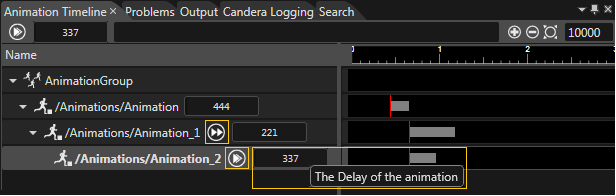
- **Animation Group Timeline**: 
    - Toggle Begin with / Begin after parent animation
    - Time delay in milliseconds  
        <div drawio-diagram="636"><img src="https://doc316en.candera.eu/uploads/images/drawio/2023-02/drawing-7-1676367297.png" alt="drawing-7-1676367297.png"/></div>
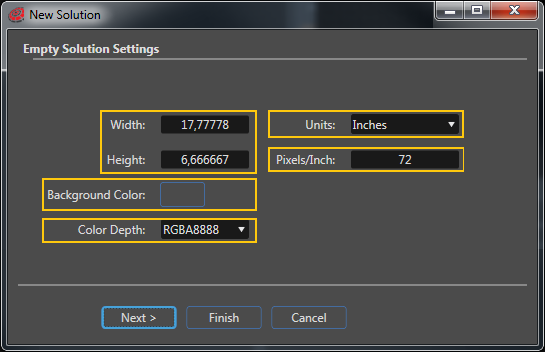
- **Empty Solution Settings**: 
    - Width/Height
    - Units
    - Pixels/Inch
    - Background Color
    - Color Depth  
        <div drawio-diagram="637"><img src="https://doc316en.candera.eu/uploads/images/drawio/2023-02/drawing-7-1676367372.png" alt="drawing-7-1676367372.png"/></div>
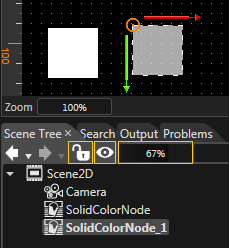
- **Scene Tree - Quick Action Toolbar**: 
    - Lock
    - Visibility
    - Opacity  
        <div drawio-diagram="638"><img src="https://doc316en.candera.eu/uploads/images/drawio/2023-02/drawing-7-1676367446.png" alt="drawing-7-1676367446.png"/></div>

---

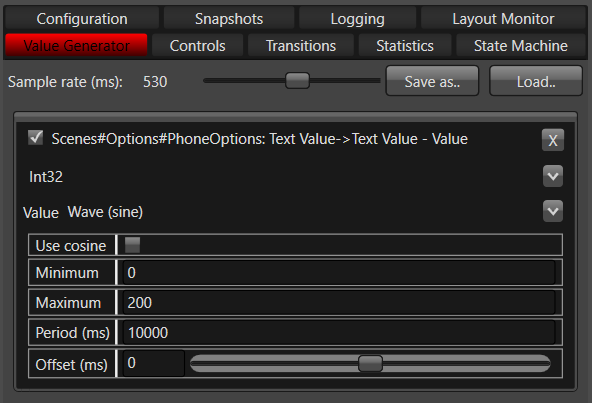
#### CGI Player - Value Generator  


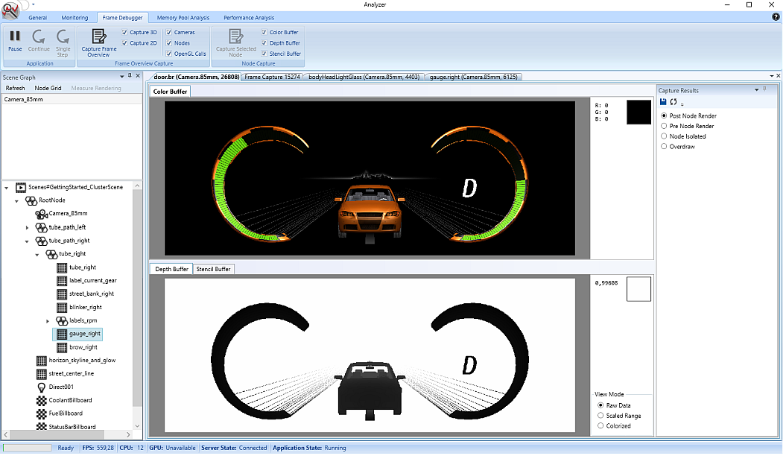
This feature in CGI Player provides the possibility to simulate the change of values on view elements.   
With this, view elements/controls can be simulated without logic implementation.<span style="color:rgb(230,126,35);">[ \[More...\]](https://doc316en.candera.eu/books/player/page/value-generator)</span>

<div drawio-diagram="639"><img src="https://doc316en.candera.eu/uploads/images/drawio/2023-02/drawing-7-1676367504.png" alt="drawing-7-1676367504.png"/></div>

---

#### Smart Photoshop Importer  


The Smart Photoshop Importer provides the ability to import Photoshop files in a smart way using Artificial Intelligence. This feature is in preview state. <span style="color:rgb(230,126,35);">[\[More...\] ](https://doc316en.candera.eu/books/import-of-resources/chapter/smart-importer)</span>

<div drawio-diagram="640"><img src="https://doc316en.candera.eu/uploads/images/drawio/2023-02/drawing-7-1676367558.png" alt="drawing-7-1676367558.png"/></div>

---

# CGI Studio 3.8

#### CGI Studio 3.8 - What's new:  


Welcome to CGI Studio 3.8, Candera's software development platform for development of hybrid 2D and 3D graphical interfaces for Automotive Systems.

This page provides information about the most important features added since the last Release.

---

#### Release Package Signature  


CGI Studio Release Packages will now be released with a Release Package Signature. This way you can always make sure that the delivery is from [<span style="color:rgb(53,152,219);">Candera</span>](http://dev.doc.cgistudio.at/APILINK/namespace_candera.html) GmbH and it includes the original files without any change.<span style="color:rgb(230,126,35);"> [\[More...\]](https://doc316en.candera.eu/link/208#bkmrk-page-title)</span>

---

#### Adorners - Gizmos for Layouters  


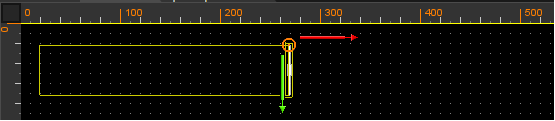
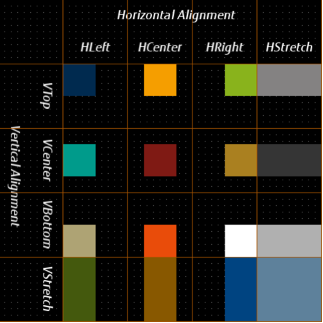
CGI Studio offers the option to use adorners for an easy manipulation of the nodes inside layouters. The adorners gizmos can affect the following properties: Vertical Alignment, Horizontal Alignment, Size and Margin (Left, Top, Right, Bottom) in the Layout category and the Position in the Transformations category. This editing can now be done using the mouse and keyboard without having to manually change the node properties values. <span style="color:rgb(230,126,35);">[\[More...\]](https://doc316en.candera.eu/link/103#bkmrk-page-title)</span>

---

#### LayoutMonitor Support in Player  


The Layout monitor is a feature that allows the user to see the relevant areas computed by the layouter as an overlay on top of the rendering of the application. The user can select nodes in the scene tree, the layouter rectangles are drawn automatically. The visualization is useful to understand how the dynamic layout is applied. Additionally the retrieval of various layout properties is available. The feature is available in the Player. [<span style="color:rgb(230,126,35);">\[More...\]</span>](https://doc316en.candera.eu/books/player/page/layout-monitor-4Tv)

---

#### New Controls  


<table id="bkmrk-keyboard-control%3Athe" style="border-collapse:collapse;width:100%;height:126.781px;"><colgroup><col style="width:5.8101%;"></col><col style="width:94.1899%;"></col></colgroup><tbody><tr style="height:96.9844px;"><td class="align-left" style="vertical-align:top;height:96.9844px;">![Icon_Keyboard.png](https://doc316en.candera.eu/uploads/images/gallery/2023-02/scaled-1680-/S0Aicon-keyboard.png)

</td><td class="align-left" style="vertical-align:top;height:96.9844px;">**Keyboard Control**:  
The Keyboard Control emulates physical computer keyboard that enables a user to enter characters into an InputField Control. The Keyboard Control is highly customizable via Configuration Script described below. To use the Control one needs to connect an InputField with a keyboard via KeyboardAction with Action Open. When the InputField send the event, the Keyboard appears and sends pressed characters to the InputField that activates it. [<span style="color:rgb(230,126,35);">\[More...\]</span>](https://doc316en.candera.eu/link/1156#bkmrk-keyboard)</td></tr><tr style="height:29.7969px;"><td class="align-left" style="vertical-align:top;height:29.7969px;">![Icon_Roll.png](https://doc316en.candera.eu/uploads/images/gallery/2023-02/scaled-1680-/VJ1icon-roll.png)

</td><td class="align-left" style="vertical-align:top;height:29.7969px;">**Roll Control**:  
The Control represents a vertical list of numeric values from a specified range with a specified step. Current value of the Control is visible in the middle of the control and can be zoomed like using lens. Changing the current value can be animated and can be done using touch/pointer or configurable keys of a keyboard. One can edit the current value of the Control by entering it with a keyboard.  
To use the Control simply put it in a scene and configure all desirable properties. A roll can forward value as well as receive a send value as event. <span style="color:rgb(230,126,35);">[\[More...\]](https://doc316en.candera.eu/link/1156#bkmrk-roll)</span></td></tr><tr><td style="vertical-align:top;">![Icon_MenuScreen.png](https://doc316en.candera.eu/uploads/images/gallery/2023-02/scaled-1680-/icon-menuscreen.png)

</td><td style="vertical-align:top;">**MenuScreens Control**:  
The Control represents a menu in the form of a grid of icons (instances of the Menu Item Control).   
It has configurable number of rows and columns as well as default and maximum number of screens. A user can swipe between neighbouring screens. The Control handles user input and forwards proper information to children MenuItem nodes. The children nodes may be removed and reordered in runtime. <span style="color:rgb(230,126,35);">[\[More...\]](https://doc316en.candera.eu/link/1156#bkmrk-menu-screen)</span></td></tr><tr><td style="vertical-align:top;">![Icon_MenuIcon.png](https://doc316en.candera.eu/uploads/images/gallery/2023-02/scaled-1680-/icon-menuicon.png)

</td><td style="vertical-align:top;">**MenuIcon Control**:  
The main rationale behind the MenuIcon Control is an encapsulation and abstraction of an “icon” like in graphical environments of most known operating systems. It stores a bitmap and a string (label) together and provides single configuration of common behavior like positioning or highlighting.   
It is designed to use inside the MenuItem Control and most probably one would like to use the MenuItem instead of plain MenuIcon. <span style="color:rgb(230,126,35);">[\[More...\]](https://doc316en.candera.eu/link/1157#bkmrk-menu-icon)</span></td></tr><tr><td style="vertical-align:top;">![Icon_Icon_PageIndicator.png](https://doc316en.candera.eu/uploads/images/gallery/2023-02/scaled-1680-/icon-icon-pageindicator.png)

</td><td style="vertical-align:top;">**PageIndicator Control**:  
A PageIndicatorElement is a control which is part of Page Indicator which indicates currently displayed page. This control is intended to be used as component of Page Indicator and therefore is not focusable as individual element.  
The control offers possibility to customize it’s appearance through 9 patch image and color properties. <span style="color:rgb(230,126,35);">[\[More...\]](https://doc316en.candera.eu/link/1156#bkmrk-pageindicator)</span></td></tr><tr><td style="vertical-align:top;">![Icon_Mesh2D.png](https://doc316en.candera.eu/uploads/images/gallery/2023-02/scaled-1680-/icon-mesh2d.png)

</td><td style="vertical-align:top;">**Mesh2D Control**:  
Performs a perspective projection of a 3D rotated effect (e.g. Bitmap or SolidColor effects) based on the configured origin, rotation and field of view. <span style="color:rgb(230,126,35);">[\[More...\]](https://doc316en.candera.eu/link/1157#bkmrk-mesh2d)</span></td></tr><tr><td style="vertical-align:top;">![Icon_CoverFlowIcon.png](https://doc316en.candera.eu/uploads/images/gallery/2023-02/scaled-1680-/icon-coverflowicon.png)

</td><td style="vertical-align:top;">**CoverFlow Control**:  
A CoverFlow is a proof-of-concept control that alows for horizontal swiping of child items. The items are scaled according to their location. <span style="color:rgb(230,126,35);">[\[More...\]](https://doc316en.candera.eu/link/1156#bkmrk-coverflow)</span></td></tr><tr><td style="vertical-align:top;">![Icon_FPSCounter.png](https://doc316en.candera.eu/uploads/images/gallery/2023-02/scaled-1680-/icon-fpscounter.png)

</td><td style="vertical-align:top;">**FPSDisplay Control**:  
The FPS Display Control provides a Text Node that displays the currently rendered frames per second, which allows benchmarking running applications. <span style="color:rgb(230,126,35);">[\[More...\]](https://doc316en.candera.eu/link/1164#bkmrk-fps-display)</span></td></tr><tr><td style="vertical-align:top;">![Icon_FrameCounterControlIcon.png](https://doc316en.candera.eu/uploads/images/gallery/2023-02/scaled-1680-/icon-framecountercontrolicon.png)

</td><td style="vertical-align:top;">**FrameCounterDisplay Control**:  
The Frame Counter Display Control provides a Text Node that displays how many frames were already rendered. <span style="color:rgb(230,126,35);">[\[More...\]](https://doc316en.candera.eu/link/1164#bkmrk-framecounterdisplay)</span></td></tr><tr><td style="vertical-align:top;">![Icon_FrameTimeControlIcon.png](https://doc316en.candera.eu/uploads/images/gallery/2023-02/scaled-1680-/VhBicon-frametimecontrolicon.png)

</td><td style="vertical-align:top;">**FrameTimeDisplay Control**:  
The Frame Time Display Control provides a Text Node that displays the time it takes between frames to be rendered, which allows benchmarking running applications. <span style="color:rgb(230,126,35);">[\[More...\]](https://doc316en.candera.eu/link/1164#bkmrk-frametimedisplay)</span></td></tr></tbody></table>

---

#### New Behaviors  


- **Blend Options**:  
    Sets a blend mode from a given list of options. Depending on that option the behavior choses the appropriate blend factors and operations. In 2D it sets the values on the effect and in 3D on the render-mode if one is attached on the same node.   
    There are 8 different blend modes to set. <span style="color:rgb(230,126,35);">[\[More...\]](https://doc316en.candera.eu/link/598#bkmrk-blend-mode)</span>
- **Smooth Value**:  
    Acts as a receiving Process Value Behavior. When the Behavior receives a Value, it will apply exponential smoothing. <span style="color:rgb(230,126,35);">[\[More...\]](https://doc316en.candera.eu/link/647#bkmrk-smooth-value)</span>
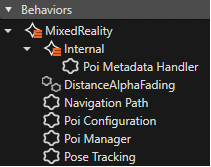
- **Poi Metadata Handler**:  
    PoiBehavior <span style="color:rgb(230,126,35);">[\[More...\]](https://doc316en.candera.eu/link/639#bkmrk-mixed-reality-intern-0)</span>
- **Distance Alpha Fading**:  
    This behavior is a Group. <span style="color:rgb(230,126,35);">[\[More...\]](https://doc316en.candera.eu/link/639#bkmrk-distance-alpha-fadin)</span>
- **Navigation Path**:  
    Registers to navigation points and displays them as mesh in world space. <span style="color:rgb(230,126,35);">[\[More...\]](https://doc316en.candera.eu/link/639#bkmrk-navigation-path)</span>
- **Poi Configuration**:  
    Behavior that configures the mapping of a name to a assetId, such that it can be found by the PoiFactory. <span style="color:rgb(230,126,35);">[\[More...\]](https://doc316en.candera.eu/link/639#bkmrk-poi-configuration)</span>
- **POI Manager**:  
    Manager of the poi control nodes. <span style="color:rgb(230,126,35);">[\[More...\]](https://doc316en.candera.eu/link/639#bkmrk-poi-manager)</span>
- **Pose Tracking**:  
    Behavior that sets the pose of a target node. <span style="color:rgb(230,126,35);">[\[More...\]](https://doc316en.candera.eu/link/639#bkmrk-pose-tracking)</span>

<div drawio-diagram="642"><img src="https://doc316en.candera.eu/uploads/images/drawio/2023-02/drawing-7-1676368920.png" alt="drawing-7-1676368920.png"/></div>

---

#### Extended Animation Features  


<div drawio-diagram="643"><img src="https://doc316en.candera.eu/uploads/images/drawio/2023-02/drawing-7-1676368970.png" alt="drawing-7-1676368970.png"/></div>

In SceneComposer 3.8.0 the user can animate even more different properties. It is now able to animate Control Properties, Optionals, Variants and Script Component Properties. <span style="color:rgb(230,126,35);">[\[More...\]](https://doc316en.candera.eu/link/17#bkmrk-page-title)</span>

---

#### glTF 2.0 Importer to Support Physically Based Rendering  


In order to be able to create HMIs using 3D objects with similar rendering quality as running on mobile versions of game engines, CGI Studio's render techniques have been improved by methods of Physically Based Rendering (PBR). glTF 2.0 is more than defining PBR materials, it is a new state-of-the-art file format that is now supported by CGI Studio. <span style="color:rgb(230,126,35);">[\[More...\]](https://doc316en.candera.eu/link/328#bkmrk-page-title)</span>

---

#### 2D over 3D Support for Post Processing Effects  


The process of creating and applying posr processing effects within CGI Studio has been simplified. The user can now drag and drop pre-defined post processing effects onto a camera via script.  
An example has been created to show how the following post processing effects can be applied to a 2D and 3D scene:

- Depth of Field
- Bloom
- Simple Blur  
    <span style="color:rgb(230,126,35);">[\[More...\]](https://doc316en.candera.eu/link/329#bkmrk-page-title)</span>

---

#### External Texture Image  


Users of CGI Studio are now able provide externally rendered images within the HMI on Linux systems using Wayland. For example an image decoded from a video stream or provided from an external image repository, such as a media database. <span style="color:rgb(230,126,35);">[\[More...\]](https://doc316en.candera.eu/link/543#bkmrk-page-title)</span>

---

# CGI Studio 3.7

#### CGI Studio 3.7 - What's new:  


Welcome to CGI Studio 3.7, Candera's software development platform for development of hybrid 2D and 3D graphical interfaces for Automotive Systems.

This page provides information about the most important features added since the last Release.

---

#### Auto Values  


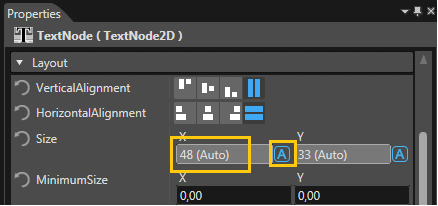
Auto values is a novel feature which displays parameter/property values internally computed by SceneComposer, [Candera](http://dev.doc.cgistudio.at/APILINK/namespace_candera.html) or inherited from other objects, as well as the information, that this value was automatically set.

The user can interact with auto-values through the switch button which is available - in the Properties panel - near the field were the value control is displayed as read-only. As can be seen in the image below, a suffix indicates that the value is auto. As expected, if the button is used the value will become editable and the user will be allowed to modify it as desired.

Example: The TextNode2D.LineHeight is a property where the auto values are often used. By switching auto on (which happens by default), [Candera](http://dev.doc.cgistudio.at/APILINK/namespace_candera.html) will compute the value to be used based on the associated text style. The user can overwrite this auto value through by switching auto off (using the auto button) and force the engine to use the specified line height which now the user can modify. By setting the height to “0” the automatic computation is again enabled and [Candera](http://dev.doc.cgistudio.at/APILINK/namespace_candera.html) will return to the usage of the automatically determined line height for text placement.

<div drawio-diagram="668"><img src="https://doc316en.candera.eu/uploads/images/drawio/2023-02/drawing-7-1676371424.png" alt="drawing-7-1676371424.png"/></div>

More information is available in chapter <span style="color:rgb(230,126,35);">[Auto Values](https://doc316en.candera.eu/link/37#bkmrk-page-title)</span>.

---

#### HMI Report  


The HMI Report feature produces statistics, summary and details for the solution loaded in Scene Composer, including but not limited to:

- How many bitmaps are loaded in this solution?
- How many of them are actually used and which is the biggest/smallest?
- What controls/behaviors/texts do I have in the solution and where are they used?

The HMI report is presented in browser in the form of a set of HTML documents. Each document is linked to one another by a navigation bar.

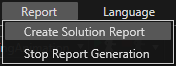
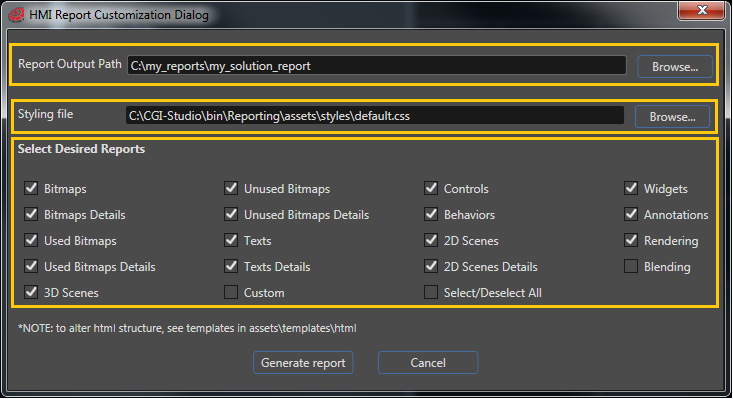
To generate an HMI report after loading a solution, one must click on the Report button from within the main bar in the upper part of the screen and select the Create Solution Report: This will open the HMI Report Customization Dialog, where in the 2 mandatory text fields the user defines where to store the generated output and from where to load the css file necessary to style said HTML documents. Furthermore, using the checkbox grid the user can customize the resulting report.

<div drawio-diagram="669"><img src="https://doc316en.candera.eu/uploads/images/drawio/2023-02/drawing-7-1676371445.png" alt="drawing-7-1676371445.png"/></div>

The 2 textboxes are for setting up where the output HTML documents shall be stored and from where to retrieve the css file needed to style said HTML documents. These 2 fields are mandatory. The checkbox grid is for selecting which of the available sub reports you would like to have added.

<div drawio-diagram="670"><img src="https://doc316en.candera.eu/uploads/images/drawio/2023-02/drawing-7-1676371464.png" alt="drawing-7-1676371464.png"/></div>

More information is available in chapter <span style="color:rgb(230,126,35);">[HMI Report](https://doc316en.candera.eu/link/45#bkmrk-page-title)</span>.

---

#### Annotations  


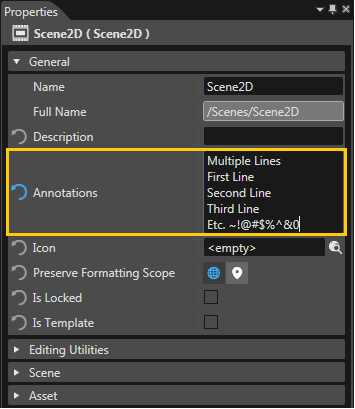
A new property named Annotations was introduced for every SceneComposer element. This property can be used to assign individual information to the selected object and it is located in the Properties panel under the General section. The property can be restored to its default empty state using the Restore Default button.

Annotations are not included in the asset, but only in the HMI report.

<div drawio-diagram="671"><img src="https://doc316en.candera.eu/uploads/images/drawio/2023-02/drawing-7-1676371498.png" alt="drawing-7-1676371498.png"/></div>

More information is available in chapter <span style="color:rgb(230,126,35);">[Annotations](https://doc316en.candera.eu/link/13#bkmrk-page-title)</span>.

---

#### Canvas Text Outline  


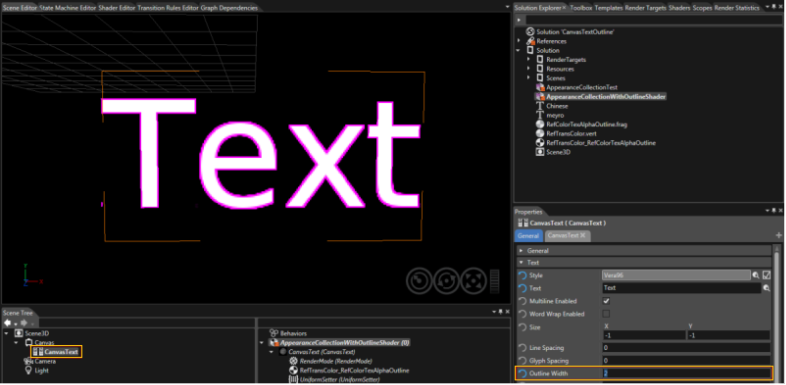
This feature enables adding an outline to a canvas text in a 3D scene by using a dedicated shader program.

<div drawio-diagram="658"><img src="https://doc316en.candera.eu/uploads/images/drawio/2023-02/drawing-7-1676370592.png" alt="drawing-7-1676370592.png"/></div>

More information is available in chapter [<span style="color:rgb(230,126,35);">Canvas Text Outline</span>](https://doc316en.candera.eu/link/130#bkmrk-canvas-text-outline-0).

---

#### Support for Object Script Reference Properties  


It is possible to assign objects from the solution script component properties. Once a script has been assigned to a node, it is shown as a script component in the scene extra tree (a script having user parameter values) and the property panel will display the properties exposed by the script.

Scripts can use assigned objects for post processing effects, animating nodes in the scenes, starting and stopping animations, and other.

More information is available in chapter <span style="color:rgb(230,126,35);">[Support for Object Reference Properties](https://doc316en.candera.eu/link/80#bkmrk-page-title)</span>.

---

#### Script Component Templates  


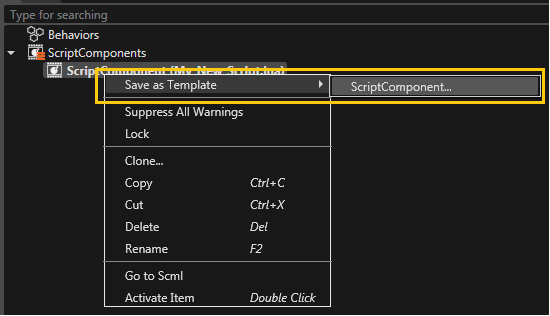
It is possible to create a template from an existing script component. To do this, just right click on an existing script component - in Scene extra-Tree - and from the context menu select the "Save as Template... &gt; ScriptComponent..." option.

<div drawio-diagram="659"><img src="https://doc316en.candera.eu/uploads/images/drawio/2023-02/drawing-7-1676370621.png" alt="drawing-7-1676370621.png"/></div>

More information is available in chapter <span style="color:rgb(230,126,35);">[Script Component Templates](https://doc316en.candera.eu/link/78#bkmrk-script-component-tem)</span>.

---

#### Post Processing Effects  


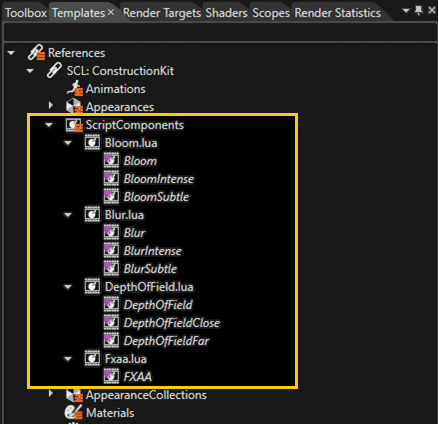
Until now the rendering flow of the effect had to be modelled completely with the scene graph including manual management of any temporary render targets involved, creating a rigid structure that was hard to extend and tweak since effect parameters were scattered around in the scene graph and its assets. That is why the usage of post processing effects was cumbersome and not intuitive. Consequently, the process was simplified through the introduction of a scriptable post processing pipeline and the creation of predefined effects. Since this version on, the user has the possibility to use them in an easy and intuitive manner, just by dragging and dropping any predefined effect on a camera node, or by creating a new effect with just implementing a single callback in a script.

Four predefined post processing effects are available in the "Templates": "References &gt; SCL:ConstructionKit &gt; ScriptComponents":

- Bloom
- Depth of Field
- FXAA ("Fast Approximate Anti-Aliasing")
- Blur

<div drawio-diagram="660"><img src="https://doc316en.candera.eu/uploads/images/drawio/2023-02/drawing-7-1676370638.png" alt="drawing-7-1676370638.png"/></div>

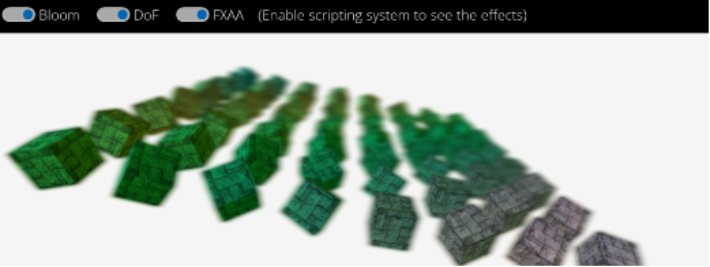
A new sample "PostProcessing" was added to demonstrate how post processing effects can be used.

<div drawio-diagram="656"><img src="https://doc316en.candera.eu/uploads/images/drawio/2023-02/drawing-7-1676370197.png" alt="drawing-7-1676370197.png"/></div>

More information is available in chapter <span style="color:rgb(230,126,35);">[Post Processing Effects](https://doc316en.candera.eu/link/78#bkmrk-post-processing-effe)</span>.

---

#### State Machine Extensions for Sub-charting and Debugging  


The state machine support has been extended with new modeling and debugging capabilities, for example sub-charts, used to abstract and hide modeling details of complex states and transitions, or the possibility to inspect the active state, transition dynamics and executed actions by attaching to a running Player and opening the State Machine panel.

More information is available in chapter <span style="color:rgb(230,126,35);">[State Machine](https://doc316en.candera.eu/books/state-machine)</span>.

---

#### Export Images  


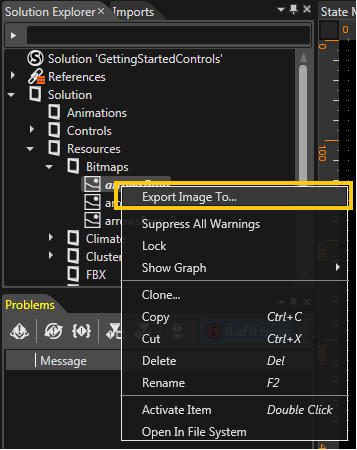
If necessary, it is possible to export any imported image from solution to a .png file. This operation can be done through the context menu which is available when right click on any image.

<div drawio-diagram="672"><img src="https://doc316en.candera.eu/uploads/images/drawio/2023-02/drawing-7-1676371530.png" alt="drawing-7-1676371530.png"/></div>

More information is available in chapter <span style="color:rgb(230,126,35);">[How to Import Resources](https://doc316en.candera.eu/books/import-of-resources/page/how-to-import-resources)</span>.

---

#### New Controls for CGI Studio 3.7  


**Breadcrumb Control**  
CGI Studio 3.7 provides a hierarchical navigational aid for user interfaces called Breadcrumb.

<div drawio-diagram="661"><img src="https://doc316en.candera.eu/uploads/images/drawio/2023-02/drawing-7-1676370722.png" alt="drawing-7-1676370722.png"/></div>

More information is available in chapter <span style="color:rgb(230,126,35);">[Breadcrumb](https://doc316en.candera.eu/books/controls-and-behaviors/page/common#bkmrk-breadcrumb)</span>.

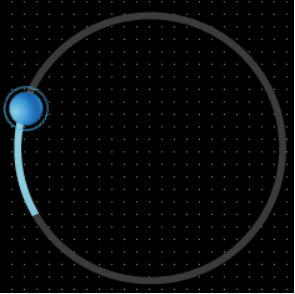
**Circular Slider Control**  
In addition to the <span style="color:rgb(230,126,35);">[Slider](https://doc316en.candera.eu/link/1156#bkmrk-slider)</span>, there is now a circular version called Circular Slider.

<div drawio-diagram="662"><img src="https://doc316en.candera.eu/uploads/images/drawio/2023-02/drawing-7-1676370751.png" alt="drawing-7-1676370751.png"/></div>

More information is available in chapter <span style="color:rgb(230,126,35);">[CircularSlider](https://doc316en.candera.eu/link/1156#bkmrk-circularslider)</span>.

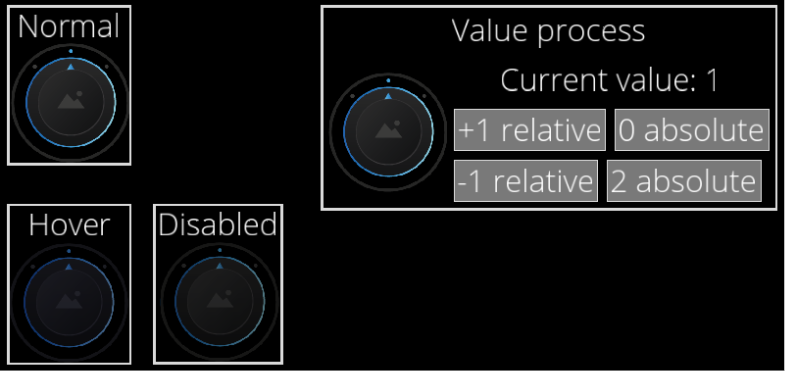
**Dial Control**  
A Dial behaves similar to a physical rotary switch.

<div drawio-diagram="663"><img src="https://doc316en.candera.eu/uploads/images/drawio/2023-02/drawing-7-1676370779.png" alt="drawing-7-1676370779.png"/></div>

More information is available in chapter <span style="color:rgb(230,126,35);">[Dial](https://doc316en.candera.eu/link/1156#bkmrk-dial)</span>.

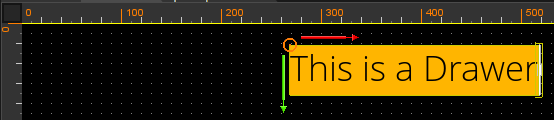
**Drawer Control**  
CGI Studio 3.7 provides a control that allows to hide content that can be shown again when it is needed.  
This control is Touch Screen compatible, but can also be used with Events.

<div drawio-diagram="664"><img src="https://doc316en.candera.eu/uploads/images/drawio/2023-02/drawing-7-1676370808.png" alt="drawing-7-1676370808.png"/></div>

<div drawio-diagram="665"><img src="https://doc316en.candera.eu/uploads/images/drawio/2023-02/drawing-7-1676370818.png" alt="drawing-7-1676370818.png"/></div>

More information is available in chapter <span style="color:rgb(230,126,35);">[Drawer](https://doc316en.candera.eu/link/1156#bkmrk-drawer)</span>.

**Icon Button Control**  
The Icon Button is a new addition to the <span style="color:rgb(230,126,35);">[Button](https://doc316en.candera.eu/link/1156#bkmrk-button)</span> and <span style="color:rgb(230,126,35);">[TextButton](https://doc316en.candera.eu/link/1156#bkmrk-textbutton)</span>.

<div drawio-diagram="666"><img src="https://doc316en.candera.eu/uploads/images/drawio/2023-02/drawing-7-1676370875.png" alt="drawing-7-1676370875.png"/></div>

More information is available in chapter <span style="color:rgb(230,126,35);">[IconButton](https://doc316en.candera.eu/link/1156#bkmrk-iconbutton)</span>.

**Particle Emitter Control**  
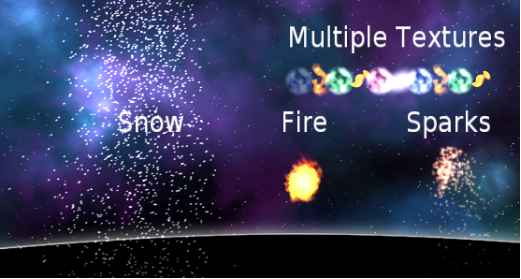
CGI Studio 3.7 provides a way to implement Particle Effects with Controls and Behaviors.   
There is a Showcase of different Particles Effects integrated in the <span style="color:rgb(230,126,35);">[3D Effects Solution](https://doc316en.candera.eu/link/270#bkmrk-page-title)</span>.

<div drawio-diagram="753"><img src="https://doc316en.candera.eu/uploads/images/drawio/2023-02/drawing-7-1676424069.png" alt="drawing-7-1676424069.png"/></div>

More information is available in chapter <span style="color:rgb(230,126,35);">[Point Sprite Emitter](https://doc316en.candera.eu/link/1167#bkmrk-pointspriteemitter)</span>.

**Spin Box Control**  
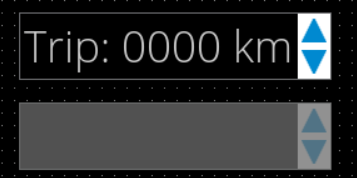
CGI Studio 3.7 provides a Spin Box. With it Values can be increased or decreased by a certain value.

<div drawio-diagram="667"><img src="https://doc316en.candera.eu/uploads/images/drawio/2023-02/drawing-7-1676370944.png" alt="drawing-7-1676370944.png"/></div>

More information is available in chapter<span style="color:rgb(230,126,35);">[ SpinBox](https://doc316en.candera.eu/link/1156#bkmrk-spinbox)</span>.

---

#### Behaviors: Deep Copy/Paste  


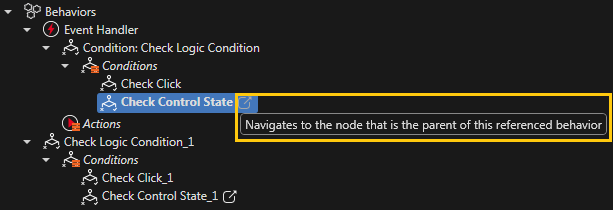
If a behavior is just the reference of another (parent) behavior, the referenced behavior will be marked by a specific sign and a tooltip will become visible on it:

<div drawio-diagram="763"><img src="https://doc316en.candera.eu/uploads/images/drawio/2023-02/drawing-7-1676424740.png" alt="drawing-7-1676424740.png"/></div>

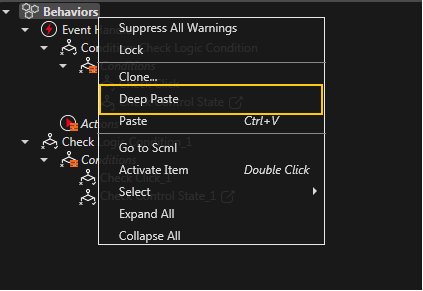
If a behavior which contains referenced behavior is copied, a new option will become available in the context menu: "Deep Paste".

<div drawio-diagram="764"><img src="https://doc316en.candera.eu/uploads/images/drawio/2023-02/drawing-7-1676424763.png" alt="drawing-7-1676424763.png"/></div>

More information is available in chapter <span style="color:rgb(230,126,35);">[Behaviors: Deep Copy/Paste Operation](https://doc316en.candera.eu/link/566#bkmrk-behaviors%3A-deep-copy)</span>.

---

#### Focus Navigation  


A default focus navigation has been implemented (based on nearest geometrical neighbor control and/or the tab order defined by the order in the scene tree). This enables changing the focused control to another control instance with keyboard focus navigation events (left, right, up, down, left-up, left-down, right-up, right-down, tab order previous and tab order next).

---

#### Gesture Recognition  


An abstract interface for gesture detectors has been introduced. Existing gestures (click, press/release and drag/drop) have been restructured to implement that interface. In addition a swipe/flick gesture detector (detecting swipes/flicks to the left/right/up/down) and a transform gesture detector (rotation/pan/pinch) have been implemented.

More information is available in chapter Behavior Gesture.

---

#### Enhanced Player  


The Player has now a new interface (CGIPanel) that allows to use the newly introduced features like:

- panel usability on target (TCP/IP, Serial), logging, scripting, render statistics, snapshots or recording of application handling.

<div drawio-diagram="765"><img src="https://doc316en.candera.eu/uploads/images/drawio/2023-02/drawing-7-1676425087.png" alt="drawing-7-1676425087.png"/></div>

More information is available in chapter <span style="color:rgb(230,126,35);">[Player](https://doc316en.candera.eu/books/player)</span>.

---

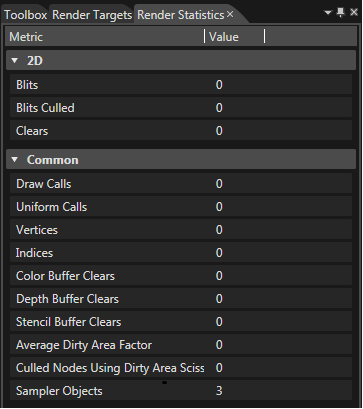
#### Enhanced Render Statistics  


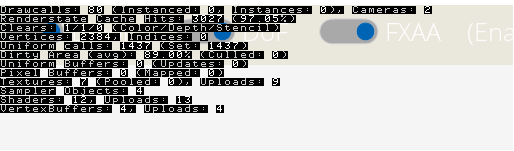
Render Statistics inform the user about current performance indicators during rendering. Therefore they are of major help when trying to identify performance bottlenecks. This statistic has been enhanced with the following information:

2D:

- Uploaded BitmapImages
- Total Uploaded BitmapImages
- Render Camera2D Calls

3D:

- Uploaded Textures (incl. breakdown to BitmapTextureImages, CubeMapTextureImages, DirectTextureImages)
- Total Uploaded Textures (incl. breakdown to BitmapTextureImages, CubeMapTextureImages, DirectTextureImages)
- Uploaded Shader Programs
- Total Uploaded Shader Programs
- Uploaded VertexBuffers
- Total Uploaded VertexBuffers
- Render Camera Calls

If CANDERA\_RENDER\_STATE\_CACHING\_ENABLED and CANDERA\_DETAIL\_STATISTICS\_ENABLED are set to true, additional information about Render State Cache Effectivity is available.

- Render State Cache Hits informs about the number of OpenGL state changes that were saved because the value was already cached.
- Render State Cache Misses informs about the number of OpenGL state changes that had to be executed because the new value was not in the cache.
- With these values the Render State Cache Hit Rate can be calculated, where 100% would mean no state changes.

These values are visible either in the Render Statistics Overlay of the Player, the Render Statistics Panel in SceneComposer (only for applicable properties) or directly accessible from the API.

<div drawio-diagram="657"><img src="https://doc316en.candera.eu/uploads/images/drawio/2023-02/drawing-7-1676370492.png" alt="drawing-7-1676370492.png"/></div>

---

#### Default Render Target  


A new camera is automatically assigned to a default render target. The user can specify a default render target via context menu in the Render Target panel. In case that no default render target is defined a default render target is set automatically when a new camera is created. Especially for beginners this features eases the start with Scene Composer.

---

# CGI Studio 3.6

#### CGI Studio 3.6 - What's new:  


Welcome to CGI Studio 3.6, Candera's software development platform for development of hybrid 2D and 3D graphical interfaces for Automotive Systems.

This page provides information about the most important features added since the last Release. In this release the focus was on the integration of the redesigned Player, culture management in Scene Composer, Monotype support and new Controls with key handling. A special highlight among the Controls is the dynamic list. Please see the details below.

---

#### RenderMode for SceneEditor 2D/3D to show RenderTarget Alpha Blending  


With CGI Studio 3.6 we introduce a new render mode for the scene editor for 2D and 3D scenes. The user is now able to switch between "Normal Scene Editor Rendering" and "Alpha Blending Scene Editor Rendering". The new render mode allows you to easily identify transparent objects. This is especially useful for devices that support hardware layer blending.

<div drawio-diagram="850"><img src="https://doc316en.candera.eu/uploads/images/drawio/2023-02/drawing-7-1676439135.png" alt="drawing-7-1676439135.png"/></div>

More information is available in chapter <span style="color:rgb(230,126,35);">[RenderTarget Alpha Blending](https://doc316en.candera.eu/link/309#bkmrk-page-title)</span>

---

#### Drop Shadow Effect and Outline Effect also available for TextNode2D  


The newly implemented OpenGL 2D effects

- OpenGL Drop Shadow Text Brush Blend and
- OpenGL Outline Text Brush Blend

offer the possibility to add these visual effects also to TextNode2D.

<div drawio-diagram="849"><img src="https://doc316en.candera.eu/uploads/images/drawio/2023-02/drawing-7-1676439114.png" alt="drawing-7-1676439114.png"/></div>

For more information please see the <span style="color:rgb(230,126,35);">[OpenGL 2D Effects Solution](https://doc316en.candera.eu/link/326#bkmrk-page-title)</span> Scene Composer sample solutions.

---

#### 2D SolidColorBrushColorBlend Effect  


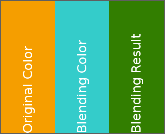
A SolidColorBrushColorBlend effect adds a color effect to the existing SolidColorBrushBlend effect. It multiplies the FillColor with the Color. This effect can be useful when it comes to reusing ColorEffects out of an effect, to multiply a color with the actual color to blit; especially in cases where the original color should be preserved, but should be changed for certain effects.

<div drawio-diagram="851"><img src="https://doc316en.candera.eu/uploads/images/drawio/2023-02/drawing-7-1676439172.png" alt="drawing-7-1676439172.png"/></div>

For further details please see section [<span style="color:rgb(230,126,35);">SolidColorBrushColorBlend</span>](https://doc316en.candera.eu/link/603#bkmrk-solidcolorbrushcolor) SolidColorBrushColorBlend.

---

#### Integration of Monotype  


Users of CGI Studio can now use the commercial font engine Monotype (iType) together with its WT Shaper as alternative to the already used freetype, harfbuzz and ComplexScript engines. Switching to monotype can easily be done using CMake. More details on the integration of Monotype can be found in chapter [<span style="color:rgb(230,126,35);">Integration of Monotype</span>](https://doc316en.candera.eu/link/294#bkmrk-page-title)

---

#### Copy &amp; Paste or Drag &amp; Drop from ToolBox to SolutionExplorer  


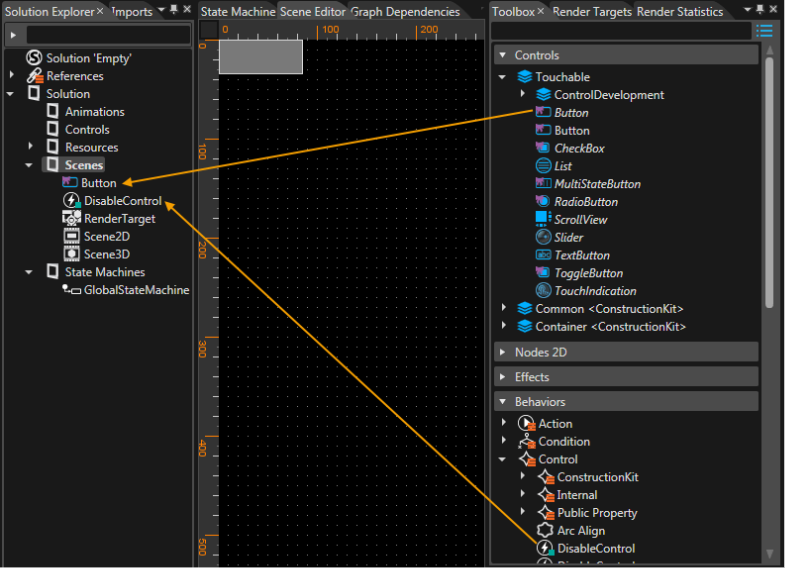
To make CGI Studio SceneComposer even more convenient and userfriendly we introduced the possiblity to Copy &amp; Paste or Drag &amp; Drop items from the Toolbox to the SolutionExplorer. The performed Drag&amp;Drop operation automatically creates a copy of the source object. It can be used to create your own variants of the controls delivered in the construction kit.

<div drawio-diagram="852"><img src="https://doc316en.candera.eu/uploads/images/drawio/2023-02/drawing-7-1676439224.png" alt="drawing-7-1676439224.png"/></div>

Copy and paste is performed using the context menu or the keyboard shortcuts CTRL+C and CTRL+V. Drag &amp; Drop is done by picking the item with the mouse, dragging it to its destination in the SolutionExplorer and dropping it at the desired location.

---

#### Integration of the Player into SceneComposer  


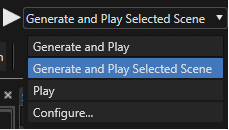
So far we were offering CGI Studio SceneComposer and Player as two separate applications. With CGI Studio 3.6 the Player can be started from within the SceneComposer. In the toolbar near the top left corner you can now find a play button and a drop-down menu to start the Player. In the drop-down menu you can choose one of the following options:

<div drawio-diagram="853"><img src="https://doc316en.candera.eu/uploads/images/drawio/2023-02/drawing-7-1676439264.png" alt="drawing-7-1676439264.png"/></div>

<table id="bkmrk-menu-entry-action-ge" style="border-collapse:collapse;width:105.185%;"><colgroup><col style="width:28.6774%;"></col><col style="width:71.3226%;"></col></colgroup><tbody><tr><td>**<span style="color:rgb(0,0,0);">Menu Entry</span>**</td><td>**<span style="color:rgb(0,0,0);">Action</span>**</td></tr><tr><td>Generate and Play</td><td>Generates assets and starts the Player</td></tr><tr><td>Generate and Play Selected Scene</td><td>Generates assets and starts the Player with the current scene after pressing the "play" button on the left</td></tr><tr><td>Play</td><td>Starts the Player after pressing the "play" button with the most recent generated asset</td></tr><tr><td>Configure...</td><td>Opens a configuration dialog. Configurations, like the path to the Player, can be set. Further wise it allows to set additional parameters and the default scene that will be shown.</td></tr></tbody></table>

It is possible to start two Players in parallel with different assets. Starting a third Player is not possible because it would try to overwrite the first generated asset. The generated assets are stored in temporary application data user folders.

---

#### Player Re-Design  


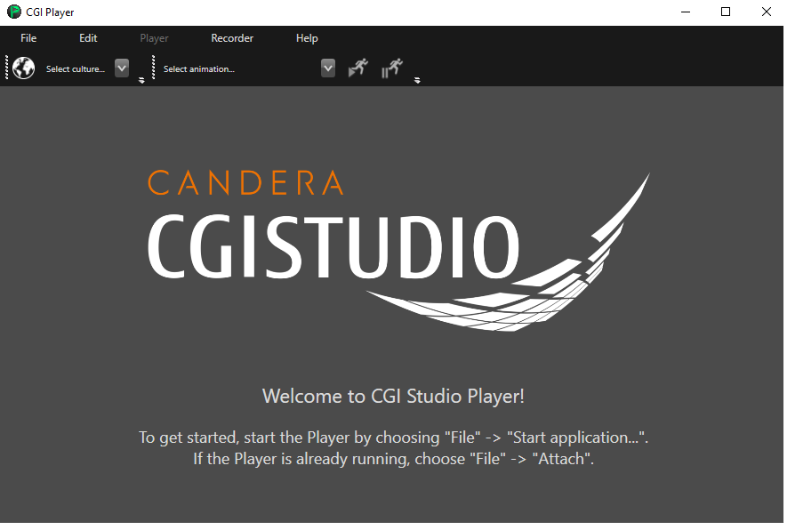
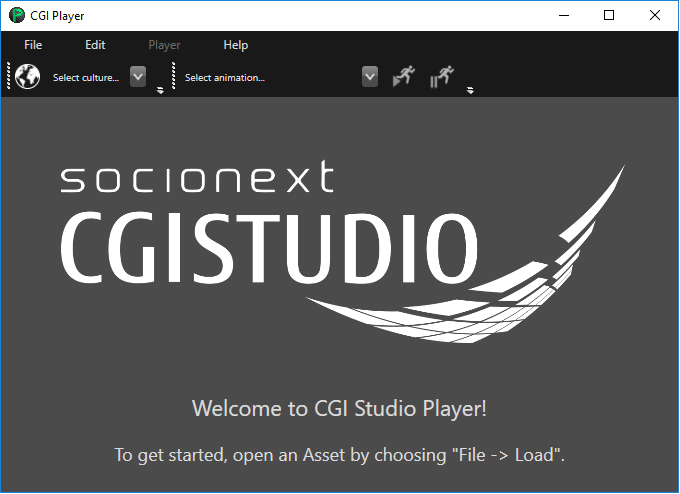
Speaking of the Player: it now features a fresh new design - both in the UI and internal architecture setup - for an improved user experience.

<div drawio-diagram="857"><img src="https://doc316en.candera.eu/uploads/images/drawio/2023-02/drawing-7-1676439457.png" alt="drawing-7-1676439457.png"/></div>

---

#### Handling of Keyboard incl. Virtual Keyboard Events  


With CGI Studio 3.6 it is now possible to directly react on virtual Key Events using the concept of Behaviors. A new Control Behavior "Virtual Key" has been added that receives a Change Value Event with a boolean. True will start emitting Key Events, false will stop emitting Key Events. A new Condition Input Behavior "Check Key Input" has been added, so it is possible for any control to react on it and call any Action Behavior. The "Check Key" Input Condition Input Behavior as well the "Virtual Key" Control Behavior can be configured with a Modifier and a KeyType.

<div drawio-diagram="864"><img src="https://doc316en.candera.eu/uploads/images/drawio/2023-02/drawing-7-1676439646.png" alt="drawing-7-1676439646.png"/></div>

---

#### Line Spacing Customization  


With CGI Studio 3.6 the user can customize the way multi-line text is imported from Photoshop. As CGI Studio is using a different text engine than Adobe, customization is needed to achieve the same presentation, especially spacing for multi-line text.

The Photoshop importer imports multi-line text as it is - setting default line spacing

With implementation of this new customization possibility, the Line Height property has been removed from the TextNode in SceneComposer. TextStyle has a new category (in the property grid) called "Metrics" that contains the following properties to display the line spacing values calculated from [<span style="color:rgb(53,152,219);"><span style="color:rgb(230,126,35);">Candera:</span> </span>](http://dev.doc.cgistudio.at/APILINK/namespace_candera.html)

<table id="bkmrk-property-description" style="border-collapse:collapse;width:70.7407%;"><colgroup><col style="width:18.7713%;"></col><col style="width:81.2287%;"></col></colgroup><tbody><tr><td>**<span style="color:rgb(0,0,0);">Property</span>**</td><td>**<span style="color:rgb(0,0,0);">Description</span>**</td></tr><tr><td>Ascender</td><td>Font ascender value in device pixels.</td></tr><tr><td>Descender</td><td>Font descender value in device pixels.</td></tr><tr><td>Line Height</td><td>Line height of the font (lineGap = lineHeight - (ascender - descender))</td></tr></tbody></table>

<div drawio-diagram="868"><img src="https://doc316en.candera.eu/uploads/images/drawio/2023-02/drawing-7-1676439804.png" alt="drawing-7-1676439804.png"/></div>

---

#### Generic Transformation is optional  


In order to increase the performance when rendering, the generic transformation used for 3D Nodes, Canvas Nodes and also for Textures, has become an optional parameter in SceneComposer.

---

#### Advanced Cluster Sample Solution  


A new Advanced Cluster Solution has been added to the Sample Solutions that can be found on the startup screen of CGI Studio SceneComposer 3.6. It shows how to create an advanced cluster without the need of application logic. It is just using Controls for implementation and therefore works with the Player.

<div drawio-diagram="870"><img src="https://doc316en.candera.eu/uploads/images/drawio/2023-02/drawing-7-1676439853.png" alt="drawing-7-1676439853.png"/></div>

A description of how it is assembled and how it can be created from start can be found in the section for Sample Solutions [<span style="color:rgb(230,126,35);">Advanced Cluster Solution</span>](https://doc316en.candera.eu/books/best-practice/chapter/advanced-cluster-solution).

---

#### Extension of FeatStd::Variant  


The list of data types of <span style="color:rgb(230,126,35);">[FeatStd::Variant](http://dev.doc.cgistudio.at/APILINK/class_feat_std_1_1_variant.html)</span> has been extended by data types that are often used in applications:

- FloatValue
- **DoubleValue**
- **Int8Value**
- **Int16Value**
- Int32Value
- **Int64Value**
- **UInt8Value**
- **UInt16Value**
- UInt32Value
- **UInt64Value**
- BoolValue
- **StringValue**

A new TryGet() method has been implemented, which returns true if the conversion was possible without value range limitation and false otherwise. You can find out more about this in the Class Reference of <span style="color:rgb(230,126,35);">[FeatStd::Variant](http://dev.doc.cgistudio.at/APILINK/class_feat_std_1_1_variant.html).</span>

---

#### Freetype Font Streaming  


Instead of loading a complete font from asset file into RAM it is also possible to use the freetype custom IO stream API where only the required bytes are requested from the font. This features is especially useful for big fonts. This can be done on a font-by-font basis.

Even after introducing the new (stream-based) font data access strategy, it is still possible to select the old (memory-based) font data access strategy.

---

#### Offline Shader Compiler Plugin for R-Car D3 Integrity  


With CGI Studio 3.6, a shader compiler plugin for Scene Composer is provided for Renesas R-Car D3 Integrity platform. This new shader compiler also supports offline compilation. All shaders and only those shaders that are used and are part of the asset library are compiled.

---

#### PSD Exporter sets Text Height  


The PSD Export now sets the Layout Size of the TextNode2D to the text area size from Photoshop. The TextNode2D's clipping behavior is adapted so that rendering area is big enough for rendering complete lines and then apply clipping to the area.

---

#### Pivot Point  


With CGI Studio 3.6 Scene Composer uses a real pivot point instead of a pivot offset. The pivot point is used as center point for rotation and scaling. It is available for 2D and 3D. A gizmo - an orange circle with an orange dot inside - shows the position of the pivot point in 2D scenes.

In 2D the existing translation modes (Pivot and Object, Pivot only, Object only) are now based on the real pivot point:

<div drawio-diagram="873"><img src="https://doc316en.candera.eu/uploads/images/drawio/2023-02/drawing-7-1676440049.png" alt="drawing-7-1676440049.png"/></div>

"Pivot and Object" mode: Position property (only) of the translated node is re-computed and updated.   
"Pivot only" mode: both Pivot property and Position property values of the translated node are re-computed and updated.   
"Object only" mode: both Position and PivotPoint properties of the translated node are re-computed and updated.

---

#### Memory Usage Improvements  


For CGI Studio 3.6 the memory Usage for large solutions has been improved significantly.

---

#### Integrated Text Management  


CGI Studio supports internationalization in form of a custom solution based on the Translator plugin and customer external tools. All language tables can be now maintained directly in Scene Composer. For a better integration of the text's management, the following steps have been performed:

- The translator plugin has been integrated to be part of SceneComposer.
- The text table editing has been extended so that any text item can be edited for all languages.
- Text editing is allowed in the property grid for the selected locale.
- Live text switching w/o asset re-generation is now possible in the editor and display preview.

Further wise, CGI Studio 3.6 comes with an integrated Translator Plugin. In the toolbar you can find an icon to open the "Solution Icons: Cultures" dialog to add or delete languages as well as a drop-down box for choosing the currently active language.

<div drawio-diagram="878"><img src="https://doc316en.candera.eu/uploads/images/drawio/2023-02/drawing-7-1676440145.png" alt="drawing-7-1676440145.png"/></div>

More information about the Translation Plugin can be found in chapter [<span style="color:rgb(230,126,35);">Scene Composer Translator Plugin</span>](https://doc316en.candera.eu/books/scene-design/chapter/scenecomposer-translator-plugin).

---

#### Unique Identifiers for Behaviors  


With CGI Studio 3.6 unique identifiers for behaviors have been introduced. For this, an Identifier class has been introduced which matches any arbitrary string path / string tree. The concept is derived from Java String Interning (<span style="color:rgb(230,126,35);">[https://en.wikipedia.org/wiki/String\_interning](https://en.wikipedia.org/wiki/String_interning)</span>).

---

#### Support for True Type Font Container (TTC)  


An Iterator has been implemented to iterate over the names of the faces contained by a TTC font. The order in which the face names are provided by the iterator is a hint for the index that needs to be passed at Font::Setup(name, index), to properly load the expected face.

---

#### Toggle Button  


We have now added a new Control "Toggle Button" that behaves like a Push Button but it toggles with each press between "On" and "Off". It is typically used for activating and deactivating a persisting functionality.

<div drawio-diagram="881"><img src="https://doc316en.candera.eu/uploads/images/drawio/2023-02/drawing-7-1676440215.png" alt="drawing-7-1676440215.png"/></div>

The visual appearance of the Toggle Button can be altered in the properties panel. The texts, the images and also the colors for hovered and disabled can be configured.

<div drawio-diagram="883"><img src="https://doc316en.candera.eu/uploads/images/drawio/2023-02/drawing-7-1676440350.png" alt="drawing-7-1676440350.png"/></div>

---

#### Clock Control  


CGIStudio 3.6 offers a new DigitalClock and an AnalogClock Control, which can be found in the ConstructionKit.

<div drawio-diagram="884"><img src="https://doc316en.candera.eu/uploads/images/drawio/2023-02/drawing-7-1676440423.png" alt="drawing-7-1676440423.png"/></div>

More information can be found in chapter [<span style="color:rgb(230,126,35);">Digital Clock</span>](https://doc316en.candera.eu/link/1157#bkmrk-digitalclock) and [<span style="color:rgb(230,126,35);">Analog Clock</span>](https://doc316en.candera.eu/link/1157#bkmrk-analogclock).

---

#### Input Field Control  


CGI Studio 3.6 provides an Input Field Control for Keyboard Input.

<div drawio-diagram="885"><img src="https://doc316en.candera.eu/uploads/images/drawio/2023-02/drawing-7-1676440461.png" alt="drawing-7-1676440461.png"/></div>

For more information please check section [<span style="color:rgb(230,126,35);">InputField</span>](https://doc316en.candera.eu/link/1156#bkmrk-inputfield).

---

#### Dynamic List  


The list control has been extended by supporting <span style="color:rgb(230,126,35);">[Courier](http://dev.doc.cgistudio.at/APILINK/namespace_courier.html)</span> Data Binding and generic windowed list model fragments.

<div drawio-diagram="886"><img src="https://doc316en.candera.eu/uploads/images/drawio/2023-02/drawing-7-1676440496.png" alt="drawing-7-1676440496.png"/></div>

For more information please see the [<span style="color:rgb(230,126,35);">Dynamic List Tutorial</span>](https://doc316en.candera.eu/link/293#bkmrk-page-title).

---

#### Databinding UI  


With Scene Composer 3.6 each bindable property of a Behavior, Widget, Behavior Building Block or Control will have a button next to the property that allows to define or break a link to a data source.

The buttons indicate if the binding is established or not:

<div drawio-diagram="887"><img src="https://doc316en.candera.eu/uploads/images/drawio/2023-02/drawing-7-1676440637.png" alt="drawing-7-1676440637.png"/></div>

Additionally, when hovering the buttons, the concerned binding source is displayed as tooltip (see the lower right corner of the picture above).

---

#### Sequential and Bidirectional Transitions  


Until now, only simultaneous transitions from one scene to another were possible, meaning that, for example, one scene would fade out while the other one fades in. With CGI Studio 3.6, it is possible to configure transition rules, which result in a sequential playback of the respectively involved transition fragments. To accomplish this, new options to set the transition strategy for "Activation" and "Deactivation" fragments have been added to Scene Composer's Rules Editor.

Additionally, transition rules can now be set as bidirectional, further simplifying the transition setup process. Now, only one rule is needed for a transition in both directions.

For more information about the new Transition features, please read the chapter [<span style="color:rgb(230,126,35);">Transitions</span>](https://doc316en.candera.eu/books/scene-design/chapter/transitions).

<div drawio-diagram="888"><img src="https://doc316en.candera.eu/uploads/images/drawio/2023-02/drawing-7-1676440720.png" alt="drawing-7-1676440720.png"/></div>

---

# CGI Studio 3.5

#### CGI Studio 3.5 - What's new:  


Welcome to CGI Studio 3.5, Candera's software development platform for development of hybrid 2D and 3D graphical interfaces for Automotive Systems.

This page informs about the most important features, added since the last Release. Focus of this Release was to improve usability of SceneComposer, but also brand new features have found their way into it. Please see yourself.

---

#### Monotype  


Font engine iType feature has been integrated. iType is a font engine which main purpose is fast and qualitative rasterization of fonts.

There are two different approaches to integrate the third party code iType into CGI Studio:

- adding prebuilt libraries
- add the third party code into the build process

Monotype/iType has a special porting API with which target and OS specifics can be overridden. CGI Studio provides a single solution for all targets. For this, the framework links the API to the device and operating system layers. It is also possible to use an own customized port instead of the CGI Studio solution.

For complete description refer to [<span style="color:rgb(230,126,35);">Integration of Monotype</span>](https://doc316en.candera.eu/link/294#bkmrk-page-title) chapter.

---

#### Candera Scripting  


##### Script Events  


This versions adds support for script events. Script events can be sent and received by both [<span style="color:rgb(35,111,161);">Lua scripts</span>](http://dev.doc.cgistudio.at/APILINK/group___lua_scripting_events.html) and [<span style="color:rgb(35,111,161);">native code</span>](http://dev.doc.cgistudio.at/APILINK/group___scripting_events.html).

##### Candera Object References in Scripts  


This versions adds support for [<span style="color:rgb(35,111,161);">referencing Candera objects in scripts</span>](http://dev.doc.cgistudio.at/APILINK/group___lua_object_references.html). These object references are aware about the lifetime of the objects they reference without interfering with them. They can be passed from native code to scripts and vice versa, as well as dereferenced to call object specific methods in Lua.

---

#### Property Editing Improvements  


##### Visualization of Enums as Icons  


In CGI Studio SceneComposer for some properties the user can choose from a defined set of values e.g. the type of layout he wants to use (GridLayout, StackLayout...) or he can define the values for horizontal and vertical alignment. CGI Studio 3.5 offers intuitive icons to the user, so he can easily decide, which option he wants to take. Tooltips when hovering these icons make these icons even more user friendly.

<div drawio-diagram="975"><img src="https://doc316en.candera.eu/uploads/images/drawio/2023-02/drawing-7-1676444810.png" alt="drawing-7-1676444810.png"/></div>

##### Multi-Column Properties in the Property Panel  


Several items have properties where more than one value can be entered:

- position properties require a value for the x- and a value for the y-coordinate
- size properties require a value for the x- and a value for the y-coordinate
- margin properties even require 4 values (for left, top, right and bottom)

With CGI Studio 3.5 the input fields for these values are positioned next to each other in multiple columns to save space and reduce scrolling effort.  
As you can see in the screenshot below, the appearance of the properties has been very much improved and looks a lot tighter.

<div drawio-diagram="979"><img src="https://doc316en.candera.eu/uploads/images/drawio/2023-02/drawing-7-1676444922.png" alt="drawing-7-1676444922.png"/></div>

---

#### Nine-Patch  


When scaling images, the loss of too much quality shall be prevented. To optimize the scaling process, with CGI Studio 3.5 each image allows the configuration as Nine-Patch. By defining four stretchable areas for left, top, right and bottom, the image will be divided into 9 differently scaled patches (thus Nine-Patch) as seen in the image below.

<div drawio-diagram="981"><img src="https://doc316en.candera.eu/uploads/images/drawio/2023-02/drawing-7-1676444964.png" alt="drawing-7-1676444964.png"/></div>

The properties for the Nine-Patch can be defined on image level in the properties tab after activating the Nine-Patch functionality by clicking on the NinePatch icon. When the Nine-Patch functionality is activated, the user can define the 9Patch Stretchable Area by entering a value for each of the borders: left, right, top and bottom as explained in the right picture below.

<div drawio-diagram="988"><img src="https://doc316en.candera.eu/uploads/images/drawio/2023-02/drawing-7-1676445214.png" alt="drawing-7-1676445214.png"/></div>

The Nine-Patch configuration is considered at any kind of scale operation - no matter if it is a manual scale operation or during layout calculation. Here is an example that shows the original image and the same image resized using the Nine-Patch configuration:

<div drawio-diagram="989"><img src="https://doc316en.candera.eu/uploads/images/drawio/2023-02/drawing-7-1676445278.png" alt="drawing-7-1676445278.png"/></div>

Note: that when computing the resized image, the position of the center point is calculated accordingly. This is especially important as the image center is used when composing and positioning parts of a control (e.g. the needle image of a NeedleControl has to rotate around the defined image center no matter if it has been resized using the Nine-Patch.)

For complete description refer to [<span style="color:rgb(230,126,35);">9-patch image</span>](https://doc316en.candera.eu/link/291#bkmrk-page-title) chapter and for a small tutorial check [<span style="color:rgb(230,126,35);">9-patch image</span>](https://doc316en.candera.eu/link/429#bkmrk-page-title) chapter.

---

#### Pivot Hint  


In addition to optimized resizing of images using the Nine-Patch approach, the user can define a Pivot Hint for each image. Additionally the Pivot Hint is used by Behaviors to allow them to set a Pivot Offset to an image that has been set.

<div drawio-diagram="990"><img src="https://doc316en.candera.eu/uploads/images/drawio/2023-02/drawing-7-1676445362.png" alt="drawing-7-1676445362.png"/></div>

---

#### Controls and Behaviors  


There is a bunch of new predefined Controls in SceneComposer. Those reach from Cluster Controls to IVI Controls. They cover many elements necessary in a user interface. Among those Controls are a progress-bar, gauge, telltale, list, button, slider and many more. Controls quicken the process of HMI development massively. The HMI elements can interact with each other and because of the underlying Behaviors no single line of code has to be written for many use cases.

<div drawio-diagram="993"><img src="https://doc316en.candera.eu/uploads/images/drawio/2023-02/drawing-7-1676445426.png" alt="drawing-7-1676445426.png"/></div>

To make these Controls work and to be able to define own Controls, the list of Behaviors has increased significantly. There are many different Behaviors reaching from Event Handling to Value Processing. For a more detailed documentation of the new Controls and Behaviors please refer to [<span style="color:rgb(230,126,35);">Controls and Behaviors</span>](https://doc316en.candera.eu/books/controls-and-behaviors).

<div drawio-diagram="995"><img src="https://doc316en.candera.eu/uploads/images/drawio/2023-02/drawing-7-1676445463.png" alt="drawing-7-1676445463.png"/></div>

The LayoutType of a Control can now conveniently be configured via the LayoutType in the properties panel of a Control.

A new tutorial is available [<span style="color:rgb(230,126,35);">here</span>](https://doc316en.candera.eu/books/best-practice/chapter/gettingstartedcontrols-solution). This tutorial covers most of controls and behaviors.

---

#### Building Blocks for Behaviors  


Behaviors can be nested and in this way combined to a reusable behavior building block that is part of the solution and appears in the Solution Explorer. These behavior blocks offer the possibility to configure, which of the properties of this behavior block will be published and are therefore editable at the time the behavior block is instantiated and used in the SceneComposer scene.

##### Visualization of Behaviors as Tree in SceneComposer  


When many behaviors are nested, the hierarchy of the behaviors is shown trough the visualization of the behaviors integral map ( = "tree") structure. The tree structure of nested behaviors is now visualized properly in the Scene Tree View. This makes it easier to see, which behaviors belong together.

<div drawio-diagram="997"><img src="https://doc316en.candera.eu/uploads/images/drawio/2023-02/drawing-7-1676445503.png" alt="drawing-7-1676445503.png"/></div>

For more information please check out the [<span style="color:rgb(230,126,35);">Behavior Building Blocks</span>](https://doc316en.candera.eu/link/567#bkmrk-page-title)

---

#### EventHandler Tab  


Every control needs an EventHandler in order to handle user events and take appropriate actions. With CGI Studio 3.5 an EventHandler Tab has been introduced in the Properties View for all Controls. In this EventHandler Tab the user can choose the event he wants to react on from a drop-down menu. Furthermore, conditions and actions can also be configured with drop-down menus in this tab. Once an Event is selected, only conditions that are suitable for the selected event are offered in the drop-down menu.

<div drawio-diagram="1000"><img src="https://doc316en.candera.eu/uploads/images/drawio/2023-02/drawing-7-1676445557.png" alt="drawing-7-1676445557.png"/></div>

Additional EventHandlers can be added by clicking the '+' sign next to the EventHandler Tabs, more Actions can be added by clicking the '+' sign next to the Actions (marked in orange in the image above).

Having only a selection of suitable and applicable conditions available at configuration time after selecting an event makes this new EventHandler Tab a welcome and user friendly feature.

---

#### New Data Types: Optional and Variant  


Especially for the implementation of the new Behaviors new data types have been introduced.

- Optional: The Optional data-type allows the use of uninitialized objects. Therefore it provides methods to check whether the object has been initialized or not.
- Variant: The Variant data-type allows to store one value in different types. The type can be an integer, unsigned integer, floating point number or boolean.

Sample code for Optional:

> Optional&lt;Int&gt; opt;  
> if(true == opt) {  
>  Int value = \*opt; //opt has been set  
> }  
> else {  
>  //opt has not been set  
> }

---

#### State Machine  


CGI Studio introduces support for a new integrated solution to model behavior based on the state machine concept. By using traditional design means, multiple state machines can be defined. A state machine contains states and transitions and allows defining model changes into the graphical model when certain conditions are met. The state machine links workflow logic to existing CGI Studio graphical items and building blocks such as behaviors and controls.

<div drawio-diagram="1003"><img src="https://doc316en.candera.eu/uploads/images/drawio/2023-02/drawing-7-1676445659.png" alt="drawing-7-1676445659.png"/></div>

---

# CGI Studio 3.4.2

#### CGI Studio 3.4.2 - What's new:  


Welcome to CGI Studio 3.4.2, Candera's software development platform for development of hybrid 2D and 3D graphical interfaces for automotive systems.

This page informs about the most important features, added since the last release. Focus of this release were 2D Composition in 3D using a Canvas Node and full integration of the Functional Safety features to SceneComposer.

---

#### 2D Composition in 3D  


With progressing SceneComposer releases 2D and 3D editing is converging constantly. More and more 2D composing functions are merged into 3D editor to pave the way for unified editing regardless of 2D or 3D content. With the latest introduction of layout support in 3D editor, you can now arrange your content on a canvas like you were used to in 2D editor. The layout strategies behave same.

The following layouters are available

- BaseLine Layouter
- DockPanel Layouter
- Grid Layouter
- Overlay Layouter
- Stack Layouter

More information can be found in the [<span style="color:rgb(230,126,35);">Layouter Documentation</span>](https://doc316en.candera.eu/books/layouter)

<div drawio-diagram="1008"><img src="https://doc316en.candera.eu/uploads/images/drawio/2023-02/drawing-7-1676445808.png" alt="drawing-7-1676445808.png"/></div>

---

#### Advanced Functional Safety  


Functional safe user interfaces according to ISO 26262 become more and more important for graphical user interfaces. [<span style="color:rgb(35,111,161);">Candera</span>](http://dev.doc.cgistudio.at/APILINK/namespace_candera.html) Safety engine, which meets the strict ASIL B requirements, has been enhanced extensively to allow easy creation of appealing but safe content directly in SceneComposer. With this release comprehensive support for animations of safety content has been added. Find below an excerpt of most important features:

- Key-frame based animation authoring in SceneComposer for Safety HMI similar to so-called Convenience HMI, which does not meet ASIL B requirements
- Support for animating all content properties: Position, size (scale), transparency, and text color
- Animation playback control: Start, pause, resume, finish
- Animation properties: Speed factor, repeat mode, playback direction
- Animation interpolation strategies: Step, Linear, Easing In, Easing Out, Easing In-Out
- Rendering of RLE compressed content

Together with available support for advanced image and text rendering it is now easier than ever to render attractive but safe HMI and blend seamlessly with Convenience HMI. At the same time [<span style="color:rgb(35,111,161);">Candera</span>](http://dev.doc.cgistudio.at/APILINK/namespace_candera.html) safety engine assures a secure and performant render path and guarantees freedom of interference with convenience HMI.

<div drawio-diagram="1009"><img src="https://doc316en.candera.eu/uploads/images/drawio/2023-02/drawing-7-1676445859.png" alt="drawing-7-1676445859.png"/></div>

---

# CGI Studio 3.4.1

#### CGI Studio 3.4.1 - What's new:  


Welcome to CGI Studio 3.4.1, Candera's software development platform for development of hybrid 2D and 3D graphical interfaces for automotive systems.

This page informs about the most important features, added since the last release. Focus of this release were new features such as canvas text, functional safety support in SceneComposer, usability improvements, new samples and startup screen with online information.

---

#### 2D Composition in 3D  


Composition of 2D and 3D content will be unified more and more. As next step it is now possible to render true type text directly in 3D like you are used to in 2D. The text can be rendered on a dedicated canvas object, which is a plane object that can be oriented in 3D space. It is now very easy to apply different text effects directly via shaders. To get best performance the texts are automatically assembled to reduce the number of draw calls.

<div drawio-diagram="1012"><img src="https://doc316en.candera.eu/uploads/images/drawio/2023-02/drawing-7-1676445949.png" alt="drawing-7-1676445949.png"/></div>

---

#### Functional Safety SceneComposer  


With version 3.4.1 a preview of advanced functional safety HMI composition is introduced in SceneComposer. The safety HMI sample shows how you can compose and export safety content directly in SceneComposer. Advanced functional safety includes following features with 3.4.1:

- Authoring and safe presentation of images and text including transparency
- Positioning and scaling incl. pivot point configuration
- Grouping of objects for common transformations
- Safety asset library validation and integrity checks during runtime

<div drawio-diagram="1013"><img src="https://doc316en.candera.eu/uploads/images/drawio/2023-02/drawing-7-1676446002.png" alt="drawing-7-1676446002.png"/></div>

---

#### New Sample Solutions  


For everyone who wants to explore the possibilities and capabilities of SceneComposer we offer new sample solutions. In this release you can have a look at the following new sample solutions:

- [<span style="color:rgb(230,126,35);">2D Effects</span>](https://doc316en.candera.eu/link/262#bkmrk-page-title)
- [<span style="color:rgb(230,126,35);">OpenGL 2D Effects</span>](https://doc316en.candera.eu/link/326#bkmrk-page-title)
- Safety Sample: A new safety sample solution is available under the safety license. It demonstrates the functionality available under the [<span style="color:rgb(35,111,161);">Candera</span>](http://dev.doc.cgistudio.at/APILINK/namespace_candera.html) safety promise. It supports building the scene tree with groups, transparent images, texts and offers managing the rendering order using render slots

<div drawio-diagram="1019"><img src="https://doc316en.candera.eu/uploads/images/drawio/2023-02/drawing-7-1676446179.png" alt="drawing-7-1676446179.png"/></div>

<div drawio-diagram="1021"><img src="https://doc316en.candera.eu/uploads/images/drawio/2023-02/drawing-7-1676446233.png" alt="drawing-7-1676446233.png"/></div>

<div drawio-diagram="1024"><img src="https://doc316en.candera.eu/uploads/images/drawio/2023-02/drawing-7-1676446295.png" alt="drawing-7-1676446295.png"/></div>

---

#### Startup Screen with online information  


Beside of recent and sample solution the startup screen now also shows the latest online news around CGI Studio development, including features, webinars, and other events to come.

<div drawio-diagram="1025"><img src="https://doc316en.candera.eu/uploads/images/drawio/2023-02/drawing-7-1676446358.png" alt="drawing-7-1676446358.png"/></div>

---

#### Usability Improvements  


- The funcionality of copy, paste and clone has been unified: now, all context menus support copy, paste and clone operations if appropriate. Especially, the scene tree and the solution panel has been optimized regarding that matter.
- Smart Scene Preview: camera visualization into displays can now be enabled/disabled based on scenes. This action can be performed via a context menu entry on the camera, render target or display object.

---

# CGI Studio 3.4.0

#### CGI Studio 3.4.0 - What's new:  


Welcome to CGI Studio 3.4.0, Candera's software development platform for development of hybrid 2D and 3D graphical interfaces for automotive systems.

This page informs about the most important features, added since the last release. Focus of this release were new features such as transitions, a new Player, animation property setters, performance improvements, language dependent fonts, custom property configuration, Uniform Buffer Object (UBO) support, CGI Analyzer with frame debugger, IVI controls, live data preview, sample solutions, and improved documentation.

---

#### Improved Documentation  


The documentation was enhanced for:

- all new controls and all new sample solutions
- a cluster controls tutorial were you can learn how to create a cluster with controls, the solution can be found in
- SceneComposer Start Screen
- Tutorial videos like how to use design master, learn about scripting up to the cluster control tutorial
- new tutorials for Transitions, Behaviours, MFR (Multi-Freqency Rendering) or Lua-scripting
- Layouter documentation and tutorial

Find below a glimpse of the layout-sample:

<div drawio-diagram="1026"><img src="https://doc316en.candera.eu/uploads/images/drawio/2023-02/drawing-7-1676446505.png" alt="drawing-7-1676446505.png"/></div>

---

#### Sample Solutions  


Many samples are now on SceneComposer Start Screen

New samples have been added to ease exploring CGI Studio features. The new ones are: scripted car, layouter, cluster control tutorial, transitions

<div drawio-diagram="1027"><img src="https://doc316en.candera.eu/uploads/images/drawio/2023-02/drawing-7-1676446551.png" alt="drawing-7-1676446551.png"/></div>

Mark a solution and follow the link to the documentation at the bottom of the screen, you are guided to the related tutorial.

---

#### IVI Controls in Construction Kits  


Now also controls are available to create menus or to support touch.

In the construction kit you can find the IVI controls available for your platform:

<div drawio-diagram="1028"><img src="https://doc316en.candera.eu/uploads/images/drawio/2023-02/drawing-7-1676446591.png" alt="drawing-7-1676446591.png"/></div>

---

#### Analyzer with Frame Debugger  


The Analyzer provides a frame debugger as a new feature to help discovering visual defects much easier. The frame debugger gives an overview of what has been rendered in which order. Additionally, it gives visual access to the drawn content of each node. Furthermore, a statistical summary of the rendered frame is available.

<div drawio-diagram="1029"><img src="https://doc316en.candera.eu/uploads/images/drawio/2023-02/drawing-7-1676446639.png" alt="drawing-7-1676446639.png"/></div>

Debug color, depth, and stencil buffer content at custom defined time points.

<div drawio-diagram="1031"><img src="https://doc316en.candera.eu/uploads/images/drawio/2023-02/drawing-7-1676446667.png" alt="drawing-7-1676446667.png"/></div>

---

#### Animation Transitions  


The transition framework has been extended to add a Animations as new build-in transition type. Now it is possible to trigger animations or group animations within transitions. With animation transitions almost any arbitrary transition can be realized.

The transition type Animation holds three additional optional parameters:

- AnimationId – Candera::Id of the animation that is executed by the transition framework.
- AnimationTimeline- specifies the time when the animation will start. The end time of the animation depends on the selected playback mode.
- IsAnimationTimeRelative- defines the playback mode for the animation:  
    
    - TransitionTime - default(false) - The animation speed is adapted such that the end time of the transition, specified by the AnimationTimeline parameter, will match the end time of the animation.
    - AnimationTime (true) - The animation duration is given by the animation itself.

The animation specific parameters can be specified in the properties panel once the corresponding transition type has been selected:

<div drawio-diagram="1035"><img src="https://doc316en.candera.eu/uploads/images/drawio/2023-02/drawing-7-1676446806.png" alt="drawing-7-1676446806.png"/></div>

The animations can be triggered through a request by matching the corresponding rule.

<div drawio-diagram="1037"><img src="https://doc316en.candera.eu/uploads/images/drawio/2023-02/drawing-7-1676446824.png" alt="drawing-7-1676446824.png"/></div>

---

#### Reverse Transitions  


The transition framework offers the possibility of reversing transitions, because transitions shall be reversed when a fragment is deactivated, while it’s fragment is in activation or vice versa. If a reversible fragment has been identified, the already running TransitionFragment shall go backwards, from its current state to the original one.

A reverse transition is executed if all of the following conditions are fulfilled:

- the variant of the already running TransitionFragment shall match the variant of the current request
- the source of the already running TransitionFragment shall match the Destination of the matching rule
- the Destination of the already running TransitionFragment shall match the Source of the matching rule
- AllowReverse is set to true

---

#### Uniform Buffer Objects (UBOs)  


[<span style="color:rgb(35,111,161);">Candera</span>](http://dev.doc.cgistudio.at/APILINK/namespace_candera.html) now supports uniform buffer objects on OpenGL ES 3.0 platforms. Uniform buffer objects batch uniform settings for e.g. light and materials. A reduced number of render state changes increases render performance on GPU-bound applications.

They can be set in Solution Options:

<div drawio-diagram="1039"><img src="https://doc316en.candera.eu/uploads/images/drawio/2023-02/drawing-7-1676446899.png" alt="drawing-7-1676446899.png"/></div>

---

#### Transform Feedback  


[<span style="color:rgb(35,111,161);">Candera</span>](http://dev.doc.cgistudio.at/APILINK/namespace_candera.html) supports transform feedback on OpenGL ES 3.0 platforms. This feature enables the user to utilize the vertex processing unit of the GPU to perform calculations and reuse the results. This is especially useful for debugging vertex transformations. Applications can also use it for use cases like speeding up particle systems.

---

#### Pixel Buffer Objects  


[<span style="color:rgb(35,111,161);">Cander</span>a](http://dev.doc.cgistudio.at/APILINK/namespace_candera.html) supports pixel buffer objects on OpenGL ES 3.0 platforms. This feature can be used to transfer data to and from video memory asynchronously.

---

#### Renderer Statistics Overlay  


[<span style="color:rgb(35,111,161);">Candera</span>](http://dev.doc.cgistudio.at/APILINK/namespace_candera.html) introduces a helper class to draw renderer statistics data on screen as an overlay. That way critical information regarding rendering is available in real time on target platforms for diagnostic purposes.

<div drawio-diagram="1040"><img src="https://doc316en.candera.eu/uploads/images/drawio/2023-02/drawing-7-1676447002.png" alt="drawing-7-1676447002.png"/></div>

---

#### Renderer Statistics  


New render statistics have been added under the 2D section: Blits, Blits Culled, and Clears.

They can be seen here:

<div drawio-diagram="1041"><img src="https://doc316en.candera.eu/uploads/images/drawio/2023-02/drawing-7-1676447038.png" alt="drawing-7-1676447038.png"/></div>

---

#### Language Dependent Fonts  


Until now, the fonts could be configured based exclusively on unicode ranges. From this version onwards it is possible to configure the fonts on the basis of language. So, the configuration is extended in such a way that the font selection can be also conditioned by language ISO codes (the standardized nomenclature used to classify languages). The text style entries are grouped by culture (multiple). Every text style has - similar to "Entries" - a "Culture" list and every culture from this list has its own "Entries" list. In this way all the text style entries are grouped - as mentioned above - by culture.

This is an example for the Japanese and Chinese, just the culture is changed not the font:

<div drawio-diagram="1045"><img src="https://doc316en.candera.eu/uploads/images/drawio/2023-02/drawing-7-1676447145.png" alt="drawing-7-1676447145.png"/></div>

<div drawio-diagram="1044"><img src="https://doc316en.candera.eu/uploads/images/drawio/2023-02/drawing-7-1676447128.png" alt="drawing-7-1676447128.png"/></div>

---

#### New Animation Property Setters  


It is now possible to animate more properties for cameras and nodes in both 2D and 3D scenes. The new properties which can be animated are:

- viewport and scissor rectangle properties of camera objects from both 2D and 3D scenes
- bounding rectangle, clipping rectangle, and layout margin properties of 2D nodes
- vertex rectangle property of renderable canvas objects

Widgets have been enhanced to support properties of Vector4 and Margin type. This type of properties can also be animated.

---

#### Custom Property Configuration  


A configuration file allows the user to set values that overwrite the default value from the ApplicationConfig file when SceneComposer starts. This file can be generated by using the SceneComposerConfigurator.exe.

Here you can see the default configuration of the properties for TextNode:

<div drawio-diagram="1046"><img src="https://doc316en.candera.eu/uploads/images/drawio/2023-02/drawing-7-1676447208.png" alt="drawing-7-1676447208.png"/></div>

The Pivot Offset has been removed and the properties Render Order Rank and Enable Snap To Device Pixel have been set to read only:

<div drawio-diagram="1047"><img src="https://doc316en.candera.eu/uploads/images/drawio/2023-02/drawing-7-1676447226.png" alt="drawing-7-1676447226.png"/></div>

---

#### Live Data Preview  


SceneComposer was extended to allow an advanced usage of [<span style="color:rgb(35,111,161);">Courier</span>](http://dev.doc.cgistudio.at/APILINK/namespace_courier.html) plugin.

The user, when working with [<span style="color:rgb(35,111,161);">Courier</span>](http://dev.doc.cgistudio.at/APILINK/namespace_courier.html), can define the data items and link them to widget/control properties via data binding. With live data you can simulate this for each item and store the simulation.

<div drawio-diagram="1048"><img src="https://doc316en.candera.eu/uploads/images/drawio/2023-02/drawing-7-1676447274.png" alt="drawing-7-1676447274.png"/></div>

---

#### New Player  


A new Player is available under "&lt;cgi-studio-root&gt;/cgi\_studio\_player". It supports <span style="color:rgb(35,111,161);">Courier</span> which means that it recognizes touch-input for instance. Further features are Transitions and Memory Statistics. It also comes with a new Panel.

<div drawio-diagram="1049"><img src="https://doc316en.candera.eu/uploads/images/drawio/2023-02/drawing-7-1676447333.png" alt="drawing-7-1676447333.png"/></div>

---

# CGI Studio 3.3.3

#### CGI Studio 3.3.3 - What's new:  


Welcome to CGI Studio 3.3.3, Candera's software development platform for development of hybrid 2D and 3D graphical interfaces for Automotive Systems.

This page informs about the most important features, added since the last Release. Focus of this Release was Bugfixing, but also brand new features have found their way into it. Please see yourself.

---

#### Compiler Plugin for ApolloLake  


Supports binary shader programs through GLSL shader compiler plugin. Requires Intel standalone GLSL compiler binary, and also target platform specific GLP file. Uses GHS compiler v2016.5.2 and INTEGRITY Intel Broxton version 11.4.2, monolith from updated BSP. Linking is done against libdrm version 2.4.67, and MESA version 11.2.1. DirectTextureImage on ApolloLake INTEGRITY allows the user to access the texture image data in VRAM directly:

- Direct access is also possible with user provided buffer object handle.
- Supported image data formats are NV12, YUY2 (YUYV), RGBA and BGRA. Images in RGBA and BGRA formats are currently not displayed correctly.
- Requires OES\_EGL\_image\_external and EGL\_EXT\_image\_dma\_buf\_import EGL extensions.

---

#### Amber Cluster Sample Tutorial and the Amber Cluster Demo  


The Amber Cluster App is a complex application for Amber device, built with IAR compiler. It uses various features of Candera, and also integrates Courier. It uses data-binding implemented in the application for managing content, also uses the FeatStd templated state machine.

<div drawio-diagram="1057"><img src="https://doc316en.candera.eu/uploads/images/drawio/2023-02/drawing-7-1676447496.png" alt="drawing-7-1676447496.png"/></div>

---

#### Lua-Scripting Tutorial and the Lua-Scripting SampleSolution  


The Sample Solution gives an overview of how scripts can communicate with each other. With the corresponding tutorial you can learn how the id handling works and how to manage that nodes even communicate with their sibling nodes.

<div drawio-diagram="1059"><img src="https://doc316en.candera.eu/uploads/images/drawio/2023-02/drawing-7-1676447535.png" alt="drawing-7-1676447535.png"/></div>

---

# CGI Studio 3.3.2

#### CGI Studio 3.3.2 - What's new:  


Welcome to CGI Studio 3.3.2, Candera's software development platform for development of hybrid 2D and 3D graphical interfaces for Automotive Systems.

This page informs about the most important features, added since the last Release.

---

#### Visualization of Layouter Areas  


The actual size and the arrange area of a selected node are visualized as boxes in the render panel. The **actual size** is the bounding box of the node with additional margins. The **arrange area** is the available space for layouting provided by the parent node. If a group node is selected, additionally arrange area and actual size of all child nodes are visualized.

<div drawio-diagram="1061"><img src="https://doc316en.candera.eu/uploads/images/drawio/2023-02/drawing-7-1676447637.png" alt="drawing-7-1676447637.png"/></div>

Yellow boxes visualize the arrange size (bounding boxes use also yellow).

<div drawio-diagram="1062"><img src="https://doc316en.candera.eu/uploads/images/drawio/2023-02/drawing-7-1676447665.png" alt="drawing-7-1676447665.png"/></div>

The dotted blue lines visualize the actual size of a node.

<div drawio-diagram="1063"><img src="https://doc316en.candera.eu/uploads/images/drawio/2023-02/drawing-7-1676447679.png" alt="drawing-7-1676447679.png"/></div>

Layout visualization is only activated for selected nodes.

---

# CGI Studio 3.3.1

#### CGI Studio 3.3.1 - What's new:  


Welcome to CGI Studio 3.3.1, Candera's software development platform for development of hybrid 2D and 3D graphical interfaces for Automotive Systems.

This page informs about the most important features, added since the last Release.

---

#### Multi-threading support  


Various features belonging to multi-threading have been introduced. The next sections give an overview of those features.

##### Asynchronous Jobs  


FeatStd contains the new feature of asynchronous jobs. Users can submit jobs that should not block the currents thread execution, thus should be executed asynchronously. These jobs are further dispatched and executed by a provided dispatcher queue. Asynchronous jobs can further be executed in a separate thread, or at a defined time slice on the same thread. As soon as the execution has been finished, the request handle becomes valid and the result can be retrieved. This feature is the base for further features introduced in this Release, in particular Asynchronous Asset Loading and Asynchronous Text Rendering.

##### Asynchronous Asset-Loading  


Asset Loading, especially reading from the asset repositories, can be a time consuming task, which blocks the CPU from further processing. This can even slow down rendering in certain cases. To improve this, asset loading requests can now be submitted as asynchronous jobs. These jobs can be done either in parallel on a separate thread, or interleaved with the rendering in smaller chunks. Whenever an asset is available, the main thread can retrieve it and add it to the render loop.

##### Asynchronous Text-Rendering  


The <span style="color:rgb(35,111,161);">Candera</span> engine provides asynchronous text rendering to improve the handling of time-consuming text processing, such as glyph creation, shaping or layout specific calculations. While asynchronous text rendering is not directly speed up, performance improvements are expected to be seen during rendering, as text processing gets decoupled from it.

##### Analyzer Multi-Thread Recording  


The Scene Analyzer supports performance log files which contain recordings over multiple threads now. See the screenshot below.

<div drawio-diagram="1064"><img src="https://doc316en.candera.eu/uploads/images/drawio/2023-02/drawing-7-1676447807.png" alt="drawing-7-1676447807.png"/></div>

---

#### Glyph Texture Atlas  


This version introduces a new text node renderer for TextNode2D and a TextBrushCache which uses a glyph atlas for rendering. The GlyphAtlas stores glyphs in bitmap atlases together with lookup information for re-use. The advantage of the glyph atlas is that dynamic texts are rendered faster.

---

# CGI Studio 3.3.0

#### CGI Studio 3.3.0 - What's new:  


Welcome to CGI Studio 3.3.0, Candera's software development platform for development of hybrid 2D and 3D graphical interfaces for Automotive Systems.

This page informs about the most important features, added since the last Release. Focus of this Release was to improve usability of SceneComposer, but also brand new features have found their way into it. Please see yourself.

---

#### Start up Screen:  


<div drawio-diagram="1065"><img src="https://doc316en.candera.eu/uploads/images/drawio/2023-02/drawing-7-1676447927.png" alt="drawing-7-1676447927.png"/></div>

The first point you'll notice when starting SceneComposer 3.3.0 will be the new Start up screen, which eases the handling of recent solutions and samples. All your recent solutions are visible at a glance, and can be opened by a simple doubleclick. The need for locating known solutions in the filesystem is therefore not needed any more. Additionally you can find many prepared Samples and Templates, both being a reference and a showcase what can be done with CGI Studio.

---

#### Scripting:  


<div drawio-diagram="1066"><img src="https://doc316en.candera.eu/uploads/images/drawio/2023-02/drawing-7-1676447964.png" alt="drawing-7-1676447964.png"/></div>

SceneComposer 3.3.0 introduces Scripting, which turns SceneComposer into an integrated development environment. Using the Lua language, complex behaviors for scene objects and their assets can be implemented and executed without the need to switch to other applications. This facilitates rapid development with fast iteration cycles that improve productivity and reduce development time and costs. [Here](http://dev.doc.cgistudio.at/APILINK/group___lua_tutorial.html) is an introduction to scripting. The scripting reference manual can be found [here](http://dev.doc.cgistudio.at/APILINK/group___lua_binding.html).

### <a class="anchor" id="bkmrk--3"></a>Transitions:

---

#### Transitions:  


<div drawio-diagram="1067"><img src="https://doc316en.candera.eu/uploads/images/drawio/2023-02/drawing-7-1676447995.png" alt="drawing-7-1676447995.png"/></div>

Brand new is our scene transition editor with which you can define transitions on a per scene basis and test these transitions directly in SceneComposer's display preview. The editor is intuitive and allows setting transitions to or from a scene just by dragging and dropping effects onto the scene list. Additionally the transition framework was extended to support cut, fade, slide and scale transitions or combinations of these effects by default. Transitions are also integrated in the behavior system, allowing you to add interactive controls to your application from the start.

---

#### Controls:  


<div drawio-diagram="1068"><img src="https://doc316en.candera.eu/uploads/images/drawio/2023-02/drawing-7-1676448029.png" alt="drawing-7-1676448029.png"/></div>

Controls are nodes assembled of other nodes. They offer reusing large systems of nodes and abstracting their complexity. Several Common controls have been created to demonstrate their potential. An example is NeedleControl - an analog gauge you can place in your digital dashboard. The often needed settings - such as the range of values representable by the gauge's needle - are accessible as public properties. Many controls arrive with default graphics; a user will hastly grasp their concept.

Behaviors give controls functionality and so bring life to images and shapes on the screen. Each behavior is a simple building block that does something: one rotates a node, another handles an input, the other scales a real value from one interval to another, etc. They work together to compose more complex behaviors. By placing behaviors together comes the possibility to rapidly create animated or interactive elements on the screen without coding.

---

#### Appearance Library:  


<div drawio-diagram="1069"><img src="https://doc316en.candera.eu/uploads/images/drawio/2023-02/drawing-7-1676448058.png" alt="drawing-7-1676448058.png"/></div>

The appearance library is a huge collection of various appearances. They can be used as templates that can simply be dragged on a 3D object to change its appearance. Among the appearances are wood, fur, carbon and cube-mapping-effects for example. On of the sample solutions shows all the different appearances. The appearances have special exposed properties that allow to modify the desired appearance. Please visit [<span style="color:rgb(230,126,35);">Materials Solution</span>](https://doc316en.candera.eu/link/318#bkmrk-page-title) for more informations about the sample solution that shows the appearance library.

---

#### 3D Primitive Shapes:  


<div drawio-diagram="1073"><img src="https://doc316en.candera.eu/uploads/images/drawio/2023-02/drawing-7-1676448099.png" alt="drawing-7-1676448099.png"/></div>

3D Primitives have been added, and can be used from within SceneComposer. They can e.g. be used as placeholder objects if the desired 3D model is not yet ready. This is also one of the means to support rapid prototyping. You will find a sphere, a cylinder, a cube, a plane and a torus ready to be used.

---

#### Community Integration:  


On the new Start up screen there is also a link to the "CGI Studio Lighthouse". Clicking on it will open your web browser pointing at the CGI Studio Lighthouse.

<div drawio-diagram="1075"><img src="https://doc316en.candera.eu/uploads/images/drawio/2023-02/drawing-7-1676448129.png" alt="drawing-7-1676448129.png"/></div>

The CGI Studio Lighthouse provides access to common resources like news and an FAQ. Additionally registered users can post their questions but also urgent requests there.

---

#### Feedback Form:  


From now on it is possible to immediately send a feedback when using SceneComposer. Just select from the menu "Send a smile..." or "Send a frown..." and tell us what you like or don't like.

<div drawio-diagram="1078"><img src="https://doc316en.candera.eu/uploads/images/drawio/2023-02/drawing-7-1676448154.png" alt="drawing-7-1676448154.png"/></div>

Optionally you can include a screenshot and/or a recent log file to your feedback, which can be included automatically. If you provide us your e-mail address we can get back to you regarding your feedback. The data will be treated as confident and we will take any feedback serious.

---