# Introduction

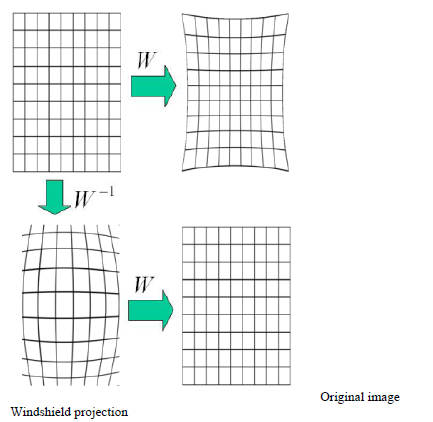
The Head-up display (HUD) projects information onto the windscreen glass. An image projected to the windscreen is distorted because the glass is not flat. For correcting this image distortion, warping process shall be used and the original image shall be prepared so that the driver can observe it on the windscreen linearly.

The basic principle of the Warping Library is to map a texture onto a grid, which's form compensates for the deformation of the windscreen when the information is projected on the HUD. The texture that is used is the readily rendered content for the HUD.

<div drawio-diagram="1990"><img src="https://doc316en.candera.eu/uploads/images/drawio/2023-02/drawing-7-1676948061.png" alt=""/></div>

<div class="contents" id="bkmrk--0"><div class="contents"><div class="textblock">  
</div></div></div>CGI Studio Warping is intended to be used for correcting such image distortions. The following two components are involved in the process:

<div class="contents" id="bkmrk-warping-library%3A-use"><div class="contents"><div class="textblock">- **Warping Library**: used for computing of the warping matrix
- <span style="color: rgb(230, 126, 35);">**[Candera](http://dev.doc.cgistudio.at/APILINK/namespace_candera.html "[DataBinding_RefTypeSample]")**</span>: used to map a displays image (or part of it) as texture to a mesh created from the warping matrix information and displays the correspondingly distorted result.

</div></div></div>#### CGI Studio Controller Integration Tool

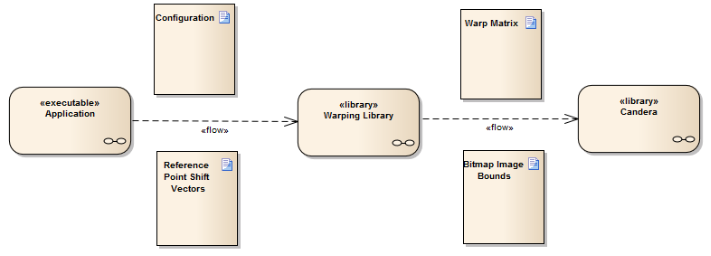
The presented figure shows an overview of the information flow when using the CGI Studio Warping components.

<div drawio-diagram="1993"><img src="https://doc316en.candera.eu/uploads/images/drawio/2023-02/drawing-7-1676948130.png" alt=""/></div>

<div class="contents" id="bkmrk--3"><div class="contents"><div class="textblock">  
</div></div></div>Three components can be identified, that together, implement the warping:

<div class="contents" id="bkmrk-application%3A-control"><div class="contents"><div class="contents"><div class="textblock">- **Application**: Controls execution, prepares and passes information between the other two components
- **Warping Library**: Computes the warping matrix and image bounds of the are to be warped
- <span style="color: rgb(230, 126, 35);">**[Candera](http://dev.doc.cgistudio.at/APILINK/namespace_candera.html "[DataBinding_RefTypeSample]")**</span>: Applies the warping matrix and image bounds to the image rendered to a display, thus warping the desired portion of the overall display content.
</div></div></div></div>#### System View

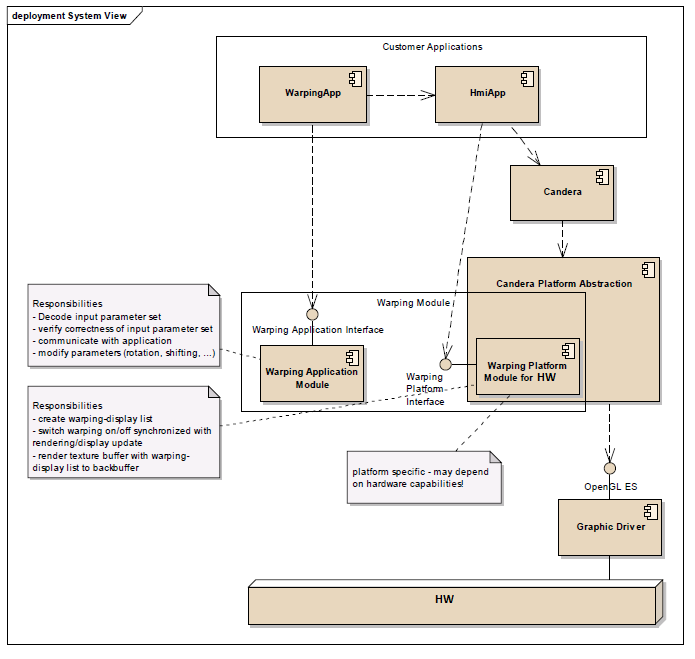
Below figure shows the location of the warping library in the system and which other components use it. Globally, the warping library consists of two parts, the warping application module and a warping platform module. The platform module is platform dependent - a version for Windows host platform and a version for target hardware are available (although several platforms share the same implementation). Responsibility for each part is described in the system view.

<div class="contents" id="bkmrk--4"><div class="contents"><div class="textblock"><div drawio-diagram="1995"><img src="https://doc316en.candera.eu/uploads/images/drawio/2023-02/drawing-7-1676948161.png" alt=""/></div>

---

</div></div></div>