# Image Flipping

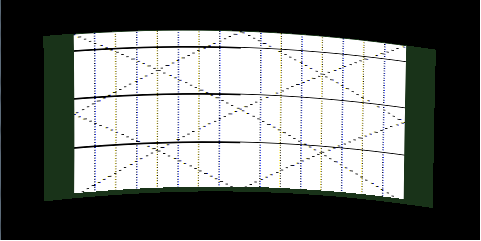
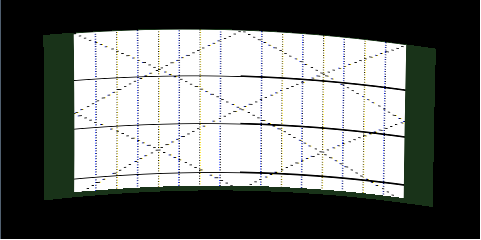
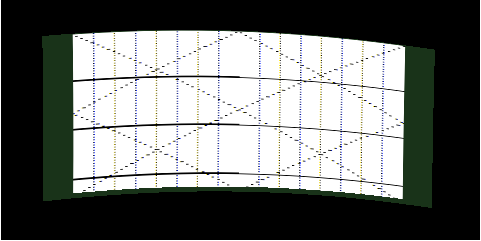
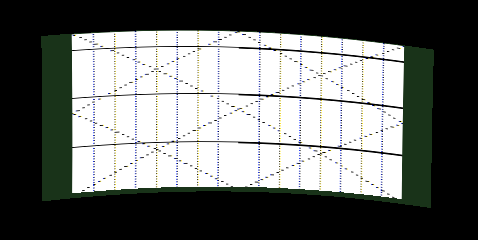
Flipping transforms the content prior to warping the image on screen. Flipping is supported only when warping is enabled. The following orientations are supported:

<div class="contents" id="bkmrk-candera%3A%3Adisplayorie"><div class="contents"><div class="textblock">- Candera::DisplayOrientation::Unchanged
- Candera::DisplayOrientation::HorizontallyFlipped
- Candera::DisplayOrientation::VerticallyFlipped
- Candera::DisplayOrientation::VerticallyAndHorizontallyFlipped

</div></div></div>Changing the image orientation is achieved through the public interface of Candera::Display class using Candera::Display::SetWarpOrientation, like in the following snippet.

```
    // flip the image vertically and horizontally
    display->SetWarpOrientation(Candera::DisplayOrientation::VerticallyAndHorizontallyFlipped);
```

##### Example
<div class="contents" id="bkmrk-unchanged-horizontal"><div class="contents"><div class="textblock"><table border="0" cellpadding="5" cellspacing="0" style="width: 764px;" width="600"><tbody><tr><td style="width: 340.5px;">**Unchanged**   
<div class="image"><div drawio-diagram="2109"><img src="https://doc316en.candera.eu/uploads/images/drawio/2023-02/drawing-7-1676962188.png" alt=""/></div>

</div></td><td style="width: 340.5px;">**HorizontallyFlipped**   
<div class="image"><div drawio-diagram="2110"><img src="https://doc316en.candera.eu/uploads/images/drawio/2023-02/drawing-7-1676962198.png" alt=""/></div>

</div></td></tr><tr><td style="width: 340.5px;">**VerticallyFlipped**   
<div class="image"><div drawio-diagram="2111"><img src="https://doc316en.candera.eu/uploads/images/drawio/2023-02/drawing-7-1676962217.png" alt=""/></div>

</div></td><td style="width: 340.5px;">**VerticallyAndHorizontallyFlipped**   
<div class="image"><div drawio-diagram="2112"><img src="https://doc316en.candera.eu/uploads/images/drawio/2023-02/drawing-7-1676962226.png" alt=""/></div>

</div></td></tr></tbody></table>

---

</div></div></div>