# Fbdev BSP

# Fbdev: Prerequisites

#### Hardware: Telechips Dolphin 5

CGI Studio has been tested on Telechips Dolphin 5 Board.

##### CMake

In order to build Candera, the Meta build system CMake needs to be installed with at least version mentioned <span style="color: rgb(230, 126, 35);">[here](https://doc316en.candera.eu/books/build-system-setup/page/prerequisites)</span>.  
CMake is able to create the cross compilation make files that can be used with GCC (cross-compile) compiler.

##### Linux Toolchain (BSP)

<div class="contents" id="bkmrk-yocto-6.6.0-built-at"><div class="contents"><div class="contents"><div class="textblock">- poky-telechips-systemd 4.0.17
- Image and SDK were prepared by the Candera.
- The GCC compiler is not part of the delivery. It is contained in the SDK that has to be provided by the customer.
- Compiler/s used for this release is GCC (GNU 11.2.1).

</div></div></div></div><p class="callout info">SD Card image, SDK and cross-compiler/s are not part of the delivery and have to be provided by the customer.</p>

#### Hardware: Allwinner T507

CGI Studio has been tested on Allwinner T507 Board.

##### CMake

In order to build Candera, the Meta build system CMake needs to be installed with at least version mentioned <span style="color: rgb(230, 126, 35);">[here](https://doc316en.candera.eu/books/build-system-setup/page/prerequisites)</span>.  
CMake is able to create the cross compilation make files that can be used with GCC (cross-compile) compiler.

##### Linux Toolchain (BSP)

<div class="contents" id="bkmrk-to-build-the-player-"><div class="contents"><div class="contents"><div class="textblock">- <span style="font-size: inherit;"><span data-teams="true">To build the Player for the target platform, you need to download the additional library package: OKT507-linux-sdk20.tar.bz2</span></span>
- <span style="font-size: inherit;"><span data-teams="true">The build requires an older version of Debian or Ubuntu. In our case, the entire build was performed on **Ubuntu 18.04.6 LTS** running in WSL on **Windows 11**.</span></span>
- The GCC compiler is not part of the delivery. It is contained in the SDK that has to be provided by the customer.
- Compiler/s used for this release is <span data-teams="true">GCC 5.3.1 (Linaro GCC 5.3-2016.05)</span>.

</div></div></div></div><p class="callout info">SD Card image, SDK and cross-compiler/s are not part of the delivery and have to be provided by the customer.</p>

# Running the CGI Player Demo Application on Fbdev

Copy the application and the asset to the target. This can be done by copying the filed to the SD card containing the system, via ssh or with an USB flash drive.

#### Loading and running the application

Note that no other application that uses graphics hardware can be running when using the Player, the CourierSampleApp or the CitDemoApp.  
If your Yocto image is built with Weston or X you must shut these down before running the application.

Player can be run by using the command:

```
$ /PathToPlayer/Player /PathToAsset/AssetName.bin


```

<div class="contents" id="bkmrk-if-touch-input-handl"><div class="textblock"><div class="fragment">  
</div><dl class="note"><dt></dt><dd><p class="callout info">If touch input handling is enabled, touch devices must be assigned to seat so that display identifier matches seat number. For example, display-0 must be assigned to seat0. Refer to udev documentation for more information on how to assign devices to seats.</p>

</dd></dl></div></div>

# Building Own Application for Fbdev

#### Generate Makefiles with CMake

For general information about CGI Studio Build System and CMake properties available to configure Candera applications refer to <span style="color: rgb(230, 126, 35);">[CGI Studio Build System](https://doc316en.candera.eu/books/build-system-setup/chapter/build-system-overview)</span>

To configure and generate makefiles for compiling the CGI Player, follow below steps:   
  
The first step for cross compiling is to make sure all the environment variables for the Yocto SDK are set!

<div class="contents" id="bkmrk-open-a-terminal.-set"><div class="contents"><div class="textblock">1. Open a terminal.
2. Set the environment. This step is mandatory. Omitting this step will cause building with the host systems compiler instead of cross compiling.  
    Dolphin 5 (Yocto based SDK) ```shell
    $source /<path to the Yocto SDK installation>/environment-setup-<platform specific suffix e.g. aarch64-poky-linux> 


    ```
    
    Allwinner T507 (Buildroot based SDK)
    
    ```shell
    export SDKTARGETSYSROOT=/home/candera/Desktop/OKT507-linux-sdk20/out/t507/okt507/longan/buildroot/host/aarch64-buildroot-linux-gnu/sysroot
    export PATH=/home/candera/Desktop/OKT507-linux-sdk20/out/t507/okt507/longan/buildroot/host/bin:$PATH


    ```
3. Important! From the same console with the set environment start the CMake GUI or run the CMake commandline. We will continue with the CMake GUI in this guide.  
    Dolphin 5 (Yocto based SDK)  
    ```shell
    cd <build directory>
    cmake-gui .


    ```
    
    Allwinner T507 (Buildroot based SDK) ```shell
    cd <build directory>
    # Environment variables for sdk
    export SDKTARGETSYSROOT="/home/candera/Desktop/OKT507-linux-sdk20/out/t507/okt507/longan/buildroot/host/aarch64-buildroot-linux-gnu/sysroot"
    export PATH="/home/candera/Desktop/OKT507-linux-sdk20/out/t507/okt507/longan/buildroot/host/bin:$PATH"
    export SYSROOT="$SDKTARGETSYSROOT"
    export SDKSYSROOT="$SYSROOT"
    export PKG_CONFIG="/usr/bin/pkg-config"
    export PKG_CONFIG_SYSROOT_DIR="$SYSROOT"
    export PKG_CONFIG_PATH="$SYSROOT/usr/lib/pkgconfig"
    export CXX="/home/candera/Desktop/OKT507-linux-sdk20/out/t507/okt507/longan/buildroot/host/bin/aarch64-linux-gnu-g++ --sysroot=$SYSROOT"
    export CC="/home/candera/Desktop/OKT507-linux-sdk20/out/t507/okt507/longan/buildroot/host/bin/aarch64-linux-gnu-gcc --sysroot=$SYSROOT"
    export LD="/home/candera/Desktop/OKT507-linux-sdk20/out/t507/okt507/longan/buildroot/host/bin/aarch64-linux-gnu-ld --sysroot=$SYSROOT"
    cmake-gui .


    ```
4. Point CMake to source directory 
    - Folder containing top-level "CMakeLists.txt", e.g. /cmake/Candera/Player <div class="image"><div drawio-diagram="2938"><img src="https://doc316en.candera.eu/uploads/images/drawio/2023-02/drawing-4-1677567539.png" alt=""/></div>

        
          
        </div>
5. Point CMake to binary directory 
    - May not exist, create folder with CMake if necessary
    - Root directory for generated makefiles / solutions
    - Root directory for build artifacts <div class="image"><div drawio-diagram="2939"><img src="https://doc316en.candera.eu/uploads/images/drawio/2023-02/drawing-4-1677567561.png" alt=""/></div>

        
          
        </div>
6. Configure 
    - Specify Unix Makefiles as generator for the project.
    - Specify tool-chain file for cross-compiling. <div class="image"><div drawio-diagram="2940"><img src="https://doc316en.candera.eu/uploads/images/drawio/2023-02/drawing-4-1677567581.png" alt=""/></div>
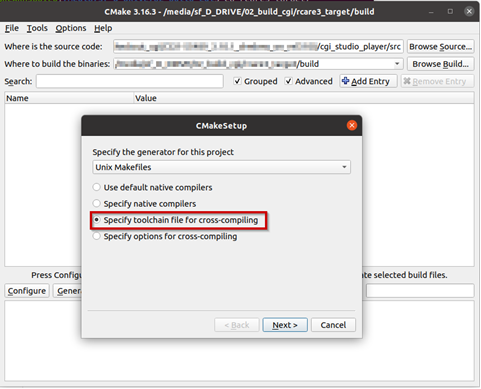
        
          
        </div>
7. Select the toolchain-file from the delivery (adapt for your toolchain installation and application specific needs)  
    cgi\_studio\_devices/src/Fbdev/ToolchainFiles/GCC-toolchain-&lt;platform&gt;-Fbdev-Linux.txt
8. Adapt the CMake settings, if necessary, e.g.: 
    - CMAKE\_BUILD\_TYPE-&gt; Debug or Release.
    - Enable/disable features.
    - Press Configure.
9. Press Generate.

</div></div></div>#### Building Application

<div class="contents" id="bkmrk-make-sure-that-the-e"><div class="textblock"><dl class="note"><dd><p class="callout info">Make sure that the environment variables for the Yocto/Buildroot SDK are set in the terminal! Either reuse the terminal used to start CMake for building the Player or call the environment setup script again.</p>

</dd></dl></div></div>Dolphin 5 (Yocto based SDK)

```shell
$source /<path to the Yocto SDK installation>/environment-setup-<platform specific suffix e.g. aarch64-poky-linux> 


```

Allwinner T507 (Buildroot based SDK)

```shell
# Environment variables for sdk
export SDKTARGETSYSROOT="/home/candera/Desktop/OKT507-linux-sdk20/out/t507/okt507/longan/buildroot/host/aarch64-buildroot-linux-gnu/sysroot"
export PATH="/home/candera/Desktop/OKT507-linux-sdk20/out/t507/okt507/longan/buildroot/host/bin:$PATH"
export SYSROOT="$SDKTARGETSYSROOT"
export SDKSYSROOT="$SYSROOT"
export PKG_CONFIG="/usr/bin/pkg-config"
export PKG_CONFIG_SYSROOT_DIR="$SYSROOT"
export PKG_CONFIG_PATH="$SYSROOT/usr/lib/pkgconfig"
export CXX="/home/candera/Desktop/OKT507-linux-sdk20/out/t507/okt507/longan/buildroot/host/bin/aarch64-linux-gnu-g++ --sysroot=$SYSROOT"
export CC="/home/candera/Desktop/OKT507-linux-sdk20/out/t507/okt507/longan/buildroot/host/bin/aarch64-linux-gnu-gcc --sysroot=$SYSROOT"
export LD="/home/candera/Desktop/OKT507-linux-sdk20/out/t507/okt507/longan/buildroot/host/bin/aarch64-linux-gnu-ld --sysroot=$SYSROOT"


```

<div class="contents" id="bkmrk-open-cmake-gui-and-c"><div class="textblock">1. Open CMake GUI and configure the project (e.g Player, CourierSampleApp, CitDemoApp) according to Generate Makefiles with CMake.
2. After generating your cmake files, navigate to the specified build directory (binary directory created in CMake GUI) and type "make" to start the build or “make -j” to build with multithreading.   
    With some hypervisors, the Linux VM may get unresponsive when using the –j option. Reducing the number of used threads to the number of available cores improves the responsiveness of the VM during the build.

</div></div><div class="contents" id="bkmrk-for-couriersampleapp"><div class="textblock"><dl class="note"><dd><p class="callout info">For CourierSampleApp and CitDemoApp asset file must be created with a matching SCHost.dll as the SCHost.dll for the CourierSampleApp and CitDemoApp contain specialized Widgets.</p>

</dd></dl></div></div>