# Undo and Redo Operations

#### <a class="anchor" id="bkmrk--8"></a>Undo and Redo Operations

Any operation concerning scene design and animation design can be undone or redone.

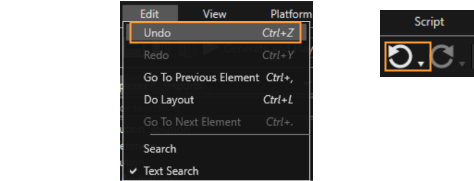
**Undo** an operation via menu "Edit" &gt; "Undo" or Toolbar item.

<div drawio-diagram="4819"><img src="https://doc316en.candera.eu/uploads/images/drawio/2023-11/drawing-5-1700229326.png" alt=""/></div>

<div class="contents" id="bkmrk--0"><div class="contents"><div class="textblock">  
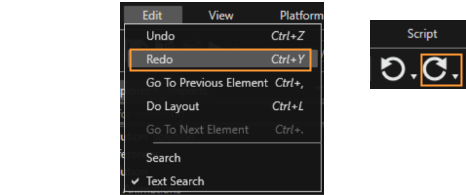
</div></div></div>**Redo** an undone operation via menu "Edit" &gt; "Redo" or Toolbar item.

<div drawio-diagram="4821"><img src="https://doc316en.candera.eu/uploads/images/drawio/2023-11/drawing-5-1700234312.png" alt=""/></div>

<div class="contents" id="bkmrk--2"><div class="contents"><div class="textblock">  
</div></div></div>#### <a class="anchor" id="bkmrk--11"></a>Undo/Redo Actions' History

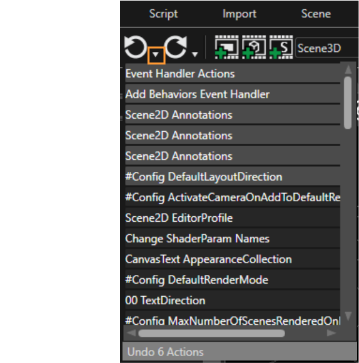
A very helpful function associated with Undo/Redo options is the "Actions' History". All the previous actions can be shown by pressing the "v" button, which is placed between "Undo" and "Redo" buttons visible in Toolbar.

<div drawio-diagram="4823"><img src="https://doc316en.candera.eu/uploads/images/drawio/2023-11/drawing-5-1700234433.png" alt=""/></div>

<div class="contents" id="bkmrk--5"><div class="contents"><div class="textblock">  
</div></div></div>By using this function all the previous actions are displayed. In this way, it is possible to choose which of the previous actions should be undone.

<div drawio-diagram="4824"><img src="https://doc316en.candera.eu/uploads/images/drawio/2023-11/drawing-5-1700234490.png" alt=""/></div>

<div class="contents" id="bkmrk--7"><div class="contents"><div class="textblock">  
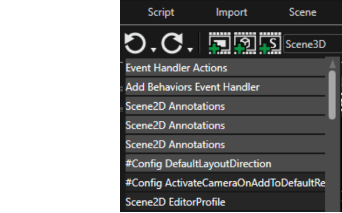
</div></div></div>After all the selected actions have been undone, the "Actions' History" menu will reflect the current state of actions.

After undoing multiple actions, the Redo of "History' Actions" button, which is placed on the right side of the Undo arrow, will become available. The Redo "Actions' History" shows all the actions that have been undone.

<div class="contents" id="bkmrk-importing-a-resource"><div class="textblock"><dl class="note"><dt></dt><dd><p class="callout info">Importing a resource into Scene Composer, regardless of type, will result in your undo/redo history being cleared.</p>

</dd></dl></div></div>