# New Script

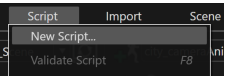
A new script is created using the "New Script" menu item.

<div drawio-diagram="385"><img src="https://doc316en.candera.eu/uploads/images/drawio/2023-02/drawing-7-1676348830.png" alt=""/></div>

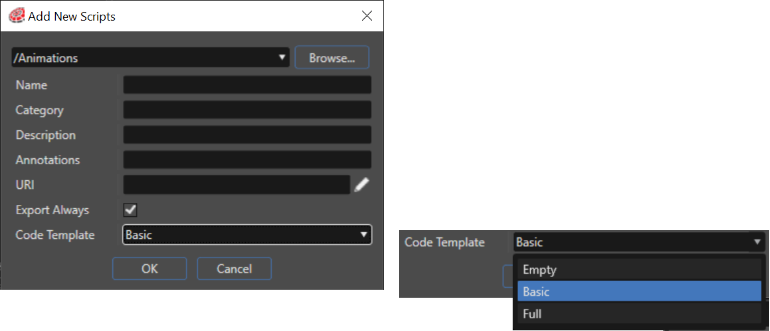
Selecting the item will prompt a dialog to enter a name.

<div drawio-diagram="5183"><img src="https://doc316en.candera.eu/uploads/images/drawio/2024-02/drawing-5-1706879465.png" alt=""/></div>

Depending on the option 'Code Template' in the dialog, the newly created script will either be empty (Code Template: Empty), contain commonly used callback functions (Code Template: Basic), or contain the full set of callback functions for the user to implement (Code Template: Full).

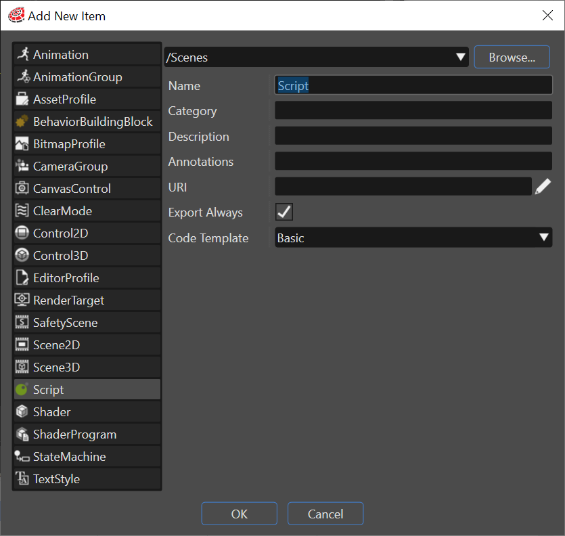
Alternatively, scripts can be added to a solution via "Add" &gt; "New item" option by using the Solution Explorer context menu.

<div drawio-diagram="6441"><img src="https://doc316en.candera.eu/uploads/images/drawio/2024-07/drawing-5-1721972141.png" alt=""/></div>

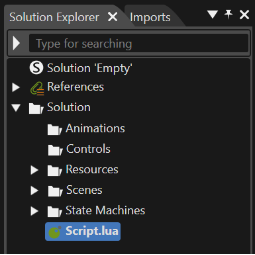
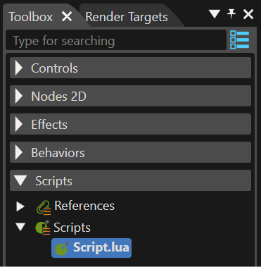
Scripts will show up in the Solution Explorer and the Scripts section of the Toolbox with the postfix ".lua".

<div drawio-diagram="6442"><img src="https://doc316en.candera.eu/uploads/images/drawio/2024-07/drawing-5-1721972214.png" alt=""/></div>

<div drawio-diagram="6443"><img src="https://doc316en.candera.eu/uploads/images/drawio/2024-07/drawing-5-1721972280.png" alt=""/></div>

---