# Vertex Buffer Editor

Imported Geometry can be managed and configured in either ArrayBuffer or IndexBuffer format, depending on its Geometry Topology. ArrayBuffer offers higher rendering performance (cache efficiency and sequential read) but consumes more memory since vertices cannot be shared.

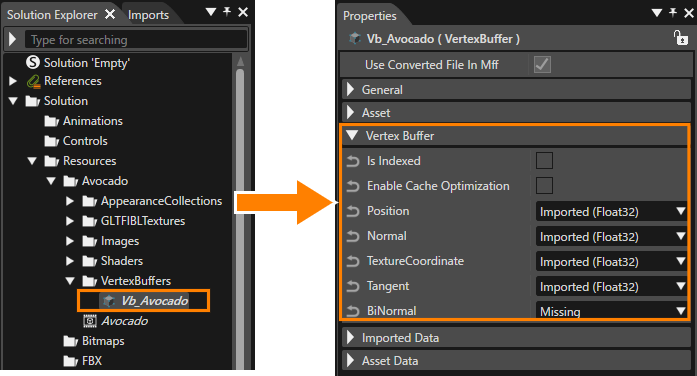
To configure these two types of Vertex Buffer elements, select the vertex buffer in the Solution Explorer, and then configure the VertexGeometry (vertex attribute statuses) within the \[Vertex Buffer\] category in the \[Properties\] panel.

<div drawio-diagram="8474"><img src="https://doc316en.candera.eu/uploads/images/drawio/2025-07/drawing-4-1751508970.png" alt=""/></div>

Within the Vertex Buffer, each Property Item has a status of Imported (available), Removed (deleted), Regenerated/Generated (added), or Missing (not set). All selected Float32-type vertex attributes within the vertex buffer can be converted to Float16 if necessary, with convertible patterns indicated in parentheses.

When \[Is Indexed\] is enabled, the vertex buffer can be converted to an index array buffer by selecting the optimal index size. Depending on the vertex count, 8-bit, 16-bit, or 32-bit index buffers will be generated, and a valid buffer type can be specified via the BufferType property in the AssetData section.

When importing a glTF file that contains positions, UVs, and normals but lacks tangents, tangents will be automatically generated using the MikkTSpace algorithm. With MikkTSpace support in the Vertex Buffer Editor, the “Generated MikkTSpace” and “Regenerated MikkTSpace” options can now be selected for the Tangent and BiNormal Property Items, improving rendering quality when applying normal maps and ensuring consistency across tools.

The editable items are listed in the table below.

<table border="1" id="bkmrk-normal-%E5%B1%9E%E6%80%A7%E3%81%82%E3%82%8A-missing%2C" style="border-collapse: collapse; width: 800px; border-width: 1px;"><colgroup><col style="width: 161px;"></col><col style="width: 638px;"></col></colgroup><tbody><tr><td><span style="vertical-align: inherit;"><span style="vertical-align: inherit;">Normal</span></span>  
<span style="vertical-align: inherit;"><span style="vertical-align: inherit;">  
</span></span></td><td>- When attribute is not included:  
    Missing, Generated (Float16), Generated (Float32)
- When attribute is included:  
    Imported (Float32), Imported (Float32 =&gt; Float16), Regenerated (Float16), Regenerated (Float32), Removed

</td></tr><tr><td><span style="vertical-align: inherit;"><span style="vertical-align: inherit;">BiNormal/<span style="vertical-align: inherit;"><span style="vertical-align: inherit;">Tangent</span></span></span></span>  
<span style="vertical-align: inherit;"><span style="vertical-align: inherit;">  
</span></span></td><td>- When attribute is not included:  
    Missing, Generated MikkTSpace (Float16), Generated MikkTSpace (Float32), Generated (Float16), Generated (Float32)
- When attribute is included:  
    Imported (Float32), Imported (Float32 =&gt; Float16), Regenerated MikkTSpace (Float16), Regenerated MikkTSpace (Float32), Regenerated (Float16), Regenerated (Float32), Removed

</td></tr></tbody></table>

The selectable items in the \[Properties\] panel vary depending on whether the imported file contains the respective vertex attributes.

<div class="contents" id="bkmrk-if-the-attribute-is-"><div class="contents"><div class="textblock">- If the respective vertex attribute is not included in the imported file (Missing status), \[Generated\] can be selected.
- If the respective vertex attribute is included in the imported file (Imported status), \[Regenerated\] and \[Removed\] can be selected.

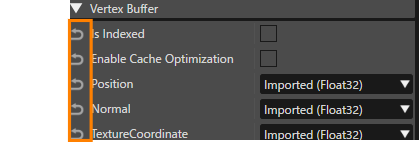
</div></div></div>If the import data and the property settings do not match, an error message will appear in the <span style="color: rgb(230, 126, 35);">[Output Panel](https://doc316en.candera.eu/books/solution-handling/page/output)</span>. As with other properties, the settings can be reset using the arrow button on the left of each property (Please refer to the figure below). When settings are changed, values such as Vertex Stride, Vertex Count, and Vertex Format are updated and reflected within the \[Vertex Buffer\] category in the Properties panel.

<div drawio-diagram="8476"><img src="https://doc316en.candera.eu/uploads/images/drawio/2025-07/drawing-4-1751510001.png" alt=""/></div>