# Effects

Effects describe the appearance of a RenderNode in a 2D scene. The number of effects may differ on each platform. A functional overview of each effect is provided in the table below (you can navigate to the detailed pages by using the links in the titles).

<table border="1" id="bkmrk-effect-name-descript" style="border-collapse: collapse; width: 800px; height: 1174.05px; border-width: 1px;"><colgroup><col style="width: 39px;"></col><col style="width: 273px;"></col><col style="width: 487px;"></col></colgroup><tbody><tr style="height: 29.7969px;"><td style="height: 29.7969px; background-color: rgb(35, 111, 161);"></td><td class="align-center" style="height: 29.7969px; background-color: rgb(35, 111, 161);">**<span style="color: rgb(255, 255, 255);">Effect name</span>**</td><td class="align-center" style="height: 29.7969px; background-color: rgb(35, 111, 161);">**<span style="color: rgb(255, 255, 255);">Description</span>**

</td></tr><tr style="height: 46.5938px;"><td class="align-center" style="height: 46.5938px;">1

</td><td style="height: 46.5938px;"><span style="color: rgb(230, 126, 35);">[BitmapBrushBlend](https://doc316en.candera.eu/link/602#bkmrk-bitmapbrushblend)</span></td><td style="height: 46.5938px;">Renders a bitmap image as source content and blends it with the destination (store) buffer.

</td></tr><tr style="height: 46.5938px;"><td class="align-center" style="height: 46.5938px;">2</td><td style="height: 46.5938px;"><span style="color: rgb(230, 126, 35);">[BitmapBrushColorBlend](https://doc316en.candera.eu/link/602#bkmrk-bitmapbrushcolorblen)</span></td><td style="height: 46.5938px;">Renders a bitmap, modulates its color (e.g., RGBA factors) and blends the result with the destination buffer.</td></tr><tr style="height: 46.5938px;"><td class="align-center" style="height: 46.5938px;">3</td><td style="height: 46.5938px;"><span style="color: rgb(230, 126, 35);">[BitmapBrushHslBlend](https://doc316en.candera.eu/link/602#bkmrk-bitmapbrushhslblend)</span></td><td style="height: 46.5938px;">Renders a bitmap with hue/saturation/lightness adjustments and blends it with the destination buffer.</td></tr><tr style="height: 46.5938px;"><td class="align-center" style="height: 46.5938px;">4</td><td style="height: 46.5938px;"><span style="color: rgb(230, 126, 35);">[BlurBitmapBrushBlend](https://doc316en.candera.eu/link/602#bkmrk-blurbitmapbrushblend)</span></td><td style="height: 46.5938px;">Produces a blurred bitmap image (post filter) and blends it into the destination buffer.</td></tr><tr style="height: 46.5938px;"><td class="align-center" style="height: 46.5938px;">5</td><td style="height: 46.5938px;"><span style="color: rgb(230, 126, 35);">[GlBitmapBrushColorMaskBlend](https://doc316en.candera.eu/link/605#bkmrk-glbitmapbrushcolorma)</span></td><td style="height: 46.5938px;">Renders a bitmap using a color-based alpha mask and blends it with the destination buffer.</td></tr><tr style="height: 46.5938px;"><td class="align-center" style="height: 46.5938px;">6</td><td style="height: 46.5938px;"><span style="color: rgb(230, 126, 35);">[GlBitmapBrushMaskBlend](https://doc316en.candera.eu/link/605#bkmrk-glbitmapbrushmaskble)</span></td><td style="height: 46.5938px;">Renders a bitmap with an alpha mask (mask texture) and blends it with the destination buffer.</td></tr><tr style="height: 46.5938px;"><td class="align-center" style="height: 46.5938px;">7</td><td style="height: 46.5938px;"><span style="color: rgb(230, 126, 35);">[GlDropShadowBitmapBrushBlend](https://doc316en.candera.eu/link/608#bkmrk-gldropshadowbitmapbr)</span></td><td style="height: 46.5938px;">Draws a drop shadow for the input bitmap and blends both shadow and image with the destination buffer.</td></tr><tr style="height: 46.5938px;"><td class="align-center" style="height: 46.5938px;">8</td><td style="height: 46.5938px;"><span style="color: rgb(230, 126, 35);">[GlDropShadowBitmapBrushColorBlend](https://doc316en.candera.eu/link/608#bkmrk-gldropshadowbitmapbr-0)</span></td><td style="height: 46.5938px;">Draws a drop shadow and applies color modulation to the bitmap output before blending to destination.</td></tr><tr style="height: 46.5938px;"><td class="align-center" style="height: 46.5938px;">9</td><td style="height: 46.5938px;">[<span style="color: rgb(230, 126, 35);">GlFlipBitmapBrushBlend</span>](https://doc316en.candera.eu/link/607#bkmrk-glflipbitmapbrushble)</td><td style="height: 46.5938px;">Flips the bitmap horizontally and/or vertically and blends it with the destination buffer.</td></tr><tr style="height: 46.5938px;"><td class="align-center" style="height: 46.5938px;">10</td><td style="height: 46.5938px;"><span style="color: rgb(230, 126, 35);">[GlFlipBitmapBrushColorBlend](https://doc316en.candera.eu/link/607#bkmrk-glflipbitmapbrushcol)</span></td><td style="height: 46.5938px;">Flips the bitmap, applies color modulation, and blends the result with the destination buffer.</td></tr><tr style="height: 46.5938px;"><td class="align-center" style="height: 46.5938px;">11</td><td style="height: 46.5938px;"><span style="color: rgb(230, 126, 35);">[GlLinearGradientBitmapBrushBlend](https://doc316en.candera.eu/link/606#bkmrk-gllineargradientbitm)</span></td><td style="height: 46.5938px;">Applies a linear gradient over bitmap/text content and blends it to the destination buffer.</td></tr><tr style="height: 46.5938px;"><td class="align-center" style="height: 46.5938px;">12</td><td style="height: 46.5938px;"><span style="color: rgb(230, 126, 35);">[GlLinearGradientBrushBlend](https://doc316en.candera.eu/link/606#bkmrk-gllineargradientbrus)</span></td><td style="height: 46.5938px;">Generates a linear-gradient brush as source pixels and blends it with the destination buffer.</td></tr><tr style="height: 46.5938px;"><td class="align-center" style="height: 46.5938px;">13</td><td style="height: 46.5938px;"><span style="color: rgb(230, 126, 35);">[GlMultiTextureBrushBlend](https://doc316en.candera.eu/link/1191#bkmrk-glmultitexturebrushb)</span></td><td style="height: 46.5938px;">Blends two bitmap inputs (multi-texture combine) and then blends the result to the destination buffer.</td></tr><tr style="height: 46.5938px;"><td class="align-center" style="height: 46.5938px;">14</td><td style="height: 46.5938px;"><span style="color: rgb(230, 126, 35);">[GlOutlineBitmapBrushColorBlend](https://doc316en.candera.eu/link/609#bkmrk-gloutlinebitmapbrush)</span></td><td style="height: 46.5938px;">Creates an outline from the image alpha (notably for bitmap-cached text), modulates color, and blends to destination.</td></tr><tr style="height: 46.5938px;"><td class="align-center" style="height: 46.5938px;">15</td><td style="height: 46.5938px;"><span style="color: rgb(230, 126, 35);">[GlRadialGradientBrushBlend](https://doc316en.candera.eu/link/606#bkmrk-glradialgradientbrus)</span></td><td style="height: 46.5938px;">Generates a radial-gradient brush as source pixels and blends it with the destination buffer.</td></tr><tr style="height: 46.5938px;"><td class="align-center" style="height: 46.5938px;">16</td><td style="height: 46.5938px;"><span style="color: rgb(230, 126, 35);">[GlSolidColorBrushMaskBlend](https://doc316en.candera.eu/link/604#bkmrk-glsolidcolorbrushmas)</span></td><td style="height: 46.5938px;">Fills with a solid color through an alpha mask and blends it with the destination buffer.</td></tr><tr style="height: 29.7969px;"><td class="align-center" style="height: 29.7969px;">17</td><td style="height: 29.7969px;"><span style="color: rgb(230, 126, 35);">[MVGArcBrush](https://doc316en.candera.eu/link/1290#bkmrk-mvgarcbrush)</span></td><td style="height: 29.7969px;">Renders a vector arc shape (MVG) as a brush output (source pixels).</td></tr><tr style="height: 29.7969px;"><td class="align-center" style="height: 29.7969px;">18</td><td style="height: 29.7969px;"><span style="color: rgb(230, 126, 35);">[MVGEllipseBrush](https://doc316en.candera.eu/link/1290#bkmrk-mvgellipsebrush)</span></td><td style="height: 29.7969px;">Renders a vector ellipse/circle (MVG) as a brush output.</td></tr><tr style="height: 29.7969px;"><td class="align-center" style="height: 29.7969px;">19</td><td style="height: 29.7969px;"><span style="color: rgb(230, 126, 35);">[MVGPathBrush](https://doc316en.candera.eu/link/1290#bkmrk-mvgpathbrush)</span></td><td style="height: 29.7969px;">Renders a vector path (MVG) as a brush output.</td></tr><tr style="height: 29.7969px;"><td class="align-center" style="height: 29.7969px;">20</td><td style="height: 29.7969px;"><span style="color: rgb(230, 126, 35);">[MVGRectBrush](https://doc316en.candera.eu/link/1290#bkmrk-mvgrectbrush)</span></td><td style="height: 29.7969px;">Renders a vector rectangle/rounded-rect (MVG) as a brush output.</td></tr><tr style="height: 46.5938px;"><td class="align-center" style="height: 46.5938px;">21</td><td style="height: 46.5938px;"><span style="color: rgb(230, 126, 35);">[MirrorBitmapBrushBlend](https://doc316en.candera.eu/link/602#bkmrk-mirrorbitmapbrushble)</span></td><td style="height: 46.5938px;">Renders a bitmap together with its mirror reflection and blends the combined output to destination.</td></tr><tr style="height: 46.5938px;"><td class="align-center" style="height: 46.5938px;">22</td><td style="height: 46.5938px;"><span style="color: rgb(230, 126, 35);">[ShadowBitmapBrushBlend](https://doc316en.candera.eu/link/602#bkmrk-shadowbitmapbrushble)</span></td><td style="height: 46.5938px;">Produces a shadow or glow around the bitmap and blends the effect and image with destination.</td></tr><tr style="height: 46.5938px;"><td class="align-center" style="height: 46.5938px;">23</td><td style="height: 46.5938px;"><span style="color: rgb(230, 126, 35);">[ShearBitmapBrushBlend](https://doc316en.candera.eu/link/602#bkmrk-shearbitmapbrushblen)</span></td><td style="height: 46.5938px;">Shears (skews) the image by X/Y shear angles and blends it with the destination buffer.</td></tr><tr style="height: 46.5938px;"><td class="align-center" style="height: 46.5938px;">24</td><td style="height: 46.5938px;"><span style="color: rgb(230, 126, 35);">[SolidColorBrushBlend](https://doc316en.candera.eu/link/603#bkmrk-solidcolorbrushblend)</span></td><td style="height: 46.5938px;">Generates a solid-color rectangle as source pixels and blends it with the destination buffer.</td></tr><tr style="height: 46.5938px;"><td class="align-center" style="height: 46.5938px;">25</td><td style="height: 46.5938px;"><span style="color: rgb(230, 126, 35);">[SolidColorBrushColorBlend](https://doc316en.candera.eu/link/603#bkmrk-solidcolorbrushcolor)</span></td><td style="height: 46.5938px;">Generates a solid-color rectangle, applies color modulation, then blends to the destination buffer.</td></tr><tr style="height: 46.5938px;"><td class="align-center" style="height: 46.5938px;">26</td><td style="height: 46.5938px;"><span style="color: rgb(230, 126, 35);">[SolidColorBrushHslBlend](https://doc316en.candera.eu/link/603#bkmrk-solidcolorbrushhslbl)</span></td><td style="height: 46.5938px;">Generates a solid-color rectangle with HSL correction and blends it with the destination buffer.</td></tr></tbody></table>

<div class="contents" id="bkmrk--0"><div class="contents">  
</div></div><div class="contents" id="bkmrk--2"><div class="contents"><div class="textblock">---

</div></div></div>#### **Combined Effects**  


<p class="callout info">The effects provided in SceneComposer are **combined effects**. They can be dragged from the toolbox and dropped onto a RenderNode.</p>

##### Background information

Combined effects are a combination of two or three basic effect types that are combined to an effect chain.

The following three basic effect types are used to form this effect chain

- **Brush Effect:** Acts as the input effect; it defines the source data for the node (e.g. SolidColorBrush, BitmapBrush)
- **In-place Effect:** Multiple different in-place effects can be concatenated (e.g. ConstantAlphaEffect, MaskEffect)
- **Blend Effect:** e.g. AlphaBlendEffect

A correctly configured effect chain consists of the following

<div class="contents" id="bkmrk-a-brush-effect-at-fi"><div class="contents"><div class="textblock">- a Brush effect at first
- followed by an optional In-place effect
- finished by a final Blend effect

</div></div></div><div class="contents" id="bkmrk--6"><div class="contents">  
</div></div><div class="contents" id="bkmrk--8"><div class="contents">  
</div></div>For usability reasons, Scene Composer only provides combined effects in the Toolbox by default.

<div class="contents" id="bkmrk--9"><div class="contents"><div class="textblock">---

</div></div></div>#### <a class="anchor" id="bkmrk--22"></a>Use Combined Effects

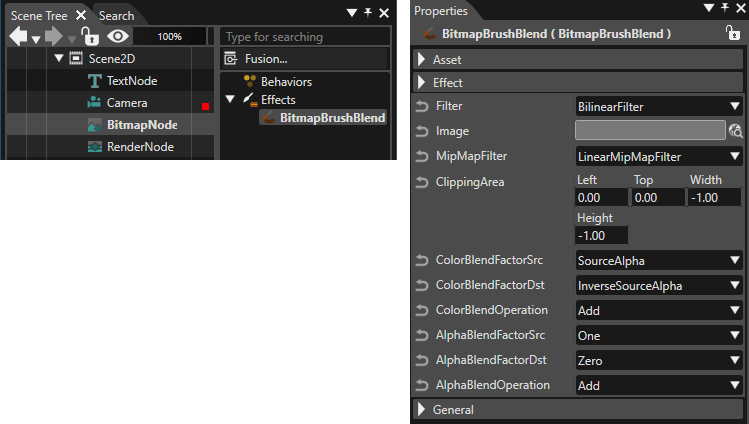
Several node types are already preconfigured with a specific combined effect. E.g when a BitmapNode is added to the scene graph, it is automatically linked to a BitmapBrushBlend combined effect

For user-defined nodes, use the following 2D node type:

<div class="contents" id="bkmrk-rendernode%3A-drag-a-c"><div class="contents"><div class="textblock">- **RenderNode:** Drag a combined effect from the Toolbox and drop it over the desired RenderNode in the Scene Tree panel.

</div></div></div>Follow these steps to view and edit the effect:

1. Select the node in the left side of the Scene Tree panel.
2. The linked effect will appear on the right side.
3. Select the effect to display its properties in the Properties panel, where you can edit them.

<div drawio-diagram="8626"><img src="https://doc316en.candera.eu/uploads/images/drawio/2025-10/drawing-5-1760694192.png" alt=""/></div>

<div class="contents" id="bkmrk--11"><div class="contents"><div class="textblock">  
</div></div></div><div class="contents" id="bkmrk--13"></div>