# Edit Scope Mask of a Node

#### <a class="anchor" id="bkmrk--5"></a>Scope Mask of a Node in the Properties Panel

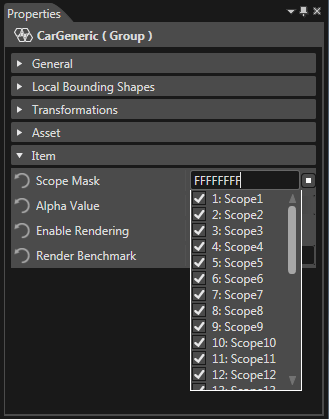
By default, the scope mask of a node contains all 32 scopes available. This can be inspected in:

<div class="contents" id="bkmrk-properties-panel%2C-on"><div class="contents"><div class="contents"><div class="textblock">- Properties Panel, on the item property "Scope Mask"
- Scopes Panel, since all scopes valid for the currently selected node are highlighted.

</div></div></div></div>#### <a class="anchor" id="bkmrk--6"></a>Select specific Scopes for a Node

Modify the scope mask of a node from the Properties panel by checking or unchecking the desired scopes from the Scope Mask combo box.

<div drawio-diagram="971"><img src="https://doc316en.candera.eu/uploads/images/drawio/2023-02/drawing-4-1676444667.png" alt=""/></div>

<div class="contents" id="bkmrk--0"><div class="contents"><div class="textblock">  
</div></div></div>#### <a class="anchor" id="bkmrk--8"></a>Select or Deselect all Scopes for a Node

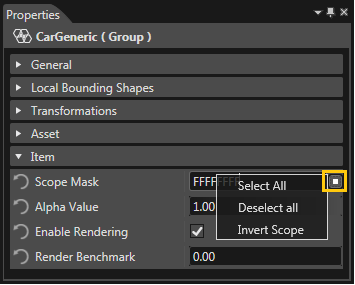
Select all/Deselect all scopes from Properties panel.

<div drawio-diagram="3313"><img src="https://doc316en.candera.eu/uploads/images/drawio/2023-04/drawing-4-1682584802.png" alt=""/></div>

<div class="contents" id="bkmrk--2"><div class="contents"><div class="textblock">  
</div></div></div>#### <a class="anchor" id="bkmrk--10"></a>Invert a Scope Mask

Invert Scope option will perform a bitwise NOT operation on the bits of the selected scope mask.

#### <a class="anchor" id="bkmrk--11"></a>Apply Node Scope on Children

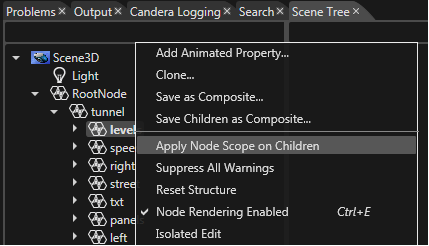
Apply a node scope mask on all children of the node by using the "Apply Node Scope on Children" option from the context menu.
<div drawio-diagram="3314"><img src="https://doc316en.candera.eu/uploads/images/drawio/2023-04/drawing-4-1682584825.png" alt=""/></div>

<div class="contents" id="bkmrk--4"><div class="textblock">  
</div></div>