# OpenGL 2D Effects Solution

#### Summary

This solution shows various OpenGL 2D effects applied on different node types in a 2D scene. Additionally it includes a scene where the Mesh2D is used.

#### Purpose

The user can see how OpenGL 2D effects are used on various node types in a 2D scene. This solution helps to understand the basic properties of the shown 2D effects and the Mesh2D.  
There is another solution available for additional 2D effects that are not using OpenGL.

#### Description

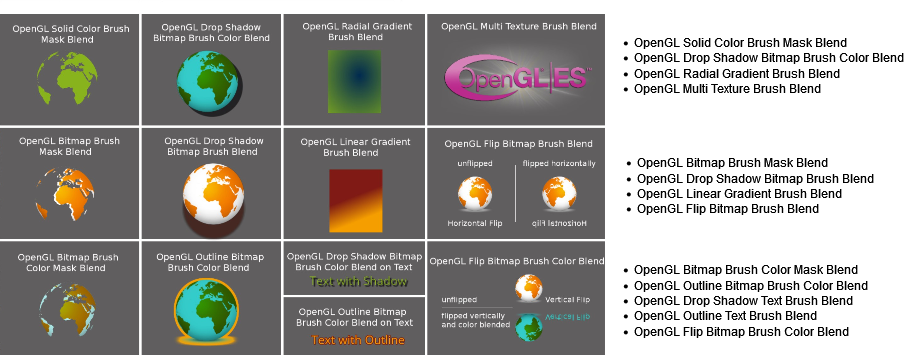
This solution contains the following OpenGL 2D effects applied on different node types:

<div drawio-diagram="6218"><img src="https://doc316en.candera.eu/uploads/images/drawio/2024-06/drawing-5-1718369872.png" alt=""/></div>

This sample also demonstrates that effects can be animated. The scene can be switched with a single mouse click.

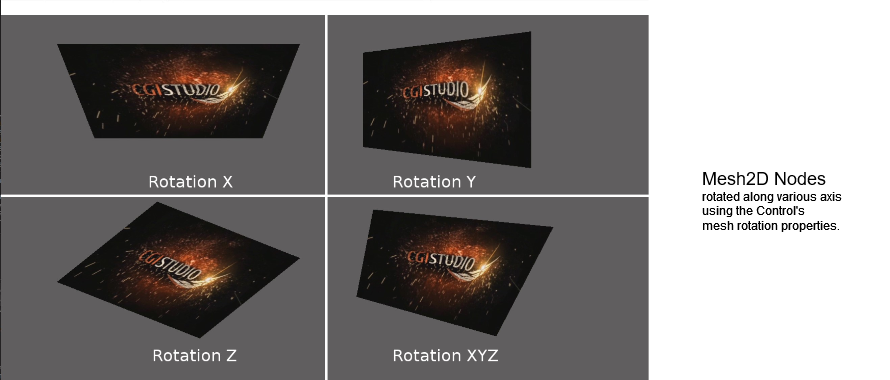
The second scene shows the possibilities of perspective warping with the Mesh2D control. The important properties of Mesh2D in order to realize perspective warping are "Mesh Rotation" and "Rotation Axis".

<div drawio-diagram="6221"><img src="https://doc316en.candera.eu/uploads/images/drawio/2024-06/drawing-5-1718370994.png" alt=""/></div>

<div class="contents" id="bkmrk--0"><div class="contents"><div class="textblock">  
</div></div></div>#### Information about 2D Effects

More information about 2D effects can be found in section <span style="color: rgb(230, 126, 35);">[2D Effects](https://doc316en.candera.eu/books/2d-effects)</span>.   
Descriptions for OpenGL effects in particular can be found in the following sections:

<div class="contents" id="bkmrk-opengl-solid-color-b"><div class="contents"><div class="textblock">- <span style="color: rgb(230, 126, 35);">[OpenGL Solid Color Brush Mask Effect](https://doc316en.candera.eu/link/604#bkmrk-page-title)</span>
- <span style="color: rgb(230, 126, 35);">[OpenGL Bitmap Brush Mask Effects](https://doc316en.candera.eu/link/605#bkmrk-page-title)</span>
- <span style="color: rgb(230, 126, 35);">[OpenGL Gradient Brush Effects](https://doc316en.candera.eu/link/606#bkmrk-page-title)</span>
- <span style="color: rgb(230, 126, 35);">[OpenGL Flip Effects](https://doc316en.candera.eu/link/607#bkmrk-page-title)</span>
- <span style="color: rgb(230, 126, 35);">[OpenGL Drop Shadow Effects](https://doc316en.candera.eu/link/608#bkmrk-page-title)</span>
- <span style="color: rgb(230, 126, 35);">[OpenGL Outline Effects](https://doc316en.candera.eu/link/609#bkmrk-page-title)</span>
- <span style="color: rgb(230, 126, 35);">[<span style="color: rgb(230, 126, 35);">OpenGL Multi Texture Brush Blend</span>](https://doc316en.candera.eu/books/2d-effects/page/opengl-multi-texture-brush-blend)</span>

---

</div></div></div>