# MixedReality Solution
#### Purpose
This sample shows how to use the AR controls introduced in CGI Studio 3.8:
- [Navigation Path](https://doc316en.candera.eu/link/1165#bkmrk-navigationpath3d)
- [Points of Interest](https://doc316en.candera.eu/link/1165#bkmrk-poimanager3d)
- [Video Streaming](https://doc316en.candera.eu/link/1165#bkmrk-videostream)
#### Summary
can be used to switch between three scenes:
- 2D streaming: Tests if GStreamer is working properly.
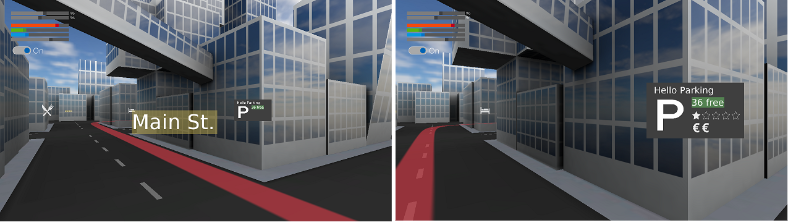
- City example: 3D over 3D, but a good example to understand how Points of Interest can be used.
- 3D streaming: Combines the 3D elements with a background video feed. Camera can no longer be controlled manually, but tracking data must be provided.
#### Description
#### 1. 2D streaming
Streaming feature is disabled by default. It is necessary to build your own SCHost.dll with the respective cmake flag enabled. (see [3. Prerequisites](https://doc316en.candera.eu/link/468#bkmrk-3.-prerequisites) Prerequisits)
#### 2. City example
Move around with <W,A,S,D>, rotate with <Q,E>.
The path you can see is created dynamically from a file at \\cgi\_studio\_player\\src\\Player\\SampleComponents\\NavigationPathData.csv. As you move closer to a POI you should see how the [alphadistance fading](https://doc316en.candera.eu/link/639#bkmrk-distance-alpha-fadin) is handling the level of detail of the information that is displayed.
##### 2.1 Creating a new PoiControl
- Design the control and safe it
- Assign a name and a asset id
- Drag a [new config](https://doc316en.candera.eu/link/639#bkmrk-poi-configuration) onto the PoiManager
- Add to .csv file and use the name that you just defined in the config. The sample dictionary can be found in cgi\_studio\_player\\src\\Player\\SampleComponents\\PoiDictionary.csv and looks like this: