# Layouter Solution

#### Summary

A solution exemplifying the use of the layout.   
It contains several 2D scenes for all kinds of 2D layout and for central layout properties. An additional 2D scene shows how to configure layouts that automatically resize when the available space changes.  
It also contains several 3D scenes to show how to work with the different layout on a canvas to position Canvas Texts and Canvas Sprites. 3D scenes that explain the Layout Properties can also be found in this solution as well as the automatic resizing Layouts.

#### Purpose

The user can see how to use layout in 2D and 3D scenes (with canvas) and gets to know the core properties and how their values affect the layout calculation. The included "use cases" scene uses three different layouts to realize a layout that resizes automatically when the available space is changed.

#### Description

##### 2D Scenes for 2D Layout

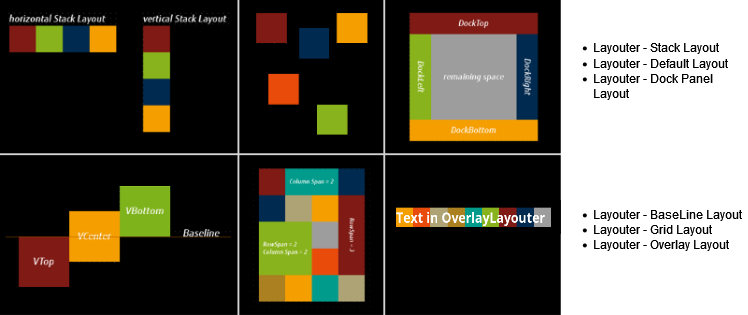
It contains one 2D scene for each of the following layouts to demonstrate their functionalities:

<div drawio-diagram="6858"><img src="https://doc316en.candera.eu/uploads/images/drawio/2024-09/drawing-5-1726829042.png" alt=""/></div>

<div class="contents" id="bkmrk--0"><div class="contents"><div class="textblock">  
</div></div></div>#### 2D Scenes for 2D Layout Properties

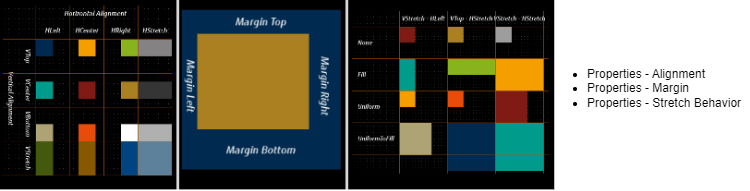
To show the possibilities of the layout properties there is a 2D scene for each of the following properties:

<div drawio-diagram="2986"><img src="https://doc316en.candera.eu/uploads/images/drawio/2023-03/drawing-7-1677831750.png" alt=""/></div>

<div class="contents" id="bkmrk--2"><div class="contents"><div class="textblock">  
</div></div></div>#### 2D Scene for 2D Layout Use Cases

<div drawio-diagram="1642"><img src="https://doc316en.candera.eu/uploads/images/drawio/2023-02/drawing-7-1676611879.png" alt=""/></div>

<div class="contents" id="bkmrk--4"><div class="contents"><div class="textblock">  
</div></div></div>#### 3D Scenes for 3D Canvas Layout

##### 3D Scenes for Canvas Layout

For positioning canvas nodes (canvas texts and canvas sprites) on a canvas the same layouts are available as for 2D scenes. Several 3D scenes show the functionality of these layouts on a canvas.
<div class="contents" id="bkmrk-canvas---layouter---"><div class="contents"><div class="textblock">- Canvas - Layouter - BaseLine Layout
- Canvas - Layouter - Default Layout
- Canvas - Layouter - Dock Panel Layout
- Canvas - Layouter - Grid Layout
- Canvas - Layouter - Overlay Layout
- Canvas - Layouter - Stack Layout

</div></div></div>##### 3D Scenes for 3D Canvas Layout Properties

The possibilities of the 3D Canvas layout properties can be seen in separate 3D scenes for:

<div class="contents" id="bkmrk-canvas---properties-"><div class="contents"><div class="textblock">- Canvas - Properties - Alignment
- Canvas - Properties - Margin
- Canvas - Properties - Stretch Behavior

</div></div></div>##### 3D Scene for 3D Canvas Layout Use Cases

<div class="contents" id="bkmrk-canvas---use-cases--"><div class="contents"><div class="textblock">- Canvas - Use Cases - Automatic Resizing Layouter

</div></div></div>For more information see: <span style="color: rgb(230, 126, 35);">[Layouter](https://doc316en.candera.eu/books/layouter)</span>

---