# Plugin Options

#### Plugins Available

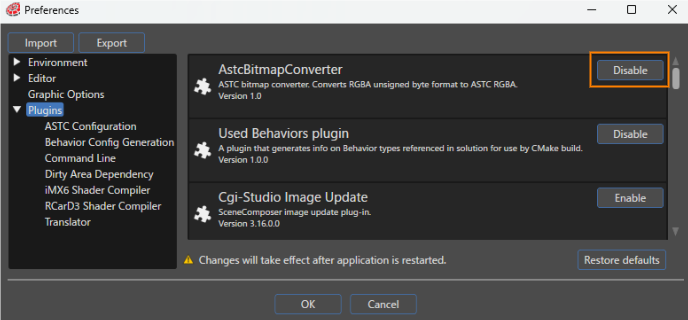
Available plugins are displayed under \[ Plugins \] in the Preferences dialog.

All available plugins are enabled by default. To disable a plugin, click the button to the right of its properties. When the button displays "Enable," the plugin is disabled.

<div drawio-diagram="8531"><img src="https://doc316en.candera.eu/uploads/images/drawio/2025-08/drawing-7-1755754648.png" alt="drawing-7-1755754648.png"/></div>

The following plugins are available for Scene Composer:

<table id="bkmrk-%E3%83%97%E3%83%A9%E3%82%B0%E3%82%A4%E3%83%B3%E5%90%8D-%E8%AA%AC%E6%98%8E-%E5%82%99%E8%80%83-astcbit" style="border-collapse: collapse; width: 100%; height: 681.875px;"><colgroup><col style="width: 29.9166%;"></col><col style="width: 62.4553%;"></col><col style="width: 7.62813%;"></col></colgroup><tbody><tr style="height: 29.7969px;"><td class="align-center" style="height: 29.7969px; background-color: rgb(230,126,35);"><span style="color: rgb(255,255,255);">**Plugin Name**</span></td><td class="align-center" style="height: 29.7969px; background-color: rgb(230,126,35);"><span style="color: rgb(255,255,255);">**Description**</span></td><td class="align-center" style="height: 29.7969px; background-color: rgb(230,126,35);"><span style="color: rgb(255,255,255);">**Note**</span></td></tr><tr style="height: 35.3906px;"><td style="height: 35.3906px;">AstcBitmapConverter</td><td style="height: 35.3906px;">This is an ASTC bitmap converter. Converts RGBA unsigned byte data to ASTC RGBA.</td><td class="align-center" style="height: 35.3906px;">[<span style="color: rgb(0,0,0);"><span style="color: rgb(230,126,35);">Details</span></span>](https://doc316en.candera.eu/books/3d-devices-common-documentation/page/astcbitmapconverter)</td></tr><tr style="height: 29.7969px;"><td style="height: 29.7969px;">Used Behavior plugin</td><td style="height: 29.7969px;">This plugin extracts the type names of all behaviors included in the solution. When generating assets, a CMake file is generated according to the plugin's specific settings.</td><td class="align-center" style="height: 29.7969px;">[<span style="color: rgb(230,126,35);">Details</span>](https://doc316en.candera.eu/books/build-system-setup/page/used-behaviors-plugin)</td></tr><tr style="height: 35.3906px;"><td style="height: 35.3906px;">Cgi-Studio Image Update</td><td style="height: 35.3906px;">This is a plugin for the Image Update function.</td><td class="align-center" style="height: 35.3906px;"><span style="color: rgb(230,126,35);">[Details](https://doc316en.candera.eu/books/import-of-resources/page/image-update)</span></td></tr><tr style="height: 35.3906px;"><td style="height: 35.3906px;">CommandLinePlugin</td><td style="height: 35.3906px;">This is a plugin for executing commands when generating assets.</td><td class="align-center" style="height: 35.3906px;"><span style="color: rgb(230,126,35);">[Details](https://doc316en.candera.eu/books/asset-library-generation/page/plugin-notification-after-generation)</span></td></tr><tr style="height: 46.5938px;"><td style="height: 46.5938px;">List Property Editor</td><td style="height: 46.5938px;">This is a plugin for the List Editor. The List Editor can be used with controls such as BarGraph and LineGraph.

</td><td class="align-center" style="height: 46.5938px;"><span style="color: rgb(230,126,35);">[Details](https://doc316en.candera.eu/books/controls-and-behaviors/page/charts)</span></td></tr><tr style="height: 46.5938px;"><td style="height: 46.5938px;">SpecificationPlugin</td><td style="height: 46.5938px;">This is a plugin for Define application specification. Define application specification is required to link data binding sources with Scene Composer.

</td><td class="align-center" style="height: 46.5938px;">[Details](https://doc316en.candera.eu/link/1178#bkmrk-2.-876%AE-sc)</td></tr><tr style="height: 35.3906px;"><td style="height: 35.3906px;">DataBindingEditorPlugin</td><td style="height: 35.3906px;">This is a plugin for the Data Binding bind icon and Live Preview panel.

</td><td class="align-center" style="height: 35.3906px;"><span style="color: rgb(230,126,35);">[Details](https://doc316en.candera.eu/books/scene-design/page/databinding-ui)</span></td></tr><tr style="height: 35.3906px;"><td style="height: 35.3906px;">Dirty Area Dependency Plugin</td><td style="height: 35.3906px;">This is a plugin for the Dirty Area Management (DAM).</td><td class="align-center" style="height: 35.3906px;"><span style="color: rgb(230,126,35);">[Details](https://doc316en.candera.eu/books/courier/page/dirty-area-management)</span></td></tr><tr style="height: 29.7969px;"><td style="height: 29.7969px;">ExecutableGenerationPlugin</td><td style="height: 29.7969px;">This is a plugin for executing scripts when generating assets.

</td><td class="align-center" style="height: 29.7969px;"><span style="color: rgb(230,126,35);">[Details](https://doc316en.candera.eu/books/extending-scenecomposer/page/executable-generation)</span></td></tr><tr style="height: 29.7969px;"><td style="height: 29.7969px;">ExternalResourceContainerPlugin</td><td style="height: 29.7969px;">This is a plugin for the Referencing external resource function.  
</td><td class="align-center" style="height: 29.7969px;"><span style="color: rgb(230,126,35);">[Details](https://doc316en.candera.eu/books/scene-design/page/referencing-external-resource)</span></td></tr><tr style="height: 35.3906px;"><td style="height: 35.3906px;">iMX6 Shader Compiler</td><td style="height: 35.3906px;">This is a shader compiler for iMX6.</td><td class="align-center" style="height: 35.3906px;"><span style="color: rgb(230,126,35);">[Details](https://doc316en.candera.eu/books/target-setup-for-imx6-with-qnx-os/page/compile-shaders)</span></td></tr><tr style="height: 29.7969px;"><td style="height: 29.7969px;">RCarD3 Shader Compiler</td><td style="height: 29.7969px;">This is a shader compiler for RCarD3.</td><td class="align-center" style="height: 29.7969px;"><span style="color: rgb(230,126,35);">[Details](https://doc316en.candera.eu/books/target-setup-for-r-car-d3/page/shader-compiler)</span></td></tr><tr><td>RT117XBitmapConverter</td><td>This is a bitmap converter for RT117X.</td><td>[<span style="color: rgb(230,126,35);">Details</span>](https://doc316en.candera.eu/books/target-setup-for-nxp-rt117x/page/rt117xbitmapconverter)</td></tr><tr style="height: 29.7969px;"><td style="height: 29.7969px;">RZA1HBitmapConverter</td><td style="height: 29.7969px;">This is a bitmap converter for RZA1H.</td><td class="align-center" style="height: 29.7969px;"><span style="color: rgb(230,126,35);">[Details](https://doc316en.candera.eu/books/target-setup-for-rza1h/page/rza1hbitmapconverter)</span></td></tr><tr style="height: 35.3906px;"><td style="height: 35.3906px;">Cgi-Studio Translator</td><td style="height: 35.3906px;">This is a plugin for Localization.</td><td class="align-center" style="height: 35.3906px;">[Details](https://doc316en.candera.eu/books/candera/page/scenecomposer-translator-plugin)</td></tr><tr style="height: 35.3906px;"><td style="height: 35.3906px;">Traveo2BitmapConverter</td><td style="height: 35.3906px;">This is a custom bitmap converter for Traveo2.</td><td class="align-center" style="height: 35.3906px;">[<span style="color: rgb(230,126,35);">Details</span>](https://doc316en.candera.eu/books/target-setup-for-traveo2/page/traveo2bitmapconverter)</td></tr></tbody></table>

<p class="callout info">Enabling/disabling the plugin will take effect after restarting Scene Composer.</p>

---

#### Plugin-Specific Settings

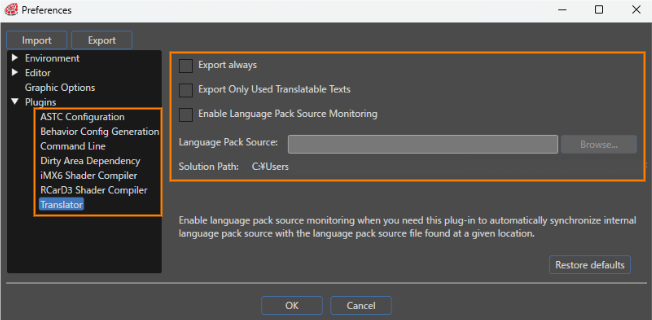
Some plugins have their own settings. You can configure these settings in the Preferences dialog.

<div drawio-diagram="8532"><img src="https://doc316en.candera.eu/uploads/images/drawio/2025-08/drawing-7-1755760580.png" alt="drawing-7-1755760580.png"/></div>

Details of plugin-specific settings are listed below.

##### ASTC Configuration

<table id="bkmrk-%E3%83%91%E3%83%A9%E3%83%A1%E3%83%BC%E3%82%BF%E3%83%BC%E5%90%8D-%E8%AA%AC%E6%98%8E-%E5%9C%A7%E7%B8%AE%E9%80%9F%E5%BA%A6-%E5%9C%A7%E7%B8%AE%E9%80%9F%E5%BA%A6" style="border-collapse: collapse; width: 100%;"><colgroup><col style="width: 22.5596%;"></col><col style="width: 77.5596%;"></col></colgroup><tbody><tr><td class="align-center" style="background-color: rgb(230,126,35);"><span style="color: rgb(255,255,255);">**Setting item**</span></td><td class="align-center" style="background-color: rgb(230,126,35);"><span style="color: rgb(255,255,255);">**Description**</span></td></tr><tr><td>Compression Speed</td><td>The Compression Speed can be set to one of five levels.

</td></tr></tbody></table>

##### Behavior Config Generation

<table id="bkmrk-%E3%83%91%E3%83%A9%E3%83%A1%E3%83%BC%E3%82%BF%E3%83%BC%E5%90%8D-%E8%AA%AC%E6%98%8E-%E5%8B%95%E4%BD%9C%E8%A8%AD%E5%AE%9A%E3%81%8C%E6%9C%89%E5%8A%B9-%E5%AE%9B" style="border-collapse: collapse; width: 100%;"><colgroup><col style="width: 26.5801%;"></col><col style="width: 73.4199%;"></col></colgroup><tbody><tr><td class="align-center" style="background-color: rgb(230,126,35);"><span style="color: rgb(255,255,255);">**Setting item**</span></td><td class="align-center" style="background-color: rgb(230,126,35);"><span style="color: rgb(255,255,255);">**Description**</span></td></tr><tr><td>Behavior Configuration Enabled</td><td>If enabled, a CMake file containing the configuration of all behaviors included in the solution will be generated.

</td></tr><tr><td>Destination path</td><td>Set the path to the CMake file in the CMake flag "CONTROLS\_USED\_BEHAVIORS\_CONFIG\_PATH".

</td></tr></tbody></table>

##### Commnad Line

<table id="bkmrk-%E3%83%91%E3%83%A9%E3%83%A1%E3%83%BC%E3%82%BF%E3%83%BC%E5%90%8D-%E8%AA%AC%E6%98%8E-%E3%82%B3%E3%83%9E%E3%83%B3%E3%83%89%E3%83%A9%E3%82%A4%E3%83%B3-%C2%A0" style="border-collapse: collapse; width: 100%;"><colgroup><col style="width: 22.5268%;"></col><col style="width: 77.4732%;"></col></colgroup><tbody><tr><td class="align-center" style="background-color: rgb(230,126,35);"><span style="color: rgb(255,255,255);">**Setting item**</span></td><td class="align-center" style="background-color: rgb(230,126,35);"><span style="color: rgb(255,255,255);">**Description**</span></td></tr><tr><td>Command Line</td><td>Sets the command to be executed when generating assets.

</td></tr></tbody></table>

##### Dirty Area Dependency

<table id="bkmrk-%E3%83%91%E3%83%A9%E3%83%A1%E3%83%BC%E3%82%BF%E3%83%BC%E5%90%8D-%E8%AA%AC%E6%98%8E-%E3%82%A2%E3%82%BB%E3%83%83%E3%83%88%E3%81%AB%E5%90%AB%E3%82%81%E3%82%8B-" style="border-collapse: collapse; width: 100%;"><colgroup><col style="width: 22.5268%;"></col><col style="width: 77.4732%;"></col></colgroup><tbody><tr><td class="align-center" style="background-color: rgb(230,126,35);"><span style="color: rgb(255,255,255);">**Setting item**</span></td><td class="align-center" style="background-color: rgb(230,126,35);"><span style="color: rgb(255,255,255);">**Description**</span></td></tr><tr><td>Include in asset</td><td>If enabled, information about Dirty Area Management will be output to the asset.

</td></tr></tbody></table>

##### iMX6 Shader Compiler

<table id="bkmrk-%E3%83%91%E3%83%A9%E3%83%A1%E3%83%BC%E3%82%BF%E3%83%BC%E5%90%8D-%E8%AA%AC%E6%98%8E-%E5%87%BA%E5%8A%9B%E5%BD%A2%E5%BC%8F-%E5%87%BA%E5%8A%9B%E5%BD%A2%E5%BC%8F" style="border-collapse: collapse; width: 100%;"><colgroup><col style="width: 24.7914%;"></col><col style="width: 75.2086%;"></col></colgroup><tbody><tr><td class="align-center" style="background-color: rgb(230,126,35);"><span style="color: rgb(255,255,255);">**Setting item**</span></td><td class="align-center" style="background-color: rgb(230,126,35);"><span style="color: rgb(255,255,255);">**Description**</span></td></tr><tr><td>Generated output format</td><td>Set the output format from three options (Text, Binary, or Binary program).

</td></tr><tr><td>Custom command line string</td><td>Enter the tool or identifier to execute in command line format. This setting can only be set when the output format is Binary or Binary program.

</td></tr></tbody></table>

##### RCarD3 Shader Compiler

<table id="bkmrk-%E3%83%91%E3%83%A9%E3%83%A1%E3%83%BC%E3%82%BF%E3%83%BC%E5%90%8D-%E8%AA%AC%E6%98%8E-%E5%87%BA%E5%8A%9B%E5%BD%A2%E5%BC%8F-%E5%87%BA%E5%8A%9B%E5%BD%A2%E5%BC%8F-1" style="border-collapse: collapse; width: 100%;"><colgroup><col style="width: 24.6719%;"></col><col style="width: 75.3281%;"></col></colgroup><tbody><tr><td class="align-center" style="background-color: rgb(230,126,35);"><span style="color: rgb(255,255,255);">**Setting item**</span></td><td class="align-center" style="background-color: rgb(230,126,35);"><span style="color: rgb(255,255,255);">**Description**</span></td></tr><tr><td>Generated output format</td><td>Set the output format from three options (Text, Binary, or Binary program).

</td></tr><tr><td>Custom command line string</td><td>Enter the tool or identifier to execute in command line format. This setting can only be set when the output format is Binary or Binary program.

</td></tr></tbody></table>

##### Translator

<table id="bkmrk-%E3%83%91%E3%83%A9%E3%83%A1%E3%83%BC%E3%82%BF%E3%83%BC%E5%90%8D-%E8%AA%AC%E6%98%8E-%E5%B8%B8%E3%81%AB%E5%87%BA%E5%8A%9B-%E6%9C%89%E5%8A%B9%E3%81%AE%E5%A0%B4" style="border-collapse: collapse; width: 100%; height: 178.781px;"><colgroup><col style="width: 33.2539%;"></col><col style="width: 66.7461%;"></col></colgroup><tbody><tr style="height: 29.7969px;"><td class="align-center" style="background-color: rgb(230,126,35);"><span style="color: rgb(255,255,255);">**Setting item**</span></td><td class="align-center" style="background-color: rgb(230,126,35);"><span style="color: rgb(255,255,255);">**Description**</span></td></tr><tr style="height: 29.7969px;"><td style="height: 29.7969px;">Export always</td><td style="height: 29.7969px;">If enabled, all translated text will be included in asset.</td></tr><tr style="height: 29.7969px;"><td style="height: 29.7969px;">Export Only Used Translatable Texts</td><td style="height: 29.7969px;">If enabled, only translated text used in behaviors, etc. will be included in assets.</td></tr><tr style="height: 29.7969px;"><td style="height: 29.7969px;">Enable Language Pack Source Monitoring</td><td style="height: 29.7969px;">If enabled, Language Pack Source files will be monitored.</td></tr><tr style="height: 29.7969px;"><td style="height: 29.7969px;">Language Pack Source</td><td style="height: 29.7969px;">Set the Language Pack Source to be monitored.</td></tr><tr style="height: 29.7969px;"><td style="height: 29.7969px;">Solution Path</td><td style="height: 29.7969px;">The root path of the solution will be displayed.</td></tr></tbody></table>

<p class="callout info">Changes to Plugin-Specific settings will take effect after restarting Scene Composer.  
</p>

---