# Fusion

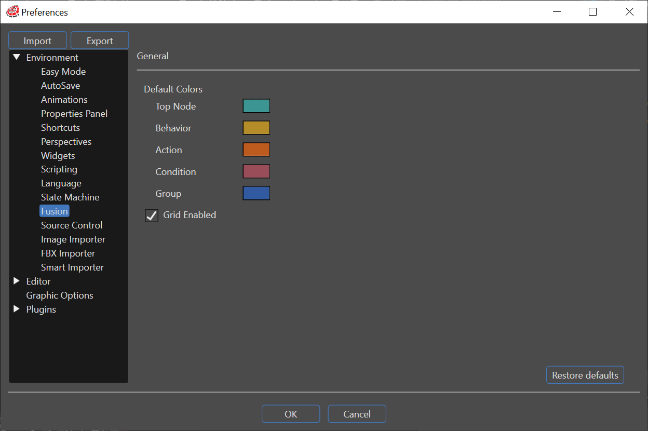
In the Preferences \[ Environment \] &gt; \[ Fusion \], you can configure settings related to the display in the Fusion panel.

<div drawio-diagram="6491"><img src="https://doc316en.candera.eu/uploads/images/drawio/2024-07/drawing-5-1721997234.png" alt=""/></div>

#### General

<table border="1" id="bkmrk-default-colors-you-c" style="border-collapse: collapse; width: 100%;"><colgroup><col style="width: 23.115%;"></col><col style="width: 76.885%;"></col></colgroup><tbody><tr><td>Default colors</td><td><span style="color: rgb(0, 0, 0);">You can configure the color of the newly created Fusion nodes displayed on the Fusion panel. </span>

<span style="color: rgb(0, 0, 0);">Changing default color do not attached already created nodes, however those color will be used when user will call "<span style="color: rgb(230, 126, 35);">[Restore Default Header Color](https://doc316en.candera.eu/link/1060#bkmrk-lock-performs-an-edi)</span>" command from context menu.</span>

</td></tr><tr><td>Grid Enabled</td><td>When this option is enabled, there are grids in <span style="color: rgb(230, 126, 35);">[Fusion panel](https://doc316en.candera.eu/books/fusion/page/fusion-editor-ui)</span>.</td></tr><tr><td><span style="color: rgb(0, 0, 0);">Restore Defaults</span></td><td>Pressing this button will return all settings to their default settings.</td></tr></tbody></table>