# Overview
#### Description
The Panel is a control tool for the Player application. It visualizes all the mentioned feature blocks in the Features section.
#### Hotkeys
Following shortcuts are available for CGI Panel:
**Hotkeys**
**Description**
Ctrl+O
Open asset
Ctrl+S
Capture screenshot
Ctrl+Shift+S
Capture screenshot (select file)
Ctrl+P
Open settings
Ctrl+I
Single invalidation
F1
Documentation
#### Interface
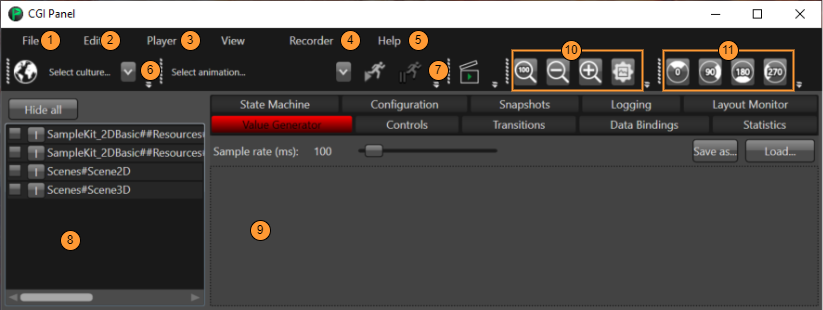
1. [File menu](https://doc316en.candera.eu/books/player/page/file-menu "File Menu") allows user to run and configure the application.
2. [Edit menu](https://doc316en.candera.eu/books/player/page/edit-menu "Edit Menu") offers access to editing operations and undo-redo actions.
3. [Player menu](https://doc316en.candera.eu/books/player/page/player-menu "Player Menu") allows to control the rendering and scripting system.
4. [Recorder menu](https://doc316en.candera.eu/books/player/page/recorder-menu "Recorder Menu") gives control to the recording of application handling.
5. [Help menu](https://doc316en.candera.eu/books/player/page/help-menu "Help Menu") offers information about CGI Panel.
6. Culture toolbar allows to switch between languages. In order to use this, "Globalization" needs to be enabled.
7. Animation toolbar shows a list of all animations available. Select an animation from dropdown box and press Start to run it.
8. [Scene View](https://doc316en.candera.eu/books/player/page/scene-view "Scene View") panel shows a list of all scenes. In order to activate one scene, click the corresponding checkbox.
9. Miscellaneous Panel embeds the following views:
- [Configuration](https://doc316en.candera.eu/books/player/page/configuration-view) view presents information about the features enabled in the Player.
- [Snapshots](https://doc316en.candera.eu/books/player/page/snapshots-view "Snapshots View") view allows to take snapshots (on host) and shows the last snapshots taken.
- [Logging](https://doc316en.candera.eu/books/player/page/logging-view "Logging View") view allows to enable or disable the logging and also to set the log level for the main realms.
- [Controls](https://doc316en.candera.eu/books/player/page/controls-view) view shows all controls of a selected scene.
- [Transitions](https://doc316en.candera.eu/books/player/page/transitions-view) view is available to trigger transitions.
- [Statistics](https://doc316en.candera.eu/books/player/page/statistics-view) view shows memory consumption statistics.
- [State Machine](https://doc316en.candera.eu/books/player/page/state-machine-view) view shows the state for all state machines.
- [Value Generator](https://doc316en.candera.eu/books/player/page/value-generator) provides the possibility to simulate the change of values on view elements.
10. [Zooming](https://doc316en.candera.eu/link/1076#bkmrk-page-title) toolbar
11. [Rotate](https://doc316en.candera.eu/link/1077#bkmrk-page-title) display toolbar