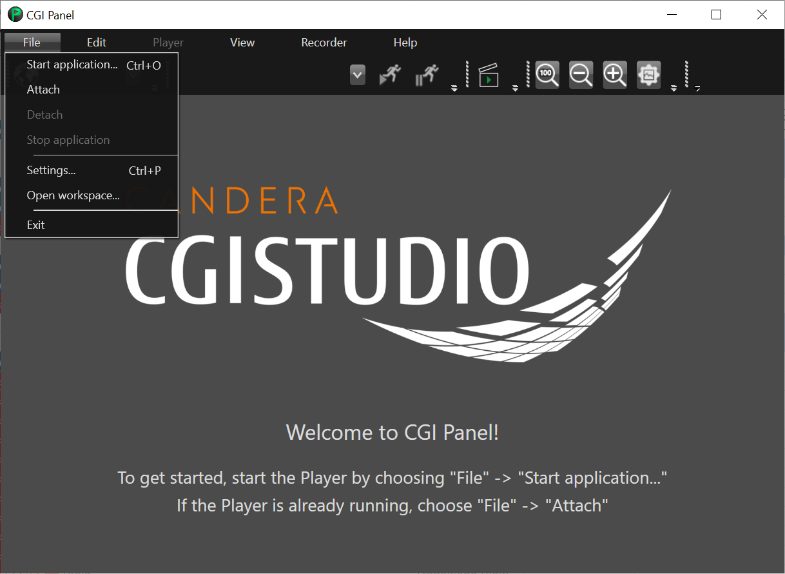
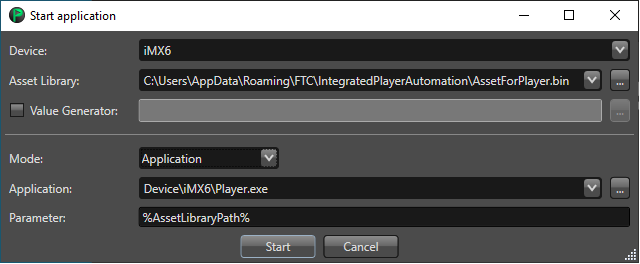
- **Start application ...** - opens a dialog window which allows to configure and start the application.
- The configuration options are:
- *Device*: allows to choose the device from a dropdown list.
- *Asset Library Path*: allows to set the full path to the asset.
- *Mode*: allows to decide if the Player will be started as an application or by a script.
- Application Mode
- *Application*: allows to set the path to the Player executable.
- *Parameter*: allows to set a parameter which shall be passed to the application.
- Script Mode
- *Script*: allows to set the path to the script.
- *Parameter*: allows to set a parameter which shall be passed to the script.
- *Wait for script to finish*: configures whether the panel should wait or not until the script has finished.
- **Attach** - attaches the panel to a running Player.
- **Settings...** - opens a dialog window which allows to configure the Cgi Panel.
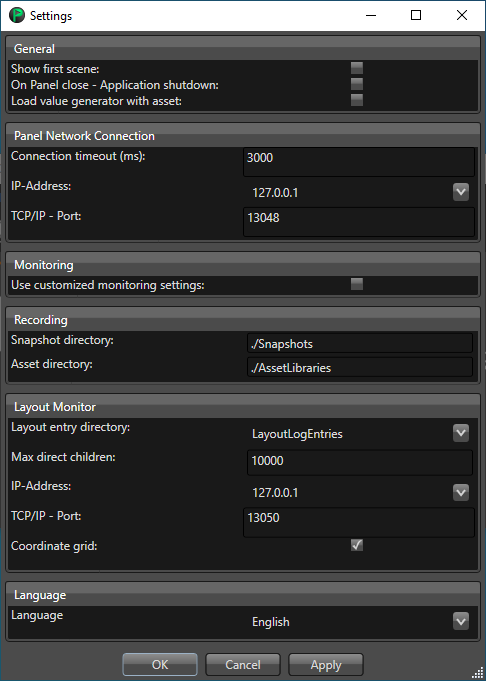
The configuration options are:
- General
- *Show first scene*: enables that the first scene is automatically loaded at start time.
- *On Panel close - Application shutdown*: if enabled the applications started by the Player will be shutdown automatically.
- Panel Network Connection
- *Connection timeout (ms)*: sets a timeout for network connection.
- *IP-Address*: sets a custom IP address of the network control.
- *TCP/IP - Port*: sets a custom TCP/IP port of the network control.
- Monitoring
- *Use customized monitoring settings*: allows to set custom setting for the monitoring (*TCP/IP-Port*, *Serial-Port* and *Serial-Baudrate*).
- Recording
- *Snapshot directory*: defines the location where the snapshots shall be stored.
- *Asset directory*: defines the location of assets which will be loaded.
- **Open workspace**: opens in File Explorer the directory were the CGIPanel.exe resides.
- **Exit**: closes CGI Panel.