# Occlusion Queries and Occlusion Culling

#### <a class="anchor" id="bkmrk--1"></a>Description

In scenes containing nodes with lots of vertices or expensive fragment shaders, the rendering speed can be drastically improved by avoiding to render occluded objects. For this purpose [Candera](http://dev.doc.cgistudio.at/APILINK/namespace_candera.html "[DataBinding_RefTypeSample]") offers the Occlusion Queries and Occlusion Culling, which are described on this page.

#### **Occlusion Queries**

##### <a class="anchor" id="bkmrk--2"></a>Overview

Occlusion queries are the collective name for a particular type of queries, which are useful to detect whether an object is visible or not. They interrogate asynchronously the Render Device to determine whether the scoped rendering commands pass the depth test and if so, how many samples pass. Occlusion queries are typically used to enable features like occlusion culling and varying lens flare or bloom intensity.

<div class="contents" id="bkmrk-queries-are-related-"><div class="contents"><div class="textblock"><dl class="note"><dt></dt><dd><p class="callout info">Queries are related to one specific rendering context and must not be uploaded to multiple contexts.</p>

</dd><dd></dd></dl></div></div></div>##### <a class="anchor" id="bkmrk--3"></a>Occlusion Query Types

There are three types of occlusion queries:

<div class="contents" id="bkmrk-query%3A%3Aqueryanysampl"><div class="contents"><div class="textblock">- [Query::QueryAnySamplesPassed](http://dev.doc.cgistudio.at/APILINK/class_candera_1_1_query.html#aeef30513e21344092b50c82f7ddf6ccda7141400f708d270e4f8b95b4ca3f5a7f "Query determines if any sample passes the depth test."): query determines, if any sample passes the depth test.
- [Query::QueryAnySamplesPassedConservative](http://dev.doc.cgistudio.at/APILINK/class_candera_1_1_query.html#aeef30513e21344092b50c82f7ddf6ccdaa69721a27042afb9796561f3a7d17099 "Similar to QueryAnySamplesPassed type, but less precise for queries performance's sake..."): similar to QueryAnySamplesPassed type except that the implementation may use a less accurate algorithm, which may be faster, but at the cost of more false positives.
- [Query::QueryTransformFeedbackPrimitivesWritten](http://dev.doc.cgistudio.at/APILINK/class_candera_1_1_query.html#aeef30513e21344092b50c82f7ddf6ccda9d24a7bd8b750118dc44517bc7b82cba "Query determines how many vertices have been written into bound transform feedback buffer(s)..."): query determines how many vertices have been written into bound transform feedback buffer.
</div></div></div>##### <a class="anchor" id="bkmrk--4"></a>Conditional Rendering Example

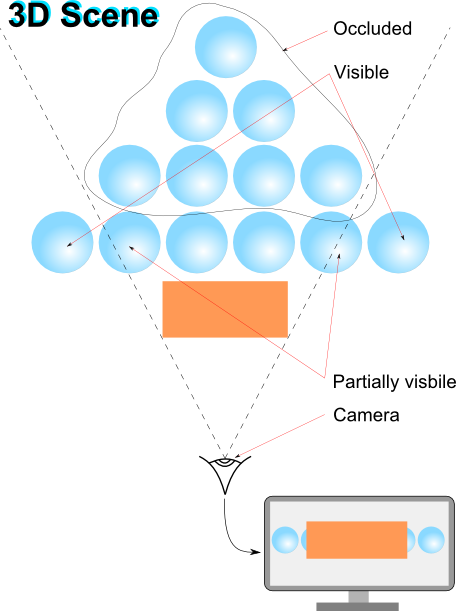
The figure below depicts the demand for occlusion queries to determine and subsequently discard occluded objects in a highly populated scene:

<div drawio-diagram="1943"><img src="https://doc316en.candera.eu/uploads/images/drawio/2023-02/drawing-4-1676863030.png" alt=""/></div>

<div class="contents" id="bkmrk--0"><div class="contents"><div class="textblock">  
</div></div></div>Find below an abstract code sample for occlusion queries to obtain information whether any pixels have been rendered or not:

```
SharedPointer<Query> query;
query = <a class="code" href="http://dev.doc.cgistudio.at/APILINK/class_candera_1_1_query.html#ad85249a37de10608cb92612c8c7784e6">Query::Create</a>(<a class="code" href="http://dev.doc.cgistudio.at/APILINK/class_candera_1_1_query.html#aeef30513e21344092b50c82f7ddf6ccda7141400f708d270e4f8b95b4ca3f5a7f" title="Query determines if any sample passes the depth test.">Query::QueryAnySamplesPassed</a>);
query.Upload();
query.Begin(); 

// Do some rendering here.

query.End(); 

// Process other operations to provide GPU with sufficient time to complete query or skip query evaluation, if result is not available yet.

if (query.IsResultAvailable()) {
    if (query.GetResult() > 0)) {
        // Samples have been written to framebuffer while query was active, this is between query.Begin() and query.End().
        // In case low resolution model was rendered, render next frame with high resolution model.
    }
    else {
        // No sample has been written to framebuffer while query was active.
        // In case high resolution model was rendered, render next frame with low resolution model.
    }
}
```

####   
**Occlusion Culling**

##### <a class="anchor" id="bkmrk--6"></a>Overview

Occlusion Culling is a feature that disables rendering of objects when they are not currently seen by the camera because they are obscured by other objects. The feature can be enabled by setting the render strategy for camera to [OcclusionCullingCameraRenderStrategy](http://dev.doc.cgistudio.at/APILINK/class_candera_1_1_occlusion_culling_camera_render_strategy.html "The class OcclusionCullingCameraRenderStrategy is an implementation of the abstract class CameraRende..."). During the rendering, all nodes initialized by the strategy will issue occlusion queries. If query results are available from the previous frame, they are evaluated and all nodes deemed occluded will have their bounding box rendered invisibly instead of the node itself. Visible nodes, or nodes not having a QueryProperty attached, will be rendered as usual. A new query to determine visibility for the next frame will be issued regardless the result of the previous query.

<div class="contents" id="bkmrk-a-performance-increa"><div class="contents"><div class="textblock"><dl class="note"><dd><p class="callout info">A performance increase by using occlusion culling can only be expected when objects occlude each other, and occluded objects consist of lots of vertices, have expensive fragment shaders, or both.</p>

</dd></dl></div></div></div>##### <a class="anchor" id="bkmrk--7"></a>Workflow

<div class="contents" id="bkmrk-attach-an-occlusionc"><div class="contents"><div class="contents"><div class="textblock">- Attach an [OcclusionCullingCameraRenderStrategy](http://dev.doc.cgistudio.at/APILINK/class_candera_1_1_occlusion_culling_camera_render_strategy.html "The class OcclusionCullingCameraRenderStrategy is an implementation of the abstract class CameraRende...") to the camera.

<div class="fragment">  
</div></div></div></div></div>```
    m_occlusionCullingStrategy = CANDERA_NEW(OcclusionCullingCameraRenderStrategy)();
    m_camera->SetCameraRenderStrategy(m_occlusionCullingStrategy);
```

<div class="contents" id="bkmrk-initialize-the-rootn"><div class="contents"><div class="contents"><div class="textblock"><div class="fragment">  
</div>- Initialize the rootNode's subtree for use by the render strategy.

<div class="fragment">  
</div></div></div></div></div>```
    m_occlusionCullingStrategy->Initialize(m_group, <a class="code" href="http://dev.doc.cgistudio.at/APILINK/class_candera_1_1_query.html#aeef30513e21344092b50c82f7ddf6ccdaa69721a27042afb9796561f3a7d17099" title="Similar to QueryAnySamplesPassed type, but less precise for queries performance's sake...">Query::QueryAnySamplesPassedConservative</a>);
```

<div class="contents" id="bkmrk-this-camera-render-s"><div class="contents"><div class="textblock"><dl class="note"><dd><dl class="note"><dd><p class="callout info">This camera render strategy requires nodes to have a valid bounding box. This camera render strategy reaches its full potential when nodes were sorted front to back first.</p>

</dd></dl></dd><dd></dd></dl></div></div></div><div class="contents" id="bkmrk-render-camera-m_gdu-"><div class="contents"><div class="contents"><div class="textblock">- Render camera ```
        m_gdu->ToRenderTarget3D()->Activate();
        RenderDevice::ClearDepthBuffer(1.0f);
        <a class="code" href="http://dev.doc.cgistudio.at/APILINK/class_candera_1_1_renderer.html#aed822ba1d66620f2d1e794973e30f354">Renderer::RenderAllCameras</a>();
    ```

- [OcclusionCullingCameraRenderStrategy](http://dev.doc.cgistudio.at/APILINK/class_candera_1_1_occlusion_culling_camera_render_strategy.html "The class OcclusionCullingCameraRenderStrategy is an implementation of the abstract class CameraRende...") interface provides also methods to get the number of occluded and non-occluded nodes since last render pass by using the methods [OcclusionCullingCameraRenderStrategy::GetOccludedNodesCount()](http://dev.doc.cgistudio.at/APILINK/class_candera_1_1_occlusion_culling_camera_render_strategy.html#a11ffc92413b74687427d05eee20be52c) and [OcclusionCullingCameraRenderStrategy::GetVisibleNodesCount()](http://dev.doc.cgistudio.at/APILINK/class_candera_1_1_occlusion_culling_camera_render_strategy.html#a26d3bf20b6c9bc588efe5e4aa52e29a5).

- Before destroying the render strategy remove the association with nodes by calling the [OcclusionCullingCameraRenderStrategy::Reset()](http://dev.doc.cgistudio.at/APILINK/class_candera_1_1_occlusion_culling_camera_render_strategy.html#a214a77f084e490f73e74eb107f7556e0) method

<div class="fragment">  
</div></div></div></div></div>```
    m_occlusionCullingStrategy->Reset(m_group);
    CANDERA_DELETE(m_occlusionCullingStrategy);
```

<div class="contents" id="bkmrk-the-nodes-removed-fr"><div class="contents"><div class="textblock"><dl class="note"><dd><p class="callout info">The nodes removed from the subtree are automatically detached from the render strategy</p>

</dd></dl></div></div></div>##### <a class="anchor" id="bkmrk--8"></a>Occlusion Culling in SceneComposer

Refer to chapter<span style="color: rgb(230, 126, 35);"> [Occlusion Culling](https://doc316en.candera.eu/link/130#bkmrk-%C2%A0occlusion-culling-0)</span> to see how to configure occlusion culling in SceneComposer.