# Multi Frequency Rendering

#### <a id="bkmrk--9"></a>Description

This chapter briefly describes the Multi Frequency Rendering technique supported by [Candera](http://dev.doc.cgistudio.at/APILINK/namespace_candera.html "[DataBinding_RefTypeSample]").   
It allows to split rendering of complex parts to several frames, to achieve an overall higher frame rate.

#### **Introduction**

##### <a class="anchor" id="bkmrk--10"></a>Multi Frequency Rendering Introduction

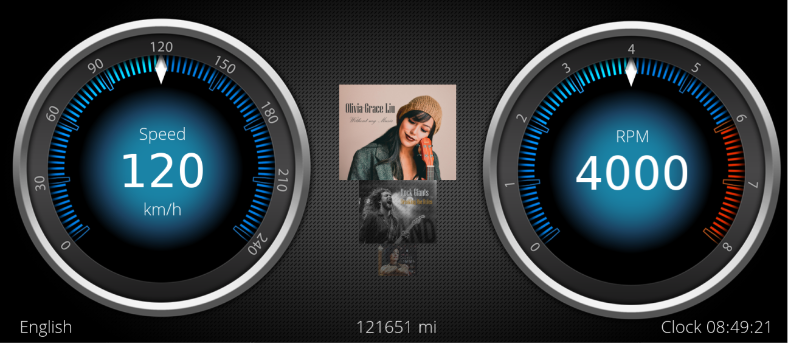
Multi Frequency Rendering allows using different update rates for multiple render targets. For example

<div class="contents" id="bkmrk-fix-framerate-for-tu"><div class="contents"><div class="contents"><div class="textblock">- Fix framerate for tubes.
- Adaptive framerate for center use case.
- Details of entire content are preserved.

</div></div></div></div><div drawio-diagram="1945"><img src="https://doc316en.candera.eu/uploads/images/drawio/2023-02/drawing-4-1676868292.png" alt=""/></div>

<div class="contents" id="bkmrk--1"><div class="contents"><div class="textblock">  
</div></div></div>##### <a class="anchor" id="bkmrk--12"></a>Workflow

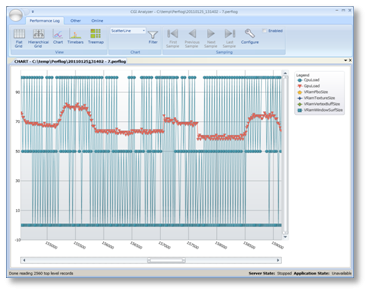
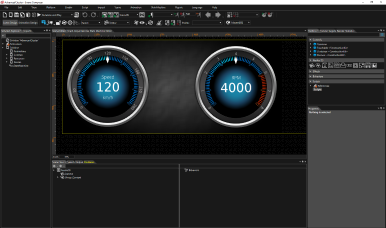
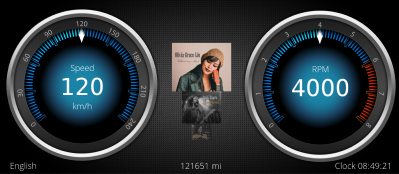
<div class="contents" id="bkmrk-cgi-analyzer-sceneco"><div class="contents"><div class="textblock"><table border="0"><tbody><tr><td align="center">**CGI Analyzer**</td><td align="center">**SceneComposer**</td><td align="center">**Application**</td></tr><tr><td style="vertical-align: middle;">[![09_mfranalyzer.png](https://doc316en.candera.eu/uploads/images/gallery/2023-02/scaled-1680-/nIy09-mfranalyzer.png)](https://doc316en.candera.eu/uploads/images/gallery/2023-02/nIy09-mfranalyzer.png)

</td><td style="vertical-align: middle;">[![09_mfrscenecomposer.png](https://doc316en.candera.eu/uploads/images/gallery/2023-02/scaled-1680-/09-mfrscenecomposer.png)](https://doc316en.candera.eu/uploads/images/gallery/2023-02/09-mfrscenecomposer.png)

</td><td style="vertical-align: middle;">[![09_mfrapplication.png](https://doc316en.candera.eu/uploads/images/gallery/2023-02/scaled-1680-/09-mfrapplication.png)](https://doc316en.candera.eu/uploads/images/gallery/2023-02/09-mfrapplication.png)

</td></tr><tr><td align="left">CGI Analyzer determines benchmark values for each node of a scene given. The benchmarks are exported to a \*.crsms file.</td><td align="left">The benchmarks are assigned to nodes benchmark property. SceneComposer stores nodes incl. benchmark values in Asset File.</td><td align="left">The Application renders multiple cameras with different framerates with help of Benchmark-CameraRenderStrategy.</td></tr></tbody></table>

</div></div></div>##### <a class="anchor" id="bkmrk--13"></a>Candera::CameraRenderStrategy

The following sections explain how an application can use the [Candera::CameraRenderStrategy](http://dev.doc.cgistudio.at/APILINK/class_candera_1_1_camera_render_strategy.html "The abstract class CameraRenderStrategy is intended to be derived in order to tell the Renderer...") to implement multi frequency rendering based on given benchmark values within the scene tree.

##### <a class="anchor" id="bkmrk--14"></a>References

For details about how to calculate benchmark values and how to assign them to a scene tree, please refer to:

<div class="contents" id="bkmrk-cgi-analyzer_user_ma"><div class="textblock">- **CGI-Analyzer\_User\_Manual.pdf**: Calculate benchmark values and export to a \*.crsms file.
- <span style="color: rgb(230, 126, 35);">**[SceneComposer Help](https://doc316en.candera.eu/books/import-of-resources/page/import-benchmarks)**</span>: Import benchmark values from a \*.crsms file into a given solution.

</div></div>####   
**Candera - Camera Render Strategy**

##### <a class="anchor" id="bkmrk--15"></a>Partitioning Render Passes

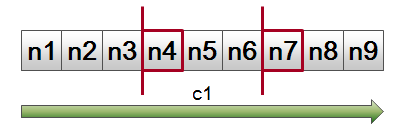
A Camera render pass renders all scene nodes in one sweep.  
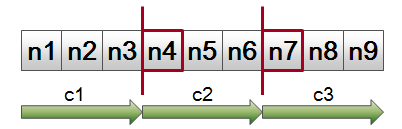
[Candera::CameraRenderStrategy](http://dev.doc.cgistudio.at/APILINK/class_candera_1_1_camera_render_strategy.html "The abstract class CameraRenderStrategy is intended to be derived in order to tell the Renderer...") enables to partition a Camera render pass, if e.g. complete processing in one frame is not possible.

##### <a class="anchor" id="bkmrk--16"></a>Examples of Usage

<div class="contents" id="bkmrk-omit-rendering-of-no"><div class="contents"><div class="contents"><div class="textblock">- Omit rendering of nodes with low priority like decorations.
- Multi Frequency Rendering: Suspend and continue Camera render pass next time Camera renders. Unless render pass is complete, render target is not swapped.

</div></div></div></div><div drawio-diagram="1950"><img src="https://doc316en.candera.eu/uploads/images/drawio/2023-02/drawing-4-1676868435.png" alt=""/></div>

<div class="contents" id="bkmrk--3"><div class="contents"><div class="textblock">  
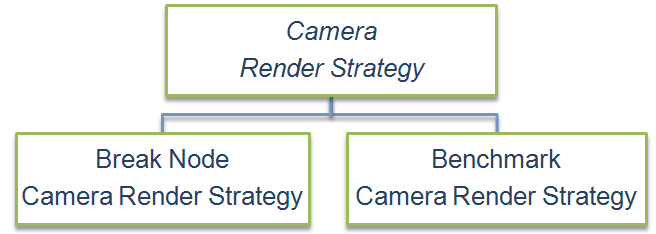
</div></div></div>Both, [Candera::BreakNodeCameraRenderStrategy](http://dev.doc.cgistudio.at/APILINK/class_candera_1_1_break_node_camera_render_strategy.html "The BreakNodeCameraRenderStrategy is an implementation of the abstract class CameraRenderStrategy. The rendering of the nodes is done until it reaches a node that is in the list of break nodes (See function AddBreakNode).") and [Candera::BenchmarkCameraRenderStrategy](http://dev.doc.cgistudio.at/APILINK/class_candera_1_1_benchmark_camera_render_strategy.html "The class BenchmarkCameraRenderStrategy is an implementation of the abstract class CameraRenderStrate...") are concrete implementations of the interface [Candera::CameraRenderStrategy](http://dev.doc.cgistudio.at/APILINK/class_candera_1_1_camera_render_strategy.html "The abstract class CameraRenderStrategy is intended to be derived in order to tell the Renderer...") to cover most typical Camera render pass partitioning.

####   
**Candera - Break Node Camera Render Strategy**

##### <a class="anchor" id="bkmrk--18"></a>Splitting Render Pass on specific Break Nodes

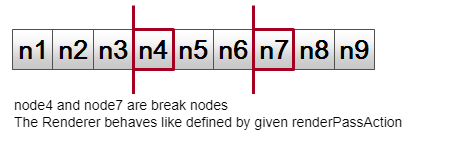
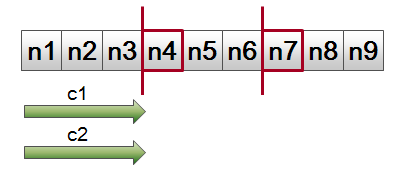
The [Candera::BreakNodeCameraRenderStrategy](http://dev.doc.cgistudio.at/APILINK/class_candera_1_1_break_node_camera_render_strategy.html "The BreakNodeCameraRenderStrategy is an implementation of the abstract class CameraRenderStrategy. The rendering of the nodes is done until it reaches a node that is in the list of break nodes (See function AddBreakNode).") is populated with a list of arbitrary break nodes.  
Defined by RenderPassAction a break node can pause or stop a Camera render pass, if encountered.

```
breakNodeStrategy = new BreakNodeCameraRenderStrategy();
breakNodeStrategy->AddBreakNode(node4);
breakNodeStrategy->AddBreakNode(node7);
breakNodeStrategy->SetRenderPassActionOnBreakNode(renderPassAction);
camera->SetCameraRenderStrategy(breakNodeStrategy);
```

<div drawio-diagram="1952"><img src="https://doc316en.candera.eu/uploads/images/drawio/2023-02/drawing-4-1676868541.png" alt=""/></div>

<div class="contents" id="bkmrk-back-to-the-menu-1"></div>####   
**Candera - Benchmark Camera Render Strategy**

##### <a class="anchor" id="bkmrk--20"></a>Splitting Render Pass on Benchmark Threshold Values

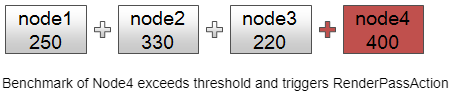
Each node has a benchmark property that describes a custom reference value for render duration.  
During Camera render pass benchmarks are accumulated until threshold of [Candera::BenchmarkCameraRenderStrategy](http://dev.doc.cgistudio.at/APILINK/class_candera_1_1_benchmark_camera_render_strategy.html "The class BenchmarkCameraRenderStrategy is an implementation of the abstract class CameraRenderStrate...") is reached. RenderPassAction defines to suspend or stop render pass.

```
benchmarkStrategy = new BenchmarkCameraRenderStrategy(); 
node1->SetRenderBenchmark(250.0f); 
node2->SetRenderBenchmark(330.0f); 
node3->SetRenderBenchmark(220.0f); 
node4->SetRenderBenchmark(400.0f); 
node5->SetRenderBenchmark(390.0f); 
benchmarkStrategy->SetThreshold(1000.0f);
benchmarkStrategy->SetRenderPassActionOnThreshold(renderPassAction);
camera->SetCameraRenderStrategy(benchmarkStrategy);
```

<div drawio-diagram="1953"><img src="https://doc316en.candera.eu/uploads/images/drawio/2023-02/drawing-4-1676868597.png" alt=""/></div>

<div class="contents" id="bkmrk--7"><div class="textblock">  
</div></div>####   
**Candera - Render Pass Actions**

##### <a class="anchor" id="bkmrk--22"></a>Render Pass Actions

<div class="contents" id="bkmrk-proceed-render-pass-"><div class="textblock"><table border="0" cellpadding="5"><tbody><tr><td align="center" valign="top" width="33%">[![09_mfrrenderpassaction1.png](https://doc316en.candera.eu/uploads/images/gallery/2023-02/scaled-1680-/09-mfrrenderpassaction1.png)](https://doc316en.candera.eu/uploads/images/gallery/2023-02/09-mfrrenderpassaction1.png)

</td><td align="center" valign="top" width="33%">[![09_mfrrenderpassaction2.png](https://doc316en.candera.eu/uploads/images/gallery/2023-02/scaled-1680-/09-mfrrenderpassaction2.png)](https://doc316en.candera.eu/uploads/images/gallery/2023-02/09-mfrrenderpassaction2.png)

</td><td align="center" valign="top" width="33%">[![09_mfrrenderpassaction3.png](https://doc316en.candera.eu/uploads/images/gallery/2023-02/scaled-1680-/09-mfrrenderpassaction3.png)](https://doc316en.candera.eu/uploads/images/gallery/2023-02/09-mfrrenderpassaction3.png)

</td></tr><tr><td align="center">**Proceed Render Pass**</td><td align="center">**Pause Render Pass**</td><td align="center">**Stop Render Pass**</td></tr><tr><td align="left">Proceeds Rendering. Rendering is not interrupted. Break nodes are ignored.</td><td align="left">Pauses rendering. The next time the Camera is rendered it restarts from the node that has been paused. Swaps render target when Camera completes.  
Usage: Entire content captured by Camera shall be displayed</td><td align="left">Stops rendering. The next time the Camera renders it restarts from the very first node in render order. Swaps render target at each render cycle.  
Usage: Nodes with lower priority shall be omitted.</td></tr></tbody></table>

</div></div>####   
**Example - Multi Frequency Rendering**

##### <a class="anchor" id="bkmrk--23"></a>Example: Different Frame Rates for several Cameras

<div class="contents" id="bkmrk-fix-framerate-for-sp"><div class="contents"><div class="textblock">- Fix framerate for speedometer.
- Adaptive framerate for car.
- Details of entire content is preserved.

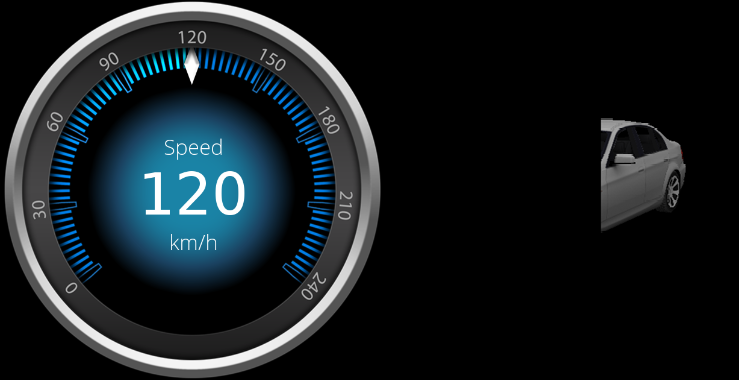
</div></div></div>##### <a class="anchor" id="bkmrk--24"></a>Cycle 1

<div class="contents" id="bkmrk-camera-1-%3A-renders-t"><div class="contents"><div class="textblock"><table border="0"><tbody><tr><td>[![09_mfrcycle1.png](https://doc316en.candera.eu/uploads/images/gallery/2023-02/scaled-1680-/09-mfrcycle1.png)](https://doc316en.candera.eu/uploads/images/gallery/2023-02/09-mfrcycle1.png)

</td></tr><tr><td>Camera 1 : Renders the speedometer and swaps render target.  
Camera 2 : Renders car until benchmark threshold is exceeded. Render target is not swapped.</td></tr></tbody></table>

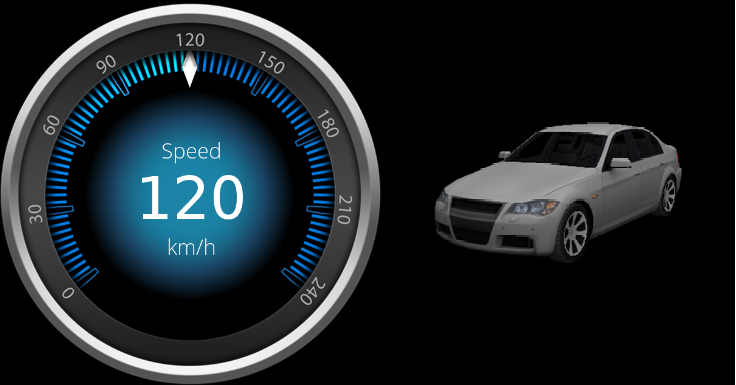
</div></div></div>##### <a class="anchor" id="bkmrk--25"></a>Cycle 2

<div class="contents" id="bkmrk-camera-1-%3A-renders-t-0"><div class="textblock"><table border="0"><tbody><tr><td>[![09_mfrcycle2.png](https://doc316en.candera.eu/uploads/images/gallery/2023-02/scaled-1680-/09-mfrcycle2.png)](https://doc316en.candera.eu/uploads/images/gallery/2023-02/09-mfrcycle2.png)

</td></tr><tr><td>Camera 1 : Renders the speedometer and swaps render target.  
Camera 2 : Completes render pass and swaps render target. Thus Camera2 renders with half frames per second (FPS) than Camera1.</td></tr></tbody></table>

</div></div>####   
**Multi Frequency Rendering in 2D**

Analogous to [Candera::CameraRenderStrategy](http://dev.doc.cgistudio.at/APILINK/class_candera_1_1_camera_render_strategy.html "The abstract class CameraRenderStrategy is intended to be derived in order to tell the Renderer..."), there is an abstract class [Candera::Camera2DRenderStrategy](http://dev.doc.cgistudio.at/APILINK/class_candera_1_1_camera2_d_render_strategy.html "The abstract class Camera2DRenderStrategy is intended to be derived in order to tell the Renderer2D...") available.

This class is intended to be derived to tell the [Candera::Renderer2D](http://dev.doc.cgistudio.at/APILINK/class_candera_1_1_renderer2_d.html "The class Renderer2D represents the unique Candera 2D render interface to the application. Each render call shall be triggered via the Renderer2D interface."), if rendering shall proceed, pause, or stop for a given node in a camera's render pass.

##### <a class="anchor" id="bkmrk--26"></a>BreakNodeCamera2DRenderStrategy

In difference to 3D, [Candera](http://dev.doc.cgistudio.at/APILINK/namespace_candera.html "[DataBinding_RefTypeSample]") 2D Engine only provides a [Candera::BreakNodeCamera2DRenderStrategy](http://dev.doc.cgistudio.at/APILINK/class_candera_1_1_break_node_camera2_d_render_strategy.html "The BreakNodeCamera2DRenderStrategy is an implementation of the abstract class Camera2DRenderStrategy...") to split a 2D render pass along specific break nodes.

####   
**Limitations**

##### <a class="anchor" id="bkmrk--27"></a>MFR animation issue

Using an AnimationReq-Message in combination with MFR results in an wrong output since the animation progresses during each partial drawn frame. One idea is to check if the view uses MFR and if used the view would provide it's own AnimationTime-Dispatcher which only gets updated during the Update call. The animation for this view would then be added to this time dispatcher. This allows to use animations as long as they only affect a single scene.

##### <a class="anchor" id="bkmrk--28"></a>MFR transition issue

Using a Scene-Transition in combination with MFR results in an wrong output since the transition progresses during each partial drawn frame. Transitions should check the status of the camera and only perform a modification if the Render-Pass is complete. This would allow transitions to be used if only one Scene is active per Render-Target. To allow multiple scenes per Render-Target (more common case) all Cameras in the transition need to be "synced".