# Courier Specific

#### **MFR - Multi-Frequency Rendering in Courier**   


Multi-Frequency rendering in [Courier](http://dev.doc.cgistudio.at/APILINK/namespace_courier.html) can be used to create custom sort criteria for the render jobs.

By default, the [Courier::RenderJobStrategy](http://dev.doc.cgistudio.at/APILINK/class_courier_1_1_render_job_strategy.html) sorts them like this:

<div class="contents" id="bkmrk-offscreen-render-job"><div class="contents"><div class="textblock">- offscreen render jobs before Display render jobs.
- 2d render jobs before 3d render jobs
- clear render jobs before normal view render jobs
- lower camera sequence number before higher camera sequence number

</div></div></div>One can create a custom sort criteria, simply by deriving from [Courier::RenderJobStrategy](http://dev.doc.cgistudio.at/APILINK/class_courier_1_1_render_job_strategy.html) and then use the [Courier::Renderer::SetRenderJobStrategy()](http://dev.doc.cgistudio.at/APILINK/class_courier_1_1_renderer.html#a2f24a34cfa676ab7fd71ca48edc4f5f3 "Set a custom RenderJobStrategy.") method to use this custom one.IE: SampleApp.cpp mRenderer.SetRenderJobStrategy(CANDERA\_NEW(PriorityRenderJobStrategy)(1000));

For example, PriorityRenderStrategy class uses such a custom sort criteria.

In this sample, the PriorityRenderStrategy demonstrates the ability to use the Renderer to sort the render targets depending on the layer they are on, and the sequence number of the associated camera.

```
bool PriorityRenderJobStrategy::IsPriorityRenderJob(const <a class="code" href="http://dev.doc.cgistudio.at/APILINK/class_courier_1_1_render_job.html">Courier::RenderJob</a>& renderJob) const
{
    bool res;
    if (renderJob.IsClear()) {
        res = IsPriorityRenderTarget(renderJob.GetGdu());
        return res;
    }
    res = GetRenderJobCameraSequenceNumber(renderJob) <= m_lastPriorityCameraSequenceNumber;
    return res;
}

// ------------------------------------------------------------------------
bool PriorityRenderJobStrategy::IsPriorityRenderTarget(<a class="code" href="http://dev.doc.cgistudio.at/APILINK/class_courier_1_1_gdu.html">Courier::Gdu</a>* gdu) const
{
    for (FeatStd::Int i = 0; i < m_priorityRenderTargets.Size(); ++i) {
        if (gdu == m_priorityRenderTargets[i]) {
            return true;
        }
    }
    return false;
}
```

Also as you can see in RenderTargetPerformanceData class, we can compute the cost of rendering a frame and see how many frame drops we had.

The PriorityRenderStrategy uses two other classes, PriorityCamera2DRenderStrategy and PriorityCamera3DRenderStrategy which are derived from RendererListenerBase, and [Candera::Camera2DRenderStrategy](http://dev.doc.cgistudio.at/APILINK/class_candera_1_1_camera2_d_render_strategy.html "The abstract class Camera2DRenderStrategy is intended to be derived in order to tell the Renderer2D...") and these classes compute the render cost for each node.

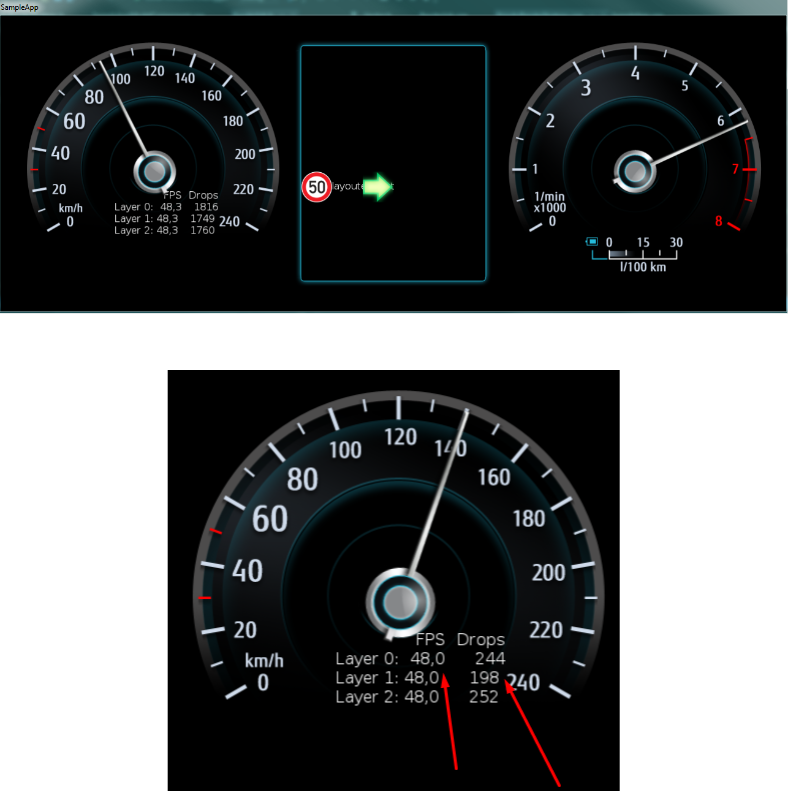
Example of the application running:

<div drawio-diagram="1824"><img src="https://doc316en.candera.eu/uploads/images/drawio/2023-02/drawing-4-1676621611.png" alt=""/></div>

<div class="contents" id="bkmrk--0"><div class="contents"><div class="textblock"><div class="image">  
</div><div class="image">  
</div></div></div></div>As you can see, the FPS is kept the same for all the layers, but the drops vary depending on the Layer/Nodes/Camera Sequence Number of each render target, some of the render jobs being skipped by the custom sort criteria in the PriorityRenderStrategy class.

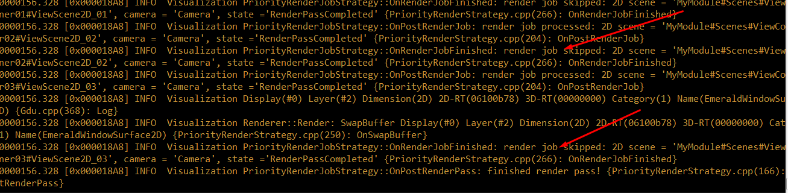
In the sample output, red arrows mark skipped render jobs:

<div drawio-diagram="1825"><img src="https://doc316en.candera.eu/uploads/images/drawio/2023-02/drawing-4-1676621631.png" alt=""/></div>

<div class="contents" id="bkmrk--2"><div class="contents"><div class="textblock"><div class="image">  
</div></div></div></div>##### <a class="anchor" id="bkmrk--17"></a>SceneComposer solution

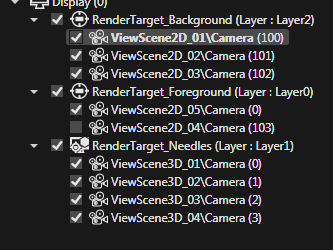
In this demo application, there are three layers: Layer0, Layer1 and Layer2 displayed bellow:

<div drawio-diagram="1827"><img src="https://doc316en.candera.eu/uploads/images/drawio/2023-02/drawing-4-1676621655.png" alt=""/></div>

<div class="contents" id="bkmrk--4"><div class="contents"><div class="textblock"><div class="image">  
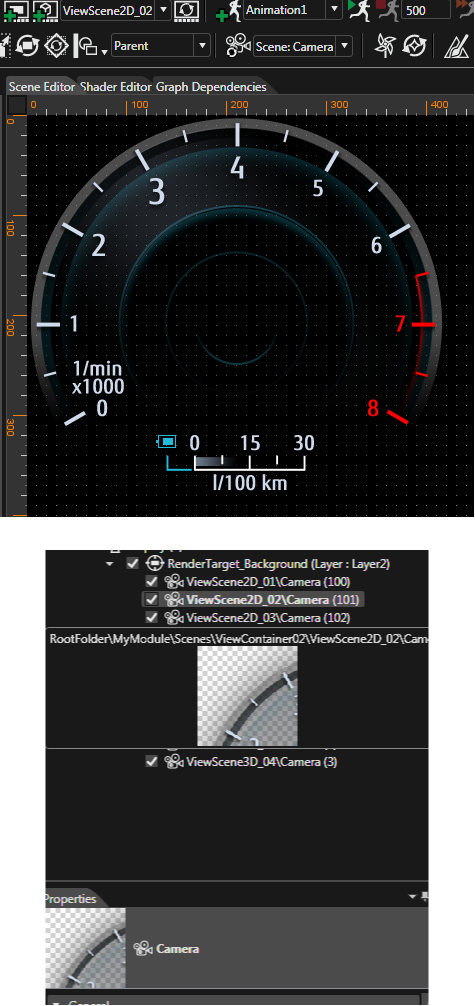
</div></div></div></div>For Layer 2 – which has the most content – the backgrounds, the respective cameras have the highest Sequence Number to have priority being rendered.

<div drawio-diagram="1828"><img src="https://doc316en.candera.eu/uploads/images/drawio/2023-02/drawing-4-1676621683.png" alt=""/></div>

<div class="contents" id="bkmrk--6"><div class="textblock"><div class="image">  
</div></div></div>#### **Invalidation**   


##### <a class="anchor" id="bkmrk--20"></a>Description

[Courier](http://dev.doc.cgistudio.at/APILINK/namespace_courier.html) introduces an invalidation mechanism by providing [Courier::FrameworkWidget::Invalidate](http://dev.doc.cgistudio.at/APILINK/class_courier_1_1_framework_widget.html#a40c3fcf4c499f73e8e9156bef1f78a79 "Invalidates the parent view.") and [Courier::View::Invalidate](http://dev.doc.cgistudio.at/APILINK/class_courier_1_1_view.html#ab0c2b9e33adfb550d0ad840d082b1955) methods, which shall be called if ViewScenes Candera::Camera(s) shall be rendered. Only enabled and invalidated cameras will be rendered. Cameras can be enabled/disabled by sending the appropriate [Courier::ActivationReqMsg](http://dev.doc.cgistudio.at/APILINK/class_courier_1_1_activation_req_msg.html) or by manually maintaining the state of the cameras via widget implementation.

The invalidation of the cameras causes appending a [Courier::RenderJob](http://dev.doc.cgistudio.at/APILINK/class_courier_1_1_render_job.html) to a [Courier::RenderJobs](http://dev.doc.cgistudio.at/APILINK/class_courier_1_1_render_jobs.html) array inside the [Courier::Renderer](http://dev.doc.cgistudio.at/APILINK/class_courier_1_1_renderer.html). This array is then used for rendering the cameras when [Courier::RenderComponent](http://dev.doc.cgistudio.at/APILINK/group___c_o_u_r_i_e_r___f_o_u_n_d_a_t_i_o_n.html#ga111beafd1fd94fe52d99eda8c752bcbf "RenderComponent renders both 2D and 3D Views.") executes the Render method. If the render counter of a RenderJob reaches 0 then the RenderJob is removed from the array of RenderJobs. If a new RenderJob is appended with an already existing RenderJob for this camera, the older entry will be removed.

2D and 3D RenderJobs are processed in their own arrays. This is necessary because of above threading configuration scenarios.   
Every Candera::Rendertarget used by a rendered camera will be swapped once after rendering the cameras.

A more specific method of invalidation is the usage of the methods:

<div class="contents" id="bkmrk-courier%3A%3Aviewscene2d"><div class="contents"><div class="textblock">- [Courier::ViewScene2D::Invalidate](http://dev.doc.cgistudio.at/APILINK/class_courier_1_1_view_scene2_d.html#aa5d29150c17c8b7c3029229f323c20d3)([Candera::Camera2D](http://dev.doc.cgistudio.at/APILINK/class_candera_1_1_camera2_d.html "A camera defines the view to the scene. At least one Camera2D has to be added to a 2D scene graph and...") \* invalidatedCamera, UInt8 renderCounter = cDefaultRenderCounter)
- [Courier::ViewScene3D::Invalidate](http://dev.doc.cgistudio.at/APILINK/class_courier_1_1_view_scene3_d.html#afe6364fea300839ec5c7147212cc8fb2)([Candera::Camera](http://dev.doc.cgistudio.at/APILINK/class_candera_1_1_camera.html "A Camera provides Modelview and Projection matrices. Camera is a Transformable.* The eye point is set...") \* invalidatedCamera, UInt8 renderCounter = cDefaultRenderCounter)
</div></div></div>Those methods allow invalidating the specified cameras (not necessarily all cameras of a view) and might also be used in the widget implementations. The widget has therefore use method [Courier::FrameworkWidget::GetParentView](http://dev.doc.cgistudio.at/APILINK/class_courier_1_1_framework_widget.html#a54ff7d5327313cf9350937c0b2868c0c "Returns the parent view."), cast the returned pointer to ViewScene2D or ViewScene3D and then call the appropriate 2D or 3D Invalidation method.

##### <a class="anchor" id="bkmrk--21"></a>Update &amp; Invalidation Sample

For example the BindeableValueWidget in our GettingStarted App invalidates if the bound value has changed and it shall be redrawn.

```
void <a class="code" href="http://dev.doc.cgistudio.at/APILINK/class_bindable_value_widget_base.html#a5da105c5b7bcdbde7322baa16b036906">BindableValueWidget::OnChanged</a>(Candera::UInt32 propertyId)
{
    if(!mBuffered) {
        if(propertyId == ValuePropertyId) {
            UpdateValue(GetValue());
        }
        <a class="code" href="http://dev.doc.cgistudio.at/APILINK/group___c_o_u_r_i_e_r___v_i_s_u_a_l_i_z_a_t_i_o_n.html#ggaf0e93dc4242f607c3c8d13dafd036af9a7e58b417e215e88881554ef892d19906">Invalidate</a>();
    }
}
```

<div class="contents" id="bkmrk--7"><div class="contents"><div class="textblock"><div class="fragment">  
</div>---

</div></div></div>##### <a class="anchor" id="bkmrk--22"></a>Invalidation in General

Most views are not overlapping, so there is no dependency between the displayed view. However, depending on the design, this may not always be the case.

The following examples demonstrate various combinations of overlapping views and their dependencies regarding invalidation:

##### <a class="anchor" id="bkmrk--23"></a>Example 1

<div class="contents" id="bkmrk-whenever-view2-is-in"><div class="contents"><div class="contents"><div class="textblock"><table border="0" style="width: 100%;"><tbody><tr><td style="width: 37.3334%;">[![invalidation1.png](https://doc316en.candera.eu/uploads/images/gallery/2023-02/scaled-1680-/invalidation1.png)](https://doc316en.candera.eu/uploads/images/gallery/2023-02/invalidation1.png)

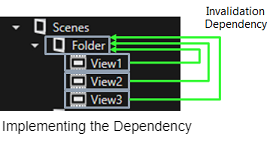
</td><td style="vertical-align: top; width: 62.6666%;" valign="top">Whenever View2 is invalidated, View1 must be invalidated too, because they are overlapping. View3 has to be invalidated as well, because it is overlapping with View2.

<table border="0"><tbody><tr><td colspan="3">View2 is invalidated</td></tr><tr><td>-&gt;</td><td colspan="2">Overlap with View1</td></tr><tr><td>-&gt;</td><td colspan="2">View 1 must be invalidated</td></tr><tr><td>  
</td><td>-&gt;</td><td>Overlap with View3</td></tr><tr><td>  
</td><td>-&gt;</td><td>View3 must be invalidated</td></tr></tbody></table>

</td></tr></tbody></table>

</div></div></div></div><div drawio-diagram="1836"><img src="https://doc316en.candera.eu/uploads/images/drawio/2023-02/drawing-4-1676621892.png" alt=""/></div>

<div class="contents" id="bkmrk--9"><div class="contents"><div class="textblock">  
</div></div></div>When a ViewContainer ("Folder" in SceneComposer) is invalidated, all its child views are invalidated.  
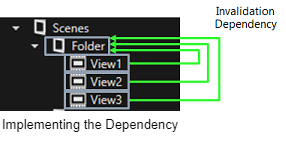
View1-3 can set an invalidation dependency to the ViewGroup "Folder" to implement the mutual invalidation.

##### <a class="anchor" id="bkmrk--25"></a>Example 2

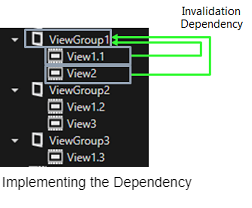
This is a possible solution for a shared background: Split the background into multiple views.

<div class="contents" id="bkmrk-view2-is-invalidated"><div class="contents"><div class="contents"><div class="textblock"><table border="1" style="border-collapse: collapse; width: 100%; border-width: 0px;"><tbody><tr><td style="width: 42.507%; border-width: 0px;">[![invalidation3.png](https://doc316en.candera.eu/uploads/images/gallery/2023-02/scaled-1680-/invalidation3.png)](https://doc316en.candera.eu/uploads/images/gallery/2023-02/invalidation3.png)

</td><td style="vertical-align: top; width: 57.493%; border-width: 0px;" valign="top">View2 is invalidated  
-&gt; Overlap with View 1.1  
-&gt; View 1.1 must be invalidated  
  
View 3 is invalidated  
-&gt; Overlap with View 1.2  
-&gt; View 1.2 must be invalidated  
</td></tr></tbody></table>

</div></div></div></div><div drawio-diagram="1838"><img src="https://doc316en.candera.eu/uploads/images/drawio/2023-02/drawing-4-1676621966.png" alt=""/></div>

<div class="contents" id="bkmrk--11"><div class="contents"><div class="textblock">  
</div></div></div>##### <a class="anchor" id="bkmrk--27"></a>Example 3

Sometimes overlap can not be avoided because of the design.

<div class="contents" id="bkmrk-an-invalidation-depe"><div class="contents"><div class="textblock"><table border="1" style="border-collapse: collapse; width: 100%; border-width: 0px;"><tbody><tr><td style="width: 41.1797%; border-width: 0px;">[![invalidation5.png](https://doc316en.candera.eu/uploads/images/gallery/2023-02/scaled-1680-/invalidation5.png)](https://doc316en.candera.eu/uploads/images/gallery/2023-02/invalidation5.png)

</td><td style="vertical-align: top; width: 58.8203%; border-width: 0px;" valign="top">An invalidation dependency between all 3 views exists.

**Possible solution:**  
Use multiple hardware layers if available.

If only 1 hardware layer is available, invalidation dependencies must be set.

</td></tr></tbody></table>

</div></div></div><div drawio-diagram="1840"><img src="https://doc316en.candera.eu/uploads/images/drawio/2023-02/drawing-4-1676622017.png" alt=""/></div>

<div class="textblock" id="bkmrk--13"></div><div class="textblock" id="bkmrk--14"></div>#### **Wakeup Render Mechanism** 

##### <a class="anchor" id="bkmrk--29"></a>Description

[Courier::RenderConfiguration::UseWakeUpRenderMechanism](http://dev.doc.cgistudio.at/APILINK/class_courier_1_1_render_configuration.html#a0d6faf01325c97dd10e92aaf12fc9815): The default value for this is false. If this is set to true, each widget should call WakeUpAllRenderComponents() whenever a property setter is called. Otherwise the Update method will not be called if the RenderComponent is currently in sleep mode. If implemented correctly this setting will result in the best possible performance optimization, therefore it can be recommended.