# Panel

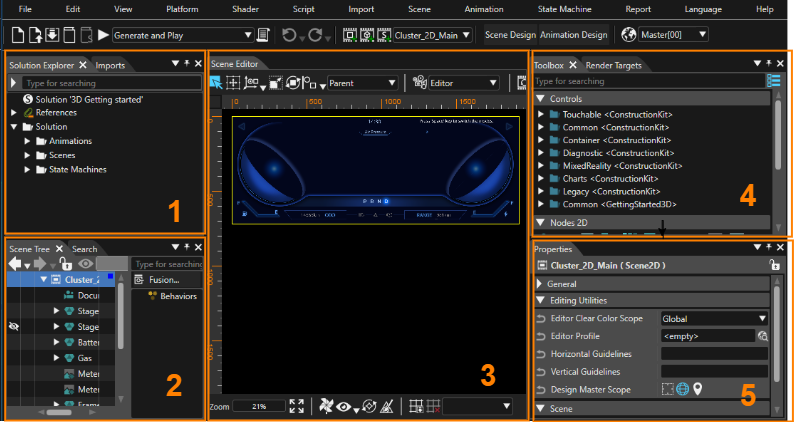
The Scene Composer user interface is composed of parts called panels. This page describes each panel, for which corresponding explanations can be found below.

<div drawio-diagram="7856"><img src="https://doc316en.candera.eu/uploads/images/drawio/2025-02/drawing-4-1738545034.png" alt=""/></div>

<p class="callout info">This page is explained according to the default layout for convenience.</p>

---

#### 1. Solution Explorer/Imports

<table border="1" id="bkmrk-%E3%82%BD%E3%83%AA%E3%83%A5%E3%83%BC%E3%82%B7%E3%83%A7%E3%83%B3%E3%82%A8%E3%82%AF%E3%82%B9%E3%83%97%E3%83%AD%E3%83%BC%E3%83%A9%E3%83%BC-%E3%82%BD%E3%83%AA%E3%83%A5%E3%83%BC" style="border-collapse: collapse; width: 800px; height: 75.1875px; border-width: 1px;"><colgroup><col style="width: 236px;"></col><col style="width: 488px;"></col><col style="width: 75px;"></col></colgroup><tbody><tr style="background-color: rgb(230, 126, 35); height: 29.7969px;"><td class="align-center" style="border-width: 1px; height: 29.7969px;">**Panel name**</td><td class="align-center" style="border-width: 1px; height: 29.7969px;">**Description**</td><td class="align-center" style="border-width: 1px; height: 29.7969px;">**<span style="color: rgb(0, 0, 0);">Note</span>**</td></tr><tr style="height: 10px;"><td style="height: 10px; border-width: 1px;">Solution Explorer</td><td style="height: 10px; border-width: 1px;">All items in the solution are displayed.

You can add new items, edit existing items and so on.

</td><td class="align-center" style="height: 10px; border-width: 1px;"><span style="color: rgb(230, 126, 35);">[\[ Detail \]](https://doc316en.candera.eu/books/solution-handling/page/organize-a-solution-using-folders)</span></td></tr><tr style="height: 35.3906px;"><td style="height: 35.3906px; border-width: 1px;">Imports</td><td style="height: 35.3906px; border-width: 1px;">Displays all items imported into the solution.

</td><td class="align-center" style="height: 35.3906px; border-width: 1px;"><span style="color: rgb(230, 126, 35);">[\[ Detail \]](https://doc316en.candera.eu/link/74#bkmrk-imports-panel)</span></td></tr></tbody></table>


#### 2. Scene Tree/Search/Output etc.

<table border="1" id="bkmrk-%E3%82%B7%E3%83%BC%E3%83%B3%E3%83%84%E3%83%AA%E3%83%BC-%E3%82%B7%E3%83%BC%E3%83%B3%E3%81%AB%E5%90%AB%E3%81%BE%E3%82%8C%E3%82%8B%E3%81%99%E3%81%B9%E3%81%A6%E3%81%AE%E3%83%8E" style="border-collapse: collapse; width: 800px; height: 181.359px; border-width: 1px;"><colgroup><col style="width: 181px;"></col><col style="width: 544px;"></col><col style="width: 74px;"></col></colgroup><tbody><tr style="background-color: rgb(230, 126, 35); height: 29.7969px;"><td class="align-center" style="border-width: 1px; height: 29.7969px;">**Panel name**</td><td class="align-center" style="border-width: 1px; height: 29.7969px;">**Description**</td><td class="align-center" style="border-width: 1px; height: 29.7969px;">**<span style="color: rgb(0, 0, 0);">Note</span>**</td></tr><tr style="height: 10px;"><td style="height: 10px; border-width: 1px;">Scene Tree</td><td style="height: 10px; border-width: 1px;">All nodes in the scene are displayed in a tree format.

You can add, edit, delete, etc. nodes.

</td><td class="align-center" style="border-width: 1px; height: 10px;"><span style="color: rgb(230, 126, 35);">[\[ Detail \]](https://doc316en.candera.eu/books/scene-design/chapter/scene-tree-editing)</span></td></tr><tr style="height: 35.3906px;"><td style="height: 35.3906px; border-width: 1px;">Search</td><td style="height: 35.3906px; border-width: 1px;">Displays trace information about the Scene Composer.

</td><td class="align-center" style="border-width: 1px; height: 35.3906px;"><span style="color: rgb(230, 126, 35);">[\[ Detail \]](https://doc316en.candera.eu/books/solution-handling/page/searching)</span></td></tr><tr style="height: 35.3906px;"><td style="height: 35.3906px; border-width: 1px;">Output</td><td style="height: 35.3906px; border-width: 1px;">Displays trace information about the Scene Composer.

</td><td class="align-center" style="border-width: 1px; height: 35.3906px;"><span style="color: rgb(230, 126, 35);">[\[ Detail \]](https://doc316en.candera.eu/books/solution-handling/page/output)</span></td></tr><tr style="height: 35.3906px;"><td style="height: 35.3906px; border-width: 1px;">Problems</td><td style="height: 35.3906px; border-width: 1px;">Displays errors/warnings/messages.

</td><td class="align-center" style="border-width: 1px; height: 35.3906px;"><span style="color: rgb(230, 126, 35);">[\[ Detail \]](https://doc316en.candera.eu/books/solution-handling/page/problems-browser)</span></td></tr><tr style="height: 35.3906px;"><td style="height: 35.3906px; border-width: 1px;">Text Size Report</td><td style="height: 35.3906px; border-width: 1px;">Displays a text size report.

</td><td class="align-center" style="border-width: 1px; height: 35.3906px;"><span style="color: rgb(230, 126, 35);">[\[ Detail \]](https://doc316en.candera.eu/books/solution-handling/page/text-size-report-KPG)</span></td></tr></tbody></table>


#### 3. Scene Editor/State Machine Editor/ Fusion etc.

<table border="1" id="bkmrk-%E3%82%B7%E3%83%BC%E3%83%B3%E3%82%A8%E3%83%87%E3%82%A3%E3%82%BF%E3%83%BC-%E8%A9%B3%E7%B4%B0%E3%81%AF%E3%80%81%E3%80%8C2d%E3%82%B7%E3%83%BC%E3%83%B3%E3%82%A8" style="border-collapse: collapse; width: 800px; height: 398.453px; border-width: 1px;"><colgroup><col style="width: 210px;"></col><col style="width: 495px;"></col><col style="width: 94px;"></col></colgroup><tbody><tr style="background-color: rgb(230, 126, 35); height: 29.7969px;"><td class="align-center" style="border-width: 1px; height: 29.7969px;">**Panel name**</td><td class="align-center" style="border-width: 1px; height: 29.7969px;">**Description**</td><td class="align-center" style="border-width: 1px; height: 29.7969px;">**<span style="color: rgb(0, 0, 0);">Note</span>**</td></tr><tr style="height: 40.75px;"><td style="height: 40.75px; border-width: 1px;">Scene Editor</td><td style="height: 40.75px; border-width: 1px;">The main panel of Scene Composer allows you to view and edit the nodes contained in a scene.

</td><td class="align-center" style="border-width: 1px; height: 40.75px;"><span style="color: rgb(230, 126, 35);">[\[ 2D Scene \]](https://doc316en.candera.eu/books/scene-design/page/2d-scene-editor)  
[\[ 3D Scene \]](https://doc316en.candera.eu/books/scene-design/page/3d-scene-editor)</span></td></tr><tr style="height: 57.7812px;"><td style="height: 57.7812px; border-width: 1px;">Fusion</td><td style="height: 57.7812px; border-width: 1px;">Various actions can be configured by adding Fusion nodes to the nodes selected in the scene tree.

</td><td class="align-center" style="border-width: 1px; height: 57.7812px;"><span style="color: rgb(230, 126, 35);">[\[ Detail \]](https://doc316en.candera.eu/books/fusion/page/fusion-editor-ui)</span></td></tr><tr style="height: 35.3906px;"><td style="height: 35.3906px; border-width: 1px;">State Machine Editor</td><td style="height: 35.3906px; border-width: 1px;">You can edit the selected state machine in the Solution Explorer.

</td><td class="align-center" style="border-width: 1px; height: 35.3906px;"><span style="color: rgb(230, 126, 35);">[\[ Detail \]](https://doc316en.candera.eu/books/state-machine)</span></td></tr><tr style="height: 35.3906px;"><td style="height: 35.3906px; border-width: 1px;">Shader Editor</td><td style="height: 35.3906px; border-width: 1px;">You can edit the selected shaders in the Shaders panel.

</td><td class="align-center" style="border-width: 1px; height: 35.3906px;"><span style="color: rgb(230, 126, 35);">[\[ Detail \]](https://doc316en.candera.eu/link/146#bkmrk-shader-editor%C2%A0)</span></td></tr><tr style="height: 35.3906px;"><td style="height: 35.3906px; border-width: 1px;">Script Editor</td><td style="height: 35.3906px; border-width: 1px;">You can edit the selected script in the Solution Explorer or in the Toolbox.

</td><td class="align-center" style="border-width: 1px; height: 35.3906px;"><span style="color: rgb(230, 126, 35);">[\[ Detail \]](https://doc316en.candera.eu/books/scripting/page/script-editor-and-script-validation)</span></td></tr><tr style="height: 35.3906px;"><td style="height: 35.3906px; border-width: 1px;">SCML Editor</td><td style="height: 35.3906px; border-width: 1px;">You can edit the SCML.

</td><td class="align-center" style="border-width: 1px; height: 35.3906px;"><span style="color: rgb(230, 126, 35);">[\[ Detail \]](https://doc316en.candera.eu/books/scenecomposer-markup-language/page/scml-editor)</span></td></tr><tr style="height: 35.3906px;"><td style="height: 35.3906px; border-width: 1px;">Appearance Editor</td><td style="height: 35.3906px; border-width: 1px;">You can edit node attachment templates.

</td><td class="align-center" style="border-width: 1px; height: 35.3906px;"><span style="color: rgb(230, 126, 35);">[\[ Detail \]](https://doc316en.candera.eu/link/132#bkmrk-appearance-editor)</span></td></tr><tr style="height: 35.3906px;"><td style="height: 35.3906px; border-width: 1px;">Graph Dependencies</td><td style="height: 35.3906px; border-width: 1px;">Visualize the dependencies of the nodes in the scene tree.

</td><td class="align-center" style="border-width: 1px; height: 35.3906px;"><span style="color: rgb(230, 126, 35);">[\[ Detail \]](https://doc316en.candera.eu/books/scene-design/page/usage-and-dependencies)</span></td></tr><tr style="height: 57.7812px;"><td style="height: 57.7812px; border-width: 1px;">Transition Rules Editor

/Transition Execution

</td><td style="height: 57.7812px; border-width: 1px;">Transitions between scenes can be set up.

</td><td class="align-center" style="border-width: 1px; height: 57.7812px;"><span style="color: rgb(230, 126, 35);">[\[ Detail \]](https://doc316en.candera.eu/link/1194#bkmrk-page-title)</span></td></tr><tr><td style="border-width: 1px;">Player/CGIPane

</td><td style="border-width: 1px;">The Embedded Player validates solutions created with Scene Composer.

</td><td class="align-center" style="border-width: 1px;"><span style="color: rgb(230, 126, 35);">[\[ Detail \]](https://doc316en.candera.eu/books/scene-design/page/embedded-player)</span></td></tr></tbody></table>


#### 4. Toolbox/Render Targets etc.

<table border="1" id="bkmrk-%E3%83%84%E3%83%BC%E3%83%AB%E3%83%9C%E3%83%83%E3%82%AF%E3%82%B9-%E3%82%B7%E3%83%BC%E3%83%B3%E3%81%AA%E3%81%A9%E3%81%AB%E8%BF%BD%E5%8A%A0%E5%8F%AF%E8%83%BD%E3%81%AA%E3%82%A2" style="border-collapse: collapse; width: 800px; border-width: 1px;"><colgroup><col style="width: 164px;"></col><col style="width: 530px;"></col><col style="width: 105px;"></col></colgroup><tbody><tr style="background-color: rgb(230, 126, 35);"><td class="align-center" style="border-width: 1px; height: 29.7969px;">**Panel name**</td><td class="align-center" style="border-width: 1px; height: 29.7969px;">**Description**</td><td class="align-center" style="border-width: 1px; height: 29.7969px;">**<span style="color: rgb(0, 0, 0);">Note</span>**</td></tr><tr><td style="border-width: 1px;">Toolbox</td><td style="border-width: 1px;">Items (controls, nodes, effects, behaviors, and scripts) that can be added to scenes and other objects are listed.

</td><td class="align-center" style="border-width: 1px;"><span style="color: rgb(230, 126, 35);">[\[ 2D Toolbox \]](https://doc316en.candera.eu/link/147#bkmrk-2d-toolbox)  
[\[ 3D Toolbox \]](https://doc316en.candera.eu/link/130#bkmrk-3d-toolbox)</span></td></tr><tr><td style="border-width: 1px;">RenderTargets</td><td style="border-width: 1px;">Create/edit new render targets.

</td><td class="align-center" style="border-width: 1px;"><span style="color: rgb(230, 126, 35);">[\[ Detail \]](https://doc316en.candera.eu/books/display-configuration)</span>

</td></tr><tr><td style="border-width: 1px;">Tempates</td><td style="border-width: 1px;">View templates included in the solution.

</td><td class="align-center" style="border-width: 1px;"><span style="color: rgb(230, 126, 35);">[\[ Detail \]](https://doc316en.candera.eu/link/1193#bkmrk-page-title)</span>

</td></tr><tr><td style="border-width: 1px;">Diagram Bird's Eye</td><td style="border-width: 1px;">View a bird's eye view of the Fusion diagram or the entire State Machine Editor.

</td><td class="align-center" style="border-width: 1px;"><span style="color: rgb(230, 126, 35);">[\[ Detail \]](https://doc316en.candera.eu/books/solution-handling/page/diagram-birds-eye)</span>

</td></tr><tr><td style="border-width: 1px;">Scopes</td><td style="border-width: 1px;">Set up camera culling and light culling.

</td><td class="align-center" style="border-width: 1px;"><span style="color: rgb(230, 126, 35);">[\[ Detail \]](https://doc316en.candera.eu/books/scene-design/chapter/scoping)</span>

</td></tr><tr><td style="border-width: 1px;">Shaders</td><td style="border-width: 1px;">Shaders included in the solution are displayed.

</td><td class="align-center" style="border-width: 1px;"><span style="color: rgb(230, 126, 35);">[\[ Detail \]](https://doc316en.candera.eu/books/scene-design/page/shader-configuration)</span>

</td></tr><tr><td style="border-width: 1px;">Render Statistics</td><td style="border-width: 1px;">A performance indicator for the display is shown during rendering.

</td><td class="align-center" style="border-width: 1px;"><span style="color: rgb(230, 126, 35);">[\[ Detail \]](https://doc316en.candera.eu/books/display-configuration/page/display-renderer-statistics)</span>

</td></tr><tr><td style="border-width: 1px;">Text Search</td><td style="border-width: 1px;">This panel allows you to search for text contained in the solution or selected scenes.

</td><td style="border-width: 1px;"><span style="color: rgb(230, 126, 35);">[\[ Detail \]](https://doc316en.candera.eu/link/16#bkmrk-text-search)</span>

</td></tr></tbody></table>


#### 5. Properties

Here displays the properties of the selected item in the Solution Explorer, scene tree, and various editors. You can also edit the value of each property.

#### Animation Panels

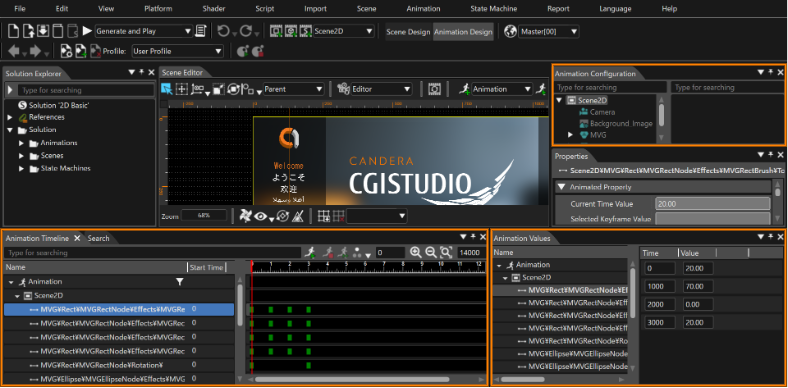
The animation-related panel appears when \[ Animation Design \] is enabled via the mode-switching button on the toolbar.

<div drawio-diagram="7857"><img src="https://doc316en.candera.eu/uploads/images/drawio/2025-02/drawing-4-1738545071.png" alt=""/></div>

<table border="1" id="bkmrk-%E3%82%A2%E3%83%8B%E3%83%A1%E3%83%BC%E3%82%B7%E3%83%A7%E3%83%B3%E3%82%BF%E3%82%A4%E3%83%A0%E3%83%A9%E3%82%A4%E3%83%B3-%E3%82%A2%E3%83%8B%E3%83%A1%E3%83%BC%E3%82%B7%E3%83%A7" style="border-collapse: collapse; width: 800px; border-width: 1px;"><colgroup><col style="width: 200px;"></col><col style="width: 525px;"></col><col style="width: 74px;"></col></colgroup><tbody><tr style="background-color: rgb(230, 126, 35);"><td class="align-center" style="border-width: 1px; height: 29.7969px;">**Panel name**</td><td class="align-center" style="border-width: 1px; height: 29.7969px;">**Description**</td><td class="align-center" style="border-width: 1px; height: 29.7969px;">**<span style="color: rgb(0, 0, 0);">Note</span>**</td></tr><tr><td style="border-width: 1px;">Animation Timeline</td><td style="border-width: 1px;">Graphically view or edit animation-related settings.

</td><td class="align-center" style="border-width: 1px;"><span style="color: rgb(230, 126, 35);">[\[ Detail \]](https://doc316en.candera.eu/books/animation-design/page/timeline-editor)</span>

</td></tr><tr><td style="border-width: 1px;">Animation Values</td><td style="border-width: 1px;">View or edit animation-related settings with information in text format.

</td><td class="align-center" style="border-width: 1px;"><span style="color: rgb(230, 126, 35);">[\[ Detail \]](https://doc316en.candera.eu/books/animation-design/page/animation-values-keyframes)</span>

</td></tr><tr><td style="border-width: 1px;">Animation Configuration</td><td style="border-width: 1px;">Nodes in the solution are displayed in a tree format, with only the nodes related to the active animation highlighted.

</td><td class="align-center" style="border-width: 1px;"><span style="color: rgb(230, 126, 35);">[\[ Detail \]](https://doc316en.candera.eu/link/17#bkmrk-animation-configurat)</span></td></tr></tbody></table>

#### Other panels

<table border="1" id="bkmrk-%E3%83%A9%E3%82%A4%E3%83%96%E3%83%97%E3%83%AC%E3%83%93%E3%83%A5%E3%83%BC-candera%E3%83%AD%E3%82%AE%E3%83%B3%E3%82%B0" style="border-collapse: collapse; width: 800px; border-width: 1px; height: 194.531px;"><colgroup><col style="width: 203px;"></col><col style="width: 522px;"></col><col style="width: 74px;"></col></colgroup><tbody><tr style="background-color: rgb(230, 126, 35); height: 29.7969px;"><td class="align-center" style="border-width: 1px; height: 29.7969px;">**Panel name**</td><td class="align-center" style="border-width: 1px; height: 29.7969px;">**Description**</td><td class="align-center" style="border-width: 1px; height: 29.7969px;">**<span style="color: rgb(0, 0, 0);">Note</span>**</td></tr><tr style="height: 23.1719px;"><td style="border-width: 1px; height: 23.1719px;">Live Preview

</td><td style="border-width: 1px; height: 23.1719px;">The definition of the data binding used in the selected scene can be displayed. You can also simulate the behavior of data binding by dynamically setting values for the definitions.

</td><td class="align-center" style="border-width: 1px; height: 23.1719px;"><span style="color: rgb(230, 126, 35);">[\[ Detail \]](https://doc316en.candera.eu/link/100#bkmrk-%E3%83%A9%E3%82%A4%E3%83%96%E3%83%97%E3%83%AC%E3%83%93%E3%83%A5%E3%83%BC%E3%83%91%E3%83%8D%E3%83%AB)</span>

</td></tr><tr style="height: 35.3906px;"><td style="border-width: 1px; height: 35.3906px;">Candera Logging

</td><td style="border-width: 1px; height: 35.3906px;">Trace information about the Candera Graphic Engine is displayed.

</td><td class="align-center" style="border-width: 1px; height: 35.3906px;"><span style="color: rgb(230, 126, 35);">[\[ Detail \]](https://doc316en.candera.eu/books/solution-handling/page/candera-logging)</span>

</td></tr><tr style="height: 35.3906px;"><td style="border-width: 1px; height: 35.3906px;">Widgets</td><td style="border-width: 1px; height: 35.3906px;">User custom widgets can be used.  
</td><td class="align-center" style="border-width: 1px; height: 35.3906px;"><span style="color: rgb(230, 126, 35);">[\[ Detail \]](https://doc316en.candera.eu/link/200#bkmrk-widgets-panel)</span></td></tr><tr style="height: 35.3906px;"><td style="border-width: 1px; height: 35.3906px;">Render Order Bins</td><td style="border-width: 1px; height: 35.3906px;">Manage the rendering order in a 3D scene.  
</td><td class="align-center" style="border-width: 1px; height: 35.3906px;"><span style="color: rgb(230, 126, 35);">[\[ Detail \]](https://doc316en.candera.eu/link/132#bkmrk-render-order-bins)</span></td></tr></tbody></table>

---