# Scene Composer User Interface

# Overview

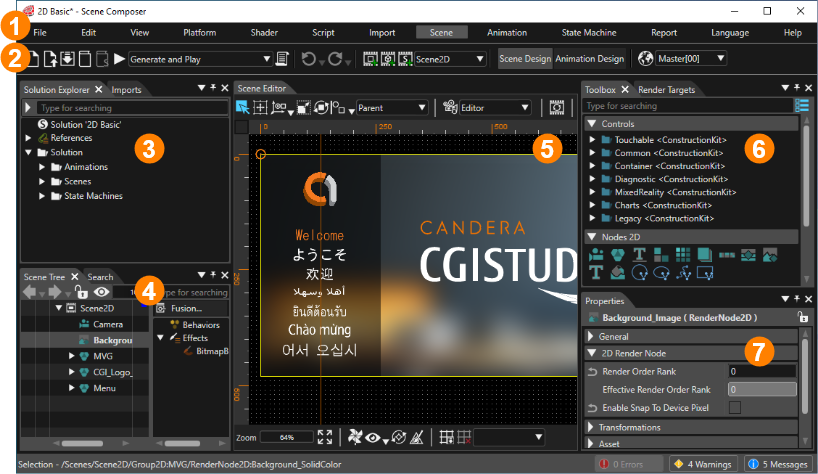
The Scene Composer interface consists of three parts: the menu bar, the toolbar, and the panels. The menu bar contains operation menus arranged by category, such as File and Edit. The toolbar contains icons for frequently used operations. In addition, for each function, a window called a panel is provided for working with Scene Composer. For more information, see the description page for each part.

1. <span style="color: rgb(230, 126, 35);">[Menu bar](https://doc316en.candera.eu/books/getting-started/page/menu-bar)</span>
2. <span style="color: rgb(230, 126, 35);">[Tool bar](https://doc316en.candera.eu/books/getting-started/page/tool-bar)</span>
3. <span style="color: rgb(230, 126, 35);">[Panel: Solution Explorer/Imports](https://doc316en.candera.eu/link/1162#bkmrk-3.-%E3%82%BD%E3%83%AA%E3%83%A5%E3%83%BC%E3%82%B7%E3%83%A7%E3%83%B3%E3%82%A8%E3%82%AF%E3%82%B9%E3%83%97%E3%83%AD%E3%83%BC%E3%83%A9%E3%83%BC%EF%BC%8F%E3%82%A4)</span>
4. <span style="color: rgb(230, 126, 35);">[Panel: Scene Tree/Search/Output etc.](https://doc316en.candera.eu/link/1162#bkmrk-4.-%E3%82%B7%E3%83%BC%E3%83%B3%E3%83%84%E3%83%AA%E3%83%BC%EF%BC%8F%E6%A4%9C%E7%B4%A2%EF%BC%8F%E5%87%BA%E5%8A%9B%E3%80%80%E4%BB%96)</span>
5. <span style="color: rgb(230, 126, 35);">[Panel: Scene Editor/State Machine Editor/Fusion etc.](https://doc316en.candera.eu/link/1162#bkmrk-5.-%E3%82%B7%E3%83%BC%E3%83%B3%E3%82%A8%E3%83%87%E3%82%A3%E3%82%BF%E3%83%BC%EF%BC%8F%E3%82%B9%E3%83%86%E3%83%BC%E3%83%88%E3%83%9E%E3%82%B7%E3%83%B3%E3%82%A8)</span>
6. <span style="color: rgb(230, 126, 35);">[Panel: Toolbox/Render Targets etc.](https://doc316en.candera.eu/link/1162#bkmrk-6.-%E3%83%84%E3%83%BC%E3%83%AB%E3%83%9C%E3%83%83%E3%82%AF%E3%82%B9%EF%BC%8F%E3%83%AC%E3%83%B3%E3%83%80%E3%83%BC%E3%82%BF%E3%83%BC%E3%82%B2%E3%83%83%E3%83%88)</span>
7. <span style="color: rgb(230, 126, 35);">[Panel: Properties](https://doc316en.candera.eu/link/1162#bkmrk-7.-%E3%83%97%E3%83%AD%E3%83%91%E3%83%86%E3%82%A3)</span>

<div drawio-diagram="7538"><img src="https://doc316en.candera.eu/uploads/images/drawio/2024-11/drawing-5-1732867854.png" alt=""/></div>

<p class="callout info">Panels 3 through 7 above can be customized to any layout. Customized layouts can also be managed as perspectives. (For more information, see <span style="color: rgb(230, 126, 35);">[Perspective Support](https://doc316en.candera.eu/link/9#bkmrk-perspective-support)</span>.)</p>

---

# Menu bar

Each feature of Scene Composer can be selected and executed from the menu bar. The menu bar contains "File," "Edit," "View," and other major items, and each feature and various settings are arranged under these major items, just as in a general application. Each feature and setting can also be executed using the key commands at the right end of the menu bar. This page explains the functions and various settings for each major item.

---

#### File

<table border="1" id="bkmrk-%E3%83%A1%E3%83%8B%E3%83%A5%E3%83%BC%E5%90%8D-%E8%AA%AC%E6%98%8E-%E5%82%99%E8%80%83-%E3%82%BD%E3%83%AA%E3%83%A5%E3%83%BC%E3%82%B7%E3%83%A7%E3%83%B3%E3%82%92" style="border-collapse: collapse; width: 800px; height: 758.609px; border-width: 1px;"><colgroup><col style="width: 239px;"></col><col style="width: 488px;"></col><col style="width: 72px;"></col></colgroup><tbody><tr style="height: 29.7969px;"><td class="align-center" style="background-color: rgb(230, 126, 35); height: 29.7969px; border-width: 1px;">**Menu name**</td><td class="align-center" style="background-color: rgb(230, 126, 35); height: 29.7969px; border-width: 1px;">**Description**</td><td class="align-center" style="background-color: rgb(230, 126, 35); height: 29.7969px; border-width: 1px;">**Note**</td></tr><tr style="height: 35.3906px;"><td style="height: 35.3906px; border-width: 1px;">New Solution...</td><td style="height: 35.3906px; border-width: 1px;">Create a new solution.</td><td class="align-center" style="height: 35.3906px; border-width: 1px;"><span style="color: rgb(230, 126, 35);">[\[ Detail \]](https://doc316en.candera.eu/books/solution-handling/page/new-solution)</span></td></tr><tr style="height: 35.3906px;"><td style="height: 35.3906px; border-width: 1px;">Open Solution...</td><td style="height: 35.3906px; border-width: 1px;">Opens an existing solution.</td><td class="align-center" style="height: 35.3906px; border-width: 1px;"><span style="color: rgb(230, 126, 35);">[\[ Detail \]](https://doc316en.candera.eu/books/solution-handling/page/open-solution)</span></td></tr><tr style="height: 29.7969px;"><td style="height: 29.7969px; border-width: 1px;">Close Solution</td><td style="height: 29.7969px; border-width: 1px;">Closes the currently open solution.</td><td class="align-center" style="height: 29.7969px; border-width: 1px;">ー</td></tr><tr style="height: 35.3906px;"><td style="height: 35.3906px; border-width: 1px;">Source Control</td><td style="height: 35.3906px; border-width: 1px;">Import/checkout source control.</td><td class="align-center" style="height: 35.3906px; border-width: 1px;"><span style="color: rgb(230, 126, 35);">[\[ Detail \]](https://doc316en.candera.eu/books/solution-handling/page/source-control-support)</span></td></tr><tr style="height: 35.3906px;"><td style="height: 35.3906px; border-width: 1px;">Save Solution</td><td style="height: 35.3906px; border-width: 1px;">Overwrites the currently open Solution.</td><td class="align-center" style="height: 35.3906px; border-width: 1px;"><span style="color: rgb(230, 126, 35);">[\[ Detail \]](https://doc316en.candera.eu/link/43#bkmrk-save-a-solution)</span></td></tr><tr style="height: 35.3906px;"><td style="height: 35.3906px; border-width: 1px;">Save Solution As...</td><td style="height: 35.3906px; border-width: 1px;">Save the currently open solution as.</td><td class="align-center" style="height: 35.3906px; border-width: 1px;"><span style="color: rgb(230, 126, 35);">[\[ Detail \]](https://doc316en.candera.eu/link/43#bkmrk-save-a-solution-in-a)</span></td></tr><tr style="height: 35.3906px;"><td style="height: 35.3906px; border-width: 1px;">Clear Solution Cache</td><td style="height: 35.3906px; border-width: 1px;">Clears the solution cache.</td><td class="align-center" style="height: 35.3906px; border-width: 1px;"><span style="color: rgb(230, 126, 35);">[\[ Detail \]](https://doc316en.candera.eu/books/solution-handling/page/clear-solution-cache)</span></td></tr><tr style="height: 35.3906px;"><td style="height: 35.3906px; border-width: 1px;">Recent Soltions</td><td style="height: 35.3906px; border-width: 1px;">Displays recently opened solutions.</td><td class="align-center" style="height: 35.3906px; border-width: 1px;"><span style="color: rgb(230, 126, 35);">[\[ Detail \]](https://doc316en.candera.eu/link/42#bkmrk-recent-solutions)</span></td></tr><tr style="height: 35.3906px;"><td style="border-width: 1px; height: 35.3906px;">Solution Reports...</td><td style="border-width: 1px; height: 35.3906px;">Displays the Solution Report.</td><td class="align-center" style="border-width: 1px; height: 35.3906px;"><span style="color: rgb(230, 126, 35);">[\[ Detail \]](https://doc316en.candera.eu/books/solution-handling/page/solution-report)</span></td></tr><tr style="height: 35.3906px;"><td style="height: 35.3906px; border-width: 1px;">Preferences...</td><td style="height: 35.3906px; border-width: 1px;">Opens the "Preferences" dialog.</td><td class="align-center" style="height: 35.3906px; border-width: 1px;"><span style="color: rgb(230, 126, 35);">[\[ Detail \]](https://doc316en.candera.eu/books/preferences)</span></td></tr><tr style="height: 35.3906px;"><td style="height: 35.3906px; border-width: 1px;">Solution Options...</td><td style="height: 35.3906px; border-width: 1px;">Opens the "Solution Options" dialog.</td><td class="align-center" style="height: 35.3906px; border-width: 1px;"><span style="color: rgb(230, 126, 35);">[\[ Detail \]](https://doc316en.candera.eu/books/solution-handling/chapter/solution-options)</span></td></tr><tr style="height: 35.3906px;"><td style="height: 35.3906px; border-width: 1px;">Generate Asset Library...</td><td style="height: 35.3906px; border-width: 1px;">Generate Asset Library</td><td class="align-center" style="height: 35.3906px; border-width: 1px;"><span style="color: rgb(230, 126, 35);">[\[ Detail \]](https://doc316en.candera.eu/books/asset-library-generation/page/generate-asset-library)</span></td></tr><tr style="height: 35.3906px;"><td style="height: 35.3906px; border-width: 1px;">Export SCL...</td><td style="height: 35.3906px; border-width: 1px;">Exports SCLs (Shared Component Libraries).</td><td class="align-center" style="height: 35.3906px; border-width: 1px;"><span style="color: rgb(230, 126, 35);">[\[ Detail \]](https://doc316en.candera.eu/books/solution-handling/page/reusable-solution-libraries)</span></td></tr><tr style="height: 15.3906px;"><td style="height: 15.3906px; border-width: 1px;">Automation Scripts...</td><td style="height: 15.3906px; border-width: 1px;">Sets up automatic execution of user-defined scripts.</td><td class="align-center" style="height: 15.3906px; border-width: 1px;"><span style="color: rgb(230, 126, 35);">[\[ Detail \]](https://doc316en.candera.eu/books/extending-scenecomposer/page/executable-generation)</span></td></tr><tr style="height: 35.3906px;"><td style="height: 35.3906px; border-width: 1px;">Export Symbolic Names...</td><td style="height: 35.3906px; border-width: 1px;">Exports a header file (.h) with a list of symbolic names.</td><td class="align-center" style="height: 35.3906px; border-width: 1px;"><span style="color: rgb(230, 126, 35);">[\[ Detail \]](https://doc316en.candera.eu/link/418#bkmrk-accessing-items-via-)</span></td></tr><tr style="height: 57.7812px;"><td style="height: 57.7812px; border-width: 1px;">Define application specification</td><td style="height: 57.7812px; border-width: 1px;">Sets up application specifications (definitions for the connection between the Scene Composer solution and the CGI Panel).

</td><td class="align-center" style="height: 57.7812px; border-width: 1px;"><span style="color: rgb(230, 126, 35);">[\[ Detail \]](https://doc316en.candera.eu/link/312#bkmrk-application-specific)</span></td></tr><tr style="height: 35.3906px;"><td style="height: 35.3906px; border-width: 1px;">Set External Resources Path…</td><td style="height: 35.3906px; border-width: 1px;">Sets the folder where external resources will be placed.</td><td class="align-center" style="height: 35.3906px; border-width: 1px;"><span style="color: rgb(230, 126, 35);">[\[ Detail \]](https://doc316en.candera.eu/link/1073#bkmrk-resource-reference-m)</span></td></tr><tr style="height: 29.7969px;"><td style="height: 29.7969px; border-width: 1px;">Exit</td><td style="height: 29.7969px; border-width: 1px;">Exit Scene Composer.</td><td class="align-center" style="height: 29.7969px; border-width: 1px;">ー</td></tr></tbody></table>

#### Edit

<table border="1" id="bkmrk-%E3%83%A1%E3%83%8B%E3%83%A5%E3%83%BC%E5%90%8D-%E8%AA%AC%E6%98%8E-%E5%82%99%E8%80%83-%E3%83%AC%E3%82%A4%E3%82%A2%E3%82%A6%E3%83%88%E3%82%92%E5%AE%9F%E8%A1%8C" style="border-collapse: collapse; width: 800px; height: 148.984px; border-width: 1px;"><colgroup><col style="width: 242px;"></col><col style="width: 484px;"></col><col style="width: 74px;"></col></colgroup><tbody><tr style="height: 29.7969px;"><td class="align-center" style="background-color: rgb(230, 126, 35); height: 29.7969px; border-width: 1px;">**Menu name**</td><td class="align-center" style="background-color: rgb(230, 126, 35); height: 29.7969px; border-width: 1px;">**Description**</td><td class="align-center" style="background-color: rgb(230, 126, 35); height: 29.7969px; border-width: 1px;">**Note**</td></tr><tr><td style="border-width: 1px;">Undo</td><td style="border-width: 1px;">Undo the previous operation.</td><td class="align-center" style="border-width: 1px;">[\[ Detail \]](https://doc316en.candera.eu/books/solution-handling/page/undo-and-redo-operations)</td></tr><tr><td style="border-width: 1px;">Redo</td><td style="border-width: 1px;">Redo the previous operation.</td><td class="align-center" style="border-width: 1px;">[\[ Detail \]](https://doc316en.candera.eu/books/solution-handling/page/undo-and-redo-operations)</td></tr><tr><td style="border-width: 1px;">Go To Previous Element</td><td style="border-width: 1px;">Moves to the previous element.</td><td class="align-center" style="border-width: 1px;">ー</td></tr><tr style="height: 29.7969px;"><td style="height: 29.7969px; border-width: 1px;">Do Layout</td><td style="height: 29.7969px; border-width: 1px;">Apply layout.</td><td class="align-center" style="height: 29.7969px; border-width: 1px;">ー</td></tr><tr style="height: 29.7969px;"><td style="height: 29.7969px; border-width: 1px;">Go To Next Element</td><td style="height: 29.7969px; border-width: 1px;">Moves to the next element.</td><td class="align-center" style="height: 29.7969px; border-width: 1px;">ー</td></tr></tbody></table>

#### View

<table border="1" id="bkmrk-%E3%83%A1%E3%83%8B%E3%83%A5%E3%83%BC%E5%90%8D-%E8%AA%AC%E6%98%8E-%E5%82%99%E8%80%83-%E6%96%B0%E8%A6%8F%E3%81%AE%E3%83%91%E3%83%BC%E3%82%B9%E3%83%9A%E3%82%AF" style="border-collapse: collapse; width: 800px; height: 268.937px; border-width: 1px;"><colgroup><col style="width: 241px;"></col><col style="width: 486px;"></col><col style="width: 73px;"></col></colgroup><tbody><tr style="height: 29.7969px;"><td class="align-center" style="background-color: rgb(230, 126, 35); height: 29.7969px; border-width: 1px;">**Menu name**</td><td class="align-center" style="background-color: rgb(230, 126, 35); height: 29.7969px; border-width: 1px;">**Description**</td><td class="align-center" style="background-color: rgb(230, 126, 35); height: 29.7969px; border-width: 1px;">**Note**</td></tr><tr style="height: 35.3906px;"><td style="height: 35.3906px; border-width: 1px;">New perspective</td><td style="height: 35.3906px; border-width: 1px;">Saves a new perspective (Scene Composer layout).</td><td class="align-center" style="height: 35.3906px; border-width: 1px;">[\[ Detail \]](https://doc316en.candera.eu/link/9#bkmrk-perspective-support)</td></tr><tr style="height: 35.3906px;"><td style="height: 35.3906px; border-width: 1px;">Delete Perspective</td><td style="height: 35.3906px; border-width: 1px;">Deletes the active perspective.</td><td class="align-center" style="height: 35.3906px; border-width: 1px;">[\[ Detail \]](https://doc316en.candera.eu/link/9#bkmrk-perspective-support)</td></tr><tr style="height: 29.7969px;"><td style="height: 29.7969px; border-width: 1px;">Restore Default Layout</td><td style="height: 29.7969px; border-width: 1px;">Resets the Scene Composer layout to default.</td><td class="align-center" style="height: 29.7969px; border-width: 1px;">ー</td></tr><tr style="height: 57.7812px;"><td style="height: 57.7812px; border-width: 1px;">Toolbar</td><td style="height: 57.7812px; border-width: 1px;">Shows/hides the icons related to the Navigation/Animation/Editor Profile/Script System contained in the toolbar.

</td><td class="align-center" style="height: 57.7812px; border-width: 1px;">[\[ Detail \]](https://doc316en.candera.eu/books/getting-started/page/tool-bar)</td></tr><tr style="height: 35.3906px;"><td style="height: 35.3906px; border-width: 1px;">2D Editing Utilities</td><td style="height: 35.3906px; border-width: 1px;">Enables/disables various features of the 2D scene editor.</td><td class="align-center" style="height: 35.3906px; border-width: 1px;">[\[ Detail \]](https://doc316en.candera.eu/books/preferences/page/2d-editing-helpers)</td></tr><tr style="height: 35.3906px;"><td style="height: 35.3906px; border-width: 1px;">3D Editing Helpers</td><td style="height: 35.3906px; border-width: 1px;">Enables/disables various 3D scene editor features.</td><td class="align-center" style="height: 35.3906px; border-width: 1px;">[\[ Detail \]](https://doc316en.candera.eu/books/preferences/page/3d-editing-helpers)</td></tr><tr style="height: 10px;"><td style="height: 10px; border-width: 1px;">Panels</td><td style="height: 10px; border-width: 1px;">Display/Hide various panels.</td><td class="align-center" style="height: 10px; border-width: 1px;">[\[ Detail \]](https://doc316en.candera.eu/books/getting-started/page/panel)</td></tr></tbody></table>

<p class="callout info">The Render Slots panel cannot be used unless Safety function is enabled. For more information about the Safety function, please contact our representative.</p>

#### Platform

<table border="1" id="bkmrk-%E3%83%A1%E3%83%8B%E3%83%A5%E3%83%BC%E5%90%8D-%E8%AA%AC%E6%98%8E-%E5%82%99%E8%80%83-%E6%96%B0%E8%A6%8F%E3%83%87%E3%82%A3%E3%82%B9%E3%83%97%E3%83%AC%E3%82%A4" style="border-collapse: collapse; width: 800px; height: 195.562px; border-width: 1px;"><colgroup><col style="width: 242px;"></col><col style="width: 485px;"></col><col style="width: 73px;"></col></colgroup><tbody><tr style="height: 29.7969px;"><td class="align-center" style="background-color: rgb(230, 126, 35); height: 29.7969px; border-width: 1px;">**Menu name**</td><td class="align-center" style="background-color: rgb(230, 126, 35); height: 29.7969px; border-width: 1px;">**Description**</td><td class="align-center" style="background-color: rgb(230, 126, 35); height: 29.7969px; border-width: 1px;">**Note**</td></tr><tr style="height: 35.3906px;"><td style="height: 35.3906px; border-width: 1px;">New Display...</td><td style="height: 35.3906px; border-width: 1px;">Add a new display.</td><td class="align-center" style="height: 35.3906px; border-width: 1px;">[\[ Detail \]](https://doc316en.candera.eu/books/display-configuration/page/add-a-new-display)</td></tr><tr style="height: 35.3906px;"><td style="height: 35.3906px; border-width: 1px;">New Render Target...</td><td style="height: 35.3906px; border-width: 1px;">Add a new render target.</td><td class="align-center" style="height: 35.3906px; border-width: 1px;">[\[ Detail \]](https://doc316en.candera.eu/books/display-configuration/page/add-a-new-render-target)</td></tr><tr style="height: 10px;"><td style="height: 10px; border-width: 1px;">Manage Render Targets...</td><td style="height: 10px; border-width: 1px;">Opens the Manage Render Targets dialog included in the solution.</td><td class="align-center" style="height: 10px; border-width: 1px;">[\[ Detail \]](https://doc316en.candera.eu/books/display-configuration/page/manage-render-targets)</td></tr><tr style="height: 49.5938px;"><td style="height: 49.5938px; border-width: 1px;">Device Capabilities...</td><td style="height: 49.5938px; border-width: 1px;">The specifications of the simulation device and target device are displayed</td><td class="align-center" style="height: 49.5938px; border-width: 1px;">[\[ Detail \]](https://doc316en.candera.eu/books/solution-handling/page/device-capabilities-and-constraint-violations)</td></tr><tr style="height: 35.3906px;"><td style="height: 35.3906px; border-width: 1px;">SCHost Information...</td><td style="height: 35.3906px; border-width: 1px;">SCHost information is displayed.</td><td class="align-center" style="height: 35.3906px; border-width: 1px;">[\[ Detail \]](https://doc316en.candera.eu/books/solution-handling/page/schost-information)</td></tr></tbody></table>

#### Shader

<table border="1" id="bkmrk-%E3%83%A1%E3%83%8B%E3%83%A5%E3%83%BC%E5%90%8D-%E8%AA%AC%E6%98%8E-%E5%82%99%E8%80%83-%E6%96%B0%E8%A6%8F%E3%82%B7%E3%82%A7%E3%83%BC%E3%83%80%E3%83%BC." style="border-collapse: collapse; width: 800px; height: 148.984px; border-width: 1px;"><colgroup><col style="width: 242px;"></col><col style="width: 485px;"></col><col style="width: 73px;"></col></colgroup><tbody><tr style="height: 29.7969px;"><td class="align-center" style="background-color: rgb(230, 126, 35); height: 29.7969px; border-width: 1px;">**Menu name**</td><td class="align-center" style="background-color: rgb(230, 126, 35); height: 29.7969px; border-width: 1px;">**Description**</td><td class="align-center" style="background-color: rgb(230, 126, 35); height: 29.7969px; border-width: 1px;">**Note**</td></tr><tr style="height: 29.7969px;"><td style="height: 29.7969px; border-width: 1px;">New Shader...</td><td style="height: 29.7969px; border-width: 1px;">Add a new shader.</td><td class="align-center" style="height: 29.7969px; border-width: 1px;">[\[ Detail \]](https://doc316en.candera.eu/link/146#bkmrk-add-a-new-vertex-or--0)</td></tr><tr style="height: 29.7969px;"><td style="height: 29.7969px; border-width: 1px;">New Shader Program...</td><td style="height: 29.7969px; border-width: 1px;">Add a new shader program.</td><td class="align-center" style="height: 29.7969px; border-width: 1px;">[\[ Detail \]](https://doc316en.candera.eu/link/146#bkmrk-add-a-new-shader-pro)</td></tr><tr style="height: 29.7969px;"><td style="height: 29.7969px; border-width: 1px;">Compile Shader</td><td style="height: 29.7969px; border-width: 1px;">Compile shaders.</td><td class="align-center" style="height: 29.7969px; border-width: 1px;">[\[ Detail \]](https://doc316en.candera.eu/link/146#bkmrk-compile-shaders%C2%A0)</td></tr></tbody></table>

#### Script

<table border="1" id="bkmrk-%E3%83%A1%E3%83%8B%E3%83%A5%E3%83%BC%E5%90%8D-%E8%AA%AC%E6%98%8E-%E5%82%99%E8%80%83-%E6%96%B0%E8%A6%8F%E3%82%B9%E3%82%AF%E3%83%AA%E3%83%97%E3%83%88%E2%80%A6" style="border-collapse: collapse; width: 800px; height: 145.969px; border-width: 1px;"><colgroup><col style="width: 242px;"></col><col style="width: 484px;"></col><col style="width: 74px;"></col></colgroup><tbody><tr style="height: 29.7969px;"><td class="align-center" style="background-color: rgb(230, 126, 35); height: 29.7969px; border-width: 1px;">**Menu name**</td><td class="align-center" style="background-color: rgb(230, 126, 35); height: 29.7969px; border-width: 1px;">**Description**</td><td class="align-center" style="background-color: rgb(230, 126, 35); height: 29.7969px; border-width: 1px;">**Note**</td></tr><tr style="height: 35.3906px;"><td style="height: 35.3906px; border-width: 1px;">New Script...</td><td style="height: 35.3906px; border-width: 1px;">Create a new script.</td><td class="align-center" style="height: 35.3906px; border-width: 1px;">[\[ Detail \]](https://doc316en.candera.eu/books/scripting/page/new-script)</td></tr><tr style="height: 10px;"><td style="height: 10px; border-width: 1px;">Validate Script</td><td style="height: 10px; border-width: 1px;">Validate a script.</td><td class="align-center" style="height: 10px; border-width: 1px;">[\[ Detail \]](https://doc316en.candera.eu/books/scripting/page/script-editor-and-script-validation)</td></tr><tr style="height: 35.3906px;"><td style="height: 35.3906px; border-width: 1px;">Start | Pause Script System</td><td style="height: 35.3906px; border-width: 1px;">Runs a script system or pauses a running script system.</td><td class="align-center" style="height: 35.3906px; border-width: 1px;">[\[ Detail \]](https://doc316en.candera.eu/books/scripting/page/script-execution)</td></tr><tr style="height: 35.3906px;"><td style="height: 35.3906px; border-width: 1px;">Stop Script System</td><td style="height: 35.3906px; border-width: 1px;">Stops the script system from running.</td><td class="align-center" style="height: 35.3906px; border-width: 1px;">[\[ Detail \]](https://doc316en.candera.eu/books/scripting/page/script-execution)</td></tr></tbody></table>

#### Import

<table border="1" id="bkmrk-%E3%83%A1%E3%83%8B%E3%83%A5%E3%83%BC%E5%90%8D-%E8%AA%AC%E6%98%8E-%E5%82%99%E8%80%83-%E3%83%AA%E3%82%BD%E3%83%BC%E3%82%B9%E3%81%AE%E3%82%A4%E3%83%B3%E3%83%9D" style="border-collapse: collapse; width: 800px; height: 148.984px; border-width: 1px;"><colgroup><col style="width: 242px;"></col><col style="width: 485px;"></col><col style="width: 73px;"></col></colgroup><tbody><tr style="height: 29.7969px;"><td class="align-center" style="background-color: rgb(230, 126, 35); height: 29.7969px; border-width: 1px;">**Menu name**</td><td class="align-center" style="background-color: rgb(230, 126, 35); height: 29.7969px; border-width: 1px;">**Description**</td><td class="align-center" style="background-color: rgb(230, 126, 35); height: 29.7969px; border-width: 1px;">**Note**</td></tr><tr style="height: 29.7969px;"><td style="height: 29.7969px; border-width: 1px;">Import Resources....</td><td style="height: 29.7969px; border-width: 1px;">Imports various resources.</td><td class="align-center" style="height: 29.7969px; border-width: 1px;">[\[ Detail \]](https://doc316en.candera.eu/books/import-of-resources/page/how-to-import-resources)</td></tr><tr style="height: 29.7969px;"><td style="height: 29.7969px; border-width: 1px;">Import Raw Resources...</td><td style="height: 29.7969px; border-width: 1px;">Import raw resources.</td><td class="align-center" style="height: 29.7969px; border-width: 1px;">[\[ Detail \]](https://doc316en.candera.eu/books/import-of-resources/page/import-raw-resources)</td></tr><tr style="height: 29.7969px;"><td style="height: 29.7969px; border-width: 1px;">Import Benchmarks...</td><td style="height: 29.7969px; border-width: 1px;">Import render benchmarks (.crsms) exported from CGI Analyzer.</td><td class="align-center" style="height: 29.7969px; border-width: 1px;">[\[ Detail \]](https://doc316en.candera.eu/books/import-of-resources/page/import-benchmarks)</td></tr><tr><td style="border-width: 1px;">Import From Solution...</td><td style="border-width: 1px;">mport various resources from existing solution files.</td><td class="align-center" style="border-width: 1px;">[\[ Detail \]](https://doc316en.candera.eu/books/import-of-resources/page/import-from-solution)</td></tr><tr><td style="border-width: 1px;">Smart Importer</td><td style="border-width: 1px;">Import various graphics resources via the Smart Importer.</td><td class="align-center" style="border-width: 1px;">[\[ Detail \]](https://doc316en.candera.eu/books/import-of-resources/chapter/smart-importer)</td></tr><tr><td style="border-width: 1px;">Configure Automatic Imports,,,</td><td style="border-width: 1px;">Set up automatic import (image and fbx files only).   
</td><td class="align-center" style="border-width: 1px;">[\[ Detail \]](https://doc316en.candera.eu/books/import-of-resources/page/automatic-imports)</td></tr><tr><td style="border-width: 1px;">Image Update...</td><td style="border-width: 1px;">Import images from any folder at once.</td><td class="align-center" style="border-width: 1px;">[\[ Detail \]](https://doc316en.candera.eu/books/import-of-resources/page/image-update)</td></tr><tr><td style="border-width: 1px;">Delete Unused Imports...</td><td style="border-width: 1px;">Delete imported but unused items.</td><td class="align-center" style="border-width: 1px;">[\[ Detail \]](https://doc316en.candera.eu/link/74#bkmrk-delete-unused-import)</td></tr></tbody></table>

#### Scene

<table border="1" id="bkmrk-%E3%83%A1%E3%83%8B%E3%83%A5%E3%83%BC%E5%90%8D-%E8%AA%AC%E6%98%8E-%E5%82%99%E8%80%83-%E6%96%B0%E8%A6%8F2d%E3%82%B7%E3%83%BC%E3%83%B3%E2%80%A6" style="border-collapse: collapse; width: 800px; height: 148.984px; border-width: 1px;"><colgroup><col style="width: 241px;"></col><col style="width: 486px;"></col><col style="width: 73px;"></col></colgroup><tbody><tr style="height: 29.7969px;"><td class="align-center" style="background-color: rgb(230, 126, 35); height: 29.7969px; border-width: 1px;">**Menu name**</td><td class="align-center" style="background-color: rgb(230, 126, 35); height: 29.7969px; border-width: 1px;">**Description**</td><td class="align-center" style="background-color: rgb(230, 126, 35); height: 29.7969px; border-width: 1px;">**Note**</td></tr><tr style="height: 29.7969px;"><td style="height: 29.7969px; border-width: 1px;">New 2D Scene...</td><td style="height: 29.7969px; border-width: 1px;">Create a new 2D scene.</td><td class="align-center" style="height: 29.7969px; border-width: 1px;">[\[ Detail \]](https://doc316en.candera.eu/books/scene-design/page/create-a-new-scene)</td></tr><tr style="height: 29.7969px;"><td style="height: 29.7969px; border-width: 1px;">New 3D Scene...</td><td style="height: 29.7969px; border-width: 1px;">Create a new 3D scene.</td><td class="align-center" style="height: 29.7969px; border-width: 1px;">[\[ Detail \]](https://doc316en.candera.eu/books/scene-design/page/create-a-new-scene)</td></tr><tr style="height: 29.7969px;"><td style="height: 29.7969px; border-width: 1px;">Refresh Scene</td><td style="height: 29.7969px; border-width: 1px;">Reload the active scene.</td><td class="align-center" style="height: 29.7969px; border-width: 1px;">[\[ Detail \]](https://doc316en.candera.eu/books/scene-design/page/refresh-a-scene)</td></tr></tbody></table>

#### Animation

<table border="1" id="bkmrk-%E3%83%A1%E3%83%8B%E3%83%A5%E3%83%BC%E5%90%8D-%E8%AA%AC%E6%98%8E-%E5%82%99%E8%80%83-%E6%96%B0%E8%A6%8F%E3%82%A2%E3%83%8B%E3%83%A1%E3%83%BC%E3%82%B7%E3%83%A7" style="border-collapse: collapse; width: 800px; height: 148.984px; border-width: 1px;"><colgroup><col style="width: 241px;"></col><col style="width: 485px;"></col><col style="width: 74px;"></col></colgroup><tbody><tr style="height: 29.7969px;"><td class="align-center" style="background-color: rgb(230, 126, 35); height: 29.7969px; border-width: 1px;">**Menu name**</td><td class="align-center" style="background-color: rgb(230, 126, 35); height: 29.7969px; border-width: 1px;">**Description**</td><td class="align-center" style="background-color: rgb(230, 126, 35); height: 29.7969px; border-width: 1px;">**Note**</td></tr><tr style="height: 29.7969px;"><td style="height: 29.7969px; border-width: 1px;">New Animation Group...</td><td style="height: 29.7969px; border-width: 1px;">Creates a new animation group.</td><td class="align-center" style="height: 29.7969px; border-width: 1px;">[\[ Detail \]](https://doc316en.candera.eu/link/25#bkmrk-create-an-animation-)</td></tr><tr style="height: 29.7969px;"><td style="height: 29.7969px; border-width: 1px;">Start Animation</td><td style="height: 29.7969px; border-width: 1px;">Start an existing animation.</td><td class="align-center" style="height: 29.7969px; border-width: 1px;">[\[ Detail \]](https://doc316en.candera.eu/books/animation-design/page/play-animation)</td></tr><tr style="height: 29.7969px;"><td style="height: 29.7969px; border-width: 1px;">New Animation...</td><td style="height: 29.7969px; border-width: 1px;">Create a new animation.</td><td class="align-center" style="height: 29.7969px; border-width: 1px;">[\[ Detail \]](https://doc316en.candera.eu/link/14#bkmrk-create-a-new-empty-a-0)</td></tr><tr style="height: 29.7969px;"><td style="height: 29.7969px; border-width: 1px;">Stop Animation</td><td style="height: 29.7969px; border-width: 1px;">Stops an existing animation that is starting.</td><td class="align-center" style="height: 29.7969px; border-width: 1px;">[\[ Detail \]](https://doc316en.candera.eu/link/24#bkmrk-stop-animation)</td></tr></tbody></table>

#### State Machine

<table border="1" id="bkmrk-%E3%83%A1%E3%83%8B%E3%83%A5%E3%83%BC%E5%90%8D-%E8%AA%AC%E6%98%8E-%E5%82%99%E8%80%83-%E6%96%B0%E8%A6%8F%E3%82%B9%E3%83%86%E3%83%BC%E3%83%88%E3%83%9E%E3%82%B7" style="border-collapse: collapse; width: 800px; height: 148.984px; border-width: 1px;"><colgroup><col style="width: 241px;"></col><col style="width: 486px;"></col><col style="width: 73px;"></col></colgroup><tbody><tr><td class="align-center" style="background-color: rgb(230, 126, 35); height: 29.7969px; border-width: 1px;">**Menu name**</td><td class="align-center" style="background-color: rgb(230, 126, 35); height: 29.7969px; border-width: 1px;">**Description**</td><td class="align-center" style="background-color: rgb(230, 126, 35); height: 29.7969px; border-width: 1px;">**Note**</td></tr><tr style="height: 29.7969px;"><td style="height: 29.7969px; border-width: 1px;">New State Machines...</td><td style="height: 29.7969px; border-width: 1px;">Create a new state machine.</td><td class="align-center" style="height: 29.7969px; border-width: 1px;">ー</td></tr><tr style="height: 29.7969px;"><td style="height: 29.7969px; border-width: 1px;">Attach...</td><td style="height: 29.7969px; border-width: 1px;">Make a TCP connection to the application.</td><td class="align-center" style="height: 29.7969px; border-width: 1px;">ー</td></tr><tr style="height: 29.7969px;"><td style="height: 29.7969px; border-width: 1px;">Validate Active State Machine</td><td style="height: 29.7969px; border-width: 1px;">Validate the active state machine.</td><td class="align-center" style="height: 29.7969px; border-width: 1px;">ー</td></tr></tbody></table>

#### Report

<table border="1" id="bkmrk-%E3%83%A1%E3%83%8B%E3%83%A5%E3%83%BC%E5%90%8D-%E8%AA%AC%E6%98%8E-%E5%82%99%E8%80%83-hmi%E3%83%AC%E3%83%9D%E3%83%BC%E3%83%88%E2%80%A6" style="border-collapse: collapse; width: 800px; height: 148.984px; border-width: 1px;"><colgroup><col style="width: 240px;"></col><col style="width: 487px;"></col><col style="width: 73px;"></col></colgroup><tbody><tr style="height: 29.7969px;"><td class="align-center" style="background-color: rgb(230, 126, 35); height: 29.7969px; border-width: 1px;">**Menu name**</td><td class="align-center" style="background-color: rgb(230, 126, 35); height: 29.7969px; border-width: 1px;">**Description**</td><td class="align-center" style="background-color: rgb(230, 126, 35); height: 29.7969px; border-width: 1px;">**Note**</td></tr><tr style="height: 29.7969px;"><td style="height: 29.7969px; border-width: 1px;">HMI Report...</td><td style="height: 29.7969px; border-width: 1px;">Opens the HMI Report dialog, where you can configure various settings related to HMI reports and create HMI reports.

</td><td class="align-center" style="height: 29.7969px; border-width: 1px;">[\[ Detail \]](https://doc316en.candera.eu/books/solution-handling/page/hmi-report)</td></tr><tr style="height: 29.7969px;"><td style="height: 29.7969px; border-width: 1px;">Text Size Report...</td><td style="height: 29.7969px; border-width: 1px;">Open the Text Size Report dialog. Select the scene and culture for which you want to run the text size report and run the text size report.

</td><td class="align-center" style="height: 29.7969px; border-width: 1px;">[\[ Detail \]](https://doc316en.candera.eu/books/solution-handling/page/text-size-report-KPG)</td></tr></tbody></table>

#### Language

<table border="1" id="bkmrk-%E3%83%A1%E3%83%8B%E3%83%A5%E3%83%BC%E5%90%8D-%E8%AA%AC%E6%98%8E-%E5%82%99%E8%80%83-%E3%82%AB%E3%83%AB%E3%83%81%E3%83%A3%E3%83%BC%E3%82%BD%E3%83%AA%E3%83%A5" style="border-collapse: collapse; width: 800px; height: 148.984px; border-width: 1px;"><colgroup><col style="width: 241px;"></col><col style="width: 485px;"></col><col style="width: 74px;"></col></colgroup><tbody><tr style="height: 29.7969px;"><td class="align-center" style="background-color: rgb(230, 126, 35); height: 29.7969px; border-width: 1px;">**Menu name**</td><td class="align-center" style="background-color: rgb(230, 126, 35); height: 29.7969px; border-width: 1px;">**Description**</td><td class="align-center" style="background-color: rgb(230, 126, 35); height: 29.7969px; border-width: 1px;">**Note**</td></tr><tr style="height: 29.7969px;"><td style="height: 29.7969px; border-width: 1px;">Culture Solution Options...</td><td style="height: 29.7969px; border-width: 1px;">Opens the Culture Solution option.</td><td class="align-center" style="height: 29.7969px; border-width: 1px;">[\[ Detail \]](https://doc316en.candera.eu/books/scene-design/page/create-and-manage-cultures-and-translatable-texts#bkmrk-culture-solution-opt-1)</td></tr><tr style="height: 29.7969px;"><td style="height: 29.7969px; border-width: 1px;">Export Languages...</td><td style="height: 29.7969px; border-width: 1px;">Open the Select Cultures dialog. Select the language for output.</td><td class="align-center" style="height: 29.7969px; border-width: 1px;">[\[ Detail \]](https://doc316en.candera.eu/books/scene-design/page/create-and-manage-cultures-and-translatable-texts#bkmrk-culture-solution-opt-1)</td></tr><tr style="height: 29.7969px;"><td style="height: 29.7969px; border-width: 1px;">Import languages</td><td style="height: 29.7969px; border-width: 1px;">Opens the Import Languages dialog. Select the file to import.  
</td><td class="align-center" style="height: 29.7969px; border-width: 1px;">[\[ Detail \]](https://doc316en.candera.eu/books/scene-design/page/create-and-manage-cultures-and-translatable-texts#bkmrk-culture-solution-opt-1)</td></tr><tr style="height: 29.7969px;"><td style="height: 29.7969px; border-width: 1px;">Language Usage...</td><td style="height: 29.7969px; border-width: 1px;">Opens the Language Usage dialog where all text properties of the solution are listed.

</td><td class="align-center" style="height: 29.7969px; border-width: 1px;">[\[ Detail \]](https://doc316en.candera.eu/books/scene-design/page/create-and-manage-cultures-and-translatable-texts#bkmrk-culture-solution-opt-1)</td></tr><tr><td style="border-width: 1px;">Language Table...</td><td style="border-width: 1px;">Opens the Language Table dialog where users can add, edit, or delete translatable text.

</td><td class="align-center" style="border-width: 1px;">[\[ Detail \]](https://doc316en.candera.eu/books/scene-design/page/create-and-manage-cultures-and-translatable-texts#bkmrk-culture-solution-opt-1)</td></tr></tbody></table>

#### Help

<table border="1" id="bkmrk-%E3%83%A1%E3%83%8B%E3%83%A5%E3%83%BC%E5%90%8D-%E8%AA%AC%E6%98%8E-%E5%82%99%E8%80%83-%E3%83%98%E3%83%AB%E3%83%97-cgi-" style="border-collapse: collapse; width: 800px; height: 315.734px; border-width: 1px;"><colgroup><col style="width: 241px;"></col><col style="width: 485px;"></col><col style="width: 74px;"></col></colgroup><tbody><tr style="height: 29.7969px;"><td class="align-center" style="background-color: rgb(230, 126, 35); height: 29.7969px; border-width: 1px;">**Menu name**</td><td class="align-center" style="background-color: rgb(230, 126, 35); height: 29.7969px; border-width: 1px;">**Description**</td><td class="align-center" style="background-color: rgb(230, 126, 35); height: 29.7969px; border-width: 1px;">**Note**</td></tr><tr style="height: 35.3906px;"><td style="height: 35.3906px; border-width: 1px;">Help</td><td style="height: 35.3906px; border-width: 1px;">Open the CGI Studio help documentation (this document).</td><td class="align-center" style="height: 35.3906px; border-width: 1px;">[\[ Detail \]](https://doc316en.candera.eu/books/about-this-document)</td></tr><tr style="height: 35.3906px;"><td style="height: 35.3906px; border-width: 1px;">Quick Start Guide</td><td style="height: 35.3906px; border-width: 1px;">Open the CGI Studio Basic Usage tutorial.</td><td class="align-center" style="height: 35.3906px; border-width: 1px;">[\[ Detail \]](https://doc316en.candera.eu/books/getting-started/chapter/quick-start-guide)</td></tr><tr style="height: 29.7969px;"><td style="height: 29.7969px; border-width: 1px;">Welcom Screen</td><td style="height: 29.7969px; border-width: 1px;">Opens the Welcome to Scene Composer dialog.</td><td class="align-center" style="height: 29.7969px; border-width: 1px;">ー</td></tr><tr style="height: 35.3906px;"><td style="height: 35.3906px; border-width: 1px;">Hot keys.,,</td><td style="height: 35.3906px; border-width: 1px;">Opens a list of shortcut keys.</td><td class="align-center" style="height: 35.3906px; border-width: 1px;">[\[ Detail \]](https://doc316en.candera.eu/books/appendix/page/shortcut-commands)</td></tr><tr style="height: 35.3906px;"><td style="height: 35.3906px; border-width: 1px;">Licenses...</td><td style="height: 35.3906px; border-width: 1px;">Opens the License dialog.</td><td class="align-center" style="height: 35.3906px; border-width: 1px;">[\[ Detail \]](https://doc316en.candera.eu/books/starting-scenecomposer/page/using-licenses)</td></tr><tr style="height: 29.7969px;"><td style="height: 29.7969px; border-width: 1px;">Visit Lighthouse</td><td style="height: 29.7969px; border-width: 1px;">Opens the Lighthouse (support/forums page).</td><td class="align-center" style="height: 29.7969px; border-width: 1px;">ー</td></tr><tr style="height: 19.5938px;"><td style="height: 19.5938px; border-width: 1px;">Feedback</td><td style="height: 19.5938px; border-width: 1px;">Opens a dialog for submitting feedback about CGI Studio.</td><td class="align-center" style="height: 19.5938px; border-width: 1px;">ー</td></tr><tr style="height: 29.7969px;"><td style="height: 29.7969px; border-width: 1px;">About...</td><td style="height: 29.7969px; border-width: 1px;">Displays information about Scene Composer.</td><td class="align-center" style="height: 29.7969px; border-width: 1px;">ー</td></tr></tbody></table>

---

# Tool bar

The toolbar is lined with icons for frequently used operations.

---

Each number in the image below corresponds to the below icon descriptions.

<div drawio-diagram="8762"><img src="https://doc316en.candera.eu/uploads/images/drawio/2025-11/drawing-7-1763364625.png" alt=""/></div>

1. Create a new solution
2. Opne an existing solution
3. Save solution...
4. Open asset library generator dialog...
5. Open safety asset library generator dialog...
6. Run/Stop Player/Embedded Player, Update Embedded Player
7. Select Player/Embedded Player setting (6. Select the player to launch when clicked.)
8. Open automation scripts dialog...
9. Undo
10. Redo
11. Add a new 2D scene
12. Add a new 3D scene
13. Add a new safety scene
14. Select active scene
15. Select perspective (Scene Design/Animation Design/User created perspective）
16. Display/Hide Scene Editor
17. Open Culture solution option dialog
18. Select culture
19. Create new animation
20. Select animation
21. Start animation
22. Stop animation
23. Animation fast forward speed
24. Animation fast forward
25. Go back to one previous active item
26. Go forward to one previous active item
27. Edit current profile
28. Add a new profile
29. Delete current profile
30. Select profile
31. Start the execution of the script system
32. Stop the execution of the script system

<p class="callout info">Icons through 19 to 32 can be shown or hidden from the menu bar under \[ View &gt; Toolbars \]. (Animation: 19 to 24, Navigation: 25 and 26, Editor Profiles: 27 to 30, Scripting System: 31 and 32)</p>

<p class="callout info">By mousing the separators in the toolbar, you can customize the placement of icons on a separator-by-separator basis.</p>

---

# Panel

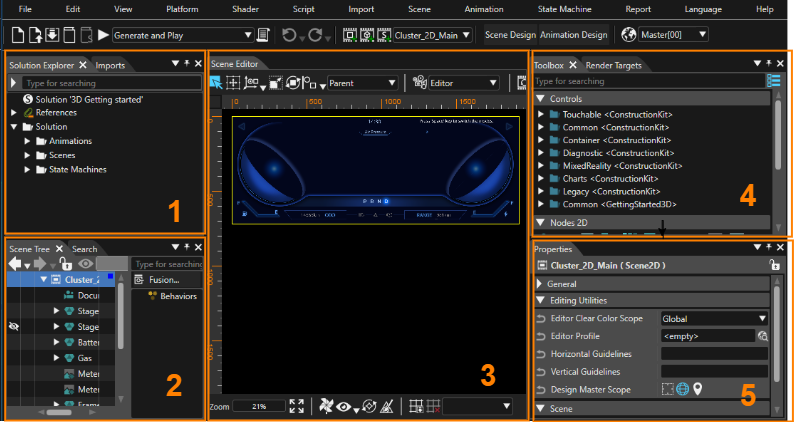
The Scene Composer user interface is composed of parts called panels. This page describes each panel, for which corresponding explanations can be found below.
<div drawio-diagram="7856"><img src="https://doc316en.candera.eu/uploads/images/drawio/2025-02/drawing-4-1738545034.png" alt=""/></div>

<p class="callout info">This page is explained according to the default layout for convenience.</p>

---

#### 1. Solution Explorer/Imports

<table border="1" id="bkmrk-%E3%82%BD%E3%83%AA%E3%83%A5%E3%83%BC%E3%82%B7%E3%83%A7%E3%83%B3%E3%82%A8%E3%82%AF%E3%82%B9%E3%83%97%E3%83%AD%E3%83%BC%E3%83%A9%E3%83%BC-%E3%82%BD%E3%83%AA%E3%83%A5%E3%83%BC" style="border-collapse: collapse; width: 800px; height: 75.1875px; border-width: 1px;"><colgroup><col style="width: 236px;"></col><col style="width: 488px;"></col><col style="width: 75px;"></col></colgroup><tbody><tr style="background-color: rgb(230, 126, 35); height: 29.7969px;"><td class="align-center" style="border-width: 1px; height: 29.7969px;">**Panel name**</td><td class="align-center" style="border-width: 1px; height: 29.7969px;">**Description**</td><td class="align-center" style="border-width: 1px; height: 29.7969px;">**<span style="color: rgb(0, 0, 0);">Note</span>**</td></tr><tr style="height: 10px;"><td style="height: 10px; border-width: 1px;">Solution Explorer</td><td style="height: 10px; border-width: 1px;">All items in the solution are displayed.

You can add new items, edit existing items and so on.

</td><td class="align-center" style="height: 10px; border-width: 1px;"><span style="color: rgb(230, 126, 35);">[\[ Detail \]](https://doc316en.candera.eu/books/solution-handling/page/organize-a-solution-using-folders)</span></td></tr><tr style="height: 35.3906px;"><td style="height: 35.3906px; border-width: 1px;">Imports</td><td style="height: 35.3906px; border-width: 1px;">Displays all items imported into the solution.

</td><td class="align-center" style="height: 35.3906px; border-width: 1px;"><span style="color: rgb(230, 126, 35);">[\[ Detail \]](https://doc316en.candera.eu/link/74#bkmrk-imports-panel)</span></td></tr></tbody></table>


#### 2. Scene Tree/Search/Output etc.

<table border="1" id="bkmrk-%E3%82%B7%E3%83%BC%E3%83%B3%E3%83%84%E3%83%AA%E3%83%BC-%E3%82%B7%E3%83%BC%E3%83%B3%E3%81%AB%E5%90%AB%E3%81%BE%E3%82%8C%E3%82%8B%E3%81%99%E3%81%B9%E3%81%A6%E3%81%AE%E3%83%8E" style="border-collapse: collapse; width: 800px; height: 181.359px; border-width: 1px;"><colgroup><col style="width: 181px;"></col><col style="width: 544px;"></col><col style="width: 74px;"></col></colgroup><tbody><tr style="background-color: rgb(230, 126, 35); height: 29.7969px;"><td class="align-center" style="border-width: 1px; height: 29.7969px;">**Panel name**</td><td class="align-center" style="border-width: 1px; height: 29.7969px;">**Description**</td><td class="align-center" style="border-width: 1px; height: 29.7969px;">**<span style="color: rgb(0, 0, 0);">Note</span>**</td></tr><tr style="height: 10px;"><td style="height: 10px; border-width: 1px;">Scene Tree</td><td style="height: 10px; border-width: 1px;">All nodes in the scene are displayed in a tree format.

You can add, edit, delete, etc. nodes.

</td><td class="align-center" style="border-width: 1px; height: 10px;"><span style="color: rgb(230, 126, 35);">[\[ Detail \]](https://doc316en.candera.eu/books/scene-design/chapter/scene-tree-editing)</span></td></tr><tr style="height: 35.3906px;"><td style="height: 35.3906px; border-width: 1px;">Search</td><td style="height: 35.3906px; border-width: 1px;">Displays trace information about the Scene Composer.

</td><td class="align-center" style="border-width: 1px; height: 35.3906px;"><span style="color: rgb(230, 126, 35);">[\[ Detail \]](https://doc316en.candera.eu/books/solution-handling/page/searching)</span></td></tr><tr style="height: 35.3906px;"><td style="height: 35.3906px; border-width: 1px;">Output</td><td style="height: 35.3906px; border-width: 1px;">Displays trace information about the Scene Composer.

</td><td class="align-center" style="border-width: 1px; height: 35.3906px;"><span style="color: rgb(230, 126, 35);">[\[ Detail \]](https://doc316en.candera.eu/books/solution-handling/page/output)</span></td></tr><tr style="height: 35.3906px;"><td style="height: 35.3906px; border-width: 1px;">Problems</td><td style="height: 35.3906px; border-width: 1px;">Displays errors/warnings/messages.

</td><td class="align-center" style="border-width: 1px; height: 35.3906px;"><span style="color: rgb(230, 126, 35);">[\[ Detail \]](https://doc316en.candera.eu/books/solution-handling/page/problems-browser)</span></td></tr><tr style="height: 35.3906px;"><td style="height: 35.3906px; border-width: 1px;">Text Size Report</td><td style="height: 35.3906px; border-width: 1px;">Displays a text size report.

</td><td class="align-center" style="border-width: 1px; height: 35.3906px;"><span style="color: rgb(230, 126, 35);">[\[ Detail \]](https://doc316en.candera.eu/books/solution-handling/page/text-size-report-KPG)</span></td></tr></tbody></table>


#### 3. Scene Editor/State Machine Editor/ Fusion etc.

<table border="1" id="bkmrk-%E3%82%B7%E3%83%BC%E3%83%B3%E3%82%A8%E3%83%87%E3%82%A3%E3%82%BF%E3%83%BC-%E8%A9%B3%E7%B4%B0%E3%81%AF%E3%80%81%E3%80%8C2d%E3%82%B7%E3%83%BC%E3%83%B3%E3%82%A8" style="border-collapse: collapse; width: 800px; height: 398.453px; border-width: 1px;"><colgroup><col style="width: 210px;"></col><col style="width: 495px;"></col><col style="width: 94px;"></col></colgroup><tbody><tr style="background-color: rgb(230, 126, 35); height: 29.7969px;"><td class="align-center" style="border-width: 1px; height: 29.7969px;">**Panel name**</td><td class="align-center" style="border-width: 1px; height: 29.7969px;">**Description**</td><td class="align-center" style="border-width: 1px; height: 29.7969px;">**<span style="color: rgb(0, 0, 0);">Note</span>**</td></tr><tr style="height: 40.75px;"><td style="height: 40.75px; border-width: 1px;">Scene Editor</td><td style="height: 40.75px; border-width: 1px;">The main panel of Scene Composer allows you to view and edit the nodes contained in a scene.

</td><td class="align-center" style="border-width: 1px; height: 40.75px;"><span style="color: rgb(230, 126, 35);">[\[ 2D Scene \]](https://doc316en.candera.eu/books/scene-design/page/2d-scene-editor)  
[\[ 3D Scene \]](https://doc316en.candera.eu/books/scene-design/page/3d-scene-editor)</span></td></tr><tr style="height: 57.7812px;"><td style="height: 57.7812px; border-width: 1px;">Fusion</td><td style="height: 57.7812px; border-width: 1px;">Various actions can be configured by adding Fusion nodes to the nodes selected in the scene tree.

</td><td class="align-center" style="border-width: 1px; height: 57.7812px;"><span style="color: rgb(230, 126, 35);">[\[ Detail \]](https://doc316en.candera.eu/books/fusion/page/fusion-editor-ui)</span></td></tr><tr style="height: 35.3906px;"><td style="height: 35.3906px; border-width: 1px;">State Machine Editor</td><td style="height: 35.3906px; border-width: 1px;">You can edit the selected state machine in the Solution Explorer.

</td><td class="align-center" style="border-width: 1px; height: 35.3906px;"><span style="color: rgb(230, 126, 35);">[\[ Detail \]](https://doc316en.candera.eu/books/state-machine)</span></td></tr><tr style="height: 35.3906px;"><td style="height: 35.3906px; border-width: 1px;">Shader Editor</td><td style="height: 35.3906px; border-width: 1px;">You can edit the selected shaders in the Shaders panel.

</td><td class="align-center" style="border-width: 1px; height: 35.3906px;"><span style="color: rgb(230, 126, 35);">[\[ Detail \]](https://doc316en.candera.eu/link/146#bkmrk-shader-editor%C2%A0)</span></td></tr><tr style="height: 35.3906px;"><td style="height: 35.3906px; border-width: 1px;">Script Editor</td><td style="height: 35.3906px; border-width: 1px;">You can edit the selected script in the Solution Explorer or in the Toolbox.

</td><td class="align-center" style="border-width: 1px; height: 35.3906px;"><span style="color: rgb(230, 126, 35);">[\[ Detail \]](https://doc316en.candera.eu/books/scripting/page/script-editor-and-script-validation)</span></td></tr><tr style="height: 35.3906px;"><td style="height: 35.3906px; border-width: 1px;">SCML Editor</td><td style="height: 35.3906px; border-width: 1px;">You can edit the SCML.

</td><td class="align-center" style="border-width: 1px; height: 35.3906px;"><span style="color: rgb(230, 126, 35);">[\[ Detail \]](https://doc316en.candera.eu/books/scenecomposer-markup-language/page/scml-editor)</span></td></tr><tr style="height: 35.3906px;"><td style="height: 35.3906px; border-width: 1px;">Appearance Editor</td><td style="height: 35.3906px; border-width: 1px;">You can edit node attachment templates.

</td><td class="align-center" style="border-width: 1px; height: 35.3906px;"><span style="color: rgb(230, 126, 35);">[\[ Detail \]](https://doc316en.candera.eu/link/132#bkmrk-appearance-editor)</span></td></tr><tr style="height: 35.3906px;"><td style="height: 35.3906px; border-width: 1px;">Graph Dependencies</td><td style="height: 35.3906px; border-width: 1px;">Visualize the dependencies of the nodes in the scene tree.

</td><td class="align-center" style="border-width: 1px; height: 35.3906px;"><span style="color: rgb(230, 126, 35);">[\[ Detail \]](https://doc316en.candera.eu/books/scene-design/page/usage-and-dependencies)</span></td></tr><tr style="height: 57.7812px;"><td style="height: 57.7812px; border-width: 1px;">Transition Rules Editor

/Transition Execution

</td><td style="height: 57.7812px; border-width: 1px;">Transitions between scenes can be set up.

</td><td class="align-center" style="border-width: 1px; height: 57.7812px;"><span style="color: rgb(230, 126, 35);">[\[ Detail \]](https://doc316en.candera.eu/link/1194#bkmrk-page-title)</span></td></tr><tr><td style="border-width: 1px;">Player/CGIPane

</td><td style="border-width: 1px;">The Embedded Player validates solutions created with Scene Composer.

</td><td class="align-center" style="border-width: 1px;"><span style="color: rgb(230, 126, 35);">[\[ Detail \]](https://doc316en.candera.eu/books/scene-design/page/embedded-player)</span></td></tr></tbody></table>


#### 4. Toolbox/Render Targets etc.

<table border="1" id="bkmrk-%E3%83%84%E3%83%BC%E3%83%AB%E3%83%9C%E3%83%83%E3%82%AF%E3%82%B9-%E3%82%B7%E3%83%BC%E3%83%B3%E3%81%AA%E3%81%A9%E3%81%AB%E8%BF%BD%E5%8A%A0%E5%8F%AF%E8%83%BD%E3%81%AA%E3%82%A2" style="border-collapse: collapse; width: 800px; border-width: 1px;"><colgroup><col style="width: 164px;"></col><col style="width: 530px;"></col><col style="width: 105px;"></col></colgroup><tbody><tr style="background-color: rgb(230, 126, 35);"><td class="align-center" style="border-width: 1px; height: 29.7969px;">**Panel name**</td><td class="align-center" style="border-width: 1px; height: 29.7969px;">**Description**</td><td class="align-center" style="border-width: 1px; height: 29.7969px;">**<span style="color: rgb(0, 0, 0);">Note</span>**</td></tr><tr><td style="border-width: 1px;">Toolbox</td><td style="border-width: 1px;">Items (controls, nodes, effects, behaviors, and scripts) that can be added to scenes and other objects are listed.

</td><td class="align-center" style="border-width: 1px;"><span style="color: rgb(230, 126, 35);">[\[ 2D Toolbox \]](https://doc316en.candera.eu/link/147#bkmrk-2d-toolbox)  
[\[ 3D Toolbox \]](https://doc316en.candera.eu/link/130#bkmrk-3d-toolbox)</span></td></tr><tr><td style="border-width: 1px;">RenderTargets</td><td style="border-width: 1px;">Create/edit new render targets.

</td><td class="align-center" style="border-width: 1px;"><span style="color: rgb(230, 126, 35);">[\[ Detail \]](https://doc316en.candera.eu/books/display-configuration)</span>

</td></tr><tr><td style="border-width: 1px;">Tempates</td><td style="border-width: 1px;">View templates included in the solution.

</td><td class="align-center" style="border-width: 1px;"><span style="color: rgb(230, 126, 35);">[\[ Detail \]](https://doc316en.candera.eu/link/1193#bkmrk-page-title)</span>

</td></tr><tr><td style="border-width: 1px;">Diagram Bird's Eye</td><td style="border-width: 1px;">View a bird's eye view of the Fusion diagram or the entire State Machine Editor.

</td><td class="align-center" style="border-width: 1px;"><span style="color: rgb(230, 126, 35);">[\[ Detail \]](https://doc316en.candera.eu/books/solution-handling/page/diagram-birds-eye)</span>

</td></tr><tr><td style="border-width: 1px;">Scopes</td><td style="border-width: 1px;">Set up camera culling and light culling.

</td><td class="align-center" style="border-width: 1px;"><span style="color: rgb(230, 126, 35);">[\[ Detail \]](https://doc316en.candera.eu/books/scene-design/chapter/scoping)</span>

</td></tr><tr><td style="border-width: 1px;">Shaders</td><td style="border-width: 1px;">Shaders included in the solution are displayed.

</td><td class="align-center" style="border-width: 1px;"><span style="color: rgb(230, 126, 35);">[\[ Detail \]](https://doc316en.candera.eu/books/scene-design/page/shader-configuration)</span>

</td></tr><tr><td style="border-width: 1px;">Render Statistics</td><td style="border-width: 1px;">A performance indicator for the display is shown during rendering.

</td><td class="align-center" style="border-width: 1px;"><span style="color: rgb(230, 126, 35);">[\[ Detail \]](https://doc316en.candera.eu/books/display-configuration/page/display-renderer-statistics)</span>

</td></tr><tr><td style="border-width: 1px;">Text Search</td><td style="border-width: 1px;">This panel allows you to search for text contained in the solution or selected scenes.

</td><td style="border-width: 1px;"><span style="color: rgb(230, 126, 35);">[\[ Detail \]](https://doc316en.candera.eu/link/16#bkmrk-text-search)</span>

</td></tr></tbody></table>


#### 5. Properties

Here displays the properties of the selected item in the Solution Explorer, scene tree, and various editors. You can also edit the value of each property.

#### Animation Panels

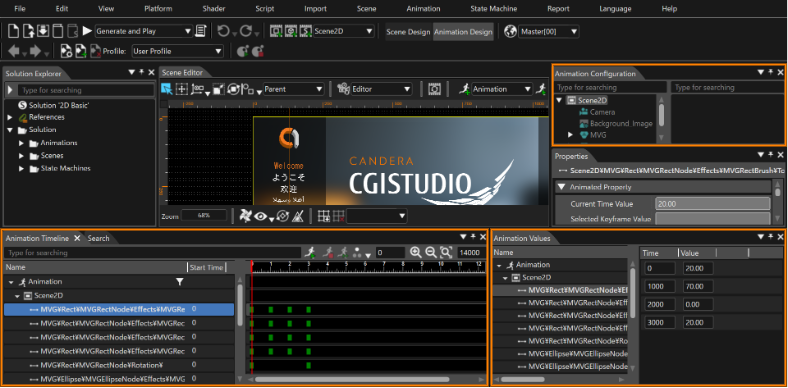
The animation-related panel appears when \[ Animation Design \] is enabled via the mode-switching button on the toolbar.

<div drawio-diagram="7857"><img src="https://doc316en.candera.eu/uploads/images/drawio/2025-02/drawing-4-1738545071.png" alt=""/></div>

<table border="1" id="bkmrk-%E3%82%A2%E3%83%8B%E3%83%A1%E3%83%BC%E3%82%B7%E3%83%A7%E3%83%B3%E3%82%BF%E3%82%A4%E3%83%A0%E3%83%A9%E3%82%A4%E3%83%B3-%E3%82%A2%E3%83%8B%E3%83%A1%E3%83%BC%E3%82%B7%E3%83%A7" style="border-collapse: collapse; width: 800px; border-width: 1px;"><colgroup><col style="width: 200px;"></col><col style="width: 525px;"></col><col style="width: 74px;"></col></colgroup><tbody><tr style="background-color: rgb(230, 126, 35);"><td class="align-center" style="border-width: 1px; height: 29.7969px;">**Panel name**</td><td class="align-center" style="border-width: 1px; height: 29.7969px;">**Description**</td><td class="align-center" style="border-width: 1px; height: 29.7969px;">**<span style="color: rgb(0, 0, 0);">Note</span>**</td></tr><tr><td style="border-width: 1px;">Animation Timeline</td><td style="border-width: 1px;">Graphically view or edit animation-related settings.

</td><td class="align-center" style="border-width: 1px;"><span style="color: rgb(230, 126, 35);">[\[ Detail \]](https://doc316en.candera.eu/books/animation-design/page/timeline-editor)</span>

</td></tr><tr><td style="border-width: 1px;">Animation Values</td><td style="border-width: 1px;">View or edit animation-related settings with information in text format.

</td><td class="align-center" style="border-width: 1px;"><span style="color: rgb(230, 126, 35);">[\[ Detail \]](https://doc316en.candera.eu/books/animation-design/page/animation-values-keyframes)</span>

</td></tr><tr><td style="border-width: 1px;">Animation Configuration</td><td style="border-width: 1px;">Nodes in the solution are displayed in a tree format, with only the nodes related to the active animation highlighted.

</td><td class="align-center" style="border-width: 1px;"><span style="color: rgb(230, 126, 35);">[\[ Detail \]](https://doc316en.candera.eu/link/17#bkmrk-animation-configurat)</span></td></tr></tbody></table>

#### Other panels

<table border="1" id="bkmrk-%E3%83%A9%E3%82%A4%E3%83%96%E3%83%97%E3%83%AC%E3%83%93%E3%83%A5%E3%83%BC-candera%E3%83%AD%E3%82%AE%E3%83%B3%E3%82%B0" style="border-collapse: collapse; width: 800px; border-width: 1px; height: 194.531px;"><colgroup><col style="width: 203px;"></col><col style="width: 522px;"></col><col style="width: 74px;"></col></colgroup><tbody><tr style="background-color: rgb(230, 126, 35); height: 29.7969px;"><td class="align-center" style="border-width: 1px; height: 29.7969px;">**Panel name**</td><td class="align-center" style="border-width: 1px; height: 29.7969px;">**Description**</td><td class="align-center" style="border-width: 1px; height: 29.7969px;">**<span style="color: rgb(0, 0, 0);">Note</span>**</td></tr><tr style="height: 23.1719px;"><td style="border-width: 1px; height: 23.1719px;">Live Preview

</td><td style="border-width: 1px; height: 23.1719px;">The definition of the data binding used in the selected scene can be displayed. You can also simulate the behavior of data binding by dynamically setting values for the definitions.

</td><td class="align-center" style="border-width: 1px; height: 23.1719px;"><span style="color: rgb(230, 126, 35);">[\[ Detail \]](https://doc316en.candera.eu/link/100#bkmrk-%E3%83%A9%E3%82%A4%E3%83%96%E3%83%97%E3%83%AC%E3%83%93%E3%83%A5%E3%83%BC%E3%83%91%E3%83%8D%E3%83%AB)</span>

</td></tr><tr style="height: 35.3906px;"><td style="border-width: 1px; height: 35.3906px;">Candera Logging

</td><td style="border-width: 1px; height: 35.3906px;">Trace information about the Candera Graphic Engine is displayed.

</td><td class="align-center" style="border-width: 1px; height: 35.3906px;"><span style="color: rgb(230, 126, 35);">[\[ Detail \]](https://doc316en.candera.eu/books/solution-handling/page/candera-logging)</span>

</td></tr><tr style="height: 35.3906px;"><td style="border-width: 1px; height: 35.3906px;">Widgets</td><td style="border-width: 1px; height: 35.3906px;">User custom widgets can be used.  
</td><td class="align-center" style="border-width: 1px; height: 35.3906px;"><span style="color: rgb(230, 126, 35);">[\[ Detail \]](https://doc316en.candera.eu/link/200#bkmrk-widgets-panel)</span></td></tr><tr style="height: 35.3906px;"><td style="border-width: 1px; height: 35.3906px;">Render Order Bins</td><td style="border-width: 1px; height: 35.3906px;">Manage the rendering order in a 3D scene.  
</td><td class="align-center" style="border-width: 1px; height: 35.3906px;"><span style="color: rgb(230, 126, 35);">[\[ Detail \]](https://doc316en.candera.eu/link/132#bkmrk-render-order-bins)</span></td></tr></tbody></table>

---