For more information on using behaviors, see [Behaviors](https://doc316en.candera.eu/books/controls-and-behaviors/chapter/behaviors).
[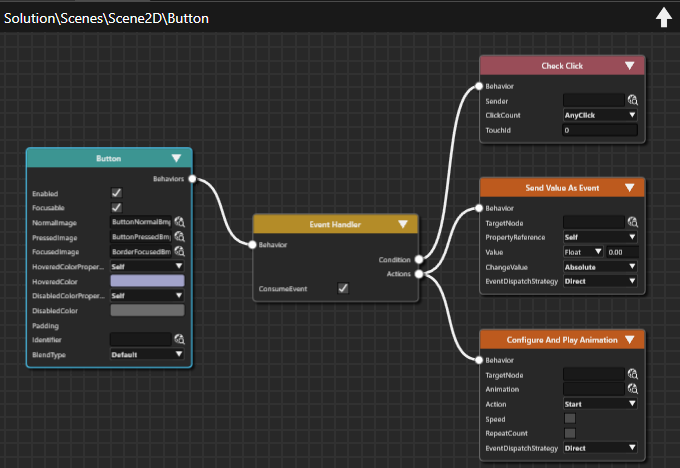](https://doc316en.candera.eu/uploads/images/gallery/2024-09/IbSimage.png) #### Benefits of using Fusion Editor - **Clear Visualization** Fusion Nodes that compose increasingly complex HMI elements are presented in a clear, consolidated view, making it ideal for presentations and design reviews. - **Comprehensive Information** All relevant details are visible in one place, significantly reducing man-hours required for reviews and analysis - **Seamless Integration** Fusion diagrams can be incorporated into solution reports, supporting the creation of detailed design documents. #### Main features - **Visual Management** Provides a graphical interface for managing Fusion Nodes and their interactions within the scene - **Editor Operations** Includes essential functions such as automatic alignment, magnification adjustment, zoom in/zoom out and Undo/Redo. - **Color-Coded Display** Each Fusion Node is visually distinguished through color coding for improved clarity. - **Automatic Filtering** Fusion displays only attachable Fusion Nodes, streamlining workflow. - **Properties Panel Synchronization** Fusion ensures that Fusion Node properties remain synchronized with the properties displayed in the Properties Panel. - **Context Menu Support** Offers quick access to relevant actions via a context-sensitive menu.