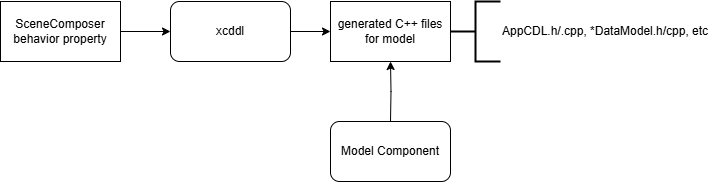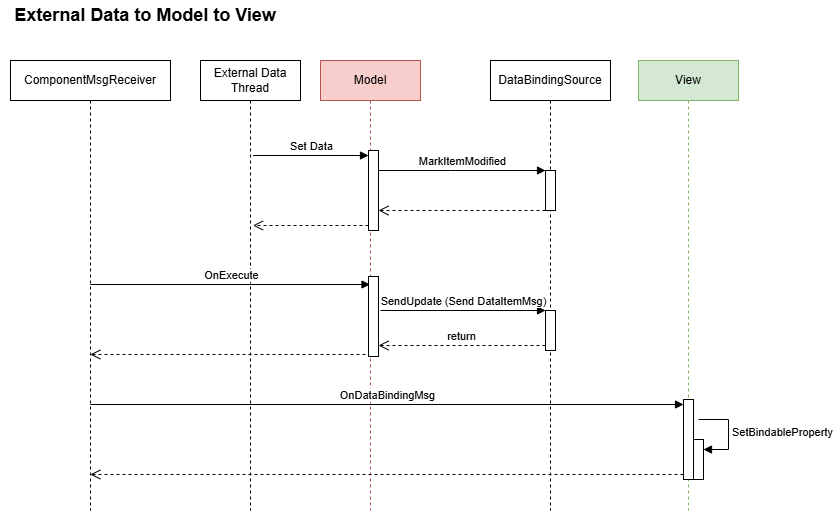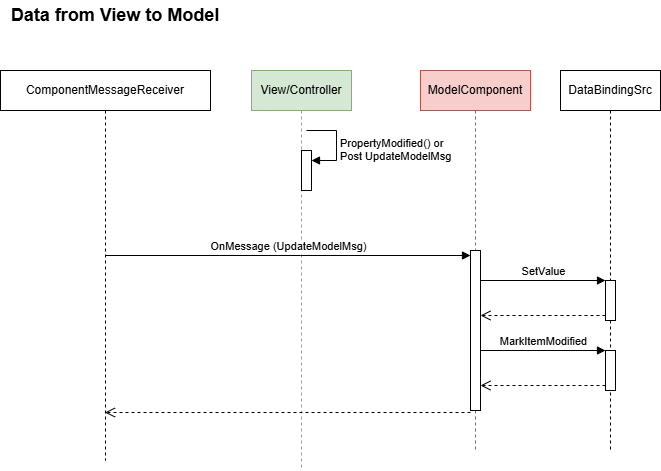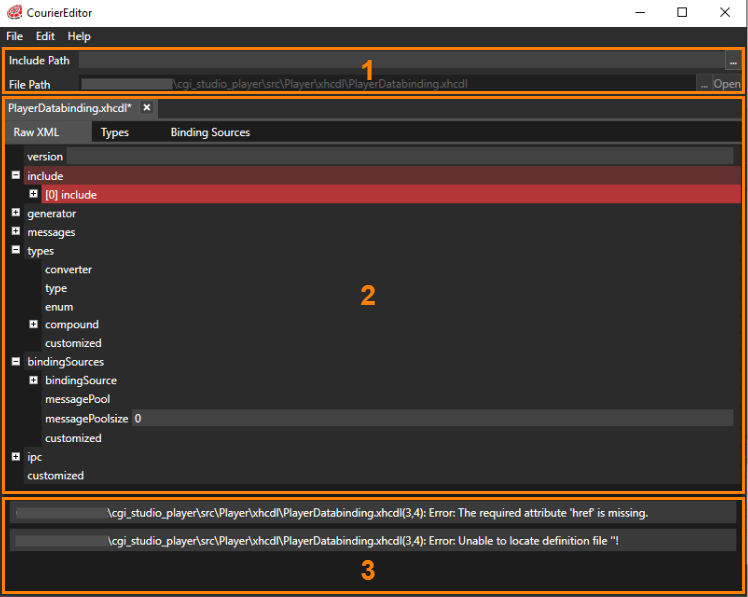
# Courier

\- This document contains a short introduction of Courier.   
\- A set of tutorials demonstrating the use of Courier API for building applications.   
\- Further, the Courier API documentation is added to provide full traceability between the tutorials and the used Courier API.   
\- The latest release infos.

# Introduction

#### <a class="anchor" id="bkmrk--5"></a>CGI Studio Courier Overview

<div class="contents" id="bkmrk-courier-framework-im"><div class="contents"><div class="textblock">- [Courier](http://dev.doc.cgistudio.at/APILINK/namespace_courier.html) framework implements Model-View-Control architecture pattern.
- It has defined extension points for 3rd party state machine integration.
- [Courier](http://dev.doc.cgistudio.at/APILINK/namespace_courier.html) is focusing on Message Handling and Data Binding.
- Depends on CGI Studio [Candera](http://dev.doc.cgistudio.at/APILINK/namespace_candera.html "[DataBinding_RefTypeSample]") graphics functionality.

</div></div></div>#### <a class="anchor" id="bkmrk--6"></a>Message Handling

<div class="contents" id="bkmrk-it-defines-the-infor"><div class="contents"><div class="textblock">- It defines the information flow in the system.
- Additionally it supports XML based message definition and C++ code generation.
- Static and dynamic message distribution path definition.

</div></div></div>#### <a class="anchor" id="bkmrk--7"></a>Data Binding

<div class="contents" id="bkmrk-it-binds-model-data-"><div class="contents"><div class="textblock">- It binds model data items to visual entities in the view component (i.e. widget properties).
- Changes in the data model trigger automatic update of bound entities in the user interface.

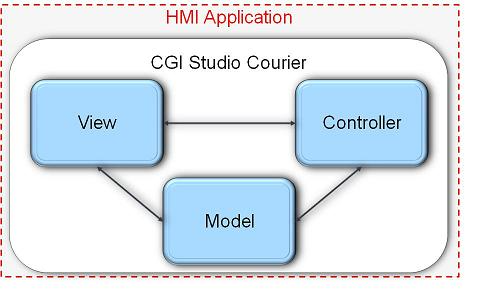
</div></div></div>#### <a class="anchor" id="bkmrk--8"></a>Model-View-Controller

For details on this well known pattern please refer to the following explanation: [MVC](http://en.wikipedia.org/wiki/Model%E2%80%93view%E2%80%93controller).

<div class="contents" id="bkmrk-view-controls-cgi-st"><div class="contents"><div class="contents"><div class="textblock">- View 
    - Controls CGI Studio [Candera](http://dev.doc.cgistudio.at/APILINK/namespace_candera.html "[DataBinding_RefTypeSample]") rendering engine
    - Supports multiple, hierarchical view objects

- Controller 
    - Embedding of state machine
    - Mapping of [Courier](http://dev.doc.cgistudio.at/APILINK/namespace_courier.html) messages to state machine events

- Model 
    - Data management logic (application specific)
    - Generic interface to data items for DataBinding function

</div></div></div></div><div drawio-diagram="2741"><img src="https://doc316en.candera.eu/uploads/images/drawio/2023-02/drawing-4-1677475134.png" alt="drawing-4-1677475134.png"/></div>

<div class="contents" id="bkmrk--0"><div class="contents"><div class="textblock">  
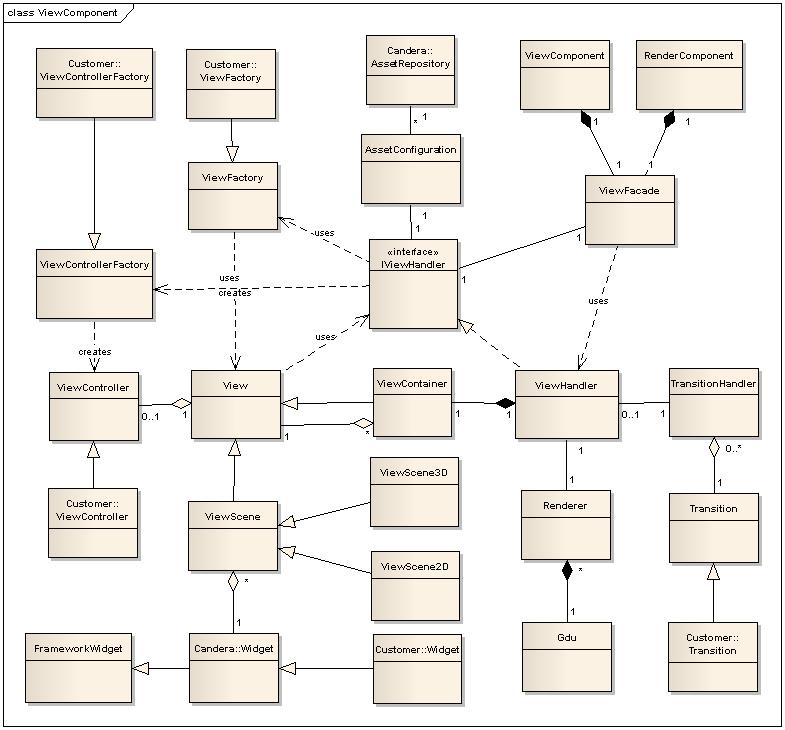
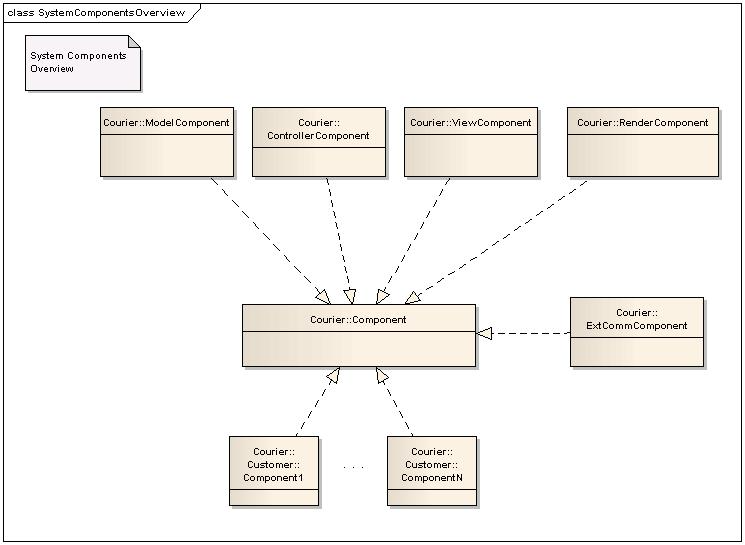
</div></div></div>The MVC pattern plus additional components are reflected by the following [Courier](http://dev.doc.cgistudio.at/APILINK/namespace_courier.html) classes:

<div drawio-diagram="2740"><img src="https://doc316en.candera.eu/uploads/images/drawio/2023-02/drawing-4-1677475118.png" alt="drawing-4-1677475118.png"/></div>

<div class="contents" id="bkmrk--2"><div class="contents"><div class="textblock">  
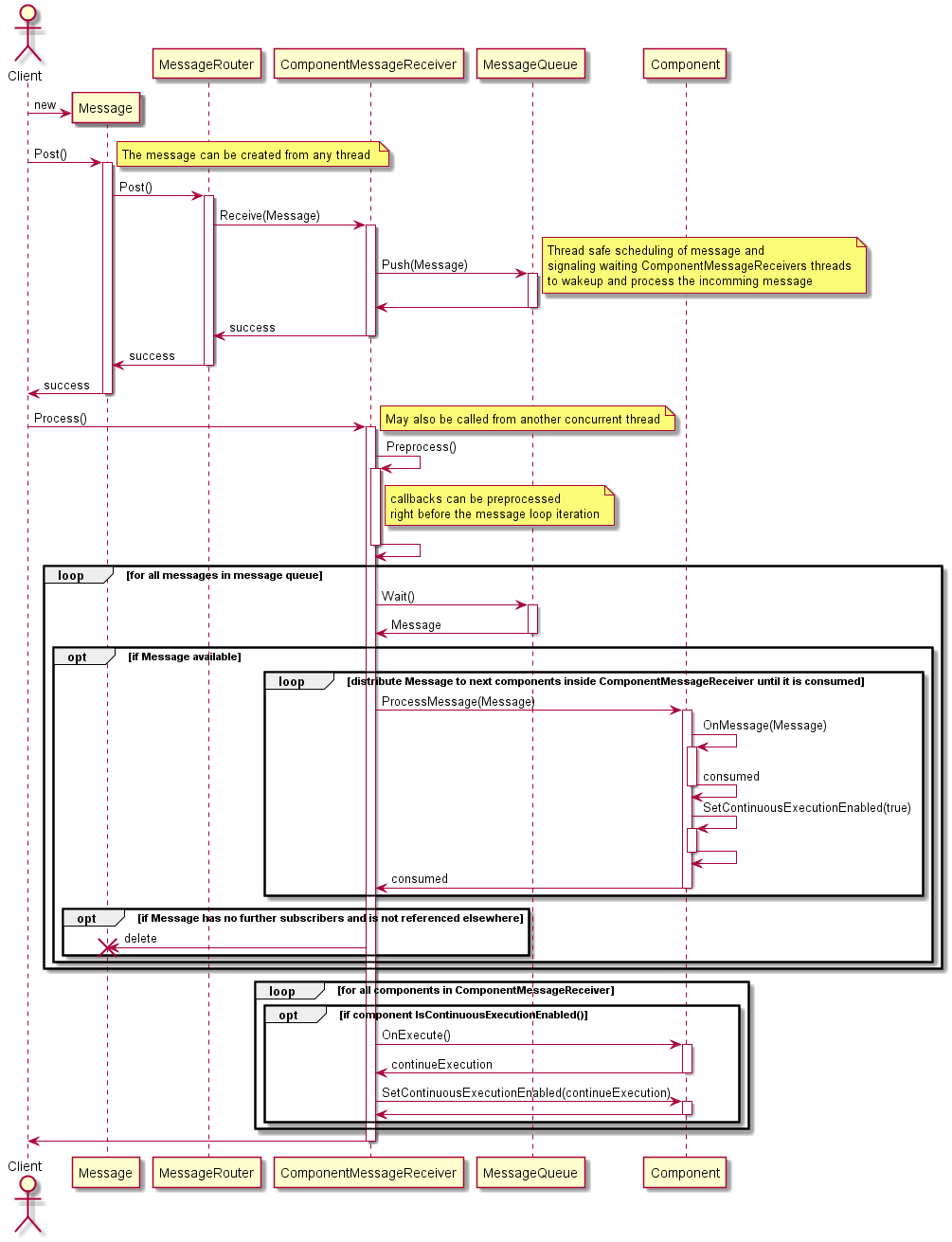
</div></div></div>#### <a class="anchor" id="bkmrk--11"></a>Courier Message Lifecycle

<div drawio-diagram="2739"><img src="https://doc316en.candera.eu/uploads/images/drawio/2023-02/drawing-4-1677475105.png" alt="drawing-4-1677475105.png"/></div>

# TroubleShooting

In the new Windows 11 environment, Windows Defender provides protection against the execution of third-party DLLs. This may cause the Courier generator to fail to execute properly. To fix this, please perform the following operations.

1. Open the folder of ***\\cgi\_studio\_courier\\bin***
2. Select ***DefaultGeneratorTemplates.dll*** from within the folder, then open the properties window from the context menu.
3. In the properties window, uncheck the security section at the bottom of the **General** tab.
4. Start the generator again and check that it is working correctly.

<p class="callout info">If the above operation does not improve the situation, please contact our support team via <span style="color:rgb(230,126,35);">[CGI Studio Lighthouse](https://forum.cgistudio.at/)</span>.</p>

# Tutorials

Description  
A set of tutorials is demonstrating the use of Courier for messaging, data binding and rendering purposes. It heavily relies on the Candera API for rendering purposes and usage of widgets. So we suggest to get familiar with Candera first.  
  
The Courier API documentation is added to provide full traceability between the tutorials and the used Courier API - refer to the sub page 'API Documentation'. Source code used for code examples in this tutorial is taken from the CourierGettingStarted and CourierSampleApp applications, which are provided as demo applications within CGI Studio Courier release packages.

# Courier Sample App

#### <a class="anchor" id="bkmrk--12"></a>Description

In this tutorial, a SampleApp application is created to explain the main building blocks of a [Courier](http://dev.doc.cgistudio.at/APILINK/namespace_courier.html) application. Among others, the following use cases will be implemented step-by-step:

<div class="contents" id="bkmrk-upon-courier%3A%3Astartu"><div class="contents"><div class="textblock">- Upon **Courier::StartupMessage**, the application will show the ClusterScene already known from the CGI Studio Getting Started example
- **Play** the CarGeneric **animation**, triggered by a [Courier](http://dev.doc.cgistudio.at/APILINK/namespace_courier.html) message
- Finally, a **Courier::ShutdownMessage** will be fired to finish the application

</div></div></div>For the application code, refer to

<div class="contents" id="bkmrk-cgi_studio_courier_a"><div class="contents"><div class="textblock">- *cgi\_studio\_courier\_apps/src/CourierSampleApp*

</div></div></div>#### <a class="anchor" id="bkmrk--13"></a>Configuration

1\. Setup Visual Studio Solution "CourierSampleApp.sln"

<div class="contents" id="bkmrk-start-cmake%3B-set-%22wh"><div class="contents"><div class="textblock">- Start CMake;
- Set "Where is the source code:" to *&lt;cgi\_studio\_root&gt;/cmake/Apps/Courier/CourierSampleApp*;
- Set "Where to build the binaries:" to *&lt;cgi\_studio\_root&gt;/cgi\_studio\_courier\_apps/src/CourierSampleApp/build*. Note that the name of the build directory can be freely chosen. Avoid blanks in the path;
- Click "Configure", select "Visual Studio 15", confirm the dialog with OK. You can see some lines in the main area appearing;
- Check "COURIER\_ADD\_SCHOST\_PROJECT" check-box;
- Set "COURIER\_PLATFORM" to the platform you want to use - e.g. iMX6IntegrityPlatform;
- Click "Configure" again and wait until it says "Configuring done";
- Click "Generate", the solution is generated. Wait for the message "Generating done".

</div></div></div>2\. Start Visual Studio C++ and load the generated solution from *&lt;cgi\_studio\_root&gt;/cgi\_studio\_courier\_apps/src/CourierSampleApp/build/CourierSampleApp.sln*.

3\. Set project "CourierSampleApp" as startup project in VisualStudio.

4\. Press F7 to build the application.

5\. Generate an AssetLibrary from the CourierSampleApp's SceneComposer solution:

<div class="contents" id="bkmrk-start-scenecomposer-"><div class="contents"><div class="textblock">- Start SceneComposer
- Open the CourierSampleApp's SceneComposer solution in SceneComposer. Appropriate solutions for all platforms can be found in &lt;cgi\_studio\_root&gt;/cgi\_studio\_courier\_apps/src/CourierSampleApp/SCSolution. Choose the folder of your preferred platform; the file to open in SceneComposer is called "Solution.scs".
- Now, generate the AssetLibrary via the menu "Generate Asset Library..." or "Ctrl+G". In the "Generate Asset Library" dialog set the "Asset Location:" to the build directory you chose for CMake (e.g. *&lt;cgi\_studio\_root&gt;/cgi\_studio\_courier\_apps/src/CourierSampleApp/build*). Change the name of the generated file to **"AssetLibCff.bin"** and click the button "Generate".

</div></div></div>6\. Switch to VisualStudio again and press F7 to execute the application.

7\. You should now be able to see the see a window showing the same scene you just saw in SceneComposer when generating the AssetLibrary.

####   
**Main.cpp** 

##### <a class="anchor" id="bkmrk--15"></a>Implement Main.cpp

A simple Main.cpp is implemented to initialize [Courier](http://dev.doc.cgistudio.at/APILINK/namespace_courier.html) and create, init and start a "SampleApp" application instance. Refer to *cgi\_studio\_courier\_apps/src/CourierSampleApp/Main.cpp*

**AppEnvironment**

The application environment configuration part of the SampleApp example provides the following features:

<div class="contents" id="bkmrk-logging-settings%2C-as"><div class="contents"><div class="textblock">- logging settings,
- asset configuration,
- platform component,
- platform-specific display and event handling.

</div></div></div>Refer to *cgi\_studio\_courier\_apps/src/CourierSampleApp/AppPlatform/AppEnvironment.h*.

**[Courier::Init](http://dev.doc.cgistudio.at/APILINK/namespace_courier.html#a2e6f80d7ef7c7a120595f3d56e6f4246)**

Basic courier functionality like a message router must be intialized before starting a [Courier](http://dev.doc.cgistudio.at/APILINK/namespace_courier.html) application.

**CourierSampleApp**

The CourierSampleApp itself is implemented as a class which implements only a few methods like Init, Run and Finalize. Those methods are suitable for this pretty simple sample. Anyway it is up to the implementer of an application how to structure the "application".

#### **AppEnvironment - Asset Configuration** 

##### <a class="anchor" id="bkmrk--16"></a>Courier::AssetConfiguration

To configure the asset repositories which shall be used by the [Courier](http://dev.doc.cgistudio.at/APILINK/namespace_courier.html) ViewHandler component to load assets, [Courier](http://dev.doc.cgistudio.at/APILINK/namespace_courier.html) provides an implementation of [Candera::AssetConfig](http://dev.doc.cgistudio.at/APILINK/class_candera_1_1_asset_config.html "Asset configuration that encapsulates various asset repositories Custom AssetConfig classes can be de..."), namely [Courier::AssetConfiguration](http://dev.doc.cgistudio.at/APILINK/class_courier_1_1_asset_configuration.html).

The following code shows the instantiation of a [Candera::FileAssetRepository](http://dev.doc.cgistudio.at/APILINK/class_candera_1_1_file_asset_repository.html "Class providing methods to read asset from file."). Alternatively [Candera::MemoryAssetRepository](http://dev.doc.cgistudio.at/APILINK/class_candera_1_1_memory_asset_repository.html "Class providing methods to read asset from memory(e.g. from flash memory)") could be used or a complete set of assets which are later registered.

```
static const FeatStd::Char * cAssetFileName = "AssetLibCff.bin";

static Candera::FileAssetRepository & GetFileAsset()
{
    static Candera::FileAssetRepository sFileAsset(cAssetFileName);
    return sFileAsset;
}

```

The FileAssetRepository is then added to an instance of [Courier::AssetConfiguration](http://dev.doc.cgistudio.at/APILINK/class_courier_1_1_asset_configuration.html):

```
        // ----- Asset configuration
        lRc = lRc && mAssetConfiguration.Add(&GetFileAsset());
        FEATSTD_DEBUG_ASSERT(lRc);

```

Finally, the [Courier](http://dev.doc.cgistudio.at/APILINK/namespace_courier.html) ViewHandler must be initialized with this asset configuration - refer to [Courier::ViewHandler::Init](http://dev.doc.cgistudio.at/APILINK/class_courier_1_1_view_handler.html#aa48e5f58172e21058b426313076f068a) - this will be done later during SampleApp initialization.

##### <a class="anchor" id="bkmrk--17"></a>Configure ViewIDs and ItemIds

For accessing single views, view containers, animations, widgets or other parts of the asset(s), it is recommended to provide corresponding constants. For the ClusterScene, following constants and IDs are defined:

```
        static const Courier::Char * c_sampleapp_mymodule_viewcontainer;
        static const Courier::Char * c_sampleapp_scenes_viewcontainer;
        static const Courier::Char * c_sampleapp_scene3D;

        static const Courier::ViewId & c_viewId_scene3D();

        static const Courier::Char * c_sampleapp_cargeneric_animation;


```

Refer to *cgi\_studio\_courier\_apps/src/CourierSampleApp/Constants.h and .cpp*

#### **CourierSampledApp - Initialization** 

##### <a class="anchor" id="bkmrk--18"></a>Building Block Declarations

The following building blocks are used inside the SampleApp:

```
    private:
        AppPlatform::AppEnvironment         * mAppEnvironment;

        // The message receiver
        Courier::ComponentMessageReceiver   mMsgReceiver;

        // ViewComponent building blocks
        Courier::ViewComponent              mViewComponent;
        Courier::ViewHandler                mViewHandler;
        Courier::Renderer                   mRenderer;
#if defined(COURIER_RENDERING_MONITOR_ENABLED)
        Courier::RenderingMonitor           mRenderingMonitor;
#endif
        SampleAppViewFactory                mViewFactory;
        SampleAppViewControllerFactory      mViewControllerFactory;
        // TouchHandling
        Courier::TouchHandling::TouchSession mTouchSession;

        // RenderComponent building blocks
#if defined(USE_TWO_RENDER_COMPONENTS)
        // Two render components can be used if 2D and 3D shall be rendered in different threads
        // One could be still in the same thread as the ViewComponent, another in its own thread.
        // It is also possible to let them run in one thread.
        Courier::RenderComponent2D          mRenderComponent2d;
        Courier::RenderComponent3D          mRenderComponent3d;
#else
        // This single render component will render both 2D and 3D at the same time.
        Courier::RenderComponent            mRenderComponent;
#endif

        // The application specific ControllerComponent
        SampleAppControllerComponent        mControllerComponent;

        // The application specific ModelComponent
        SampleAppModelComponent             mModelComponent;

        // Platform independent external communication component
        Courier::ExtCommComponent           mExtCommComponent;

        // Platform independent external output handler
        ExtCommOutputHandler                mExtCommOutputHandler;

        // Platform independent external output handler
        SampleExtCommOutputHandler          mSampleExtCommOutputHandler;

#if defined(COURIER_IPC_ENABLED)
        Courier::IpcComponent                   mIpcComponent;
        Courier::IpcStaticBuffer<2048>          mSendReceiveBuffer;
        Generated::SampleAppIpcMessageCreation  mMessageCreation;
#endif


```

As you can see, the SampleApp example only derives two standard [Courier](http://dev.doc.cgistudio.at/APILINK/namespace_courier.html) classes:

<div class="contents" id="bkmrk-courier%3A%3Aviewfactory"><div class="contents"><div class="textblock">- [Courier::ViewFactory](http://dev.doc.cgistudio.at/APILINK/class_courier_1_1_view_factory.html): to control how views and view containers are created and destroyed
- [Courier::ControllerComponent](http://dev.doc.cgistudio.at/APILINK/class_courier_1_1_controller_component.html): to implement application-specific message handling

<dl class="note"><dt>  
</dt><dd><p class="callout info">There are standard render components for 3D only, 2D only, as well as 3D and 2D available.</p>

<p class="callout info">Take care to use the render component appropriate to the content to be rendered.</p>

</dd></dl></div></div></div>##### <a class="anchor" id="bkmrk--19"></a>Init Building Blocks

The SampleApp Init method is called to initialize all building blocks, like adding the asset to the asset configuration, registering factories to the ViewHandler and others.

```
    // Initialize the ViewHandler:
    // The Courier::AssetConfiguration is retrieved from the platform specific app-environment.
    // Assets have to be added to the Courier::AssetConfiguration, this is done inside app-environment.
    lRc = lRc && mViewHandler.Init(&mViewFactory, &mAppEnvironment->GetAssetConfiguration(), &mRenderer,"");
    COURIER_DEBUG_ASSERT(lRc);

    // change the global speed factor, increase it 10 %
    mViewHandler.SetAnimationSpeedFactor(1.1f);

    // set the view controller factory (optional)
    mViewHandler.SetViewControllerFactory(&mViewControllerFactory);

    // Activate TouchSession
    mViewHandler.SetViewHandlerSession(&mTouchSession);

    // Initialize the view component
    lRc = lRc && mViewComponent.Init(&mViewHandler);
    COURIER_DEBUG_ASSERT(lRc);

#if defined(USE_TWO_RENDER_COMPONENTS)
    // Initialize the render 2d component
    lRc = lRc && mRenderComponent2d.Init(&mViewHandler);
    COURIER_DEBUG_ASSERT(lRc);

    // Initialize the render 3d component
    lRc = lRc && mRenderComponent3d.Init(&mViewHandler);
    COURIER_DEBUG_ASSERT(lRc);
#else
    // Initialize the render component (to render 2d and 3d)
    lRc = lRc && mRenderComponent.Init(&mViewHandler);
    COURIER_DEBUG_ASSERT(lRc);
#endif

```

<div class="contents" id="bkmrk-source-of-errors-are"><div class="textblock"><div class="fragment">  
</div><dl class="note"><dt></dt><dd><p class="callout info">Source of errors are usually misconfigured assets, e.g. the asset file cannot be found or the asset was generated by an incompatible CGI SceneComposer (wrong asset version).</p>

<p class="callout info">In such a case, the Init method of the ViewHandler would fail.</p>

</dd></dl></div></div>#### **SampleApp - Start Message Processing** 

##### <a class="anchor" id="bkmrk--20"></a>Attaching Components to Threads

Although the described activities could also be part of the initialization phase they are described separately in this chapter. All components have to be attached to the applications [Courier::ComponentMessageReceiver](http://dev.doc.cgistudio.at/APILINK/class_courier_1_1_component_message_receiver.html) instance. Alternatively, different multi-threading strategies can be realized by attaching components to different messaging threads.

In the SampleApp example, a single thread is used for all components, which means they are all attached to the MsgReceiver instance of the application.

```
    // Attach view component to respective message receiver
#if (0 != ENABLE_RENDER_THREAD)
    // Start view in separate thread
    ComponentMessageReceiverThread lRenderThread;
    lRenderThread.SetName("Render");

    #if defined(USE_TWO_RENDER_COMPONENTS)
        lRenderThread.Attach(mRenderComponent2d);
        lRenderThread.Attach(mRenderComponent3d);
    #else
       lRenderThread.Attach(mRenderComponent);
    #endif
    lRenderThread.Activate();
    lRc = lRc && lRenderThread.Run();
    COURIER_DEBUG_ASSERT(lRc);
#else
    #if defined(USE_TWO_RENDER_COMPONENTS)
        // Start two own render "threads" (this wont work under Win32 because because they have to run in main message loop)
        // For using real multi threading the class ComponentMessageReceiverThread could be used for other components
        // in this sample code.
        mMsgReceiver.Attach(&mRenderComponent2d);
        mMsgReceiver.Attach(&mRenderComponent3d);
    #else
        // Attach render components to main message receiver (has to run in main loop at least for Win32)
        mMsgReceiver.Attach(&mRenderComponent);
    #endif

#endif

    // Attach view component to respective message receiver
#if (0 != ENABLE_VIEW_THREAD)
    // Start view in separate thread
    ComponentMessageReceiverThread lViewThread;
    lViewThread.SetName("View");
    lViewThread.Attach(mViewComponent);
    if (mAppEnvironment->GetWindowEventExtCommComponent()) {
        lViewThread.Attach(*mAppEnvironment->GetWindowEventExtCommComponent());
    }
    lViewThread.Activate();
    lRc = lRc && lViewThread.Run();
    COURIER_DEBUG_ASSERT(lRc);
#else
    mMsgReceiver.Attach(&mViewComponent);
    if(0!=mAppEnvironment->GetTouchEventPreprocessor()) {
        mMsgReceiver.AttachPreprocessor(mAppEnvironment->GetTouchEventPreprocessor());
    }
#endif

    // Attach controller component to respective message receiver
#if (0 != ENABLE_CONTROLLER_THREAD)
    // Start controller in separate thread
    ComponentMessageReceiverThread lControllerThread;
    lControllerThread.SetName("Controller");
    lControllerThread.Attach(mControllerComponent);
    lControllerThread.Activate();
    lRc = lRc && lControllerThread.Run();
    COURIER_DEBUG_ASSERT(lRc);
#else
    mMsgReceiver.Attach(&mControllerComponent);
#endif

    // Attach model component to respective message receiver
#if (0 != ENABLE_MODEL_THREAD)
    // Start controller in separate thread
    ComponentMessageReceiverThread lModelThread;
    lModelThread.SetName("Model");
    lModelThread.Attach(mModelComponent);
    lModelThread.Activate();
    lRc = lRc && lModelThread.Run();
    COURIER_DEBUG_ASSERT(lRc);
#else
    mMsgReceiver.Attach(&mModelComponent);
#endif

    // Attach platform independent external communication component to respective message receiver
#if (0 != ENABLE_EXTCOMM_THREAD)
    // Start external communicator in separate thread
    ComponentMessageReceiverThread lExtCommThread;
    lExtCommThread.SetName("ExtComm");
    lExtCommThread.Attach(mExtCommComponent);
    lExtCommThread.Activate();
    lRc = lRc && lExtCommThread.Run();
    COURIER_DEBUG_ASSERT(lRc);
#else
    mMsgReceiver.Attach(&mExtCommComponent);
#endif

#if defined(COURIER_IPC_ENABLED)
    ComponentMessageReceiverThread lIPCThread;
    lIPCThread.SetName("IPC");
    lIPCThread.Attach(mIpcComponent);
    lIPCThread.Activate();
    lRc = lRc && lIPCThread.Run();
    COURIER_DEBUG_ASSERT(lRc);
#endif

```

##### <a class="anchor" id="bkmrk--21"></a>Starting Message Loop

After having attached the components to the message receiver instance, a StartupMsg broadcast message is posted.

```
    // Before sending the start up (resp. the first) message be sure to activate all message receivers
    mMsgReceiver.Activate();

    // Startup the system by posting the startup message after all components are in place
    Courier::Message * msg = COURIER_MESSAGE_NEW(Courier::StartupMsg)();
    lRc = lRc && (msg!=0 && msg->Post());
    COURIER_DEBUG_ASSERT(lRc);

```

After that, the message receiver main loop starts.

<div class="contents" id="bkmrk-the-process-method-d"><div class="contents"><div class="contents"><div class="textblock">- The ***Process*** method dispatches the messages and invokes the *Execute* methods of all attached components - e.g., in case of the RenderComponent, the *Execute* method implements the rendering functionality.
- The main loop is executed until shut-down is triggered by one of the components attached to this message receiver.

<div class="fragment">  
</div></div></div></div></div>```
        bool lSuccess;
        do {
            // this is the main message processing loop.
            lSuccess = mMsgReceiver.Process();
/*
            FeatStd::UInt32 fps2D = mViewHandler.GetFramesPerSecond2D();
            FeatStd::UInt32 fps3D = mViewHandler.GetFramesPerSecond();
            printf("FPS 2D(%u) 3D(%u) \n",fps2D,fps3D);
            COURIER_UNUSED2(fps2D,fps3D);
*/
        } while (lSuccess && !mMsgReceiver.IsShutdownTriggered());

        if (!lSuccess) {
            COURIER_LOG_FATAL("Main loop processing failed!");
        } else {
            COURIER_LOG_INFO("Main loop processing ended normal.");
        }
        lRc = lSuccess;

```

For a detailed description of message processing, please refer to <span style="color: rgb(230, 126, 35);">[Message Processing](https://doc316en.candera.eu/books/courier/page/message-processing)</span>.

#### **SampleAppControllerComponent - Show Scene upon Courier::StartupMsg** 

##### <a class="anchor" id="bkmrk--22"></a>Handle StartupMsg

As shown on the previous page, the broadcast message [Courier::StartupMsg](http://dev.doc.cgistudio.at/APILINK/class_courier_1_1_startup_msg.html) has been fired by the SampleApp. Any component attached to the message receiver could handle this message.

In the CourierSampleApp example, the job is done by the application specific controller component *SampleAppControllerComponent*, which consumes the [Courier::StartupMsg](http://dev.doc.cgistudio.at/APILINK/class_courier_1_1_startup_msg.html) in its *OnMessage* method implementation:

```
    switch(msg.GetId()) {
        case StartupMsg::ID: {
#if defined(COURIER_IPC_ENABLED)
            Courier::ComponentId id = static_cast<Courier::ComponentId>(Courier::ComponentType::Ipc);
            postMsg = COURIER_MESSAGE_NEW(Courier::SetMessageReceiverCycleTimeMsg)(id,Courier::ComponentMessageReceiverTiming::Cycle,20);
            rc = rc && (postMsg!=0 && postMsg->Post());
            postMsg = COURIER_MESSAGE_NEW(Courier::SetComponentMinExecutionCycleTimeMsg)(id,500,false);
            rc = rc && (postMsg!=0 && postMsg->Post());
#endif
            Courier::ComponentId extCommId = static_cast<Courier::ComponentId>(CustomComponentId::TerminalEventExtComm);
            postMsg = COURIER_MESSAGE_NEW(Courier::SetMessageReceiverCycleTimeMsg)(extCommId,Courier::ComponentMessageReceiverTiming::Cycle,500);
            rc = rc && (postMsg!=0 && postMsg->Post());
            postMsg = COURIER_MESSAGE_NEW(Courier::SetComponentMinExecutionCycleTimeMsg)(extCommId,500,false);
            rc = rc && (postMsg!=0 && postMsg->Post());


            Courier::ComponentId renderOverlayCommId = static_cast<Courier::ComponentId>(Courier::ComponentType::CustomerLast);
            postMsg = COURIER_MESSAGE_NEW(Courier::SetMessageReceiverCycleTimeMsg)(renderOverlayCommId, Courier::ComponentMessageReceiverTiming::Cycle, 500);
            rc = rc && (postMsg != 0 && postMsg->Post());
            postMsg = COURIER_MESSAGE_NEW(Courier::SetComponentMinExecutionCycleTimeMsg)(renderOverlayCommId, 500, false);
            rc = rc && (postMsg != 0 && postMsg->Post());

            // This messages are creating the hierarchical structure "manually", means are using the SampleAppViewFactory

            postMsg = (COURIER_MESSAGE_NEW(ViewReqMsg)(ViewAction::Create,ViewId(Constants::c_sampleapp_mymodule_viewcontainer),true,false));
            rc = rc && (postMsg!=0 && postMsg->Post());
            postMsg = (COURIER_MESSAGE_NEW(ViewReqMsg)(ViewAction::Create,ViewId(Constants::c_sampleapp_scenes_viewcontainer),true,false));
            rc = rc && (postMsg!=0 && postMsg->Post());
            postMsg = (COURIER_MESSAGE_NEW(ViewReqMsg)(ViewAction::Create,Constants::c_viewId_scene3D(),true,false));
            rc = rc && (postMsg!=0 && postMsg->Post());
            postMsg = (COURIER_MESSAGE_NEW(AsyncLoadReqMsg)(Constants::c_viewId_scene3D(),true));
            rc = rc && (postMsg!=0 && postMsg->Post());


            // This message creates the hierarchical structure "automatically"
             //postMsg = (COURIER_MESSAGE_NEW(ViewReqMsg)(ViewAction::CreateAll,ViewId(""),false, false));
             //rc = rc && (postMsg!=0 && postMsg->Post());

```

To make the ClusterScene visible right after startup, it must be loaded from the asset and be activated. This is achieved by posting corresponding standard [Courier](http://dev.doc.cgistudio.at/APILINK/namespace_courier.html) messages - [Courier::ViewReqMsg](http://dev.doc.cgistudio.at/APILINK/class_courier_1_1_view_req_msg.html) and [Courier::ActivationReqMsg](http://dev.doc.cgistudio.at/APILINK/class_courier_1_1_activation_req_msg.html) - handled by view components like view handler.

##### <a class="anchor" id="bkmrk--23"></a>SampleAppViewFactory

The simplest way to load all the views available via AssetConfiguration is to post a [Courier::ViewReqMsg](http://dev.doc.cgistudio.at/APILINK/class_courier_1_1_view_req_msg.html) with parameter "ViewAction::CreateAll". See this example:

```
           //This message creates the hierarchical structure "automatically"
           postMsg = (<a class="code" href="http://dev.doc.cgistudio.at/APILINK/group___c_o_u_r_i_e_r___p_l_a_t_f_o_r_m.html#ga49830e96f37f0b76cc63f52696ceb119">COURIER_MESSAGE_NEW</a>(ViewReqMsg)(<a class="code" href="http://dev.doc.cgistudio.at/APILINK/group___c_o_u_r_i_e_r___v_i_s_u_a_l_i_z_a_t_i_o_n.html#ggaf0e93dc4242f607c3c8d13dafd036af9a8306c5de054fa04ba88eb09427c2cf9a">ViewAction::CreateAll</a>, ViewId(""), false));
           rc = rc && (postMsg!=0 && postMsg->Post());
```

However, in our CourierSampleApp example, we want to control the creation of the required views regarding memory management. That's why the application specific view factory *SampleAppViewFactory* is implemented with the following code:

```
Courier::View * SampleAppViewFactory::Create(const Courier::Char * viewId)
{
    // check if we have a valid string pointer
    COURIER_DEBUG_ASSERT(viewId!=0);

    if(viewId!=0) {
        // check if we shall return a pointer to an object identified by 'c_sampleapp_mymodule_viewcontainer'
        if(0==strcmp(viewId,Constants::c_sampleapp_mymodule_viewcontainer)) {
            static Courier::ViewContainer myModuleViewCont;
            if(myModuleViewCont.Init(GetViewHandler(), Constants::c_sampleapp_mymodule_viewcontainer)) {
                return &myModuleViewCont;
            }
            return 0;
        }

        if(0==strcmp(viewId,Constants::c_sampleapp_scenes_viewcontainer)) {
            static Courier::ViewContainer myScenesViewCont;
            if(myScenesViewCont.Init(GetViewHandler(), Constants::c_sampleapp_scenes_viewcontainer)) {
                return &myScenesViewCont;
            }
            return 0;
        }

        // in case of 'c_sampleapp_scene3D' we create the view dynamically
        if(0==strcmp(viewId,Constants::c_sampleapp_scene3D)) {
            Courier::ViewScene3D* view3D = COURIER_NEW(Courier::ViewScene3D)();
            if(view3D->Init(GetViewHandler(), Constants::c_sampleapp_scene3D)) {
                return view3D;
            }
            return 0;
        }
    }
    return 0;
}

```

Besides the *Create* method, the SampleAppViewFactory must also implement a regarding *Destroy* method - refer to *cgi\_studio\_courier\_apps/src/CourierSampleApp/SampleAppViewFactory.cpp*.

#### **Play an Animation with Courier::AnimationReqMsg** 

##### <a class="anchor" id="bkmrk--24"></a>Key Event Handling

In our CourierSampleApp application we want to check key strokes from the keyboard and transform them to some [Courier::KeyDownMsg](http://dev.doc.cgistudio.at/APILINK/class_courier_1_1_key_down_msg.html) which allow controlling the application logic.

For this purpose the Win32 Host environment provides a platform specific Component which will be attached to the main [Courier::ComponentMessageReceiver](http://dev.doc.cgistudio.at/APILINK/class_courier_1_1_component_message_receiver.html).

```
    // Attach view component to respective message receiver
#if (0 != ENABLE_RENDER_THREAD)
    // Start view in separate thread
    ComponentMessageReceiverThread lRenderThread;
    lRenderThread.SetName("Render");

    #if defined(USE_TWO_RENDER_COMPONENTS)
        lRenderThread.Attach(mRenderComponent2d);
        lRenderThread.Attach(mRenderComponent3d);
    #else
       lRenderThread.Attach(mRenderComponent);
    #endif
    lRenderThread.Activate();
    lRc = lRc && lRenderThread.Run();
    COURIER_DEBUG_ASSERT(lRc);
#else
    #if defined(USE_TWO_RENDER_COMPONENTS)
        // Start two own render "threads" (this wont work under Win32 because because they have to run in main message loop)
        // For using real multi threading the class ComponentMessageReceiverThread could be used for other components
        // in this sample code.
        mMsgReceiver.Attach(&mRenderComponent2d);
        mMsgReceiver.Attach(&mRenderComponent3d);
    #else
        // Attach render components to main message receiver (has to run in main loop at least for Win32)
        mMsgReceiver.Attach(&mRenderComponent);
    #endif

#endif

    // Attach view component to respective message receiver
#if (0 != ENABLE_VIEW_THREAD)
    // Start view in separate thread
    ComponentMessageReceiverThread lViewThread;
    lViewThread.SetName("View");
    lViewThread.Attach(mViewComponent);
    if (mAppEnvironment->GetWindowEventExtCommComponent()) {
        lViewThread.Attach(*mAppEnvironment->GetWindowEventExtCommComponent());
    }
    lViewThread.Activate();
    lRc = lRc && lViewThread.Run();
    COURIER_DEBUG_ASSERT(lRc);
#else
    mMsgReceiver.Attach(&mViewComponent);
    if(0!=mAppEnvironment->GetTouchEventPreprocessor()) {
        mMsgReceiver.AttachPreprocessor(mAppEnvironment->GetTouchEventPreprocessor());
    }
#endif

    // Attach controller component to respective message receiver
#if (0 != ENABLE_CONTROLLER_THREAD)
    // Start controller in separate thread
    ComponentMessageReceiverThread lControllerThread;
    lControllerThread.SetName("Controller");
    lControllerThread.Attach(mControllerComponent);
    lControllerThread.Activate();
    lRc = lRc && lControllerThread.Run();
    COURIER_DEBUG_ASSERT(lRc);
#else
    mMsgReceiver.Attach(&mControllerComponent);
#endif

    // Attach model component to respective message receiver
#if (0 != ENABLE_MODEL_THREAD)
    // Start controller in separate thread
    ComponentMessageReceiverThread lModelThread;
    lModelThread.SetName("Model");
    lModelThread.Attach(mModelComponent);
    lModelThread.Activate();
    lRc = lRc && lModelThread.Run();
    COURIER_DEBUG_ASSERT(lRc);
#else
    mMsgReceiver.Attach(&mModelComponent);
#endif

    // Attach platform independent external communication component to respective message receiver
#if (0 != ENABLE_EXTCOMM_THREAD)
    // Start external communicator in separate thread
    ComponentMessageReceiverThread lExtCommThread;
    lExtCommThread.SetName("ExtComm");
    lExtCommThread.Attach(mExtCommComponent);
    lExtCommThread.Activate();
    lRc = lRc && lExtCommThread.Run();
    COURIER_DEBUG_ASSERT(lRc);
#else
    mMsgReceiver.Attach(&mExtCommComponent);
#endif

#if defined(COURIER_IPC_ENABLED)
    ComponentMessageReceiverThread lIPCThread;
    lIPCThread.SetName("IPC");
    lIPCThread.Attach(mIpcComponent);
    lIPCThread.Activate();
    lRc = lRc && lIPCThread.Run();
    COURIER_DEBUG_ASSERT(lRc);
#endif

```

<div class="contents" id="bkmrk-this-system-will-all"><div class="contents"><div class="textblock"><dl class="note"><dt></dt><dd><p class="callout info">This system will allow catching Win32 messages and converting them to [Courier::KeyDownMsg](http://dev.doc.cgistudio.at/APILINK/class_courier_1_1_key_down_msg.html) which are platform independent. The platform specific Win32MessagePumpComponent allows cyclic "peeking" of Win32 messages and post them to the Courier::Platform::ExtComm::Windows::WindowsExternalInputDeliverer. This WindowsExternalInputDeliverer will then pass Win32 messages to the Courier::Platform::ExtComm::Windows::WindowsExternalInputHandling objects own thread which finally create and post the [Courier::KeyDownMsg](http://dev.doc.cgistudio.at/APILINK/class_courier_1_1_key_down_msg.html). It is up to the platform implementation how [Courier::KeyDownMsg](http://dev.doc.cgistudio.at/APILINK/class_courier_1_1_key_down_msg.html) are created.</p>

</dd></dl></div></div></div>Key events on Win32 host are posted by Courier::Platform::ExtComm::Windows::WindowsExternalInputHandling (as long as no application specific input handling hook is activated), so the SampleAppControllerComponent can handle [Courier::KeyDownMsg](http://dev.doc.cgistudio.at/APILINK/class_courier_1_1_key_down_msg.html) similar to the [Courier::StartupMsg](http://dev.doc.cgistudio.at/APILINK/class_courier_1_1_startup_msg.html) in its OnMessage method implementation.

##### <a class="anchor" id="bkmrk--25"></a>Handle Key Events to trigger Animation Playing

Since we want to provide several keys to start, stop, pause, resume and fast finish the CarGeneric animation, the [Courier::AnimationReqMsg](http://dev.doc.cgistudio.at/APILINK/class_courier_1_1_animation_req_msg.html) needs to be configured accordingly. See following code:

```
                AnimationAction::Enum action = AnimationAction::Stop;
                UInt32 timeValue = 0;
                switch (Courier::message_cast<const TriggerAnimationActionMsg*>(&msg)->GetKeyCode()) {
                    case 'B': action = AnimationAction::ToBegin; break;
                    case 'E': action = AnimationAction::ToEnd; break;
                    case 'S': action = AnimationAction::Stop; break;
                    case 'P': action = AnimationAction::Pause; break;
                    case 'R': action = AnimationAction::Resume; break;
                    case 'F': action = AnimationAction::Finish; timeValue = 400; break;
                default: COURIER_DEBUG_FAIL();
                }

                AnimationProperties properties;
                properties.SetTimeToFinish(timeValue);
                postMsg = (COURIER_MESSAGE_NEW(AnimationReqMsg)(action, ViewId(), Courier::CompositePath(), ItemId(Constants::c_sampleapp_cargeneric_animation), properties));
                rc = rc && (postMsg != 0 && postMsg->Post());

```

Like view request and activation messages, also the standard [Courier::AnimationReqMsg](http://dev.doc.cgistudio.at/APILINK/class_courier_1_1_animation_req_msg.html) will be processed by related [Courier](http://dev.doc.cgistudio.at/APILINK/namespace_courier.html) view handler components.

####   
**Shutdown** 

##### <a class="anchor" id="bkmrk--26"></a>Shutdown Application

At the end of Courier Sample App, shutting down the application is not a big deal anymore:

<div class="contents" id="bkmrk-any-of-the-component"><div class="contents"><div class="textblock">- Any of the components involved needs to trigger a [Courier::ShutdownMsg](http://dev.doc.cgistudio.at/APILINK/class_courier_1_1_shutdown_msg.html),
- which will be handled by standard [Courier](http://dev.doc.cgistudio.at/APILINK/namespace_courier.html) components to safely free all used resources.
- Finally the SampleApp::Run method will finish, once the message receiver returns true for Courier::ComponentMessageReceiver::IsShutdownTriggered.

</div></div></div>The SampleAppControllerComponent triggers the ShutdownMsg upon a 'Q' key down event:

```
                case 'Q':
                    postMsg = COURIER_MESSAGE_NEW(ShutdownMsg)();
                    rc = rc && (postMsg != 0 && postMsg->Post());
                    break;

```

Refer to the following tutorial chapters to learn more about the details of message processing, component architecture, data binding, and other advanced topics:

<div class="contents" id="bkmrk-tutorials"><div class="textblock">- <span style="color: rgb(230, 126, 35);">[Tutorials](https://doc316en.candera.eu/books/courier/chapter/tutorials)</span>

</div></div>

# Message Processing

#### <a class="anchor" id="bkmrk--11"></a>Description

This tutorial leads through all necessary parts for using messages inside a [Courier](http://dev.doc.cgistudio.at/APILINK/namespace_courier.html) application.

#### **Message Generation** 

##### <a class="anchor" id="bkmrk--13"></a>Generating Application Messages

In the sample application some specific messages are used. The messages are usually defined in XCMDL files and don't have to be implemented manually. The [Courier](http://dev.doc.cgistudio.at/APILINK/namespace_courier.html) generation tool (located at "\\cgi\_studio\_courier\\bin") is using this description xml file and is generating a CPP / H file pair. In our case SampleAppMsgs.xcmdl will result in the generation of SampleAppMsgs.cpp and SampleAppMsgs.h files.

```
        <message distribution="sequential" name="SpeedMsg" tag="none" uid="{EE4C2D20-35E3-4589-9F48-AC665A1EA9B1}">
            <subscribers>
                <subscriber id="Model" />
            </subscribers>
            <member name="Speed" type="Courier::UInt32" uid="{774A1E76-E6E6-4B95-A3E7-8A809C83BE34}"></member>
        </message>

```

Finally a message definition results in the following code (e.g. SpeedMsg in file SampleAppMsgs.h):

```
class SpeedMsg : public Courier::Message
{
    public:
        SpeedMsg(Courier::UInt32 const & aSpeed);
        virtual ~SpeedMsg();

        static const Courier::UInt32 ID = 0xD0DF5519;
        static const Courier::UInt8 SubscriberListSize = 1;

        Courier::UInt32 const & GetSpeed() const { return mSpeed; }
        void SetSpeed(Courier::UInt32 const & value) { mSpeed = value; }

    private:
        virtual const Metadata& GetMetadata() const;
        static const Metadata mMetaData;

        Courier::UInt32 mSpeed;
};
```

As you can see Constructor, Getter, Setter and Metadata (inside the CPP file) are generated accordingly. The Metadata containing the component subscription list can be found in the CPP file.

####   
**Message Posting &amp; Receiving** 

##### <a class="anchor" id="bkmrk--14"></a>Posting Messages

After generating your messages via the XCMDL file, you may instantiate and post your specific message to the message receivers and their attached components. There are various attributes inside each message definition which describe how messages are distributed (please refer to [Courier::Message](http://dev.doc.cgistudio.at/APILINK/class_courier_1_1_message.html) documentation). Additionally [Courier](http://dev.doc.cgistudio.at/APILINK/namespace_courier.html) specific messages, especially [Courier::ViewComponent](http://dev.doc.cgistudio.at/APILINK/class_courier_1_1_view_component.html) messages may be used inside the application.

The following code snippet shows how to start an animation using the AnimationReqMsg:

```
            AnimationProperties properties;
            // execute the animation twice
//            properties.SetRepeatCount(2);
            postMsg = (COURIER_MESSAGE_NEW(AnimationReqMsg)(AnimationAction::Start, ViewId(), Courier::CompositePath(), ItemId(Constants::c_sampleapp_cargeneric_animation),properties));
            rc = rc && (postMsg!=0 && postMsg->Post());

```

As defined by the AnimationReqMsg definition, this message is routed directly to the corresponding ViewComponent which then starts the given animation.

##### <a class="anchor" id="bkmrk--15"></a>Receiving Messages

In order for Views, Viewcontrollers or Behaviors to be able to receive messages, the virtual method OnMessage of the base class has to be overwritten.

Each Message is uniquely identified by its ID and it can be used for identifying a specific message in a switch statement.

The return value of the OnMessage method is important, as it indicates whether the message distribution shall be stopped (true) or the following entities shall receive the same message (false). In case a message is processed but shall still be distributed to the following entities, false has to be returned. There are several entities which are capable of receiving messages, they will be explained in the following chapter.

##### <a class="anchor" id="bkmrk--16"></a>Sending Messages directly to Views or Widgets

Additionally you have the possibility to directly send an application specific message to a specific view (therefore to its Viewcontroller and Widgets) or to a specified Widget instance, without traversing the overall view tree. This can be achieved by "deriving" from the predefined [Courier::ViewMsgBase](http://dev.doc.cgistudio.at/APILINK/class_courier_1_1_view_msg_base.html) or [Courier::WidgetMsgBase](http://dev.doc.cgistudio.at/APILINK/class_courier_1_1_widget_msg_base.html) class. When [Courier::ViewComponent](http://dev.doc.cgistudio.at/APILINK/class_courier_1_1_view_component.html) receives such a message, a lookup for the specified [Courier::View](http://dev.doc.cgistudio.at/APILINK/class_courier_1_1_view.html) is done and [Courier::View::OnMessage](http://dev.doc.cgistudio.at/APILINK/class_courier_1_1_view.html#ad4e3836336afe0b9da74fa9d2e9a88c6) or [Courier::FrameworkWidget::OnMessage](http://dev.doc.cgistudio.at/APILINK/class_courier_1_1_framework_widget.html#a1f2b2e33ebeaa9d7649228fa31e07eb6) is called directly. For identifying the view the [Courier::ViewId](http://dev.doc.cgistudio.at/APILINK/class_courier_1_1_view_id.html) parameter has to be used. Two indicators that a message is a good candidate for direct sending are that the view and/or the widget which shall receive a specific message is known and the message shall be sent only to this view and/or widget.

<div class="contents" id="bkmrk-direct-sending-is-re"><div class="contents"><div class="textblock"><dl class="note"><dt></dt><dd><p class="callout info">Direct sending is recommended because it is significantly faster then traversing the whole tree. Keep in mind that messages can also be sent directly to Courier::ViewContainer(s). If such a container contains more then one view, the message is routed to all contained views (until one of these views consumes the message).</p>

</dd></dl></div></div></div>Please take a look at the definition of such a user defined message:

```
        <group baseClassRef="ViewMsgBase">
            <message name="TestDirectViewMsg" uid="{fb43aeba-e5dc-45bb-ae2c-40d1a4c16d51}">
                <member name="Param1" type="Courier::UInt32" uid="{ad313fe6-1bc7-4da4-972b-3aeaeb8948dd}"></member>
                <member name="Param2" type="Courier::UInt32" uid="{5c5736b9-443c-4820-8312-855d87dc0780}"></member>
            </message>
        </group>

```

Additionally you also have the possibility to send a message directly to a Widget instance. In this case the widget name must be known. The definition of such a message may look like this:

```
        <group baseClassRef="WidgetMsgBase">
            <message name="TestDirectWidgetMsg" uid="{fb43aeba-e5dc-45bb-ae2c-342232c16d51}">
                <member name="Param1" type="Courier::UInt32" uid="{31123fe6-1bc7-4da4-972b-3aea12eb88dd}"></member>
                <member name="Param2" type="Courier::UInt32" uid="{5c5736b9-443c-4820-8312-345343432aaa}"></member>
            </message>
          <message name="ToggleLoadViewMsg" uid="{A07CFED4-045E-49A7-881A-8B66F2FB57A1}">
          </message>
        </group>

```

Sending this message to a specified view and widget will then look like this:

```
            postMsg = (COURIER_MESSAGE_NEW(TestDirectViewMsg)(Constants::c_viewId_scene3D(),0x0815,0x4711));
            rc = rc && (postMsg!=0 && postMsg->Post());

```

####   
**Message Distribution** 

The message distribution is consequently a deterministic order throughout the [Courier](http://dev.doc.cgistudio.at/APILINK/namespace_courier.html) components. At the top level there are one or more message receivers, which have one or more components attached.

The [Courier::ViewComponent](http://dev.doc.cgistudio.at/APILINK/class_courier_1_1_view_component.html) is a specialized [Courier::Component](http://dev.doc.cgistudio.at/APILINK/class_courier_1_1_component.html) and <span style="color: rgb(230, 126, 35);">[View Tree](https://doc316en.candera.eu/link/577#bkmrk-view-tree)</span> explains how messages are routed through this component.

####   
**Message Statistics &amp; Monitoring** 

##### <a class="anchor" id="bkmrk--17"></a>Message Statistics

When using the [Courier](http://dev.doc.cgistudio.at/APILINK/namespace_courier.html) CMake feature COURIER\_MESSAGING\_MONITOR\_ENABLED the messaging mechanism will compute some statistic values, which can be read out using static methods. For accessing the values and meaning of the values please refer to the API documentation of [Courier::MessagingMonitor](http://dev.doc.cgistudio.at/APILINK/class_courier_1_1_messaging_monitor.html).

The following code snippet demonstrates how to read out the values:

```
                Courier::MessagingMonitor::RouterData data;
                Courier::MessagingMonitor::GetRouterData(data);
                printf("RouterData: Overall(%d), PostPerSec(%d), PeakPostPerSec(%d)\n",
                        data.mOverallPosts,data.mPostsPerSecond,data.mPeakPostsPerSecond);

                Courier::MessagingMonitor::ReceiverData rdata;
                for(int i=0; i<Courier::MessagingMonitor::GetReceiverCount(); i++) {
                    Courier::MessagingMonitor::GetReceiverData(i,rdata);
                    printf("ReceiverData: %20s - Overall(%d), AvgRead(%d), AvgPend(%d)\n",
                            rdata.GetName(), rdata.mOverallReads,rdata.mAvgReadsPerCycle, rdata.mAvgPendingPerCycle);
                }

                Courier::MessagingMonitor::ComponentData cdata;
                Courier::MessagingMonitor::GetComponentData(Courier::ComponentType::View,cdata);
                printf("Component View - Overall(%d), MsgConsumed(%d), OverallTime(%d) AverageTime(%d)\n",
                        cdata.mOverallMessages,cdata.mOverallMessagesConsumed,cdata.mOverallTimeMs,cdata.mAverageTimeMs);

```

The values itself can be logged to different logging or monitoring devices, e.g. by using the CGI Analyzer monitoring macros. [Courier](http://dev.doc.cgistudio.at/APILINK/namespace_courier.html) itself does not automatically log values. This has to be implemented inside the application code because the requirements of logging may differ.

##### <a class="anchor" id="bkmrk--18"></a>Message Event Monitoring

The basic idea behind monitoring events is to log or monitor certain events using a customized Courier::MessagingMonitor::Writer object. This object has to be registered to [Courier::MessagingMonitor](http://dev.doc.cgistudio.at/APILINK/class_courier_1_1_messaging_monitor.html). If registered, overwritten virtual methods of the writer object will be called after each of the following events:

<div class="contents" id="bkmrk-courier%3A%3Amessagingmo"><div class="contents"><div class="textblock">- Courier::MessagingMonitor::Writer::OnEventMessageRouterPost(const Message \* msg);
- Courier::MessagingMonitor::Writer::OnEventMessageCorrupted(const Message \* msg);
- Courier::MessagingMonitor::Writer::OnEventMessageReceiverProcess(ComponentMessageReceiver \* receiver, UInt32 reads, UInt32 pending);
- Courier::MessagingMonitor::Writer::OnEventMessageReceiverUnprocessed(const Message \* msg, ComponentMessageReceiver \* receiver);
- Courier::MessagingMonitor::Writer::OnEventMessageComponent(const Message \* msg, ComponentId cid);

</div></div></div>If you want to monitor events you have to derive your own class from Courier::MessagingMonitor::Writer classes and overwrite some or all OnEvent methods. Reasons why the application and not [Courier](http://dev.doc.cgistudio.at/APILINK/namespace_courier.html) shall decide when logging data or events are the following:

<div class="contents" id="bkmrk-not-all-type-of-even"><div class="contents"><div class="textblock">- Not all type of events may be logged, because of the large amount of data and because of the different types of events which may happen.
- In case you monitor events using Perfmon API calls you may only use up to 10 different specific values or events (this limitation is currently given by CGI Analyzer).

</div></div></div>Some writer classes are predefined (Courier::MessagingMonitor::AnalyzerFileWriter &amp; Courier::MessagingMonitor::AnalyzerMemoryWriter) but you also may implement your own class.

For example the derived class HaroldAppAnalyzerFileWriter is able to write some events to a log file which then can be read by CGI Analyzer afterwards.

```
class HaroldAppAnalyzerFileWriter : public MessagingMonitor::AnalyzerFileWriter
{
    public:
        // This method is called on each message post.
        virtual void OnEventMessageRouterPost(const Message * msg)
        {
            FEATSTD_UNUSED(msg);

        // this guard
    #if defined(COURIER_MSG_PERF_MON)
            // We want to monitor average posts per second and peak posts per second, so read out the data using the static functions
            MessagingMonitor::RouterData data;
            MessagingMonitor::GetRouterData(data);
            // We use the Perfmon value/event writing methods which uses the enumration values for events and data.
            // The number of different values and events is limited to 10 values and 10 events.
            Courier::PerfMon::RecordEvent(Courier::PerfMon::EventRecId::Application0);
            Courier::PerfMon::RecordValue(Courier::PerfMon::ValueRecId::Application1,data.mPostsPerSecond);
            Courier::PerfMon::RecordValue(Courier::PerfMon::ValueRecId::Application2,data.mPeakPostsPerSecond);

            // Additionally we want to monitor the posting of a specific message
            if(msg!=0 && msg->GetId()==ToMaudeControllerAndLocalControllerSeqIpcMsg::ID) {
                Courier::PerfMon::RecordEvent(Courier::PerfMon::EventRecId::Application1);
            }
            Flush();
    #endif
        }

        virtual void OnEventMessageCorrupted(const Message * msg)
        {
            FEATSTD_UNUSED(msg);
    #if defined(COURIER_MSG_PERF_MON)
            // We want to monitor each corruption event and write the number of overall corruptions
            MessagingMonitor::RouterData data;
            MessagingMonitor::GetRouterData(data);
            Courier::PerfMon::RecordEvent(Courier::PerfMon::EventRecId::Application3);
            Courier::PerfMon::RecordValue(Courier::PerfMon::ValueRecId::Application3,data.mOverallCorrupted);
            Flush();
    #else
            // you may also log into a log file
    #endif
        }

        virtual void OnEventMessageReceiverProcess(ComponentMessageReceiver * receiver, UInt32 reads, UInt32 pending)
        {
            FEATSTD_UNUSED3(receiver,reads,pending);
        }

        virtual void OnEventMessageReceiverUnprocessed(const Message * msg, ComponentMessageReceiver * receiver)
        {
            FEATSTD_UNUSED2(msg,receiver);
        }

        virtual void OnEventMessageComponent(const Message * msg, ComponentId cid)
        {
            FEATSTD_UNUSED2(msg,cid);
    #if defined(COURIER_MSG_PERF_MON)
            // because ToMaudeControllerAndLocalControllerSeqIpcMsg is also sent to a local component we want to monitor when it is received by the component
            if(msg!=0 && msg->GetId()==ToMaudeControllerAndLocalControllerSeqIpcMsg::ID) {
                Courier::PerfMon::RecordEvent(Courier::PerfMon::EventRecId::Application2);
            }
            Flush();
    #endif
        }
};

// Instance of the writer
static HaroldAppAnalyzerFileWriter gAnalyzerWriter;
```

The writer object must be registered to the [Courier::MessagingMonitor](http://dev.doc.cgistudio.at/APILINK/class_courier_1_1_messaging_monitor.html) like in the following example code:

```
    // Set the customized writer.
    MessagingMonitor::SetWriter(&gAnalyzerWriter);
    // Write to the given file name.
    gAnalyzerWriter.Start("D:/test.perflog");

```

Courier::MessagingMonitor::AnalyzerMemoryWriter class is writing the events into the memory buffer provided by the application. The buffer is treated as a ring buffer like known from [Candera](http://dev.doc.cgistudio.at/APILINK/namespace_candera.html "[DataBinding_RefTypeSample]") monitoring feature.

##### <a class="anchor" id="bkmrk--19"></a>Using CGI Analyzer

CGI Analyzer may be used to analyze perflog files. Using the application enumeration values inside the Writer object events and values will appear with the predefined legend description strings "Application0" to "Application9".

CGI Analyzer has the capability to change the legend description strings via the "Configure" button in the Performance Log ribbon. The changed legend descriptions string will appear in all diagrams for better readability. These strings are then stored into the PerfDataConfig.xml file and may be reused when reopening a perflog file.

For more details on CGI Analyzer please refer to its documentation.

####   
**Touch Messages** 

##### <a class="anchor" id="bkmrk--20"></a>Description

TouchMessages are used to trigger certain operations on widgets. In case a touch event has occurred, a [Courier::TouchMsg](http://dev.doc.cgistudio.at/APILINK/class_courier_1_1_touch_msg.html) is received by the [Courier::ViewComponent](http://dev.doc.cgistudio.at/APILINK/class_courier_1_1_view_component.html) and a look-up operation will follow to retrieve the touched widget, which will then become the focused widget. This means that all [Courier::TouchMsg](http://dev.doc.cgistudio.at/APILINK/class_courier_1_1_touch_msg.html) events will be routed directly to this widget for further processing.

A [Courier::TouchMsg](http://dev.doc.cgistudio.at/APILINK/class_courier_1_1_touch_msg.html) has three states defined: Down, Up, Move depending on the type of touch event which arose.

The following tutorial show how to use touch events inside the application.

##### <a class="anchor" id="bkmrk--21"></a>How to use Touch Messages

There are some aspects which need to be taken in consideration in order to use TouchMessages.

They can be used only by widgets which are "touchable". This is possible if the overwritten virtual method [Courier::FrameworkWidget::IsTouchable](http://dev.doc.cgistudio.at/APILINK/class_courier_1_1_framework_widget.html#a5b582df512af17822b9364e5f9d2996e) returns true. By default, the base method implementation returns false.

All touch related events are using [Courier::TouchInfo](http://dev.doc.cgistudio.at/APILINK/struct_courier_1_1_touch_info.html) for detecting a touched widget. This structure stores the following information:

<div class="contents" id="bkmrk-position-coordinates"><div class="contents"><div class="textblock">- Position Coordinates: XPos, YPos,
- PointerID: pointer identifier (in case of multi touch, the number of fingers used)
- SourceID: source identifier (in case of more displays, the number of the display)

</div></div></div>OnMessage method of [Courier::ViewHandler](http://dev.doc.cgistudio.at/APILINK/class_courier_1_1_view_handler.html) is responsible for handling TouchMessages also, in case the focus tag is set inside the message ([Courier::Message::IsFocus()](http://dev.doc.cgistudio.at/APILINK/class_courier_1_1_message.html#aff057af80cf72fa3c0846c41f92fbb9f) will return true in this case). Additionally, if a ViewHandlerSession object is available, it is possible to sent the message to it for preprocessing.

In case a TouchMessage has been identified, the touched widget is detected by implementing two prototype functions:

<div class="contents" id="bkmrk-courier%3A%3Aviewscene2d"><div class="contents"><div class="textblock">- [Courier::ViewScene2D::GetTouchedWidget2DFct](http://dev.doc.cgistudio.at/APILINK/class_courier_1_1_view_scene2_d.html#a7e85c2d5f3c68bad58d2c3bc0fa3c471 "The function prototype for detecting a touched 2D widget.") - for 2D Views
- [Courier::ViewScene3D::GetTouchedWidget3DFct](http://dev.doc.cgistudio.at/APILINK/class_courier_1_1_view_scene3_d.html#a87b52d2b59986c29a8ce297a0278cda8 "The function prototype for detecting a touched 3D widget.") - for 3D Views

</div></div></div>After successfully finding the widget, the message will be redirected to it. For a widget to receive touch messages, the virtual method OnMessage of the base class has to be overwritten. Each message has unique ID for identifying specific messages. Please have a look at the following implementation of OnMessage method from the SampleWidget (derived from [Courier::FrameworkWidget](http://dev.doc.cgistudio.at/APILINK/class_courier_1_1_framework_widget.html)):

```
bool rc = false;
switch(msg.GetId()) {
    case Courier::TouchHandling::TouchSessionStartEvent::ID: {
        const Courier::TouchHandling::TouchSessionStartEvent * startEvent = <a class="code" href="http://dev.doc.cgistudio.at/APILINK/group___c_o_u_r_i_e_r___m_e_s_s_a_g_i_n_g.html#gafa48bdd22c2ce30724f149b88c87b33c">Courier::message_cast</a><const Courier::TouchHandling::TouchSessionStartEvent *>(&msg);
        <a class="code" href="http://dev.doc.cgistudio.at/APILINK/class_courier_1_1_touch_handling_1_1_touch_session.html">Courier::TouchHandling::TouchSession</a> & ts = const_cast<<a class="code" href="http://dev.doc.cgistudio.at/APILINK/class_courier_1_1_touch_handling_1_1_touch_session.html">Courier::TouchHandling::TouchSession</a> &>(startEvent->GetTouchSession().Get());
        (void)ts.<a class="code" href="http://dev.doc.cgistudio.at/APILINK/class_courier_1_1_touch_handling_1_1_touch_session.html#a1086d2cc43f812922626c04009895250" title="A widget has to use that function the register itself in case it wants to receive Touch-events...">Register</a>(this);

        COURIER_LOG_INFO("SampleWidget registered to TouchSession");
        rc = true;
        break;
    }
    case Courier::TouchHandling::TouchSessionStopEvent::ID: {
        COURIER_LOG_INFO("SampleWidget unregistered to TouchSession");
        rc = true;
        break;
    }
    case Courier::TouchMsg::ID: {
        const <a class="code" href="http://dev.doc.cgistudio.at/APILINK/class_courier_1_1_touch_msg.html">Courier::TouchMsg</a> * touchMsg = <a class="code" href="http://dev.doc.cgistudio.at/APILINK/group___c_o_u_r_i_e_r___m_e_s_s_a_g_i_n_g.html#gafa48bdd22c2ce30724f149b88c87b33c">Courier::message_cast</a><const <a class="code" href="http://dev.doc.cgistudio.at/APILINK/class_courier_1_1_touch_msg.html">Courier::TouchMsg</a> *>(&msg);
        switch(touchMsg->GetState()) {
            case <a class="code" href="http://dev.doc.cgistudio.at/APILINK/group___c_o_u_r_i_e_r___f_o_u_n_d_a_t_i_o_n.html#gga482bd76d3b098535c5a060cc5707ee77a4742bcee68a0040859ebe9d67fd92306">Courier::TouchMsgState::Down</a>: {
                COURIER_LOG_INFO("SampleWidget TouchMsg(Down) Pointer %u received",touchMsg->GetPointerId());
                break;
            }
            case <a class="code" href="http://dev.doc.cgistudio.at/APILINK/group___c_o_u_r_i_e_r___f_o_u_n_d_a_t_i_o_n.html#gga482bd76d3b098535c5a060cc5707ee77a4b262fce33204b3256f641b213e016fa">Courier::TouchMsgState::Up</a>: {
                COURIER_LOG_INFO("SampleWidget TouchMsg(Up) Pointer %u received",touchMsg->GetPointerId());
                break;
            }
            case <a class="code" href="http://dev.doc.cgistudio.at/APILINK/group___c_o_u_r_i_e_r___f_o_u_n_d_a_t_i_o_n.html#gga482bd76d3b098535c5a060cc5707ee77a273430b63590c37f1fa270d7182ba7a8">Courier::TouchMsgState::Move</a>: {
                COURIER_LOG_INFO("SampleWidget TouchMsg(Move) Pointer %u Pos(%u,%u) received",touchMsg->GetPointerId(),touchMsg->GetXPos(),touchMsg->GetYPos());
                break;
            }
            case <a class="code" href="http://dev.doc.cgistudio.at/APILINK/group___c_o_u_r_i_e_r___f_o_u_n_d_a_t_i_o_n.html#gga482bd76d3b098535c5a060cc5707ee77a158802aeda5662e307c3030023c56261">Courier::TouchMsgState::Hover</a>: {
                COURIER_LOG_INFO("SampleWidget TouchMsg(Hover) Pointer %u Pos(%u,%u) received",touchMsg->GetPointerId(),touchMsg->GetXPos(),touchMsg->GetYPos());
                break;
            }
        }
        rc = true;
        break;
    }
    case ToggleLoadViewMsg::ID: {

        static bool active = false;
        static <a class="code" href="http://dev.doc.cgistudio.at/APILINK/class_courier_1_1_view_id.html">Courier::ViewId</a> viewId("MyModule#Scenes#ClusterScene");

        <a class="code" href="http://dev.doc.cgistudio.at/APILINK/class_courier_1_1_view_facade.html">Courier::ViewFacade</a> viewFacade;
        viewFacade.<a class="code" href="http://dev.doc.cgistudio.at/APILINK/class_courier_1_1_view_facade.html#ada3172827ee38b4ca573f8a035e41500">Init</a>(GetParentView()->GetViewHandler());

        Message * postMsg = (<a class="code" href="http://dev.doc.cgistudio.at/APILINK/group___c_o_u_r_i_e_r___p_l_a_t_f_o_r_m.html#ga49830e96f37f0b76cc63f52696ceb119">COURIER_MESSAGE_NEW</a>(<a class="code" href="http://dev.doc.cgistudio.at/APILINK/class_courier_1_1_view_req_msg.html">Courier::ViewReqMsg</a>)(<a class="code" href="http://dev.doc.cgistudio.at/APILINK/group___c_o_u_r_i_e_r___v_i_s_u_a_l_i_z_a_t_i_o_n.html#ggaf0e93dc4242f607c3c8d13dafd036af9a0755a8454bc3924584f1f0cddc65f7b6">Courier::ViewAction::Clear</a>, viewId, !active, !active));
        // Post a message to clear a view identified by viewId
        viewFacade.<a class="code" href="http://dev.doc.cgistudio.at/APILINK/class_courier_1_1_view_facade.html#a3767fa857cae308c842ac5dd13a67bf7">OnViewComponentMessage</a>(*postMsg);

        postMsg = (<a class="code" href="http://dev.doc.cgistudio.at/APILINK/group___c_o_u_r_i_e_r___p_l_a_t_f_o_r_m.html#ga49830e96f37f0b76cc63f52696ceb119">COURIER_MESSAGE_NEW</a>(<a class="code" href="http://dev.doc.cgistudio.at/APILINK/class_courier_1_1_view_rendering_req_msg.html">Courier::ViewRenderingReqMsg</a>)(viewId, active));
        // Post a message to enable/disable the rendering of a view 
        viewFacade.<a class="code" href="http://dev.doc.cgistudio.at/APILINK/class_courier_1_1_view_facade.html#a3767fa857cae308c842ac5dd13a67bf7">OnViewComponentMessage</a>(*postMsg);

        active = !active;
        rc = true;
        break;
    }
}
return rc;
```

##### <a class="anchor" id="bkmrk--22"></a>Using TouchSessions

As it can bee seen in the OnMessage method of [Courier::ViewHandler](http://dev.doc.cgistudio.at/APILINK/class_courier_1_1_view_handler.html) presented above, each time a TouchMessage is identified, a search is done to find the corresponding targeted widget. In order to avoid these redundant calls, it is recommended to use a [Courier::TouchHandling::TouchSession](http://dev.doc.cgistudio.at/APILINK/class_courier_1_1_touch_handling_1_1_touch_session.html) class. This class allows the possibility of registering a widget and implies that all touch related messages will be routed directly to that widget, until it gets de-registered.

In order to use a TouchSession, one needs to create an instance of TouchSession class (derived from TouchSessionBase) and activate it after [Courier::ViewHandler](http://dev.doc.cgistudio.at/APILINK/class_courier_1_1_view_handler.html) initialization like in the following snippet.

```
    // Activate TouchSession
    mViewHandler.SetViewHandlerSession(&mTouchSession);

```

A widget is able to receive and process touch messages if the virtual method OnMessage() of the base class is overwritten accordingly. Please have a look at the following implementation of the method from the SampleWidget (derived from [Courier::FrameworkWidget](http://dev.doc.cgistudio.at/APILINK/class_courier_1_1_framework_widget.html)):

```
bool rc = false;
switch(msg.GetId()) {
    case Courier::TouchHandling::TouchSessionStartEvent::ID: {
        const Courier::TouchHandling::TouchSessionStartEvent * startEvent = <a class="code" href="http://dev.doc.cgistudio.at/APILINK/group___c_o_u_r_i_e_r___m_e_s_s_a_g_i_n_g.html#gafa48bdd22c2ce30724f149b88c87b33c">Courier::message_cast</a><const Courier::TouchHandling::TouchSessionStartEvent *>(&msg);
        <a class="code" href="http://dev.doc.cgistudio.at/APILINK/class_courier_1_1_touch_handling_1_1_touch_session.html">Courier::TouchHandling::TouchSession</a> & ts = const_cast<<a class="code" href="http://dev.doc.cgistudio.at/APILINK/class_courier_1_1_touch_handling_1_1_touch_session.html">Courier::TouchHandling::TouchSession</a> &>(startEvent->GetTouchSession().Get());
        (void)ts.<a class="code" href="http://dev.doc.cgistudio.at/APILINK/class_courier_1_1_touch_handling_1_1_touch_session.html#a1086d2cc43f812922626c04009895250" title="A widget has to use that function the register itself in case it wants to receive Touch-events...">Register</a>(this);

        COURIER_LOG_INFO("SampleWidget registered to TouchSession");
        rc = true;
        break;
    }
    case Courier::TouchHandling::TouchSessionStopEvent::ID: {
        COURIER_LOG_INFO("SampleWidget unregistered to TouchSession");
        rc = true;
        break;
    }
    case Courier::TouchMsg::ID: {
        const <a class="code" href="http://dev.doc.cgistudio.at/APILINK/class_courier_1_1_touch_msg.html">Courier::TouchMsg</a> * touchMsg = <a class="code" href="http://dev.doc.cgistudio.at/APILINK/group___c_o_u_r_i_e_r___m_e_s_s_a_g_i_n_g.html#gafa48bdd22c2ce30724f149b88c87b33c">Courier::message_cast</a><const <a class="code" href="http://dev.doc.cgistudio.at/APILINK/class_courier_1_1_touch_msg.html">Courier::TouchMsg</a> *>(&msg);
        switch(touchMsg->GetState()) {
            case <a class="code" href="http://dev.doc.cgistudio.at/APILINK/group___c_o_u_r_i_e_r___f_o_u_n_d_a_t_i_o_n.html#gga482bd76d3b098535c5a060cc5707ee77a4742bcee68a0040859ebe9d67fd92306">Courier::TouchMsgState::Down</a>: {
                COURIER_LOG_INFO("SampleWidget TouchMsg(Down) Pointer %u received",touchMsg->GetPointerId());
                break;
            }
            case <a class="code" href="http://dev.doc.cgistudio.at/APILINK/group___c_o_u_r_i_e_r___f_o_u_n_d_a_t_i_o_n.html#gga482bd76d3b098535c5a060cc5707ee77a4b262fce33204b3256f641b213e016fa">Courier::TouchMsgState::Up</a>: {
                COURIER_LOG_INFO("SampleWidget TouchMsg(Up) Pointer %u received",touchMsg->GetPointerId());
                break;
            }
            case <a class="code" href="http://dev.doc.cgistudio.at/APILINK/group___c_o_u_r_i_e_r___f_o_u_n_d_a_t_i_o_n.html#gga482bd76d3b098535c5a060cc5707ee77a273430b63590c37f1fa270d7182ba7a8">Courier::TouchMsgState::Move</a>: {
                COURIER_LOG_INFO("SampleWidget TouchMsg(Move) Pointer %u Pos(%u,%u) received",touchMsg->GetPointerId(),touchMsg->GetXPos(),touchMsg->GetYPos());
                break;
            }
            case <a class="code" href="http://dev.doc.cgistudio.at/APILINK/group___c_o_u_r_i_e_r___f_o_u_n_d_a_t_i_o_n.html#gga482bd76d3b098535c5a060cc5707ee77a158802aeda5662e307c3030023c56261">Courier::TouchMsgState::Hover</a>: {
                COURIER_LOG_INFO("SampleWidget TouchMsg(Hover) Pointer %u Pos(%u,%u) received",touchMsg->GetPointerId(),touchMsg->GetXPos(),touchMsg->GetYPos());
                break;
            }
        }
        rc = true;
        break;
    }
    case ToggleLoadViewMsg::ID: {

        static bool active = false;
        static <a class="code" href="http://dev.doc.cgistudio.at/APILINK/class_courier_1_1_view_id.html">Courier::ViewId</a> viewId("MyModule#Scenes#ClusterScene");

        <a class="code" href="http://dev.doc.cgistudio.at/APILINK/class_courier_1_1_view_facade.html">Courier::ViewFacade</a> viewFacade;
        viewFacade.<a class="code" href="http://dev.doc.cgistudio.at/APILINK/class_courier_1_1_view_facade.html#ada3172827ee38b4ca573f8a035e41500">Init</a>(GetParentView()->GetViewHandler());

        Message * postMsg = (<a class="code" href="http://dev.doc.cgistudio.at/APILINK/group___c_o_u_r_i_e_r___p_l_a_t_f_o_r_m.html#ga49830e96f37f0b76cc63f52696ceb119">COURIER_MESSAGE_NEW</a>(<a class="code" href="http://dev.doc.cgistudio.at/APILINK/class_courier_1_1_view_req_msg.html">Courier::ViewReqMsg</a>)(<a class="code" href="http://dev.doc.cgistudio.at/APILINK/group___c_o_u_r_i_e_r___v_i_s_u_a_l_i_z_a_t_i_o_n.html#ggaf0e93dc4242f607c3c8d13dafd036af9a0755a8454bc3924584f1f0cddc65f7b6">Courier::ViewAction::Clear</a>, viewId, !active, !active));
        // Post a message to clear a view identified by viewId
        viewFacade.<a class="code" href="http://dev.doc.cgistudio.at/APILINK/class_courier_1_1_view_facade.html#a3767fa857cae308c842ac5dd13a67bf7">OnViewComponentMessage</a>(*postMsg);

        postMsg = (<a class="code" href="http://dev.doc.cgistudio.at/APILINK/group___c_o_u_r_i_e_r___p_l_a_t_f_o_r_m.html#ga49830e96f37f0b76cc63f52696ceb119">COURIER_MESSAGE_NEW</a>(<a class="code" href="http://dev.doc.cgistudio.at/APILINK/class_courier_1_1_view_rendering_req_msg.html">Courier::ViewRenderingReqMsg</a>)(viewId, active));
        // Post a message to enable/disable the rendering of a view 
        viewFacade.<a class="code" href="http://dev.doc.cgistudio.at/APILINK/class_courier_1_1_view_facade.html#a3767fa857cae308c842ac5dd13a67bf7">OnViewComponentMessage</a>(*postMsg);

        active = !active;
        rc = true;
        break;
    }
}
return rc;
```

In case no session has been previously started and a TouchMsg(Down) state is received, a call to Courier::TouchHandling::TouchSession::OnSessionStart is done, which will forward the message to OnMessage method of the touched widget for registration. Registering a widget to a TouchSession is done via [Courier::TouchHandling::TouchSession::Register](http://dev.doc.cgistudio.at/APILINK/class_courier_1_1_touch_handling_1_1_touch_session.html#a1086d2cc43f812922626c04009895250 "A widget has to use that function the register itself in case it wants to receive Touch-events..."). This will add the reference of the focused widget to a list of registered widgets. Once a widget has been successfully registered, the messages will be dispatched to it through Courier::TouchHandling::TouchSession::OnMessage method.

##### <a class="anchor" id="bkmrk--23"></a>Improvement using TouchEventPreProcessors

Although, TouchSessions have the possibility of reducing redundant calls for retrieving the focused widget, another overhead can be caused by posting continuous messages which are triggered by the same touch actions (most often cause by movement events). In this case, it is recommended to use a Courier::TouchHandling::TouchEventPreProcessor. This class is derived from [Courier::MessageReceiverPreprocessor](http://dev.doc.cgistudio.at/APILINK/class_courier_1_1_message_receiver_preprocessor.html) which represents the base class for preprocessing operations.

In order to use PreProcessing events for TouchMessages, the specified MessageReceiverPreprocessor needs to be attached to [Courier::MessageReceiver](http://dev.doc.cgistudio.at/APILINK/class_courier_1_1_message_receiver.html).

```
    if(0!=mAppEnvironment->GetTouchEventPreprocessor()) {
        mMsgReceiver.AttachPreprocessor(mAppEnvironment->GetTouchEventPreprocessor());
    }

```

Afterwards, the TouchEventPreProcessor should be attached to an event hook in order to enable preprocessing. This is realized by the TouchEventProProcessor::Receive() method which is responsible for filtering unnecessary move events. The messages are added to a queue of messages only if they are not already present in the queue. A message is considered to be a duplicate if for the same Source and Pointer Ids, the same TouchMsgState (TouchMsgState::Down or TouchMsgState::Up) is available. In case a Move event is identified for a message which is already present in the queue, the position coordinates will we updated. If a message with different Source and/or Pointer Ids then the ones which are already listed, the message will be added to the queue.

TouchMessage can be then posted via TouchEventPreProcessor::Process() method which is called by [Courier::MessageReceiver](http://dev.doc.cgistudio.at/APILINK/class_courier_1_1_message_receiver.html) PreProcess() method.

<div class="contents" id="bkmrk-in-order-to-obtain-t"><div class="textblock"><dl class="note"><dt></dt><dd><p class="callout info">In order to obtain the fastest and most reliable solution for handling TouchMessages it is recommended to use a combination of TouchPreProcessor and TouchSessions.</p>

</dd></dl></div></div>#### **Generating UIDs** 

##### <a class="anchor" id="bkmrk--24"></a>Using Visual Studio Macro

Some of the XML tags require a unique UID attribute. This can be achieved by adding the following Visual Studio Macro:

```
    Sub InsertGuid()    
       Dim newId As String = Guid.NewGuid().ToString("B")    
       Dim doc As Document = DTE.ActiveDocument    
       Dim textDoc As TextDocument = CType(doc.Object("TextDocument"), TextDocument)    
       textDoc.StartPoint.CreateEditPoint()    
       textDoc.Selection.Insert(newId)
    End Sub
```

This macro can then be assigned to a specified key via Tools -&gt; Options -&gt; Environment -&gt; Keyboard menu entries, and inserts the UID at the cursor position.

Of course it is allowed to use other tools for applying the UID strings to the XML definition files.

####   
**Execution Throttling** 

##### <a class="anchor" id="bkmrk--25"></a>ComponentMessageReceiver Timeout Operation Modes

The new [Courier](http://dev.doc.cgistudio.at/APILINK/namespace_courier.html) feature "Execution Throttling" is based on the fact that a timeout for the message queue processing might be set. This timeout is only valid if no message is currently waiting in the message queue. This allows immediate processing of messages but also an idle time until the timeout is over. After the timeout the Execute methods of the components will be called.

There are two possibilities to change the time out and behavior of a ComponentMessageReceiver.

<div class="contents" id="bkmrk-calling-the-method-c"><div class="contents"><div class="textblock">- Calling the method [Courier::ComponentMessageReceiver::SetCycleTime](http://dev.doc.cgistudio.at/APILINK/class_courier_1_1_component_message_receiver.html#a5ea750ff13735a8720c846ac3a4f6130)
- or sending the Message [Courier::SetMessageReceiverCycleTimeMsg](http://dev.doc.cgistudio.at/APILINK/class_courier_1_1_set_message_receiver_cycle_time_msg.html)

</div></div></div>There are three operating modes, please refer to Courier::ComponentMessageReceiverTiming::Enum.

##### <a class="anchor" id="bkmrk--26"></a>Component Minimum Processing Time

This minimum processing time can be set component specific and guarantees that Execute method of a component is only called when its minimum processing time is over.

There are two possibilities to change the minimum processing time of a Component.

<div class="contents" id="bkmrk-calling-the-method-c-0"><div class="contents"><div class="textblock">- Calling the method [Courier::Component::SetMinExecutionCycleTime](http://dev.doc.cgistudio.at/APILINK/class_courier_1_1_component.html#a9ba939e0f984b65f293938a7b9a362e5)
- or sending the Message [Courier::SetComponentMinExecutionCycleTimeMsg](http://dev.doc.cgistudio.at/APILINK/class_courier_1_1_set_component_min_execution_cycle_time_msg.html)

</div></div></div>Only if the ComponentMessageReceiver has the operating modes Courier::ComponentMessageReceiverTiming::Constant or Courier::ComponentMessageReceiverTiming::Cycle set, the minimum processing time of a component is taken into account.

<div class="contents" id="bkmrk-the-componentmessage"><div class="contents"><div class="textblock"><dl class="note"><dt></dt><dd><p class="callout info">The ComponentMessageReceiver timeout is a defacto tick interval which control the calling of [Courier::Component::Execute](http://dev.doc.cgistudio.at/APILINK/class_courier_1_1_component.html#a949c13d29bc9bde994be341f4f49cc55) during idle time. Therefore the minimum execution time cycle of a component has to be larger then the timeout value of ComponentMessageReceiver.</p>

</dd></dl></div></div></div>##### <a class="anchor" id="bkmrk--27"></a>Example

This example shows how to dynamically change the framerates of the Rendering Component.

```
        case KeyDownMsg::ID: {

#if defined(USE_TWO_RENDER_COMPONENTS)
            // The RenderComponents which shall be controlled.
            static const Courier::ComponentId renderer2DId = static_cast<Courier::ComponentId>(Courier::ComponentType::Renderer2D);
            static const Courier::ComponentId renderer3DId = static_cast<Courier::ComponentId>(Courier::ComponentType::Renderer3D);
            static const UInt32 cNormalFps2D = 25;
            static const UInt32 cNormalFps3D = 20;
            static const UInt32 cSlowFps2D = 10;
            static const UInt32 cSlowFps3D = 2;
#else
            // The RenderComponent which shall be controlled.
            static const Courier::ComponentId rendererId = static_cast<Courier::ComponentId>(Courier::ComponentType::Renderer);
            static const UInt32 cNormalFps = 45;
            static const UInt32 cSlowFps = 2;
#endif

            UInt32 keycode = Courier::message_cast<const KeyDownMsg*>(&msg)->GetKeyCode();
            switch(keycode) {

                case 'Q':
                    postMsg = COURIER_MESSAGE_NEW(ShutdownMsg)();
                    rc = rc && (postMsg != 0 && postMsg->Post());
                    break;

                case 'X':
#if defined(USE_TWO_RENDER_COMPONENTS)
                    // Change the cycle time of the components message receiver (at least 20 ms because of Win32)
                    // Both 2D and 3D are using the same MessageReceiver, therefore only one message needs tp be sent.
                    postMsg = COURIER_MESSAGE_NEW(Courier::SetMessageReceiverCycleTimeMsg)(renderer2DId,Courier::ComponentMessageReceiverTiming::Cycle,10);
                    rc = rc && (postMsg!=0 && postMsg->Post());
                    // Change the minimum execution time.
                    postMsg = COURIER_MESSAGE_NEW(Courier::SetComponentMinExecutionCycleTimeMsg)(renderer2DId,1000/cNormalFps2D,false);
                    rc = rc && (postMsg!=0 && postMsg->Post());
                    // Change the minimum execution time.
                    postMsg = COURIER_MESSAGE_NEW(Courier::SetComponentMinExecutionCycleTimeMsg)(renderer3DId,1000/cNormalFps3D,false);
                    rc = rc && (postMsg!=0 && postMsg->Post());
#else
                    // Change the cycle time of the components message receiver, is sort of tick (for Win32 at least 20 ms).
                    postMsg = COURIER_MESSAGE_NEW(Courier::SetMessageReceiverCycleTimeMsg)(rendererId,Courier::ComponentMessageReceiverTiming::Cycle,10);
                    rc = rc && (postMsg!=0 && postMsg->Post());
                    // Change the minimum execution time, in our case 1000 / FPS
                    postMsg = COURIER_MESSAGE_NEW(Courier::SetComponentMinExecutionCycleTimeMsg)(rendererId,1000/cNormalFps,false);
                    rc = rc && (postMsg!=0 && postMsg->Post());
#endif
                    COURIER_DEBUG_ASSERT(rc);
                    break;
                case 'Y':
#if defined(USE_TWO_RENDER_COMPONENTS)
                    postMsg = COURIER_MESSAGE_NEW(Courier::SetMessageReceiverCycleTimeMsg)(renderer2DId,Courier::ComponentMessageReceiverTiming::Cycle,10);
                    rc = rc && (postMsg!=0 && postMsg->Post());
                    postMsg = COURIER_MESSAGE_NEW(Courier::SetComponentMinExecutionCycleTimeMsg)(renderer2DId,1000/cSlowFps2D,false);
                    rc = rc && (postMsg!=0 && postMsg->Post());
                    postMsg = COURIER_MESSAGE_NEW(Courier::SetComponentMinExecutionCycleTimeMsg)(renderer3DId,1000/cSlowFps3D,false);
                    rc = rc && (postMsg!=0 && postMsg->Post());
#else
                    postMsg = COURIER_MESSAGE_NEW(Courier::SetMessageReceiverCycleTimeMsg)(rendererId,Courier::ComponentMessageReceiverTiming::Cycle,10);
                    rc = rc && (postMsg!=0 && postMsg->Post());
                    postMsg = COURIER_MESSAGE_NEW(Courier::SetComponentMinExecutionCycleTimeMsg)(rendererId,1000/cSlowFps,false);
                    rc = rc && (postMsg!=0 && postMsg->Post());
#endif
                    COURIER_DEBUG_ASSERT(rc);
                    break;
                case 'Z':
#if defined(USE_TWO_RENDER_COMPONENTS)
                    postMsg = COURIER_MESSAGE_NEW(Courier::SetMessageReceiverCycleTimeMsg)(renderer2DId,Courier::ComponentMessageReceiverTiming::Unused,0);
                    rc = rc && (postMsg!=0 && postMsg->Post());
#else
                    postMsg = COURIER_MESSAGE_NEW(Courier::SetMessageReceiverCycleTimeMsg)(rendererId,Courier::ComponentMessageReceiverTiming::Unused,0);
                    rc = rc && (postMsg!=0 && postMsg->Post());
#endif
                    COURIER_DEBUG_ASSERT(rc);
                    break;
                default:
                    break;
            }

```

# Data Binding: Quick Start

CGI Studio uses data binding to connect data with behavior properties. The connection can be configured inside CGI Studio Scene Composer through an xml file that defines binding sources. This same xml file is used by the Model Component to set/get data.

<div drawio-diagram="8430"><img src="https://doc316en.candera.eu/uploads/images/drawio/2025-05/drawing-4-1748593370.png" alt=""/></div>


### Creating the Binding Sources

An xcddl (xml) file must first be created to bind the asset in SceneComposer with the application. This same xcddl file is also used to generate code that will be used by the Model Component of the application.

- Use the **Courier Editor.exe** found in<span style="color: rgb(236, 240, 241);"> <span style="background-color: rgb(255, 255, 255); color: rgb(0, 0, 0);">&lt;CGI Studio&gt;\\cgi\_studio\_courier\\bin\\</span></span> to generate an xcddl file. This will contain the data binding sources. 
    - A **binding source** is a collection of data items.
    - Data items are grouped according to logical interdependencies, update frequencies, etc.
    - Scene Composer also reads the XCDDL file to bind behavior properties to data items.

```xml
  <bindingSources>
    <bindingSource uid="{ed8e107f-8e21-45d0-805e-99891f6a75a6}" name="CustomData" access="asynchronous">
      <item uid="{7ff9385a-15d9-4cff-852a-fc03c8f841da}" name="CustomValueItem1" type="FeatStd::UInt16" />
      <item uid="{150e6f31-8d88-4d8a-9a2b-7afafa968c83}" name="CustomValueItem2" type="FeatStd::UInt16" />
    </bindingSource>
  </bindingSources>
```

- The generated xcddl files must be included in the **AppCDL.xcdl.** For example "CustomDataModel.xcddl" was generated, then it should be included like below:

```
<include href="DataModel/CustomDataModel.xcddl" generate="true" />
```

### Creating the Model Component

- Next step is to convert xcddl file to C++ code using **Courier Generator.exe** found in &lt;CGI Studio&gt;\\cgi\_studio\_courier\\bin\\
- Create ModelComponent class derived from **Courier::ModelComponent.** Add the generated DataBindingSource inside a DataItemContainer as member. The "CustomDataDataBindingSource" is typically generated in **AppCDL.h**.

```c++
 Courier::DataItemContainer< CustomDataDataBindingSource > m_customBindingSource
```

- The header file will look like below:

```c++
namespace CustomNamespace {
class CustomModelComponent : public Courier::ModelComponent
{
public:
    CustomModelComponent();
	
    virtual ~CustomModelComponent();

    // sets the data binding item CustomValue1 from the binding source CustomBindingSource in a thread safe way.
	// updates of the data binding source will be postponed until they are required (call of OnExecute method).
    void SetCustomValue1(CustomValue1Type value);

    // sets the data binding item CustomValue2 from the binding source CustomBindingSource in a thread safe way.
	// updates of the data binding source will be postponed until they are required (call of OnExecute method).
    void SetCustomValue2(CustomValue2Type value);
  
protected:
    virtual bool OnMessage(const Courier::Message& message) override;
    virtual bool OnExecute() override;


private:
	// critical section for thread safe setting of data binding items via setter functions,
	// thread safe update via update model change requests fromthe view and
	// thread safe sending of the update message
    FeatStd::Internal::CriticalSection m_criticalSection;
	// one customer binding source with several data binding items
	// this is only the model storage of the model values
	// copies of the values will be stored in the corresponding Courier component (e.g. the View Courier component)
    Courier::DataItemContainer< CustomDataDataBindingSource > m_customBindingSource;
};
} //namespace CustomNamespace
```

### Model to View

In databinding, data goes both ways. If any data in the Model Component is changed, all connected Behaviors in the View will be informed of this change. Likewise if the behavior changes the data, the Model Component will be notified.

The sequence diagram from external Data -&gt; Model -&gt; View is shown below:

<div drawio-diagram="8431"><img src="https://doc316en.candera.eu/uploads/images/drawio/2025-05/drawing-4-1748593389.png" alt=""/></div>

**1. Provide setters to allow data to be set externally. Make sure it is thread-safe. Call MarkItemModified() to mark a certain data item that was changed.**

<p class="callout info">**MarkItemModified()** will mark item with the given key as modified.</p>

```c++
  void CustomModelComponent::SetCustomValue1(FeatStd::UInt16 value)
  {
    FeatStd::Internal::CriticalSectionLocker lock(&m_criticalSection);
    (*m_customBindingSource).mCustomValueItem1 = value;
    if (!m_customBindingSource.MarkItemModified(ItemKey::CustomData::CustomValueItem1Item)) {
      FEATSTD_LOG_ERROR("failed to mark data binding item as modified!");
    }
  }

  void CustomModelComponent::SetCustomValue2(FeatStd::UInt16 value)
  {
    FeatStd::Internal::CriticalSectionLocker lock(&m_criticalSection);
    (*m_customBindingSource).mCustomValueItem2 = value;
    if (m_customBindingSource.MarkItemModified(ItemKey::CustomData::CustomValueItem2Item)) {
      FEATSTD_LOG_ERROR("failed to mark data binding item as modified!");
    }
  }
```

**2. OnExecute, check if there are modified items, then call SendUpdate() to send update of the data to the View/Controller Component.**

<p class="callout info">**SendUpdate()** sends an update of the current data to the view/controller.</p>

```c++
  bool CustomModelComponent::OnExecute()
  {
    FeatStd::Internal::CriticalSectionLocker lock(&m_criticalSection);
    if (m_customBindingSource.HasModifiedItems()) {
      if (!m_customBindingSource.SendUpdate()) {
        FEATSTD_LOG_ERROR("failed to send update for binding source!");
      }
    }
    return true;
  }
```

**3. The View Component will receive the message asynchronously and set the properties.**

### View to Model

The sequence diagram from View -&gt; Model is shown below:

<div drawio-diagram="8432"><img src="https://doc316en.candera.eu/uploads/images/drawio/2025-05/drawing-4-1748593486.png" alt=""/></div>

**1. In the (View) behavior of the bindable property, when the property value has changed, invoke PropertyModified() to update the Model Component with the changed value. Or in the Controller, you may create and post an UpdateModelMsg to update the Model Component.**

<p class="callout info">To create a bindable property, define behavior properties with **CdaBindableProperty** instead of CdaProperty.</p>

<p class="callout info">**PropertyModified()** in the behavior will trigger so that the changed value is sent to the Model component.</p>

**2. OnMessage() of the Model Component, check for UpdateModelMsg and set the data accordingly ( using SetValue()) and MarkItemModified() ).**

```c++
  bool CustomModelComponent::OnMessage(const Courier::Message& msg)
  {
    bool rc = false;
    switch (msg.GetId()) {
    case Courier::StartupMsg::ID:
      // initialize model here
      break;
    case Courier::UpdateModelMsg::ID: {
      Courier::UpdateModelMsg const* updateModelMsg = Courier::message_cast<const Courier::UpdateModelMsg*>(&msg);
      if (NULL != updateModelMsg) {
        for (FeatStd::SizeType i = 0U; i < updateModelMsg->RequestCount(); ++i) {
          Courier::Request request = updateModelMsg->GetRequest(i);
          switch (request.BindingSourceKey()) {
          case ItemKey::CustomDataItem: {
            FeatStd::Internal::CriticalSectionLocker lock(&m_criticalSection);
            if (!m_customBindingSource.SetValue(request.ItemKey(), request.GetItemValue())) {
              FEATSTD_LOG_ERROR("failed to set data binding!");
            }
            if (!m_customBindingSource.MarkItemModified(request.ItemKey())) {
              FEATSTD_LOG_ERROR("failed to mark data binding item as modified!");
            }
            break;
          }
          default: break;
          }
        }
      }
      break;
    }
    default: break;
    }
    return rc;
  }
```

<p class="callout info">**UpdateModelMsg** is responsible to carry requests to modify or update data back from view/controller to the model component.</p>

Each UpdateModelMsg may contain multiple **Courier::Request** objects for multiple binding sources. Internally, UpdateModelMsg uses Courier::Internal::DataBinding::**ChangeSet** to store the request information.

The size of the buffer Courier::Internal::DataBinding::ChangeSet is using to store request data can be controlled with **COURIER\_CHANGE\_SET\_BUFFER\_SIZE**.

### Preprocessing the Model Component

Lastly, as seen above, the **ComponentMsgReceiver** is responsible for the central message processing. All components that have to be processed needs to be attached to it.

As seen in the diagram in [Model to View](https://wiki.candera.eu/books/data-binding/page/data-binding#bkmrk-model-to-view), it takes two frames to send data from Model to the View. An option to solve this is to introduce "pre-processing" in the model. This way, all modifications would be collected in **Model::PreProcess()** and then sent to the View in **Model::Process** within a single frame. If the model component is added before the view component, then Model::Process is called before View::Process, and the model updates would be processed within a single frame.

Any <span class="posthilit">PreProcessor</span> is called first by the ComponentMessageReceiver (see ComponentMessageReceiver::Process). A PreProcessor in the model updates all BindingSources which have been modified. Then the ComponentMessageReceiver processes all Messages and finally calls Component::OnExecute. By attaching the model component to the preprocessor, all model updates are handled in one step, and the updates are sent to the view within the same frame.

Therefore in the application initialization, it is advised to attach model component to the preprocessor of ComponentMsgReceiver:

```
msgReceiver.AttachPreprocessor(CourierModelComponent::GetInstance().GetPreprocessor());
```

### Implementing the Model Component Preprocessor

##### Define the Preprocessor

- First you have to derive from Courier::MessageReceiverPreprocessor to create a custom preprocessor for Model Component

```c++
class CourierAppModelComponent;
#include <Courier/Messaging/MessageReceiverPreprocessor.h>
class CourierPreprocessor :public Courier::MessageReceiverPreprocessor {
public:
    CourierPreprocessor(CourierAppModelComponent& model) :m_model(model) { /* Do not use model in constructor */ }

    virtual bool Process() override;

private:
    CourierAppModelComponent& m_model;
};
```

- Then you can call the Preprocess method in your model:

```c++
bool CourierPreprocessor::Process()
{
 m_model.Preprocess();
 return true;
}
```

#####  Modify ModelComponent

- Add Preprocessor to ModelComponent

```c++
CourierPreprocessor m_preprocessor;
```

- For initialization in constructor -&gt; m\_preprocessor(\*this)
- Add Preprocess (called above) and GetPreprocessor methods

```c++
void Preprocess();
CourierPreprocessor* CourierAppModelComponent::GetPreprocessor()
{
    return &m_preprocessor;
}
```

- For Preprocess(), check if there are HasModifiedItems in data model and then SendUpdate for example:

```c++
void CourierAppModelComponent::Preprocess()
{
    if(mCARH.HasModifiedItems())
    {
        mCARH.SendUpdate();
    } 
    if(mCLOCK.HasModifiedItems())
    {
        mCLOCK.SendUpdate();
    } 
}
```

# Data Binding

#### <a class="anchor" id="bkmrk--13"></a>Description

DataBinding is the [Courier](http://dev.doc.cgistudio.at/APILINK/namespace_courier.html) framework mechanism to automatically distribute data items to interested consumers. The owner of data is the model component. It is the master in data distribution and sends and receives both data and control messages.

#### **Data Binding Fundamentals** 

##### <a class="anchor" id="bkmrk--15"></a>Binding Source

Data is organized in so called binding sources. A binding source is a group of logically related data items. The data items in a binding source can be hierarchically organized to compound data types and also supports lists natively. Data items can be of any native C/C++ type.

Data items might be grouped under the following aspects to binding sources

<div class="contents" id="bkmrk-logical-dependencies"><div class="contents"><div class="textblock">- **logical dependencies**   
    If data items have logical dependencies, these data items shall be put into the same binding source. In the data model of a radio station the station name is logically related to the frequency of the station. Both data items should only be updated once to avoid an inconsistent visualization of data.
- **update frequency**   
    data with equal update rates shall be grouped in a binding source. The speed data item should be put into the same binding source as the odometer data item. The update rate of both items is very different and the odometer value would be distributed in an unnecessary high data rate. Always the complete set of data in a binding source is updated.
- **data size**   
    Binding source data size shall be balanced. Defining too small binding sources creates overhead in the data binding system (a reference to a [Courier::DataItemMsg](http://dev.doc.cgistudio.at/APILINK/class_courier_1_1_data_item_msg.html) is stored in every component that receives the message). Defining too large binding sources might imply copying unnecessary data (as all binding source data needs to be copied to the [Courier::DataItemMsg](http://dev.doc.cgistudio.at/APILINK/class_courier_1_1_data_item_msg.html), the number of unchanged data that needs to be copied increases with the binding source data size).

</div></div></div>A binding source may contain any number of

<div class="contents" id="bkmrk-elementary-data-item"><div class="contents"><div class="textblock">- Elementary data items which can be 
    - scalar items of any C / C++ type
    - lists of elementary or compound items
- Compound data items (complex C / C++ types) which may contain again 
    - Compound data items
    - Elementary data items

</div></div></div>All data items in binding sources will be updated in an according [Courier::DataItemMsg](http://dev.doc.cgistudio.at/APILINK/class_courier_1_1_data_item_msg.html). Thus it is guaranteed that the data contained in a binding source will always be self consistent.

Bindings can only be defined on elementary data items and list items. It is not possible to define a binding on compound data items or single list items.

Binding sources are defined with the [Courier](http://dev.doc.cgistudio.at/APILINK/namespace_courier.html) XML Data Definition Language (XCDDL). From the data definition, source code is generated by CourierGenerator tool. XCDDL is also used by CGI Studio SceneComposer. Bindings between widget properties and data items can be specified in SceneComposer and will be automatically instantiated by [Courier](http://dev.doc.cgistudio.at/APILINK/namespace_courier.html) at runtime.

##### <a class="anchor" id="bkmrk--16"></a>Data Item Keys

[Courier::DataItemKey](http://dev.doc.cgistudio.at/APILINK/group___c_o_u_r_i_e_r___d_a_t_a_b_i_n_d_i_n_g.html#ga5dd39d92ef3bdbacc8187c4f7e835ab9 "Defines an alias representing the data item key. DataItemKey is an index to the global HierarchyNode ...") is the central identifier for data items in data binding. The keys are generated by code generation and can be used to address a specific data item in a binding source.

```
// bind SpeedWidget::Speed property to /CarStatus/Speed
ok = ok && <a class="code" href="http://dev.doc.cgistudio.at/APILINK/namespace_courier.html#a5e2cc7731143ac8a79d9175ad45be25e" title="Programmatically creates a binding between the specified data item and widget property. the life time of the binding object is controlled by the connected binding source and widget instance. As this function is creating a binding between a model data instance and a widget instance, it must be invoked in ViewComponent context only.">CreateBinding</a>(::Generated::ItemKey::CarStatus::SpeedItem,
                        "SpeedWidget",
                        "BindableSpeed",
                        widget);
```

[Courier::DataItemKey](http://dev.doc.cgistudio.at/APILINK/group___c_o_u_r_i_e_r___d_a_t_a_b_i_n_d_i_n_g.html#ga5dd39d92ef3bdbacc8187c4f7e835ab9 "Defines an alias representing the data item key. DataItemKey is an index to the global HierarchyNode ...") is the most efficient way to address a data item. Nevertheless there are two additional addressing schemes supported by data binding.

<div class="contents" id="bkmrk-ascii-string-path-e."><div class="contents"><div class="textblock">- ASCII string path e.g. /CarStatus/Speed
- Hash values calculated from the fully qualified ASCII string path

</div></div></div>Normal application developers will never encounter the need to use one of the alternative addressing schemes. Hash values are used to serialize binding information into the asset library and used internally only.

##### <a class="anchor" id="bkmrk--17"></a>Data Flow

Data is asynchronously distributed in the system with messages (see [Courier::DataItemMsg](http://dev.doc.cgistudio.at/APILINK/class_courier_1_1_data_item_msg.html)). Currently this is the only supported data access mechanism. Components receive data in [Courier::DataItemMsg](http://dev.doc.cgistudio.at/APILINK/class_courier_1_1_data_item_msg.html) messages. The components will hold a reference to the last received [Courier::DataItemMsg](http://dev.doc.cgistudio.at/APILINK/class_courier_1_1_data_item_msg.html) for each binding source. Thus components can read the latest data set synchronously from the message. If e.g. the view component opens a new View, the data for bound widget properties can be set immediately from the stored [Courier::DataItemMsg](http://dev.doc.cgistudio.at/APILINK/class_courier_1_1_data_item_msg.html) messages accordingly.

If the model receives new data, it will send the new set of data with a new [Courier::DataItemMsg](http://dev.doc.cgistudio.at/APILINK/class_courier_1_1_data_item_msg.html). The message not only carries modified, new data, but the complete set of the binding source data. For each data item the message carries a flag indicating if the item has been modified or not. For non-list data a single flag is sufficient information to indicate a change in data, for list data multiple types of changes may happen (e.g. adding, removing, modifying existing list items). Therefore additional information is necessary to inform controller and view about the nature of change. Courier::Internal::ListEventMsg is used to send list modification information from model to controller and view. [Courier::ListEventNotifier](http://dev.doc.cgistudio.at/APILINK/class_courier_1_1_list_event_notifier.html "List event notifier. Convenience function for model component implementation. The class exposes a ful...") take over the job of sending Courier::Internal::ListEventMsg.

Components (controller / view) can also modify data items sent by the model. Again modified data is sent back in messages to the model. The [Courier::UpdateModelMsg](http://dev.doc.cgistudio.at/APILINK/class_courier_1_1_update_model_msg.html "Update model message is responsible to carry requests to modify or update data back from view / contr...") messages are responsible to carry modified data items back to the model component. [Courier::UpdateModelMsg](http://dev.doc.cgistudio.at/APILINK/class_courier_1_1_update_model_msg.html "Update model message is responsible to carry requests to modify or update data back from view / contr...") may carry multiple requests to change or update data for multiple binding sources.

On reception of an UpdateModelMsg the model component inspects the requests and, if the requests are accepted, modifies model data accordingly.

##### <a class="anchor" id="bkmrk--18"></a>Revision Numbers

All data binding messages carry a revision number of the data. The [Courier](http://dev.doc.cgistudio.at/APILINK/namespace_courier.html) framework maintains a revision number for each binding source data. Every time a [Courier::DataItemMsg](http://dev.doc.cgistudio.at/APILINK/class_courier_1_1_data_item_msg.html) is sent by the model, the according binding source revision number will be incremented. Requests from other components towards the model carry the revision number of the data the request has been issued with. If e.g. a widget requests to delete a list item, the model can check if the delete request has been made on the latest version of the data. If the revision number of the request is smaller than the revision number maintained in the model, the request might be ignored because widget and model have an inconsistent data state (see [Courier::BindingSourceRevisionStore](http://dev.doc.cgistudio.at/APILINK/class_courier_1_1_binding_source_revision_store.html "Binding source revision store. Maintains for each binding source a data revision number. The revision number is attached to all data binding messages from the model to other components. Change requests towards the model component carry the data revision number on which the changes should be done. It is up to the model to decide how change requests on old data revisions shall be handled.")).

##### <a class="anchor" id="bkmrk--19"></a>List Handling

DataBinding supports lists. As list data may be too large to send in messages, data binding supports fragmentation of lists. With fragmentation only list fragments of a defined number if list items are sent. Properties that can receive lists must be defined with [Courier::ListPropertyType](http://dev.doc.cgistudio.at/APILINK/class_courier_1_1_list_property_type.html "Typed concrete list property type."). Following property definition defines a property to receive list types:

```
// property excepting lists of type TString
<a class="code" href="http://dev.doc.cgistudio.at/APILINK/group___c_o_u_r_i_e_r___d_a_t_a_b_i_n_d_i_n_g.html#ga898c10e4eb9c1b99355e984e1de3be24">CdaBindableProperty</a>(MenuEntries, <a class="code" href="http://dev.doc.cgistudio.at/APILINK/class_courier_1_1_list_property_type.html" title="Typed concrete list property type.">Courier::ListPropertyType<FeatStd::String></a>, GetMenuEntries, SetMenuEntries)
CdaDescription("Test for properties bound to lists")
CdaCategory("List Test Properties")
<a class="code" href="http://dev.doc.cgistudio.at/APILINK/group___c_o_u_r_i_e_r___d_a_t_a_b_i_n_d_i_n_g.html#gadfe0cb4e5e7e411e29c60e3061371996">CdaBindablePropertyEnd</a>()
```

The [Courier::ListPropertyType](http://dev.doc.cgistudio.at/APILINK/class_courier_1_1_list_property_type.html "Typed concrete list property type.") implements the [Courier::AsyncListInterface](http://dev.doc.cgistudio.at/APILINK/class_courier_1_1_async_list_interface.html "Defines an asynchronous list interface.") which the widget can use to request data from the list. The interface is - as the name suggests - asynchronous. The widget sends requests towards the list and the list responds to the requests with [Courier::ListEvent](http://dev.doc.cgistudio.at/APILINK/class_courier_1_1_list_event.html "List event contains information about events happened on a list."). To receive list events, the widget has to register an event callback (see [Courier::ListEventHandler](http://dev.doc.cgistudio.at/APILINK/class_courier_1_1_list_event_handler.html "Stores list event callback function and user data.")).

See <span style="color: rgb(230, 126, 35);">[List Handling](#bkmrk-list-handling%C2%A0)</span> for more details.

##### <a class="anchor" id="bkmrk--20"></a>Type Conversion

To establish a binding between a data item and a widget property, the data item type must match exactly the property type. To overcome that limitation, data binding defines the concept of type converters (see [Courier::TypeConverter](http://dev.doc.cgistudio.at/APILINK/class_courier_1_1_type_converter.html)). Type conversion works both for list and non-list data.

See chapter <span style="color: rgb(230, 126, 35);">[Type Converter](#bkmrk-type-converter%C2%A0)</span> for further information.

#### **Data Binding Cook Book** 

##### <a class="anchor" id="bkmrk--21"></a>Make Application Ready for Data Binding

In order to make your application ready for data binding, the following actions must be performed:

##### <a class="anchor" id="bkmrk--22"></a>Make Widget Properties Data Binding Aware

Widget properties have to be defined with CdaBindableProperty instead of CdaProperty. This will enable the property for data binding. Making a property bindable adds a small overhead to the property definition (approximately 4 bytes RAM per property - shared by all property instances).

If your widget is going to change the property value (e.g. a text input widget that changes the Text property), data binding must be informed about the change by using the PropertyModified method.

Widget properties handling lists are explained in <span style="color: rgb(230, 126, 35);">[List Handling](#bkmrk-list-handling%C2%A0)</span>

##### <a class="anchor" id="bkmrk--23"></a>Define Data Binding Model with XCDDL

Next is to define the application data model with XCDDL language - see <span style="color: rgb(230, 126, 35);">[Courier Data Definition Language XCDDL](#bkmrk-courier-data-definit)</span>.

##### <a class="anchor" id="bkmrk--24"></a>Implement the Application Model Component

See <span style="color: rgb(230, 126, 35);">[Model Component Sample Implementation](#bkmrk-model-component-samp)</span> for further details.

##### <a class="anchor" id="bkmrk--25"></a>Programmatically Establish Bindings

Bindings between widget properties and data items are normally defined in SceneComposer.

In order to do this, the specification file (XCDL or a XCDL derived description file) must be set. This can be set in SceneComposer by going to *File/Define application specification* and setting the following:

<div class="contents" id="bkmrk-specification%3A-xcdl-"><div class="contents"><div class="textblock">- Specification: XCDL or a XCDL derived description file (e.g. *BindingSources.xcddl* for *CourierSampleApp* )
- Search path: *&lt;cgi\_studio\_root&gt;/cgi\_studio\_courier/src*

</div></div></div>After these settings are made, the **Binding Property** of the widget must be set according to the requirements of the application.

Nevertheless bindings may also be implemented in the application code. [Courier::CreateBinding](http://dev.doc.cgistudio.at/APILINK/namespace_courier.html#a5e2cc7731143ac8a79d9175ad45be25e "Programmatically creates a binding between the specified data item and widget property. the life time of the binding object is controlled by the connected binding source and widget instance. As this function is creating a binding between a model data instance and a widget instance, it must be invoked in ViewComponent context only.") does the trick.

```
// bind SpeedWidget::Speed property to /CarStatus/Speed
ok = ok && <a class="code" href="http://dev.doc.cgistudio.at/APILINK/namespace_courier.html#a5e2cc7731143ac8a79d9175ad45be25e" title="Programmatically creates a binding between the specified data item and widget property. the life time of the binding object is controlled by the connected binding source and widget instance. As this function is creating a binding between a model data instance and a widget instance, it must be invoked in ViewComponent context only.">CreateBinding</a>(::Generated::ItemKey::CarStatus::SpeedItem,
                        "SpeedWidget",
                        "BindableSpeed",
                        widget);
```

<div class="contents" id="bkmrk-bindings-exist-in-th"><div class="textblock"><div class="fragment">  
</div><dl class="note"><dt></dt><dd><p class="callout info">Bindings exist in the defined thread context. A binding from a data item to a widget property exists in the context of the view component and the thread the view component is executed in. Therefore programmatic definition of bindings must be done in the view component context only.</p>

</dd></dl></div></div>#### **Courier Data Definition Language XCDDL** 

##### <a class="anchor" id="bkmrk--26"></a>XCDDL fundamentals

XCDDL data definition contains compound data type and binding source definitions. Each distinct data entity in the binding source definition is called a *data item*. Data items can be of any C / C++ type as long as this type obeys certain criteria:

<div class="contents" id="bkmrk-the-type-must-define"><div class="contents"><div class="textblock">- the type must define a default constructor
- the type must be copyable (copy c-tor and assignment operators with public access)
- data binding has to perform certain type inspection on the data item types. Therefore the type shall not have protected or private inheritance for a base class

</div></div></div>The following XCDDL snippet defines a RadioStationData type based on a very simplified radio station model.

```
        <compound name="RadioStationData" uid="{8B61567E-F90E-4828-8EEE-E4FBD82515BD}">
            <comment>
                <![CDATA[]]>
            </comment>
            <item name="Name" type="RadioStationName" readonly="true" uid="{0EB7E841-CA1B-4B56-A755-0738924DA739}"/>
            <item name="Freq" type="Courier::Float" readonly="false" defaultValue="97.0" uid="{DDD5EFDA-EAAF-4B89-846D-6E70405C1B9D}"/>
            <item name="HasTMC" type="bool" readonly="true" defaultValue="false" uid="{8362FDC9-2C25-4986-A21B-3815F1B4344C}"/>
            <item name="Band" type="Band::Enum" validateType="false" readonly="false" defaultValue="Band::FM" uid="{6889C212-C0CE-4031-909D-9E5C7E07ADFA}"/>
        </compound>

```

The compound RadioStationData type is subsequently used to define a binding source Radio:

The binding source contains a data item for the current station, current TMC messages supplying station, and a list of preset stations.

```
        <bindingSource name="Radio" readonly="true" access="asynchronous" uid="{5361E13F-B66C-4CC9-97A7-B17CC615C195}">
            <comment>
                <![CDATA[]]>
            </comment>
            <item name="CurrentStation" type="RadioStationData" uid="{4FE2D8D6-E76F-45BE-BD22-01BC7A1352C9}">
                <comment>
                    <![CDATA[]]>
                </comment>
            </item>
            <item name="CurrentTMCStation" type="RadioStationData" uid="{d8e35b4b-b236-4814-bc04-4274245174d0}">
                <comment>
                    <![CDATA[]]>
                </comment>
            </item>
            <list name="Presets" type="RadioStationData" maxCount="6" allowEdit="true" allowRemove="true" allowAdd="true" uid="{BFCB2576-6DC0-44B5-877A-4E8DF0DD0A70}">
                <comment>
                    <![CDATA[]]>
                </comment>
            </list>
        </bindingSource>

```

Please refer to XCDDL schema documentation for further details.

##### <a class="anchor" id="bkmrk--27"></a>Sample data definition

```
<definition>
    <!--                                                        from namespace /Generated -->
    <include href="../../../../cgi_studio_courier/src/Courier/Platform/Types.xcdl" />
    <generator generate="true" location="DataModel">
        <namespace namespace="Generated"/>
        <header>
            <prolog file="../../../../cgi_studio_courier/CourierCopyright.txt" />
            <include file="FeatStd/Util/String.h"/>
            <include file="DataModel/BindingSourcesTypes.h"/>
      <include file="DataModel/RadioTypes.h"/>
          <include file="FeatStd/Util/StringBuffer.h" />
        </header>
        <source>
          <prolog file="../../../../cgi_studio_courier/CourierCopyright.txt" />
        </source>
    </generator>

    <types>
        <!-- 
        <compound name="RadioStationData" uid="{8B61567E-F90E-4828-8EEE-E4FBD82515BD}">
            <comment>
                <![CDATA[]]>
            </comment>
            <item name="Name" type="RadioStationName" readonly="true" uid="{0EB7E841-CA1B-4B56-A755-0738924DA739}"/>
            <item name="Freq" type="Courier::Float" readonly="false" defaultValue="97.0" uid="{DDD5EFDA-EAAF-4B89-846D-6E70405C1B9D}"/>
            <item name="HasTMC" type="bool" readonly="true" defaultValue="false" uid="{8362FDC9-2C25-4986-A21B-3815F1B4344C}"/>
            <item name="Band" type="Band::Enum" validateType="false" readonly="false" defaultValue="Band::FM" uid="{6889C212-C0CE-4031-909D-9E5C7E07ADFA}"/>
        </compound>
        <!-- 
    </types>

    <bindingSources>
        <!-- 
        <bindingSource name="Radio" readonly="true" access="asynchronous" uid="{5361E13F-B66C-4CC9-97A7-B17CC615C195}">
            <comment>
                <![CDATA[]]>
            </comment>
            <item name="CurrentStation" type="RadioStationData" uid="{4FE2D8D6-E76F-45BE-BD22-01BC7A1352C9}">
                <comment>
                    <![CDATA[]]>
                </comment>
            </item>
            <item name="CurrentTMCStation" type="RadioStationData" uid="{d8e35b4b-b236-4814-bc04-4274245174d0}">
                <comment>
                    <![CDATA[]]>
                </comment>
            </item>
            <list name="Presets" type="RadioStationData" maxCount="6" allowEdit="true" allowRemove="true" allowAdd="true" uid="{BFCB2576-6DC0-44B5-877A-4E8DF0DD0A70}">
                <comment>
                    <![CDATA[]]>
                </comment>
            </list>
        </bindingSource>
        <!-- 

        <bindingSource name="CarStatus" readonly="true" access="asynchronous" uid="{7F571FF5-F3F8-49DA-977F-745A4FAC1A7C}">
            <comment>
                <![CDATA[]]>
            </comment>
            <item name="Speed" type="Courier::UInt32" defaultValue="0" readonly="false" uid="{FBCADE39-6065-4B11-8F4E-D49C64DAD4B7}"/>
            <item name="RPM" type="Courier::UInt32" defaultValue="0" readonly="true" uid="{9A5D1EE6-DA77-49A9-B303-E958100C5CB2}"/>
        </bindingSource>

        <bindingSource name="TestValues" readonly="false" access="asynchronous" uid="{03ee17dc-5693-41a7-88f5-6407040b8e3d}">
            <comment>
                <![CDATA[]]>
            </comment>
            <item name="TestValue" type="Courier::Int32" defaultValue="0" readonly="false" uid="{70664678-C981-42AA-BE66-626834205C73}"/>
            <list name="TestValueList" type="Courier::UInt8" maxCount="10" allowAdd="false" allowEdit="false" allowRemove="false" uid="{6629b4a5-1618-4fea-a8c0-f1414424d2d4}"/>
        </bindingSource>
    
        <bindingSource name="SettingsMenu" access="asynchronous" uid="{6a240f30-285e-480c-9231-4f07e50b11cc}">
            <comment>
                <![CDATA[]]>
            </comment>
            <list name="MenuEntries" maxCount ="10" type ="FeatStd::String" windowSize="3" uid="{0ccf837b-9769-41b0-b8f8-111a7b272233}"/>
        </bindingSource>

        <messagePool bindingSourceRef="Radio" messagePoolsize="3" />
        <messagePool bindingSourceRef="CarStatus" messagePoolsize="3" />        
        <messagePool bindingSourceRef="SettingsMenu" messagePoolsize="8" />
        <messagePool bindingSourceRef="TestValues" messagePoolsize="3" />
    </bindingSources>
</definition>

```

#### **List Handling** 

##### <a class="anchor" id="bkmrk--28"></a>Description

[Courier::SyncListInterface](http://dev.doc.cgistudio.at/APILINK/class_courier_1_1_sync_list_interface.html "Abstract interface for synchronous access to list collections.") and [Courier::AsyncListInterface](http://dev.doc.cgistudio.at/APILINK/class_courier_1_1_async_list_interface.html "Defines an asynchronous list interface.") are the central access interfaces for lists. Handling lists split up handling lists in the model component and in widgets. The model component supplies list data and emits list events while the bound widget properties consume this data and events and emit list requests towards the model component.

##### **Widget List Handling** 

Widget properties must be defined as bindable property to enable them for data binding. List properties must be defined with [Courier::ListPropertyType](http://dev.doc.cgistudio.at/APILINK/class_courier_1_1_list_property_type.html "Typed concrete list property type.").

The following example defines among other properties a list property of type [TString](http://dev.doc.cgistudio.at/APILINK/class_t_string.html "[DataBinding_RefTypeSample]").

```
<a class="code" href="http://dev.doc.cgistudio.at/APILINK/group___widget_base.html#ga5fbdec0aa0a5d67f941ad5e4bef470da">CdaWidgetDef</a>(SampleWidget, <a class="code" href="http://dev.doc.cgistudio.at/APILINK/group___c_o_u_r_i_e_r___m_e_s_s_a_g_i_n_g.html#ggac4e3f0853af916ef773e65d02a15c95dac1224e2f0bf57d4eede7026521a13aa8">Widget</a>)
    CdaDescription("Sample widget")
    CdaReadableName("Sample <a class="code" href="http://dev.doc.cgistudio.at/APILINK/group___c_o_u_r_i_e_r___m_e_s_s_a_g_i_n_g.html#ggac4e3f0853af916ef773e65d02a15c95dac1224e2f0bf57d4eede7026521a13aa8">Widget</a>")

    CdaProperties()
        // bool property that controls render enable / disable of the the attached scene graph node
        <a class="code" href="http://dev.doc.cgistudio.at/APILINK/group___c_o_u_r_i_e_r___d_a_t_a_b_i_n_d_i_n_g.html#ga898c10e4eb9c1b99355e984e1de3be24">CdaBindableProperty</a>(<a class="code" href="http://dev.doc.cgistudio.at/APILINK/group___behaviors_control.html#gga37959d0c8bd2f2c4ec4427a697be1365a0688e6a54d1bc2299be532bf9adf230d">Enabled</a>, bool, GetEnabled, SetEnabled)
        CdaDescription("Status: enabled or not")
        <a class="code" href="http://dev.doc.cgistudio.at/APILINK/group___c_o_u_r_i_e_r___d_a_t_a_b_i_n_d_i_n_g.html#gadfe0cb4e5e7e411e29c60e3061371996">CdaBindablePropertyEnd</a>()

        // property excepting lists of type TString
        <a class="code" href="http://dev.doc.cgistudio.at/APILINK/group___c_o_u_r_i_e_r___d_a_t_a_b_i_n_d_i_n_g.html#ga898c10e4eb9c1b99355e984e1de3be24">CdaBindableProperty</a>(MenuEntries, Courier::ListPropertyType<FeatStd::String>, GetMenuEntries, SetMenuEntries)
        CdaDescription("Test for properties bound to lists")
        CdaCategory("List Test Properties")
        <a class="code" href="http://dev.doc.cgistudio.at/APILINK/group___c_o_u_r_i_e_r___d_a_t_a_b_i_n_d_i_n_g.html#gadfe0cb4e5e7e411e29c60e3061371996">CdaBindablePropertyEnd</a>()

        // property with reference type FeatStd::String
        <a class="code" href="http://dev.doc.cgistudio.at/APILINK/group___c_o_u_r_i_e_r___d_a_t_a_b_i_n_d_i_n_g.html#ga898c10e4eb9c1b99355e984e1de3be24">CdaBindableProperty</a>(Label, FeatStd::String, GetLabel, SetLabel)
        CdaDescription("Test for properties bound to reference data types (FeatStd::String)")
        <a class="code" href="http://dev.doc.cgistudio.at/APILINK/group___c_o_u_r_i_e_r___d_a_t_a_b_i_n_d_i_n_g.html#gadfe0cb4e5e7e411e29c60e3061371996">CdaBindablePropertyEnd</a>()

        <a class="code" href="http://dev.doc.cgistudio.at/APILINK/group___c_o_u_r_i_e_r___d_a_t_a_b_i_n_d_i_n_g.html#ga898c10e4eb9c1b99355e984e1de3be24">CdaBindableProperty</a>(ValueList, Courier::ListPropertyType<Courier::UInt32>, GetValueList, SetValueList)
        CdaCategory("List Test Properties")
        CdaDescription("Test for properties bound to lists")
        <a class="code" href="http://dev.doc.cgistudio.at/APILINK/group___c_o_u_r_i_e_r___d_a_t_a_b_i_n_d_i_n_g.html#gadfe0cb4e5e7e411e29c60e3061371996">CdaBindablePropertyEnd</a>()

        <a class="code" href="http://dev.doc.cgistudio.at/APILINK/group___c_o_u_r_i_e_r___d_a_t_a_b_i_n_d_i_n_g.html#ga898c10e4eb9c1b99355e984e1de3be24">CdaBindableProperty</a>(GenericList, Courier::ListPropertyType<ListItemDataPresenter>, GetGenericList, SetGenericList)
        CdaCategory("List Test Properties")
        CdaDescription("generic list type")
        <a class="code" href="http://dev.doc.cgistudio.at/APILINK/group___c_o_u_r_i_e_r___d_a_t_a_b_i_n_d_i_n_g.html#gadfe0cb4e5e7e411e29c60e3061371996">CdaBindablePropertyEnd</a>()

        <a class="code" href="http://dev.doc.cgistudio.at/APILINK/group___c_o_u_r_i_e_r___d_a_t_a_b_i_n_d_i_n_g.html#ga898c10e4eb9c1b99355e984e1de3be24">CdaBindableProperty</a>(BoolList, Courier::ListPropertyType<bool>, GetBoolList, SetBoolList)
        CdaCategory("List Test Properties")
        CdaDescription("boolean list")
        <a class="code" href="http://dev.doc.cgistudio.at/APILINK/group___c_o_u_r_i_e_r___d_a_t_a_b_i_n_d_i_n_g.html#gadfe0cb4e5e7e411e29c60e3061371996">CdaBindablePropertyEnd</a>()
    <a class="code" href="http://dev.doc.cgistudio.at/APILINK/group___widget_base.html#gaadabeed44f0653634b664191cd875742">CdaPropertiesEnd</a>()
<a class="code" href="http://dev.doc.cgistudio.at/APILINK/group___widget_base.html#ga5b5647ca32644fc63627059a7f7fdef8">CdaWidgetDefEnd</a>()
```

The getter and setter function of a list property is very similar to any other property setter

```
const <a class="code" href="http://dev.doc.cgistudio.at/APILINK/class_courier_1_1_list_property_type.html" title="Typed concrete list property type.">Courier::ListPropertyType<FeatStd::String></a>& GetMenuEntries() const {
    return mMenuEntriesProperty;
}

void SetMenuEntries(const <a class="code" href="http://dev.doc.cgistudio.at/APILINK/class_courier_1_1_list_property_type.html" title="Typed concrete list property type.">Courier::ListPropertyType<FeatStd::String></a> &value) {
    mMenuEntriesProperty = value;
    mMenuEntriesProperty.<a class="code" href="http://dev.doc.cgistudio.at/APILINK/class_courier_1_1_generic_list_property_type.html#a511ffa91ad98e7f7c489bb9e55a49744" title="Set the callback function to be invoked when a list event happens.">SetEventCallback</a>(this, &SampleWidget::OnMenuEntryPropertyListEvent);
}
```

The only difference to standard setter and getter is that the setter will not only set the property, but also a callback function to receive events that are triggered by the list.

The setter does not invoke FrameworkWidget::PropertyChanged as list objects are read only data items. Only items of the list can be changed by the widget.

##### <a class="anchor" id="bkmrk--30"></a>List Events

[Courier::ListPropertyType](http://dev.doc.cgistudio.at/APILINK/class_courier_1_1_list_property_type.html "Typed concrete list property type.") exposes a [Courier::AsyncListInterface](http://dev.doc.cgistudio.at/APILINK/class_courier_1_1_async_list_interface.html "Defines an asynchronous list interface.") to the widget. The widget cannot synchronously read list elements but has to request list items from the list. The requested items then will be delivered with [Courier::ListEvent](http://dev.doc.cgistudio.at/APILINK/class_courier_1_1_list_event.html "List event contains information about events happened on a list."). Courier::ListEventType::Enum defines other events a list might emit.

The following code shows a sample implementation for handling list events received by a list property.

```
void SampleWidget::OnMenuEntryPropertyListEvent(const <a class="code" href="http://dev.doc.cgistudio.at/APILINK/class_courier_1_1_list_event.html" title="List event contains information about events happened on a list.">Courier::ListEvent</a> &listEvent)
{
    <a class="code" href="http://dev.doc.cgistudio.at/APILINK/class_feat_std_1_1_string.html">FeatStd::String</a> string;
    const <a class="code" href="http://dev.doc.cgistudio.at/APILINK/class_feat_std_1_1_string.html">FeatStd::String</a> *itemString = listEvent.<a class="code" href="http://dev.doc.cgistudio.at/APILINK/class_courier_1_1_list_event.html#a8546d12f936218035e1b97625fc11076" title="Typed version of Item. Gets the item from the event object.">GetItem</a><<a class="code" href="http://dev.doc.cgistudio.at/APILINK/class_feat_std_1_1_string.html">FeatStd::String</a>>();
    if (itemString != 0) {    // if the list event carries a list item
        string = *itemString;
    }

    COURIER_LOG_INFO("received %s: newIndex=%u, oldIndex=%u, item=%s",
                      GetEventTypeName(listEvent.<a class="code" href="http://dev.doc.cgistudio.at/APILINK/class_courier_1_1_list_event.html#a3a5bbba10dedf7127af37a0b9274a082" title="Gets the event type.">EventType</a>()),
                      listEvent.<a class="code" href="http://dev.doc.cgistudio.at/APILINK/class_courier_1_1_list_event.html#acf691e05014f3f72761d38d3c50002fe" title="Denotes the index of the item affected by the event.">NewIndex</a>(),
                      listEvent.<a class="code" href="http://dev.doc.cgistudio.at/APILINK/class_courier_1_1_list_event.html#a0a6065973c160588ef9e275ec4840885" title="contains the index of the item previous to the change in the list If the change/event type affected t...">OldIndex</a>(),
                      string.GetCString());

    bool ok = true;

    switch (listEvent.<a class="code" href="http://dev.doc.cgistudio.at/APILINK/class_courier_1_1_list_event.html#a3a5bbba10dedf7127af37a0b9274a082" title="Gets the event type.">EventType</a>()) {
        // ignore new fragment events, fragment events come on top of RequestedItem events
        case <a class="code" href="http://dev.doc.cgistudio.at/APILINK/group___c_o_u_r_i_e_r___d_a_t_a_b_i_n_d_i_n_g.html#gga7e8c2538a212673b9e59b6941a54cb57a55e2fd0a1f3b8d1c662423da7dbe7fd9">Courier::ListEventType::NewFragment</a>:
            break;

        // list item delivery bay - the order requested items come in is not specified
        case <a class="code" href="http://dev.doc.cgistudio.at/APILINK/group___c_o_u_r_i_e_r___d_a_t_a_b_i_n_d_i_n_g.html#gga7e8c2538a212673b9e59b6941a54cb57acf184b2749a8420d95db121e6a61028a">Courier::ListEventType::RequestedItem</a>:
            SetMenuEntry(listEvent.<a class="code" href="http://dev.doc.cgistudio.at/APILINK/class_courier_1_1_list_event.html#acf691e05014f3f72761d38d3c50002fe" title="Denotes the index of the item affected by the event.">NewIndex</a>(), string, false);
            break;

        // change event handling
        case <a class="code" href="http://dev.doc.cgistudio.at/APILINK/group___c_o_u_r_i_e_r___d_a_t_a_b_i_n_d_i_n_g.html#gga7e8c2538a212673b9e59b6941a54cb57ae4fdc8e5a2ee798a354ed6523af43b16">Courier::ListEventType::ModifiedItem</a>:
            // change item in local list
            SetMenuEntry(listEvent.<a class="code" href="http://dev.doc.cgistudio.at/APILINK/class_courier_1_1_list_event.html#acf691e05014f3f72761d38d3c50002fe" title="Denotes the index of the item affected by the event.">NewIndex</a>(), string, false);
            if (!listEvent.<a class="code" href="http://dev.doc.cgistudio.at/APILINK/class_courier_1_1_list_event.html#afdb007e3620a65e33c7d783b19e75433" title="Query if this object has a data item.">HasDataItem</a>()) {
                // if the event does not carry the modified data item, create a request for it
                ok = mMenuEntriesProperty.Request(listEvent.<a class="code" href="http://dev.doc.cgistudio.at/APILINK/class_courier_1_1_list_event.html#acf691e05014f3f72761d38d3c50002fe" title="Denotes the index of the item affected by the event.">NewIndex</a>(), 1);
            }
            break;

        // add event handling
        case <a class="code" href="http://dev.doc.cgistudio.at/APILINK/group___c_o_u_r_i_e_r___d_a_t_a_b_i_n_d_i_n_g.html#gga7e8c2538a212673b9e59b6941a54cb57a47b1120a03e895efb8367d29a2f6a10a">Courier::ListEventType::AddedItem</a>:
            // insert item to local list
            SetMenuEntry(listEvent.<a class="code" href="http://dev.doc.cgistudio.at/APILINK/class_courier_1_1_list_event.html#acf691e05014f3f72761d38d3c50002fe" title="Denotes the index of the item affected by the event.">NewIndex</a>(), string, true);
            if (!listEvent.<a class="code" href="http://dev.doc.cgistudio.at/APILINK/class_courier_1_1_list_event.html#afdb007e3620a65e33c7d783b19e75433" title="Query if this object has a data item.">HasDataItem</a>()) {
                // if the event does not carry the modified data item, create a request for it
                ok = mMenuEntriesProperty.Request(listEvent.<a class="code" href="http://dev.doc.cgistudio.at/APILINK/class_courier_1_1_list_event.html#acf691e05014f3f72761d38d3c50002fe" title="Denotes the index of the item affected by the event.">NewIndex</a>(), 1);
            }
            break;

        case <a class="code" href="http://dev.doc.cgistudio.at/APILINK/group___c_o_u_r_i_e_r___d_a_t_a_b_i_n_d_i_n_g.html#gga7e8c2538a212673b9e59b6941a54cb57aea8f7d9a0ebd3abedae5d3c4e3e255ca">Courier::ListEventType::ListCleared</a>:
            mMenuEntries.Clear();
            break;

        case <a class="code" href="http://dev.doc.cgistudio.at/APILINK/group___c_o_u_r_i_e_r___d_a_t_a_b_i_n_d_i_n_g.html#gga7e8c2538a212673b9e59b6941a54cb57a3a7e4ba56fce4b37a7792ae16df1be38">Courier::ListEventType::MovedItem</a>:
            ok = mMenuEntries.Move(listEvent.<a class="code" href="http://dev.doc.cgistudio.at/APILINK/class_courier_1_1_list_event.html#acf691e05014f3f72761d38d3c50002fe" title="Denotes the index of the item affected by the event.">NewIndex</a>(), listEvent.<a class="code" href="http://dev.doc.cgistudio.at/APILINK/class_courier_1_1_list_event.html#a0a6065973c160588ef9e275ec4840885" title="contains the index of the item previous to the change in the list If the change/event type affected t...">OldIndex</a>());
            break;

        case <a class="code" href="http://dev.doc.cgistudio.at/APILINK/group___c_o_u_r_i_e_r___d_a_t_a_b_i_n_d_i_n_g.html#gga7e8c2538a212673b9e59b6941a54cb57a7b6df4c94c6dbb61af15e7b6caef4b54">Courier::ListEventType::RemovedItem</a>:
            ok = mMenuEntries.RemoveAt(listEvent.<a class="code" href="http://dev.doc.cgistudio.at/APILINK/class_courier_1_1_list_event.html#acf691e05014f3f72761d38d3c50002fe" title="Denotes the index of the item affected by the event.">NewIndex</a>());
            break;

        case <a class="code" href="http://dev.doc.cgistudio.at/APILINK/group___c_o_u_r_i_e_r___d_a_t_a_b_i_n_d_i_n_g.html#gga7e8c2538a212673b9e59b6941a54cb57ada81eaf114f442ab72d6df58ca4784b3">Courier::ListEventType::ItemCountChanged</a>:
        case <a class="code" href="http://dev.doc.cgistudio.at/APILINK/group___c_o_u_r_i_e_r___d_a_t_a_b_i_n_d_i_n_g.html#gga7e8c2538a212673b9e59b6941a54cb57a79ba07cece44c29a9048279407b2457f">Courier::ListEventType::RefreshList</a>:
            ResetMenuEntries();
            ok = mMenuEntriesProperty.Request(0, mMenuEntriesProperty.Count());
            break;

        case <a class="code" href="http://dev.doc.cgistudio.at/APILINK/group___layout.html#gga143e31a12d442971ea2cbcda11cf35e3a6325ea46e8f4c69da2da6ccae1f7c4a6" title="The image will not be stretched; it will be rendered in its original size. If the available space is ...">Courier::ListEventType::None</a>:
        default:
            COURIER_DEBUG_FAIL();
            break;
    }

    if (!ok) {
        COURIER_LOG_WARN("error processing list event");
    }

    if (listEvent.<a class="code" href="http://dev.doc.cgistudio.at/APILINK/class_courier_1_1_list_event.html#a3a5bbba10dedf7127af37a0b9274a082" title="Gets the event type.">EventType</a>() != <a class="code" href="http://dev.doc.cgistudio.at/APILINK/group___c_o_u_r_i_e_r___d_a_t_a_b_i_n_d_i_n_g.html#gga7e8c2538a212673b9e59b6941a54cb57a55e2fd0a1f3b8d1c662423da7dbe7fd9">Courier::ListEventType::NewFragment</a>) {
        // we mirrored the complete list if count matches and no empty string
        // is in menu entries. if we achieved this state, log all entries and
        // send notification message (will trigger next test)
        bool complete = mMenuEntries.Count() == mMenuEntriesProperty.Count();
        for (FeatStd::UInt32 i = 0; complete && i < mMenuEntries.Count(); ++i) {
            complete = *mMenuEntries[i].GetCString() != 0;
        }
        if (complete) {
            for (FeatStd::UInt32 i = 0; i < mMenuEntries.Count(); ++i) {
                <a class="code" href="http://dev.doc.cgistudio.at/APILINK/group___c_o_u_r_i_e_r___d_i_a_g_n_o_s_t_i_c_s.html#gacd98a31ecfbf5e78f64662726ebef6dd">COURIER_LOG_DEBUG</a>("MenuItem %02u %s", i, mMenuEntries[i].GetCString());
            }

            // state has been updated -> tell the world about it
            // in this sample the message will trigger the execution of the next test step in SampleAppViewController
            SampleWidgetMenuEntriesSetMsg *msg = <a class="code" href="http://dev.doc.cgistudio.at/APILINK/group___c_o_u_r_i_e_r___p_l_a_t_f_o_r_m.html#ga49830e96f37f0b76cc63f52696ceb119">COURIER_MESSAGE_NEW</a>(SampleWidgetMenuEntriesSetMsg)();
            if (msg != 0) {
                (void) msg->Post();
            }
        }
    }
}
```

#####   
**Model Component List Handling** 

##### <a class="anchor" id="bkmrk--31"></a>List Event

Lists can undergo multiple types of changes. List changes are therefore always propagated in two steps

<div class="contents" id="bkmrk-send-the-binding-sou"><div class="contents"><div class="textblock">- send the binding source data that contains the modified list
- send one or more notifications that tell about what changes have been applied on the lists

</div></div></div>##### <a class="anchor" id="bkmrk--32"></a>Enforce a refresh of list content

If the list content has changed on a large scale, issuing a refresh event triggers all data clients to reset their state and to reload list contents.

```
bool SampleAppModelComponent::RefreshListTest()
{
    bool ok;

    // initialize the list
    ok = SetupMenuEntries();

    // menu entries are sent in fragments -> copy the modified data to the fragment before sending the update
    ok = ok && (*mSettingsMenuData).mMenuEntries.ReadFragment(mSettingsMenu, 0);

    // send data to the view
    ok = ok && mSettingsMenuData.SendUpdate();

    // use a list event notifier to send the list event
    ListEventNotifier settingsMenuNotifier(Generated::ItemKey::SettingsMenu::MenuEntriesItem);

    // trigger widget model refresh - refresh indicates that the widgets bound to the list shall
    // refresh all state related to this list
    ok = ok && settingsMenuNotifier.NotifyRefreshList();

    return ok;
}
```

##### <a class="anchor" id="bkmrk--33"></a>Adding a list item

If a list item has been added, the change must be propagated to all clients of the list.

```
bool SampleAppModelComponent::AddItemTest()
{
    bool ok;

    ListEventNotifier settingsMenuNotifier(Generated::ItemKey::SettingsMenu::MenuEntriesItem);

    // add a menu item
    ok = mSettingsMenu.InsertAt(0, <a class="code" href="http://dev.doc.cgistudio.at/APILINK/class_feat_std_1_1_string.html">FeatStd::String</a>("New menu entry"));

    // menu entries are sent in fragments -> copy the modified data to the fragment before sending the update
    ok = ok && (*mSettingsMenuData).mMenuEntries.ReadFragment(mSettingsMenu, 0);

    // mark the item as modified - this will cause an automatic increment of the data revision number
    // of the binding source. Alternatively the data revision can also be manually incremented 
    // with BindingSourceRevisionStore::IncRevision(ItemKey::SettingsMenuItem);
    ok = ok && mSettingsMenuData.MarkItemModified(ItemKey::SettingsMenu::MenuEntriesItem);

    // Send the updated list. note - we did not set the update bit of SettingsMenu::MenuEntriesItem
    // as this would trigger a RefreshList (i.e. the list data item received a new value and this
    // can only result in a refresh of the list in the widget
    ok = ok && mSettingsMenuData.SendUpdate();

    // *after* sending the data, we tell about the changes in the list. In this case we added an
    // item at position 0
    ok = ok && settingsMenuNotifier.NotifyItemAdded(0);

    return ok;
}
```

##### <a class="anchor" id="bkmrk--34"></a>Modifying a list item

If a list item has been modified, the change must be propagated to all clients of the list.

```
bool SampleAppModelComponent::ModifyItemTest()
{
    bool ok;
    ListEventNotifier settingsMenuNotifier(Generated::ItemKey::SettingsMenu::MenuEntriesItem);

    // modifiy the list item at index 0 and send the updated data & copy to fragment
    mSettingsMenu[0] = "modified list entry";

    // update the fragment
    ok = (*mSettingsMenuData).mMenuEntries.ReadFragment(mSettingsMenu, 0);

    // mark the item as modified - this will cause an automatic increment of the data revision number
    // of the binding source. Alternatively the data revision can also be manually incremented 
    // with BindingSourceRevisionStore::IncRevision(ItemKey::SettingsMenuItem);
    ok = ok && mSettingsMenuData.MarkItemModified(ItemKey::SettingsMenu::MenuEntriesItem);

    ok = ok && mSettingsMenuData.SendUpdate();

    // tell which items have been changed (again - after the data has been updated)
    ok = ok && settingsMenuNotifier.NotifyItemModified(0);

    return ok;
}
```

##### <a class="anchor" id="bkmrk--35"></a>List item count change

If a list item has been appended at the end of the list, the change must be propagated to all clients of the list.

```
bool SampleAppModelComponent::ChangeItemCountTest()
{
    bool ok;
    ListEventNotifier settingsMenuNotifier(Generated::ItemKey::SettingsMenu::MenuEntriesItem);

    // add items at the *end* of the list, send the modified list, and tell what changed in the list
    ok = mSettingsMenu.PushBack(<a class="code" href="http://dev.doc.cgistudio.at/APILINK/class_feat_std_1_1_string.html">FeatStd::String</a>("new entry"));

    // not to forget to update the list item count in the fragment too
    (*mSettingsMenuData).mMenuEntries.UpdateListItemCount(mSettingsMenu.Count());

    // mark the item as modified - this will cause an automatic increment of the data revision number
    // of the binding source. Alternatively the data revision can also be manually incremented 
    // with BindingSourceRevisionStore::IncRevision(ItemKey::SettingsMenuItem);
    ok = ok && mSettingsMenuData.MarkItemModified(ItemKey::SettingsMenu::MenuEntriesItem);

    ok = ok && mSettingsMenuData.SendUpdate();
    ok = ok && settingsMenuNotifier.NotifyItemCountChanged();

    return ok;
}
```

##### <a class="anchor" id="bkmrk--36"></a>List item has been moved

If a list item has been moved from one position to the other in the list, the change must be propagated to all clients of the list

```
bool SampleAppModelComponent::MoveItemTest()
{
    bool ok;
    ListEventNotifier settingsMenuNotifier(Generated::ItemKey::SettingsMenu::MenuEntriesItem);

    // move item at index 1 to index 0
    ok = mSettingsMenu.Move(0, 1);

    // update the fragment
    ok = ok && (*mSettingsMenuData).mMenuEntries.ReadFragment(mSettingsMenu, 0);


    // mark the item as modified - this will cause an automatic increment of the data revision number
    // of the binding source. Alternatively the data revision can also be manually incremented 
    // with BindingSourceRevisionStore::IncRevision(ItemKey::SettingsMenuItem);
    ok = ok && mSettingsMenuData.MarkItemModified(ItemKey::SettingsMenu::MenuEntriesItem);

    // send update and notify about the list change
    ok = ok && mSettingsMenuData.SendUpdate();
    ok = ok && settingsMenuNotifier.NotifyItemMoved(0, 1);

    return ok;
}
```

##### <a class="anchor" id="bkmrk--37"></a>List item has been removed

If a list item has been removed from the list, the change must be propagated to all clients of the list.

```
bool SampleAppModelComponent::RemoveItemTest()
{
    bool ok;
    ListEventNotifier settingsMenuNotifier(Generated::ItemKey::SettingsMenu::MenuEntriesItem);

    // remove item at index 0
    ok = mSettingsMenu.RemoveAt(1);

    // update the fragment
    ok = ok && (*mSettingsMenuData).mMenuEntries.ReadFragment(mSettingsMenu, 0);


    // mark the item as modified - this will cause an automatic increment of the data revision number
    // of the binding source. Alternatively the data revision can also be manually incremented 
    // with BindingSourceRevisionStore::IncRevision(ItemKey::SettingsMenuItem);
    ok = ok && mSettingsMenuData.MarkItemModified(ItemKey::SettingsMenu::MenuEntriesItem);

    ok = ok && mSettingsMenuData.SendUpdate();
    ok = ok && settingsMenuNotifier.NotifyItemRemoved(0);

    return ok;
}
```

##### <a class="anchor" id="bkmrk--38"></a>List has been cleared

If a list has been cleared, the change must be propagated to all clients of the list.

```
bool SampleAppModelComponent::ClearListTest()
{
    bool ok;
    ListEventNotifier settingsMenuNotifier(Generated::ItemKey::SettingsMenu::MenuEntriesItem);

    // clear the list
    mSettingsMenu.Clear();

    // update the fragment
    ok = (*mSettingsMenuData).mMenuEntries.ReadFragment(mSettingsMenu, 0);

    // mark the item as modified - this will cause an automatic increment of the data revision number
    // of the binding source. Alternatively the data revision can also be manually incremented 
    // with BindingSourceRevisionStore::IncRevision(ItemKey::SettingsMenuItem);
    ok = ok && mSettingsMenuData.MarkItemModified(ItemKey::SettingsMenu::MenuEntriesItem);

    // update and notify the other components
    ok = ok && mSettingsMenuData.SendUpdate();
    ok = ok && settingsMenuNotifier.NotifyListCleared();
    return ok;
}
```

##### <a class="anchor" id="bkmrk--39"></a>List Request Handling

```
bool SampleAppModelComponent::OnSettingsMenuListRequest(const Request &request)
{
    // handle requests towards SettingsMenuList

    COURIER_LOG_INFO("request %d, newIndex=%u, oldIndex=%u", request.RequestType(), request.NewIndex(), request.OldIndex());

    // determine if the request is based on an outdated data revision
    // this sample will gracefully ignore change requests on outdated data base. the only request allowed on outdated
    // data is the request for a new list fragment
    // request.DataRevision returns the revision number in which context the request has been done by the view component
    // BindingSourceRevisionStore::GetRevision returns the current revision number of the binding source in the model
    bool outDated = <a class="code" href="http://dev.doc.cgistudio.at/APILINK/group___c_o_u_r_i_e_r___d_a_t_a_b_i_n_d_i_n_g.html#ga0102e7a03a62e0bbf06912d44b7eb070">Courier::CompareRevisions</a>(request.DataRevision(), BindingSourceRevisionStore::GetRevision(request.ItemKey())) < 0;
    if (outDated && request.RequestType() != <a class="code" href="http://dev.doc.cgistudio.at/APILINK/group___c_o_u_r_i_e_r___d_a_t_a_b_i_n_d_i_n_g.html#gga7e8c2538a212673b9e59b6941a54cb57a55e2fd0a1f3b8d1c662423da7dbe7fd9">ListRequestType::NewFragment</a>) {
        <a class="code" href="http://dev.doc.cgistudio.at/APILINK/group___c_o_u_r_i_e_r___d_i_a_g_n_o_s_t_i_c_s.html#gacd98a31ecfbf5e78f64662726ebef6dd">COURIER_LOG_DEBUG</a>("received out dated request (%u vs. %u", 
                           request.DataRevision(), 
                           BindingSourceRevisionStore::GetRevision(request.ItemKey()));
        return false;
    }

    // will be set if the request requires an update to be sent
    bool requiresUpdate = false;
    // will be set if the request caused a change in the data model
    bool listChanged = false;

    // modify list data according to the request type
    switch(request.RequestType()) {
        case ListRequestType::AddItem: {
            // add a new list item at NewIndex
            const <a class="code" href="http://dev.doc.cgistudio.at/APILINK/class_feat_std_1_1_string.html">FeatStd::String</a> *newItem = request.GetItem<<a class="code" href="http://dev.doc.cgistudio.at/APILINK/class_feat_std_1_1_string.html">FeatStd::String</a>>();
            requiresUpdate = newItem != 0 && mSettingsMenu.InsertAt(request.NewIndex(), *newItem);
            break;
        }

        case ListRequestType::ModifyItem: {
            // existing list item gets modified at index NewIndex
            const <a class="code" href="http://dev.doc.cgistudio.at/APILINK/class_feat_std_1_1_string.html">FeatStd::String</a> *newItem = request.GetItem<<a class="code" href="http://dev.doc.cgistudio.at/APILINK/class_feat_std_1_1_string.html">FeatStd::String</a>>();
            if (newItem != 0 && request.NewIndex() < mSettingsMenu.Count()) {
                mSettingsMenu[request.NewIndex()] = *newItem;
                listChanged = true;
            }
            break;
        }

        case ListRequestType::ClearList:
            // clear the list
            mSettingsMenu.Clear();
            listChanged = true;
            break;

        case ListRequestType::MoveItem:
            // move a list item to a new index
            listChanged =  mSettingsMenu.Move(request.NewIndex(), request.OldIndex());
            break;

        case ListRequestType::RemoveItem:
            // remove a list item
            listChanged = mSettingsMenu.RemoveAt(request.NewIndex());
            break;

        case <a class="code" href="http://dev.doc.cgistudio.at/APILINK/group___c_o_u_r_i_e_r___d_a_t_a_b_i_n_d_i_n_g.html#gga7e8c2538a212673b9e59b6941a54cb57a55e2fd0a1f3b8d1c662423da7dbe7fd9">ListRequestType::NewFragment</a>:
            // explicit request for a new list fragment
            requiresUpdate = true;
            break;

        case ListRequestType::PrefetchItems:
            // nothing to do here - the list is not prefetching
            // this request causes normally the model to read data from external
            // data sources. it prepares near future NewFragment requests. for example
            // a list widget might send prefetch request for next list pages when the user
            // scrolls down.
            // No events are sent back to the view component in response to the prefetch
            // request.
            break;

        case <a class="code" href="http://dev.doc.cgistudio.at/APILINK/group___layout.html#gga143e31a12d442971ea2cbcda11cf35e3a6325ea46e8f4c69da2da6ccae1f7c4a6" title="The image will not be stretched; it will be rendered in its original size. If the available space is ...">ListRequestType::None</a>:
        default:
            COURIER_DEBUG_FAIL();
            break;
    }

    if (listChanged) {
        // if the list got modified, increase data revision number
        (void) BindingSourceRevisionStore::IncRevision(ItemKey::SettingsMenuItem);
    }

    // return true if the request requires updates to be sent
    return requiresUpdate || listChanged;
}
```

#### **Type Converter** 

To establish a binding between a data item and a widget property, the data item type must match exactly the property type.

To overcome that limitation, data binding defines the concept of type converters (see [Courier::TypeConverter](http://dev.doc.cgistudio.at/APILINK/class_courier_1_1_type_converter.html)). A type converter is nothing more than two functions that convert from type A to B and vice versa. Thus the overhead of a type converter is quite low (approximately 8 bytes RAM per type converter and the code size of the two conversion functions).

```
struct DateTime {
    Courier::UInt mHour;
    Courier::UInt mMinute;
    Courier::UInt mSecond;

    Courier::UInt mDay;
    Courier::UInt mMonth;
    Courier::UInt mYear;
};

// DateTime --> std::string
bool TypeConvert(std::string &str, const DateTime &dateTime)
{
    Courier::Char buf[50];
    sprintf(buf, "%02u:%02u:%02u %u.%u.%u", dateTime.mHour, dateTime.mMinute,
            dateTime.mSecond, dateTime.mDay, dateTime.mMonth, dateTime.mYear);
    str = buf;
    return true;
}

// std::string --> DateTime
bool TypeConvert(DateTime &dateTime, const std::string &str)
{
    Courier::Int n = sscanf(str.c_str(), "%02u:%02u:%02u %u.%u.%u", &dateTime.mHour, &dateTime.mMinute,
                            &dateTime.mSecond, &dateTime.mDay, &dateTime.mMonth, &dateTime.mYear);
    return n == 6;
}

bool RegisterMyTypeConverters()
{
    using Courier::TypeConverter;
    // create a TypeConverter instance to make it known to Courier DataBinding
    static TypeConverter<std::string, DateTime> converter;

    return true;
}

```

[Courier](http://dev.doc.cgistudio.at/APILINK/namespace_courier.html) ships already with a set of standard type converters. To activate the converters the application must invoke [Courier::RegisterStdTypeConverters](http://dev.doc.cgistudio.at/APILINK/namespace_courier.html#a7be6d0e4325230b79f6dbae25125e059).

Type converters should be created at system startup time only. The list of type converters is not synchronized.

#### **Reference Types** 

To avoid multiple instances and copying of large buffers like images, messages can also reference types. A reference type does not store data intrinsically, but keeps only a reference to the data buffer. Needless to say that in a multi threaded configuration (e.g. model component and view component are executed in different threads) the access to the reference data must be synchronized. The [Courier](http://dev.doc.cgistudio.at/APILINK/namespace_courier.html) SampleApplication implements a reference type for UTF8 encoded strings which might act as a starting point for application specific reference types.

#### **Model Component Sample Implementation** 

##### <a class="anchor" id="bkmrk--40"></a>Model Component Implementation

The data model defined in <span style="color: rgb(230, 126, 35);">[Courier Data Definition Language XCDDL](#bkmrk-xcddl-fundamentals)</span> is hosted by CourierSampleApplication in the following class

```
class SampleAppModelComponent : public Courier::ModelComponent {
    public:
        SampleAppModelComponent();
        virtual ~SampleAppModelComponent();

        bool Init();

    private:
        Courier::Int32 mSpeedDelta;
        Courier::UInt32 mDataBindingTestCount;
        Courier::DataItemContainer<Generated::RadioDataBindingSource> mRadioData;
        Courier::DataItemContainer<Generated::CarStatusDataBindingSource> mCarStatus;
        Courier::DataItemContainer<Generated::SettingsMenuDataBindingSource> mSettingsMenuData;
        Courier::DataItemContainer<Generated::TestValuesDataBindingSource> mTestValuesData;
        // store for complete menu items list
        Courier::FixedSizeList<FeatStd::String, Generated::SettingsMenuData::cMenuEntriesMax> mSettingsMenu;

        void OnSpeedChanged(Courier::UInt32 newSpeed);
        void OnAutoPilot();

        void OnStartupMsg();

        bool OnSettingsMenuListRequest(const Courier::Request &request);
        bool OnTestValuesRequest(const Courier::Request &request);

        bool UpdateListFragment(Courier::DataItemKey listItemKey, Courier::UInt32 fragmentStart);
        bool SendBindingSourceUpdate(Courier::DataItemKey bindingSourceKey);

        virtual bool OnMessage(const Courier::Message & msg);
        void OnUpdateModelMsg(const Courier::UpdateModelMsg *msg);
};

```

The class defines data members for the binding sources defined in XCDDL. The data types generated from XCDDL can, but don't have to be used in the model component.

```
        Courier::DataItemContainer<Generated::RadioDataBindingSource> mRadioData;
        Courier::DataItemContainer<Generated::CarStatusDataBindingSource> mCarStatus;
        Courier::DataItemContainer<Generated::SettingsMenuDataBindingSource> mSettingsMenuData;
        Courier::DataItemContainer<Generated::TestValuesDataBindingSource> mTestValuesData;
        // store for complete menu items list
        Courier::FixedSizeList<FeatStd::String, Generated::SettingsMenuData::cMenuEntriesMax> mSettingsMenu;

```

The SettingsMenuDataBindingSource contains a fragment list. Therefore the binding source data types can only store a fragment of the menu item list. The complete list must be stored somewhere else (in the sample in a FixedSizeList container).

[Courier::DataItemContainer](http://dev.doc.cgistudio.at/APILINK/class_courier_1_1_data_item_container.html "Data item container is a helper function for model implementation. the DataItemContainer holds all da...") is a convenience class to handle binding source data.

As in any other component messages are received with [Courier::Component::OnMessage](http://dev.doc.cgistudio.at/APILINK/class_courier_1_1_component.html#a50ec4f7ca1e9556729d0d3323e3a3c88) method.

```
// ------------------------------------------------------------------------
bool SampleAppModelComponent::OnMessage(const Courier::Message & msg)
{
    // central message bay for the SampleAppModelComponent

    switch(msg.GetId()) {
        case StartupMsg::ID:
            OnStartupMsg();
            break;

        case UpdateModelMsg::ID:
            // request from controller / view to change model data
            OnUpdateModelMsg(message_cast<const UpdateModelMsg*>(&msg));
            break;

        case ToggleAutoPilotMsg::ID:
            // external request (normally triggered by hitting the 'a' key)
            OnAutoPilot();
            break;

        case SpeedMsg::ID: {
            // external speed value message (triggered normally by pressing keys 0-9
            const SpeedMsg * speedMsg = message_cast<const SpeedMsg *>(&msg);
            if(speedMsg != 0) {
                OnSpeedChanged(speedMsg->GetSpeed());
            }
            break;
        }

        // corresponding widget code was removed
        //case NextDataBindingTestMsg::ID: {
        //    // test execution control message. sent from the SampleViewController
        //    // run the next test step
        //    bool result = RunDataBindingTests();
        //    // respond with DataBindingTestExecutedMsg
        //    DataBindingTestExecutedMsg *theMsg = COURIER_MESSAGE_NEW(DataBindingTestExecutedMsg)(result);
        //    if (theMsg != 0) {
        //        (void) theMsg->Post();
        //    }
        //    break;
        //}

        default:
            break;
    }
    return false;
}

```

The OnMessage method both receives external data input (in sample application SpeedMsg or ToggleAutoPilotMsg) and messages from other components (controller and view). The most important message from other components is [Courier::UpdateModelMsg](http://dev.doc.cgistudio.at/APILINK/class_courier_1_1_update_model_msg.html "Update model message is responsible to carry requests to modify or update data back from view / contr..."). This message carries requests from the components that the model shall process.

Of course it is up to the application developer to define any number of additional messages that the model can receive from other components (like the NextDataBindingTestMsg that triggers test execution).

Processing of [Courier::UpdateModelMsg](http://dev.doc.cgistudio.at/APILINK/class_courier_1_1_update_model_msg.html "Update model message is responsible to carry requests to modify or update data back from view / contr...") takes place in OnUpdateModelMsg.

```
// ------------------------------------------------------------------------
void SampleAppModelComponent::OnUpdateModelMsg(const UpdateModelMsg *msg)
{
    using namespace Generated;

    // controller / view request changes in the model data. An UpdateModelMsg
    // may contain multiple change requests for multiple binding sources.
    // the ChangeTracker helps to keep track of the changes and takes over the
    // house keeping tasks like list fragment update, sending of DataItemMsg
    // with modified data, and list event notifications.
    ChangeTracker changeTracker(this,
                                &SampleAppModelComponent::UpdateListFragment,
                                &SampleAppModelComponent::SendBindingSourceUpdate);

    bool ok = true;
    // for every request in the UpdateModelMsg
    for (UInt32 i = 0; ok && i < msg->RequestCount(); ++i) {
        // get request from UpdateModelMsg
        Request request(msg->GetRequest(i));
        switch (request.BindingSourceKey()) {
            case ItemKey::SettingsMenuItem:
                if (OnSettingsMenuListRequest(request)) {
                    ok = changeTracker.RegisterChange(i, request);
                }
                break;

            case ItemKey::TestValuesItem:
                if (OnTestValuesRequest(request)) {
                    ok = changeTracker.RegisterChange(i, request);
                }
                break;

            case ItemKey::RadioItem:
                break;

            default:
                // unknown binding source
                COURIER_DEBUG_FAIL();
                ok = false;
                break;
        }
        if (!ok) {
            COURIER_LOG_ERROR("update request failed");
        }
    }

    // trigger send of DataItemMsg and ListEvent notifications for the requested
    // changes. changeTracker keeps track which binding source data to update and
    // which list events to send.
    if (!changeTracker.SendChanges(msg)) {
        COURIER_LOG_ERROR("failed to update data");
    }
}

```

The processing of requests for the TestValues binding source is done in SampleAppModelComponent::OnTestValuesRequest.

```
// ------------------------------------------------------------------------
bool SampleAppModelComponent::OnTestValuesRequest(const Courier::Request &request)
{
    // handle request towards TestValues binding source data

    bool appliedChange;
    switch(request.ItemKey()) {
        case ItemKey::TestValues::TestValueItem:
            appliedChange = mTestValuesData.SetValue(request.ItemKey(), request.GetItemValue());
            COURIER_LOG_INFO("TestValue->%u", (*mTestValuesData).mTestValue);
            break;

        case ItemKey::TestValues::TestValueListItem:
            // as the list is read only (allowAdd=false etc.) only NewFragment and Prefetch
            // request may come in.
            appliedChange = true;
            break;

        default:
            appliedChange = false;
            break;
    }

    return appliedChange;
}

```

Full handling of a modifiable list is implemented in SampleAppModelComponent::OnSettingsMenuListRequest.

```
// ------------------------------------------------------------------------
bool SampleAppModelComponent::OnSettingsMenuListRequest(const Request &request)
{
    // handle requests towards SettingsMenuList

    COURIER_LOG_INFO("request %d, newIndex=%u, oldIndex=%u", request.RequestType(), request.NewIndex(), request.OldIndex());

    // determine if the request is based on an outdated data revision
    // this sample will gracefully ignore change requests on outdated data base. the only request allowed on outdated
    // data is the request for a new list fragment
    // request.DataRevision returns the revision number in which context the request has been done by the view component
    // BindingSourceRevisionStore::GetRevision returns the current revision number of the binding source in the model
    bool outDated = Courier::CompareRevisions(request.DataRevision(), BindingSourceRevisionStore::GetRevision(request.ItemKey())) < 0;
    if (outDated && request.RequestType() != ListRequestType::NewFragment) {
        COURIER_LOG_DEBUG("received out dated request (%u vs. %u",
                           request.DataRevision(),
                           BindingSourceRevisionStore::GetRevision(request.ItemKey()));
        return false;
    }

    // will be set if the request requires an update to be sent
    bool requiresUpdate = false;
    // will be set if the request caused a change in the data model
    bool listChanged = false;

    // modify list data according to the request type
    switch(request.RequestType()) {
        case ListRequestType::AddItem: {
            // add a new list item at NewIndex
            const FeatStd::String *newItem = request.GetItem<FeatStd::String>();
            requiresUpdate = newItem != 0 && mSettingsMenu.InsertAt(request.NewIndex(), *newItem);
            break;
        }

        case ListRequestType::ModifyItem: {
            // existing list item gets modified at index NewIndex
            const FeatStd::String *newItem = request.GetItem<FeatStd::String>();
            if (newItem != 0 && request.NewIndex() < mSettingsMenu.Count()) {
                mSettingsMenu[request.NewIndex()] = *newItem;
                listChanged = true;
            }
            break;
        }

        case ListRequestType::ClearList:
            // clear the list
            mSettingsMenu.Clear();
            listChanged = true;
            break;

        case ListRequestType::MoveItem:
            // move a list item to a new index
            listChanged =  mSettingsMenu.Move(request.NewIndex(), request.OldIndex());
            break;

        case ListRequestType::RemoveItem:
            // remove a list item
            listChanged = mSettingsMenu.RemoveAt(request.NewIndex());
            break;

        case ListRequestType::NewFragment:
            // explicit request for a new list fragment
            requiresUpdate = true;
            break;

        case ListRequestType::PrefetchItems:
            // nothing to do here - the list is not prefetching
            // this request causes normally the model to read data from external
            // data sources. it prepares near future NewFragment requests. for example
            // a list widget might send prefetch request for next list pages when the user
            // scrolls down.
            // No events are sent back to the view component in response to the prefetch
            // request.
            break;

        case ListRequestType::None:
        default:
            COURIER_DEBUG_FAIL();
            break;
    }

    if (listChanged) {
        // if the list got modified, increase data revision number
        (void) BindingSourceRevisionStore::IncRevision(ItemKey::SettingsMenuItem);
    }

    // return true if the request requires updates to be sent
    return requiresUpdate || listChanged;
}

```

<div class="contents" id="bkmrk-the-helper-class-cha"><div class="textblock"><div class="fragment">  
</div><dl class="note"><dt></dt><dd><p class="callout info">The helper class ChangeTracker is implemented in SampleApplication and is not part of [Courier](http://dev.doc.cgistudio.at/APILINK/namespace_courier.html) framework.</p>

</dd></dl></div></div>####   
**Frequently Asked Questions** 

##### <a class="anchor" id="bkmrk--41"></a>I get unresolved externals for symbols Courier::DataBindingPrivate::gInfrastructure

DataBinding requires certain application specific infrastructure for operation (e.g. description of your data model). Normally this infrastructure will be generated by CourierGenerator during XCDDL generation. If the application does not use a generated data model, the infrastructure is missing and will cause the listed unresolved external.

To resolve the link error add the macro COURIER\_DATABINDING\_DEFAULT\_INFRASTRUCTURE to the top level scope of one of the applications source (not header!) file.

```
// no generated data items in this build -> define default infrastructure
#include <Courier/Courier.h>
COURIER_DATABINDING_DEFAULT_INFRASTRUCTURE();

```

---

##### <a class="anchor" id="bkmrk--42"></a>My list widget invokes RequestPrefetch on a bindable list property but the request never gets to the model component

---

If your list is not updated in fragments (windowSize is defined in XCDDL), requesting to prefetch the list makes no sense (you already receive the complete list in a [Courier::DataItemMsg](http://dev.doc.cgistudio.at/APILINK/class_courier_1_1_data_item_msg.html)) and therefore the request is ignored.

##### <a class="anchor" id="bkmrk--43"></a>My widget changes a bound property value but the change is not propageted back to the model

Most likely you forgot to inform data binding about the change with FrameworkWidget::PropertyModified.

```
void SampleWidget::SetEnabled(bool val)
{
    if ((mEnabled && !val) || (!mEnabled && val)) {
        mEnabled = val;
        if (GetNode() != 0) {
            GetNode()->SetRenderingEnabled(mEnabled);
        }
        PropertyModified("Enabled");
    }
}
```

---

##### <a class="anchor" id="bkmrk--45"></a>I get a compile error in BindableProperty.h (use of undefined type Courier::Diagnostics::Private::CtaOnlyTrue)

Most likely you defined a bindable property with a pointer or reference. As the ownership to referred data is not correctly managed, data binding does not support pointer, C/C++ arrays, and references as property type. Check [Reference Types](#bkmrk-reference-types%C2%A0) how to handle buffer data.

```
    typedef const Char* ConstCharPtr;
    const ConstCharPtr GetLabelX() const {
        return 0;
    }

    void SetLabelX(ConstCharPtr) {
    };
    ...

    <a class="code" href="http://dev.doc.cgistudio.at/APILINK/group___widget_base.html#ga5fbdec0aa0a5d67f941ad5e4bef470da">CdaWidgetDef</a>(SampleWidget, <a class="code" href="http://dev.doc.cgistudio.at/APILINK/group___c_o_u_r_i_e_r___m_e_s_s_a_g_i_n_g.html#ggac4e3f0853af916ef773e65d02a15c95dac1224e2f0bf57d4eede7026521a13aa8">Widget</a>)
        <a class="code" href="http://dev.doc.cgistudio.at/APILINK/group___c_o_u_r_i_e_r___d_a_t_a_b_i_n_d_i_n_g.html#ga898c10e4eb9c1b99355e984e1de3be24">CdaBindableProperty</a>(LabelX, ConstCharPtr, GetLabelX, SetLabelX)     // njet - will cause compile time assertion
        <a class="code" href="http://dev.doc.cgistudio.at/APILINK/group___c_o_u_r_i_e_r___d_a_t_a_b_i_n_d_i_n_g.html#gadfe0cb4e5e7e411e29c60e3061371996">CdaBindablePropertyEnd</a>()
    <a class="code" href="http://dev.doc.cgistudio.at/APILINK/group___widget_base.html#ga5b5647ca32644fc63627059a7f7fdef8">CdaWidgetDefEnd</a>()
```

---

##### <a class="anchor" id="bkmrk--47"></a>My widget properties gets updates disregarding the data did change or not

Data binding does not check if the widget property data changed prior to updating the property. This is in control of the model component which can set the modified flags in the [Courier::DataItemMsg](http://dev.doc.cgistudio.at/APILINK/class_courier_1_1_data_item_msg.html) accordingly. If the model fails to do this correctly, it is a good practice to check in the setter of the property if the new property value differs from the existing. If the values did not change, the widget should ignore the setter invocation.

```
void SampleWidget::SetEnabled(bool val)
{
    if ((mEnabled && !val) || (!mEnabled && val)) {
        mEnabled = val;
        if (GetNode() != 0) {
            GetNode()->SetRenderingEnabled(mEnabled);
        }
        PropertyModified("Enabled");
    }
}
```

---

##### <a class="anchor" id="bkmrk--49"></a>My attempts to establish a binding between a data item and widget property fails

Reasons of failure

<div class="contents" id="bkmrk-the-data-types-of-wi"><div class="contents"><div class="textblock">- The data types of widget property and data item don't match and type conversion is disabled or according [Courier::TypeConverter](http://dev.doc.cgistudio.at/APILINK/class_courier_1_1_type_converter.html) objects could not be found.
- The binding requires type conversion and the type exceeds COURIER\_TYPE\_CONVERSION\_BUFFER\_SIZE.
- The data item is not an elementary item
- Typo in widget type or property type name

</div></div></div>If data types don't match, enabling standard type converts may help ([Courier::RegisterStdTypeConverters](http://dev.doc.cgistudio.at/APILINK/namespace_courier.html#a7be6d0e4325230b79f6dbae25125e059)). They supply conversion functions between built-in numerical types.

# Courier Editor

#### Overview

This page describes how to use CourierEditor.  
CourierEditor is an editor for editing XML files required for Courier. This page mainly explains how to create a data binding source. A data binding source can have multiple data binding items. The created data binding source is saved as an .xcdl file. Additionally, Scene Composer allows you to bind arbitrary properties and data binding items.

<p class="callout info">Please refer to data binding basics <span style="color: rgb(230, 126, 35);">[here](https://doc316en.candera.eu/books/courier/page/data-binding)</span>.  
Please refer to data binding with Scene Composer <span style="color: rgb(230, 126, 35);">[here](https://doc316en.candera.eu/books/scene-design/page/databinding-ui)</span>.  
For details about the data binding items that you set in the data binding source, please refer to the Xml Courier Definition Language (XCDL) schema documentation. (On the menu bar, click \[Help &gt; View Schema Help\])  
</p>

---

#### Starting Courier Editor

From the Scene Composer menu bar, select \[ File &gt; Define application specifications\], open the "Courier Editor Parameters" dialog, and select \[ Edit... \] to launch CourierEditor.
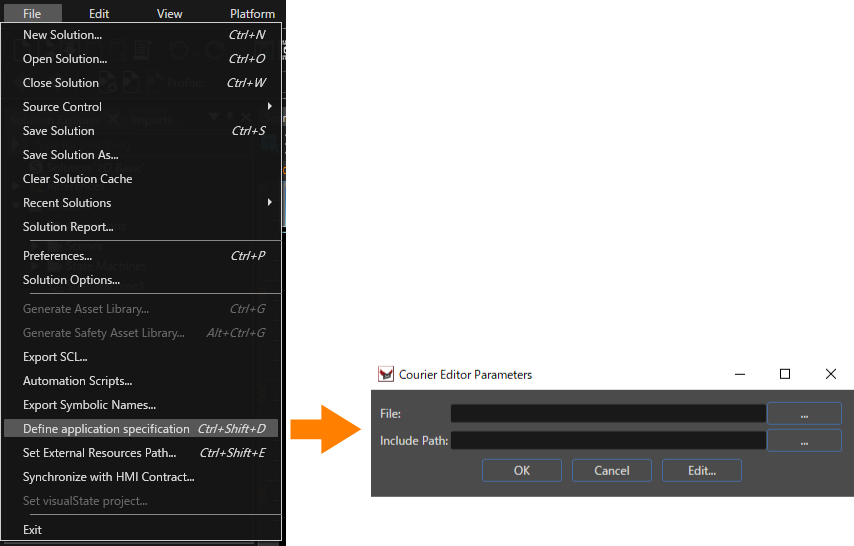
<div drawio-diagram="5957"><img src="https://doc316en.candera.eu/uploads/images/drawio/2024-06/drawing-7-1717648140.png" alt=""/></div>

<div drawio-diagram="5958"><img src="https://doc316en.candera.eu/uploads/images/drawio/2024-06/drawing-7-1717648178.png" alt=""/></div>

*<span style="text-decoration: underline;">**Courier Editor main window**</span>*

---

#### CourierEditor user interface

##### Menu bar

Please see the table below for details on CourierEditor menu bar.

<table border="1" id="bkmrk-%E3%83%A1%E3%83%8B%E3%83%A5%E3%83%BC%E5%90%8D-%E8%AA%AC%E6%98%8E-file-new-%E6%96%B0%E8%A6%8F" style="border-collapse: collapse; width: 97.7778%; height: 436.75px; border-width: 1px;"><tbody><tr style="height: 29.7969px;"><td class="align-center" colspan="2" style="width: 36.9153%; height: 29.7969px; background-color: rgb(230, 126, 35); border-width: 1px;"><span style="color: rgb(236, 240, 241);">**Menu name**</span>  
</td><td class="align-center" style="width: 63.2111%; height: 29.7969px; background-color: rgb(230, 126, 35); border-width: 1px;"><span style="color: rgb(236, 240, 241);">**Description**</span></td></tr><tr style="height: 29.7969px;"><td rowspan="5" style="width: 18.4576%; height: 148.984px; border-width: 1px;">File  
</td><td style="width: 18.4576%; height: 29.7969px; border-width: 1px;">New</td><td style="width: 63.2111%; height: 29.7969px; border-width: 1px;">Create a new data binding source.</td></tr><tr style="height: 29.7969px;"><td style="width: 18.4576%; height: 29.7969px; border-width: 1px;">Open</td><td style="width: 63.2111%; height: 29.7969px; border-width: 1px;">Open an existing data binding source.</td></tr><tr style="height: 29.7969px;"><td style="width: 18.4576%; height: 29.7969px; border-width: 1px;">Close</td><td style="width: 63.2111%; height: 29.7969px; border-width: 1px;">Closes the currently open data binding source.</td></tr><tr style="height: 29.7969px;"><td style="width: 18.4576%; height: 29.7969px; border-width: 1px;">Save</td><td style="width: 63.2111%; height: 29.7969px; border-width: 1px;">Overwrites the currently open data binding source.

</td></tr><tr style="height: 29.7969px;"><td style="width: 18.4576%; height: 29.7969px; border-width: 1px;">Save As</td><td style="width: 63.2111%; height: 29.7969px; border-width: 1px;">Save the currently open data binding source as.

</td></tr><tr style="height: 29.7969px;"><td rowspan="8" style="width: 18.4576%; height: 228.172px; border-width: 1px;">Edit  
</td><td style="width: 18.4576%; height: 29.7969px; border-width: 1px;">Undo</td><td style="width: 63.2111%; height: 29.7969px; border-width: 1px;">Undo the previous operation.</td></tr><tr style="height: 29.7969px;"><td style="width: 18.4576%; height: 29.7969px; border-width: 1px;">Redo</td><td style="width: 63.2111%; height: 29.7969px; border-width: 1px;">Redo the previous operation.</td></tr><tr style="height: 29.7969px;"><td style="width: 18.4576%; height: 29.7969px; border-width: 1px;">Validate</td><td style="width: 63.2111%; height: 29.7969px; border-width: 1px;">Validate the currently open data binding source.</td></tr><tr style="height: 29.7969px;"><td style="width: 18.4576%; height: 29.7969px; border-width: 1px;">Add Include</td><td style="width: 63.2111%; height: 29.7969px; border-width: 1px;">Add another data binding source to "include".</td></tr><tr style="height: 19.5938px;"><td style="width: 18.4576%; height: 19.5938px; border-width: 1px;">Add Message</td><td style="width: 63.2111%; height: 19.5938px; border-width: 1px;">Add a message item to "messages".</td></tr><tr style="height: 29.7969px;"><td style="width: 18.4576%; height: 29.7969px; border-width: 1px;">Add Message Group</td><td style="width: 63.2111%; height: 29.7969px; border-width: 1px;">Add a group item to "messages".</td></tr><tr style="height: 29.7969px;"><td style="width: 18.4576%; height: 29.7969px; border-width: 1px;">Add Compound</td><td style="width: 63.2111%; height: 29.7969px; border-width: 1px;">Add the compound item to "types".</td></tr><tr style="height: 29.7969px;"><td style="width: 18.4576%; height: 29.7969px; border-width: 1px;">Add Binding Source</td><td style="width: 63.2111%; height: 29.7969px; border-width: 1px;">Add a bindingSource item to "bindingSources".</td></tr><tr style="height: 29.7969px;"><td style="width: 18.4576%; height: 29.7969px; border-width: 1px;">Help</td><td style="width: 18.4576%; height: 29.7969px; border-width: 1px;">View Schema Help</td><td style="width: 63.2111%; height: 29.7969px; border-width: 1px;">Open an "Xml Courier Definition Language (XCDL) schema documentation".</td></tr></tbody></table>

##### UI item

Details of the UI items on CourierEditor main window. The numbers in the diagram match the numbers in the explanations for each item below.

<div drawio-diagram="6964"><img src="https://doc316en.candera.eu/uploads/images/drawio/2024-10/drawing-7-1728614240.png" alt=""/></div>

<table border="1" id="bkmrk-ui%E9%A0%85%E7%9B%AE-%E8%AA%AC%E6%98%8E-1.-%E3%83%91%E3%82%B9-includ" style="border-collapse: collapse; width: 100%; height: 372.938px;"><colgroup><col style="width: 22.1261%;"></col><col style="width: 77.8739%;"></col></colgroup><tbody><tr style="height: 20.7969px;"><td class="align-center" style="background-color: rgb(230, 126, 35); height: 20.7969px;">**<span style="color: rgb(255, 255, 255);">UI item</span>**  
</td><td class="align-center" style="background-color: rgb(230, 126, 35); height: 20.7969px;">**<span style="color: rgb(255, 255, 255);">Description</span>**</td></tr><tr style="height: 29.7969px;"><td colspan="2" style="background-color: rgb(251, 238, 184); height: 29.7969px;">**1. Data binding source path information**  
</td></tr><tr style="height: 29.7969px;"><td style="height: 29.7969px;">Include Path</td><td style="height: 29.7969px;">Set the save destination of the referenced Data binding source.</td></tr><tr style="height: 29.7969px;"><td style="height: 29.7969px;">File path</td><td style="height: 29.7969px;">Set the save destination of the Data binding source.</td></tr><tr style="height: 52.1875px;"><td colspan="2" style="height: 52.1875px; background-color: rgb(251, 238, 184);">**2. Data binding item editing area**  
The top row of tabs is for selecting the data binding source. (When setting Include path)

</td></tr><tr style="height: 57.7812px;"><td style="height: 57.7812px;">Raw XML tab</td><td style="height: 57.7812px;">Information on all items included in the Data binding source is displayed.  
You can add/edit/delete items.

</td></tr><tr style="height: 46.5938px;"><td style="height: 46.5938px;">Types tab</td><td style="height: 46.5938px;">Only items included in "types" in Raw XML are displayed in list format.  
You can add/edit/delete items.  
</td></tr><tr style="height: 46.5938px;"><td style="height: 46.5938px;">Binding Sources tab</td><td style="height: 46.5938px;">Only items included in "bindingSources" in Raw XML are displayed in list format.  
You can add/edit/delete items.  
</td></tr><tr style="height: 29.7969px;"><td colspan="2" style="height: 29.7969px; background-color: rgb(251, 238, 184);">**3. Verification result view**  
</td></tr><tr style="height: 29.7969px;"><td style="height: 29.7969px;">ー</td><td style="height: 29.7969px;">The data binding source validation results are displayed.</td></tr></tbody></table>

---

#### Create new definition

Create a Data binding source from \[ File &gt; New \] on the CourierEditor menu bar.

<div drawio-diagram="5961"><img src="https://doc316en.candera.eu/uploads/images/drawio/2024-06/drawing-7-1717648401.png" alt=""/></div>

In the "New File" dialog, set the destination and name for the new data binding source, then click \[ Save \].

<div drawio-diagram="5976"><img src="https://doc316en.candera.eu/uploads/images/drawio/2024-06/drawing-7-1717653084.png" alt=""/></div>

---

#### Open existing definition

Open an existing Data binding source from \[ File &gt; Open \] in CourierEditor menu bar.

In the Open dialog, select an existing data binding source, then click \[ Open \]..

<div drawio-diagram="5977"><img src="https://doc316en.candera.eu/uploads/images/drawio/2024-06/drawing-7-1717653208.png" alt=""/></div>

In addition to the steps above, you can also open an existing data binding source from the CourierEditor main window. Click the \[...\] button at the right end of File Path to set the path required to open an existing data binding source. The \[Open\] button will appear at the right end of File Path, so click it.

<div drawio-diagram="6970"><img src="https://doc316en.candera.eu/uploads/images/drawio/2024-10/drawing-7-1728614713.png" alt=""/></div>

---

#### Setting the Include Path

You can set an Include Path for a Data binding source. Include path allows you to pre-include the contents of a specific Data binding source in the Data binding source you are editing by setting the path of the specific Data binding source. For example, by setting a Data binding source that is used for general purposes to a Include Path, there are advantages such as eliminating the need to create a similar Data binding source for each solution.

##### How to set Include Path

To set the Include Path, click the \[ ... \] button at the right end of the Include Path in the CourierEditor dialog to open the "Include path" dialog.

<div drawio-diagram="6966"><img src="https://doc316en.candera.eu/uploads/images/drawio/2024-10/drawing-7-1728614326.png" alt=""/></div>

The details of the Include path dialog are as follows. Use \[ Add path \] to set the destination for any Data binding source.

<div drawio-diagram="6967"><img src="https://doc316en.candera.eu/uploads/images/drawio/2024-10/drawing-7-1728614354.png" alt=""/></div>

<table border="1" id="bkmrk-ui%E9%A0%85%E7%9B%AE-%E8%AA%AC%E6%98%8E-add-path-%E3%83%87%E3%83%BC%E3%82%BF" style="border-collapse: collapse; width: 100.053%; height: 159.578px;"><colgroup><col style="width: 15.5692%;"></col><col style="width: 84.4839%;"></col></colgroup><tbody><tr style="height: 29.7969px;"><td class="align-center" style="background-color: rgb(230, 126, 35); height: 29.7969px;"><span style="color: rgb(255, 255, 255);">**UI item**</span></td><td class="align-center" style="background-color: rgb(230, 126, 35); height: 29.7969px;"><span style="color: rgb(255, 255, 255);">**Description**</span></td></tr><tr style="height: 29.7969px;"><td style="height: 29.7969px;">Add path</td><td style="height: 29.7969px;">Sets the path for a specific Data binding source.</td></tr><tr style="height: 29.7969px;"><td style="height: 29.7969px;">Remove path</td><td style="height: 29.7969px;">Removes the path selected in the Include path dialog.</td></tr><tr style="height: 29.7969px;"><td style="height: 29.7969px;">Move up</td><td style="height: 29.7969px;">Moves the display order of the paths selected in the Include path dialog in ascending order.</td></tr><tr style="height: 10.5938px;"><td style="height: 10.5938px;">Move down</td><td style="height: 10.5938px;">Moves the display order of paths set in the Include path dialog in descending order.</td></tr><tr style="height: 29.7969px;"><td style="height: 29.7969px;">OK</td><td style="height: 29.7969px;">Finish setting Include path and proceed to the next step.</td></tr></tbody></table>

After setting the Include Path in the Include path dialog, perform the following operations in the editing area of the Data binding item.

1. Add an include element by selecting \[ Add new include \] from the context menu of include in the Raw XML tab.
    
    <div drawio-diagram="5801"><img src="https://doc316en.candera.eu/uploads/images/drawio/2024-05/drawing-7-1716523486.png" alt=""/></div>
2. Enter the file name of specific Data binding source in \[ href \] of the added include element.  
    <div drawio-diagram="5802"><img src="https://doc316en.candera.eu/uploads/images/drawio/2024-05/drawing-7-1716523515.png" alt=""/></div>
3. From the context menu of the added include element, choose \[ Edit (filename of specific Data binding source) \].  
    <div drawio-diagram="5803"><img src="https://doc316en.candera.eu/uploads/images/drawio/2024-05/drawing-7-1716523543.png" alt=""/></div>
4. The "(specific Data binding source name).xcdl" tab is displayed at the top of the Data binding item editing area.  
    <div drawio-diagram="6440"><img src="https://doc316en.candera.eu/uploads/images/drawio/2024-07/drawing-7-1721107898.png" alt=""/></div>

By performing the above operations, specific Data binding source can be included in the Data binding source being edited.

---

#### Edit definition

##### Adding new item

Add a new item by selecting \[ Add new (addable item name) \] from each item context menu.

<div drawio-diagram="5963"><img src="https://doc316en.candera.eu/uploads/images/drawio/2024-06/drawing-7-1717648728.png" alt=""/></div>


##### Deleting the item

Select \[ Delete (item name you want to delete) \] from the context menu of the item you want to delete.

<div drawio-diagram="5964"><img src="https://doc316en.candera.eu/uploads/images/drawio/2024-06/drawing-7-1717648759.png" alt=""/></div>


##### Types / Binding Sources tabs

The Types and Binding Sources tabs are duplicates of the Raw XML tab's types and bindingSources. By using the Types tab and Binding Sources tab, you can edit the types and bindingSources items in the Raw XML tab, and display them in a list. Edits in the Raw XML tab and the Types/Binding Sources tab are synchronized with each other.

<div drawio-diagram="5806"><img src="https://doc316en.candera.eu/uploads/images/drawio/2024-05/drawing-7-1716526149.png" alt=""/></div>

*<span style="text-decoration: underline;">**Raw XML tab and Type tab**</span>*

<div drawio-diagram="5807"><img src="https://doc316en.candera.eu/uploads/images/drawio/2024-05/drawing-7-1716526190.png" alt=""/></div>

<span style="text-decoration: underline;">***Raw XML tab and Binding Sources tab***</span>

##### Defining the data type of a data binding item

In the Binding Sources tab, you can define the data type of a data binding item. You can select a pre-defined data type from the item &gt; type pull-down menu.

<div drawio-diagram="6000"><img src="https://doc316en.candera.eu/uploads/images/drawio/2024-06/drawing-7-1717746646.png" alt=""/></div>

You can define a custom data type by selecting &lt;Add Type&gt; from the type pull-down menu. When you select &lt;Add Type&gt;, the "Type" dialog opens, so click the \[ + \] icon in the upper left. A new data type will be added, so enter the data type information and click \[ OK \].

<div drawio-diagram="6001"><img src="https://doc316en.candera.eu/uploads/images/drawio/2024-06/drawing-7-1717746676.png" alt=""/></div>

The added custom data type will be selectable from the pull-down menu of type.

<div drawio-diagram="6002"><img src="https://doc316en.candera.eu/uploads/images/drawio/2024-06/drawing-7-1717746708.png" alt=""/></div>

<div drawio-diagram="6638"></div>

<p class="callout info">To make the information easier to understand, the Types and Binding Sources tabs display only the important properties of the Raw XML tab.</p>

##### Specify optional artifacts like the message distribution

- Check the checkbox to the left of each artifact to set the value.
- Note: 
    - If not specified the inherited distribution is used
    - The broadcast value is edited by the checkbox on the right side
    - Uid will be automatically created by the editor
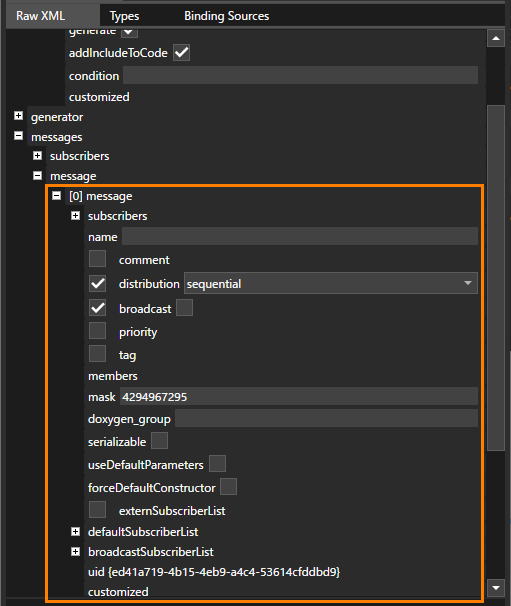
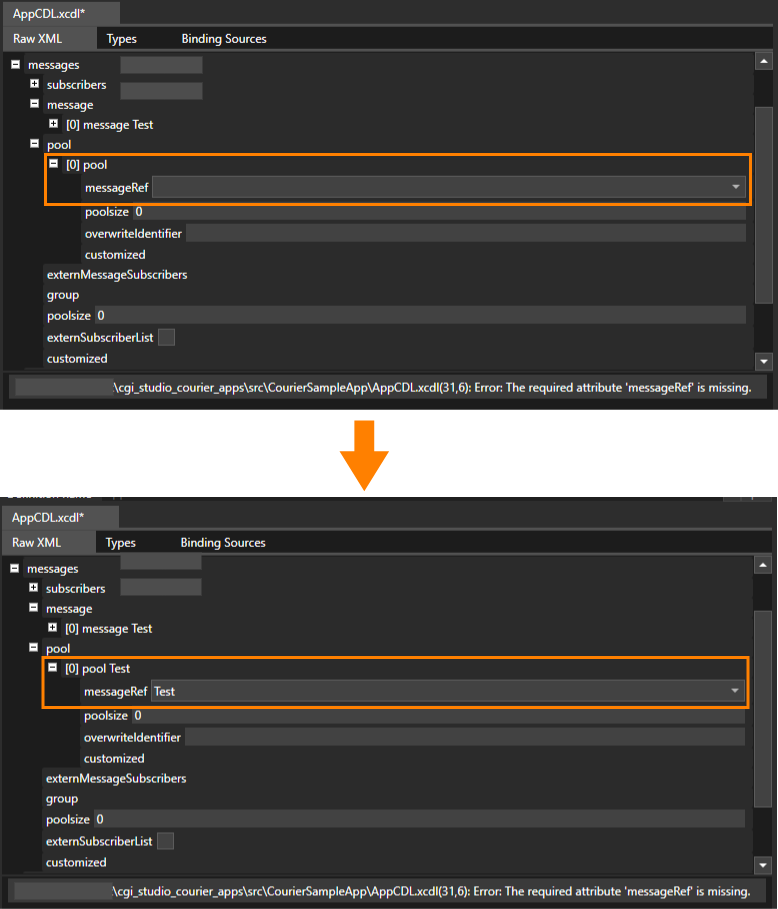
<div drawio-diagram="5678"><img src="https://doc316en.candera.eu/uploads/images/drawio/2024-04/drawing-7-1714457821.png" alt=""/></div>

##### Choose references from the dropdown list e. g.

- The data binding source contains a message called "Test".
- In that case, a validation error will occur if the pool's messageRef is not set.
- From the pool's messageRef pull-down menu, select the message "Test".
- messageRef will be set to the uid of the message "Test".

<div drawio-diagram="6968"><img src="https://doc316en.candera.eu/uploads/images/drawio/2024-10/drawing-7-1728614448.png" alt=""/></div>

#### Validation

Validation can be performed in two ways.

- Execute \[ Edit &gt; Validate \] from the menu bar.
- Using the shortcut "Alt+V"

Validation output is shown on the lower part.

<div drawio-diagram="6969"><img src="https://doc316en.candera.eu/uploads/images/drawio/2024-10/drawing-7-1728614493.png" alt=""/></div>

---

# Examples of using Data binding

This page shows how to create a data binding source using Courier Editor and how to configure data binding using Scene Composer. This tutorial will be based on an [<span style="color: rgb(230, 126, 35);">Industrial solution</span>](https://doc316en.candera.eu/books/sample-solutions/page/industrial-solution) template.

---

#### Creating a Data binding source

1. Open Scene Composer and choose to open the Industrial solution from the Samples and Templates section of Scene Composer's Startup panel by double clicking. 
    - The solution will be loaded, which may take some time
    
    <div drawio-diagram="7912"><img src="https://doc316en.candera.eu/uploads/images/drawio/2025-02/drawing-5-1738927675.png" alt=""/>  
    </div>
2. In the Scene Composer menu bar click \[ File &gt; Define application specification \] to open the "Courier Editor Parameters" dialog.  
    
    - "Courier Editor Parameters" dialog will be opened.
    
    <div drawio-diagram="7911"><img src="https://doc316en.candera.eu/uploads/images/drawio/2025-02/drawing-5-1738927658.png" alt=""/></div>
3. In the "Courier Editor Parameters" select \[ Edit... \] to start CourierEditor. 
    - CourierEditor window will be opened.
    
    <div drawio-diagram="7910"><img src="https://doc316en.candera.eu/uploads/images/drawio/2025-02/drawing-5-1738927644.png" alt=""/></div>
4. In CourierEditor menu bar, click \[ File &gt; New \]. 
    - The "New File" dialog box will be opened.
    
    <div drawio-diagram="7909"><img src="https://doc316en.candera.eu/uploads/images/drawio/2025-02/drawing-5-1738927628.png" alt=""/></div>
5. Set the destination folder and filename for the new data binding source and click \[ Save \]. 
    - The data binding source file "Industrial.xcdl" will be saved to the specified location.
    - The data binding source file is now ready to be configured with data binding items.
    
    <div drawio-diagram="7913"><img src="https://doc316en.candera.eu/uploads/images/drawio/2025-02/drawing-5-1738927747.png" alt=""/></div>
6. Add Data binding items (data name/type) to the created Data binding source. To do so, switch to the Binding Sources tab and click the \[ + \] button on the top left to add a binding source. 
    - "\[0\] bindingSource" is added
    
    <div drawio-diagram="7914"><img src="https://doc316en.candera.eu/uploads/images/drawio/2025-02/drawing-5-1738928212.png" alt=""/></div>
7. Click on "\[0\] bindingSource" to view its details on the right side and set the name to "Industrial". 
    - The name of "\[0\] bindingSource" will be set to "Industrial"
    
    <div drawio-diagram="7917"><img src="https://doc316en.candera.eu/uploads/images/drawio/2025-02/drawing-5-1738928531.png" alt=""/></div>
8. Click the \[ + \] button next to "items" and click \[ Add new item \] in the context menu. 
    - "\[0\] item" is added.
    
    <div drawio-diagram="7918"><img src="https://doc316en.candera.eu/uploads/images/drawio/2025-02/drawing-5-1738928720.png" alt=""/></div>
9. Select data binding item "\[0\] item" view its details on the right side and configure the following name and type:  
    name = Temp  
    type = ::FeatStd::Int32 
    - Data binding item will be configured accordingly.
    
    <div drawio-diagram="7920"><img src="https://doc316en.candera.eu/uploads/images/drawio/2025-02/drawing-5-1738929282.png" alt=""/></div>
10. In the menu bar of the CourierEditor select \[ File &gt; Save \] to save the data binding source file. 
    - The data binding source file will be saved.
    - The creation of the data binding source is now complete.
    - The CourierEditor can be closed.

<p class="callout info">Please refer to [<span style="color: rgb(230, 126, 35);">Courier Editor</span>](https://doc316en.candera.eu/books/courier/page/courier-editor) for more information on how to create data binding sources.</p>

---

#### Linking Data binding source to Scene Composer

1. In the Scene Composer menu bar choose \[ File &gt; Define Application Specification \] to open the "Courier Editor Parameters" dialog. 
    - The Courier Editor Parameters dialog will be opened.
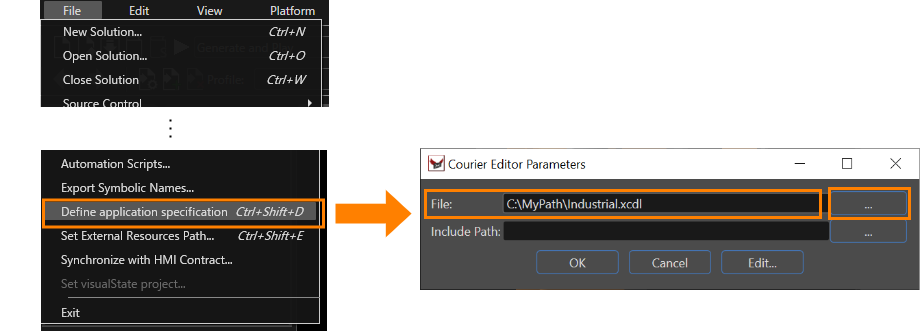
    
    <div drawio-diagram="7923"><img src="https://doc316en.candera.eu/uploads/images/drawio/2025-02/drawing-5-1738930343.png" alt=""/></div>
2. In the Courier Editor Parameters dialog click the \[ ... \] button to select the path to the data binding source file "Industrial.xcdl" file. 
    - The file which you have just created using CourierEditor in the steps above is configured.
3. Finish your configuration by clicking \[ OK \]. 
    - The Data binding source is now linked to Scene Composer.

---

#### Configuring Data binding using the Scene Composer

In Scene Composer, many Control properties can be configured for data binding. Each property on which data binding can be performed offers a bind button on the right side in the Properties panel.

<p class="callout info">For more information about data binding, please refer to [<span style="color: rgb(230, 126, 35);">Data Binding</span>](https://doc316en.candera.eu/books/scene-design/page/databinding-ui).</p>

1. In the scene tree of the Scene1\_Main scene, select \[ GaugeTemperature \], and in the properties panel, click the \[ Control &gt; Value \] bind button. 
    - The Define Data Binding dialog will be opened.
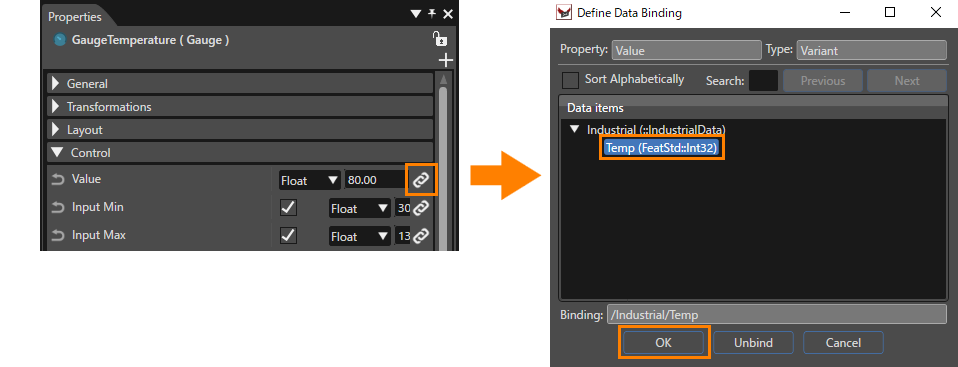
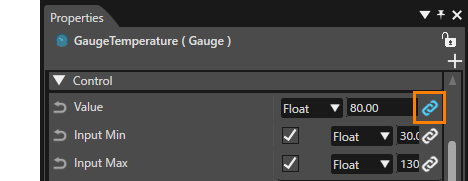
    
    <div drawio-diagram="7924"><img src="https://doc316en.candera.eu/uploads/images/drawio/2025-02/drawing-5-1738931716.png" alt=""/></div>
2. Select "Industrial &gt; Temp (FeatStd::Int32)" from the data item and click \[ OK \]. 
    - When data binding is set, the color of the bind button changes to blue.
    
    <div drawio-diagram="7925"><img src="https://doc316en.candera.eu/uploads/images/drawio/2025-02/drawing-5-1738931734.png" alt=""/></div>

---

#### Operation confirmation using Live Preview panel

You can check the operation of data binding settings in the live preview panel.

1. In Scene Composer menu bar choose \[ View &gt; Live Preview \] to display the live preview panel. Set the \[ On/Off \] button at the top right of the panel to "On". 
    - The Live Preview window will be opened.
    - After turning the live preview on, the button will display in green font \[ ON \].
    
    <div drawio-diagram="7931"><img src="https://doc316en.candera.eu/uploads/images/drawio/2025-02/drawing-5-1738933037.png" alt=""/></div>
2. Set the "Tmp (Variant)" value to your desired value. 
    - The position of the thermometer needle displayed in the Scene Editor changes to match the value you have set.
    - The value of the Control property "Value" will be updated to the value entered in the "Live Preview"
    
    <div drawio-diagram="7930"><img src="https://doc316en.candera.eu/uploads/images/drawio/2025-02/drawing-5-1738932960.png" alt=""/></div>

---

# Visualization

#### <a class="anchor" id="bkmrk--22"></a>Description

Beside the Messaging and Data Binding capabilities [Courier](http://dev.doc.cgistudio.at/APILINK/namespace_courier.html) can also be used for Visualization purposes.

#### **View and ViewController Instantiation** 

##### <a class="anchor" id="bkmrk--24"></a>Description

For instantiation of View and ViewController objects please refer to the following chapters.

##### **View Factory** 

There are several methods how View objects might be instantiated. This is always done by a ViewFactory, either by the original [Courier::ViewFactory](http://dev.doc.cgistudio.at/APILINK/class_courier_1_1_view_factory.html) or by a customized ViewFactory using overwritten methods for special purposes.

##### <a class="anchor" id="bkmrk--26"></a>Customized View Factory

If there is the special need to instantiate certain [Courier::View](http://dev.doc.cgistudio.at/APILINK/class_courier_1_1_view.html) objects manually this can be done by overwriting the virtual method [Courier::ViewFactory::Create](http://dev.doc.cgistudio.at/APILINK/class_courier_1_1_view_factory.html#ad421b5ee9235b39354662940f3e2082a).

Let's state the following View path names:

```
#include "Constants.h"
#include <Courier/Visualization/ViewId.h>
#include <Courier/Visualization/ItemId.h>

const Courier::Char * Constants::c_sampleapp_mymodule_viewcontainer = "MyModule";
const Courier::Char * Constants::c_sampleapp_scenes_viewcontainer = "MyModule#Scenes";
const Courier::Char * Constants::c_sampleapp_scene3D = "MyModule#Scenes#ClusterScene";

// defining such an access method avoid recomputing the ViewId hash value
const Courier::ViewId & Constants::c_viewId_scene3D() {
    static const Courier::ViewId id(c_sampleapp_scene3D);
    return id;
}

const Courier::Char * Constants::c_sampleapp_cargeneric_animation = "MyModule#Animations#CarGenericAnimation";


```

In our example two [Courier::ViewContainer](http://dev.doc.cgistudio.at/APILINK/class_courier_1_1_view_container.html) objects are created statically and one [Courier::ViewScene3D](http://dev.doc.cgistudio.at/APILINK/class_courier_1_1_view_scene3_d.html) object is created dynamically. When overwriting the Create method the implementer has to know which View (identified by its [Candera](http://dev.doc.cgistudio.at/APILINK/namespace_candera.html "[DataBinding_RefTypeSample]") path name) has which type ([Courier::ViewContainer](http://dev.doc.cgistudio.at/APILINK/class_courier_1_1_view_container.html), [Courier::ViewScene2D](http://dev.doc.cgistudio.at/APILINK/class_courier_1_1_view_scene2_d.html) or [Courier::ViewScene3D](http://dev.doc.cgistudio.at/APILINK/class_courier_1_1_view_scene3_d.html)):

```
Courier::View * SampleAppViewFactory::Create(const Courier::Char * viewId)
{
    // check if we have a valid string pointer
    COURIER_DEBUG_ASSERT(viewId!=0);

    if(viewId!=0) {
        // check if we shall return a pointer to an object identified by 'c_sampleapp_mymodule_viewcontainer'
        if(0==strcmp(viewId,Constants::c_sampleapp_mymodule_viewcontainer)) {
            static Courier::ViewContainer myModuleViewCont;
            if(myModuleViewCont.Init(GetViewHandler(), Constants::c_sampleapp_mymodule_viewcontainer)) {
                return &myModuleViewCont;
            }
            return 0;
        }

        if(0==strcmp(viewId,Constants::c_sampleapp_scenes_viewcontainer)) {
            static Courier::ViewContainer myScenesViewCont;
            if(myScenesViewCont.Init(GetViewHandler(), Constants::c_sampleapp_scenes_viewcontainer)) {
                return &myScenesViewCont;
            }
            return 0;
        }

        // in case of 'c_sampleapp_scene3D' we create the view dynamically
        if(0==strcmp(viewId,Constants::c_sampleapp_scene3D)) {
            Courier::ViewScene3D* view3D = COURIER_NEW(Courier::ViewScene3D)();
            if(view3D->Init(GetViewHandler(), Constants::c_sampleapp_scene3D)) {
                return view3D;
            }
            return 0;
        }
    }
    return 0;
}

```

The deletion of the view objects is done inside the overwritten [Courier::ViewFactory::Destroy](http://dev.doc.cgistudio.at/APILINK/class_courier_1_1_view_factory.html#a2a84db4207ea0e040026a6e65395e1a5) method:

```
void SampleAppViewFactory::Destroy(Courier::View * view)
{
    if(view!=0) {
        // do not destroy because we have not dynamically created them
        if(0==strcmp(view->GetId().CStr(),Constants::c_sampleapp_mymodule_viewcontainer)) {
            return;
        }
        else if(0==strcmp(view->GetId().CStr(),Constants::c_sampleapp_scenes_viewcontainer)) {
            return;
        }
        // destroy this view because we have dynamically created this view
        else if(0==strcmp(view->GetId().CStr(),Constants::c_sampleapp_scene3D)) {
            COURIER_DELETE(view);
            return;
        }
    }
}

```

##### <a class="anchor" id="bkmrk--27"></a>Automatic View Creation

The second method of View creation is a more generalized approach where no view identification is needed to create certain View objects. In our example some user specific View classes are 'implemented':

```
// These classes fullfill no special purposes but shall demonstrate how to instantiate
// customized ViewScene classes inside MyViewFactory

class MyViewScene2D : public Courier::ViewScene2D
{
    public:
        // Constructor of the MyViewScene2D class
        // the parameter value 'true' instructs the ViewHandler, which manages the View objects, 
        // that it shall call the DestroyView method when destroying the MyViewScene2D object. 
        MyViewScene2D() : ViewScene2D(true) {
        }
};

class MyViewScene3D : public Courier::ViewScene3D
{
    public:
        MyViewScene3D() : ViewScene3D(true) {
        }
};
```

The ViewScene objects are now instantiated by the following simple ViewFactory using the overwritten [Courier::ViewFactory::CreateViewScene](http://dev.doc.cgistudio.at/APILINK/class_courier_1_1_view_factory.html#a287130386980b783a267163272047bc2) method.

```
class MyViewFactory : public Courier::ViewFactory
{
    public:
        MyViewFactory() {};

        <a class="code" href="http://dev.doc.cgistudio.at/APILINK/class_courier_1_1_view.html">Courier::View</a> * <a class="code" href="http://dev.doc.cgistudio.at/APILINK/group___c_o_u_r_i_e_r___v_i_s_u_a_l_i_z_a_t_i_o_n.html#ggaf0e93dc4242f607c3c8d13dafd036af9aaabfa5309af24986d3111a092449f857">Create</a>(const FeatStd::Char * viewId)
        {
            FEATSTD_UNUSED(viewId);
            return 0;
        }

        virtual <a class="code" href="http://dev.doc.cgistudio.at/APILINK/class_courier_1_1_view_scene.html">Courier::ViewScene</a> * CreateViewScene(bool is2D) {
            <a class="code" href="http://dev.doc.cgistudio.at/APILINK/class_courier_1_1_view_scene.html">Courier::ViewScene</a> * view = 0;
            if(is2D) {
        #if defined(CANDERA_2D_ENABLED)
                view = COURIER_NEW(MyViewScene2D)();
        #endif
            } else {
        #if defined(CANDERA_3D_ENABLED)
                view = COURIER_NEW(MyViewScene3D)();
        #endif
            }
            return view;
        }
};
```

In this sample implementation ViewContainers are instantiated by the default implementation of [Courier::ViewFactory::CreateViewContainer](http://dev.doc.cgistudio.at/APILINK/class_courier_1_1_view_factory.html#a076375cab3da089bd60a42112f929e4e) method. Also the [Courier::ViewFactory::DestroyView](http://dev.doc.cgistudio.at/APILINK/class_courier_1_1_view_factory.html#a520a0979d7ef31267a4dc71cc7b0d4f8) method is not overwritten because the created MyViewScene2D and MyViewScene3D object will be dynamically allocated with COURIER\_NEW and can therefore be deleted by the default implementation.

#####   
**ViewController Factory** 

Each [Courier::View](http://dev.doc.cgistudio.at/APILINK/class_courier_1_1_view.html) might have its own ViewController object attached. This is controlled by an optional [Courier::ViewControllerFactory](http://dev.doc.cgistudio.at/APILINK/class_courier_1_1_view_controller_factory.html) which can be set to the [Courier::ViewHandler](http://dev.doc.cgistudio.at/APILINK/class_courier_1_1_view_handler.html).

If a ViewControllerFactory shall be used during View instantiation the overwritten [Courier::ViewControllerFactory::Create](http://dev.doc.cgistudio.at/APILINK/class_courier_1_1_view_controller_factory.html#aed40017b8e926154a5dd59927647937e) will be called.

Please take a look at this example:

```
Courier::ViewController * SampleAppViewControllerFactory::Create(const FeatStd::Char * viewId)
{
    if (strcmp(viewId, Constants::c_sampleapp_scene3D) == 0) {
        static SampleAppViewController viewController;
        COURIER_LOG_DEBUG("Created SampleAppViewController for View(%s)",viewId);
        return &viewController;
    }
    return 0;
}

```

Destroying of the ViewController is done by implementing the following method:

```
void SampleAppViewControllerFactory::Destroy(Courier::ViewController * viewController)
{
    COURIER_UNUSED(viewController);
    if(viewController!=0) {
        // no real destroying because we have a static object
        COURIER_LOG_DEBUG("Free SampleAppViewController for View(%s)",viewController->GetView()->GetId().CStr());
        // but release the ViewControllers view, so that the ViewController might be reused by another view.
        // Usually this is done by destructor of ViewController, but in our case the ViewController is statically allocated.
        viewController->ReleaseView();
    }
}

```

In case the ViewControllerFactory returns a pointer to a ViewController instance, it will be attached to the requesting View automatically.

#### **Messaging, Updating and Rendering** 

##### <a class="anchor" id="bkmrk--28"></a>Description

For maintaining the [Courier::View](http://dev.doc.cgistudio.at/APILINK/class_courier_1_1_view.html) tree the [Courier::ViewComponent](http://dev.doc.cgistudio.at/APILINK/class_courier_1_1_view_component.html) is responsible, for rendering the [Courier::RenderComponent](http://dev.doc.cgistudio.at/APILINK/group___c_o_u_r_i_e_r___f_o_u_n_d_a_t_i_o_n.html#ga111beafd1fd94fe52d99eda8c752bcbf "RenderComponent renders both 2D and 3D Views.")/s is/are responsible. The view tree itself is contained inside the [Courier::ViewHandler](http://dev.doc.cgistudio.at/APILINK/class_courier_1_1_view_handler.html) instance. It is used by both ViewComponent &amp; RenderComponent via the [Courier::ViewFacade](http://dev.doc.cgistudio.at/APILINK/class_courier_1_1_view_facade.html) class, which provides interfaces for Messaging, Updating and Rendering.

For details on this refer to the following chapters:

##### **Predefined Messages** 

##### <a class="anchor" id="bkmrk--30"></a>Built-in Messages

A set of built-in messages exists which can be sent to the [Courier::ViewComponent](http://dev.doc.cgistudio.at/APILINK/class_courier_1_1_view_component.html) and trigger certain operations. Please refer to the Message documentation itself:

<div class="contents" id="bkmrk-courier%3A%3Aactivationr"><div class="contents"><div class="textblock">- [Courier::ActivationReqMsg](http://dev.doc.cgistudio.at/APILINK/class_courier_1_1_activation_req_msg.html)
    - responds with [Courier::ActivationResMsg](http://dev.doc.cgistudio.at/APILINK/class_courier_1_1_activation_res_msg.html) to [Courier::ControllerComponent](http://dev.doc.cgistudio.at/APILINK/class_courier_1_1_controller_component.html)
- [Courier::AnimationReqMsg](http://dev.doc.cgistudio.at/APILINK/class_courier_1_1_animation_req_msg.html)
    - responds with [Courier::AnimationResMsg](http://dev.doc.cgistudio.at/APILINK/class_courier_1_1_animation_res_msg.html) to [Courier::ControllerComponent](http://dev.doc.cgistudio.at/APILINK/class_courier_1_1_controller_component.html)
    - sends asynchronously [Courier::AnimationIndMsg](http://dev.doc.cgistudio.at/APILINK/class_courier_1_1_animation_ind_msg.html) to [Courier::ControllerComponent](http://dev.doc.cgistudio.at/APILINK/class_courier_1_1_controller_component.html) when animation has finished.
- [Courier::LoadReqMsg](http://dev.doc.cgistudio.at/APILINK/class_courier_1_1_load_req_msg.html)
    - responds with [Courier::LoadResMsg](http://dev.doc.cgistudio.at/APILINK/class_courier_1_1_load_res_msg.html) to [Courier::ControllerComponent](http://dev.doc.cgistudio.at/APILINK/class_courier_1_1_controller_component.html)
- [Courier::SetPropertyReqMsg](http://dev.doc.cgistudio.at/APILINK/class_courier_1_1_set_property_req_msg.html)
    - responds with [Courier::SetPropertyResMsg](http://dev.doc.cgistudio.at/APILINK/class_courier_1_1_set_property_res_msg.html) to [Courier::ControllerComponent](http://dev.doc.cgistudio.at/APILINK/class_courier_1_1_controller_component.html)
- [Courier::TransitionReqMsg](http://dev.doc.cgistudio.at/APILINK/class_courier_1_1_transition_req_msg.html)
    - responds with [Courier::TransitionResMsg](http://dev.doc.cgistudio.at/APILINK/class_courier_1_1_transition_res_msg.html) to [Courier::ControllerComponent](http://dev.doc.cgistudio.at/APILINK/class_courier_1_1_controller_component.html)
    - sends asynchronously [Courier::TransitionIndMsg](http://dev.doc.cgistudio.at/APILINK/class_courier_1_1_transition_ind_msg.html) to [Courier::ControllerComponent](http://dev.doc.cgistudio.at/APILINK/class_courier_1_1_controller_component.html) when transition has finished.
- [Courier::ViewReqMsg](http://dev.doc.cgistudio.at/APILINK/class_courier_1_1_view_req_msg.html)
    - responds with [Courier::ViewResMsg](http://dev.doc.cgistudio.at/APILINK/class_courier_1_1_view_res_msg.html) to [Courier::ControllerComponent](http://dev.doc.cgistudio.at/APILINK/class_courier_1_1_controller_component.html)

</div></div></div>Messages which are processed by the [Courier::RenderComponent](http://dev.doc.cgistudio.at/APILINK/group___c_o_u_r_i_e_r___f_o_u_n_d_a_t_i_o_n.html#ga111beafd1fd94fe52d99eda8c752bcbf "RenderComponent renders both 2D and 3D Views.") are the following:

<div class="contents" id="bkmrk-courier%3A%3Alayerreqmsg"><div class="contents"><div class="textblock">- [Courier::LayerReqMsg](http://dev.doc.cgistudio.at/APILINK/class_courier_1_1_layer_req_msg.html)
    - responds with [Courier::LayerResMsg](http://dev.doc.cgistudio.at/APILINK/class_courier_1_1_layer_res_msg.html) to [Courier::ControllerComponent](http://dev.doc.cgistudio.at/APILINK/class_courier_1_1_controller_component.html)
- [Courier::RenderReqMsg](http://dev.doc.cgistudio.at/APILINK/class_courier_1_1_render_req_msg.html)
    - responds with [Courier::RenderResMsg](http://dev.doc.cgistudio.at/APILINK/class_courier_1_1_render_res_msg.html) to [Courier::ControllerComponent](http://dev.doc.cgistudio.at/APILINK/class_courier_1_1_controller_component.html)

</div></div></div>Those **CommandReqMsg**s are executed inside the both components and its subcomponents and after execution they respond immediately with **CommandResMsg**s. Asynchronous Messages are named **CommandIndMsg**. The ViewComponent or RenderComponent messages are not routed through the view tree.

##### <a class="anchor" id="bkmrk--31"></a>View Manipulation using Build-in Messages

The pre-defined messages mentioned above can be used for triggering view related operations like: create, load, clear, destroy.

In order to activate a view, there are several steps and features which need to be taken in consideration. The steps for creating such messages are described below:

<div class="contents" id="bkmrk-view-creation-there-"><div class="contents"><div class="textblock">- **View Creation**
    - There are two ways to create a view tree and these are realized by posting a [Courier::ViewReqMsg](http://dev.doc.cgistudio.at/APILINK/class_courier_1_1_view_req_msg.html) with Courier::ViewAction::Create or Courier::ViewAction::CreateAll parameter.
    - Courier::ViewAction::Create creates a view "manually", which is identified by a [Courier::ViewId](http://dev.doc.cgistudio.at/APILINK/class_courier_1_1_view_id.html). This message needs to be triggered for every view.
    - Courier::ViewAction::CreateAll creates all the view objects "automatically". The [Courier::ViewId](http://dev.doc.cgistudio.at/APILINK/class_courier_1_1_view_id.html) identifies the view and its corresponding children that will be created. ```
        postMsg = (<a class="code" href="http://dev.doc.cgistudio.at/APILINK/group___c_o_u_r_i_e_r___p_l_a_t_f_o_r_m.html#ga49830e96f37f0b76cc63f52696ceb119">COURIER_MESSAGE_NEW</a>(ViewReqMsg)(<a class="code" href="http://dev.doc.cgistudio.at/APILINK/group___c_o_u_r_i_e_r___v_i_s_u_a_l_i_z_a_t_i_o_n.html#ggaf0e93dc4242f607c3c8d13dafd036af9aaabfa5309af24986d3111a092449f857">ViewAction::Create</a>, view, sInitContent, false));
        ```

- **View Loading**
    - The creation of views is followed by a message request to load corresponding view scenes. Following options are available:
    - Synchronous/Asynchronous loading: 
        - use [Courier::LoadReqMsg](http://dev.doc.cgistudio.at/APILINK/class_courier_1_1_load_req_msg.html) for synchronous loading of a scene, which will build the [Candera::Scene](http://dev.doc.cgistudio.at/APILINK/class_candera_1_1_scene.html "The class Scene represents a top level scene graph node. Multiple Scenes are allowed. A Scene can not be part of any other Scene. To render a Scene, at least one Camera must be part of this Scene and the Camera must have rendering enabled. A Scene can have more than one Camera. Note: Lights added to a Scene apply for that Scene only and do not affect 3D objects in any other Scene.") context.
        - use [Courier::AsyncLoadReqMsg](http://dev.doc.cgistudio.at/APILINK/class_courier_1_1_async_load_req_msg.html) for asynchronous loading. This means that uploading of nodes is done step by step, until the asset has been completely loaded.
    - Forced/Unforced loading of render target: 
        - forcing the load of render target is useful for ensuring that the content is being uploaded, but sometimes this might lead to the deactivation of the render target. [Courier::LoadReqMsg](http://dev.doc.cgistudio.at/APILINK/class_courier_1_1_load_req_msg.html) and [Courier::AsyncLoadReqMsg](http://dev.doc.cgistudio.at/APILINK/class_courier_1_1_async_load_req_msg.html) are used in this case.
        - in case of unforced load, the upload of the scenes might fail in case there is no EGL context available. If the fail occurs, a [Courier::LoadReqMsg](http://dev.doc.cgistudio.at/APILINK/class_courier_1_1_load_req_msg.html) should be used before activating a view. An unforced load message will create the render target if that layer is not already used. Use [Courier::TryLoadReqMsg](http://dev.doc.cgistudio.at/APILINK/class_courier_1_1_try_load_req_msg.html) or [Courier::TryAsyncLoadReqMsg](http://dev.doc.cgistudio.at/APILINK/class_courier_1_1_try_async_load_req_msg.html) in this case.
    - Iterative loading: 
        - if this option is enabled, the complete scene tree will be retrieved using a [Candera::DefaultAssetProvider](http://dev.doc.cgistudio.at/APILINK/class_candera_1_1_default_asset_provider.html "Implements objects handling mechanisms. It implements the interface AssetProvider and holds an asset ...") interface, but few or no device objects are attached to it.
        - by default, this behaviour is not enabled. In order to enable it, the application has to call explicitly: ```
            <a class="code" href="http://dev.doc.cgistudio.at/APILINK/class_candera_1_1_default_asset_provider.html#a11bda1ea731cd18843f78b8bb7e708d1">Candera::DefaultAssetProvider::GetInstance</a>().SetIterativeLoadingEnabled(!<a class="code" href="http://dev.doc.cgistudio.at/APILINK/class_candera_1_1_default_asset_provider.html#a11bda1ea731cd18843f78b8bb7e708d1">Candera::DefaultAssetProvider::GetInstance</a>().IsIterativeLoadingEnabled());
            COURIER_LOG_INFO("Set iterative loading to: %s", <a class="code" href="http://dev.doc.cgistudio.at/APILINK/class_candera_1_1_default_asset_provider.html#a11bda1ea731cd18843f78b8bb7e708d1">Candera::DefaultAssetProvider::GetInstance</a>().IsIterativeLoadingEnabled() ? "true" : "false");
            ```

- **View Activation**
    - In order for the view to be visible on the display, the view needs to be activated be sending a [Courier::ActivationReqMsg](http://dev.doc.cgistudio.at/APILINK/class_courier_1_1_activation_req_msg.html).
    - In case the loading of scenes have not been enabled previously, they will be loaded automatically during this step. ```
        postMsg = (<a class="code" href="http://dev.doc.cgistudio.at/APILINK/group___c_o_u_r_i_e_r___p_l_a_t_f_o_r_m.html#ga49830e96f37f0b76cc63f52696ceb119">COURIER_MESSAGE_NEW</a>(ActivationReqMsg)(view, true, true));
        ```

</div></div></div>Performing an unload of a view (including completely destroying it) implies the following:

<div class="contents" id="bkmrk-clearing-a-view-the-"><div class="contents"><div class="textblock">- **Clearing a View**
    - The clearing/hiding of a view is performed by posting a [Courier::ViewReqMsg](http://dev.doc.cgistudio.at/APILINK/class_courier_1_1_view_req_msg.html) with Courier::ViewAction::Clear parameter. ```
        postMsg = (<a class="code" href="http://dev.doc.cgistudio.at/APILINK/group___c_o_u_r_i_e_r___p_l_a_t_f_o_r_m.html#ga49830e96f37f0b76cc63f52696ceb119">COURIER_MESSAGE_NEW</a>(ViewReqMsg)(<a class="code" href="http://dev.doc.cgistudio.at/APILINK/group___c_o_u_r_i_e_r___v_i_s_u_a_l_i_z_a_t_i_o_n.html#ggaf0e93dc4242f607c3c8d13dafd036af9a0755a8454bc3924584f1f0cddc65f7b6">ViewAction::Clear</a>, view, false, false));
        ```

- **Deactivating a View**
    - In order to deactivate a view, a [Courier::ActivationReqMsg](http://dev.doc.cgistudio.at/APILINK/class_courier_1_1_activation_req_msg.html) with *false* boolean flags as parameters needs to be used. After this step, the [Candera](http://dev.doc.cgistudio.at/APILINK/namespace_candera.html "[DataBinding_RefTypeSample]"):Camera rendering flags used by the view will be disabled. ```
        postMsg = (<a class="code" href="http://dev.doc.cgistudio.at/APILINK/group___c_o_u_r_i_e_r___p_l_a_t_f_o_r_m.html#ga49830e96f37f0b76cc63f52696ceb119">COURIER_MESSAGE_NEW</a>(ActivationReqMsg)(view, false, false));
        ```

- **Unloading the Scenes**
    - The corresponding scenes of the view need to be unloaded by posting a [Courier::LoadReqMsg](http://dev.doc.cgistudio.at/APILINK/class_courier_1_1_load_req_msg.html) with a *false* boolean flag as parameter. This action will release the [Candera::Scene](http://dev.doc.cgistudio.at/APILINK/class_candera_1_1_scene.html "The class Scene represents a top level scene graph node. Multiple Scenes are allowed. A Scene can not be part of any other Scene. To render a Scene, at least one Camera must be part of this Scene and the Camera must have rendering enabled. A Scene can have more than one Camera. Note: Lights added to a Scene apply for that Scene only and do not affect 3D objects in any other Scene.") context. ```
        postMsg = (<a class="code" href="http://dev.doc.cgistudio.at/APILINK/group___c_o_u_r_i_e_r___p_l_a_t_f_o_r_m.html#ga49830e96f37f0b76cc63f52696ceb119">COURIER_MESSAGE_NEW</a>(LoadReqMsg)(view, false));
        ```

- **Destroying a View**
    - Destroy a view implies sending a [Courier::ViewReqMsg](http://dev.doc.cgistudio.at/APILINK/class_courier_1_1_view_req_msg.html) with Courier::ViewAction::Destroy or Courier::ViewACtion::DestroyAll parameter.
    - Courier::ViewAction::Destroy destroys a view which is identified by a [Courier::ViewId](http://dev.doc.cgistudio.at/APILINK/class_courier_1_1_view_id.html). This message needs to be triggered for every view available.
    - Courier::ViewAction::DestroyAll destroys all view objects "automatically".
    - Before destroying any view, it is necessary that at least a *Clear View* action is performed on that view. However, it is recommended to go through all of the steps which have been described above. ```
        postMsg = (<a class="code" href="http://dev.doc.cgistudio.at/APILINK/group___c_o_u_r_i_e_r___p_l_a_t_f_o_r_m.html#ga49830e96f37f0b76cc63f52696ceb119">COURIER_MESSAGE_NEW</a>(ViewReqMsg)(<a class="code" href="http://dev.doc.cgistudio.at/APILINK/group___c_o_u_r_i_e_r___v_i_s_u_a_l_i_z_a_t_i_o_n.html#ggaf0e93dc4242f607c3c8d13dafd036af9a13c73c3aa67c954a10dc64b4a0557d21">ViewAction::Destroy</a>, view, false, false));
        ```

</div></div></div>After a [Courier::Message](http://dev.doc.cgistudio.at/APILINK/class_courier_1_1_message.html) has been created, in order to sent it to a specified view, please use the following:

```
if (0 != postMsg) {
    postMsg->Post();
}
```

##### <a class="anchor" id="bkmrk--32"></a>Sample code

The following example shows how the Controller creates the view tree by sending [Courier::ViewReqMsg](http://dev.doc.cgistudio.at/APILINK/class_courier_1_1_view_req_msg.html) during the Startup phase:

```
    switch(msg.GetId()) {
        case StartupMsg::ID: {
#if defined(COURIER_IPC_ENABLED)
            Courier::ComponentId id = static_cast<Courier::ComponentId>(Courier::ComponentType::Ipc);
            postMsg = COURIER_MESSAGE_NEW(Courier::SetMessageReceiverCycleTimeMsg)(id,Courier::ComponentMessageReceiverTiming::Cycle,20);
            rc = rc && (postMsg!=0 && postMsg->Post());
            postMsg = COURIER_MESSAGE_NEW(Courier::SetComponentMinExecutionCycleTimeMsg)(id,500,false);
            rc = rc && (postMsg!=0 && postMsg->Post());
#endif
            Courier::ComponentId extCommId = static_cast<Courier::ComponentId>(CustomComponentId::TerminalEventExtComm);
            postMsg = COURIER_MESSAGE_NEW(Courier::SetMessageReceiverCycleTimeMsg)(extCommId,Courier::ComponentMessageReceiverTiming::Cycle,500);
            rc = rc && (postMsg!=0 && postMsg->Post());
            postMsg = COURIER_MESSAGE_NEW(Courier::SetComponentMinExecutionCycleTimeMsg)(extCommId,500,false);
            rc = rc && (postMsg!=0 && postMsg->Post());


            Courier::ComponentId renderOverlayCommId = static_cast<Courier::ComponentId>(Courier::ComponentType::CustomerLast);
            postMsg = COURIER_MESSAGE_NEW(Courier::SetMessageReceiverCycleTimeMsg)(renderOverlayCommId, Courier::ComponentMessageReceiverTiming::Cycle, 500);
            rc = rc && (postMsg != 0 && postMsg->Post());
            postMsg = COURIER_MESSAGE_NEW(Courier::SetComponentMinExecutionCycleTimeMsg)(renderOverlayCommId, 500, false);
            rc = rc && (postMsg != 0 && postMsg->Post());

            // This messages are creating the hierarchical structure "manually", means are using the SampleAppViewFactory

            postMsg = (COURIER_MESSAGE_NEW(ViewReqMsg)(ViewAction::Create,ViewId(Constants::c_sampleapp_mymodule_viewcontainer),true,false));
            rc = rc && (postMsg!=0 && postMsg->Post());
            postMsg = (COURIER_MESSAGE_NEW(ViewReqMsg)(ViewAction::Create,ViewId(Constants::c_sampleapp_scenes_viewcontainer),true,false));
            rc = rc && (postMsg!=0 && postMsg->Post());
            postMsg = (COURIER_MESSAGE_NEW(ViewReqMsg)(ViewAction::Create,Constants::c_viewId_scene3D(),true,false));
            rc = rc && (postMsg!=0 && postMsg->Post());
            postMsg = (COURIER_MESSAGE_NEW(AsyncLoadReqMsg)(Constants::c_viewId_scene3D(),true));
            rc = rc && (postMsg!=0 && postMsg->Post());


            // This message creates the hierarchical structure "automatically"
             //postMsg = (COURIER_MESSAGE_NEW(ViewReqMsg)(ViewAction::CreateAll,ViewId(""),false, false));
             //rc = rc && (postMsg!=0 && postMsg->Post());


```

Another example is starting of an animation by sending the following message:

```
            AnimationProperties properties;
            // execute the animation twice
//            properties.SetRepeatCount(2);
            postMsg = (COURIER_MESSAGE_NEW(AnimationReqMsg)(AnimationAction::Start, ViewId(), Courier::CompositePath(), ItemId(Constants::c_sampleapp_cargeneric_animation),properties));
            rc = rc && (postMsg!=0 && postMsg->Post());

```

#####   
**Messaging &amp; Rendering** 

##### <a class="anchor" id="bkmrk--33"></a>View Tree

As described earlier [Courier::ViewHandler](http://dev.doc.cgistudio.at/APILINK/class_courier_1_1_view_handler.html) maintains a view tree, consisting of [Courier::ViewContainer](http://dev.doc.cgistudio.at/APILINK/class_courier_1_1_view_container.html), [Courier::ViewScene2D](http://dev.doc.cgistudio.at/APILINK/class_courier_1_1_view_scene2_d.html) &amp; [Courier::ViewScene3D](http://dev.doc.cgistudio.at/APILINK/class_courier_1_1_view_scene3_d.html) objects. For explanation of the tree structure please refer to [Courier::ViewHandler](http://dev.doc.cgistudio.at/APILINK/class_courier_1_1_view_handler.html) documentation.

As described earlier two Components are responsible for triggering the following tasks:

<div class="contents" id="bkmrk-courier%3A%3Aviewcompone"><div class="contents"><div class="textblock">- [Courier::ViewComponent](http://dev.doc.cgistudio.at/APILINK/class_courier_1_1_view_component.html): 
    - for Message distribution through view tree, down to the views, view controllers and widgets.
    - for sending an application specific message directly to a specified view (refer to <span style="color: rgb(230, 126, 35);">[Sending Messages directly to Views or Widgets](https://doc316en.candera.eu/link/575#bkmrk-sending-messages-dir)</span> )
    - for maintaining the view tree and loading of scenes (triggered by the messages explained in <span style="color: rgb(230, 126, 35);">[Built-in Messages](#bkmrk-built-in-messages)</span> )

- [Courier::RenderComponent](http://dev.doc.cgistudio.at/APILINK/group___c_o_u_r_i_e_r___f_o_u_n_d_a_t_i_o_n.html#ga111beafd1fd94fe52d99eda8c752bcbf "RenderComponent renders both 2D and 3D Views.") (s): 
    - for calling the Update methods of the widgets.
    - for rendering the previously invalidated cameras of the invalidated views (scenes).
    - for swapping the buffer of the render targets of the rendered cameras.

</div></div></div>As both components might be executed in different thread contexts they have to be synchronized because they are using the same view tree and its resources. If the ViewComponent has obtained the view tree the RenderComponent(s) will not render and vice versa. Using a single thread will cause sequential processing of the components.

##### <a class="anchor" id="bkmrk--34"></a>Rendering

The invalidation order (invalidating a view might be caused by processing a message or by an update call on the widgets) defines which camera objects and therefore [Candera::Renderer2D::RenderCamera](http://dev.doc.cgistudio.at/APILINK/class_candera_1_1_renderer2_d.html#a44c76b6ec44f705ed78d71ca4f05b66b) and [Candera::Renderer::RenderCamera](http://dev.doc.cgistudio.at/APILINK/class_candera_1_1_renderer.html#a10dbe66b15c60f44cce3aaccd38d2ee5) methods are called by the [Courier::Renderer](http://dev.doc.cgistudio.at/APILINK/class_courier_1_1_renderer.html) used by the [Courier::RenderComponent](http://dev.doc.cgistudio.at/APILINK/group___c_o_u_r_i_e_r___f_o_u_n_d_a_t_i_o_n.html#ga111beafd1fd94fe52d99eda8c752bcbf "RenderComponent renders both 2D and 3D Views."). Render components are used only for updating &amp; rendering purposes and can be executed in their own thread context. Following combinations are possible (other components are ignored here):

<div class="contents" id="bkmrk-singlethreaded%3A-view"><div class="contents"><div class="textblock">- Singlethreaded: 
    - ViewComponent &amp; RenderComponent (renders both 2D and 3D views)
    - ViewComponent &amp; RenderComponent2D (renders only 2D views)
    - ViewComponent &amp; RenderComponent3D (renders only 3D views)
    - ViewComponent &amp; RenderComponent2D &amp; RenderComponent3D (renders first 2D views and then 3D views)

- Multithreaded (T1,T2,T3 are threads): 
    - ViewComponent(T1) &amp; RenderComponent(T2) (renders both 2D and 3D views)
    - ViewComponent(T1) &amp; RenderComponent2D(T2) (renders only 2D views)
    - ViewComponent(T1) &amp; RenderComponent3D(T2) (renders only 3D views)
    - ViewComponent(T1) &amp; RenderComponent2D(T2) &amp; RenderComponent3D(T2) (2D &amp; 3D views are rendered in the same thread)
    - ViewComponent(T1) &amp; RenderComponent2D(T1) &amp; RenderComponent3D(T2) (2D views are rendered in the same thread T1 as message handling is done)
    - ViewComponent(T1) &amp; RenderComponent2D(T2) &amp; RenderComponent3D(T1) (3D views are rendered in the same thread T1 as message handling is done)
    - ViewComponent(T1) &amp; RenderComponent2D(T2) &amp; RenderComponent3D(T3) (Rendering of 2D &amp; 3D views and messaging is done in three different threads)

</div></div></div>For more details on rendering refer to the following chapter <span style="color: rgb(230, 126, 35);">[Invalidation](#bkmrk-invalidation)</span> because Invalidation &amp; Rendering is tightly coupled in [Courier](http://dev.doc.cgistudio.at/APILINK/namespace_courier.html).

##### <a class="anchor" id="bkmrk--35"></a>Invalidation

[Courier](http://dev.doc.cgistudio.at/APILINK/namespace_courier.html) introduces an invalidation mechanism by providing [Courier::FrameworkWidget::Invalidate](http://dev.doc.cgistudio.at/APILINK/class_courier_1_1_framework_widget.html#a40c3fcf4c499f73e8e9156bef1f78a79 "Invalidates the parent view.") and [Courier::View::Invalidate](http://dev.doc.cgistudio.at/APILINK/class_courier_1_1_view.html#ab0c2b9e33adfb550d0ad840d082b1955) methods, which shall be called if ViewScenes Candera::Camera(s) shall be rendered. Only enabled and invalidated cameras will be rendered. Cameras can be enabled/disabled by sending the appropriate [Courier::ActivationReqMsg](http://dev.doc.cgistudio.at/APILINK/class_courier_1_1_activation_req_msg.html) or by manually maintaining the state of the cameras via widget implementation.

The invalidation of the cameras causes appending a [Courier::RenderJob](http://dev.doc.cgistudio.at/APILINK/class_courier_1_1_render_job.html) to a [Courier::RenderJobs](http://dev.doc.cgistudio.at/APILINK/class_courier_1_1_render_jobs.html) array inside the [Courier::Renderer](http://dev.doc.cgistudio.at/APILINK/class_courier_1_1_renderer.html). This array is then used for rendering the cameras when [Courier::RenderComponent](http://dev.doc.cgistudio.at/APILINK/group___c_o_u_r_i_e_r___f_o_u_n_d_a_t_i_o_n.html#ga111beafd1fd94fe52d99eda8c752bcbf "RenderComponent renders both 2D and 3D Views.") executes the Render method. If the render counter of a RenderJob reaches 0 then the RenderJob is removed from the array of RenderJobs. If a new RenderJob is appended with an already existing RenderJob for this camera, the older entry will be removed.

2D and 3D RenderJobs are processed in their own arrays. This is necessary because of above threading configuration scenarios.   
Every Candera::Rendertarget used by a rendered camera will be swapped once after rendering the cameras.

A more specific method of invalidation is the usage of the methods:

<div class="contents" id="bkmrk-courier%3A%3Aviewscene2d"><div class="contents"><div class="textblock">- [Courier::ViewScene2D::Invalidate](http://dev.doc.cgistudio.at/APILINK/class_courier_1_1_view_scene2_d.html#aa5d29150c17c8b7c3029229f323c20d3)([Candera::Camera2D](http://dev.doc.cgistudio.at/APILINK/class_candera_1_1_camera2_d.html "A camera defines the view to the scene. At least one Camera2D has to be added to a 2D scene graph and...") \* invalidatedCamera, UInt8 renderCounter = cDefaultRenderCounter)
- [Courier::ViewScene3D::Invalidate](http://dev.doc.cgistudio.at/APILINK/class_courier_1_1_view_scene3_d.html#afe6364fea300839ec5c7147212cc8fb2)([Candera::Camera](http://dev.doc.cgistudio.at/APILINK/class_candera_1_1_camera.html "A Camera provides Modelview and Projection matrices. Camera is a Transformable.* The eye point is set...") \* invalidatedCamera, UInt8 renderCounter = cDefaultRenderCounter)

</div></div></div>Those methods allow invalidating the specified cameras (not necessarily all cameras of a view) and might also be used in the widget implementations. The widget has therefore use method [Courier::FrameworkWidget::GetParentView](http://dev.doc.cgistudio.at/APILINK/class_courier_1_1_framework_widget.html#a54ff7d5327313cf9350937c0b2868c0c "Returns the parent view."), cast the returned pointer to ViewScene2D or ViewScene3D and then call the appropriate 2D or 3D Invalidation method.

##### <a class="anchor" id="bkmrk--36"></a>Update &amp; Invalidation Sample

For example the SpeedWidget in our SampleApp invalidates if speed changes over the time and shall be redrawn.

```
void SpeedWidget::SetBindableSpeed(FeatStd::Int32 val)
{
    mCurrentSpeed = val;
    SetInputValue(static_cast<FeatStd::Float>(val));
    PropertyModified("BindableSpeed");
    <a class="code" href="http://dev.doc.cgistudio.at/APILINK/group___c_o_u_r_i_e_r___v_i_s_u_a_l_i_z_a_t_i_o_n.html#ggaf0e93dc4242f607c3c8d13dafd036af9a7e58b417e215e88881554ef892d19906">Invalidate</a>();
}
```

<div class="contents" id="bkmrk--7"><div class="contents"><div class="textblock"><div class="fragment">  
</div></div><div class="textblock">  
</div></div></div>##### <a class="anchor" id="bkmrk--37"></a>Clearing Of The Render Buffers

By default, the rendering settings from the asset (settings for swapping and clearing of the buffers) are not taken into account. This can be changed by setting a [Courier::RenderConfiguration](http://dev.doc.cgistudio.at/APILINK/class_courier_1_1_render_configuration.html) object as explained in the next chapter.

A clear of the complete render target can be triggered by sending a [Courier::ViewReqMsg](http://dev.doc.cgistudio.at/APILINK/class_courier_1_1_view_req_msg.html) with the Courier::ViewAction::Clear parameter. In response to this message the [Courier::ViewHandler](http://dev.doc.cgistudio.at/APILINK/class_courier_1_1_view_handler.html) will add a Clear [Courier::RenderJob](http://dev.doc.cgistudio.at/APILINK/class_courier_1_1_render_job.html) to the corresponding clear queue. The Clear [Courier::RenderJobs](http://dev.doc.cgistudio.at/APILINK/class_courier_1_1_render_jobs.html) are executed before the normal [Courier::RenderJobs](http://dev.doc.cgistudio.at/APILINK/class_courier_1_1_render_jobs.html). Normally, such a Clear will only be performed after the rendering of the last view gets deactivated. This is done to guarantee that the render target is cleared and has no visual impact or, if the render target is activated, to clear its random content. However, activation/deactivation of render targets is done with a reference count. Thus, if the last view that renders to a render target gets unloaded, the corresponding render target also gets unloaded, which causes all [Courier::RenderJobs](http://dev.doc.cgistudio.at/APILINK/class_courier_1_1_render_jobs.html) for this render target to be removed from the queues.

In addition to the message based Clear, each camera has the possibility to clear the viewport area. In this case the sequence number has to be used to define the correct order of the cameras. Please see [Courier::RenderConfiguration::UseGlobalCameraSequenceNumber](http://dev.doc.cgistudio.at/APILINK/class_courier_1_1_render_configuration.html#adf6a705ee638263c08c05540727f7749) setting for more details.

If several views render on the same render target the application has to consider the following use cases:

<div class="contents" id="bkmrk-the-views-do-not-ove"><div class="contents"><div class="textblock">- The views do not overlap: The application has to invalidate all those views after a Clear. This is already done by [Courier](http://dev.doc.cgistudio.at/APILINK/namespace_courier.html) when a view gets activated. Thus, the application only has to invalidate those views that already have been active when the clear happened. The simplest way would be to use a custom view implementation that is instantiated for those views by a custom [Courier::ViewFactory](http://dev.doc.cgistudio.at/APILINK/class_courier_1_1_view_factory.html). This custom [Courier::ViewFactory](http://dev.doc.cgistudio.at/APILINK/class_courier_1_1_view_factory.html) has to overwrite the [Courier::View::Invalidate()](http://dev.doc.cgistudio.at/APILINK/class_courier_1_1_view.html#ab0c2b9e33adfb550d0ad840d082b1955) method and call the Courier::View::Invalidate(Candera::RenderTarget \* renderTarget) method within the overwritten [Courier::View::Invalidate()](http://dev.doc.cgistudio.at/APILINK/class_courier_1_1_view.html#ab0c2b9e33adfb550d0ad840d082b1955) method. Also the parent implementation of [Courier::View::Invalidate()](http://dev.doc.cgistudio.at/APILINK/class_courier_1_1_view.html#ab0c2b9e33adfb550d0ad840d082b1955) has to be called. Another way would be to add a [Courier::View::InvalidationDependency](http://dev.doc.cgistudio.at/APILINK/class_courier_1_1_view_1_1_invalidation_dependency.html) for each view that has to be invalidated whenever [Courier::View::Invalidate()](http://dev.doc.cgistudio.at/APILINK/class_courier_1_1_view.html#ab0c2b9e33adfb550d0ad840d082b1955) is getting called. Adding a [Courier::View::InvalidationDependency](http://dev.doc.cgistudio.at/APILINK/class_courier_1_1_view_1_1_invalidation_dependency.html) can be done even if the view does not yet exist. Furthermore, the [Courier::View::InvalidationDependency](http://dev.doc.cgistudio.at/APILINK/class_courier_1_1_view_1_1_invalidation_dependency.html) can also be used to only invalidate a specific camera. The [Courier::View::InvalidationDependency](http://dev.doc.cgistudio.at/APILINK/class_courier_1_1_view_1_1_invalidation_dependency.html) can be added in any suitable application code (e.g. a custom [Courier::ViewFactory](http://dev.doc.cgistudio.at/APILINK/class_courier_1_1_view_factory.html)). It can also be added in a custom [Courier::ViewController](http://dev.doc.cgistudio.at/APILINK/class_courier_1_1_view_controller.html) if a dynamic list of [Courier::View::InvalidationDependency](http://dev.doc.cgistudio.at/APILINK/class_courier_1_1_view_1_1_invalidation_dependency.html) is required.

- The views do overlap: The application has to invalidate all views that overlap whenever one of them gets invalidated. Therefore a [Courier::View::InvalidationDependency](http://dev.doc.cgistudio.at/APILINK/class_courier_1_1_view_1_1_invalidation_dependency.html) has to be used for those views.

</div></div></div>The invalidation of offscreen render targets will result in an automatic invalidation of those views that use them as bitmaps.

The following functions can be used for better handling the rendering of the scenes:

<div class="contents" id="bkmrk-courier%3A%3Aviewscene%3A%3A"><div class="contents"><div class="textblock">- [Courier::ViewScene::SetClearOnSceneLoading](http://dev.doc.cgistudio.at/APILINK/class_courier_1_1_view_scene.html#a888daadeeda3fdfc0a37fb7dea0d4331 "Enables or disables the clearing of the Rendertargets if a Scene gets loaded (default = true)..."): The default value for this is true. The setting of this should be consistent with the design of the asset. If the majority of the scenes are not attached to the same render target, then the default value is recommended and the other scenes must be handled using the invalidation mechanism. If the majority of the scenes are attached to the same render target, then this should be set to false and the clearing of the cameras should be handled manually.

- [Courier::ViewScene::SetInvalidateCamerasOnSceneClearing](http://dev.doc.cgistudio.at/APILINK/class_courier_1_1_view_scene.html#a3929c019ddda579bed90dc5f5d81da77 "Enables or disables the invalidation of enabled cameras rendering into the cleared Rendertargets of a..."): The default value for this is false.The setting of this should be consistent with the design of the asset. If the majority of the scenes are not attached to the same render target, then the default value is recommended and the other scenes must be handled manually. If the majority of the scenes are attached to the same render target, then this should be set to true.

- [Courier::ViewScene::SetDetectViewReleationShip](http://dev.doc.cgistudio.at/APILINK/class_courier_1_1_view_scene.html#a162742d70910c1f7d9d90d242c2a0534 "Enable/Disable the automatic detection of view relation ship."): The default value for this is true. It is recommended to use the default value. This should be set to false only if other application side mechanisms are in place for the invalidation of the views that use offscreen render targets.

- [Courier::ViewScene::SetWidgetSortingStrategy](http://dev.doc.cgistudio.at/APILINK/class_courier_1_1_view_scene.html#a190dd404e88488a942292286005ac982 "Set the strategy for the order in which widgets are processed. By default and for backward compatibil..."): The default value for this is *NameWidgetSorting* from [Courier::ViewScene::WidgetSortingStrategy](http://dev.doc.cgistudio.at/APILINK/class_courier_1_1_view_scene.html#a1c3ec065391c4b67cf3a7dd74435bc2c) enumeration. This value is due to backward compatibility. The recommended value is *NoneWidgetSorting* from [Courier::ViewScene::WidgetSortingStrategy](http://dev.doc.cgistudio.at/APILINK/class_courier_1_1_view_scene.html#a1c3ec065391c4b67cf3a7dd74435bc2c) enumeration, as it allows to define the order in SceneComposer.

</div></div></div>It is recommended to call this functions within application initialisation, in the same place where [Courier::RenderConfiguration](http://dev.doc.cgistudio.at/APILINK/class_courier_1_1_render_configuration.html) will be set.

##### <a class="anchor" id="bkmrk--38"></a>Posting messages within views or widgets

It is possible to post view related messages as synchronous events within a view.

For this, an instance of [Courier::ViewFacade](http://dev.doc.cgistudio.at/APILINK/class_courier_1_1_view_facade.html) is needed, which is responsible for creating, activating, clearing etc. of views. This instance is being used by [Courier::ViewComponent](http://dev.doc.cgistudio.at/APILINK/class_courier_1_1_view_component.html), which is maintaining the tree view structure, and will be used to intercept the messages. A [Courier::ViewHandler](http://dev.doc.cgistudio.at/APILINK/class_courier_1_1_view_handler.html) is required for execution. In order for a messages to be distributed and processed, the message needs to be sent as parameter via [Courier::ViewFacade::OnViewComponentMessage](http://dev.doc.cgistudio.at/APILINK/class_courier_1_1_view_facade.html#a3767fa857cae308c842ac5dd13a67bf7). The method will return *true* if the message was processed successfully or *false* otherwise.

Here is an example code which can be used within a widget:

```
static bool active = false;
static <a class="code" href="http://dev.doc.cgistudio.at/APILINK/class_courier_1_1_view_id.html">Courier::ViewId</a> viewId("MyModule#Scenes#ClusterScene");

<a class="code" href="http://dev.doc.cgistudio.at/APILINK/class_courier_1_1_view_facade.html">Courier::ViewFacade</a> viewFacade;
viewFacade.<a class="code" href="http://dev.doc.cgistudio.at/APILINK/class_courier_1_1_view_facade.html#ada3172827ee38b4ca573f8a035e41500">Init</a>(GetParentView()->GetViewHandler());

Message * postMsg = (<a class="code" href="http://dev.doc.cgistudio.at/APILINK/group___c_o_u_r_i_e_r___p_l_a_t_f_o_r_m.html#ga49830e96f37f0b76cc63f52696ceb119">COURIER_MESSAGE_NEW</a>(<a class="code" href="http://dev.doc.cgistudio.at/APILINK/class_courier_1_1_view_req_msg.html">Courier::ViewReqMsg</a>)(<a class="code" href="http://dev.doc.cgistudio.at/APILINK/group___c_o_u_r_i_e_r___v_i_s_u_a_l_i_z_a_t_i_o_n.html#ggaf0e93dc4242f607c3c8d13dafd036af9a0755a8454bc3924584f1f0cddc65f7b6">Courier::ViewAction::Clear</a>, viewId, !active, !active));
// Post a message to clear a view identified by viewId
viewFacade.<a class="code" href="http://dev.doc.cgistudio.at/APILINK/class_courier_1_1_view_facade.html#a3767fa857cae308c842ac5dd13a67bf7">OnViewComponentMessage</a>(*postMsg);

postMsg = (<a class="code" href="http://dev.doc.cgistudio.at/APILINK/group___c_o_u_r_i_e_r___p_l_a_t_f_o_r_m.html#ga49830e96f37f0b76cc63f52696ceb119">COURIER_MESSAGE_NEW</a>(<a class="code" href="http://dev.doc.cgistudio.at/APILINK/class_courier_1_1_view_rendering_req_msg.html">Courier::ViewRenderingReqMsg</a>)(viewId, active));
// Post a message to enable/disable the rendering of a view 
viewFacade.<a class="code" href="http://dev.doc.cgistudio.at/APILINK/class_courier_1_1_view_facade.html#a3767fa857cae308c842ac5dd13a67bf7">OnViewComponentMessage</a>(*postMsg);

active = !active;
```

#####   
**Customization** 

inheritance. Some classes might be derived from the Courier::Visualization classes and therefore the behavior of the component can be customized. It is not recommended to derive directly from [Courier::ViewComponent](http://dev.doc.cgistudio.at/APILINK/class_courier_1_1_view_component.html) or [Courier::RenderComponent](http://dev.doc.cgistudio.at/APILINK/group___c_o_u_r_i_e_r___f_o_u_n_d_a_t_i_o_n.html#ga111beafd1fd94fe52d99eda8c752bcbf "RenderComponent renders both 2D and 3D Views.") as they use only functionality of other classes.

<div class="contents" id="bkmrk--8"><div class="contents"><div class="textblock">  
</div></div></div>##### <a class="anchor" id="bkmrk--39"></a>ViewContainer, ViewScene2D &amp; ViewScene3D

If someone wants to implement specific behavior for those classes, it is possible to derive own classes from the base classes and overwrite virtual methods. For instantiation of those View classes the mechanism described in <span style="color: rgb(230, 126, 35);">[Customized View Factory](#bkmrk-customized-view-fact)</span> or <span style="color: rgb(230, 126, 35);">[Automatic View Creation](#bkmrk-automatic-view-creat)</span> must be used.

The following code snippet shows implementing derived classes which might override virtual methods:

```
// These classes fullfill no special purposes but shall demonstrate how to instantiate
// customized ViewScene classes inside MyViewFactory

class MyViewScene2D : public Courier::ViewScene2D
{
    public:
        // Constructor of the MyViewScene2D class
        // the parameter value 'true' instructs the ViewHandler, which manages the View objects, 
        // that it shall call the DestroyView method when destroying the MyViewScene2D object. 
        MyViewScene2D() : ViewScene2D(true) {
        }
};

class MyViewScene3D : public Courier::ViewScene3D
{
    public:
        MyViewScene3D() : ViewScene3D(true) {
        }
};
```

##### <a class="anchor" id="bkmrk--40"></a>ViewHandler &amp; Renderer

Deriving from those base classes and customizing e.g. the rendering behavior needs good knowledge of the implementation details of those classes and the call sequences between the interacting objects. If needed the virtual methods can be overwritten.

```
class MyRenderer : public Courier::Renderer
{
    public:
        MyRenderer() {};
        virtual bool Render(Courier::RenderHint * hint) {
            // overwrite Render method, possibly customize it, rewrite it 
            // in this case just delegate the call to the base class
            return <a class="code" href="http://dev.doc.cgistudio.at/APILINK/class_courier_1_1_renderer.html#abb1169af271db567ace67087301fdde1">Courier::Renderer::Render</a>(hint);
        }
};

class MyViewHandler : public Courier::ViewHandler
{
    public:
        MyViewHandler() {};
        virtual bool Render(Courier::RenderHint * renderHint, bool renderAll) {
            // overwrite Render method, possibly customize it, rewrite it 
            // in this case just delegate the call to the base class
            return <a class="code" href="http://dev.doc.cgistudio.at/APILINK/class_courier_1_1_view_handler.html#adea965b4e0874c1058b6daffdc0cb57d">Courier::ViewHandler::Render</a>(renderHint,renderAll);
        }
        virtual bool Render(Courier::RenderHint * renderHint) {
            return <a class="code" href="http://dev.doc.cgistudio.at/APILINK/class_courier_1_1_view_handler.html#adea965b4e0874c1058b6daffdc0cb57d">Courier::ViewHandler::Render</a>(renderHint);
        }
};
```

The customized classes are members of the application class:

```
// Instantiate the view classes.
<a class="code" href="http://dev.doc.cgistudio.at/APILINK/class_courier_1_1_view_component.html">Courier::ViewComponent</a>              mViewComponent;
<a class="code" href="http://dev.doc.cgistudio.at/APILINK/class_courier_1_1_render_component_base.html">Courier::RenderComponent</a>          mRenderComponent2D;
MyViewHandler                       mViewHandler;
MyRenderer                          mRenderer;
MyViewFactory                       mViewFactory;
```

Initialization is done in the Init method of the application:

```
// Initialize the graphics handler using the specified repository
bool lRc = mViewHandler.Init(&mViewFactory, &mAppEnvironment->GetAssetConfiguration(), &mRenderer, "");
COURIER_DEBUG_ASSERT(lRc);

static SampleAppViewControllerFactory viewControllerFactory;

// set the view controller factory (optional)
mViewHandler.SetViewControllerFactory(&viewControllerFactory);

// Initialize the view component
lRc = lRc && mViewComponent.<a class="code" href="http://dev.doc.cgistudio.at/APILINK/class_courier_1_1_view_component.html#a886823262c405477182a93ca9495eb1a">Init</a>(&mViewHandler);
COURIER_DEBUG_ASSERT(lRc);
// Initialize the render component
lRc = lRc && mRenderComponent2D.<a class="code" href="http://dev.doc.cgistudio.at/APILINK/class_courier_1_1_render_component_base.html#ab638abe13f94d12789c9e32645b8dbd5">Init</a>(&mViewHandler);
COURIER_DEBUG_ASSERT(lRc);
```

##### <a class="anchor" id="bkmrk--41"></a>ViewVisitor

The visitor pattern can also be used for customization purposes. It allows traversing the complete view tree and "visiting" all view objects. For more details about the pattern have a look at <span style="color: rgb(230, 126, 35);">[Visitor Pattern](http://en.wikipedia.org/wiki/Visitor_pattern)</span>. This traversing can be executed before and after each rendering job. Two methods are provided by the ViewHandler:

[Courier::ViewHandler::SetBeginRenderVisitor](http://dev.doc.cgistudio.at/APILINK/class_courier_1_1_view_handler.html#a8d07b46e6860a85f2c0389134dea73fe) and [Courier::ViewHandler::SetFinalizeRenderVisitor](http://dev.doc.cgistudio.at/APILINK/class_courier_1_1_view_handler.html#a8509add79eb747a914f154228c82c313)

A simple Visitor class implementation which touches each View Object can be implemented like this class:

```
// FinalizeRenderVisitor: visitor object which just prints out the id of
// each view which gets visited. Called after each Render call.
// This would allow a post processing of rendering

class FinalizeRenderVisitor : public Courier::ViewVisitor
{
    public:
        virtual bool OnBegin() {
            printf("start visiting\n");
            return true;
        }
        virtual bool Visit(Courier::ViewContainer * viewContainer) {
            printf("%s\n",viewContainer->GetId().CStr());
            return true;
        };
#if defined(CANDERA_2D_ENABLED)
        virtual void Visit(Courier::ViewScene2D * view) {
            printf("%s\n",view->GetId().CStr());
        }
#endif
#if defined(CANDERA_3D_ENABLED)
        virtual void Visit(Courier::ViewScene3D * view)  {
            printf("%s\n",view->GetId().CStr());
        }
#endif
        virtual void OnEnd() {
            printf("end visiting\n");
        }
};

```

The initialization is done here:

```
    static FinalizeRenderVisitor myFinalizeRenderVisitor;
    mViewHandler.SetFinalizeRenderVisitor(&myFinalizeRenderVisitor);

```

##### <a class="anchor" id="bkmrk--42"></a>RenderConfiguration

The [Courier::RenderConfiguration](http://dev.doc.cgistudio.at/APILINK/class_courier_1_1_render_configuration.html) class offers the possibility to configure how the rendering is performed. This can be done by setting the values of the [Courier::RenderConfiguration](http://dev.doc.cgistudio.at/APILINK/class_courier_1_1_render_configuration.html) using the following functions:

<div class="contents" id="bkmrk-courier%3A%3Arenderconfi"><div class="contents"><div class="textblock">- [Courier::RenderConfiguration::LoadAllRenderTargetsAtStartup](http://dev.doc.cgistudio.at/APILINK/class_courier_1_1_render_configuration.html#a89e069d1f98f0c57ec7939eb8a5577e1): The default value for this is false. If this is set to true, all render targets will be automatically loaded at start-up, which will cause all render targets to have a reference count of 1 at start-up. Therefore, the automatic render target unload is not performed unless the render target reference counter is decremented by an additional manual release of the render target, by application code. This can be recommended if it is consistent with the application design.

- [Courier::RenderConfiguration::UseInvalidation](http://dev.doc.cgistudio.at/APILINK/class_courier_1_1_render_configuration.html#ad3db7e1e828395d8a4f8575853b5ade1): The default value for this is true. If this is set to false, everything is rendered all the time. This has a high impact on the performance because much more is rendered than what is required and therefore it is not recommended.

- [Courier::RenderConfiguration::UseKickDisplayUpdate](http://dev.doc.cgistudio.at/APILINK/class_courier_1_1_render_configuration.html#ad517f099fa472aa7f7f16e3d25163ec9): The default value for this is true. If this is set to false, the simulation may not show the current content of all render targets and therefore not recommended.

- [Courier::RenderConfiguration::UseCourierSwapping](http://dev.doc.cgistudio.at/APILINK/class_courier_1_1_render_configuration.html#a400fc13433b1e70b6773be8ed44fd138): The default value for this is true. If this is set to false, the swapping is no longer handled by [Courier](http://dev.doc.cgistudio.at/APILINK/namespace_courier.html) and the application is fully responsible to handle the swapping correctly. As this is very difficult to implement it is not recommended to change the default value.

- [Courier::RenderConfiguration::UseGlobalCameraSequenceNumber](http://dev.doc.cgistudio.at/APILINK/class_courier_1_1_render_configuration.html#adf6a705ee638263c08c05540727f7749): The default value for this is true. If this is set to false, sorting the render jobs is skipped and the order in which the render jobs are added to the queues will define the render order. Therefore, the application would be responsible for insuring a correct render order. As this is very difficult to implement it is not recommended to change the default value.

- [Courier::RenderConfiguration::UseWakeUpRenderMechanism](http://dev.doc.cgistudio.at/APILINK/class_courier_1_1_render_configuration.html#a0d6faf01325c97dd10e92aaf12fc9815): The default value for this is false. If this is set to true, each widget should call WakeUpAllRenderComponents() whenever a property setter is called. Otherwise the Update method will not be called if the RenderComponent is currently in sleep mode. If implemented correctly this setting will result in the best possible performance optimization, therefore it can be recommended.

- [Courier::RenderConfiguration::UseRenderComponent2DForSwapBuffer](http://dev.doc.cgistudio.at/APILINK/class_courier_1_1_render_configuration.html#a2cdf23efbd87daae81c4e9d2f9348155)

- [Courier::RenderConfiguration::UseRenderComponent3DForSwapBuffer](http://dev.doc.cgistudio.at/APILINK/class_courier_1_1_render_configuration.html#a2d93732677c90a0c49b894dab74594f6)

- [Courier::RenderConfiguration::EnableValidatingLayout](http://dev.doc.cgistudio.at/APILINK/class_courier_1_1_render_configuration.html#aff624cbe7cdafbe184ae2b4f325ade22)

</div></div></div><div class="contents" id="bkmrk-courier-uses-its-own"><div class="contents"><div class="textblock"><dl class="note"><dd><p class="callout info">[Courier](http://dev.doc.cgistudio.at/APILINK/namespace_courier.html) uses its own render mechanism based on the above default values provided by [Courier::RenderConfiguration](http://dev.doc.cgistudio.at/APILINK/class_courier_1_1_render_configuration.html). Mainly, it is recommended to use the default values in order to insure the optimal functionality: render only the items that have changed and swap only those render targets that have been modified. Additionally, [Courier::RenderConfiguration::UseWakeUpRenderMechanism](http://dev.doc.cgistudio.at/APILINK/class_courier_1_1_render_configuration.html#a0d6faf01325c97dd10e92aaf12fc9815) can be enabled to reduce the CPU load to an absolute minimum. Changing the [Courier::RenderConfiguration](http://dev.doc.cgistudio.at/APILINK/class_courier_1_1_render_configuration.html) default settings may have a very deep impact on the rendering in [Courier](http://dev.doc.cgistudio.at/APILINK/namespace_courier.html), as explained above, and should be used with care.</p>

</dd></dl></div></div></div>An example of setting a new [Courier::RenderConfiguration](http://dev.doc.cgistudio.at/APILINK/class_courier_1_1_render_configuration.html) object to the [Courier::Renderer](http://dev.doc.cgistudio.at/APILINK/class_courier_1_1_renderer.html) object is shown below:

```
    // this code allow changing the render configuration settings, if they shall be changed.
    Courier::RenderConfiguration myRenderConfiguration;
    myRenderConfiguration.LoadAllRenderTargetsAtStartup(true);
    myRenderConfiguration.UseInvalidation(true);
    myRenderConfiguration.UseGlobalCameraSequenceNumber(true);
    myRenderConfiguration.UseWakeUpRenderMechanism(true);
    myRenderConfiguration.UseCourierSwapping(true);

    Courier::Renderer::SetRenderConfiguration(myRenderConfiguration);


```

#####   
**ViewIds &amp; ItemIds** 

##### <a class="anchor" id="bkmrk--43"></a>Courier::ViewId

[Courier::ViewId](http://dev.doc.cgistudio.at/APILINK/class_courier_1_1_view_id.html) objects are identifying Views. Those objects are used throughout [Courier](http://dev.doc.cgistudio.at/APILINK/namespace_courier.html) and [Courier](http://dev.doc.cgistudio.at/APILINK/namespace_courier.html) applications. When such objects are constructed a hash value of the string is computed and stored inside the ViewId object. This needs time and therefore ViewId objects could be accessed via static methods to avoid computation of the hash again and again.

E.g. with following declaration:

```
#include <Courier/Base.h>
namespace Courier {
    class ViewId;
    class ItemId;
}

class Constants
{
    public:


        static const Courier::Char * c_sampleapp_mymodule_viewcontainer;
        static const Courier::Char * c_sampleapp_scenes_viewcontainer;
        static const Courier::Char * c_sampleapp_scene3D;

        static const Courier::ViewId & c_viewId_scene3D();

        static const Courier::Char * c_sampleapp_cargeneric_animation;


};
```

and following implementation:

```
#include "Constants.h"
#include <Courier/Visualization/ViewId.h>
#include <Courier/Visualization/ItemId.h>

const Courier::Char * Constants::c_sampleapp_mymodule_viewcontainer = "MyModule";
const Courier::Char * Constants::c_sampleapp_scenes_viewcontainer = "MyModule#Scenes";
const Courier::Char * Constants::c_sampleapp_scene3D = "MyModule#Scenes#ClusterScene";

// defining such an access method avoid recomputing the ViewId hash value
const Courier::ViewId & Constants::c_viewId_scene3D() {
    static const Courier::ViewId id(c_sampleapp_scene3D);
    return id;
}

const Courier::Char * Constants::c_sampleapp_cargeneric_animation = "MyModule#Animations#CarGenericAnimation";


```

Hashing is used for faster comparison of the ViewIds. No string compare (overall scene path) is necessary but only a 32-bit integer comparison is done.

##### <a class="anchor" id="bkmrk--44"></a>Courier::ItemId

[Courier::ItemId](http://dev.doc.cgistudio.at/APILINK/class_courier_1_1_item_id.html) objects are mainly used for identifying Widgets and shall be handled like ViewId objects.

#####   
**Visualization Classes** 

##### <a class="anchor" id="bkmrk--45"></a>Diagram

To give a better overview about the relationship between the classes have a look at the UML diagram which shows the static class structure of the Visualization part used by [Courier::ViewComponent](http://dev.doc.cgistudio.at/APILINK/class_courier_1_1_view_component.html) and [Courier::RenderComponent](http://dev.doc.cgistudio.at/APILINK/group___c_o_u_r_i_e_r___f_o_u_n_d_a_t_i_o_n.html#ga111beafd1fd94fe52d99eda8c752bcbf "RenderComponent renders both 2D and 3D Views."). Also have a look at the Customer::Classes which are usually implemented by the customer himself.

<div drawio-diagram="2742"><img src="https://doc316en.candera.eu/uploads/images/drawio/2023-02/drawing-4-1677478957.png" alt=""/></div>

<div class="contents" id="bkmrk--18"><div class="textblock"><div class="image">  
</div></div></div>#####   
**Update &amp; Rendering Sequence Diagram** 

##### <a class="anchor" id="bkmrk--47"></a>Call Sequence

To give a better overview about the call relationship between the [Courier::ViewComponent](http://dev.doc.cgistudio.at/APILINK/class_courier_1_1_view_component.html) and [Courier::RenderComponent](http://dev.doc.cgistudio.at/APILINK/group___c_o_u_r_i_e_r___f_o_u_n_d_a_t_i_o_n.html#ga111beafd1fd94fe52d99eda8c752bcbf "RenderComponent renders both 2D and 3D Views.") have a look at the UML diagram. Message processing and distribution (not shown here) is done before Update method is called.

<div drawio-diagram="2743"><img src="https://doc316en.candera.eu/uploads/images/drawio/2023-02/drawing-4-1677478992.png" alt=""/></div>

#####   
**ViewControllers** 

##### <a class="anchor" id="bkmrk--49"></a>General

[Courier::ViewController](http://dev.doc.cgistudio.at/APILINK/class_courier_1_1_view_controller.html) (s) may implement application logic. They might be bound to a specific [Courier::View](http://dev.doc.cgistudio.at/APILINK/class_courier_1_1_view.html) and can also be applied to a [Courier::ViewContainer](http://dev.doc.cgistudio.at/APILINK/class_courier_1_1_view_container.html) object (which represents a group of other Views). Please refer to <span style="color: rgb(230, 126, 35);">[View Factory](#bkmrk-view-factory%C2%A0)</span> for the creation process.

In case [Courier::ViewScene2D](http://dev.doc.cgistudio.at/APILINK/class_courier_1_1_view_scene2_d.html) or [Courier::ViewScene3D](http://dev.doc.cgistudio.at/APILINK/class_courier_1_1_view_scene3_d.html) objects own a ViewController then messages received by this View will be routed first to its ViewController and afterwards to its Courier::FrameworkWidgets (s). In case of a [Courier::ViewContainer](http://dev.doc.cgistudio.at/APILINK/class_courier_1_1_view_container.html) then its ViewController will receive the message and afterwards the message is distributed to its containing Views (and therefore its ViewControllers and Widgets).

<div class="contents" id="bkmrk-only-one-viewcontrol"><div class="contents"><div class="textblock"><dl class="note"><dt></dt><dd><p class="callout info">Only one ViewController instance might be bound to a View instance.</p>

</dd><dd></dd></dl></div></div></div>##### <a class="anchor" id="bkmrk--50"></a>Usage

If a message arrives at the ViewController of a View, it is up to the ViewController implementation how to process the message. It might access its parent View by using the method [Courier::ViewController::GetView()](http://dev.doc.cgistudio.at/APILINK/class_courier_1_1_view_controller.html#a03232d4f448a38f7cfa6e12f2970d0bd).

For accessing a specific Widget the method [Courier::View::GetFrameworkWidget(const ItemId &amp; widgetId)](http://dev.doc.cgistudio.at/APILINK/class_courier_1_1_view.html#aebc645aa46917a28aa8ceb4a6bf28521) might be used after getting the view pointer.

```
    Courier::View *view = GetView();
    COURIER_DEBUG_ASSERT(view != 0);

```

For accessing a specific child view (if the view is a ViewContainer) the method [Courier::View::FindView(const ViewId &amp; viewId)](http://dev.doc.cgistudio.at/APILINK/class_courier_1_1_view.html#ac5b2836f9b5da5beda648560450690f7) might be used.

<div class="contents" id="bkmrk-most-courier%3A%3Aview-m"><div class="contents"><div class="textblock"><dl class="note"><dt></dt><dd><p class="callout info">Most [Courier::View](http://dev.doc.cgistudio.at/APILINK/class_courier_1_1_view.html) methods must not be called by the ViewController itself but will be called by the framework when processing built-in messages and render requests.</p>

</dd></dl></div></div></div>The Courier::ViewController::OnParentViewLoad(Bool load) method is called when the scene is loaded or unloaded. This allows resetting used states and invalid pointers inside the ViewController object.

#####   
**Preparation for CGI Analyzer usage** 

##### <a class="anchor" id="bkmrk--51"></a>General

When using the CMAKE option COURIER\_MESSAGING\_MONITOR\_ENABLED [Courier](http://dev.doc.cgistudio.at/APILINK/namespace_courier.html) will enable the rendering monitoring for usage with CGI Analyzer. The application has to be instrumented by the following code during the initialization phase:

```
#if defined(COURIER_RENDERING_MONITOR_ENABLED)
    // initialize the rendering monitor, for monitoring purposes (optional)
    lRc = lRc && mRenderingMonitor.Init();
    COURIER_DEBUG_ASSERT(lRc);
    if(lRc) {
        mViewHandler.SetRenderingMonitor(&mRenderingMonitor);
    }
#endif

```

This attaches the [Courier::RenderingMonitor](http://dev.doc.cgistudio.at/APILINK/class_courier_1_1_rendering_monitor.html) object to the [Courier::ViewHandler](http://dev.doc.cgistudio.at/APILINK/class_courier_1_1_view_handler.html). Please refer to the [Courier::RenderingMonitor](http://dev.doc.cgistudio.at/APILINK/class_courier_1_1_rendering_monitor.html) API description for more details.

####   
**Transitions** 

#### <a class="anchor" id="bkmrk--52"></a>Description

The [Courier](http://dev.doc.cgistudio.at/APILINK/namespace_courier.html) transition handling allows the abstraction of transiting from one View to another View or processing a single view. There are no concrete transitions implemented inside [Courier](http://dev.doc.cgistudio.at/APILINK/namespace_courier.html) because the visualization of the transitions is usually customer specific.

The following tutorial show how transitions can be implemented and how they are used inside the application. In the example two transitions are implemented, one for fading-out a 2D View, and one for fading-in a 2D View. A transition which handles fading-in and fading-out at the same time would also be possible because a transition might process two Views at the same time.

##### **Transition Implementation** 

First of all we have to implement the Transition classes. Because our ShowSampleTransition and HideSampleTransition classes have pretty much the same implementation, we only explain the latter. The "fading" implementation is hidden inside the base class (BaseSampleTransition) and does nothing more than changing the alpha value of a surface using an animation (this is out of scope in this tutorial).

```
class HideSampleTransition : public BaseSampleTransition
{
    public:
        HideSampleTransition();
        virtual ~HideSampleTransition();
        virtual const <a class="code" href="http://dev.doc.cgistudio.at/APILINK/class_courier_1_1_item_id.html">Courier::ItemId</a> & GetId() const;

    protected:
        // method called by the Courier::TransitionHandler
        virtual bool OnExecute(<a class="code" href="http://dev.doc.cgistudio.at/APILINK/class_courier_1_1_view.html">Courier::View</a> * firstView, <a class="code" href="http://dev.doc.cgistudio.at/APILINK/class_courier_1_1_view.html">Courier::View</a> * secondView, const <a class="code" href="http://dev.doc.cgistudio.at/APILINK/group___c_o_u_r_i_e_r___v_i_s_u_a_l_i_z_a_t_i_o_n.html#gaf5cd00f8043f1b2a04a1024077299cbd">Courier::Payload</a> & optionalPayload);
};
```

The transition must return a unique name which will then be used when starting the transition:

```
const <a class="code" href="http://dev.doc.cgistudio.at/APILINK/class_courier_1_1_item_id.html">Courier::ItemId</a> & HideSampleTransition::GetId() const
{
    static <a class="code" href="http://dev.doc.cgistudio.at/APILINK/class_courier_1_1_item_id.html">Courier::ItemId</a> name("HideSampleTransition");
    return name;
}
```

This HideSampleTransition is derived from BaseSampleTransition (because of reuse by ShowSampleTransition):

```
class BaseSampleTransition : public Courier::Transition, public Candera::Animation::AnimationPlayerListener
{
    public:
        BaseSampleTransition();
        virtual ~BaseSampleTransition();

    protected:
        // this method implements the transition of on view, in our case fading in and fading out        
        Candera::AnimationController::SharedPointer& OnExecuteImpl(<a class="code" href="http://dev.doc.cgistudio.at/APILINK/class_courier_1_1_view.html">Courier::View</a> * view, FeatStd::Float startAlpha, FeatStd::Float endAlpha, int time);

        virtual void OnPastEnd(<a class="code" href="http://dev.doc.cgistudio.at/APILINK/class_candera_1_1_animation_1_1_animation_player_base.html" title="AnimationPlayerBase is a base class for all AnimationPlayers that use an AnimationTimeDispatcher to c...">Candera::Animation::AnimationPlayerBase</a>* animationPlayer, FeatStd::Int32 completedIterationsCount);

        virtual bool OnReset();
        virtual bool OnFinish();

        <a class="code" href="http://dev.doc.cgistudio.at/APILINK/class_feat_std_1_1_memory_management_1_1_shared_pointer.html">Candera::MemoryManagement::SharedPointer<Candera::Animation::AnimationPlayer></a> mAnimationPlayer;
        RenderTargetConstantAlphaPropertySetter::SharedPointer mPropertySetter;
        Candera::Animation::AnimationController::SharedPointer mController;
        <a class="code" href="http://dev.doc.cgistudio.at/APILINK/class_courier_1_1_view.html">Courier::View</a> * mView;
};
```

The implementation of [Courier::Transition::OnExecute](http://dev.doc.cgistudio.at/APILINK/class_courier_1_1_transition.html#a5ed6c1a28b2eaa5670342779f7a8ab3c) uses a Candera::AnimationPlayer for "animating" the fade-in and fade-out behavior:

```
bool HideSampleTransition::OnExecute(<a class="code" href="http://dev.doc.cgistudio.at/APILINK/class_courier_1_1_view.html">Courier::View</a> * firstView, <a class="code" href="http://dev.doc.cgistudio.at/APILINK/class_courier_1_1_view.html">Courier::View</a> * secondView, const <a class="code" href="http://dev.doc.cgistudio.at/APILINK/group___c_o_u_r_i_e_r___v_i_s_u_a_l_i_z_a_t_i_o_n.html#gaf5cd00f8043f1b2a04a1024077299cbd">Courier::Payload</a> & optionalPayload)
{
    // the second view and the payload is not used in this example.
    COURIER_UNUSED(secondView);
    COURIER_UNUSED(optionalPayload);

    // get the animation controller from the base class 
    Animation::AnimationController::SharedPointer  controller = OnExecuteImpl(firstView,1.0f,0.1f,1000);
    if(controller!=0) {
        mAnimationPlayer->SetController(controller);
        mAnimationPlayer->SetSequenceDurationMs(1000);
        // set the finishing callback
        mAnimationPlayer->AddAnimationPlayerListener(this);
        // start the transition by starting the animation
        return mAnimationPlayer->Start();
    }
    return false;
}
```

Because an animation is used in our transition a callback has to be implemented for calling the [Courier::Transition::OnTransitionFinished()](http://dev.doc.cgistudio.at/APILINK/class_courier_1_1_transition.html#a7bdf4d000c1950a6dee995c10d5325fb) method of the transition itself to indicate that the transition is now finished:

```
void BaseSampleTransition::OnPastEnd(Animation::AnimationPlayerBase * animationPlayer, FeatStd::Int32 completedIterationsCount)
{
    COURIER_UNUSED(completedIterationsCount);
    <a class="code" href="http://dev.doc.cgistudio.at/APILINK/class_feat_std_1_1_memory_management_1_1_shared_pointer.html">Candera::MemoryManagement::SharedPointer<Animation::AnimationPlayerBase></a> sPtr(animationPlayer);   
    GetTransitionHandler()->GetViewHandler()->RemoveAnimationPlayer(sPtr);
    COURIER_LINT_NEXT_EXPRESSION(534, "cant process ret value of OnTransitionFinished here");
    // Transition handler now will be informed that this transition is finished 
    OnTransitionFinished();
    AnimationController::SharedPointer animationController = static_cast<Animation::AnimationPlayer*>(sPtr.GetPointerToSharedInstance())->GetController();
    animationController.Release(); 
}
```

##### **Transition Object Creation** 

Transitions are created using a customer specific [Courier::TransitionFactory](http://dev.doc.cgistudio.at/APILINK/class_courier_1_1_transition_factory.html) which has to be registered to the [Courier::TransitionHandler](http://dev.doc.cgistudio.at/APILINK/class_courier_1_1_transition_handler.html) which is then used by the [Courier::ViewHandler](http://dev.doc.cgistudio.at/APILINK/class_courier_1_1_view_handler.html) when it shall process [Courier::TransitionReqMsg](http://dev.doc.cgistudio.at/APILINK/class_courier_1_1_transition_req_msg.html).

```
<a class="code" href="http://dev.doc.cgistudio.at/APILINK/class_courier_1_1_transition_handler.html">Courier::TransitionHandler</a>          mTransitionHandler;   
SampleTransitionFactory             mTransitionFactory;
```

The following code snippet initializes the [Courier::TransitionHandler](http://dev.doc.cgistudio.at/APILINK/class_courier_1_1_transition_handler.html) and tells the [Courier::ViewHandler](http://dev.doc.cgistudio.at/APILINK/class_courier_1_1_view_handler.html) that it shall use the [Courier::TransitionHandler](http://dev.doc.cgistudio.at/APILINK/class_courier_1_1_transition_handler.html) (because the latter is not mandatory to be used) for managing the Transitions.

```
// Initialize the transition handler
lRc = lRc && mTransitionHandler.<a class="code" href="http://dev.doc.cgistudio.at/APILINK/class_courier_1_1_transition_handler.html#a88a56b408248ba1149f375a7ed83e4ff">Init</a>(&mViewHandler,&mTransitionFactory);
COURIER_DEBUG_ASSERT(lRc);
mViewHandler.SetTransitionHandler(&mTransitionHandler);
```

For creating and destroying transition objects a factory derived from [Courier::TransitionFactory](http://dev.doc.cgistudio.at/APILINK/class_courier_1_1_transition_factory.html) has to be implemented. The following two methods have to be overwritten:

```
virtual <a class="code" href="http://dev.doc.cgistudio.at/APILINK/class_courier_1_1_transition.html">Courier::Transition</a> * <a class="code" href="http://dev.doc.cgistudio.at/APILINK/group___c_o_u_r_i_e_r___v_i_s_u_a_l_i_z_a_t_i_o_n.html#ggaf0e93dc4242f607c3c8d13dafd036af9aaabfa5309af24986d3111a092449f857">Create</a>(const <a class="code" href="http://dev.doc.cgistudio.at/APILINK/class_courier_1_1_item_id.html">Courier::ItemId</a> & transitionId);
virtual void <a class="code" href="http://dev.doc.cgistudio.at/APILINK/group___c_o_u_r_i_e_r___v_i_s_u_a_l_i_z_a_t_i_o_n.html#ggaf0e93dc4242f607c3c8d13dafd036af9a13c73c3aa67c954a10dc64b4a0557d21">Destroy</a>(<a class="code" href="http://dev.doc.cgistudio.at/APILINK/class_courier_1_1_transition.html">Courier::Transition</a> * transition);
```

##### <a class="anchor" id="bkmrk--54"></a>Dynamic allocation

For dynamic creation of the two transition types one has to implement the following code:

```
if(transitionId==ItemId("HideSampleTransition")) {
    return COURIER_NEW(HideSampleTransition)();
}
if(transitionId==ItemId("ShowSampleTransition")) {
    return COURIER_NEW(ShowSampleTransition)();
}
return 0;
```

For destroying the transition objects:

```
COURIER_DELETE(transition);
```

##### <a class="anchor" id="bkmrk--55"></a>Static allocation

For getting preallocated transition instances one has to implement the following:

```
if(transitionId==ItemId("HideSampleTransition")) {
    return <a class="code" href="http://dev.doc.cgistudio.at/APILINK/group___c_o_u_r_i_e_r___v_i_s_u_a_l_i_z_a_t_i_o_n.html#ga48228de2f8bfad080a2fa586d0914138">COURIER_STATIC_TRANSITION_NEW</a>(HideSampleTransition);
}
if(transitionId==ItemId("ShowSampleTransition")) {
    return <a class="code" href="http://dev.doc.cgistudio.at/APILINK/group___c_o_u_r_i_e_r___v_i_s_u_a_l_i_z_a_t_i_o_n.html#ga48228de2f8bfad080a2fa586d0914138">COURIER_STATIC_TRANSITION_NEW</a>(ShowSampleTransition);
}
return 0;
```

and for freeing the transition objects:

```
if(0==::strcmp(transition->GetId().CStr(),"HideSampleTransition")) {
    <a class="code" href="http://dev.doc.cgistudio.at/APILINK/group___c_o_u_r_i_e_r___v_i_s_u_a_l_i_z_a_t_i_o_n.html#gaed872aa04dc47d086c1a5631ed1eff78">COURIER_STATIC_TRANSITION_FREE</a>(HideSampleTransition,transition);
    return;
}
if(0==::strcmp(transition->GetId().CStr(),"ShowSampleTransition")) {
    <a class="code" href="http://dev.doc.cgistudio.at/APILINK/group___c_o_u_r_i_e_r___v_i_s_u_a_l_i_z_a_t_i_o_n.html#gaed872aa04dc47d086c1a5631ed1eff78">COURIER_STATIC_TRANSITION_FREE</a>(ShowSampleTransition,transition);
    return;
}
```

For declaring the maximum number of transitions preallocated per transition type following buffer information has to be declared inside the CPP [file:](file:)

```
namespace Courier {
    <a class="code" href="http://dev.doc.cgistudio.at/APILINK/group___c_o_u_r_i_e_r___v_i_s_u_a_l_i_z_a_t_i_o_n.html#gacfa3b6a688a92731c2dc1f6c4cc7fce3">COURIER_STATIC_TRANSITION_CONFIGURATION</a>(HideSampleTransition,2);
    <a class="code" href="http://dev.doc.cgistudio.at/APILINK/group___c_o_u_r_i_e_r___v_i_s_u_a_l_i_z_a_t_i_o_n.html#gacfa3b6a688a92731c2dc1f6c4cc7fce3">COURIER_STATIC_TRANSITION_CONFIGURATION</a>(ShowSampleTransition,2);
}
```

##### **Starting a Transition** 

Transitions have to be started via the built-in [Courier::TransitionReqMsg](http://dev.doc.cgistudio.at/APILINK/class_courier_1_1_transition_req_msg.html) message of the [Courier::ViewComponent](http://dev.doc.cgistudio.at/APILINK/class_courier_1_1_view_component.html) ( chapter <span style="color: rgb(230, 126, 35);">[Built-in Messages](#bkmrk-built-in-messages)</span> ) As you can see in the following code snippet the following parameters are used by this message:

```
postMsg = (<a class="code" href="http://dev.doc.cgistudio.at/APILINK/group___c_o_u_r_i_e_r___p_l_a_t_f_o_r_m.html#ga49830e96f37f0b76cc63f52696ceb119">COURIER_MESSAGE_NEW</a>(TransitionReqMsg)(
                <a class="code" href="http://dev.doc.cgistudio.at/APILINK/group___c_o_u_r_i_e_r___v_i_s_u_a_l_i_z_a_t_i_o_n.html#ggaebf7a2d5677fc4e6ddcb367db56e9c15a98a68208805c7b182b3d1cf569c78a2c">TransitionAction::Start</a>,                // the command, in this case Start the transition
                ItemId("HideSampleTransition"),         // the name of the transition to be used
                ViewId(mFrom),                          // the view which shall be processed by the transition
                ViewId(),                               // the second view which shall be used, in our case no second view
                <a class="code" href="http://dev.doc.cgistudio.at/APILINK/group___c_o_u_r_i_e_r___v_i_s_u_a_l_i_z_a_t_i_o_n.html#gaf5cd00f8043f1b2a04a1024077299cbd">Payload</a>("optional payload params"))     // some optional parameters, which might be used by the transition
            );
rc = rc && (postMsg!=0 && postMsg->Post());
```

# Platform Configuration & Build Process

#### <a class="anchor" id="bkmrk--18"></a>Description

This tutorial contains information about build process and some platform specific topics and shows how to build an SCHost.dll.

#### **Build Process** 

##### <a class="anchor" id="bkmrk--20"></a>Description

The following chapters provide some information about build process aspects.

#####   
**Using CMake for Building Courier resp. Courier Applications** 

##### <a class="anchor" id="bkmrk--22"></a>General Setup

[Courier](http://dev.doc.cgistudio.at/APILINK/namespace_courier.html) including it's sample applications provides a complete cmake environment for targeting multiple platform setups (compiler, OS, etc.). To start the CMake process either the command-line tool (cmake) or the CMake GUI (cmake-gui) can be used. As source code entry point the location of the application's source root folder has to be set. In case building [Courier](http://dev.doc.cgistudio.at/APILINK/namespace_courier.html) standalone this entry point is the root folder of [Courier](http://dev.doc.cgistudio.at/APILINK/namespace_courier.html) (more on this in the next section <span style="color: rgb(230, 126, 35);">[Building Courier Standalone](#bkmrk-building-courier-sta)</span>).

When using the CMake GUI you will encounter notifications (aka. CMake error) to

<div class="contents" id="bkmrk-define-the-courier_p"><div class="contents"><div class="textblock">1. Define the *COURIER\_PLATFORM* of choice , based on the platforms defined in the CourierPlatformDefs folder (see <span style="color: rgb(230, 126, 35);">[Platform Definition](#bkmrk-platform-definition%C2%A0)</span>).
2. Define the *COURIER\_PLATFORM\_CONFIG*, based on the platform configurations supported by the selected platform (e.g. Host, Target, etc.)

</div></div></div>When you encounter these notifications, interactively select the platform and the platform configuration of your choice and generate the build tool chain.

To avoid these notifications you may use the command line call for CMake instead, e.g.

##### <a class="anchor" id="bkmrk--23"></a>Use own Platform Definition

If you want to access your own platform definitions, which are not located in the pre-defined folder *CourierPlatformDefs*, add the CMake parameter *COURIER\_EXTENDED\_SEARCH\_PATHS*. Afterwards you can define your home-grown platform definition, e.g.

```
cmake -G "Visual Studio 15 2017 Win64" -DCOURIER_EXTENDED_SEARCH_PATHS="<MyOwnPlatformDefFolder>" -DCOURIER_PLATFORM=<MyHomegrownPlatform> -DCOURIER_PLATFORM_CONFIG=<AnyOfHomegrownPlatformConfigs> -DCMAKE_BUILD_TYPE=Debug "<MyWorkspaceFolder>\cgi_studio_courier\src\Courier"

```

<div class="contents" id="bkmrk-you-can-set-any-of-t"><div class="contents"><div class="textblock"><div class="fragment">  
</div><dl class="remark"><dt></dt><dd><p class="callout info">You can set any of the CMake parameter defined in [Courier](http://dev.doc.cgistudio.at/APILINK/namespace_courier.html) in the command-line call.</p>

</dd></dl></div></div></div>##### <a class="anchor" id="bkmrk--24"></a>Cross Compilation

CMake also supports cross compilation. The easiest way to handle this via CMake is to define a cross compilation toolchain file. CGI-Studio normally provides a basic set of toolchain files for the supported target cross compilations, which are located in *./cgi\_studio\_devices/src/&lt;Device&gt;/ToolchainFiles*. In case there is none matching your setup, you can easily create your own toolchain file.

Here is an example:

```
include(CMakeForceCompiler)

# The name of the target operating system.
set(CMAKE_SYSTEM_NAME Linux)
set(CMAKE_SYSTEM_PROCESSOR ARM)

# Which C and C++ compiler to use.
set(CMAKE_C_COMPILER <location to the C cross compiler of choice>)
set(CMAKE_CXX_COMPILER <location to the C++ cross compiler of choice>)
```

<div class="contents" id="bkmrk-courier-only-needs-t"><div class="contents"><div class="textblock"><div class="fragment">  
</div><dl class="note"><dt></dt><dd><p class="callout info">[Courier](http://dev.doc.cgistudio.at/APILINK/namespace_courier.html) only needs the basic set of cross compilation information in the toolchain file, which you can see in the example above. If you like to see more settings ([Candera](http://dev.doc.cgistudio.at/APILINK/namespace_candera.html "[DataBinding_RefTypeSample]") resp. Application specific settings) in a CGI-Studio toolchain file, you have to know, that these are often prepared to configure target builds of a CGI Application without [Courier](http://dev.doc.cgistudio.at/APILINK/namespace_courier.html). [Courier](http://dev.doc.cgistudio.at/APILINK/namespace_courier.html) itself does this configuration already in the [Courier](http://dev.doc.cgistudio.at/APILINK/namespace_courier.html) platform definition files (see <span style="color: rgb(230, 126, 35);">[Platform Definition](#bkmrk-platform-definition%C2%A0)</span>).</p>

</dd></dl></div></div></div>Once the toolchain file is available, cmake can be started for cross compilation (if CMake variable CMAKE\_TOOLCHAIN\_FILE is set properly) in the output directory of choice.

See here as example a linux build script:

```
#!/bin/bash

ROOT_DIR="~/work/cgi_studio"
GENERATOR="Unix Makefiles"
TOOLCHAIN_FILE="${ROOT_DIR}/cgi_studio_devices/src/<Device>/ToolchainFiles/<name of the toolchain file of choice>"
PLATFORM=<Courier platform name to use>
PLATFORM_CONFIG=<Courier platform configuration to use>
APPLICATION_PATH="${ROOT_DIR}/cmake/Courier/CourierSampleApp"
BUILD_TYPE=Debug

cmake -G "$GENERATOR" -DCMAKE_TOOLCHAIN_FILE=$TOOLCHAIN_FILE -DCOURIER_PLATFORM=$PLATFORM -DCOURIER_PLATFORM_CONFIG=$PLATFORM_CONFIG -DCMAKE_BUILD_TYPE=$BUILD_TYPE $APPLICATION_PATH

make

```

If the build finishes successful, the target executable can be found in the output directory. In the above example the executable will have the name CourierSampleApp\_&lt;PLATFORM&gt;\_&lt;PLATFORM\_CONFIG&gt;. This executable then has to be loaded together with the target Asset to the device (e.g. via rootfs), for which the application was built.

<div class="contents" id="bkmrk-in-case-of-a-courier"><div class="textblock"><dl class="note"><dt></dt><dd><p class="callout info">In case of a [Courier](http://dev.doc.cgistudio.at/APILINK/namespace_courier.html) demo application *./cgi\_studio\_courier\_apps/src* the asset is copied to the binary root folder of the build (where the executable resides), named *AssetLibCff.bin*.</p>

</dd></dl></div></div>#####   
**Selecting Courier Features** 

<div class="contents" id="bkmrk-cmake-feature-switch"><div class="contents"><div class="textblock"><dl class="warning"><dt></dt><dd><p class="callout warning">CMake feature switches have been renamed for V3.x releases, see <span style="color: rgb(230, 126, 35);">[Change Log](https://doc316en.candera.eu/shelves/6-change-log)</span></p>

</dd></dl></div></div></div>##### <a class="anchor" id="bkmrk--25"></a>CMAKE Features

Since Courier2 (V2.0.0) the interaction framework was enhanced with new substantial functionalities. Three new optional [Courier](http://dev.doc.cgistudio.at/APILINK/namespace_courier.html) software modules are now available, which are reflected by their pendants - the [Courier](http://dev.doc.cgistudio.at/APILINK/namespace_courier.html) CMake features:

##### <a class="anchor" id="bkmrk--26"></a>ENHANCED

While the [Courier](http://dev.doc.cgistudio.at/APILINK/namespace_courier.html) CMake feature `COURIER_ENHANCED_ENABLED` was inherent part of Courier1 (V1.x.x), it is now possible to disable it for using [Courier](http://dev.doc.cgistudio.at/APILINK/namespace_courier.html) without [Candera](http://dev.doc.cgistudio.at/APILINK/namespace_candera.html "[DataBinding_RefTypeSample]") graphics engine. The only additional library, which is needed in such a setup is libFeatStd (actually every CGI Studio software product relies on libFeatStd).

The enhanced mode enabled activates the link to CGI-Studio's graphics engine [Candera](http://dev.doc.cgistudio.at/APILINK/namespace_candera.html "[DataBinding_RefTypeSample]") and enables in [Courier](http://dev.doc.cgistudio.at/APILINK/namespace_courier.html) the modules Visualization and DataBinding. This enhanced mode reflects the feature-set provided with previous [Courier](http://dev.doc.cgistudio.at/APILINK/namespace_courier.html) (1.x) versions.

Turn on the [Courier](http://dev.doc.cgistudio.at/APILINK/namespace_courier.html) CMake feature `COURIER_ENHANCED_ENABLED` (either via CMake-gui or the CMakeLists.txt file of the respective application) to have this mode available.

##### <a class="anchor" id="bkmrk--27"></a>IPC

[Courier](http://dev.doc.cgistudio.at/APILINK/namespace_courier.html) also supports IPC with [Courier](http://dev.doc.cgistudio.at/APILINK/namespace_courier.html) messages, which is supported for Windows, Linux and Integrity environments. [Courier](http://dev.doc.cgistudio.at/APILINK/namespace_courier.html) IPC abstracts OS specific mechanisms to transport the serialized message over process borders. This IPC is (currently) limited to be used within one processor. To enable this functionality the CMake feature `FEATSTD_IPC_ENABLED` has to be set.

For this IPC mechanism the [Courier](http://dev.doc.cgistudio.at/APILINK/namespace_courier.html) generator was enhanced to generate the IPC infrastructure for the applications, which want to communicate via IPC.

##### <a class="anchor" id="bkmrk--28"></a>MONITOR

Courier2 introduces an additional CMake feature, which is about monitoring messaging and rendering performance. Both monitoring features can be enabled separately having their distinct [Courier](http://dev.doc.cgistudio.at/APILINK/namespace_courier.html) CMake feature, called:

```
- <a class="code" href="http://dev.doc.cgistudio.at/APILINK/group___c_o_u_r_i_e_r___c_o_n_f_i_g.html#ga1e6ad0bdc91811525f16ceefffb0891c">COURIER_MESSAGING_MONITOR_ENABLED</a>
- <a class="code" href="http://dev.doc.cgistudio.at/APILINK/group___c_o_u_r_i_e_r___c_o_n_f_i_g.html#ga3fe43a9497651e5cf08f0a7fe223fd16">COURIER_RENDERING_MONITOR_ENABLED</a>
```

These features are prepared to be connected to the CGI Studio Analyzer tool, if this optional CGI Studio module is available and activated via the respective [Courier](http://dev.doc.cgistudio.at/APILINK/namespace_courier.html) platform definition file using the CGI CMake flag `FEATSTD_MONITOR_ENABLED` (V2.x: `CGIFEATURE_ENABLE_MONITOR`).

Additionally if CGI Studio Analyzer option is not available, the [Courier](http://dev.doc.cgistudio.at/APILINK/namespace_courier.html) messaging monitor feature provides also a native support, while the rendering monitor is not available natively.

<div class="contents" id="bkmrk-using-cmake-gui-both"><div class="textblock"><dl class="note"><dt></dt><dd><p class="callout info">Using CMake-GUI both monitoring features are available only if `FEATSTD_MONITOR_ENABLED` is set to **ON** in the respective platform definition file. If `FEATSTD_MONITOR_ENABLED` is set to **OFF**, then only the `COURIER_MESSAGING_MONITOR_ENABLED` is visible.</p>

</dd></dl></div></div>##### **Building Courier Standalone** 

For building [Courier](http://dev.doc.cgistudio.at/APILINK/namespace_courier.html) in standalone mode simply start CMake pointing to the folder

```
./cgi_studio_courier/src/Courier/ 
```

After generating the buildsystem via CMake and building the code using the according build tool chain, the [Courier](http://dev.doc.cgistudio.at/APILINK/namespace_courier.html) platform dependent library is available. Additionally this solution includes the complete [Candera](http://dev.doc.cgistudio.at/APILINK/namespace_candera.html "[DataBinding_RefTypeSample]"), so it is easy to provide also the [Candera](http://dev.doc.cgistudio.at/APILINK/namespace_candera.html "[DataBinding_RefTypeSample]") libraries within one build step.

<div class="contents" id="bkmrk-if-the-courier-libra"><div class="textblock"><dl class="remark"><dt></dt><dd><p class="callout info">If the [Courier](http://dev.doc.cgistudio.at/APILINK/namespace_courier.html) library is build standalone and linked as external library to an customer application code, [Courier](http://dev.doc.cgistudio.at/APILINK/namespace_courier.html) has generated header files (e.g. Config.h and Version.h), which are created to the [Courier](http://dev.doc.cgistudio.at/APILINK/namespace_courier.html) build output directory</p>

</dd></dl></div></div><div class="contents" id="bkmrk-%3Ccourieroutputdirect"><div class="textblock"><dl class="remark"><dd>```
<br></br><CourierOutputDirectory>/gensrc/Courier
```

and have to be in the include path of the customer [Courier](http://dev.doc.cgistudio.at/APILINK/namespace_courier.html) application. To solve this issue the folder ```
<CourierOutputDirectory>/gensrc
```

has to be added to the customer application's include paths. (To copy the files to cgi\_studio\_courier/src/Courier may also be possible, but be aware that these generated files can be highly build configuration dependent!)</dd></dl></div></div>##### **Building Courier together with an Application Solution** 

When using this option, there will be a dedicated CMakeLists.txt file for the [Courier](http://dev.doc.cgistudio.at/APILINK/namespace_courier.html) application available. [Courier](http://dev.doc.cgistudio.at/APILINK/namespace_courier.html) has defined a set of CMake macros which shall ease the CMake configuration in the application.

Take a look at the following template to see what this may look like. The comments in the section explain the various steps in detail.

```
cmake_minimum_required(VERSION 3.8)
cmake_policy(VERSION 3.8)

# Requested Courier version
set(APP_COURIER_VERSION 3.12.0.0)

# -----------------------------------------------------------------------------
# Enable optional Courier features
set(COURIER_ENHANCED_ENABLED ON)

# Required to resolve root paths of CGI Studio products
set(CGI_ROOT_PATH_HINT "../../.." "../.." "../") # Adapt to specific needs

# -----------------------------------------------------------------------------
# Checks for Couriesr package with given version in given paths
function(FindPackage pkg version path0)
    string(TOLOWER ${pkg} searchString)
    foreach(p ${path0} ${ARGN})
        file(GLOB tmp "${p}/*${searchString}*")
        list(APPEND paths ${tmp})
    endforeach()
    message(STATUS "Searching for ${pkg} ${version} in '${paths}' ...")
    find_package("${pkg}" ${version} REQUIRED PATHS ${paths})
endfunction()

# Search for Courier package
FindPackage(Courier ${APP_COURIER_VERSION} ${CGI_ROOT_PATH_HINT})

# -----------------------------------------------------------------------------
# Set customer specific search path for Courier platform definitions
set(CGI_ROOT_PATH "${CMAKE_CURRENT_LIST_DIR}/../../..") 
set(COURIER_PLATFORMDEFS_DIR "${CGI_ROOT_PATH}/cgi_studio_devices/src")

# If COURIER_PLATFORMDEF_FILE is not set, pre-select one of the available platforms
if (NOT COURIER_PLATFORM)
#    Preselection is disabled, as application can be used for different platforms
#    set(COURIER_PLATFORM "<anyPlatform>")
endif()

# Pre-select platform configuration
if (NOT COURIER_PLATFORM_CONFIG)
#    Preselection is disabled, as SampleApp can be used for different platforms
#    set(COURIER_PLATFORM_CONFIG "<anyPlatformConfig>")
    if (CMAKE_SYSTEM_NAME STREQUAL Windows)
        set(COURIER_PLATFORM_CONFIG "Simulation_Win32_x64")
    endif()
endif()

# -----------------------------------------------------------------------------
# Include Courier build system
include("${Courier_DIR}/cmake/Courier.cmake")

# -----------------------------------------------------------------------------
# Enable solution folder representation in Visual Studio
#CgiEnableSolutionFolderSupport(ON)

# -----------------------------------------------------------------------------
# Set asset locations
if (CGIDEVICE_TARGET_BUILD) 
    set(ASSET_POSTFIX Target)
else()
    set(ASSET_POSTFIX Simulation)
endif()
set(ASSET_SOURCE_LOCATION "${CMAKE_CURRENT_LIST_DIR}/Assets/AssetLibCff_${CGIDEVICE_NAME}_${ASSET_POSTFIX}.bin")
set(ASSET_TARGET_LOCATION ${CMAKE_BINARY_DIR}/AssetLibCff.bin)

# -----------------------------------------------------------------------------
# Courier application solution (incl. build of SCHost.dll)
CourierSolution("CourierSampleApp")

    # -------------------------------------------------------------------------
    # Generate application's widget library
    CourierAddProjectFiles(
        AppCDL.h
        AppCDL.cpp
        AppCDL.xcdl
        Constants.cpp
        Constants.h
        ComponentMessageReceiverThread.h
        CustomComponentId.h
        ExtCommOutputHandler.h
        ExtCommOutputHandler.cpp
        ListItemDataPresenter.h
        ListItemDataPresenter.cpp
        RenderStatisticsOverlayWrapper.h
        RenderStatisticsOverlayWrapper.cpp
        SampleApp.cpp
        SampleApp.h
        SampleAppControllerComponent.cpp
        SampleAppControllerComponent.h
        SampleExtCommOutputHandler.cpp
        SampleExtCommOutputHandler.h
        SampleAppLogRealm.cpp
        SampleAppLogRealm.h
        SampleAppMsgs.cpp
        SampleAppMsgs.h
        SampleAppMsgs.xcmdl
        SampleAppViewController.cpp
        SampleAppViewController.h
        SampleAppViewControllerFactory.cpp
        SampleAppViewControllerFactory.h
        SampleAppViewFactory.cpp
        SampleAppViewFactory.h
        SampleTypeConverter.cpp
    )

    # Add screen broker related files
    if(CGIDEVICE_ENABLE_SCREENBROKER)
        CourierAddProjectFiles(
            ScreenBrokerClient.cpp
            ScreenBrokerClient.h
        )
    endif()

    # Bind widgets
    CgiAddProject(Widgets)

    # Add subfolder sources
    CourierAddListFile("DataModel/DataModel.cmake")
    CourierAddListFile("AppPlatform/AppPlatform.cmake")

    # Add Memory Pool specific files
    if(FEATSTD_MEMORYPOOL_ENABLED)
        CourierAddProjectFiles(
            MemoryPoolConfig.cpp
        )
        CourierAddListFile("MemoryPoolUtil/MemoryPoolUtil.cmake")
    endif()

    # Add IPC resources
    if(FEATSTD_IPC_ENABLED)
        CourierAddProjectFiles(
            IpcCDL.cpp
            IpcCDL.h
            IpcCDL.xcdl
            IpcMsgs.cpp
            IpcMsgs.h
        )
        CourierAddListFile("Ipc/Shared/Shared.cmake")
    endif()

set(CGIAPP_TYPE_NATIVE_DLL "NativeDll")
set(CGIAPP_TYPE_NATIVE_EXE "NativeExe")
set(CGIAPP_TYPES ${CGIAPP_TYPE_NATIVE_EXE} ${CGIAPP_TYPE_NATIVE_DLL})
set(CGIAPP_BUILD_TYPE ${CGIAPP_TYPE_NATIVE_EXE} CACHE STRING "Binary type of the built application, one of: ${CGIAPP_TYPES}")
set_property(CACHE CGIAPP_BUILD_TYPE PROPERTY STRINGS ${CGIAPP_TYPES})

    if (${CGIAPP_BUILD_TYPE} STREQUAL ${CGIAPP_TYPE_NATIVE_DLL})
        CgiSetSolutionFolderName("CourierApplication")
        CourierAddDynamicLibrary(CourierSampleAppLib)
        CgiCreateOutputName(PRV_APP_TARGET_NAME CourierSampleAppLib)
    else()
        CgiSetSolutionFolderName("CourierApplication")
        CourierAddStaticLibrary(CourierSampleAppLib)
        # add application top level source files
        CourierAddProjectFiles(
            Main.cpp
        )
        CourierAddExecutable(CourierSampleApp TARGET_NAME COURIER_APPLICATION_TARGET)
        CgiCreateOutputName(PRV_APP_TARGET_NAME CourierSampleApp)
    endif()

    # -------------------------------------------------------------------------
    # Include target specific build targets
    # -----------------------------------------------------------------------------
    if (CMAKE_SYSTEM_NAME STREQUAL Integrity)
        set(COURIER_KERNEL_TARGET_DIR "${COURIER_PLATFORMDEFS_DIR}/${CGIDEVICE_NAME}/CourierPlatformDefs/${COURIER_PLATFORM_CONFIG}/KernelTargets")
        include("${COURIER_KERNEL_TARGET_DIR}/KernelTargets.cmake")
    endif()

    # -------------------------------------------------------------------------
    # Generate application's SCHost dynamic link library project for scene composer
    CourierAddSCHostLibrary()

    CgiClearSolutionFolderName()
CourierSolutionEnd()

#! [COURIER_XCDLGeneration]
# -----------------------------------------------------------------------------
# Generate h/cpp sources from XCDL files
#   Attention: As soon as the generation output dir (3rd parameter) is changed,
#              the courier messages cannot be generated any more!
#              SampleAppMsgs.xcmdl has to be adapted to that effect.
if (FEATSTD_IPC_ENABLED)
    CourierGenerateFromXcdl(CourierSampleAppLib ${CMAKE_SOURCE_DIR}/IpcCDL.xcdl ${CMAKE_SOURCE_DIR} -i ${COURIER_SRC_DIR} -gm -gi -gfa -v)
endif()

CourierGenerateFromXcdl(CourierSampleAppLib ${CMAKE_SOURCE_DIR}/AppCDL.xcdl ${CMAKE_SOURCE_DIR} -i ${COURIER_SRC_DIR} -gm -gd -gfa -v)
#! [COURIER_XCDLGeneration]

# -----------------------------------------------------------------------------
# Copy device specific asset to working dir (with target name AssetLibCff.bin) 
if (EXISTS "${ASSET_SOURCE_LOCATION}")
    if (${CGIAPP_BUILD_TYPE} STREQUAL ${CGIAPP_TYPE_NATIVE_DLL})
        CourierLog0("Asset file found at ${ASSET_SOURCE_LOCATION}. Copy to binary dir manually!")
    else()
        CourierLog0("Asset file found at ${ASSET_SOURCE_LOCATION}. Copying to binary dir")
        add_custom_command(TARGET ${COURIER_APPLICATION_TARGET}
                           PRE_LINK
                           COMMENT "Copy AssetLibCff.bin"
                           COMMAND ${CMAKE_COMMAND} -E copy_if_different ${ASSET_SOURCE_LOCATION} ${ASSET_TARGET_LOCATION}
                           VERBATIM)
    endif()
else()
    CourierLog0("No asset file found at ${ASSET_SOURCE_LOCATION}. Cannot copy to ${ASSET_TARGET_LOCATION}")
endif()


```

##### <a class="anchor" id="bkmrk--29"></a>Solution Folder

An interesting option (for Visual Studio only) is the solution folder support, which groups projects to logical groups (aka. solution folder). Though [Courier](http://dev.doc.cgistudio.at/APILINK/namespace_courier.html) implements the solution folders internally, the option itself is turned off by default (solution folders are not supported by Visual Studio Express edition installations and may cause problems using Express Editions). It can easily be enabled by calling the [Courier](http://dev.doc.cgistudio.at/APILINK/namespace_courier.html) CMake macro *CgiEnableSolutionFolderSupport()*.

Alternatively setting the environment variable *CGI\_STUDIO\_ENABLE\_SOLUTION\_FOLDERS* to value 1 enables the solution folder support without changing cmake files. With CGI\_STUDIO\_ENABLE\_SOLUTION\_FOLDERS variable solution folder support can be enabled per user / workstation.

<div class="contents" id="bkmrk-after-cgi_studio_ena"><div class="contents"><div class="textblock"><dl class="note"><dt></dt><dd><p class="callout info">After CGI\_STUDIO\_ENABLE\_SOLUTION\_FOLDERS has been defined, CMake needs to be restarted and the solution be re-generated.</p>

</dd></dl></div></div></div>If various application libraries shall be grouped, then the scoping macros *CgiSetSolutionFolderName()* and *CgiClearSolutionFolderName()* can be used. The example above already makes use of the options mentioned here.

##### **Building SCHost.dll** 

How to build an SCHost.dll for the CGI SceneComposer is described in this chapter.

It is possible to build an additional SCHost.dll for SceneComposer (containing the widgets) by adding the following simple cmake macro to the of the application CMakeLists.txt:

```
    CourierAddSCHostLibrary()
```

right after the entry

```
    CourierAddExecutable(<solutionName>)
```

<div class="contents" id="bkmrk-it-is-important-to-s"><div class="contents"><div class="textblock"><div class="fragment">  
</div><dl class="note"><dt></dt><dd><p class="callout info">It is important to separate the application project in a widget library and an application executable. A simple guideline for the separation is to put only the main entry point (e.g. main.cpp) into the executable and the rest of the application code into the application (widget) library. You can also use a different separation if you so desire, but please make sure that all widget dependent code resides in the application widget library.</p>

</dd></dl></div></div></div>As mentioned above the application widget library must be self-contained as it shall be able it to the SCHost.lib without any link error. Just take the CMakeList.txt of the CourierSampleApp as a reference (see <span style="color: rgb(230, 126, 35);">[Platform Configuration &amp; Build Process](#bkmrk-description)</span>).

Having the macro *CourierAddSCHostLibrary()* applied in the applications CMakeLists.txt file you will find a new CMAKE option in the [Courier](http://dev.doc.cgistudio.at/APILINK/namespace_courier.html) section named **COURIER\_ADD\_SCHOST\_PROJECT**. Enable this option, configure until there is no configuration line marked red and generate the solution.

<div class="contents" id="bkmrk-schost-generation-is"><div class="contents"><div class="textblock"><dl class="note"><dt></dt><dd><p class="callout info">SCHost generation is only applicable (at least tested) with the CMake generators for Visual Studio versions that are mentioned in the release notes.</p>

</dd></dl></div></div></div>When opening your Visual Studio project you see an additional **CourierSCHost** solution folder, which contains the project **CourierSCHostDll**. This DLL project links the applications widget project (e.g. CourierSampleAppLib inside CourierSampleApp) and the pre-built static [Courier](http://dev.doc.cgistudio.at/APILINK/namespace_courier.html) SCHost library (provided at **cgi\_studio\_courier/lib** folder).

If you also apply the correct SceneComposer binary path in the CMAKE configuration (before generating the project), see CMAKE option **CGIAPP\_SCENE\_COMPOSER\_PATH**, the built DLL is automatically renamed to SCHost.dll and copied into the SceneComposer binary folder. If this path is not set, the built DLL CourierSCHostDll\_&lt;COURIER\_PLATFORM&gt;\_&lt;COURIER\_PLATFORM\_CONFIG&gt;.dll has to be renamed to SCHost.dll and copied to the SceneComposer binary folder manually.

For details on developing widgets please also refer to [Candera](http://dev.doc.cgistudio.at/APILINK/namespace_candera.html "[DataBinding_RefTypeSample]") documentation.

##### <a class="anchor" id="bkmrk--30"></a>Building SCHost.dll when using Memory Pools

As memory pools are introduced in FeatStd V1.2.0 resp. V1.1.0.3, and an SCHost builds using this feature is not binary compatible to a build not using memory pools, a new restriction is added for building SCHost.dll:

<div class="contents" id="bkmrk-in-the-solution-for-"><div class="contents"><div class="textblock">- In the solution for building SCHost.dll, the feature FEATSTD\_MEMORYPOOL\_ENABLED must not be set!

</div></div></div>As an example, the [Courier](http://dev.doc.cgistudio.at/APILINK/namespace_courier.html) SampleApp platform configuration has been extended to provide two different host simulation configurations:

<div class="contents" id="bkmrk-simulation_win32_x86"><div class="textblock">- ***Simulation\_Win32\_x64***: Disabled memory pool feature, option **COURIER\_ADD\_SCHOST\_PROJECT** available. Use this one to integrate your widgets to SceneComposer.
- ***Simulation\_Win32\_x86\_MP***: Enabled memory pool feature, but no option to add the [Courier](http://dev.doc.cgistudio.at/APILINK/namespace_courier.html) SCHost project available. Use this one to integrate and test memory pool configurations on host simulation as preparation for the target.

</div></div>#####   
**Adding External Widgets** 

In the last major update it is now possible to add additional external widgets (e.g. from a widget repository) to the application. For this reason the widgets of CourierSampleApp are collected in a separate sub-project enhancing the application with the possibility to add additional external defined widget libraries to be linked to the application.

The usage is basically the same like it is already available in CGIApplication (without [Courier](http://dev.doc.cgistudio.at/APILINK/namespace_courier.html)).

This means a CMake file variable (`CGIAPP_ADDITIONAL_WIDGET_PATH`) was added pointing to a file, which contains all the additional widget paths. If the paths in this file are valid and the second CMake flag `CGIAPP_ENABLE_ADDITIONAL_WIDGETS` is checked, than all widgets found in these folders resp. subfolders are added as separate projects to the solution. The format of defining these widgets follow the same structure as it is already used in CGIApplication resp. the sample widget repository cgi\_studio\_widgets.

The CourierSampleApp got a new folder named Widgets, which includes the basic CMake infrastructure for this new feature. Additionally the already used (and adapted) widgets (SampleWidget and SpeedWidget) and the base classes (CgiWidget2D &amp; CgiWidget3D) are moved to this new Widgets folder.

The WidgetSet itself was removed from the CourierSampleApp source code, and will be replaced with a generated one (based on all the widgets linked to the project), which is located in ${CMAKE\_BINARY\_DIR}/gensrc/CanderaGen/WidgetSet.cpp.

##### <a class="anchor" id="bkmrk--31"></a>Migration Info of "Binding of External Widget Libraries"

Migration info of the "Binding of external widget libraries" feature to any other (customer) Courier/CIT application (called in the following &lt;myProject&gt;):

<div class="contents" id="bkmrk-copy-folder-couriers"><div class="textblock">1. Copy Folder CourierSampleApp/Widgets to &lt;myProject&gt;/Widgets (optional: remove CourierSampleApp's widgets: SampleWidget and SpeedWidget).
2. Move project (local) owned widgets (if already available) to &lt;myProject&gt;//Widgets.
3. Remove project (local) owned widget base classes (CgiWidget2D &amp; CgiWidget3D) and WidgetSet.cpp.
4. Adapt the file AdditionalWidgetsPaths.txt to your needs or let the CMake variable `CGIAPP_ENABLE_ADDITIONAL_WIDGETS` point to a custom provided additional widgets file.
5. Optional: adapt &lt;myProject&gt;//Widgets/CMakeLists.txt, if the additional widgets project name shall be changed, resp. the local widgets search path shall be adapted.
6. To build the new SCHost.dll, don't forget to check the [Courier](http://dev.doc.cgistudio.at/APILINK/namespace_courier.html) CMake flag `COURIER_ADD_SCHOST_PROJECT`.
7. Compile and build the solution (or at least the project CourierSCHostDll\_&lt;myProject&gt;\_&lt;myProject&gt;).
8. If the CMake variable `CGISTUDIO_SCENE_COMPOSER_PATH` was set (or found correctly) the newly built CourierSCHostDll.dll is automatically copied to the previous mentioned SceneComposer path (with name SCHost.dll).
9. Start SceneComposer and enjoy the newly added widgets.

</div></div>#### **Platform Configuration** 

#### <a class="anchor" id="bkmrk--32"></a>Description

Some platform specific topics are described here.

#####   
**Platform Definition** 

A [Courier](http://dev.doc.cgistudio.at/APILINK/namespace_courier.html) platform definition describes the complete setup for a dedicated platform. This comprises the implementation of the various platform interfaces defined in Courier::Platform but also stores the [Candera](http://dev.doc.cgistudio.at/APILINK/namespace_candera.html "[DataBinding_RefTypeSample]") configuration and the characteristics of the target build environment (like OS, Compiler, CPU, etc.).

[Courier](http://dev.doc.cgistudio.at/APILINK/namespace_courier.html) pre-defines a few sets of platform definitions, which are located in the folder

```
./cgi_studio_courier/src/CourierPlatformDefs/<PlatformName>/
```

and [Courier](http://dev.doc.cgistudio.at/APILINK/namespace_courier.html) may use one of them, which is selected via CMake. See <span style="color: rgb(230, 126, 35);">[Platform Configuration &amp; Build Process](#bkmrk-description)</span>.

If there is a need to adapt a platform definition, like different [Candera](http://dev.doc.cgistudio.at/APILINK/namespace_candera.html "[DataBinding_RefTypeSample]") setup, additional platform configurations, compiler settings, etc. simply duplicate and modify or create a completely new platform definition folder, which has a cmake file with the name *&lt;AnyPlatformName&gt;Def.cmake*. If the new platform definition doesn't reside in the CourierPlatformDefs folder a simple [Courier](http://dev.doc.cgistudio.at/APILINK/namespace_courier.html) CMake commando (COURIER\_EXTENDED\_SEARCH\_PATHS), applied accordingly to your [Courier](http://dev.doc.cgistudio.at/APILINK/namespace_courier.html) application project, will help to find it.

<div class="contents" id="bkmrk-"><div class="contents"><div class="textblock">  
</div></div></div>##### <a class="anchor" id="bkmrk--34"></a>Platform Definition File

The platform definition file holds the complete setup for the platform, as the example Courier's Platform shows:

##### <a class="anchor" id="bkmrk--35"></a>Config macros

Config macros are used to source re-useable configuration out of any concrete platform definition. Currently they are used to define compiler specific sets for the platform definitions, e.g. for MSVC, gcc, etc. Generally these config macros are included at the beginning of the platform definition file.

Take a look at the config macros for MSVC setup:

```
CourierConfigMacro(MSVCBase "Base compiler flag set for Microsoft Visual Studio")

    CourierAddConfigMacroRequirement(COURIER_TOOLCHAIN_ID STREQUAL "MSVC")

    if(FEATSTD_64BIT_PLATFORM)
        SET(tmp_linker_flags "/STACK:10000000 /machine:X64 ")
    else()
        SET(tmp_linker_flags "/STACK:10000000 /machine:X86 ")
    endif()
    
    CourierSetConfigMacroProperties(
        # C++ compiler
        CMAKE_CXX_FLAGS                             "/D_VARIADIC_MAX=10 /DWIN32 /D_WINDOWS /DWINVER=0x0601 /D_WIN32_WINNT=0x0601 /Zm1000 /GR /MP"
        CMAKE_CXX_FLAGS_DEBUG                       "/D_DEBUG /MDd /Ob0 /Od /Z7 /RTC1 /DFEATSTD_BUILD_MODE=FEATSTD_BUILD_MODE_DEBUG"
        CMAKE_CXX_FLAGS_MINSIZEREL                  "/MD /O1 /Ob1 /DNDEBUG /DFEATSTD_BUILD_MODE=FEATSTD_BUILD_MODE_MINSIZEREL"
        CMAKE_CXX_FLAGS_RELEASE                     "/MD /O2 /Ob2 /DNDEBUG /DFEATSTD_BUILD_MODE=FEATSTD_BUILD_MODE_RELEASE"
        CMAKE_CXX_FLAGS_RELWITHDEBINFO              "/MD /O2 /Ob2 /Z7 /DNDEBUG /DFEATSTD_BUILD_MODE=FEATSTD_BUILD_MODE_RELWITHDEBINFO"
        CMAKE_CXX_STANDARD_LIBRARIES                "kernel32.lib user32.lib gdi32.lib winspool.lib shell32.lib ole32.lib oleaut32.lib uuid.lib comdlg32.lib advapi32.lib"

        #    C compiler
        CMAKE_C_FLAGS                               "/D_VARIADIC_MAX=10 /DWIN32 /D_WINDOWS /DWINVER=0x0601 /D_WIN32_WINNT=0x0601 /W4 /Zm1000 /MP"
        CMAKE_C_FLAGS_DEBUG                         "/D_DEBUG /MDd /Ob0 /Od /Z7 /RTC1 /DFEATSTD_BUILD_MODE=FEATSTD_BUILD_MODE_DEBUG"
        CMAKE_C_FLAGS_MINSIZEREL                    "/MD /O1 /Ob1 /DNDEBUG /DFEATSTD_BUILD_MODE=FEATSTD_BUILD_MODE_MINSIZEREL"
        CMAKE_C_FLAGS_RELEASE                       "/MD /O2 /Ob2 /DNDEBUG /DFEATSTD_BUILD_MODE=FEATSTD_BUILD_MODE_RELEASE"
        CMAKE_C_FLAGS_RELWITHDEBINFO                "/MD /O2 /Ob2 /Z7 /DNDEBUG /DFEATSTD_BUILD_MODE=FEATSTD_BUILD_MODE_RELWITHDEBINFO"
        CMAKE_C_STANDARD_LIBRARIES                  "kernel32.lib user32.lib gdi32.lib winspool.lib shell32.lib ole32.lib oleaut32.lib uuid.lib comdlg32.lib advapi32.lib "

        # linker EXE
        CMAKE_EXE_LINKER_FLAGS                      ${tmp_linker_flags}
        CMAKE_EXE_LINKER_FLAGS_DEBUG                "/INCREMENTAL /debug"
        CMAKE_EXE_LINKER_FLAGS_MINSIZEREL           "/INCREMENTAL:NO"
        CMAKE_EXE_LINKER_FLAGS_RELEASE              "/INCREMENTAL:NO"
        CMAKE_EXE_LINKER_FLAGS_RELWITHDEBINFO       "/INCREMENTAL /debug"

        # linker Modules
        CMAKE_MODULE_LINKER_FLAGS                   ${tmp_linker_flags}
        CMAKE_MODULE_LINKER_FLAGS_DEBUG             "/debug /INCREMENTAL"
        CMAKE_MODULE_LINKER_FLAGS_MINSIZEREL        "/INCREMENTAL:NO"
        CMAKE_MODULE_LINKER_FLAGS_RELEASE           "/INCREMENTAL:NO"
        CMAKE_MODULE_LINKER_FLAGS_RELWITHDEBINFO    "/INCREMENTAL:NO /debug"

        # linker DLLs
        CMAKE_SHARED_LINKER_FLAGS                   ${tmp_linker_flags}
        CMAKE_SHARED_LINKER_FLAGS_DEBUG             "/debug /INCREMENTAL"
        CMAKE_SHARED_LINKER_FLAGS_MINSIZEREL        "/INCREMENTAL:NO"
        CMAKE_SHARED_LINKER_FLAGS_RELEASE           "/INCREMENTAL:NO"
        CMAKE_SHARED_LINKER_FLAGS_RELWITHDEBINFO    "/INCREMENTAL:NO /debug"

        # resource compiler
        CMAKE_RC_FLAGS    " "

        # tool chain features
        COURIER_DEPRECATED                          "__declspec(deprecated)"
        COURIER_DEPRECATED_MSG                      "__declspec(deprecated(msg))"
    )
CourierConfigMacroEnd()

CourierConfigMacro(MSVC_Candera "MSVC flags with warning level 3 and enabled exception handling" PARENT MSVCBase)
    CourierSetConfigMacroProperty(CMAKE_CXX_FLAGS "/W4 /EHsc" ADD)
CourierConfigMacroEnd()

CourierConfigMacro(MSVC "Default compiler configuration for Microsoft Visual Studio" PARENT MSVC_Candera)
CourierConfigMacroEnd()

```

##### <a class="anchor" id="bkmrk--36"></a>General Platform setup

The basic platform setup begins with the macro *CourierPlatformDef* setting the platform name and a short description about this platform. Various settings are included in the platform definition block, like the choices of toolchains, various platform configurations (e.g. for Host, Target, etc.), and general properties (valid for all platform configurations).

##### <a class="anchor" id="bkmrk--37"></a>Platform configuration

A platform definition is additionally separated one or more sections of platform configurations. Usually a host (e.g. for simulation on Win32) and a target configuration are defined. Though they are typically named *Host* and *Target*, the names of these platform configurations are changeable.

##### <a class="anchor" id="bkmrk--38"></a>Platform Implementation

Besides the platform definition file, also the implementation of the Courier::Platform interfaces is essential (see also <span style="color: rgb(230, 126, 35);">[OS Abstraction](#bkmrk-os-abstraction%C2%A0)</span>), which can be found in the subfolders of the various platform definition. For each platform configuration which is defined in the platform definition file, a subfolder with the name of the platform configuration has to exist.

E.g. if there are the several platform configurations, it has to look like this:

```
<AnyPlatformDefsFolder>/<PlatformName>/Integrity_ARM
<AnyPlatformDefsFolder>/<PlatformName>/Linux_ARM
<AnyPlatformDefsFolder>/<PlatformName>/Simulation_Win32_x64
<AnyPlatformDefsFolder>/<PlatformName>/Simulation_Win32_x86
<AnyPlatformDefsFolder>/<PlatformName>Def.cmake

```

In this platform configuration folders, the realizations of the Courier::Platform interfaces are located. There are at least two possibilities how this can be done:

<div class="contents" id="bkmrk-directly-code-in-the"><div class="contents"><div class="textblock">1. Directly code in the platform configuration folder the implementation of the Courier::Platform interface of choice and name the corresponding source and header file like Courier::Platform interface file.
2. Simply put forwards to a concrete implementation (located anywhere, e.g. in Courier/Platform/Impl) of the platform interface in a header file, named like the corresponding platform interface file. E.g.

</div></div></div>In order to get the (concrete or forwarded) platform implementation linked to the according Courier::Platform interface a namespace forward has to be done at the end of the header file of the real implementation as listed here:

```
namespace Courier { namespace Platform { namespace Impl {
    typedef Courier::Platform::Os::Generic::GenericMessageQueue MessageQueue;
}}}
```

<div class="contents" id="bkmrk-the-only-important-t"><div class="textblock"><div class="fragment">  
</div><dl class="note"><dt></dt><dd><p class="callout info">The only important thing with this namespace forward is the target namespace, which has to be Courier::Platform::Impl::&lt;PlatformInterface&gt;!</p>

</dd></dl></div></div>#####   
**External Communication** 

##### <a class="anchor" id="bkmrk--39"></a>External Communication Component

The external communication component ([Courier::ExtCommComponent](http://dev.doc.cgistudio.at/APILINK/class_courier_1_1_ext_comm_component.html)) is served as interface to the "outside world". One of Courier's basic concept are the Components, which are active entities communicating via messages among each other. Besides the core components, which represent the model view controller pattern, the external communication component incorporates this concept.

External communication in other words means interfacing the [Courier](http://dev.doc.cgistudio.at/APILINK/namespace_courier.html) world with information sent from and to non [Courier](http://dev.doc.cgistudio.at/APILINK/namespace_courier.html) modules. An ExtCommComponent plays the role of a gateway in this matter.

Like all other components, the ExtCommComponent is identified by an ID, the Component ID, which itself has to be unique per instance. Other than the dedicated [Courier](http://dev.doc.cgistudio.at/APILINK/namespace_courier.html) components, like ModelComponent, ViewComponent, ControllerComponent, a.s.o. the ExtCommComponent can be instantiated multiple times by providing this unique ID in its constructor interface.

Additionally the ExtCommComponent has an interface to attach/detach multiple external input handler and an interface to set one external output handler. The reason to have only one output handler per ExtCommComponent is that [Courier](http://dev.doc.cgistudio.at/APILINK/namespace_courier.html) messaging internally has no additional routing information for routing outgoing messages than the message tag "external". So [Courier](http://dev.doc.cgistudio.at/APILINK/namespace_courier.html) cannot differentiate between different types of "external" messages and sends all "external" [Courier](http://dev.doc.cgistudio.at/APILINK/namespace_courier.html) messages to all external output handler in the system.

```
    public:
        ExtCommComponent(ComponentId cid);

        virtual ~ExtCommComponent();

        void <a class="code" href="http://dev.doc.cgistudio.at/APILINK/group___behaviors_mixed_reality.html#gga9cc8f4e76f63ae9535ba9e36b2c42beda3dac7c7669d534d6f83caf5a75b07a5a">Attach</a>(ExtCommInputHandler * extCommInputHandler);

        void Detach(ExtCommInputHandler * extCommInputHandler);

        IExtCommOutputHandler * SetExtCommOutputHandler(IExtCommOutputHandler * extCommOutputHandler);
```

<div class="contents" id="bkmrk-an-extcommcomponent-"><div class="contents"><div class="textblock"><div class="fragment">  
</div><dl class="note"><dt></dt><dd><p class="callout info">An ExtCommComponent may also be dedicated to external output handling respectively input handling only (just not attach an external input handler respectively set an external output handler).</p>

</dd></dl></div></div></div>A characteristic of [Courier](http://dev.doc.cgistudio.at/APILINK/namespace_courier.html) components is that they run in a (application defined) thread context defined by the component message receiver ([Courier::ComponentMessageReceiver](http://dev.doc.cgistudio.at/APILINK/class_courier_1_1_component_message_receiver.html)) they are attached to. In case of the ExtCommComponent this means, that all attached external input handler are running in this very same thread context. The external output handler assigned to an ExtCommComponent also runs in the same thread context receiving [Courier](http://dev.doc.cgistudio.at/APILINK/namespace_courier.html) messages marked with the message tag "external".

<div class="contents" id="bkmrk-in-case-an-external-"><div class="contents"><div class="textblock"><dl class="attention"><dt></dt><dd><p class="callout warning">In case an external input/output handler is blocking on its execution, the application designer is well advised to create a separate thread context (for listening from respectively distributing data to external modules), in order not to interfere any other external input/output handler or even component attached to the same ComponentMessageReceiver. An example for this can be found in the implementation of the Courier::Platform::ExtComm::PosixTerminalInputHandler.</p>

</dd></dl></div></div></div>##### <a class="anchor" id="bkmrk--40"></a>External Input Handler

An external input handler is an object, which listens on an external communication channel. If an event on this channel is received, which shall be transported to the [Courier](http://dev.doc.cgistudio.at/APILINK/namespace_courier.html) system, the external input handler has to transform this message into an appropriate [Courier](http://dev.doc.cgistudio.at/APILINK/namespace_courier.html) message and post it into the [Courier](http://dev.doc.cgistudio.at/APILINK/namespace_courier.html) system. [Courier](http://dev.doc.cgistudio.at/APILINK/namespace_courier.html) provides a base (interface) class, which depicts the interface of an external input handler [Courier](http://dev.doc.cgistudio.at/APILINK/namespace_courier.html) is able to attach to an ExtCommComponent, this class is called Courier::ExtCommInputHandler.

An external input handler has to fulfil one simple interface, called Listen().

```
        static bool Post(Message * msg);

        virtual void Listen() = 0;
```

The static method Post() shall be used in the derived class of ExtCommInputHandler for posting [Courier](http://dev.doc.cgistudio.at/APILINK/namespace_courier.html) messages to the [Courier](http://dev.doc.cgistudio.at/APILINK/namespace_courier.html) system. It is also possible to simply use the method Post(), which is provided by the dedicated message itself. But using the Courier::ExtCommOutputHandler::Post() method, provides the possibility to monitor the events coming from external sources in a well-defined manner. The method Listen(), which has to be implemented in the respective external input handler, has to provide all the logic about extracting an event from an external source and transform it into a [Courier](http://dev.doc.cgistudio.at/APILINK/namespace_courier.html) message.

<div class="contents" id="bkmrk-the-method-listen%28%29-"><div class="contents"><div class="textblock"><dl class="note"><dt></dt><dd><p class="callout info">The method Listen() is, as already mentioned above, running in the thread context of the component message receiver, where its ExtCommComponent is attached to. This method is triggered every loop cycle of the underlying thread, so a "forever"-loop must not be used in the implementation of the method Listen(). Running in the context of the component message receiver is also the reason not to use any blocking calls in this method.</p>

</dd></dl></div></div></div>##### <a class="anchor" id="bkmrk--41"></a>External Output Handler

External output handler are simply defined by an interface in [Courier](http://dev.doc.cgistudio.at/APILINK/namespace_courier.html), called Courier::IExtCommOutputHandler.

```
        virtual bool OnMessage(const Message & msg) = 0;
```

These output handler are application specific because they are simply used to transform a [Courier](http://dev.doc.cgistudio.at/APILINK/namespace_courier.html) message, which has to be tagged with "external", into a whatever corresponding external event.

```
        <message distribution="sequential" name="SpeedLimitViolationMsg" tag="external" uid="{8628147C-CC61-4366-BC86-D1DD2C550B78}">
            <subscribers>
                <subscriber id="External" />
            </subscribers>
        </message>

```

Once an external output handler is implemented, for whatever reasons, it can be attached to any available ExtCommComponent in the system. Simply be aware of the above mentioned restrictions on blocking external input handler attached to an ExtCommComponent.

<div class="contents" id="bkmrk-the-above-message-ex"><div class="contents"><div class="textblock"><dl class="note"><dd><p class="callout info">The above message example also defines a dedicated subscriber (component) for the external message, which makes definitely sense for using the optimized routing path. The subscriber named "External" reflects the pre-defined Courier::ComponentType::ExternalCommunicator. This pre-defined component ID is still available in [Courier](http://dev.doc.cgistudio.at/APILINK/namespace_courier.html), though it is not anymore assigned to an ExtCommComponent by [Courier](http://dev.doc.cgistudio.at/APILINK/namespace_courier.html) automatically. Reason is that the ExtCommComponent may be instantiated multiple times having now a [Courier::ComponentId](http://dev.doc.cgistudio.at/APILINK/namespace_courier.html#ade469915d5185e2f772f1890edbb6803 "Type for component ID.") in its constructor. But the application can still re-use this pre-defined component ID or simply create its own customer specific component ID. Using a custom component ID means also that this custom component ID has to be used in the subscriber list of the message definition, if needed.  
</p>

```
#include <Courier/Foundation/Component.h>

namespace CustomComponentId {
    enum Enum {
        WindowEventExtComm = Courier::ComponentType::CustomerFirst,
        TerminalEventExtComm
    };
}

```

 </dd><dd></dd></dl></div></div></div><div class="contents" id="bkmrk-the-blocking-call-li"><div class="contents"><div class="textblock"><dl class="attention"><dd><p class="callout warning">The blocking call limitations for external output handler are the same as for the external input handlers. Means if an external output handler uses blocking calls the corresponding ExtCommComponent resp. the underlying ComponentMessageReceiver are blocked too, which would result in not processing the messages in an appropriate manner. In this case a separate thread context is needed to resolve this issue.</p>

</dd></dl></div></div></div>##### <a class="anchor" id="bkmrk--42"></a>How to Implement External Communication

External communication is in most cases dependent on the application requirements, as the application defines which events shall be received from and sent to the external modules. Additionally the external communication may differ on which platform configuration it is applied. E.g. on Win32 the window event handling will make use of the Win32 Messaging System, while on a Linux X11 environment the window events are represented by X11 event handling. Additionally it may be required, that besides window event handling another input source provides events, which shall be forwarded to the [Courier](http://dev.doc.cgistudio.at/APILINK/namespace_courier.html) application (e.g. CAN, SPI, TCP/IP, Serial, etc.). For this reason is shall be possible to setup different external input handler or even external communication components, running in separate message receiver (thread contexts). [Courier](http://dev.doc.cgistudio.at/APILINK/namespace_courier.html) itself doesn't has a hard link to these application specific needs, but provides a framework to easily adopt to these needs. The translation from external event to [Courier](http://dev.doc.cgistudio.at/APILINK/namespace_courier.html) message and vice versa will basically always be part of the application, though [Courier](http://dev.doc.cgistudio.at/APILINK/namespace_courier.html) provides building blocks, which at least can provide a default transformation.

These building blocks, which are currently available, focus on external input handling. [Courier](http://dev.doc.cgistudio.at/APILINK/namespace_courier.html) simply provides this implementation, which are not linked into the [Courier](http://dev.doc.cgistudio.at/APILINK/namespace_courier.html) library but can be added to any application, that wants to make use of them.

##### <a class="anchor" id="bkmrk--43"></a>Available pre-implemented External Input Handler

[Courier](http://dev.doc.cgistudio.at/APILINK/namespace_courier.html) already provides a small set of external input handler, which can be used either as building blocks in an applications platform specific code or as templates to implemented custom input handlers.

<div class="contents" id="bkmrk-these-building-block-0"><div class="contents"><div class="textblock"><dl class="note"><dt></dt><dd><p class="callout info">These building blocks are not linked to the [Courier](http://dev.doc.cgistudio.at/APILINK/namespace_courier.html) library but may be linked into any application library (or executable). This enables the possibility to completely exchange external input handler for any need.</p>

</dd></dl></div></div></div>Currently following external input handler building blocks/templates are available in [Courier](http://dev.doc.cgistudio.at/APILINK/namespace_courier.html) source folder (see cgi\_studio\_courier/src/Courier/Platform/Impl/ExtComm/):

<div class="contents" id="bkmrk-courier%3A%3Aplatform%3A%3Ae"><div class="contents"><div class="textblock">- Courier::Platform::ExtComm:Generic::GenericConsoleInputHander
- Courier::Platform::ExtComm:Posix::PosixTerminalInputHander
- Courier::Platform::ExtComm:Win32::Win32WindowInputHandler
- Courier::Platform::ExtComm:Wayland::WaylandInputHandler

</div></div></div>While external input handler can be implemented in many variations, fulfilling the base class interface from Courier::ExtCommInputHandler, the mentioned [Courier](http://dev.doc.cgistudio.at/APILINK/namespace_courier.html) external input handler building blocks follow basically the same pattern. Every external input handler has a method Init() and if needed a method Dispose(), called at startup respectively shutdown phase of the applications platform environment. For transformation of an incoming event, these external input handler use a hook interface providing the (platform) specific event object. This (platform) specific hook interface can be used to implement the application specific event to [Courier](http://dev.doc.cgistudio.at/APILINK/namespace_courier.html) message transformation and assigned to the very external input handler.

<div class="contents" id="bkmrk-currently-all-extern"><div class="contents"><div class="textblock"><dl class="note"><dt></dt><dd><p class="callout info">Currently all external input handlers provided by [Courier](http://dev.doc.cgistudio.at/APILINK/namespace_courier.html) (as application building blocks) are "non-blocking"! This has the benefit, that they will work in a single threaded application setup (e.g. all components running in the main thread).</p>

</dd></dl></div></div></div><div class="contents" id="bkmrk-using-a-non-blocking"><div class="contents"><div class="textblock"><dl class="attention"><dd><p class="callout warning">Using a non blocking external input handler has unfortunately a big drawback. When attached to an ExtCommComponent, which itself is running in a ComponentMessageReceiver together with other components, this ExtCommComponent will signal to be permanently executed (no wait). This may cause a boost in CPU usage respectively performance issues (e.g. for rendering)! To solve this problem the external input handler execution has to be throttled by either the Component throttling mechanism (available since [Courier](http://dev.doc.cgistudio.at/APILINK/namespace_courier.html) V2.1) or by simple add a wait state within the execution loop where the ComponentMessageReceiver of the respective ExtCommComponent is running.</p>

</dd></dl></div></div></div>Another solution to solve performance problems of "non-blocking" external input handler is to make them "blocking". Having a blocking external input handler implicates changes in the application's thread layout, which at least leads into having the external input handler run in its very own thread context. In [Courier](http://dev.doc.cgistudio.at/APILINK/namespace_courier.html) terms this means, maximum one external input handler is attached to an ExtCommComponent, which itself must be the only Component running in a ComponentMessageReveiver instance, that in turn is processed in a separate thread context. Though this seems a little restrictive it is the normal way how (external) input events are queried - by listen (and wait) on their respective input event queue in a separate thread. As this is the better approach for external input handling this topic is under review and most probably external input handler building blocks in blocking manner (wait and listen) will be supported.

An example for a Wayland input handler:

```
    class WaylandInputHandler : public ExtCommInputHandler {
        typedef ExtCommInputHandler Base;
    public:
        WaylandInputHandler();

        virtual ~WaylandInputHandler() {}

        bool <a class="code" href="http://dev.doc.cgistudio.at/APILINK/namespace_courier.html#a2e6f80d7ef7c7a120595f3d56e6f4246">Init</a>(void * display, void * data, WaylandEventHook * eventHook = 0);

        WaylandEventHook * SetEventHook(WaylandEventHook * eventHook);

        virtual void Listen();

        const WaylandContext & GetContext() const { return mContext; }

    private:
        WaylandContext mContext;
    };
```

or an example of a POSIX terminal input handler,

```
    class PosixTerminalInputHandler : public ExtCommInputHandler {
        typedef ExtCommInputHandler Base;
    public:
        class Hook {
        public:
            virtual Message * OnEvent(Int event) = 0;
        };

        PosixTerminalInputHandler();

        bool <a class="code" href="http://dev.doc.cgistudio.at/APILINK/namespace_courier.html#a2e6f80d7ef7c7a120595f3d56e6f4246">Init</a>(const Char * serialPortPath, bool mapStdIn, bool mapStdOut, bool mapStdErr, Hook * hook = 0);

        void Dispose();

        Hook * SetEventHook(Hook * hook);

        virtual void Listen();

        void OnEvent(Int event);

        void SetTerminalListenerName(const Char * name);

        const Char * GetTerminalListenerName() const;

    private:
        SerialPort mSerialPort;
        Hook * mHook;
        PosixTerminalListener mTerminalListener;
        CriticalSection mCs;
        bool mSerialPortOpened;
        bool mStdInMapped;
        bool mStdOutMapped;
        bool mStdErrMapped;
    };
```

which uses a separate thread for listening to terminal inputs:

```
    class PosixTerminalListener : public Thread {
    public:
        PosixTerminalListener();

        virtual ~PosixTerminalListener();

        bool <a class="code" href="http://dev.doc.cgistudio.at/APILINK/namespace_courier.html#a2e6f80d7ef7c7a120595f3d56e6f4246">Init</a>(PosixTerminalInputHandler * inputHandler);

        void Terminate();

    protected:
        virtual Int ThreadFn();

    private:
        PosixTerminalInputHandler * mInputHandler;
        bool mTerminate;
    };
```

In order to get a building block linked to an application, simply add the sources to the application's build path. If [Courier](http://dev.doc.cgistudio.at/APILINK/namespace_courier.html) CMake system is used it looks like this:

```
CourierAddProjectFiles(
    ABSOLUTE_FILE_PATHS "."
    SOURCE_GROUP AppPlatform/${<a class="code" href="http://dev.doc.cgistudio.at/APILINK/group___c_o_u_r_i_e_r___c_o_n_f_i_g.html#gad00275503cc208695e709ef2a0eea220">COURIER_PLATFORM_CONFIG</a>}
    ${COURIER_SRC_DIR}/Courier/Platform/Impl/ExtComm/Win32/Win32WindowInputHandler.cpp
    ${COURIER_SRC_DIR}/Courier/Platform/Impl/ExtComm/Win32/Win32WindowInputHandler.h
)
```

##### <a class="anchor" id="bkmrk--44"></a>Using Courier Provided External Input Handler

All external input handler building blocks rely basically on the same pattern: providing a hook interface which is used if available. If no hook object is applied to the respective external input handler, a default handling (if possible) may take place (e.g. sending key messages with keycode, when receiving a mappable key event). This means an application may re-use these building blocks without changing the code but simply applying a hook for events it wants to handle or overwrite (if the default handling is inappropriate).

See here an example of a hook implementation:

```
    class WindowInputEventHook : public Courier::InputHandling::Win32::Win32WindowInputHandler::Hook
    {
    public:
        WindowInputEventHook() :
            mTouchEventPreprocessor(0),
            mRenderer(0) {}

        ~WindowInputEventHook()
        {
            mTouchEventPreprocessor = 0;
            mRenderer = 0;
        }

        void SetTouchEventPreprocessor(Courier::TouchHandling::TouchEventPreprocessor * touchEventPreprocessor) {
            mTouchEventPreprocessor = touchEventPreprocessor;
        };

        virtual Courier::Message * OnEvent(const MSG & event);

        void SetRenderer(Courier::Renderer* renderer) { mRenderer = renderer; }

    private:
        Courier::TouchHandling::TouchEventPreprocessor * mTouchEventPreprocessor;
        Courier::Renderer* mRenderer;

    };

```

```
    Courier::Message * WindowInputEventHook::OnEvent(const MSG & event)
    {

        if (0 != mRenderer) {
            mRenderer->ForceKickDisplay();
        }

        Courier::Message * lMsg = Courier::InputHandling::InputHandler::cDoDefaultHandling;
        switch (event.message) {
        case WM_KEYDOWN:
            {
                COURIER_DEBUG_ASSERT(event.wParam <= 255);
                if (event.wParam == 'Q') {
                    lMsg = COURIER_MESSAGE_NEW(Courier::ShutdownMsg)();
                    // Post directly the message
                    Courier::InputHandling::InputHandler::Post(lMsg);
                }
                else if ((event.wParam >= '0') && (event.wParam <= '9')) {
                    const Courier::UInt32 lSpeed(static_cast<Courier::UInt32>((event.wParam - '0') * 25));
                    COURIER_DEBUG_ASSERT(lSpeed <= 270);
                    lMsg = COURIER_MESSAGE_NEW(SpeedMsg)(lSpeed);
                }
                else if (event.wParam == 'A') {
                    lMsg = COURIER_MESSAGE_NEW(ToggleAutoPilotMsg)();
                }
                else if ((event.wParam == 'S') || (event.wParam == 'P') ||
                         (event.wParam == 'R') || (event.wParam == 'B') ||
                         (event.wParam == 'E') || (event.wParam == 'F')) {
                            const Courier::UInt8 lKeyCode(static_cast<Courier::UInt8>(event.wParam));
                            lMsg = COURIER_MESSAGE_NEW(TriggerAnimationActionMsg)(lKeyCode);
                }
                else if (event.wParam == 'O') {
                    lMsg = COURIER_MESSAGE_NEW(RenderStatisticsOverlayMsg)();
                }
                break;
            }
        case WM_MOUSEMOVE:
            // Don't handle moves without left button pressed
            if ((event.wParam & MK_LBUTTON) == 0) {
                break;
            }
            if(mTouchEventPreprocessor!=0) {
                if(mTouchEventPreprocessor->Receive(COURIER_MESSAGE_NEW(TouchMsg)(TouchMsgState::Move, WINDOWS_GET_X_LPARAM(event.lParam), WINDOWS_GET_Y_LPARAM(event.lParam), FeatStd::Internal::PerfCounter::Now(),static_cast<PointerId>(0),0))) {
                    lMsg = Courier::InputHandling::InputHandler::cIgnoreDefaultHandling;
                }
            }
            break;

        case WM_LBUTTONDOWN:
            COURIER_DEBUG_ASSERT((event.wParam & MK_LBUTTON) == MK_LBUTTON);
            if(mTouchEventPreprocessor!=0) {
                if(mTouchEventPreprocessor->Receive(COURIER_MESSAGE_NEW(TouchMsg)(TouchMsgState::Down, WINDOWS_GET_X_LPARAM(event.lParam), WINDOWS_GET_Y_LPARAM(event.lParam), FeatStd::Internal::PerfCounter::Now(),static_cast<PointerId>(0),0))) {
                    lMsg = Courier::InputHandling::InputHandler::cIgnoreDefaultHandling;
                }
            }
            break;

        case WM_LBUTTONUP:
            COURIER_DEBUG_ASSERT((event.wParam & MK_LBUTTON) == 0);
            if(mTouchEventPreprocessor!=0) {
                if(mTouchEventPreprocessor->Receive(COURIER_MESSAGE_NEW(TouchMsg)(TouchMsgState::Up, WINDOWS_GET_X_LPARAM(event.lParam), WINDOWS_GET_Y_LPARAM(event.lParam), FeatStd::Internal::PerfCounter::Now(),static_cast<PointerId>(0),0))) {
                    lMsg = Courier::InputHandling::InputHandler::cIgnoreDefaultHandling;
                }
            }
            break;

        default:
            break;
        }

        return lMsg;
    }

```

This window event hook then has to be linked to an external input handler

```
// Configure external communication input handling
lRc = lRc && mWin32WindowInputHandler.Init(handle, &mWindowInputEventHook);
COURIER_DEBUG_ASSERT(lRc);
```

and the external input handler has to be attached to an external communication component.

```
// Attach external input handler to external communication component
mExtCommComponent.Attach(&mWin32WindowInputHandler);
```

##### <a class="anchor" id="bkmrk--45"></a>Using External Output Handler

As already mentioned more than one external input handler may be attached to one ExtCommComponent. Additionally to external input handlers an external output handler may be assigned to the ExtCommComponent. See here a sample of a very simple external output handler:

```
#include <Courier/Foundation/IExtCommOutputHandler.h>

class ExtCommOutputHandler : public Courier::IExtCommOutputHandler
{
public:
    ExtCommOutputHandler() {}

    virtual bool OnMessage(const Courier::Message & message);
};

```

```
bool ExtCommOutputHandler::OnMessage(const Courier::Message & message)
{
    printf("***** %s processed by external entity *****\n", message.GetName());
    return true;
}

```

This external output handler may also be assigned to the same ExtCommComponent (but can also be assigned to a different one).

```
    // Configure platform independent external communication component for output handling
    (void) mExtCommComponent.SetExtCommOutputHandler(&mExtCommOutputHandler);

```

<div class="contents" id="bkmrk-the-external-communi-0"><div class="contents"><div class="textblock"><div class="fragment">  
</div><dl class="note"><dt></dt><dd><p class="callout info">The external communication component which an external output handler is assigned to is the one which shall be assigned in an [Courier](http://dev.doc.cgistudio.at/APILINK/namespace_courier.html) "external" tagged message's subscriber list. If an "external" tagged message has no subscriber list it is assumed to be "broadcasted", that is this message is sent to all ExtCommComponents having an external output handler attached.</p>

</dd></dl></div></div></div>##### <a class="anchor" id="bkmrk--46"></a>Starting an External Communication Component

We already learned that the ExtCommComponent has to be instantiated with an unique component ID, which can either be the one available from Courier::ComponentType, called ExternalCommunicator or any custom defined component ID.

```
    mExtCommComponent(Courier::ComponentId(Courier::ComponentType::ExternalCommunicator))

```

Once an external communication component has its external input and/or output handler attached (<span style="color: rgb(230, 126, 35);">[Using Courier Provided External Input Handler](#bkmrk-available-pre-implem)</span> resp. <span style="color: rgb(230, 126, 35);">[Using External Output Handler](#bkmrk-external-output-hand)</span>), it is ready to be linked to the [Courier](http://dev.doc.cgistudio.at/APILINK/namespace_courier.html) application.

Next step is to attach the ExtCommComponent to a ComponentMessageReceiver, which provides (beside other things like message queue, etc.) the thread context in which the ExtCommComponent is supposed to run. A few ExtCommComponents may have special requirements, like an ExtCommComponent for window event handling,

```
    // Attach platform dependent window event handler 
    mMsgReceiver.Attach(mAppEnvironment->GetWindowEventExtCommComponent());
```

others may run in a separate thread context.

```
    // Start external communicator in separate thread
    <a class="code" href="http://dev.doc.cgistudio.at/APILINK/class_component_message_receiver_thread.html" title="[ComponentMessageReceiverThread]">ComponentMessageReceiverThread</a> lExternalCommunicatorThread;
    lExternalCommunicatorThread.SetName("ExtComm");
    lExternalCommunicatorThread.Attach(mExtCommComponent);
    lExternalCommunicatorThread.Activate();
    rc = rc && lExternalCommunicatorThread.Run();
```

The above piece of code uses the class [ComponentMessageReceiverThread](http://dev.doc.cgistudio.at/APILINK/class_component_message_receiver_thread.html "[ComponentMessageReceiverThread]"). This class is not part of [Courier](http://dev.doc.cgistudio.at/APILINK/namespace_courier.html) but simply a helper class to let a ComponentMessageReceiver run in a separate thread. Here is the complete implementation of this basic helper:

```
class ComponentMessageReceiverThread : public Courier::Platform::Thread
{
    COURIER_LOG_SET_REALM(LogRealm::SampleApp);
public:
    class Hook {
        public:
            virtual ~Hook() {}
            virtual bool OnStartup(void * data) { FEATSTD_UNUSED(data); return true; }
            virtual bool OnExecute(void * data) { FEATSTD_UNUSED(data); return true; }
            virtual void OnShutdown(void * data, bool normalShutdown) { FEATSTD_UNUSED2(data, normalShutdown); }
    };

    ComponentMessageReceiverThread(Hook * hook = 0, void * data = 0) : mHook(hook), mData(data) {}

    Hook * SetHook(Hook * hook) {
        Hook * lPrevHook = mHook;
        mHook = hook;
        return lPrevHook;
    }

    void * SetData(void * data) {
        void * lPrevData = data;
        mData = data;
        return lPrevData;
    }

    // Make receiver active to start receiving messages
    void Activate() {
        mMsgReceiver.Activate();
    }

    void Attach(Courier::Component & component) {
        mMsgReceiver.Attach(&component);
    }

    void Detach(Courier::Component & component) {
        mMsgReceiver.Detach(&component);
    }

    void SetCycleTime(Courier::ComponentMessageReceiverTiming::Enum type, FeatStd::UInt32 timeMs) {
        mMsgReceiver.SetCycleTime(type, timeMs);
    }

    FeatStd::UInt32 GetCycleTime() const { return mMsgReceiver.GetCycleTime(); }


protected:
    virtual Courier::Int ThreadFn() {
        mMsgReceiver.SetName(this->GetName());

        bool lSuccess = true;
        if (0 != mHook) {
            lSuccess = lSuccess && mHook->OnStartup(mData);
        }

        // The message processing loop
        while (lSuccess && !mMsgReceiver.IsShutdownTriggered()) {
            if (0 != mHook) {
                lSuccess =  mHook->OnExecute(mData);
            }
            lSuccess = lSuccess && mMsgReceiver.Process();
        }

        if (0 != mHook) {
            mHook->OnShutdown(mData, lSuccess);
        }

        Courier::Int lRc;
        if (!lSuccess) {
            COURIER_LOG_FATAL("Thread (%s) processing failed!", GetName());
            lRc = -1;
        } else {
            COURIER_LOG_INFO("Thread (%s) processing ended normal.", GetName());
            lRc = 0;
        }

        return lRc;
    }

private:
    Courier::ComponentMessageReceiver mMsgReceiver;
    Hook * mHook;
    void * mData;
};


```

After attaching the components to its appropriate message receiver, all message receiver have to be activated, which basically means, that they are registered to the [Courier](http://dev.doc.cgistudio.at/APILINK/namespace_courier.html) internal message router. The message router now know all the message receivers (respectively their message queues) in the system and is able to forward the messages, based on their characteristics (distribution strategy, tags, etc.). Sending the [Courier::StartupMsg](http://dev.doc.cgistudio.at/APILINK/class_courier_1_1_startup_msg.html), which shall always be the very first message to be sent, informs all components about the system startup.

```
    // Before sending the start up (resp. the first) message be sure to activate all message receivers
    mMsgReceiver.Activate();

    // Startup the system by posting the startup message after all components are in place
    Courier::Message * msg = COURIER_MESSAGE_NEW(Courier::StartupMsg)();
    lRc = lRc && (msg!=0 && msg->Post());
    COURIER_DEBUG_ASSERT(lRc);

```

Afterwards let the message receiver being processed in the "main" thread context, if not already done via a [ComponentMessageReceiverThread](http://dev.doc.cgistudio.at/APILINK/class_component_message_receiver_thread.html "[ComponentMessageReceiverThread]") (see code sample above).

```
        bool lSuccess;
        do {
            // this is the main message processing loop.
            lSuccess = mMsgReceiver.Process();
/*
            FeatStd::UInt32 fps2D = mViewHandler.GetFramesPerSecond2D();
            FeatStd::UInt32 fps3D = mViewHandler.GetFramesPerSecond();
            printf("FPS 2D(%u) 3D(%u) \n",fps2D,fps3D);
            COURIER_UNUSED2(fps2D,fps3D);
*/
        } while (lSuccess && !mMsgReceiver.IsShutdownTriggered());

        if (!lSuccess) {
            COURIER_LOG_FATAL("Main loop processing failed!");
        } else {
            COURIER_LOG_INFO("Main loop processing ended normal.");
        }
        lRc = lSuccess;

```

##### <a class="anchor" id="bkmrk--47"></a>Graceful Termination of External Communication Component

Cleaning up has to be done to the external communication component to terminate a program gracefully. Maybe the most important is to call the external input handlers Dispose() method, if one exists, which may restore respectively free external resources.

For example in the implementation of the PosixTerminalInputHandler, the Dispose() method restores the terminal settings, which were changed in initialization phase.

```
        // Cleanup external communication input handling
        mExtCommComponent.Detach(&mTerminalInputHandler);
        mTerminalInputHandler.Dispose();

```

```
    // Cleanup external communication output handling
    (void) mExtCommComponent.SetExtCommOutputHandler(0);

```

The above code fragments perform detach of the external input handler applied on system shutdown and reset the assigned external output handler.

<div class="contents" id="bkmrk-the-application-shal"><div class="contents"><div class="textblock"><dl class="attention"><dt></dt><dd><p class="callout warning">The application shall always care to cleanup and restore all the resources (like threads, external resources) it has used during its execution to avoid a mess up of the platform.</p>

</dd></dl></div></div></div>E.g. gracefully shutdown of component message receiver threads after [Courier::ShutdownMsg](http://dev.doc.cgistudio.at/APILINK/class_courier_1_1_shutdown_msg.html) was issued:

```
        toggleThread.Stop();
        do {
            lTerminate = true;
#if (0 != ENABLE_VIEW_THREAD)
            lTerminate = lTerminate && (Courier::Platform::ThreadStatus::Terminated == lViewThread.GetStatus());
#endif
#if (0 != ENABLE_RENDER_THREAD)
            lTerminate = lTerminate && (Courier::Platform::ThreadStatus::Terminated == lRenderThread.GetStatus());
#endif
#if (0 != ENABLE_CONTROLLER_THREAD)
            lTerminate = lTerminate && (Courier::Platform::ThreadStatus::Terminated == lControllerThread.GetStatus());
#endif
#if (0 != ENABLE_MODEL_THREAD)
            lTerminate = lTerminate && (Courier::Platform::ThreadStatus::Terminated == lModelThread.GetStatus());
#endif
#if (0 != ENABLE_EXTCOMM_THREAD)
            lTerminate = lTerminate && (Courier::Platform::ThreadStatus::Terminated == lExtCommThread.GetStatus());
#endif
#if defined(COURIER_IPC_ENABLED)
            lTerminate = lTerminate && (Courier::Platform::ThreadStatus::Terminated == lIPCThread.GetStatus());
#endif
            lTerminate = lTerminate && (Courier::Platform::ThreadStatus::Terminated == toggleThread.GetStatus());

        } while (!lTerminate);

```

#####   
**Message Factories** 

Usually [Courier](http://dev.doc.cgistudio.at/APILINK/namespace_courier.html) objects are created/deleted using the macros COURIER\_NEW() and COURIER\_DELETE().

For customization reasons [Courier::Message](http://dev.doc.cgistudio.at/APILINK/class_courier_1_1_message.html) instances must be handled in a different way.   
Therefore a platform specific interface ([Courier::Platform::MessageFactory](http://dev.doc.cgistudio.at/APILINK/class_courier_1_1_platform_1_1_message_factory.html)) was introduced:

```
    Message* lpMessage;
    lpMessage = COURIER_MESSAGE_NEW(Helper::BroadcastMsg)();
    EXPECT_NE((void*)0, lpMessage);

    MessageFactory::Destroy(lpMessage);

```

For convenience reasons the macro [COURIER\_MESSAGE\_NEW()](http://dev.doc.cgistudio.at/APILINK/group___c_o_u_r_i_e_r___p_l_a_t_f_o_r_m.html#ga49830e96f37f0b76cc63f52696ceb119) was defined.

There are two different ways of Message allocation: **static** and **dynamic**. This is reflected by either using DynamicMessageFactory or StaticMessageFactory.

<div class="contents" id="bkmrk--16"><div class="contents"><div class="textblock">  
</div></div></div>##### <a class="anchor" id="bkmrk--48"></a>DynamicMessageFactory

Courier::Platform::Messaging::DynamicMessageFactory allows the creation of an unlimited number of Message instances using the [Courier](http://dev.doc.cgistudio.at/APILINK/namespace_courier.html) memory management.   
See Candera::MemoryManagement::PlatformHeap for details.

##### <a class="anchor" id="bkmrk--49"></a>StaticMessageFactory

Courier::Platform::Messaging::StaticMessageFactory preallocates memory for a certain number of Message instances using [Courier::StaticObjectBuffer](http://dev.doc.cgistudio.at/APILINK/class_courier_1_1_static_object_buffer.html). The **number of instances** must be requested by using Courier::StaticObjectBuffer\_Private::BufferData specialization. Please note that the specialization has to be done either in global namespace or in namespace [Courier](http://dev.doc.cgistudio.at/APILINK/namespace_courier.html) (preferred).

```
class TestClass_A { };
static FeatStd::SizeType sBuffer_A[((sizeof(TestClass_A) + SIZE_OF_VOID_PTR + SIZE_OF_VOID_PTR - 1) / SIZE_OF_VOID_PTR) * 8];
    static const Courier::Internal::StaticObjectBuffer_Private::BufferDataTyped<TestClass_A> sBuffer_AT(8, sBuffer_A);

namespace Courier {
    class TestClass_A { };
    static FeatStd::SizeType sBuffer_A[((sizeof(TestClass_A) + SIZE_OF_VOID_PTR + SIZE_OF_VOID_PTR - 1) / SIZE_OF_VOID_PTR) * 3];
    static const Courier::Internal::StaticObjectBuffer_Private::BufferDataTyped<TestClass_A> sBuffer_AT(3, sBuffer_A);

```

For convenience reasons the macro COURIER\_MESSAGE\_CONFIGURATION() was defined:

```
#include "MessageFactoryConfiguration.h"

namespace AppPlatform {
    void LoadMessageFactoryConfiguration()
    {
    }

} // namespace AppPlatform

namespace Courier {
    COURIER_MESSAGE_CONFIGURATION( ::Courier::Internal::ListEventMsg, 10);

// ------------------------------------------------------------------------
    COURIER_MESSAGE_CONFIGURATION( ::<a class="code" href="http://dev.doc.cgistudio.at/APILINK/class_courier_1_1_update_model_msg.html" title="Update model message is responsible to carry requests to modify or update data back from view / contr...">Courier::UpdateModelMsg</a>, 10);

// ------------------------------------------------------------------------
    COURIER_MESSAGE_CONFIGURATION( ::<a class="code" href="http://dev.doc.cgistudio.at/APILINK/class_courier_1_1_startup_msg.html">Courier::StartupMsg</a>, 1);
```

See CourierSampleApp/AppPlatform/MessageFactoryConfiguration.cpp for details.

For configuring the usage of StaticMessageFactory please see chapter <span style="color: rgb(230, 126, 35);">[Platform Implementation](#bkmrk-platform-implementat)</span>.

<div class="contents" id="bkmrk-if-couriergenerator."><div class="textblock"><dl class="remark"><dt></dt><dd><p class="callout info">If CourierGenerator.exe is used to generate MessageFactoryConfiguration.cpp the configuration has to be done in XML (MessageFactoryConfiguration.xcmdl).</p>

</dd></dl><dl class="note"><dt></dt><dd><p class="callout info">Workaround: Due to the fact that some linkers throw away unreferenced static declarations, MessageFactoryConfiguration.\[h|cpp\] has to implement a method which has to be called before the first Message creation. In SampleApp this is done in AppEnvironment::Setup().</p>

 ```
    bool AppEnvironment::Setup(Courier::Renderer* renderer)
    {
        // Call dummy call for not let the linker omit the message factory configuration
        AppPlatform::LoadMessageFactoryConfiguration();
```

</dd></dl></div></div>##### **OS Abstraction** 

[Courier](http://dev.doc.cgistudio.at/APILINK/namespace_courier.html) provides ready-to-use implementations of Courier::Platform interfaces based on different OS, environments, etc., which can be used as a construction kit for any platform setup. These sources are located in the folder

```
./cgi_studio_courier/src/Courier/Platform/Impl/Os
```

Various operating systems implementations are available, like Win32, Posix, Integrity, etc. and Generic, which basically implement the interface based on other interfaces (e.g. Mutex, CriticalSection, AtomicOp, etc.) or have stub implementations for atomic platform interfaces (means they **must** be implemented for the target OS), like Semaphore, Thread, Ticks, etc.

For more details of interfaces, which have to be provided for the OS abstraction, refer to API definition of Courier::Platform.

# Interprocess Communication (IPC)

#### <a class="anchor" id="bkmrk--11"></a>Description

[Courier](http://dev.doc.cgistudio.at/APILINK/namespace_courier.html) IPC provides a mechanism to send [Courier](http://dev.doc.cgistudio.at/APILINK/namespace_courier.html) messages to other applications (aka. processes) running on the same processor. Communication between physically distinct processors is not supported.

This tutorial describes how you may enable IPC for your applications. We assume, that you are familiar with the basic [Courier](http://dev.doc.cgistudio.at/APILINK/namespace_courier.html) concepts like messages, components, [Courier](http://dev.doc.cgistudio.at/APILINK/namespace_courier.html) XCDL and generator, etc.

####   
**Describe IPC System Structure** 

##### <a class="anchor" id="bkmrk--13"></a>Enabling IPC in Courier

IPC is not enabled per default. To enable IPC the feature `FEATSTD_IPC_ENABLED` has to be turned on in the CMake file. This can be achieved either in the CMake GUI, on the command line or by adding

```
# -----------------------------------------------------------------------------
# Enable Courier IPC feature
set(FEATSTD_IPC_ENABLED ON)
```

to the `CMakeLists.txt` file of all applications that need IPC.

##### <a class="anchor" id="bkmrk--14"></a>Define the Connections

The next step to enable IPC is to define which applications are communicating with each other and which messages they are using for communication. In other words, you have to define which applications take part in the IPC by assigning process IDs, define the connections between those applications and also define the messages which shall be exchanged. If two applications want to exchange messages, the messages have to be known by both of them.

Defining the IPC communication structure is done as part of the AppCDL.xcdl. One thing to consider is, that this information has to be shared between all applications that are part of the IPC. So it is probably a good idea to put all the IPC related configuration into a dedicated file which can be accessed by all applications resp. their development teams.

A simple example for such an IPC configuration could look like this:

```
<definition
    xsi:noNamespaceSchemaLocation="../../../../cgi_studio_courier/schema/Courier.xsd"
    xmlns:xsi="http://www.w3.org/2001/XMLSchema-instance">

    <generator generate="false"/>
    <ipc>
        <process name="Harold" uid="" />
        <process name="Maude" uid="" />

        <connection process1="Harold" process2="Maude" />
    </ipc>
</definition>

```

In our example we have two applications named HaroldApp and MaudeApp that exchange messages over IPC.

<div class="contents" id="bkmrk-first-two-processes-"><div class="contents"><div class="textblock">- First two processes for the applications are defined. Behind the scenes each process is assigned an unique ID, but within the CDL the ID can be referenced by the process' name.
- Second, we configure a connection between those processes.

</div></div></div>A connection is always bidirectional so there is no need to define a separate connection the other way round. However *process1* takes a special role when it comes down to actually opening the connection. Because of the way IPC is handled on the OS level, one process has to create the connection on OS level before the second process can open it. The first process is called the *creator* in our context.

##### <a class="anchor" id="bkmrk--15"></a>Describe Messages Used in IPC

We can describe the messages used for IPC using the XCDL ([Courier](http://dev.doc.cgistudio.at/APILINK/namespace_courier.html) Definition Language), an XML dialect used throughout [Courier](http://dev.doc.cgistudio.at/APILINK/namespace_courier.html) to define messages. As the messages are sent back and forth between two applications, it is recommended, that the message definition file is shared between the applications. It is possible to have a separate file for each connection including only the messages exchanged by the two applications on that channel. This should help to keep dependencies at a minimum.

```
    <message name="ToMaudeControllerAndLocalControllerSeqIpcMsg" serializable="true" distribution="sequential" uid="{d7cfaf4b-219f-456b-843c-9a735aab7880}" >
      <subscribers>
          <subscriber id="Controller" process="Maude" />
          <subscriber id="Controller" />
      </subscribers>
    </message>
```

Defining messages for IPC is basically the same as for non-IPC [Courier](http://dev.doc.cgistudio.at/APILINK/namespace_courier.html) based applications. The only addition is, that, if the message should be distributed to a component in another application, the process ID of the concerned application has to be added. Of course, a message can be delivered locally and over IPC at the same time. In our example the message is sent to the local controller and to the controller of Maude.

##### <a class="anchor" id="bkmrk--16"></a>Build AppCDL

Once we have defined all the messages and connections we have to include them in the involved applications. Usually, an application has a root XCDL file, where also local messages are defined or included from other CDL files.

```
<definition
    xsi:noNamespaceSchemaLocation="../../../../cgi_studio_courier/schema/Courier.xsd"
    xmlns:xsi="http://www.w3.org/2001/XMLSchema-instance">


    <include generate="false" addIncludeToCode="false" href="../Shared/IpcHaroldAndMaudeConnections.xcdl" />
    <include generate="true" href="HaroldAppMsgs.xcmdl" />
    <include generate="true" href="../Shared/HaroldAndMaudeIpcMsgs.xcmdl" />
    <include generate="true" href="AppPlatform/MessageFactoryConfiguration.xcmdl" />


    <!-- Generate C++ file using
            CMake: -o ${COURIER_XCMDL_OUTPUT_DIR} (.../cgi_studio_courier/src)
            CL:    -o ../../../ (1st ../ for XCMDL) -->
    <generator generate="true" location="CourierIpcHaroldApp">
        <header>
            <prolog file="../../../../cgi_studio_courier/CourierCopyright.txt" />
        </header>
        <source>
            <prolog file="../../../../cgi_studio_courier/CourierCopyright.txt" />
        </source>
    </generator>

    <ipc processName="Harold" />

</definition>

```

We include the XCDL files for the messages used in Harold internally, the IPC connections, the IPC messages and have to announce that the application *Harold* has the process id Harold.

##### <a class="anchor" id="bkmrk--17"></a>Generating IPC Information

Once all things are put together, the [Courier](http://dev.doc.cgistudio.at/APILINK/namespace_courier.html) generator has to be used to generate all the source files for all the messages and the IPC information. The generator produces almost all information needed for successful IPC.

##### <a class="anchor" id="bkmrk--18"></a>Process IDs

The generated file `AppCDL.h` contains the constant definitions for the process IDs of Harold and Maude.

```
const ::Courier::IpcProcessId HaroldProcessId = 1;
const ::Courier::IpcProcessId MaudeProcessId = 2;
```

##### <a class="anchor" id="bkmrk--19"></a>Connection Info

The second product of the generator is the connection table containing an entry for each connection (in our example one entry).

```
    static const ::Courier::IpcConnectionInfo gTable[] = {
        <a class="code" href="http://dev.doc.cgistudio.at/APILINK/namespace_courier_1_1_ipc_connection_info.html">::Courier::IpcConnectionInfo</a>(true, ::MaudeProcessId, ::AppPlatform::AppEnvironment::GetChannelConfiguration(0)),
    };
```

This table is generated static, so we need a way to give the [Courier::IpcComponent](http://dev.doc.cgistudio.at/APILINK/namespace_courier_1_1_ipc_component.html) access to it. That is why the following function is generated:

```
<a class="code" href="http://dev.doc.cgistudio.at/APILINK/namespace_courier_1_1_ipc_connection_info_accessor_base.html">Courier::IpcConnectionInfoAccessorBase</a>* GetIpcConnectionInfoAccessor();
```

##### <a class="anchor" id="bkmrk--20"></a>Message Creation

To create "empty" messages which are filled with the deserialized data coming via IPC [Courier](http://dev.doc.cgistudio.at/APILINK/namespace_courier.html) a message "factory" (instantiation) is generated:

```
class HaroldIpcMessageCreation : public ::Courier::IpcMessageCreation
{
    public:
        virtual ::Courier::Message * CreateMessage(::Courier::UInt32 msgId) const;
};

<a class="code" href="http://dev.doc.cgistudio.at/APILINK/namespace_courier_1_1_message.html">::Courier::Message</a> * HaroldIpcMessageCreation::CreateMessage(::Courier::UInt32 msgId) const
{
    <a class="code" href="http://dev.doc.cgistudio.at/APILINK/namespace_courier_1_1_message.html">::Courier::Message</a> * msg = 0;
    switch (msgId) {

        ...
        case ::ToHaroldControllerAndLocalControllerSeqIpcMsg::ID:
            msg = <a class="code" href="http://dev.doc.cgistudio.at/APILINK/group___c_o_u_r_i_e_r___p_l_a_t_f_o_r_m.html#ga49830e96f37f0b76cc63f52696ceb119">COURIER_MESSAGE_NEW</a>(::ToHaroldControllerAndLocalControllerSeqIpcMsg)();
            break;
        ...
        
        default:
            break;
    }
    return msg;
}
```

##### <a class="anchor" id="bkmrk--21"></a>IPC Messages

Message definitions for the IPC messages are also created. In our example they are generated into the files `HaroldAndMaudeIpcMsgs.h` and `HaroldAndMaudeIpcMsgs.cpp`. It is also possible to generate them independently so that the applications don't need to share source files but XCDL files only.

####   
**Integrating IPC into the Application** 

Now we will see what needs to be done to get an application ready for IPC.

##### <a class="anchor" id="bkmrk--22"></a>Platform Dependent Channel Configuration

For each defined connection an instance of FeatStd::Internal::IpcChannel is used to perform the actual data transmission back and forth. The implementation of the channel is dependent on the used platform. The needed configuration parameters varies from platform to platform. On an abstract point of view, a channel can be seen as two queues, one for sending messages and one for receiving. Each queue has a maximum number of entries, each entry has a maximum size and each entry needs memory.

Consequently the set of configuration parameters for all platforms are:

<div class="contents" id="bkmrk-max.-outgoing-messag"><div class="contents"><div class="textblock">- max. outgoing message buffers
- outgoing message buffer size
- max. incoming message buffers
- incoming message buffer size
- pointer to message buffers

</div></div></div>##### <a class="anchor" id="bkmrk--23"></a>Microsoft Windows Platform

The simplest platform in terms of IPC channel configuration is Win32. Here the OS completely takes care of all buffer handling. The only parameters the application has to define is the total size of memory to be used for incoming and the total size of memory used for outgoing messages. The message buffer counts are simply "one", the pointers to the message buffers are set to zero.

To make things easier for the application, FeatStd provides the FeatStd::Win32::StaticWindowsChannelBufferConfig template that can be used to create a proper configuration object.

```
    static FeatStd::Win32::StaticWindowsChannelBufferConfig<2048, 2048> gChannelBufferConfig;

    // ------------------------------------------------------------------------
    FeatStd::IpcChannelConfiguration * AppEnvironment::GetChannelConfiguration(Courier::UInt32 /* idx */) {
        /* we want all channels have the same config, we don't need to allocate memory ergo we can use the same object for all channels. */
        return &gChannelBufferConfig;
    }

```

##### <a class="anchor" id="bkmrk--24"></a>GHS Integrity Platform

On Integrity, the communication is done via Integrity connections. The IPC channel has to hold a set of receiving buffers for incoming transfers. Applications are responsible for allocating the buffers and has control over buffer allocation. The interface for this is [FeatStd::IpcChannelConfiguration](http://dev.doc.cgistudio.at/APILINK/namespace_feat_std_1_1_ipc_channel_configuration.html "The IpcChannelConfiguration holds the configuration parameters an FeatStd::Internal::IpcChannel needs..."), which has to be implemented by the application.

For each connection one [FeatStd::IpcChannelConfiguration](http://dev.doc.cgistudio.at/APILINK/namespace_feat_std_1_1_ipc_channel_configuration.html "The IpcChannelConfiguration holds the configuration parameters an FeatStd::Internal::IpcChannel needs...") instance is needed and has to be made accessible via GetChannelConfiguration() method inside your AppPlatform implementation. The generated IPC information relies on the existence of this interface. For static buffer allocation a template can be used to create a table of static buffers.

```
    static FeatStd::Integrity::StaticIntegrityChannelBufferConfiguration<10, 500> gChannelBufferConfig[HAROLD_IPC_CONNECTION_COUNT];

    // ------------------------------------------------------------------------
    FeatStd::IpcChannelConfiguration * AppEnvironment::GetChannelConfiguration(Courier::UInt32 idx)
    {
        FEATSTD_DEBUG_ASSERT(idx < HAROLD_IPC_CONNECTION_COUNT);
        if (idx < HAROLD_IPC_CONNECTION_COUNT) {
            return &gChannelBufferConfig[idx];
        }
        return 0;
    }

```

##### <a class="anchor" id="bkmrk--25"></a>Posix Platform

For all Posix based platforms (mainly Linux), the IPC channel is implemented using Posix message queues. In this case the buffer handling is done by the OS. The needed configuration consists of:

<div class="contents" id="bkmrk-number-of-outgoing-m"><div class="contents"><div class="contents"><div class="textblock">- number of outgoing message buffers
- outgoing message buffer size
- number incoming message buffers
- incoming message buffer size

<div class="fragment">  
</div></div></div></div></div>```
    static FeatStd::Posix::StaticPosixChannelBufferConfig<10, 2048, 10, 2048> gChannelBufferConfig;

    FeatStd::IpcChannelConfiguration * AppEnvironment::GetChannelConfiguration(Courier::UInt32 /* idx */) {
        /* we want all channels have the same config, we don't need to allocate memory ergo we can use the same object for all channels. */
        return &gChannelBufferConfig;
    }

```

As no buffers are needed, it is possible to use a single configuration object for all channels, if all channels shall have the same configuration. Also for Posix a template exists for easy use.

####   
**Enable IPC in the Application** 

In order for IPC to run, the application has to instantiate and activate a set of objects which are described here. Here is an example of the Harold application class:

```
class HaroldApp
{
    public:
        HaroldApp();
        virtual ~HaroldApp();

        bool Init(AppPlatform::AppEnvironment * appEnvironment);
        bool Run();
        bool Finalize();

    private:
        AppPlatform::AppEnvironment         * mAppEnvironment;

        // The message receiver
        Courier::ComponentMessageReceiver   mMsgReceiver;

        // The application specific ControllerComponent
        HaroldAppControllerComponent        mControllerComponent;

        // Platform independent external communication component
        Courier::ExtCommComponent           mExtCommComponent;

        // Platform independent external output handler
        ExtCommOutputHandler                mExtCommOutputHandler;

        //
        HaroldIpcConnectionControlPolicy    mIpcPolicy;
        //
        HaroldIpcComponent                  mIpcComponent;

        Courier::IpcStaticBuffer<2048>      mSendReceiveBuffer;
};

```

##### <a class="anchor" id="bkmrk--26"></a>IpcComponent

The most important component for IPC is the [Courier::IpcComponent](http://dev.doc.cgistudio.at/APILINK/namespace_courier_1_1_ipc_component.html). The application has to keep an instance of [Courier::IpcComponent](http://dev.doc.cgistudio.at/APILINK/namespace_courier_1_1_ipc_component.html) and attach it to a message receiver. First the IPC component has to be initialized:

```
    bool retVal = mIpcComponent.Init(HaroldProcessId, &gMessageCreation, GetIpcConnectionInfoAccessor(), &mSendReceiveBuffer, &mIpcPolicy);

```

[Courier::IpcComponent](http://dev.doc.cgistudio.at/APILINK/namespace_courier_1_1_ipc_component.html) needs then following data for proper operation.

##### <a class="anchor" id="bkmrk--27"></a>Local Process ID

The local process ID has been defined in the application's CDL file (see <span style="color: rgb(230, 126, 35);">[Build AppCDL](#bkmrk-build-appcdl)</span>). [Courier::IpcComponent](http://dev.doc.cgistudio.at/APILINK/namespace_courier_1_1_ipc_component.html) has to know which process ID it shall use.

##### <a class="anchor" id="bkmrk--28"></a>Message Instantiation

Incoming data is deserialized inside [Courier::IpcComponent](http://dev.doc.cgistudio.at/APILINK/namespace_courier_1_1_ipc_component.html). Consequently, [Courier::IpcComponent](http://dev.doc.cgistudio.at/APILINK/namespace_courier_1_1_ipc_component.html) has to create empty message instances. For this, a message "factory" is generated as described in [<span style="color: rgb(230, 126, 35);">Generating IPC Information</span>](#bkmrk-generating-ipc-infor) . This message instance is then filled with content (deserialization) and posted as usual.

##### <a class="anchor" id="bkmrk--29"></a>Connection Information

Obviously [Courier::IpcComponent](http://dev.doc.cgistudio.at/APILINK/namespace_courier_1_1_ipc_component.html) also needs the information about connections used by the application. This information is passed via an instance of [Courier::IpcConnectionInfoAccessorBase](http://dev.doc.cgistudio.at/APILINK/namespace_courier_1_1_ipc_connection_info_accessor_base.html). For each application a derived implementation of this class is generated, which can be accessed by the (also generated) function GetIpcConnectionInfoAccessor().

##### <a class="anchor" id="bkmrk--30"></a>De-/Serialization Buffer

For serializing and deserializing messages [Courier::IpcComponent](http://dev.doc.cgistudio.at/APILINK/namespace_courier_1_1_ipc_component.html) needs a buffer. The application has full control over how this buffer is allocated. It has to pass the buffer to [Courier::IpcComponent](http://dev.doc.cgistudio.at/APILINK/namespace_courier_1_1_ipc_component.html) during initialization.

##### <a class="anchor" id="bkmrk--31"></a>The IpcPolicy

During operation connections to remote peers are opened, closed and re-opened. By implementing its own version of [Courier::IpcPolicy](http://dev.doc.cgistudio.at/APILINK/namespace_courier_1_1_ipc_policy.html) the application can control when [Courier::IpcComponent](http://dev.doc.cgistudio.at/APILINK/namespace_courier_1_1_ipc_component.html) is allowed to open a connection. If a [Courier::IpcPolicy](http://dev.doc.cgistudio.at/APILINK/namespace_courier_1_1_ipc_policy.html) is provided, [Courier::IpcComponent](http://dev.doc.cgistudio.at/APILINK/namespace_courier_1_1_ipc_component.html) asks the policy instance for authorization before opening a connection.

```
class MaudeIpcConnectionControlPolicy : public Courier::IpcPolicy {

public:
    static const Courier::UInt32 cTimeOut = 3000;

    MaudeIpcConnectionControlPolicy():
        mTimeout(Courier::Platform::TicksType::Infinite)
    {}

    virtual void OnConnectionEstablished(Courier::IpcProcessId /* peerPid */) {
    }

    virtual void OnConnectionLost(Courier::IpcProcessId /* peerPid */) {
        mTimeout = Courier::Platform::Ticks(Courier::Platform::TicksType::Now);
    }

    virtual bool CanConnect(Courier::IpcProcessId /* peerPid */) {
        bool rc = (mTimeout.IsInfinite() || (mTimeout.GetExpiredTime() > cTimeOut));

        if (rc) {
            // store timestamp of last time connect was authorized
            mTimeout = Courier::Platform::Ticks(Courier::Platform::TicksType::Now);
        }
        return rc;
    }

private:
    Courier::Platform::Ticks mTimeout;
};

```

This example sketches how to implement an IpcPolicy that allows a reconnect after a certain time has passed since the last connection loss. The idea is, to slow down reconnects a bit to reduce system load. Of course this example misses handling each connection separately. Providing an [Courier::IpcPolicy](http://dev.doc.cgistudio.at/APILINK/namespace_courier_1_1_ipc_policy.html) is optional, but it may help to better control IPC based on facts that only the application knows.

##### <a class="anchor" id="bkmrk--32"></a>Activating The IpcComponent

As any other component that shall be executed and able to receive messages the [Courier::IpcComponent](http://dev.doc.cgistudio.at/APILINK/namespace_courier_1_1_ipc_component.html) has to be attached to a [Courier::ComponentMessageReceiver](http://dev.doc.cgistudio.at/APILINK/namespace_courier_1_1_component_message_receiver.html).

```
    // Attach IPC component -> eventually maybe done in Courier
    mMsgReceiver.Attach(&mIpcComponent);
    // Before sending the start up (resp. the first) message be sure to activate all message receivers
    mMsgReceiver.Activate();

```

After that the application is able to send and receive messages via IPC.

##### <a class="anchor" id="bkmrk--33"></a>IPC Sample Applications

There are several sample applications shipped so that you may have a look how things might be implemented in your own application.

First of all there are HaroldApp and MaudeApp which can be found in the following directories:

<div class="contents" id="bkmrk-cgi_studio_courier_a"><div class="contents"><div class="textblock">- cgi\_studio\_courier\_apps/src/IpcApplications/CourierIpcHaroldApp
- cgi\_studio\_courier\_apps/src/IpcApplications/CourierIpcMaudeApp

</div></div></div>They are sending messages from one to the other and receive responses. Most of the code snippets in this tutorial are taken from HaroldApp.

Second SampleApp got a new partner application, called RemoteApp, which may be used do send key input ('1' to '9') via IPC messages and let you therefore control the speed value of SampleApp. Main purpose is to demonstrate how easily SampleApp (which is using Visualization and DataBinding) might be used with IPC feature. When building the feature has to be explicitly enabled in CMAKE.

####   
**Handling IPC Component Errors**

The [Courier::IpcComponent](http://dev.doc.cgistudio.at/APILINK/namespace_courier_1_1_ipc_component.html) base class has no default error handling implemented but provides a virtual method which may be overwritten. The following code snippet shows how this can be implemented:

```
class HaroldIpcComponent : public Courier::IpcComponent
{
    protected:
        virtual void OnError(Courier::IpcErrorCode::Enum errorCode, Courier::IpcConnection * connection, FeatStd::UInt32 msgId, const Courier::Message * msg)
        {
            // Always check connection and msg pointer if they are valid
            FEATSTD_UNUSED3(connection,msgId,msg);
            switch(errorCode) {
                case Courier::IpcErrorCode::ReceiveFailed: {
                    printf("\nReceiving of an IPC message failed\n");
                    break;
                }
                case Courier::IpcErrorCode::SendFailed: {
                    if(msg!=0) {
                        printf("\nSending of IPC message '%s' failed \n",msg->GetName());
                    }
                    break;
                }
                default: {
                    // another error occured.
                }
            }
        }
};
```

# Serialization and Corruption Detection of Messages

#### <a class="anchor" id="bkmrk--4"></a>Description

[Courier](http://dev.doc.cgistudio.at/APILINK/namespace_courier.html) provides a mechanism which allows serialization of messages. The serialization mechanism is only available when using the feature FEATSTD\_IPC\_ENABLED. Serialized messages can then be sent from IPC component of application A to the IPC component of application B.

Additionally the serialization of messages can be used for computing a checksum and using this checksum for checking if the content of the messages got corrupted. This is especially necessary when using interprocess communication but also make sense for message distribution inside one address space.

####   
**Serialization of Messages** 

Customer has just to define a message with the attribute **serializable="true"** . The message generator then generates necessary meta info into the message source code which is used by the serialization mechanism.

For example for the message ToMaudeControllerPayloadIpcMsg:

```
    <message name="ToMaudeControllerPayloadIpcMsg" serializable="true" distribution="sequential" uid="{bc55f074-d5c9-4fd7-a052-fdc9ae272f17}" >
      <subscribers>
        <subscriber id="Controller" process="Maude" />
      </subscribers>
      <member name="FixedSizeStringPayload" type="FixedSizeStringPayload" uid="{073e7195-a06e-4706-8506-726c7e3e5abb}"></member>
      <member name="Int32Payload" type="Int32Payload" uid="{a09b107f-a4a9-4eaa-a9af-fb22ef93414b}"></member>
    </message>
```

the following serialization meta data will be generated:

```
#if defined COURIER_IPC_ENABLED
const ::Courier::SerializationInfo * ToMaudeControllerPayloadIpcMsg::GetSerializationInfo() const
{
    static const ::Courier::SerializationMemberInfo gSerializationInfo[] = {
        { &::Courier::Serialization< ::Courier::SerializationTypeTrait< FixedSizeStringPayload >::Type >, <a class="code" href="http://dev.doc.cgistudio.at/APILINK/group___c_o_u_r_i_e_r___s_e_r_i_a_l_i_z_a_t_i_o_n.html#ga26bc9b43ce1f53b4b3c421eb81953902" title="Computes the offset of a member of a struct/class of a given type.">SERIALIZATION_OFFSET</a>(ToMaudeControllerPayloadIpcMsg, mFixedSizeStringPayload) },
        { &::Courier::Serialization< ::Courier::SerializationTypeTrait< Int32Payload >::Type >, <a class="code" href="http://dev.doc.cgistudio.at/APILINK/group___c_o_u_r_i_e_r___s_e_r_i_a_l_i_z_a_t_i_o_n.html#ga26bc9b43ce1f53b4b3c421eb81953902" title="Computes the offset of a member of a struct/class of a given type.">SERIALIZATION_OFFSET</a>(ToMaudeControllerPayloadIpcMsg, mInt32Payload) },
    };
    static const ::Courier::DeserializationMemberInfo gDeserializationInfo[] = {
        { &::Courier::Deserialization< ::Courier::SerializationTypeTrait< FixedSizeStringPayload >::Type >, <a class="code" href="http://dev.doc.cgistudio.at/APILINK/group___c_o_u_r_i_e_r___s_e_r_i_a_l_i_z_a_t_i_o_n.html#ga26bc9b43ce1f53b4b3c421eb81953902" title="Computes the offset of a member of a struct/class of a given type.">SERIALIZATION_OFFSET</a>(ToMaudeControllerPayloadIpcMsg, mFixedSizeStringPayload) },
        { &::Courier::Deserialization< ::Courier::SerializationTypeTrait< Int32Payload >::Type >, <a class="code" href="http://dev.doc.cgistudio.at/APILINK/group___c_o_u_r_i_e_r___s_e_r_i_a_l_i_z_a_t_i_o_n.html#ga26bc9b43ce1f53b4b3c421eb81953902" title="Computes the offset of a member of a struct/class of a given type.">SERIALIZATION_OFFSET</a>(ToMaudeControllerPayloadIpcMsg, mInt32Payload) },
    };
    static const ::Courier::SerializationInfo gInfo = {
        Base::GetSerializationInfo(),
        gSerializationInfo,
        gDeserializationInfo,
        2
    };
    return &gInfo;
}
#endif
```

As one can see the message generator generates an entry for each member of the message and uses a template for the serialization of each type. If a specialized template for a certain type exists the specialized template will be used for serialization, otherwise the [Courier](http://dev.doc.cgistudio.at/APILINK/namespace_courier.html) default implementation.

####   
**Customer Type Serialization** 

##### <a class="anchor" id="bkmrk--6"></a>Serialization of Messages

Imagine you have a class or a struct which have the following members:

```
class CustomerClass
{
    public:
        friend FeatStd::UInt32 Courier::Serialization< CustomerClass >(const void * elemPtr, void * byteDest);
        friend FeatStd::UInt32 Courier::Deserialization< CustomerClass >(const void * elemPtr, void * byteDest);

        enum { StringLength = 128 };

        CustomerClass() : mVal(0), mVal2(0), mCustomerEnum(EnumerationValue1) { mCharArray[0] = 0; }
        CustomerClass(const CustomerClass & c) : mVal(c.mVal),mVal2(c.mVal2), mCustomerEnum(c.mCustomerEnum) {
             FeatStd::Internal::String::CopyPartial(mCharArray,c.mCharArray,StringLength-1);
             mCharArray[StringLength-1] = 0;
        }

        CustomerClass(FeatStd::Int val, CustomerEnum enumVal, const FeatStd::Char * str) : mVal(val),mVal2(val),mCustomerEnum(enumVal) {
             FeatStd::Internal::String::CopyPartial(mCharArray,str,StringLength-1);
             mCharArray[StringLength-1] = 0;
        }

        bool operator==(const CustomerClass & s) const {
            return s.mVal==mVal && s.mVal2==mVal2 && 0==FeatStd::Internal::String::CompareStrings(mCharArray,s.mCharArray) && s.mCustomerEnum== mCustomerEnum;
        }

    private:
        FeatStd::Int mVal;
        FeatStd::Char mCharArray[StringLength];
        FeatStd::Int mVal2;
        CustomerEnum mCustomerEnum;
};

namespace Courier {
    template <> FeatStd::UInt32 Serialization< CustomerClass >(const void * elemPtr, void * byteDest);
    template <> FeatStd::UInt32 Deserialization< CustomerClass >(const void * byteSource, void * elemPtr);
}


```

You only have to add the Serialization and Deserialization template functions for this CustomClass type.

The implementation of those functions (this is just an example and shows that you also can reuse the already existing basic data type serialization functions) may look like this:

```
namespace Courier {

    template <> FeatStd::UInt32 Serialization< CustomerClass >(const void * elemPtr, void * byteDest)
    {
        const CustomerClass * c = reinterpret_cast<const CustomerClass*>(elemPtr);

        UInt32 written = Serialization<Int>(&(c->mVal),(byteDest==0)?0:Courier::ToUInt8Ptr(byteDest));
        written += Serialization<TChar*>(&(c->mCharArray),(byteDest==0)?0:Courier::ToUInt8Ptr(byteDest,written));
        written += Serialization<Int>(&(c->mVal2),(byteDest==0)?0:Courier::ToUInt8Ptr(byteDest,written));
        written += Serialization<CustomerEnum>(&(c->mCustomerEnum),(byteDest==0)?0:Courier::ToUInt8Ptr(byteDest,written));
        return written;
    }

    template <> FeatStd::UInt32 Deserialization< CustomerClass >(const void * byteSource, void * elemPtr)
    {
        CustomerClass * c = reinterpret_cast<CustomerClass*>(elemPtr);

        UInt32 read = Deserialization<Int>(Courier::ToUInt8Ptr(byteSource),&(c->mVal));
        read += Deserialization<TChar*>(Courier::ToUInt8Ptr(byteSource,read),&(c->mCharArray));
        read += Deserialization<Int>(Courier::ToUInt8Ptr(byteSource,read),&(c->mVal2));
        read += Deserialization<CustomerEnum>(Courier::ToUInt8Ptr(byteSource,read),&(c->mCustomerEnum));
        return read;
    }
}

```

If you want to use that CustomerClass inside a message just define the message the usual way:

```
   <message uid="{fae2602f-d04a-4fd2-b98d-3b3569e8f1bf}" name="CustomClassMsg" serializable="true">
      <subscribers>
        <subscriber id="Controller" />
      </subscribers>
      <member uid="{909323b4-029d-42ba-aed2-fc39619150b3}" name="P1" type="CustomerClass" />
      <member uid="{372324d9-a396-4bc3-ac9d-7488d343e966}" name="P2" type="CustomerClass" />
    </message>
```

The code generated will be as following and will be used whenever the CustomClassMsg gets serialized:

```
#if defined COURIER_IPC_ENABLED
const ::Courier::SerializationInfo * CustomClassMsg::GetSerializationInfo() const
{
    static const ::Courier::SerializationMemberInfo gSerializationInfo[] = {
        { &::Courier::Serialization< ::Courier::SerializationTypeTrait< CustomerClass >::Type >, <a class="code" href="http://dev.doc.cgistudio.at/APILINK/group___c_o_u_r_i_e_r___s_e_r_i_a_l_i_z_a_t_i_o_n.html#ga26bc9b43ce1f53b4b3c421eb81953902" title="Computes the offset of a member of a struct/class of a given type.">SERIALIZATION_OFFSET</a>(CustomClassMsg, mP1) },
        { &::Courier::Serialization< ::Courier::SerializationTypeTrait< CustomerClass >::Type >, <a class="code" href="http://dev.doc.cgistudio.at/APILINK/group___c_o_u_r_i_e_r___s_e_r_i_a_l_i_z_a_t_i_o_n.html#ga26bc9b43ce1f53b4b3c421eb81953902" title="Computes the offset of a member of a struct/class of a given type.">SERIALIZATION_OFFSET</a>(CustomClassMsg, mP2) },
    };
    static const ::Courier::DeserializationMemberInfo gDeserializationInfo[] = {
        { &::Courier::Deserialization< ::Courier::SerializationTypeTrait< CustomerClass >::Type >, <a class="code" href="http://dev.doc.cgistudio.at/APILINK/group___c_o_u_r_i_e_r___s_e_r_i_a_l_i_z_a_t_i_o_n.html#ga26bc9b43ce1f53b4b3c421eb81953902" title="Computes the offset of a member of a struct/class of a given type.">SERIALIZATION_OFFSET</a>(CustomClassMsg, mP1) },
        { &::Courier::Deserialization< ::Courier::SerializationTypeTrait< CustomerClass >::Type >, <a class="code" href="http://dev.doc.cgistudio.at/APILINK/group___c_o_u_r_i_e_r___s_e_r_i_a_l_i_z_a_t_i_o_n.html#ga26bc9b43ce1f53b4b3c421eb81953902" title="Computes the offset of a member of a struct/class of a given type.">SERIALIZATION_OFFSET</a>(CustomClassMsg, mP2) },
    };
    static const ::Courier::SerializationInfo gInfo = {
        Base::GetSerializationInfo(),
        gSerializationInfo,
        gDeserializationInfo,
        2
    };
    return &gInfo;
}
#endif
```

##### <a class="anchor" id="bkmrk--7"></a>Multidimensional Arrays

There is currently no "automated" way to serialize/deserialize multidimensional arrays. We recommend implementing your own struct or class which wraps (implements) the multidimensional array.

Additionally you have to implement the Serialization/Deserialization template function for this new type like described in <span style="color: rgb(230, 126, 35);">[Serialization of Messages](#bkmrk-serialization-of-mes-1)</span>.

####   
**Message Corruption Handling** 

The serialization mechanism is also used for detecting corrupted messages.

This means that when a message is posted checksums are computed and this checksums are then part of the message. Whenever the OnMessage methods of components are called the checksums are computed again and compared with the checksums of the message. If a corruption is detected the optional callback [Courier::Component::MessageCorruptionFct](http://dev.doc.cgistudio.at/APILINK/namespace_courier_1_1_component.html#a20b8be63d364efd258167cc693988c1f) might be called.

The implementation of this callback might look like this:

```
static void HaroldAppMessageCorruptionHandler(Component * component, const Message & message)
{
    if(component!=0) {
        FEATSTD_LOG_ERROR("Message corruption occured when sending a message to Component %u Message 0x%08x",component->GetId(),message.GetId());
    }
}

```

Setting of the callback is done during application initialization by calling the method [Courier::Component::SetMessageCorruptionCallback](http://dev.doc.cgistudio.at/APILINK/namespace_courier_1_1_component.html#a69f6d750c3abc26d8fe8087c48c11536):

```
    Component::SetMessageCorruptionCallback(&HaroldAppMessageCorruptionHandler);

```

In the HaroldApp test application the corruption is simulated by posting a message and afterwards changing a byte.

```
#ifdef PERFORM_MESSAGE_CORRUPTION_TEST
                msg = COURIER_MESSAGE_NEW(CorruptionTestMsg)(0x11111111);
                FEATSTD_DEBUG_ASSERT(msg!=0);
                rc = msg->Post();
                // corrupt it
                UInt8 * buffer = ToUInt8Ptr(msg);
                buffer[18] = 0x21;
                if(rc) {
                    FEATSTD_LOG_INFO("Sent CorruptionTestMsg");
                }
#endif

```

# Dirty Area Management

**Dirty Area Management** (**DAM**) refers to an optimization measure to reduce draw calls to the render API and thus, improving frame times.

<p class="callout info">DAM benefits depend on factors such as how scenes overlap and the size of the intersection area. Typical use cases, conditions where the benefit is limited, and known limitations are explained in <span style="color: rgb(230, 126, 35);">[**Use Cases and Notes**](#bkmrk-use-cases-and-notes)</span>.</p>

By defining so called invalidation dependencies between scenes and cameras, views are not re-rendered continuously, but only upon changes in the view itself or in one of its dependents. An invalidation dependency additionally defines an intersection rectangle, which determines where views and cameras are intersecting each other. Visual changes in this intersection area will trigger the re-rendering of the affected cameras.  
Invalidation dependencies are automatically computed and stored in the asset during export. The rendering engine extracts this information from the asset and processes it accordingly. When exporting an asset from Scene Composer (GUI), no additional configuration is typically required. However, when generating an asset with **FTCCmd.exe**, disabled plugin settings are not carried over automatically, so specify the Scene Composer settings file via `/Config`.

Currently, all scenes and cameras are invalidated continuously while the asset is rendered in the player. Thus, the continuous invalidation must be turned off in the panel for improving frame times with the newly introduced DAM method.
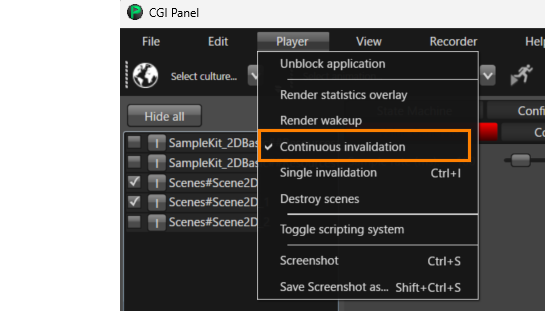
<div drawio-diagram="8914"><img src="https://doc316en.candera.eu/uploads/images/drawio/2026-01/drawing-4-1769726673.png" alt=""/></div>

If you want to disable the dirty area management, disable the *Dirty Area Dependency Plugin* in Scene Composer preferences in section "<span style="color: rgb(230, 126, 35);">[Plugins](https://doc316en.candera.eu/books/preferences/page/plugin-options)</span>". After disabling the plugin, restart Scene Composer.

#### Current limitations

- The auto-calculated invalidation dependencies only refer to views and cameras in the same render target.

#### Notes when generating assets with FTCCmd.exe

**FTCCmd.exe** does not automatically inherit plugin settings that were disabled in Scene Composer. When generating assets with **FTCCmd.exe**, specify the Scene Composer settings file via `/Config`.

1. From the **File** menu in **Scene Composer**, select **Preferences**, then disable **Dirty Area Dependency Plugin** under **<span style="color: rgb(230, 126, 35);">[Plugins](https://doc316en.candera.eu/books/preferences/page/plugin-options)</span>**.
2. Restart Scene Composer after disabling it.
3. From the **File** menu in **Scene Composer**, select **Preferences**, then use <span style="color: rgb(230, 126, 35);">[**Export**](https://doc316en.candera.eu/books/preferences/page/export-import)</span> to export the Scene Composer configuration file.
4. Place the exported settings file on disk or in the repository, and specify it with `/Config` when running **FTCCmd.exe**.
    
    ```c++
    FTCCmd.exe Generate <Solution File> /Config <Config File>
    
    
    ```

#### Use Cases and Notes

##### Typical Cases Where DAM Is Effective

DAM defines **Invalidation Dependencies** based on the **Intersection Rectangle** between scenes/cameras, with the goal of minimizing the redraw region. Therefore, DAM can be beneficial especially in configurations where scenes overlap and the intersection area remains limited, such as:

- A static background scene with a small, frequently updated overlay scene on top (e.g., HUD/widgets)
- Multiple scenes partially overlapping, where changes can be confined to the intersection area

##### Cases Where DAM Provides Limited or No Benefit

Under the following conditions, DAM may not reduce redraws, or the benefit may be limited:

- **Scenes do not overlap**  
    Since no **Intersection Rectangle** is generated, the effect of constraining the **Dirty Area** based on the intersection area is generally not achieved.
- **The intersection area is large (e.g., close to full-screen)**  
    If any calculated intersection effectively becomes full-screen, the **Dirty Area** for that camera becomes full-screen, and the entire screen will be re-rendered while resolving/rendering the dependencies.
- **Multiple dependencies increase the union of intersection areas**  
    If a camera has multiple **Invalidation Dependencies**, the rendering schedule treats the **union** of the related intersection areas as the **Dirty Area**. As a result, when the union is large, the Dirty Area grows and the redraw reduction benefit may be limited.

<p class="callout info">DAM benefits depend on the scene layout (how scenes overlap and the size of the intersection area), the frequency of invalidations, and the target environment. Therefore, this document does not provide generalized performance numbers.</p>

##### Example Behavior with Overlapping Scenes (Static Background + Small Foreground)

As an example, if a small foreground scene (**Scene A**) overlaps a static background scene (**Scene B**), DAM detects the **Intersection** between the two scenes/cameras and adds **Invalidation Dependencies** based on the **Intersection Rectangle**. When **Scene A** is invalidated, **Scene B** is re-rendered only in the intersection area first, and then the entirety of **Scene A** is re-rendered as the foreground. In other words, in this example, it is not the case that both scenes/cameras are always re-rendered in full.

##### Handling Multiple Dependencies

With the current auto-detection, if a camera has multiple **Invalidation Dependencies**, the **union** of the relevant intersection areas is determined as the **Dirty Area** for render job scheduling. As the number or size of intersection areas increases, the Dirty Area grows and the benefit may become limited. If any calculated intersection is effectively full-screen, the resulting Dirty Area can become full-screen.

##### Limitations

**Camera translation** is not supported. Intersections/dependencies are calculated at **export** time and stored statically in the asset. If you need to update the **Dirty Area** dynamically at runtime, a manual setup using the legacy API is required. DAM auto-detection does not detect dependencies between scenes on different **render targets** (consider manual configuration if needed).

# Interfaces & Namespaces

#### Interfaces

The Feat-Standard public interface is covered by the namespaces FeatStd and various subnamespaces of namespace FeatStd. All namespaces containing either **Internal** or **Private** in the name cover private namespaces, which are not recommended to be used in any application, as it is not guaranteed that these interfaces remain stable respectively exist in any future release. Changes in any of these private namespaces can be applied without any (prior) notifications.

#### <a class="anchor" id="bkmrk-"></a>Namespace FeatStd

<div class="contents" id="bkmrk-container-utilities"><div class="contents"><div class="textblock">- [Container](http://dev.doc.cgistudio.at/APILINK/group___f_e_a_t_s_t_d___c_o_n_t_a_i_n_e_r.html)
- [Utilities](http://dev.doc.cgistudio.at/APILINK/group___f_e_a_t_s_t_d___u_t_i_l_s.html)

</div></div></div>#### <a class="anchor" id="bkmrk--1"></a>Namespace FeatStd::Diagnostics

<div class="contents" id="bkmrk-diagnostics"><div class="contents"><div class="textblock">- [Diagnostics](http://dev.doc.cgistudio.at/APILINK/group___f_e_a_t_s_t_d___d_i_a_g_n_o_s_t_i_c_s.html)

</div></div></div>#### <a class="anchor" id="bkmrk--2"></a>Namespace FeatStd::MemoryManagement

<div class="contents" id="bkmrk-memory-management"><div class="contents"><div class="textblock">- [Memory Management](http://dev.doc.cgistudio.at/APILINK/group___f_e_a_t_s_t_d___m_e_m_o_r_y_m_a_n_a_g_e_m_e_n_t.html)

</div></div></div>#### <a class="anchor" id="bkmrk--3"></a>Namespace FeatStd::PerfMon

<div class="contents" id="bkmrk-monitorperformancere"><div class="contents"><div class="textblock">- MonitorPerformanceReporting

</div></div></div>#### <a class="anchor" id="bkmrk--4"></a>Namespace FeatStd::Platform

This interface defines the access to platform dependent objects. The implementation of this platform dependent code is not part of FeatStd, though there are a few reference platforms, like SimulationPlatform (implemented basically for Win32) or GenericPlatform (providing generic respectively stub implementations), which can used as templates for the customer.

This platform interface can be seen as an official porting interface of FeatStd to any customer specific platform setup, which is the reason for outlining it in the separate namespace FeatStd::Platform.

<div class="contents" id="bkmrk-platform"><div class="textblock">- [Platform](http://dev.doc.cgistudio.at/APILINK/group___f_e_a_t_s_t_d___p_l_a_t_f_o_r_m.html)

</div></div>