# Predefined Data Bindings
The CGI Studio Professional Edition comes with a predefined set of data bindings. This set consists of ten data binding sources with ten data binding items each. They are all of type [FeatStd::Variant](http://dev.doc.cgistudio.at/APILINK/class_feat_std_1_1_variant.html) and can be bound to any bindable property in the scene composer with [standard data binding](https://doc316en.candera.eu/link/1178#bkmrk-3.-scene-composer-%E3%81%AB%E3%82%88). The data binding sources are prefixed with *PredefinedBindingSource*\[n\] and the items of each source is prefixed with *Item*\[n\].
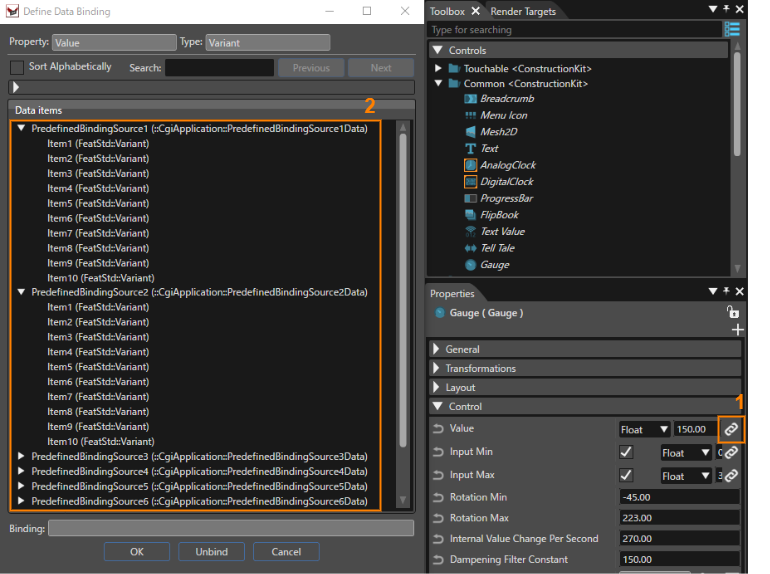
To select and use the predefined set of data bindings follow the steps in the image below
1. Click on the chain icon near a bindable property in the properties panel.
2. Select a predefined binding item from the list in the modal window that follows the nomenclature described above.
There are two methods how to set values to the binding items and observe changes in the player.
- During solution development in the Scene Composer, values can be set and simulated through the player panel, as described [here](https://doc316en.candera.eu/books/player/page/data-bindings).
- By exporting the solution as asset and setting the values with the Player Connector Library, as described [here](https://doc316en.candera.eu/books/cgi-studio-professional-edition/page/python-based-data-binding).