
# Modules

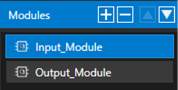
<span lang="EN-US">Modules are used to group a set of interfaces which usually belong logically together. </span>

<span lang="EN-US">It is possible to add, remove and reorder them using the corresponding buttons at the top of the module list.</span>

<div drawio-diagram="6514"><img src="https://doc316en.candera.eu/uploads/images/drawio/2024-08/drawing-7-1724375420.png" alt=""/></div>

#### Properties

In general, these offer a few basic options. However, depending on the targeted tool, different tool-specific options might be available. For more information about tool specific options and limitation refer to the specific target tool chapter.

<div drawio-diagram="6513"><img src="https://doc316en.candera.eu/uploads/images/drawio/2024-08/drawing-7-1724375397.png" alt=""/></div>

<table border="1" id="bkmrk-property-name-descri" style="border-collapse: collapse; width: 100%;"><colgroup><col style="width: 18.2942%;"></col><col style="width: 81.7058%;"></col></colgroup><tbody><tr><td class="align-center" style="background-color: rgb(230, 126, 35);">**<span style="color: rgb(255, 255, 255);">Property Name</span>**</td><td class="align-center" style="background-color: rgb(230, 126, 35);">**<span style="color: rgb(255, 255, 255);">Description</span>**</td></tr><tr><td>Name</td><td>Name of the module. Only characters from ‘a’-‘z’, ‘A’-Z’, ‘0’-‘9’, ‘ ‘ , ‘-‘ and ‘\_’ are allowed, though the name must start with a character.</td></tr><tr><td>UId</td><td>The UId is used to identify the module. It can be seen as the tooltip of the ‘UId’ button. When the button is clicked a new UId will be generated.</td></tr><tr><td>Type</td><td>Defines the type of module. The available options depend on the specific target tool.</td></tr></tbody></table>

---