
# Editor

<span lang="EN-US">An editor for the Build-Projects definition can be found here:  
“</span><span class="DescriptionChar"><span lang="EN-US">cgi\_studio\_connector/bin/BuildProjectEditor.exe</span></span><span lang="EN-US">”</span>

<span lang="EN-US" style="font-size: 10.0pt; mso-bidi-font-size: 11.0pt; line-height: 107%; font-family: 'Daytona',sans-serif; mso-fareast-font-family: 游明朝; mso-fareast-theme-font: minor-fareast; mso-bidi-font-family: 'Times New Roman'; mso-bidi-theme-font: minor-bidi; mso-ansi-language: EN-US; mso-fareast-language: JA; mso-bidi-language: AR-SA;">If called with a file as first argument the editor will try to open the specified file.</span>

#### Global

<div drawio-diagram="6958"><img src="https://doc316en.candera.eu/uploads/images/drawio/2024-10/drawing-7-1728344045.png" alt=""/></div>

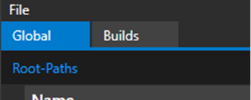
On this tab, global settings can be configured.

**Root-Paths**  
Root-Paths allow the user to make path/file variables relative to a specified path. When a build is started these Root-paths must be set by the user beforehand.

They can be added and removed via the respective buttons on the right of the group.

<div drawio-diagram="8312"><img src="https://doc316en.candera.eu/uploads/images/drawio/2025-04/drawing-7-1744614347.png" alt=""/></div>

**Properties:**

<table border="1" id="bkmrk-property-name-descri-7" style="border-collapse: collapse; width: 87.284%;"><colgroup><col style="width: 17.806%;"></col><col style="width: 82.194%;"></col></colgroup><tbody><tr><td class="align-center" style="background-color: rgb(230, 126, 35);"><span style="color: rgb(255, 255, 255);">**Property Name**</span></td><td class="align-center" style="background-color: rgb(230, 126, 35);"><span style="color: rgb(255, 255, 255);">**Description**</span></td></tr><tr><td>**Name**</td><td>Name of the Root-Path</td></tr><tr><td>**Description**</td><td>Description of the Root-Path.</td></tr></tbody></table>

**Variables**

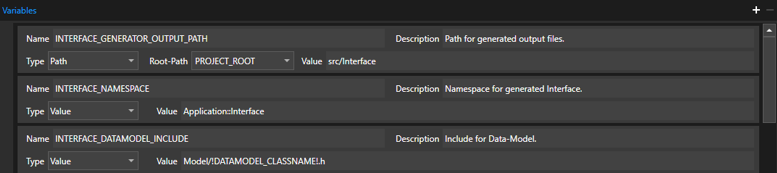
Here, global variables can be set which apply to every build. However, each build can override the value of a variable simply by respecifying it directly in the build.

They can be added and removed via the respective buttons on the right of the group.

<div drawio-diagram="8313"><img src="https://doc316en.candera.eu/uploads/images/drawio/2025-04/drawing-7-1744614384.png" alt=""/></div>

**Propertise:**

<table border="1" id="bkmrk-property-name-descri" style="border-collapse: collapse; width: 87.284%;"><colgroup><col style="width: 17.9365%;"></col><col style="width: 82.0635%;"></col></colgroup><tbody><tr><td class="align-center" style="background-color: rgb(230, 126, 35);"><span style="color: rgb(255, 255, 255);">**Property Name**</span></td><td class="align-center" style="background-color: rgb(230, 126, 35);"><span style="color: rgb(255, 255, 255);">**Description**</span></td></tr><tr><td>**Name**</td><td>Name of the Variable. This is the same name that is to be used in the scripts.</td></tr><tr><td>**Description**</td><td>Description of the Variable.</td></tr><tr><td>**Type**</td><td>Type of the Variable. The following options are available:  
\- Value: Simple value type

\- Option: Value that must be set at run time.  
\- Path: A path (folder)  
\- File: Full file path

</td></tr><tr><td>**Root-Path**</td><td>If the variable type is Path or File, this is used to reference a specified Root-Path. Doing so will treat the path as a relative path.</td></tr><tr><td>**Value**</td><td>Value of the variable. In case of ‘Option’ type values, the valid choices can be restricted by defining multiple values separated with a semicolon.</td></tr></tbody></table>

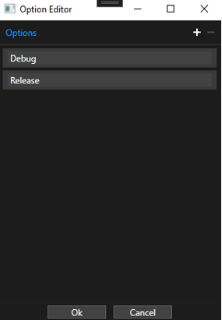
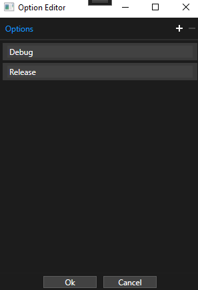
If the type is set to ‘Option’ the ‘Option Editor’ can be opened by clicking on the ‘…’ button next to the Value field.

<div drawio-diagram="8314"><img src="https://doc316en.candera.eu/uploads/images/drawio/2025-04/drawing-7-1744614486.png" alt=""/></div>

In the Option Editor window individual options can be easily added and removed using the ‘plus’ and ‘minus’ buttons on the right side.

<div drawio-diagram="8324"><img src="https://doc316en.candera.eu/uploads/images/drawio/2025-04/drawing-7-1744704010.png" alt=""/></div>

#### Builds

On this tab, individual builds can be configured.

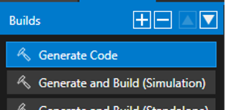
On the left side, Native-Functions can be added/removed and reordered using the respective buttons.

<div drawio-diagram="6961"><img src="https://doc316en.candera.eu/uploads/images/drawio/2024-10/drawing-7-1728344180.png" alt=""/></div>

**<span lang="EN-US" style="font-size: 10.0pt; mso-bidi-font-size: 11.0pt; line-height: 107%; font-family: 'Daytona',sans-serif; mso-fareast-font-family: 游明朝; mso-fareast-theme-font: minor-fareast; mso-bidi-font-family: 'Times New Roman'; mso-bidi-theme-font: minor-bidi; mso-ansi-language: EN-US; mso-fareast-language: JA; mso-bidi-language: AR-SA;">Properties</span>**

Builds contain several general properties.

<div drawio-diagram="8316"><img src="https://doc316en.candera.eu/uploads/images/drawio/2025-04/drawing-7-1744614568.png" alt=""/></div>

<table border="1" id="bkmrk-property-name-descri-1" style="border-collapse: collapse; width: 87.9012%;"><colgroup><col style="width: 18.0939%;"></col><col style="width: 81.9061%;"></col></colgroup><tbody><tr><td class="align-center" style="background-color: rgb(230, 126, 35);"><span style="color: rgb(255, 255, 255);">**Property Name**</span></td><td class="align-center" style="background-color: rgb(230, 126, 35);"><span style="color: rgb(255, 255, 255);">**Description**</span></td></tr><tr><td>**Name**</td><td>Name of the build.</td></tr><tr><td>**Description**</td><td>Description of the build.</td></tr><tr><td>**Script Path**</td><td>Path to the script file which should be executed for this build. All scripts (.bat/.cmd) inside the specified folder are executed in alphabetical order so it is recommended to begin the filename with the number of the execution step.

</td></tr><tr><td>**Root-Path**

**(Script Path)**

</td><td>Root-Path of the Script Path.</td></tr><tr><td>**Output Path**</td><td>Main output path for this build. Even if the build doesn’t produce any artifacts or generates output in other directories, at least the log file will be saved here.</td></tr><tr><td>**Root-Path**

**(Output Path)**

</td><td>Root-Path of the Output Path.</td></tr></tbody></table>

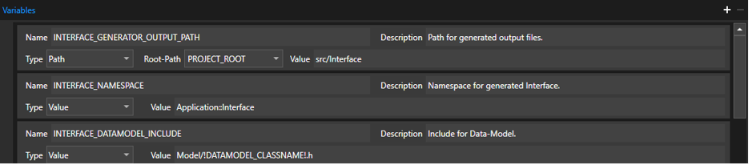
**Variables**

<span lang="EN-US">Variables for this build can be set here.</span>

<span lang="EN-US">They can be added and removed via the respective buttons on the right of the group.</span>

<div drawio-diagram="8317"><img src="https://doc316en.candera.eu/uploads/images/drawio/2025-04/drawing-7-1744614619.png" alt=""/></div>

**Properties:**

<table border="1" id="bkmrk-property-name-descri-2" style="border-collapse: collapse; width: 89.5062%; height: 235.156px;"><colgroup><col style="width: 21.5637%;"></col><col style="width: 78.4363%;"></col></colgroup><tbody><tr style="height: 29.7969px;"><td class="align-center" style="background-color: rgb(230, 126, 35); height: 29.7969px;"><span style="color: rgb(255, 255, 255);">**Property Name**</span></td><td class="align-center" style="background-color: rgb(230, 126, 35); height: 29.7969px;"><span style="color: rgb(255, 255, 255);">**Description**</span></td></tr><tr style="height: 29.7969px;"><td style="height: 29.7969px;">**Name**</td><td style="height: 29.7969px;">Name of the Variable. This is the same name that is to be used in the scripts.</td></tr><tr style="height: 29.7969px;"><td style="height: 29.7969px;">**Description**</td><td style="height: 29.7969px;">Description of the Variable.</td></tr><tr style="height: 80.1875px;"><td style="height: 80.1875px;">**<span lang="EN-US" style="font-size: 10.0pt; mso-bidi-font-size: 11.0pt; line-height: 107%; font-family: 'Daytona',sans-serif; mso-fareast-font-family: 游明朝; mso-fareast-theme-font: minor-fareast; mso-bidi-font-family: 'Times New Roman'; mso-bidi-theme-font: minor-bidi; mso-ansi-language: EN-US; mso-fareast-language: JA; mso-bidi-language: AR-SA;">Type</span>**</td><td style="height: 80.1875px;">Type of the Variable. The following options are available:  
\- Value: Simple value type

\- Option: Value that must be set at run time.  
\- Path: A path (folder)  
\- File: Full file path

</td></tr><tr style="height: 35.7812px;"><td style="height: 35.7812px;">**<span lang="EN-US" style="font-size: 10.0pt; mso-bidi-font-size: 11.0pt; line-height: 107%; font-family: 'Daytona',sans-serif; mso-fareast-font-family: 游明朝; mso-fareast-theme-font: minor-fareast; mso-bidi-font-family: 'Times New Roman'; mso-bidi-theme-font: minor-bidi; mso-ansi-language: EN-US; mso-fareast-language: JA; mso-bidi-language: AR-SA;">Root-Path</span>**

</td><td style="height: 35.7812px;">If the variable type is Path or File, this is used to reference a specified Root-Path. Doing so will treat the path as a relative path.</td></tr><tr style="height: 29.7969px;"><td style="height: 29.7969px;">**Value**</td><td style="height: 29.7969px;">Value of the variable. In case of ‘Option’ type values, the valid choices can be restricted by defining multiple values separated with a semicolon.</td></tr></tbody></table>

If the type is set to ‘Option’ the ‘Option Editor’ can be opened by clicking on the ‘…’ button next to the Value field.

<div drawio-diagram="8318"><img src="https://doc316en.candera.eu/uploads/images/drawio/2025-04/drawing-7-1744614715.png" alt=""/></div>

In the Option Editor window individual options can be easily added and removed using the ‘plus’ and ‘minus’ buttons on the right side.

<div drawio-diagram="8319"><img src="https://doc316en.candera.eu/uploads/images/drawio/2025-04/drawing-7-1744614753.png" alt=""/></div>

---