# Connector

This is the central tool which allows the user to define the interfaces to interact with the other system.

# Welcome Screen

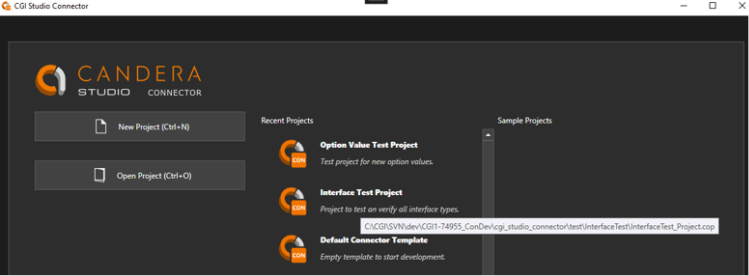
The welcome screen allows the user to create a new (Ctrl + N) or open an existing (Ctrl + O) CGI Connector Project.

Additionally, it also shows a list of the recently used projects to provide quick access. The exact location of the project can be seen in the tooltip of the individual projects.

It will also display a list of sample projects that can be used as references.

<div drawio-diagram="8305"><img src="https://doc316en.candera.eu/uploads/images/drawio/2025-04/drawing-7-1744607904.png" alt=""/></div>

---

# New Project

A new project can be created from the Welcome Screen or via the menu bar (File &gt; New Project) or via the shortcut “Ctrl + N”. This will open additional windows to help setting up the new project.

#### Template-Selection

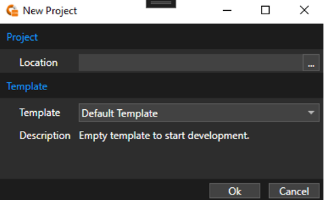
In the Template-Selection screen the user needs to first select the location where the new project shall be stored and select which template shall be used as a starting point for the project.

A template usually contains premade application code, build scripts, tooling related files and predefined project settings.

<div drawio-diagram="8325"><img src="https://doc316en.candera.eu/uploads/images/drawio/2025-04/drawing-7-1744868171.png" alt=""/></div>

#### Setup

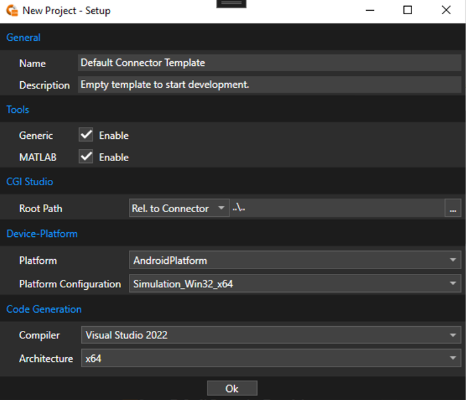
On the next screen the user can configure the most important project settings.

##### General

<table border="1" id="bkmrk-property-name-descri" style="width: 76.7857%;"><tbody><tr><td class="align-center" style="background-color: rgb(230, 126, 35); width: 22.4806%;"><span style="color: rgb(255, 255, 255);">**Property Name**</span></td><td class="align-center" style="background-color: rgb(230, 126, 35); width: 77.5194%;"><span style="color: rgb(255, 255, 255);">**Description**</span></td></tr><tr><td style="width: 22.4806%;">Name</td><td style="width: 77.5194%;">Name of the project.</td></tr><tr><td style="width: 22.4806%;">Description</td><td style="width: 77.5194%;">Description of the project.</td></tr></tbody></table>

##### Tools

<table border="1" id="bkmrk-property-name-descri-1" style="width: 76.7857%;"><tbody><tr><td class="align-center" style="width: 22.3608%; background-color: rgb(230, 126, 35);"><span style="color: rgb(255, 255, 255);">**Property Name**</span></td><td class="align-center" style="width: 77.6416%; background-color: rgb(230, 126, 35);"><span style="color: rgb(255, 255, 255);">**Description**</span></td></tr><tr><td style="width: 22.3608%;">Generic</td><td style="width: 77.6416%;">Enables generic support. This will provide a plain C/C++ interface.</td></tr><tr><td style="width: 22.3608%;">MATLAB</td><td style="width: 77.6416%;">Enables support for MATLAB. This will provide additional options/setting related to MathWorks MATLAB support</td></tr></tbody></table>

##### CGI Studio

<table border="1" id="bkmrk-property-name-descri-2" style="width: 76.7857%;"><tbody><tr><td class="align-center" style="width: 22.24%; background-color: rgb(230, 126, 35);"><span style="color: rgb(255, 255, 255);">**Property Name**</span></td><td class="align-center" style="width: 77.7624%; background-color: rgb(230, 126, 35);"><span style="color: rgb(255, 255, 255);">**Description**</span></td></tr><tr><td style="width: 22.24%;">Root Path</td><td style="width: 77.7624%;">Path to CGI Studio package. The path can be either absolute or relative to CGI Connector/Project paths.</td></tr></tbody></table>

##### Device-Platform

<table border="1" id="bkmrk-property-name-descri-3" style="width: 76.9048%;"><tbody><tr><td class="align-center" style="width: 28.3055%; background-color: rgb(230, 126, 35);"><span style="color: rgb(255, 255, 255);">**Property Name**</span></td><td class="align-center" style="width: 71.6969%; background-color: rgb(230, 126, 35);"><span style="color: rgb(255, 255, 255);">**Description**</span></td></tr><tr><td style="width: 28.3055%;">Platform</td><td style="width: 71.6969%;">Name of the CGI Studio Platform (as found in CMake)</td></tr><tr><td style="width: 28.3055%;">Platform Configuration</td><td style="width: 71.6969%;">Name of the CGI Studio Platform configuration (as found in CMake)</td></tr></tbody></table>

##### Code Generation

<table border="1" id="bkmrk-property-name-descri-4" style="width: 76.7857%;"><tbody><tr><td class="align-center" style="width: 28.062%; background-color: rgb(230, 126, 35);"><span style="color: rgb(255, 255, 255);">**Property Name**</span></td><td class="align-center" style="width: 71.938%; background-color: rgb(230, 126, 35);"><span style="color: rgb(255, 255, 255);">**Description**</span></td></tr><tr><td style="width: 28.062%;">Compiler</td><td style="width: 71.938%;">Compiler used to build code.</td></tr><tr><td style="width: 28.062%;">Architecture</td><td style="width: 71.938%;">Architecture used to build the code.</td></tr></tbody></table>

<div drawio-diagram="8326"><img src="https://doc316en.candera.eu/uploads/images/drawio/2025-04/drawing-7-1744868266.png" alt=""/></div>

<p class="callout info">These, and more, settings can later be changed. For more information, please refer to the <span style="color: rgb(230, 126, 35);">[“Project Settings”](https://doc316en.candera.eu/books/cgi-studio-connector/page/project-settings)</span> chapter.</p>

#### Custom Templates

It is possible to add custom templates to the CGI Connector. This can be useful to apply customizations from a project to other projects.  
To create a template, pack all needed content into a ZIP file. Make sure that it contains the CGI Connector-Project file (.cop) in the root. Then add an entry to the “Templates.xml” in “cgi\_studio\_connector/bin” where the name, description and file location needs to be specified. Note that the file location is relative to the CGI Connector binaries.

---

# Modules

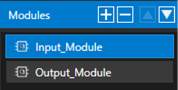
<span lang="EN-US">Modules are used to group a set of interfaces which usually belong logically together. </span>

<span lang="EN-US">It is possible to add, remove and reorder them using the corresponding buttons at the top of the module list.</span>
<div drawio-diagram="6514"><img src="https://doc316en.candera.eu/uploads/images/drawio/2024-08/drawing-7-1724375420.png" alt=""/></div>

#### Properties

In general, these offer a few basic options. However, depending on the targeted tool, different tool-specific options might be available. For more information about tool specific options and limitation refer to the specific target tool chapter.

<div drawio-diagram="6513"><img src="https://doc316en.candera.eu/uploads/images/drawio/2024-08/drawing-7-1724375397.png" alt=""/></div>

<table border="1" id="bkmrk-property-name-descri" style="border-collapse: collapse; width: 100%;"><colgroup><col style="width: 18.2942%;"></col><col style="width: 81.7058%;"></col></colgroup><tbody><tr><td class="align-center" style="background-color: rgb(230, 126, 35);">**<span style="color: rgb(255, 255, 255);">Property Name</span>**</td><td class="align-center" style="background-color: rgb(230, 126, 35);">**<span style="color: rgb(255, 255, 255);">Description</span>**</td></tr><tr><td>Name</td><td>Name of the module. Only characters from ‘a’-‘z’, ‘A’-Z’, ‘0’-‘9’, ‘ ‘ , ‘-‘ and ‘\_’ are allowed, though the name must start with a character.</td></tr><tr><td>UId</td><td>The UId is used to identify the module. It can be seen as the tooltip of the ‘UId’ button. When the button is clicked a new UId will be generated.</td></tr><tr><td>Type</td><td>Defines the type of module. The available options depend on the specific target tool.</td></tr></tbody></table>

---

# Interfaces

<span lang="EN-US">Interfaces define the inputs and outputs of the CGI Application. Depending on the module type either one or both types of interfaces are available. </span>

<span lang="EN-US">By selecting the corresponding tab, interfaces can be added, removed or rearranged using the buttons at the top of the interface list.</span>

<div drawio-diagram="6627"><img src="https://doc316en.candera.eu/uploads/images/drawio/2024-08/drawing-7-1724649376.png" alt=""/></div>

---

#### General Properties

The following general properties are available for all interfaces.

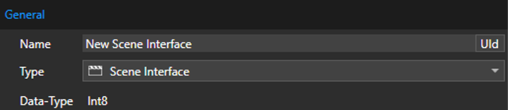
<div drawio-diagram="6628"><img src="https://doc316en.candera.eu/uploads/images/drawio/2024-08/drawing-7-1724649397.png" alt=""/></div>

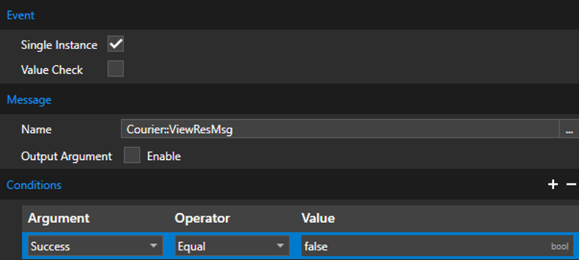
<table border="1" id="bkmrk-property-name-descri" style="border-collapse: collapse; width: 97.5309%; height: 175.953px;"><colgroup><col style="width: 16.3511%;"></col><col style="width: 83.6489%;"></col></colgroup><tbody><tr style="height: 29.7969px;"><td class="align-center" style="background-color: rgb(230, 126, 35); height: 29.7969px;"><span style="color: rgb(255, 255, 255);">**Property Name**</span></td><td class="align-center" style="background-color: rgb(230, 126, 35); height: 29.7969px;"><span style="color: rgb(255, 255, 255);">**Description**</span></td></tr><tr style="height: 46.5938px;"><td style="height: 46.5938px;">**Name**</td><td style="height: 46.5938px;">Name of the interface. Only characters from ‘a’-‘z’, ‘A’-Z’, ‘0’-‘9’, ‘ ‘, ‘-’ and ‘\_’ are allowed, though the name must start with a character.</td></tr><tr style="height: 46.5938px;"><td style="height: 46.5938px;">**UId**</td><td style="height: 46.5938px;">The UId is used to identify the interface. It can be seen as the tooltip of the ‘UId’ button. When the button is clicked a new UId will be generated.</td></tr><tr style="height: 29.7969px;"><td style="height: 29.7969px;">**Type**</td><td style="height: 29.7969px;">Defines the type of interface. The available options depend on the specific target tool.</td></tr><tr style="height: 23.1719px;"><td style="height: 23.1719px;">**Data-Type**</td><td style="height: 23.1719px;">The used basic data type of the interface to transfer data. This value is automatically calculated depending on the used interface type and set properties.

For arrays the length is indicated in brackets.

</td></tr></tbody></table>

---

#### Types

The following general interface types are available.

**Input:**

<table border="1" id="bkmrk-name-scene-scene-tab" style="border-collapse: collapse; width: 64.1975%; height: 158.984px;"><colgroup><col style="width: 100%;"></col></colgroup><tbody><tr style="height: 10px;"><td class="align-center" style="background-color: rgb(230, 126, 35); height: 10px;"><span style="color: rgb(255, 255, 255);">**Name**</span></td></tr><tr style="height: 29.7969px;"><td style="height: 29.7969px;">**Scene**</td></tr><tr style="height: 29.7969px;"><td style="height: 29.7969px;">**Scene-Table**</td></tr><tr style="height: 29.7969px;"><td style="height: 29.7969px;">**Data-Input**</td></tr><tr style="height: 29.7969px;"><td style="height: 29.7969px;">**Function Call (Action)**</td></tr><tr style="height: 29.7969px;"><td style="height: 29.7969px;">**Message (Action)**</td></tr></tbody></table>

**Output:**

<table border="1" id="bkmrk-name-data-input-gene" style="border-collapse: collapse; width: 64.0741%; height: 148.984px;"><colgroup><col style="width: 100%;"></col></colgroup><tbody><tr style="height: 29.7969px;"><td class="align-center" style="background-color: rgb(230, 126, 35); height: 29.7969px;"><span style="color: rgb(255, 255, 255);">**Name**</span></td></tr><tr style="height: 29.7969px;"><td style="height: 29.7969px;">**Data-Output**</td></tr><tr style="height: 29.7969px;"><td style="height: 29.7969px;">**Generic Event**</td></tr><tr style="height: 29.7969px;"><td style="height: 29.7969px;">**Function Call (Event)**</td></tr><tr style="height: 29.7969px;"><td style="height: 29.7969px;">**Message (Event)**</td></tr></tbody></table>

<p class="callout info">Depending on the used module type, some interface types might not be available or special interface types might be supported. Please refer to the target tool specific section for more details.</p>

##### Scene Interface

<span lang="EN-US" style="font-size: 10.0pt; mso-bidi-font-size: 11.0pt; line-height: 107%; font-family: 'Daytona',sans-serif; mso-fareast-font-family: 游明朝; mso-fareast-theme-font: minor-fareast; mso-bidi-font-family: 'Times New Roman'; mso-bidi-theme-font: minor-bidi; mso-ansi-language: EN-US; mso-fareast-language: JA; mso-bidi-language: AR-SA;">The Scene interface allows to control the state of a scene or group of scenes. Depending on the set value the scene/scenes will change to a different state. By default, the values have the following meaning:</span>

<table border="1" id="bkmrk-property-name-descri-1" style="border-collapse: collapse; width: 97.4074%; height: 174.375px;"><colgroup><col style="width: 16.4978%;"></col><col style="width: 83.5042%;"></col></colgroup><tbody><tr style="height: 19.7969px;"><td class="align-center" style="background-color: rgb(230, 126, 35); height: 19.7969px;"><span style="color: rgb(255, 255, 255);">**Property Name**</span></td><td class="align-center" style="background-color: rgb(230, 126, 35); height: 19.7969px;"><span style="color: rgb(255, 255, 255);">**Description**</span></td></tr><tr style="height: 29.7969px;"><td style="height: 29.7969px;">0</td><td style="height: 29.7969px;"><span lang="EN-US" style="color: black; mso-color-alt: windowtext;">Destroyed (No data loaded)</span></td></tr><tr style="height: 29.7969px;"><td style="height: 29.7969px;">**1**</td><td style="height: 29.7969px;"><span lang="EN-US">Loaded (Scene data is loaded to system memory)</span></td></tr><tr style="height: 29.7969px;"><td style="height: 29.7969px;">**2**</td><td style="height: 29.7969px;"><span lang="EN-US" style="color: black; mso-color-alt: windowtext;">Uploaded (Scene data is uploaded to VRAM)</span></td></tr><tr style="height: 35.3906px;"><td style="height: 35.3906px;">**3**</td><td style="height: 35.3906px;">Active (Scene and related behaviors are updated)

</td></tr><tr style="height: 29.7969px;"><td style="height: 29.7969px;">**4**</td><td style="height: 29.7969px;"><span lang="EN-US"><span lang="EN-US" style="color: black; mso-color-alt: windowtext;">Rendering (Scene is drawing)</span></span></td></tr></tbody></table>

<p class="callout info">The actual meaning of each value is controlled by the application specific implementation.</p>

**Icon:**

<div drawio-diagram="6629"><img src="https://doc316en.candera.eu/uploads/images/drawio/2024-08/drawing-7-1724649437.png" alt=""/></div>

**Properties:**

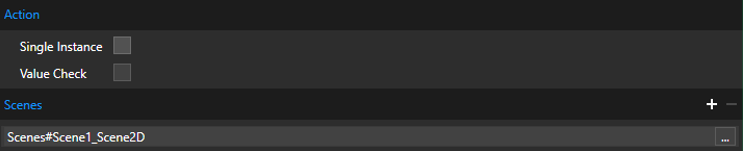
<div drawio-diagram="8327"><img src="https://doc316en.candera.eu/uploads/images/drawio/2025-04/drawing-7-1744868459.png" alt=""/></div>

<table border="1" id="bkmrk-property-name-descri-2" style="border-collapse: collapse; width: 97.4074%; height: 318.75px;"><colgroup><col style="width: 21.574%;"></col><col style="width: 78.428%;"></col></colgroup><tbody><tr style="height: 27.7969px;"><td class="align-center" style="background-color: rgb(230, 126, 35); height: 27.7969px;"><span style="color: rgb(255, 255, 255);">**Property Name**</span></td><td class="align-center" style="background-color: rgb(230, 126, 35); height: 27.7969px;"><span style="color: rgb(255, 255, 255);">**Description**</span></td></tr><tr style="height: 63.3906px;"><td style="height: 63.3906px;">**<span lang="EN-US" style="font-size: 10.0pt; mso-bidi-font-size: 11.0pt; line-height: 107%; font-family: 'Daytona',sans-serif; mso-fareast-font-family: 游明朝; mso-fareast-theme-font: minor-fareast; mso-bidi-font-family: 'Times New Roman'; mso-bidi-theme-font: minor-bidi; mso-ansi-language: EN-US; mso-fareast-language: JA; mso-bidi-language: AR-SA;">Single Instance</span>**</td><td style="height: 63.3906px;"><span lang="EN-US" style="color: black; mso-color-alt: windowtext;"><span lang="EN-US" style="font-size: 10.0pt; mso-bidi-font-size: 11.0pt; line-height: 107%; font-family: 'Daytona',sans-serif; mso-fareast-font-family: 游明朝; mso-fareast-theme-font: minor-fareast; mso-bidi-font-family: 'Times New Roman'; mso-bidi-theme-font: minor-bidi; mso-ansi-language: EN-US; mso-fareast-language: JA; mso-bidi-language: AR-SA;">When selected, only a single instance of this action will be queue. If the action is triggered again before the previous instance is executed it will overwrite the previous action in the queue instead.</span></span></td></tr><tr style="height: 63.3906px;"><td style="height: 63.3906px;">**<span lang="EN-US" style="font-size: 10.0pt; mso-bidi-font-size: 11.0pt; line-height: 107%; font-family: 'Daytona',sans-serif; mso-fareast-font-family: 游明朝; mso-fareast-theme-font: minor-fareast; mso-bidi-font-family: 'Times New Roman'; mso-bidi-theme-font: minor-bidi; mso-ansi-language: EN-US; mso-fareast-language: JA; mso-bidi-language: AR-SA;">Value Check</span>**</td><td style="height: 63.3906px;"><span lang="EN-US"><span lang="EN-US" style="font-size: 10.0pt; mso-bidi-font-size: 11.0pt; line-height: 107%; font-family: 'Daytona',sans-serif; mso-fareast-font-family: 游明朝; mso-fareast-theme-font: minor-fareast; mso-bidi-font-family: 'Times New Roman'; mso-bidi-theme-font: minor-bidi; mso-ansi-language: EN-US; mso-fareast-language: JA; mso-bidi-language: AR-SA;">If enabled, the sent value will be compared to the previous value and processing will be skipped if it has not changed. This can improve performance if the sent value is often the same/different.</span></span></td></tr><tr style="height: 164.172px;"><td style="height: 164.172px;">**<span lang="EN-US" style="font-size: 10.0pt; mso-bidi-font-size: 11.0pt; line-height: 107%; font-family: 'Daytona',sans-serif; mso-fareast-font-family: 游明朝; mso-fareast-theme-font: minor-fareast; mso-bidi-font-family: 'Times New Roman'; mso-bidi-theme-font: minor-bidi; mso-ansi-language: EN-US; mso-fareast-language: JA; mso-bidi-language: AR-SA;">Scenes</span>**</td><td style="height: 164.172px;"><span lang="EN-US" style="color: black; mso-color-alt: windowtext;"><span lang="EN-US" style="font-size: 10.0pt; mso-bidi-font-size: 11.0pt; line-height: 107%; font-family: 'Daytona',sans-serif; mso-fareast-font-family: 游明朝; mso-fareast-theme-font: minor-fareast; mso-bidi-font-family: 'Times New Roman'; mso-bidi-theme-font: minor-bidi; mso-ansi-language: EN-US; mso-fareast-language: JA; mso-bidi-language: AR-SA;">Scene controlled by the interface. A scene is defined by the following expression:  
  
\[FOLDERNAME#….#\]SCENENAME  
  
Clicking on the ‘…’ button next to the field opens a dialog window which lists possible scenes from the referenced Scene Composer solution.  
  
Multiple scenes can be specified by adding or removing additional lines with the ‘+’ and ‘-‘ buttons.</span></span></td></tr></tbody></table>

##### Scene Table Interface

<span lang="EN-US">The Scene-Table signal allows to specify a collection of scenes and assigns them a certain Id. <span lang="EN-US" style="font-size: 10.5pt; font-family: 'Segoe UI',sans-serif; mso-fareast-font-family: 游ゴシック; color: #444444; background: white; mso-ansi-language: EN-US; mso-fareast-language: JA; mso-bidi-language: AR-SA;">The interface value controls this Id and therefore selects the next entry to be activated. If the new entry contains a scene which was not ‘active’ before, it will be ‘activated’. Similar if the new entry is missing a scene which was ‘active’ before it will be ‘deactivated’.</span> If a scene was part of the previous set of scenes and is still part of the new set, no action will be performed. </span>

<span lang="EN-US">Additionally, “Hints” can be specified which can affect how the change between different sets happens. These are primarily used to control the transition animation.</span>

<p class="callout info"><span lang="EN-US">The actual behavior is controlled by the application specific implementation. </span></p>

**<span lang="EN-US">Icon:</span>**

<div drawio-diagram="6631"><img src="https://doc316en.candera.eu/uploads/images/drawio/2024-08/drawing-7-1724649497.png" alt=""/></div>

**Properties:**

<div drawio-diagram="6632"><img src="https://doc316en.candera.eu/uploads/images/drawio/2024-08/drawing-7-1724649516.png" alt=""/></div>

<table border="1" id="bkmrk-property-name-descri-3" style="border-collapse: collapse; width: 97.5309%; height: 144.578px;"><colgroup><col style="width: 21.5463%;"></col><col style="width: 78.4537%;"></col></colgroup><tbody><tr style="height: 17.7969px;"><td class="align-center" style="background-color: rgb(230, 126, 35); height: 17.7969px;"><span style="color: rgb(255, 255, 255);">**Property Name**</span></td><td class="align-center" style="background-color: rgb(230, 126, 35); height: 17.7969px;"><span style="color: rgb(255, 255, 255);">**Description**</span></td></tr><tr style="height: 63.3906px;"><td style="height: 63.3906px;">**<span lang="EN-US" style="font-size: 10.0pt; mso-bidi-font-size: 11.0pt; line-height: 107%; font-family: 'Daytona',sans-serif; mso-fareast-font-family: 游明朝; mso-fareast-theme-font: minor-fareast; mso-bidi-font-family: 'Times New Roman'; mso-bidi-theme-font: minor-bidi; mso-ansi-language: EN-US; mso-fareast-language: JA; mso-bidi-language: AR-SA;">Single Instance</span>**</td><td style="height: 63.3906px;"><span lang="EN-US" style="color: black; mso-color-alt: windowtext;"><span lang="EN-US" style="font-size: 10.0pt; mso-bidi-font-size: 11.0pt; line-height: 107%; font-family: 'Daytona',sans-serif; mso-fareast-font-family: 游明朝; mso-fareast-theme-font: minor-fareast; mso-bidi-font-family: 'Times New Roman'; mso-bidi-theme-font: minor-bidi; mso-ansi-language: EN-US; mso-fareast-language: JA; mso-bidi-language: AR-SA;">When selected, only a single instance of this action will be queue. If the action is triggered again before the previous instance is executed it will overwrite the previous action in the queue instead.</span></span></td></tr><tr style="height: 63.3906px;"><td style="height: 63.3906px;">**<span lang="EN-US" style="font-size: 10.0pt; mso-bidi-font-size: 11.0pt; line-height: 107%; font-family: 'Daytona',sans-serif; mso-fareast-font-family: 游明朝; mso-fareast-theme-font: minor-fareast; mso-bidi-font-family: 'Times New Roman'; mso-bidi-theme-font: minor-bidi; mso-ansi-language: EN-US; mso-fareast-language: JA; mso-bidi-language: AR-SA;">Value Check</span>**</td><td style="height: 63.3906px;"><span lang="EN-US"><span lang="EN-US" style="font-size: 10.0pt; mso-bidi-font-size: 11.0pt; line-height: 107%; font-family: 'Daytona',sans-serif; mso-fareast-font-family: 游明朝; mso-fareast-theme-font: minor-fareast; mso-bidi-font-family: 'Times New Roman'; mso-bidi-theme-font: minor-bidi; mso-ansi-language: EN-US; mso-fareast-language: JA; mso-bidi-language: AR-SA;">If enabled, the sent value will be compared to the previous value and processing will be skipped if it has not changed. This can improve performance if the sent value is often the same/different.</span></span></td></tr></tbody></table>

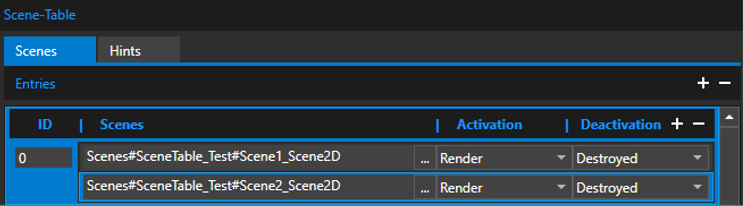
<div drawio-diagram="8328"><img src="https://doc316en.candera.eu/uploads/images/drawio/2025-04/drawing-7-1744868560.png" alt=""/></div>

<table border="1" id="bkmrk-property-name-descri-4" style="border-collapse: collapse; width: 97.6543%; height: 322.953px;"><colgroup><col style="width: 29.7474%;"></col><col style="width: 70.2546%;"></col></colgroup><tbody><tr style="height: 22.7969px;"><td class="align-center" style="background-color: rgb(230, 126, 35); height: 22.7969px;"><span style="color: rgb(255, 255, 255);">**Property Name**</span></td><td class="align-center" style="background-color: rgb(230, 126, 35); height: 22.7969px;"><span style="color: rgb(255, 255, 255);">**Description**</span></td></tr><tr style="height: 46.5938px;"><td style="height: 46.5938px;">**<span lang="EN-US" style="font-size: 10.0pt; mso-bidi-font-size: 11.0pt; line-height: 107%; font-family: 'Daytona',sans-serif; mso-fareast-font-family: 游明朝; mso-fareast-theme-font: minor-fareast; mso-bidi-font-family: 'Times New Roman'; mso-bidi-theme-font: minor-bidi; mso-ansi-language: EN-US; mso-fareast-language: JA; mso-bidi-language: AR-SA;">(Scenes) Entries</span>**

</td><td style="height: 46.5938px;"><span lang="EN-US" style="color: black; mso-color-alt: windowtext;"><span lang="EN-US" style="font-size: 10.0pt; mso-bidi-font-size: 11.0pt; line-height: 107%; font-family: 'Daytona',sans-serif; mso-fareast-font-family: 游明朝; mso-fareast-theme-font: minor-fareast; mso-bidi-font-family: 'Times New Roman'; mso-bidi-theme-font: minor-bidi; mso-ansi-language: EN-US; mso-fareast-language: JA; mso-bidi-language: AR-SA;">Collection of Scenes represented by an Id. Multiple collections can be specified by adding or removing additional lines with the ‘+’ and ‘-‘ buttons.</span></span></td></tr><tr style="height: 29.7969px;"><td style="height: 29.7969px;">**<span lang="EN-US" style="font-size: 10.0pt; mso-bidi-font-size: 11.0pt; line-height: 107%; font-family: 'Daytona',sans-serif; mso-fareast-font-family: 游明朝; mso-fareast-theme-font: minor-fareast; mso-bidi-font-family: 'Times New Roman'; mso-bidi-theme-font: minor-bidi; mso-ansi-language: EN-US; mso-fareast-language: JA; mso-bidi-language: AR-SA;">(Scenes) Entries ID</span>**

</td><td style="height: 29.7969px;"><span lang="EN-US"><span lang="EN-US" style="font-size: 10.0pt; mso-bidi-font-size: 11.0pt; line-height: 107%; font-family: 'Daytona',sans-serif; mso-fareast-font-family: 游明朝; mso-fareast-theme-font: minor-fareast; mso-bidi-font-family: 'Times New Roman'; mso-bidi-theme-font: minor-bidi; mso-ansi-language: EN-US; mso-fareast-language: JA; mso-bidi-language: AR-SA;">The Id representing this set of Scenes.</span></span>

</td></tr><tr style="height: 164.172px;"><td style="height: 164.172px;">**<span lang="EN-US" style="font-size: 10.0pt; mso-bidi-font-size: 11.0pt; line-height: 107%; font-family: 'Daytona',sans-serif; mso-fareast-font-family: 游明朝; mso-fareast-theme-font: minor-fareast; mso-bidi-font-family: 'Times New Roman'; mso-bidi-theme-font: minor-bidi; mso-ansi-language: EN-US; mso-fareast-language: JA; mso-bidi-language: AR-SA;">(Scenes) Entries Scenes</span>**

</td><td style="height: 164.172px;"><span lang="EN-US"><span lang="EN-US" style="font-size: 10.0pt; mso-bidi-font-size: 11.0pt; line-height: 107%; font-family: 'Daytona',sans-serif; mso-fareast-font-family: 游明朝; mso-fareast-theme-font: minor-fareast; mso-bidi-font-family: 'Times New Roman'; mso-bidi-theme-font: minor-bidi; mso-ansi-language: EN-US; mso-fareast-language: JA; mso-bidi-language: AR-SA;">Scenes which belong to this entry. A scene is defined by the following expression:  
  
\[FOLDERNAME#….#\]SCENENAME  
  
Clicking on the ‘…’ button next to the field opens a dialog window which lists possible scenes from the referenced Scene Composer solution.  
</span></span>

<span lang="EN-US"><span lang="EN-US" style="font-size: 10.0pt; mso-bidi-font-size: 11.0pt; line-height: 107%; font-family: 'Daytona',sans-serif; mso-fareast-font-family: 游明朝; mso-fareast-theme-font: minor-fareast; mso-bidi-font-family: 'Times New Roman'; mso-bidi-theme-font: minor-bidi; mso-ansi-language: EN-US; mso-fareast-language: JA; mso-bidi-language: AR-SA;">  
Multiple scenes can be specified by adding or removing additional lines with the ‘+’ and ‘-‘ buttons.</span></span>

</td></tr><tr style="height: 29.7969px;"><td style="height: 29.7969px;">**<span lang="EN-US" style="font-size: 10.0pt; mso-bidi-font-size: 11.0pt; line-height: 107%; font-family: 'Daytona',sans-serif; mso-fareast-font-family: 游明朝; mso-fareast-theme-font: minor-fareast; mso-bidi-font-family: 'Times New Roman'; mso-bidi-theme-font: minor-bidi; mso-ansi-language: EN-US; mso-fareast-language: JA; mso-bidi-language: AR-SA;">(Scenes) Entries Activation</span>**</td><td style="height: 29.7969px;"><span lang="EN-US"><span lang="EN-US" style="font-size: 10.0pt; mso-bidi-font-size: 11.0pt; line-height: 107%; font-family: 'Daytona',sans-serif; mso-fareast-font-family: 游明朝; mso-fareast-theme-font: minor-fareast; mso-bidi-font-family: 'Times New Roman'; mso-bidi-theme-font: minor-bidi; mso-ansi-language: EN-US; mso-fareast-language: JA; mso-bidi-language: AR-SA;">State of the scene to be applied when scene is activated.</span></span></td></tr><tr style="height: 29.7969px;"><td style="height: 29.7969px;">**<span lang="EN-US" style="font-size: 10.0pt; mso-bidi-font-size: 11.0pt; line-height: 107%; font-family: 'Daytona',sans-serif; mso-fareast-font-family: 游明朝; mso-fareast-theme-font: minor-fareast; mso-bidi-font-family: 'Times New Roman'; mso-bidi-theme-font: minor-bidi; mso-ansi-language: EN-US; mso-fareast-language: JA; mso-bidi-language: AR-SA;">(Scenes) Entries Deactivation</span>**</td><td style="height: 29.7969px;"><span lang="EN-US"><span lang="EN-US" style="font-size: 10.0pt; mso-bidi-font-size: 11.0pt; line-height: 107%; font-family: 'Daytona',sans-serif; mso-fareast-font-family: 游明朝; mso-fareast-theme-font: minor-fareast; mso-bidi-font-family: 'Times New Roman'; mso-bidi-theme-font: minor-bidi; mso-ansi-language: EN-US; mso-fareast-language: JA; mso-bidi-language: AR-SA;">State of the scene to be applied when scene is deactivated.</span></span></td></tr></tbody></table>

<div drawio-diagram="6634"><img src="https://doc316en.candera.eu/uploads/images/drawio/2024-08/drawing-7-1724649594.png" alt=""/></div>

<table border="1" cellpadding="0" cellspacing="0" class="MsoTable15Grid4Accent2" id="bkmrk-property-name-descri-5" style="border-collapse: collapse; width: 788px; height: 126.797px; border-width: 1px; border-style: none;"><tbody><tr style="height: 29.7969px;"><td class="align-center" style="background-color: rgb(230, 126, 35); height: 29.7969px; width: 199.5px;"><span style="color: rgb(255, 255, 255);">**Property Name**</span></td><td class="align-center" style="background-color: rgb(230, 126, 35); height: 29.7969px; width: 587.5px;"><span style="color: rgb(255, 255, 255);">**Description**</span></td></tr><tr style="height: 33px;"><td style="width: 199.5px; border-width: 1px; border-style: none solid solid; border-image: initial; background-image: initial; background-position: initial; background-size: initial; background-repeat: initial; background-attachment: initial; background-origin: initial; background-clip: initial; height: 33px;" valign="top" width="127">**<span lang="EN-US" style="color: black; mso-color-alt: windowtext;">(Hints) Entries</span>**

</td><td style="width: 587.5px; border-width: 1px; border-style: none solid solid none; background-image: initial; background-position: initial; background-size: initial; background-repeat: initial; background-attachment: initial; background-origin: initial; background-clip: initial; height: 33px;" valign="top" width="496"><span lang="EN-US" style="color: black; mso-color-alt: windowtext;">Collection of Hints represented by an Id. Multiple collections can be specified by adding or removing additional lines with the ‘+’ and ‘-‘ buttons.</span>

</td></tr><tr style="height: 32px;"><td style="width: 199.5px; border-width: 1px; border-style: none solid solid; border-image: initial; height: 32px;" valign="top" width="127">**<span lang="EN-US">(Hints) </span><span lang="EN-US">Entries ID</span>**

</td><td style="width: 587.5px; border-width: 1px; border-style: none solid solid none; height: 32px;" valign="top" width="496"><span lang="EN-US">The Id representing this Hint.</span>

</td></tr><tr style="height: 32px;"><td style="width: 199.5px; border-width: 1px; border-style: none solid solid; border-image: initial; background-image: initial; background-position: initial; background-size: initial; background-repeat: initial; background-attachment: initial; background-origin: initial; background-clip: initial; height: 32px;" valign="top" width="127">**<span lang="EN-US" style="color: black; mso-color-alt: windowtext;">(Hints) </span><span lang="EN-US" style="color: black; mso-color-alt: windowtext;">Entries Hint</span>**

</td><td style="width: 587.5px; border-width: 1px; border-style: none solid solid none; background-image: initial; background-position: initial; background-size: initial; background-repeat: initial; background-attachment: initial; background-origin: initial; background-clip: initial; height: 32px;" valign="top" width="496"><span lang="EN-US" style="color: black; mso-color-alt: windowtext;">Hint which belongs to this entry.</span>

</td></tr></tbody></table>

##### Data-Input Interface

The Data-Input interface is used to send data values from external to the CGI Studio application. Only data-items provided by Courier Data-Binding can be set as destination. For more information about Data-Binding please refer to the <span style="color: rgb(230, 126, 35);">[Courier documentation](https://doc316en.candera.eu/books/courier)</span>.

**<span lang="EN-US" style="font-size: 10.0pt; mso-bidi-font-size: 11.0pt; line-height: 107%; font-family: 'Daytona',sans-serif; mso-fareast-font-family: 游明朝; mso-fareast-theme-font: minor-fareast; mso-bidi-font-family: 'Times New Roman'; mso-bidi-theme-font: minor-bidi; mso-ansi-language: EN-US; mso-fareast-language: JA; mso-bidi-language: AR-SA;">Icon:</span>**

<div drawio-diagram="6635"><img src="https://doc316en.candera.eu/uploads/images/drawio/2024-08/drawing-7-1724649663.png" alt=""/></div>

**<span lang="EN-US" style="font-size: 10.0pt; mso-bidi-font-size: 11.0pt; line-height: 107%; font-family: 'Daytona',sans-serif; mso-fareast-font-family: 游明朝; mso-fareast-theme-font: minor-fareast; mso-bidi-font-family: 'Times New Roman'; mso-bidi-theme-font: minor-bidi; mso-ansi-language: EN-US; mso-fareast-language: JA; mso-bidi-language: AR-SA;">Properties:</span>**

<div drawio-diagram="6636"><img src="https://doc316en.candera.eu/uploads/images/drawio/2024-08/drawing-7-1724649684.png" alt=""/></div>

<table border="1" cellpadding="0" cellspacing="0" class="MsoTable15Grid4Accent2" id="bkmrk-property-name-descri-6" style="border-collapse: collapse; border-width: 1px; border-style: none; width: 97.284%; height: 101.797px;"><tbody><tr style="height: 29.7969px;"><td class="align-center" style="background-color: rgb(230, 126, 35); height: 29.7969px; width: 16.5187%;"><span style="color: rgb(255, 255, 255);">**Property Name**</span></td><td class="align-center" style="background-color: rgb(230, 126, 35); height: 29.7969px; width: 83.4813%;"><span style="color: rgb(255, 255, 255);">**Description**</span></td></tr><tr style="height: 51px;"><td style="width: 16.5187%; border-width: 1px; border-style: none solid solid; border-image: initial; background-image: initial; background-position: initial; background-size: initial; background-repeat: initial; background-attachment: initial; background-origin: initial; background-clip: initial; height: 51px;" valign="top" width="127">**<span lang="EN-US" style="color: black; mso-color-alt: windowtext;">Item</span>**

</td><td style="width: 83.4813%; border-width: 1px; border-style: none solid solid none; background-image: initial; background-position: initial; background-size: initial; background-repeat: initial; background-attachment: initial; background-origin: initial; background-clip: initial; height: 51px;" valign="top" width="496"><span lang="EN-US" style="color: black; mso-color-alt: windowtext;">Data-Item used as a destination for the data value transferred via this signal. Clicking on the ‘…’ button next to the field opens a dialog window which lists all possible data items defined for this application.</span>

</td></tr><tr style="height: 21px;"><td style="width: 16.5187%; border-width: 1px; border-style: none solid solid; border-image: initial; height: 21px;" valign="top" width="127">**<span lang="EN-US">Value Check</span>**

</td><td style="width: 83.4813%; border-width: 1px; border-style: none solid solid none; height: 21px;" valign="top" width="496"><span lang="EN-US">If enabled, the sent value will be compared to the previous value and processing will be skipped if it has not changed. This can improve performance if the sent value is often the same/different.</span>

</td></tr></tbody></table>

##### <span lang="EN-US">Function Call (Action) Interface </span>

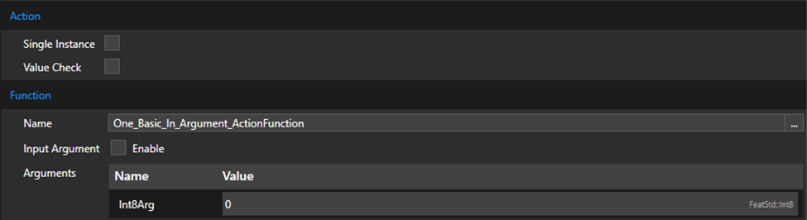
<span lang="EN-US">The Function-Call (Action) interface allows to trigger a user defined function. To learn how to define functions to be used in the Connector refer to the <span style="color: rgb(230, 126, 35);">[Native Functions](https://doc316en.candera.eu/books/cgi-studio-connector/chapter/native-functions)</span> chapter.</span>

**<span lang="EN-US">Icon:</span>**

<div drawio-diagram="6616"><img src="https://doc316en.candera.eu/uploads/images/drawio/2024-08/drawing-7-1724648244.png" alt=""/></div>

<span lang="EN-US"><span style="mso-no-proof: yes;"> </span></span>

**<span lang="EN-US">Properties:  
</span>**

<div drawio-diagram="6617"><img src="https://doc316en.candera.eu/uploads/images/drawio/2024-08/drawing-7-1724648290.png" alt=""/></div>

<table border="1" id="bkmrk-property-name-descri-7" style="border-collapse: collapse; width: 98.0247%; height: 277.766px;"><colgroup><col style="width: 16.0156%;"></col><col style="width: 83.9844%;"></col></colgroup><tbody><tr style="height: 44.7969px;"><td class="align-center" style="background-color: rgb(230, 126, 35); height: 44.7969px;"><span style="color: rgb(255, 255, 255);">**Property Name**</span></td><td class="align-center" style="background-color: rgb(230, 126, 35); height: 44.7969px;"><span style="color: rgb(255, 255, 255);">**Description**</span></td></tr><tr style="height: 46.5938px;"><td style="height: 46.5938px;">**Single Instance**</td><td style="height: 46.5938px;">When selected, only a single instance of this action will be queue. If the action is triggered again before the previous instance is executed it will overwrite the previous action in the queue instead.</td></tr><tr style="height: 46.5938px;"><td style="height: 46.5938px;">**Value Check**</td><td style="height: 46.5938px;">If enabled, the sent value will be compared to the previous value and processing will be skipped if it has not changed. This can improve performance if the sent value is often the same/different.</td></tr><tr style="height: 46.5938px;"><td style="height: 46.5938px;">**Name**</td><td style="height: 46.5938px;">Name of the function to execute. Clicking on the ‘…’ button next to the field opens a dialog window which lists all possible functions defined for this application.</td></tr><tr style="height: 46.5938px;"><td style="height: 46.5938px;">**Input Argument**</td><td style="height: 46.5938px;">When enabled, a single argument of the function can be defined as Input-Argument. The value of the argument will then depend directly on the data sent when triggering the interface.</td></tr><tr style="height: 46.5938px;"><td style="height: 46.5938px;">**Arguments**</td><td style="height: 46.5938px;">List of arguments for this function (excluding the Input-Argument if specified). Here the values for the arguments that will be used to execute the function are set.

Depending on the type of the argument, the \[ … \] button will be displayed next to the field. When clicking it, it will open a dialog window which lists possible objects from the referenced Scene Composer solution that can be used as a value.

</td></tr></tbody></table>

##### <span lang="EN-US">Message (Action) Interface</span>

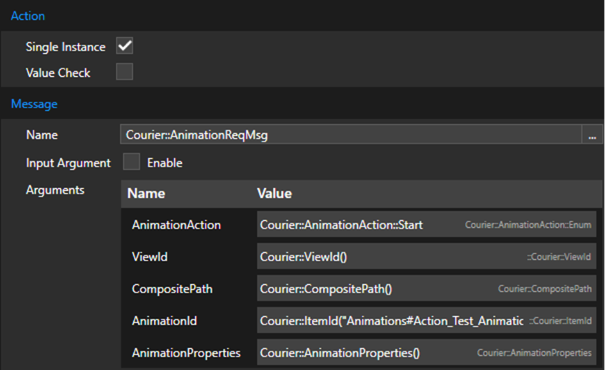
<span lang="EN-US">The Message (Action) interface allows to trigger the sending of a Courier message. For more information about Messaging in Courier please refer to the <span style="color: rgb(230, 126, 35);">[Courier documentation](https://doc316en.candera.eu/books/courier)</span>.</span>

**<span lang="EN-US">Icon:</span>**

<div drawio-diagram="6614"><img src="https://doc316en.candera.eu/uploads/images/drawio/2024-08/drawing-7-1724648115.png" alt=""/></div>

<span lang="EN-US"><span style="mso-spacerun: yes;"> </span></span>**<span lang="EN-US">Properties:</span>**

<div drawio-diagram="6615"><img src="https://doc316en.candera.eu/uploads/images/drawio/2024-08/drawing-7-1724648209.png" alt=""/></div>

<span lang="EN-US" style="mso-no-proof: yes;"> </span>

<table border="1" id="bkmrk-property-name-descri-8" style="border-collapse: collapse; width: 97.4074%;"><colgroup><col style="width: 22.2017%;"></col><col style="width: 77.8003%;"></col></colgroup><tbody><tr><td class="align-center" style="background-color: rgb(230, 126, 35);"><span style="color: rgb(255, 255, 255);">**Property Name**</span></td><td class="align-center" style="background-color: rgb(230, 126, 35);"><span style="color: rgb(255, 255, 255);">**Description**</span></td></tr><tr><td>**Single Instance**</td><td>When selected, only a single instance of this action will be queue. If the action is triggered again before the previous instance is executed it will overwrite the previous action in the queue instead.</td></tr><tr><td>**Value Check**</td><td>If enabled, the sent value will be compared to the previous value and processing will be skipped if it has not changed. This can improve performance if the sent value is often the same/different.</td></tr><tr><td>**Name**</td><td>Name of the message to send. Clicking on the ‘…’ button next to the field opens a dialog window which lists all possible messages defined for this application.</td></tr><tr><td>**Input Argument**</td><td>When enabled, a single argument of the message can be defined as Input-Argument. The value of the argument will then depend directly on the data sent when triggering the interface.</td></tr><tr><td>**Arguments**</td><td>List of arguments for this message (excluding the Input-Argument if specified). Here the values for the arguments that will be used to send the message are set.

Depending on the type of the argument, the \[ … \] button will be displayed next to the field. When clicking it, it will open a dialog window which lists possible objects from the referenced Scene Composer solution that can be used as a value.

</td></tr></tbody></table>

##### <span lang="EN-US">Data-Output Interface</span>

<span lang="EN-US">The Data-Output interface is used to receive data values from CGI Studio application. Only data-items provided by Courier Data-Binding can be set as source. For more information about Data-Binding please refer to the <span style="color: rgb(230, 126, 35);">[Courier documentation](https://doc316en.candera.eu/books/courier)</span>.</span>

**<span lang="EN-US">Icon:</span>**

<div drawio-diagram="6618"><img src="https://doc316en.candera.eu/uploads/images/drawio/2024-08/drawing-7-1724648527.png" alt=""/></div>

<span lang="EN-US"><span style="mso-spacerun: yes;"> </span></span>**<span lang="EN-US">Properties:</span>**

<div drawio-diagram="6622"><img src="https://doc316en.candera.eu/uploads/images/drawio/2024-08/drawing-7-1724648763.png" alt=""/></div>

<table border="1" id="bkmrk-property-name-descri-9" style="border-collapse: collapse; width: 97.5309%;"><colgroup><col style="width: 16.4838%;"></col><col style="width: 83.5162%;"></col></colgroup><tbody><tr><td class="align-center" style="background-color: rgb(230, 126, 35);"><span style="color: rgb(255, 255, 255);">**Property Name**</span></td><td class="align-center" style="background-color: rgb(230, 126, 35);"><span style="color: rgb(255, 255, 255);">**Description**</span></td></tr><tr><td>**Item**</td><td>Data-Item used as a destination for the data value transferred via this signal. Clicking on the ‘…’ button next to the field opens a dialog window which lists all possible data items defined for this application.</td></tr><tr><td>**Value Check**</td><td>If enabled, the sent value will be compared to the previous value and processing will be skipped if it has not changed. This can improve performance if the sent value is often the same/different.</td></tr></tbody></table>

<span lang="EN-US" style="mso-no-proof: yes;"> </span>

##### <span lang="EN-US">Generic Event Interface</span>

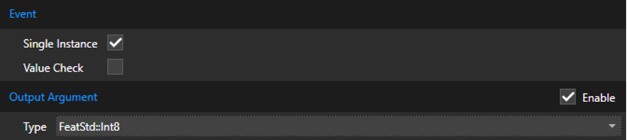
<span lang="EN-US">The Generic Event interface is used to signal an event. Instead of being automatically triggered, this interface must be manually triggered from the CGI Application side. For more information on how to do this refer to the <span style="color: rgb(230, 126, 35);">[TriggerGenericEvent](https://doc316en.candera.eu/link/1210#bkmrk-triggergenericevent)</span> article.</span>

**<span lang="EN-US">Icon:</span>**

<div drawio-diagram="6620"><img src="https://doc316en.candera.eu/uploads/images/drawio/2024-08/drawing-7-1724648700.png" alt=""/></div>

<span lang="EN-US"><span style="mso-spacerun: yes;"> </span></span>**<span lang="EN-US">Properties:</span>**

<div drawio-diagram="6621"><img src="https://doc316en.candera.eu/uploads/images/drawio/2024-08/drawing-7-1724648739.png" alt=""/></div>

<table border="1" id="bkmrk-property-name-descri-10" style="border-collapse: collapse; width: 97.5309%;"><colgroup><col style="width: 21.5464%;"></col><col style="width: 78.4536%;"></col></colgroup><tbody><tr><td class="align-center" style="background-color: rgb(230, 126, 35);"><span style="color: rgb(255, 255, 255);">**Property Name**</span></td><td class="align-center" style="background-color: rgb(230, 126, 35);"><span style="color: rgb(255, 255, 255);">**Description**</span></td></tr><tr><td>**Single Instance**</td><td>When selected, only a single instance of this event will be queue. If the event is triggered again before the previous instance is executed it will overwrite the previous event in the queue instead.</td></tr><tr><td>**Value Check**</td><td>If enabled, the sent value will be compared to the previous value and processing will be skipped if it has not changed. This can improve performance if the sent value is often the same/different.</td></tr><tr><td>**Output Argument**</td><td>If enabled the event will be accompanied by an output value.</td></tr><tr><td>**Type**</td><td>Data type of the value.</td></tr></tbody></table>

##### <span lang="EN-US">Function Call Interface (Event)</span>

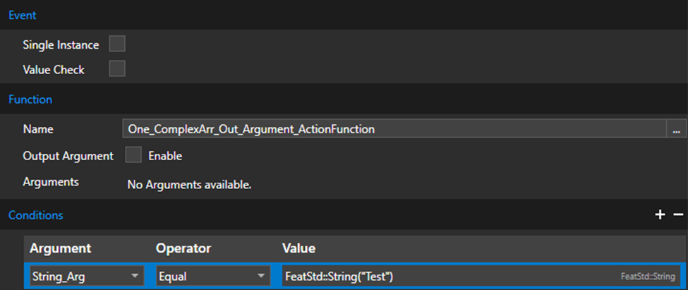
<span lang="EN-US">The Function-Call (Event) interface will execute a native function to check if an event has been triggered. Depending on the result of the function call (return value must be true) and specified conditions, an event will be queued.</span>

<span lang="EN-US">To learn how to define functions to be used in the Connector refer to the <span style="color: rgb(230, 126, 35);">[Native Functions](https://doc316en.candera.eu/books/cgi-studio-connector/chapter/native-functions)</span> chapter.</span>

**<span lang="EN-US">Icon:</span>**

<div drawio-diagram="6623"><img src="https://doc316en.candera.eu/uploads/images/drawio/2024-08/drawing-7-1724648910.png" alt=""/></div>

**<span lang="EN-US">Properties:</span>**

<div drawio-diagram="6624"><img src="https://doc316en.candera.eu/uploads/images/drawio/2024-08/drawing-7-1724648968.png" alt=""/></div>

<table border="1" id="bkmrk-property-name-descri-11" style="border-collapse: collapse; width: 97.4074%; height: 331.953px;"><colgroup><col style="width: 21.7013%;"></col><col style="width: 78.3007%;"></col></colgroup><tbody><tr style="height: 29.7969px;"><td class="align-center" style="background-color: rgb(230, 126, 35); height: 29.7969px;"><span style="color: rgb(255, 255, 255);">**Property Name**</span></td><td class="align-center" style="background-color: rgb(230, 126, 35); height: 29.7969px;"><span style="color: rgb(255, 255, 255);">**Description**</span></td></tr><tr style="height: 46.5938px;"><td style="height: 46.5938px;">**Single Instance**</td><td style="height: 46.5938px;">When selected, only a single instance of this event will be queue. If the event is triggered again before the previous instance is executed it will overwrite the previous event in the queue instead.</td></tr><tr style="height: 46.5938px;"><td style="height: 46.5938px;">**Value Check**</td><td style="height: 46.5938px;">If enabled, the sent value will be compared to the previous value and processing will be skipped if it has not changed. This can improve performance if the sent value is often the same/different.</td></tr><tr style="height: 46.5938px;"><td style="height: 46.5938px;">**Name**</td><td style="height: 46.5938px;">Name of the function which triggers the event. Clicking on the ‘…’ button next to the field opens a dialog window which lists all possible messages defined for this application.</td></tr><tr style="height: 46.5938px;"><td style="height: 46.5938px;">**Output Argument**</td><td style="height: 46.5938px;">If enabled, the event will be accompanied by an output value. This value can be selected from the available members of the related message.</td></tr><tr style="height: 26.3906px;"><td style="height: 26.3906px;">**Conditions**</td><td style="height: 26.3906px;">Conditions allow to specify additional conditions which the function must fulfill before the event is triggered. If multiple conditions are set, all <span lang="EN-US" style="font-size: 10.0pt; mso-bidi-font-size: 11.0pt; line-height: 107%; font-family: 'Daytona',sans-serif; mso-fareast-font-family: 游明朝; mso-fareast-theme-font: minor-fareast; mso-bidi-font-family: 'Times New Roman'; mso-bidi-theme-font: minor-bidi; mso-ansi-language: EN-US; mso-fareast-language: JA; mso-bidi-language: AR-SA;">conditions must be fulfilled. Conditions can be added and removed with the ‘+’ and ‘-‘ buttons. </span></td></tr><tr style="height: 29.7969px;"><td style="height: 29.7969px;">**Argument**</td><td style="height: 29.7969px;">Name of the argument of the function this condition is applied to</td></tr><tr style="height: 29.7969px;"><td style="height: 29.7969px;">**Operator**</td><td style="height: 29.7969px;">Operator used to check the condition</td></tr><tr style="height: 29.7969px;"><td style="height: 29.7969px;">**Value**</td><td style="height: 29.7969px;">Value of the condition.

Depending on the type of the argument, the \[ … \] button will be displayed next to the field. When clicking it, it will open a dialog window which lists possible objects from the referenced Scene Composer solution that can be used as a value.

</td></tr></tbody></table>

<span lang="EN-US" style="mso-no-proof: yes;"> </span>

##### <span lang="EN-US">Message Interface (Event)</span>

<span lang="EN-US">The Message (Event) interface allows to react to incoming Courier messages. If a matching message is received and all conditions are fulfilled an event will be queued.</span>

<span lang="EN-US">For more information about Messaging in Courier please refer to the <span style="color: rgb(230, 126, 35);">[Courier documentation](https://doc316en.candera.eu/books/courier)</span>.</span>

**<span lang="EN-US">Icon:</span>**

<div drawio-diagram="6625"><img src="https://doc316en.candera.eu/uploads/images/drawio/2024-08/drawing-7-1724649194.png" alt=""/></div>

<span lang="EN-US"><span style="mso-spacerun: yes;"> </span></span>**<span lang="EN-US">Properties:</span>**

<div drawio-diagram="6626"><img src="https://doc316en.candera.eu/uploads/images/drawio/2024-08/drawing-7-1724649226.png" alt=""/></div>

<table border="1" id="bkmrk-property-name-descri-12" style="border-collapse: collapse; width: 97.5309%;"><colgroup><col style="width: 21.646%;"></col><col style="width: 78.356%;"></col></colgroup><tbody><tr><td class="align-center" style="background-color: rgb(230, 126, 35);"><span style="color: rgb(255, 255, 255);">**Property Name**</span></td><td class="align-center" style="background-color: rgb(230, 126, 35);"><span style="color: rgb(255, 255, 255);">**Description**</span></td></tr><tr><td>**Single Instance**</td><td>When selected, only a single instance of this event will be queue. If the event is triggered again before the previous instance is executed it will overwrite the previous event in the queue instead.</td></tr><tr><td>**Value Check**</td><td>If enabled, the sent value will be compared to the previous value and processing will be skipped if it has not changed. This can improve performance if the sent value is often the same/different.</td></tr><tr><td>**Name**</td><td>Name of the message which triggers the event. Clicking on the ‘…’ button next to the field opens a dialog window which lists all possible messages defined for this application.</td></tr><tr><td>**Output Argument**</td><td>If enabled, the event will be accompanied by an output value. This value can be selected from the available members of the related message.</td></tr><tr><td>**Conditions**</td><td>Conditions allow to specify additional conditions which the message must fulfill before the event is triggered. If multiple conditions are set, all conditions must be fulfilled. Conditions can be added and removed with the ‘+’ and ‘-‘ buttons.</td></tr><tr><td>**Argument**</td><td>Name of the member of the message this condition is applied to</td></tr><tr><td>**Operator**</td><td>Operator used to check the condition</td></tr><tr><td>**Value**</td><td>Value of the condition.

Depending on the type of the argument, the \[ … \] button will be displayed next to the field. When clicking it, it will open a dialog window which lists possible objects from the referenced Scene Composer solution that can be used as a value.

</td></tr></tbody></table>

<span lang="EN-US" style="mso-no-proof: yes;"> </span>

---

# Edit Menu

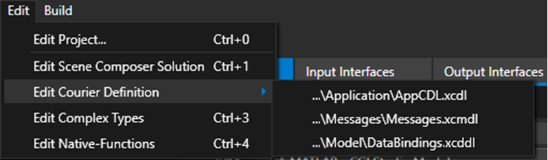
It is possible to quickly edit external resources with via the edit menu or the toolbar.

<div drawio-diagram="7210"><img src="https://doc316en.candera.eu/uploads/images/drawio/2024-10/drawing-7-1730275143.png" alt=""/></div>

<div drawio-diagram="7211"><img src="https://doc316en.candera.eu/uploads/images/drawio/2024-10/drawing-7-1730275169.png" alt=""/></div>

<table border="1" id="bkmrk-property-name-descri-13" style="border-collapse: collapse; width: 97.5309%;"><colgroup><col style="width: 29.8982%;"></col><col style="width: 70.1018%;"></col></colgroup><tbody><tr><td class="align-center" style="background-color: rgb(230, 126, 35);"><span style="color: rgb(255, 255, 255);">**Property Name**</span></td><td class="align-center" style="background-color: rgb(230, 126, 35);"><span style="color: rgb(255, 255, 255);">**Description**</span></td></tr><tr><td>**Edit Project**</td><td>Opens the Project configuration window.</td></tr><tr><td>**Edit Scene Composer Solution**</td><td>Edits the configured Scene Composer solution.</td></tr><tr><td>**Edit Courier Definition**</td><td><span lang="EN-US" style="font-size: 10.0pt; mso-bidi-font-size: 11.0pt; line-height: 107%; font-family: 'Daytona',sans-serif; mso-fareast-font-family: 游明朝; mso-fareast-theme-font: minor-fareast; mso-bidi-font-family: 'Times New Roman'; mso-bidi-theme-font: minor-bidi; mso-ansi-language: EN-US; mso-fareast-language: JA; mso-bidi-language: AR-SA;">Displays all Courier definition files based on the configured XCDL file and allows to quickly edit them using the Courier Editor.</span></td></tr><tr><td>**Edit Complex Types**</td><td><span lang="EN-US" style="font-size: 10.0pt; mso-bidi-font-size: 11.0pt; line-height: 107%; font-family: 'Daytona',sans-serif; mso-fareast-font-family: 游明朝; mso-fareast-theme-font: minor-fareast; mso-bidi-font-family: 'Times New Roman'; mso-bidi-theme-font: minor-bidi; mso-ansi-language: EN-US; mso-fareast-language: JA; mso-bidi-language: AR-SA;">Edits the configured Complex-Types definition file.</span></td></tr><tr><td>**Edit Native-Functions**</td><td><span lang="EN-US" style="font-size: 10.0pt; mso-bidi-font-size: 11.0pt; line-height: 107%; font-family: 'Daytona',sans-serif; mso-fareast-font-family: 游明朝; mso-fareast-theme-font: minor-fareast; mso-bidi-font-family: 'Times New Roman'; mso-bidi-theme-font: minor-bidi; mso-ansi-language: EN-US; mso-fareast-language: JA; mso-bidi-language: AR-SA;">Edits the configured Native-Functions definition file.</span></td></tr></tbody></table>

<p class="callout info">If a resource or related script file is not available, the function is disabled.</p>

---

# Build Menu

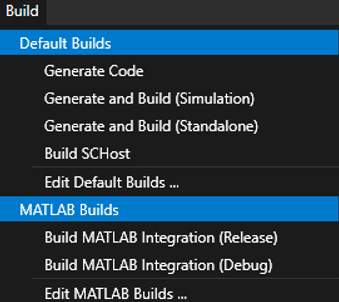
The build menu allows to quickly trigger a build from the specified Build-Projects. It lists all available default builds and, depending on the tool configuration, special tool specific builds. Same can be done via the toolbar.

<div drawio-diagram="8308"><img src="https://doc316en.candera.eu/uploads/images/drawio/2025-04/drawing-7-1744609006.png" alt=""/></div>

<div drawio-diagram="7213"><img src="https://doc316en.candera.eu/uploads/images/drawio/2024-10/drawing-7-1730275295.png" alt=""/></div>

Additionally, the related Build-Projects can be directly edited from the menu (not available via the Toolbar)

---

# Project Settings

Several project related configurations can be performed in the project settings window which is accessible var the “Edit” menu or the shortcut “Ctrl + 0”.

<div drawio-diagram="6936"><img src="https://doc316en.candera.eu/uploads/images/drawio/2024-10/drawing-7-1728276701.png" alt=""/></div>

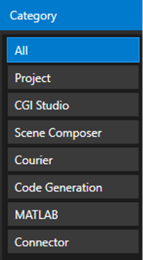
Via the List on the left the displayed options can be filtered to make it faster to find a related setting.  
All project settings (with a few additions) are available in any build that is executed. For more details about this refer to <span style="color: rgb(230, 126, 35);">[Builds chapter](https://doc316en.candera.eu/books/cgi-studio-connector/page/builds)</span>.

##### General

<div drawio-diagram="6937"><img src="https://doc316en.candera.eu/uploads/images/drawio/2024-10/drawing-7-1728276791.png" alt=""/></div>

<table border="1" id="bkmrk-property-name-descri-14" style="border-collapse: collapse; width: 97.4074%;"><colgroup><col style="width: 21.701%;"></col><col style="width: 78.299%;"></col></colgroup><tbody><tr><td class="align-center" style="background-color: rgb(230, 126, 35);"><span style="color: rgb(255, 255, 255);">**Property Name**</span></td><td class="align-center" style="background-color: rgb(230, 126, 35);"><span style="color: rgb(255, 255, 255);">**Description**</span></td></tr><tr><td>**Name** </td><td>Name of the project.</td></tr><tr><td>**Description** </td><td>Description of the project.</td></tr><tr><td>**Icon**</td><td>Custom icon used for the project.</td></tr></tbody></table>

##### Interface

<div drawio-diagram="6938"><img src="https://doc316en.candera.eu/uploads/images/drawio/2024-10/drawing-7-1728277079.png" alt=""/></div>

<table border="1" id="bkmrk-property-name-descri-15" style="border-collapse: collapse; width: 97.6543%;"><colgroup><col style="width: 25.4453%;"></col><col style="width: 74.5547%;"></col></colgroup><tbody><tr><td class="align-center" style="background-color: rgb(230, 126, 35);"><span style="color: rgb(255, 255, 255);">**Property Name**</span></td><td class="align-center" style="background-color: rgb(230, 126, 35);"><span style="color: rgb(255, 255, 255);">**Description**</span></td></tr><tr><td>**Interface Definition** </td><td><span lang="EN-US" style="font-size: 10.0pt; mso-bidi-font-size: 11.0pt; line-height: 107%; font-family: 'Daytona',sans-serif; mso-fareast-font-family: 游明朝; mso-fareast-theme-font: minor-fareast; mso-bidi-font-family: 'Times New Roman'; mso-bidi-theme-font: minor-bidi; mso-ansi-language: EN-US; mso-fareast-language: JA; mso-bidi-language: AR-SA;">File containing the Interface definition. The path can be either absolute or relative to CGI Connector/Project/CGI Studio path.</span></td></tr><tr><td>**Complex-Type Definition**</td><td>File containing the Complex-Type definition. The path can be either absolute or relative to CGI Connector/Project/CGI Studio path.</td></tr><tr><td>**Native-Function Definition**</td><td>File containing the Native-Function definition. The path can be either absolute or relative to CGI Connector/Project/CGI Studio path.</td></tr></tbody></table>

##### Tools

<div drawio-diagram="6939"><img src="https://doc316en.candera.eu/uploads/images/drawio/2024-10/drawing-7-1728277203.png" alt=""/></div>

<table border="1" id="bkmrk-property-name-descri-16" style="border-collapse: collapse; width: 97.5309%;"><colgroup><col style="width: 16.285%;"></col><col style="width: 83.715%;"></col></colgroup><tbody><tr><td class="align-center" style="background-color: rgb(230, 126, 35);"><span style="color: rgb(255, 255, 255);">**Property Name**</span></td><td class="align-center" style="background-color: rgb(230, 126, 35);"><span style="color: rgb(255, 255, 255);">**Description**</span></td></tr><tr><td>**Generic** </td><td><span lang="EN-US" style="font-size: 10.0pt; mso-bidi-font-size: 11.0pt; line-height: 107%; font-family: 'Daytona',sans-serif; mso-fareast-font-family: 游明朝; mso-fareast-theme-font: minor-fareast; mso-bidi-font-family: 'Times New Roman'; mso-bidi-theme-font: minor-bidi; mso-ansi-language: EN-US; mso-fareast-language: JA; mso-bidi-language: AR-SA;">Enables generic support. This will provide a plain C/C++ interface.</span></td></tr><tr><td>**MATLAB**</td><td>Enables support for MATLAB. This will provide additional options/setting related to Mathworks MATLAB support</td></tr></tbody></table>

##### CGI Studio

<div drawio-diagram="6940"><img src="https://doc316en.candera.eu/uploads/images/drawio/2024-10/drawing-7-1728277503.png" alt=""/></div>

<table border="1" id="bkmrk-property-name-descri-17" style="border-collapse: collapse; width: 97.5309%;"><colgroup><col style="width: 16.1783%;"></col><col style="width: 83.8217%;"></col></colgroup><tbody><tr><td class="align-center" style="background-color: rgb(230, 126, 35);"><span style="color: rgb(255, 255, 255);">**Property Name**</span></td><td class="align-center" style="background-color: rgb(230, 126, 35);"><span style="color: rgb(255, 255, 255);">**Description**</span></td></tr><tr><td>**Root Path** </td><td><span lang="EN-US" style="font-size: 10.0pt; mso-bidi-font-size: 11.0pt; line-height: 107%; font-family: 'Daytona',sans-serif; mso-fareast-font-family: 游明朝; mso-fareast-theme-font: minor-fareast; mso-bidi-font-family: 'Times New Roman'; mso-bidi-theme-font: minor-bidi; mso-ansi-language: EN-US; mso-fareast-language: JA; mso-bidi-language: AR-SA;">Path to CGI Studio package. The path can be either absolute or relative to CGI Connector/Project path.</span></td></tr></tbody></table>

##### Device-Platform

<div drawio-diagram="6941"><img src="https://doc316en.candera.eu/uploads/images/drawio/2024-10/drawing-7-1728278193.png" alt=""/></div>

<table border="1" id="bkmrk-property-name-descri-18" style="border-collapse: collapse; width: 97.5309%;"><colgroup><col style="width: 22.4814%;"></col><col style="width: 77.488%;"></col></colgroup><tbody><tr><td class="align-center" style="background-color: rgb(230, 126, 35);"><span style="color: rgb(255, 255, 255);">**Property Name**</span></td><td class="align-center" style="background-color: rgb(230, 126, 35);"><span style="color: rgb(255, 255, 255);">**Description**</span></td></tr><tr><td>**Platform** </td><td><span lang="EN-US" style="font-size: 10.0pt; mso-bidi-font-size: 11.0pt; line-height: 107%; font-family: 'Daytona',sans-serif; mso-fareast-font-family: 游明朝; mso-fareast-theme-font: minor-fareast; mso-bidi-font-family: 'Times New Roman'; mso-bidi-theme-font: minor-bidi; mso-ansi-language: EN-US; mso-fareast-language: JA; mso-bidi-language: AR-SA;">Name of the CGI Studio Platform (as found in CMake)</span></td></tr><tr><td>**Platform Configuration**</td><td><span lang="EN-US" style="font-size: 10.0pt; mso-bidi-font-size: 11.0pt; line-height: 107%; font-family: 'Daytona',sans-serif; mso-fareast-font-family: 游明朝; mso-fareast-theme-font: minor-fareast; mso-bidi-font-family: 'Times New Roman'; mso-bidi-theme-font: minor-bidi; mso-ansi-language: EN-US; mso-fareast-language: JA; mso-bidi-language: AR-SA;">Name of the CGI Studio Platform configuration (as found in CMake)</span></td></tr></tbody></table>

##### Scene Composer

<div drawio-diagram="6942"><img src="https://doc316en.candera.eu/uploads/images/drawio/2024-10/drawing-7-1728278275.png" alt=""/></div>

<table border="1" id="bkmrk-property-name-descri-19" style="border-collapse: collapse; width: 97.4074%;"><colgroup><col style="width: 16.285%;"></col><col style="width: 83.715%;"></col></colgroup><tbody><tr><td class="align-center" style="background-color: rgb(230, 126, 35);"><span style="color: rgb(255, 255, 255);">**Property Name**</span></td><td class="align-center" style="background-color: rgb(230, 126, 35);"><span style="color: rgb(255, 255, 255);">**Description**</span></td></tr><tr><td>**Executable** </td><td><span lang="EN-US" style="font-size: 10.0pt; mso-bidi-font-size: 11.0pt; line-height: 107%; font-family: 'Daytona',sans-serif; mso-fareast-font-family: 游明朝; mso-fareast-theme-font: minor-fareast; mso-bidi-font-family: 'Times New Roman'; mso-bidi-theme-font: minor-bidi; mso-ansi-language: EN-US; mso-fareast-language: JA; mso-bidi-language: AR-SA;">Executable used to edit the Scene Composer solution file.</span></td></tr><tr><td>**Solution**</td><td><span lang="EN-US" style="font-size: 10.0pt; mso-bidi-font-size: 11.0pt; line-height: 107%; font-family: 'Daytona',sans-serif; mso-fareast-font-family: 游明朝; mso-fareast-theme-font: minor-fareast; mso-bidi-font-family: 'Times New Roman'; mso-bidi-theme-font: minor-bidi; mso-ansi-language: EN-US; mso-fareast-language: JA; mso-bidi-language: AR-SA;">Scene Composer solution file. The path can be either absolute or relative to CGI Connector/Project/CGI Studio path.</span></td></tr></tbody></table>

##### Courier

<div drawio-diagram="6943"><img src="https://doc316en.candera.eu/uploads/images/drawio/2024-10/drawing-7-1728278352.png" alt=""/></div>

<table border="1" id="bkmrk-property-name-descri-20" style="border-collapse: collapse; width: 97.4074%;"><colgroup><col style="width: 25.6962%;"></col><col style="width: 74.3038%;"></col></colgroup><tbody><tr><td class="align-center" style="background-color: rgb(230, 126, 35);"><span style="color: rgb(255, 255, 255);">**Property Name**</span></td><td class="align-center" style="background-color: rgb(230, 126, 35);"><span style="color: rgb(255, 255, 255);">**Description**</span></td></tr><tr><td>**XCDL Definition File** </td><td><span lang="EN-US" style="font-size: 10.0pt; mso-bidi-font-size: 11.0pt; line-height: 107%; font-family: 'Daytona',sans-serif; mso-fareast-font-family: 游明朝; mso-fareast-theme-font: minor-fareast; mso-bidi-font-family: 'Times New Roman'; mso-bidi-theme-font: minor-bidi; mso-ansi-language: EN-US; mso-fareast-language: JA; mso-bidi-language: AR-SA;">File containing the Courier definition. The path can be either absolute or relative to CGI Connector/Project/CGI Studio path.</span></td></tr><tr><td>**XCDL Include Path**</td><td><span lang="EN-US" style="font-size: 10.0pt; mso-bidi-font-size: 11.0pt; line-height: 107%; font-family: 'Daytona',sans-serif; mso-fareast-font-family: 游明朝; mso-fareast-theme-font: minor-fareast; mso-bidi-font-family: 'Times New Roman'; mso-bidi-theme-font: minor-bidi; mso-ansi-language: EN-US; mso-fareast-language: JA; mso-bidi-language: AR-SA;">Additional include path required to by the XCDL definition. Multiple path must be separated by a ‘;’. Paths must be relative to the project file or CGI Studio root path.</span></td></tr></tbody></table>

##### Code Generation

<div drawio-diagram="7214"><img src="https://doc316en.candera.eu/uploads/images/drawio/2024-10/drawing-7-1730276369.png" alt=""/></div>

<table border="1" id="bkmrk-property-name-descri-21" style="border-collapse: collapse; width: 97.5309%;"><colgroup><col style="width: 21.6285%;"></col><col style="width: 78.3715%;"></col></colgroup><tbody><tr><td class="align-center" style="background-color: rgb(230, 126, 35);"><span style="color: rgb(255, 255, 255);">**Property Name**</span></td><td class="align-center" style="background-color: rgb(230, 126, 35);"><span style="color: rgb(255, 255, 255);">**Description**</span></td></tr><tr><td>**Compiler** </td><td><span lang="EN-US" style="font-size: 10.0pt; mso-bidi-font-size: 11.0pt; line-height: 107%; font-family: 'Daytona',sans-serif; mso-fareast-font-family: 游明朝; mso-fareast-theme-font: minor-fareast; mso-bidi-font-family: 'Times New Roman'; mso-bidi-theme-font: minor-bidi; mso-ansi-language: EN-US; mso-fareast-language: JA; mso-bidi-language: AR-SA;">Compiler used to build code.</span></td></tr><tr><td>**Architecture**</td><td><span lang="EN-US" style="font-size: 10.0pt; mso-bidi-font-size: 11.0pt; line-height: 107%; font-family: 'Daytona',sans-serif; mso-fareast-font-family: 游明朝; mso-fareast-theme-font: minor-fareast; mso-bidi-font-family: 'Times New Roman'; mso-bidi-theme-font: minor-bidi; mso-ansi-language: EN-US; mso-fareast-language: JA; mso-bidi-language: AR-SA;">Architecture used to build the code.</span></td></tr><tr><td>**Build-Project File**</td><td><span lang="EN-US" style="font-size: 10.0pt; mso-bidi-font-size: 11.0pt; line-height: 107%; font-family: 'Daytona',sans-serif; mso-fareast-font-family: 游明朝; mso-fareast-theme-font: minor-fareast; mso-bidi-font-family: 'Times New Roman'; mso-bidi-theme-font: minor-bidi; mso-ansi-language: EN-US; mso-fareast-language: JA; mso-bidi-language: AR-SA;">File containing default builds. The path can be either absolute or relative to CGI Connector/Project/CGI Studio path.</span></td></tr></tbody></table>

##### MATLAB

<div drawio-diagram="7215"><img src="https://doc316en.candera.eu/uploads/images/drawio/2024-10/drawing-7-1730276428.png" alt=""/></div>

<table border="1" id="bkmrk-property-name-descri-22" style="border-collapse: collapse; width: 97.5309%;"><colgroup><col style="width: 25.4453%;"></col><col style="width: 74.5547%;"></col></colgroup><tbody><tr><td class="align-center" style="background-color: rgb(230, 126, 35);"><span style="color: rgb(255, 255, 255);">**Property Name**</span></td><td class="align-center" style="background-color: rgb(230, 126, 35);"><span style="color: rgb(255, 255, 255);">**Description**</span></td></tr><tr><td>**Build-Project File**</td><td><span lang="EN-US" style="font-size: 10.0pt; mso-bidi-font-size: 11.0pt; line-height: 107%; font-family: 'Daytona',sans-serif; mso-fareast-font-family: 游明朝; mso-fareast-theme-font: minor-fareast; mso-bidi-font-family: 'Times New Roman'; mso-bidi-theme-font: minor-bidi; mso-ansi-language: EN-US; mso-fareast-language: JA; mso-bidi-language: AR-SA;">File containing MATLAB related builds. The path can be either absolute or relative to CGI Connector/Project/CGI Studio path.</span></td></tr></tbody></table>

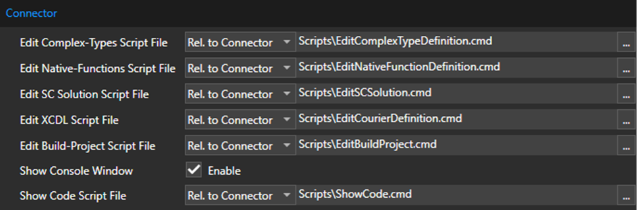
##### Connector

<div drawio-diagram="7216"><img src="https://doc316en.candera.eu/uploads/images/drawio/2024-10/drawing-7-1730276530.png" alt=""/></div>

<table border="1" id="bkmrk-property-name-descri-23" style="border-collapse: collapse; width: 97.5309%;"><colgroup><col style="width: 29.7845%;"></col><col style="width: 70.2155%;"></col></colgroup><tbody><tr><td class="align-center" style="background-color: rgb(230, 126, 35);"><span style="color: rgb(255, 255, 255);">**Property Name**</span></td><td class="align-center" style="background-color: rgb(230, 126, 35);"><span style="color: rgb(255, 255, 255);">**Description**</span></td></tr><tr><td>**Edit Complex-Types Script File** </td><td><span lang="EN-US" style="font-size: 10.0pt; mso-bidi-font-size: 11.0pt; line-height: 107%; font-family: 'Daytona',sans-serif; mso-fareast-font-family: 游明朝; mso-fareast-theme-font: minor-fareast; mso-bidi-font-family: 'Times New Roman'; mso-bidi-theme-font: minor-bidi; mso-ansi-language: EN-US; mso-fareast-language: JA; mso-bidi-language: AR-SA;">Script file executed when editing Complex-Types. The path can be either absolute or relative to CGI Connector/Project/CGI Studio path.</span></td></tr><tr><td>**Edit Native-Functions Script File**</td><td><span lang="EN-US" style="font-size: 10.0pt; mso-bidi-font-size: 11.0pt; line-height: 107%; font-family: 'Daytona',sans-serif; mso-fareast-font-family: 游明朝; mso-fareast-theme-font: minor-fareast; mso-bidi-font-family: 'Times New Roman'; mso-bidi-theme-font: minor-bidi; mso-ansi-language: EN-US; mso-fareast-language: JA; mso-bidi-language: AR-SA;">Script file executed when editing Native-Functions. The path can be either absolute or relative to CGI Connector/Project/CGI Studio path.</span></td></tr><tr><td>**Edit SC Solution Script File**</td><td><span lang="EN-US" style="font-size: 10.0pt; mso-bidi-font-size: 11.0pt; line-height: 107%; font-family: 'Daytona',sans-serif; mso-fareast-font-family: 游明朝; mso-fareast-theme-font: minor-fareast; mso-bidi-font-family: 'Times New Roman'; mso-bidi-theme-font: minor-bidi; mso-ansi-language: EN-US; mso-fareast-language: JA; mso-bidi-language: AR-SA;">Script file executed when editing SC Solution. The path can be either absolute or relative to CGI Connector/Project/CGI Studio path.</span></td></tr><tr><td>**Edit XCDL Script File**</td><td><span lang="EN-US" style="font-size: 10.0pt; mso-bidi-font-size: 11.0pt; line-height: 107%; font-family: 'Daytona',sans-serif; mso-fareast-font-family: 游明朝; mso-fareast-theme-font: minor-fareast; mso-bidi-font-family: 'Times New Roman'; mso-bidi-theme-font: minor-bidi; mso-ansi-language: EN-US; mso-fareast-language: JA; mso-bidi-language: AR-SA;">Script file executed when editing Courier definition. The path can be either absolute or relative to CGI Connector/Project/CGI Studio path.</span></td></tr><tr><td>**Edit Build-Project Script File**</td><td><span lang="EN-US" style="font-size: 10.0pt; mso-bidi-font-size: 11.0pt; line-height: 107%; font-family: 'Daytona',sans-serif; mso-fareast-font-family: 游明朝; mso-fareast-theme-font: minor-fareast; mso-bidi-font-family: 'Times New Roman'; mso-bidi-theme-font: minor-bidi; mso-ansi-language: EN-US; mso-fareast-language: JA; mso-bidi-language: AR-SA;">Script file executed when editing a Build-Project. The path can be either absolute or relative to CGI Connector/Project/CGI Studio path.</span></td></tr><tr><td>**Show Console Window**</td><td><span lang="EN-US" style="font-size: 10.0pt; mso-bidi-font-size: 11.0pt; line-height: 107%; font-family: 'Daytona',sans-serif; mso-fareast-font-family: 游明朝; mso-fareast-theme-font: minor-fareast; mso-bidi-font-family: 'Times New Roman'; mso-bidi-theme-font: minor-bidi; mso-ansi-language: EN-US; mso-fareast-language: JA; mso-bidi-language: AR-SA;">When enabled, shows a command line window executing scripts. This can be used to debug scripts.</span></td></tr><tr><td>**Show Code Script File**</td><td><span lang="EN-US" style="font-size: 10.0pt; mso-bidi-font-size: 11.0pt; line-height: 107%; font-family: 'Daytona',sans-serif; mso-fareast-font-family: 游明朝; mso-fareast-theme-font: minor-fareast; mso-bidi-font-family: 'Times New Roman'; mso-bidi-theme-font: minor-bidi; mso-ansi-language: EN-US; mso-fareast-language: JA; mso-bidi-language: AR-SA;">Script file executed when editing code (via the log window). The path can be either absolute or relative to CGI Connector/Project/CGI Studio path.</span></td></tr></tbody></table>

---

# Builds

When a build is started the Build-Window will be shown and the build will be automatically started.

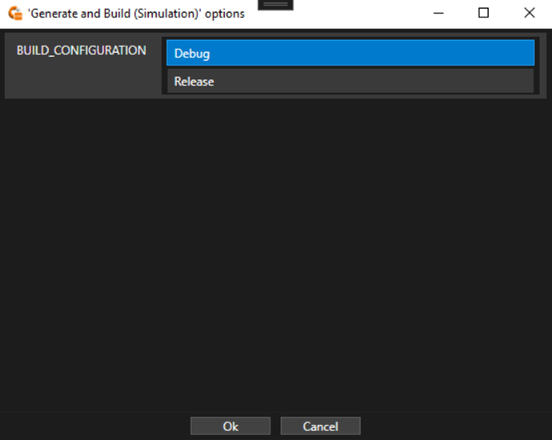
If the build contains some Option-Values an additional dialog will be displayed before the actual Build-Window, which allows the user to configure the build. Depending on the option, the user can either select from a set of predefined values or needs to enter a custom value.

<div drawio-diagram="8309"><img src="https://doc316en.candera.eu/uploads/images/drawio/2025-04/drawing-7-1744609190.png" alt=""/></div>

A build is commonly separated into multiple steps each corresponding to a separate script file that is executed from the specified build-script folder.

<div drawio-diagram="7217"><img src="https://doc316en.candera.eu/uploads/images/drawio/2024-10/drawing-7-1730336981.png" alt=""/></div>

<span lang="EN-US">The top row shows the current build state. It indicates the progress or if the build has finished/failed. On the right side the combined information about all build steps is shown. It displays the total amount of info, warning and error messages from the output. The second row provides information about the current executed step.</span>

<span lang="EN-US" style="font-size: 10.0pt; mso-bidi-font-size: 11.0pt; line-height: 107%; font-family: 'Daytona',sans-serif; mso-fareast-font-family: 游明朝; mso-fareast-theme-font: minor-fareast; mso-bidi-font-family: 'Times New Roman'; mso-bidi-theme-font: minor-bidi; mso-ansi-language: EN-US; mso-fareast-language: JA; mso-bidi-language: AR-SA;">When enabling the details, by checking the option in the bottom right, the output of the build scripts can be seen, grouped by the step. This output is also saved into a log-file into the specified build folder.</span>

#### Build Settings

When a build is started, the builds specific options defined in the related Build Project are set (See <span style="color: rgb(230, 126, 35);">[Build Projects](https://doc316en.candera.eu/books/cgi-studio-connector/chapter/build-projects)</span> for more information). Further the following settings are applied by the Connector.

**Root-Paths:**

<table border="1" id="bkmrk-property-name-descri-22" style="width: 71.2346%;"><tbody><tr><td class="align-center" style="background-color: rgb(230, 126, 35); width: 32.789%;"><span style="color: rgb(255, 255, 255);">**Argument**</span></td><td class="align-center" style="background-color: rgb(230, 126, 35); width: 67.211%;"><span style="color: rgb(255, 255, 255);">**Description**</span></td></tr><tr><td style="width: 32.789%;">**CONNECTOR\_ROOT** </td><td style="width: 67.211%;"><span lang="EN-US">Path to the Connector binary</span></td></tr><tr><td style="width: 32.789%;">**PROJECT\_ROOT**</td><td style="width: 67.211%;"><span lang="EN-US">Path to the Connector project file</span></td></tr><tr><td style="width: 32.789%;">**CGI\_ROOT**</td><td style="width: 67.211%;"><span lang="EN-US">Path to the CGI packages</span></td></tr></tbody></table>

**Variables:**

<table border="1" id="bkmrk-argument-description" style="width: 97.1605%; height: 965.095px;"><tbody><tr style="height: 29.7969px;"><td class="align-center" style="background-color: rgb(230, 126, 35); width: 50.7643%; height: 29.7969px;"><span style="color: rgb(255, 255, 255);">**Argument**</span></td><td class="align-center" style="background-color: rgb(230, 126, 35); width: 49.2357%; height: 29.7969px;"><span style="color: rgb(255, 255, 255);">**Description**</span></td></tr><tr style="height: 29.7969px;"><td style="width: 50.7643%; height: 29.7969px;">**CONNECTOR\_EXECUTABLE\_PATH**</td><td style="width: 49.2357%; height: 29.7969px;">Path to the Connector binary</td></tr><tr style="height: 29.7969px;"><td style="width: 50.7643%; height: 29.7969px;">**CONNECTOR\_PROJECT\_FILE**</td><td style="width: 49.2357%; height: 29.7969px;"><span lang="EN-US">Connector project file</span></td></tr><tr style="height: 29.7969px;"><td style="width: 50.7643%; height: 29.7969px;">**CONNECTOR\_PROJECT\_PATH**</td><td style="width: 49.2357%; height: 29.7969px;"><span lang="EN-US">Path to the Connector project file</span></td></tr><tr style="height: 29.7969px;"><td style="width: 50.7643%; height: 29.7969px;">**CONNECTOR\_PROJECT\_NAME**</td><td style="width: 49.2357%; height: 29.7969px;"><span lang="EN-US">Connector project Name</span></td></tr><tr style="height: 29.7969px;"><td style="width: 50.7643%; height: 29.7969px;">**CONNECTOR\_PROJECT\_DESCRIPTION** </td><td style="width: 49.2357%; height: 29.7969px;"><span lang="EN-US">Connector project Description</span></td></tr><tr style="height: 29.7969px;"><td style="width: 50.7643%; height: 29.7969px;">**CONNECTOR\_PROJECT\_ICON\_FILE**</td><td style="width: 49.2357%; height: 29.7969px;"><span lang="EN-US">Connector project icon file</span></td></tr><tr style="height: 29.7969px;"><td style="width: 50.7643%; height: 29.7969px;">**CONNECTOR\_INTERFACE\_DEFINITION\_FILE**</td><td style="width: 49.2357%; height: 29.7969px;"><span lang="EN-US">Interface definition file</span></td></tr><tr style="height: 29.7969px;"><td style="width: 50.7643%; height: 29.7969px;">**CONNECTOR\_COMPLEXTYPE\_DEFINITION\_FILE**</td><td style="width: 49.2357%; height: 29.7969px;"><span lang="EN-US">Complex-Type definition file</span></td></tr><tr style="height: 29.7969px;"><td style="width: 50.7643%; height: 29.7969px;">**CONNECTOR\_NATIVEFUNCTION\_DEFINITION\_FILE**</td><td style="width: 49.2357%; height: 29.7969px;"><span lang="EN-US">Native-Function definition file</span></td></tr><tr style="height: 29.7969px;"><td style="width: 50.7643%; height: 29.7969px;">**CONNECTOR\_ENABLE\_GENERIC\_TOOL**</td><td style="width: 49.2357%; height: 29.7969px;"><span lang="EN-US">Indicates if ‘Generic Tool’ is enabled</span></td></tr><tr style="height: 29.7969px;"><td style="width: 50.7643%; height: 29.7969px;">**CONNECTOR\_ENABLE\_MATLAB\_TOOL**</td><td style="width: 49.2357%; height: 29.7969px;"><span lang="EN-US">Indicates if ‘MATLAB Tool’ is enabled</span></td></tr><tr style="height: 29.7969px;"><td style="width: 50.7643%; height: 29.7969px;">**CONNECTOR\_CGISTUDIO\_ROOT\_PATH**</td><td style="width: 49.2357%; height: 29.7969px;"><span lang="EN-US">Path to CGI Studio root folder</span></td></tr><tr style="height: 29.7969px;"><td style="width: 50.7643%; height: 29.7969px;">**CONNECTOR\_CGISTUDIO\_PLATFORM**</td><td style="width: 49.2357%; height: 29.7969px;"><span lang="EN-US">CGI Studio Platform (e.g. Android, RCar,..)</span></td></tr><tr style="height: 29.7969px;"><td style="width: 50.7643%; height: 29.7969px;">**CONNECTOR\_CGISTUDIO\_PLATFORM\_CONFIG**</td><td style="width: 49.2357%; height: 29.7969px;"><span lang="EN-US">CGI Studio Platform Configuration (x86/x64)</span></td></tr><tr style="height: 29.7969px;"><td style="width: 50.7643%; height: 29.7969px;">**CONNECTOR\_SCENECOMPOSER\_EXECUTABLE\_FILE**</td><td style="width: 49.2357%; height: 29.7969px;"><span lang="EN-US">Scene-Composer executable file</span></td></tr><tr style="height: 29.7969px;"><td style="width: 50.7643%; height: 29.7969px;">**CONNECTOR\_SCENECOMPOSER\_EXECUTABLE\_PATH**</td><td style="width: 49.2357%; height: 29.7969px;"><span lang="EN-US">Scene-Composer executable path</span></td></tr><tr style="height: 29.7969px;"><td style="width: 50.7643%; height: 29.7969px;">**CONNECTOR\_SCENECOMPOSER\_SOLUTION\_FILE**</td><td style="width: 49.2357%; height: 29.7969px;"><span lang="EN-US">Scene-Composer solution file</span></td></tr><tr style="height: 29.7969px;"><td style="width: 50.7643%; height: 29.7969px;">**CONNECTOR\_COURIER\_XCDL\_DEFINITION\_FILE**</td><td style="width: 49.2357%; height: 29.7969px;"><span lang="EN-US">XCDL root definition file</span></td></tr><tr style="height: 29.7969px;"><td style="width: 50.7643%; height: 29.7969px;">**CONNECTOR\_COURIER\_XCDL\_INCLUDE\_PATHS**</td><td style="width: 49.2357%; height: 29.7969px;"><span lang="EN-US">XCDL include paths (separated by ‘;’)</span></td></tr><tr style="height: 29.7969px;"><td style="width: 50.7643%; height: 29.7969px;">**CONNECTOR\_COURIER\_XCDL\_RESOLVED\_INCLUDE\_PATHS**</td><td style="width: 49.2357%; height: 29.7969px;"><span lang="EN-US">Resolved XCDL include paths using available root paths</span></td></tr><tr style="height: 29.7969px;"><td style="width: 50.7643%; height: 29.7969px;">**CONNECTOR\_CODE\_GENERATION\_COMPILER**</td><td style="width: 49.2357%; height: 29.7969px;"><span lang="EN-US">Compiler used for code generation/build</span></td></tr><tr style="height: 29.7969px;"><td style="width: 50.7643%; height: 29.7969px;">**CONNECTOR\_CODE\_GENERATION\_ARCHITECTURE**</td><td style="width: 49.2357%; height: 29.7969px;"><span lang="EN-US">Architecture used for code generation/build</span></td></tr><tr style="height: 29.7969px;"><td style="width: 50.7643%; height: 29.7969px;">**CONNECTOR\_CODE\_GENERATION\_BUILD\_PROJECT\_FILE**</td><td style="width: 49.2357%; height: 29.7969px;"><span lang="EN-US">Default Build-Project file</span></td></tr><tr style="height: 29.7969px;"><td style="width: 50.7643%; height: 29.7969px;">**CONNECTOR\_MATLAB\_ENABLE\_LEGACY\_OPTIONS**</td><td style="width: 49.2357%; height: 29.7969px;"><span lang="EN-US">Indicates if MATLAB legacy options are enabled</span></td></tr><tr style="height: 29.7969px;"><td style="width: 50.7643%; height: 29.7969px;">**CONNECTOR\_MATLAB\_BUILD\_PROJECT\_FILE**</td><td style="width: 49.2357%; height: 29.7969px;"><span lang="EN-US">MATLAB Build-Project file</span></td></tr><tr style="height: 29.7969px;"><td style="width: 50.7643%; height: 29.7969px;">**CONNECTOR\_EDIT\_COMPLEX\_TYPES\_SCRIPT\_FILE**</td><td style="width: 49.2357%; height: 29.7969px;"><span lang="EN-US">Script for ‘Edit Complex-Type definition’</span></td></tr><tr style="height: 29.7969px;"><td style="width: 50.7643%; height: 29.7969px;">**CONNECTOR\_EDIT\_NATIVE\_FUNTIONS\_SCRIPT\_FILE**</td><td style="width: 49.2357%; height: 29.7969px;"><span lang="EN-US">Script for ‘Edit Native-Function definition’</span></td></tr><tr style="height: 29.7969px;"><td style="width: 50.7643%; height: 29.7969px;">**CONNECTOR\_EDIT\_SC\_SOLUTION\_SCRIPT\_FILE**</td><td style="width: 49.2357%; height: 29.7969px;"><span lang="EN-US">Script for ‘Edit Scene Composer solution’</span></td></tr><tr style="height: 29.7969px;"><td style="width: 50.7643%; height: 29.7969px;">**CONNECTOR\_EDIT\_XCDL\_SCRIPT\_FILE**</td><td style="width: 49.2357%; height: 29.7969px;"><span lang="EN-US">Script for ‘Edit Courier Definition’</span></td></tr><tr style="height: 29.7969px;"><td style="width: 50.7643%; height: 29.7969px;">**CONNECTOR\_EDIT\_BUILD\_PROJECT\_SCRIPT\_FILE**</td><td style="width: 49.2357%; height: 29.7969px;"><span lang="EN-US">Script for ‘Edit Build-Project’</span></td></tr><tr style="height: 11.5938px;"><td style="width: 50.7643%; height: 11.5938px;">**CONNECTOR\_SHOW\_CONSOLE\_WINDOW**</td><td style="width: 49.2357%; height: 11.5938px;"><span lang="EN-US">Indicates if console window is shown when running scripts.</span></td></tr><tr style="height: 29.7969px;"><td style="width: 50.7643%; height: 29.7969px;">**CONNECTOR\_SHOW\_CODE\_SCRIPT\_FILE**</td><td style="width: 49.2357%; height: 29.7969px;"><span lang="EN-US">Script for triggering editor from Build details</span></td></tr></tbody></table>

The same environment variables are also set when any other script is executed (such as ‘Edit Scene-Composer solution’)

#### Close on Success

If a build contains the CONNECTOR\_BUILD\_CLOSE\_ON\_SUCCESS variable and sets a value of ‘1’ then the Build-Window will be automatically closed when the build is finished successfully.  
This can feature is very useful if Builds are used to just perform simple tasks or open other programs.

<p class="callout info">Note that some programs do ‘block’ the command script execution until closed even when started using the START command. To workaround this problem the provided ‘ProcRun’ tool found in ‘cgi\_studio\_connector\\BuildScripts\\Common\\ProcRun‘ can be used. The syntax to use it is:  
ProcRun &lt;Executable&gt; \[“&lt;Arguments&gt;”\]  
</p>

---