# SceneComposer V3.0.3

# SceneComposer Usability Improvements

#### Zoom Display Preview

In some particular situations, the user could need an option to switch back to 100% of a display if its size has been modified. Consequently, the possibility to zoom in Display Preview through options in the context menu of the view has been added (Mantis 5093).

<div class="contents" id="bkmrk-see-also%3A-additional"><div class="contents"><div class="textblock"><dl class="see"><dt>**See also:**</dt><dd>- <span style="color: rgb(230, 126, 35);">[Additional Info about Rendering](https://doc316en.candera.eu/link/3#bkmrk-additional-info-abou)</span> in SceneComposer User Manual

</dd></dl>---

</div></div></div>#### Bitmap Fonts Support

Bitmap fonts are now supported by SceneComposer. In order to use bitmap fonts, the SCHost.dll must be compiled using BitmapFont font engine. Only one font engine can be active at a time in an SCHost.dll.

The user can import 2 types of files as bitmap fonts:

<div class="contents" id="bkmrk-.fnt-%28windows-font-f"><div class="contents"><div class="textblock">- .fnt (windows font files) - are converted to bitmap fonts
- .fbm - already converted bitmap font files

<dl class="see"><dt>**See also:**</dt><dd>- <span style="color: rgb(230, 126, 35);">[How to Import Resources](https://doc316en.candera.eu/books/import-of-resources/page/how-to-import-resources)</span> in SceneComposer User Manual

</dd></dl>---

</div></div></div>#### Font Handling

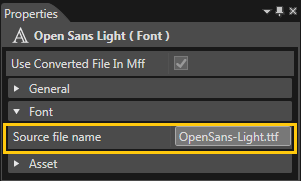
When a font is imported, 2 new properties will be set:

<div class="contents" id="bkmrk-font-engine%3A-specifi"><div class="contents"><div class="textblock">- Font engine: specifies the font engine that this font is compatible with (Freetype, BitmapFont or Other)
- Source file names: specifies the name of the file which was imported - helps the user identify a font
<div drawio-diagram="2972"><img src="https://doc316en.candera.eu/uploads/images/drawio/2023-03/drawing-7-1677741392.png" alt=""/></div>

<dl class="see"><dt>**See also:**</dt><dd>- <span style="color: rgb(230, 126, 35);">[Import Fonts](https://doc316en.candera.eu/link/1101#bkmrk-image%2C-font%2C-shader%2C-1)</span> in SceneComposer User Manual

</dd></dl>---

</div></div></div>#### SCHost Build Info

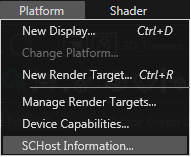
In order to help the user identify which font engine is active in SceneComposer, a new Platform menu entry was added: "SCHost info". It displays the configuration that was used to build SCHost, including the font engine.

<div class="contents" id="bkmrk-see-also%3A-schost-bui"><div class="contents"><div class="textblock"><div drawio-diagram="2973"><img src="https://doc316en.candera.eu/uploads/images/drawio/2023-03/drawing-7-1677741422.png" alt=""/></div>

<dl class="see"><dt>**See also:**</dt><dd>- <span style="color: rgb(230, 126, 35);">[SCHost Build Info](https://doc316en.candera.eu/link/34#bkmrk-page-title)</span> in SceneComposer User Manual

</dd></dl>---

</div></div></div>#### Clone Item Multiple Times

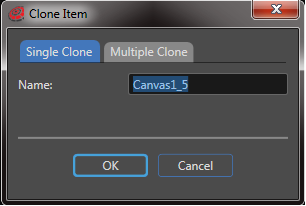
Now it is possible to specify the number of clones to be generated, simultaneously, for an item. If this number is greater than 1, the name will be read-only and generated automatically (Mantis 4091).

<div class="contents" id="bkmrk-see-also%3A-copy%2C-clon"><div class="textblock"><div drawio-diagram="2974"><img src="https://doc316en.candera.eu/uploads/images/drawio/2023-03/drawing-7-1677741453.png" alt=""/></div>

<dl class="see"><dt>**See also:**</dt><dd>- <span style="color: rgb(230, 126, 35);">[Copy, Clone, Rename and Delete Items](https://doc316en.candera.eu/link/46#bkmrk-copy%2C-clone%2C-rename-)</span> in SceneComposer User Manual

</dd></dl>---

</div></div>

# Platform-dependent Photoshop Exports

#### Platform-dependent Photoshop Exports

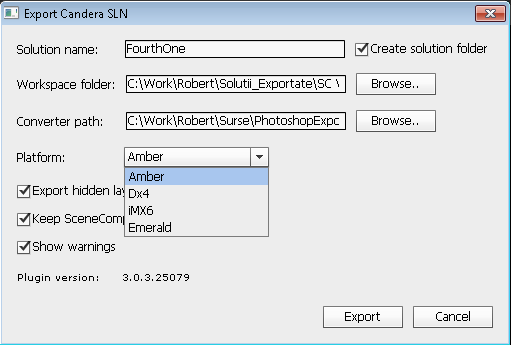
As Dx4 does not have a BitmapBrushColorBlend effect, it was necessary to force BitmapBrushBlend effects to be created instead of the other ones. Therefore a new option was introduced in the Photoshop export dialog: Platform. The user can select the platform to which to export.

<div class="contents" id="bkmrk-"><div class="textblock"><div drawio-diagram="2975"><img src="https://doc316en.candera.eu/uploads/images/drawio/2023-03/drawing-7-1677741508.png" alt=""/></div>

</div></div>---