# SceneComposer V3.0.2

# Restructuring Sources

There were 2 major changes in source code organization:

<div class="contents" id="bkmrk-decoupling%3A-schost-p"><div class="contents"><div class="textblock">- Decoupling: SCHost projects which produce the SCHost.lib were decoupled from cgi\_studio\_scenecomposer to a separate repository. Also, some projects were renamed: CommonLib -&gt; Common, SCHostLib -&gt; SCHostApp, SCImporterLib -&gt; MffWriter. The new repository is called cgi\_studio\_schost and can be configured and build separately to obtain the SCHost.lib required by custom environments that create SCHost.dll files.

- 2D/3D separation: SCHost can be compiled/built now with only CANDERA\_2D\_ENABLED or CANDERA\_3D\_ENABLED, as required by the selected platform.

---

</div></div></div>

# SceneComposer Usability Improvements

#### Clear Mode Palette

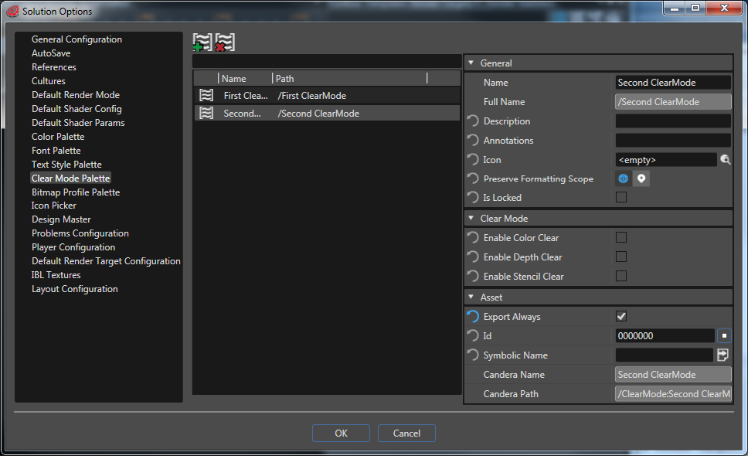
A ClearMode Palette View was added in Solution Options. By using it ("File" &gt; "Solution Options"), it is possible to create different clear mode items which can be saved and later reused.

<div class="contents" id="bkmrk-see-also%3A-clear-mode"><div class="contents"><div class="textblock"><div drawio-diagram="2977"><img src="https://doc316en.candera.eu/uploads/images/drawio/2023-03/drawing-7-1677743928.png" alt=""/></div>

<dl class="see"><dt>**See also:**</dt><dd>- <span style="color: rgb(230, 126, 35);">[Clear Mode](https://doc316en.candera.eu/link/55#bkmrk-page-title)</span> in SceneComposer User Manual

</dd></dl>---

</div></div></div>#### Delete Items

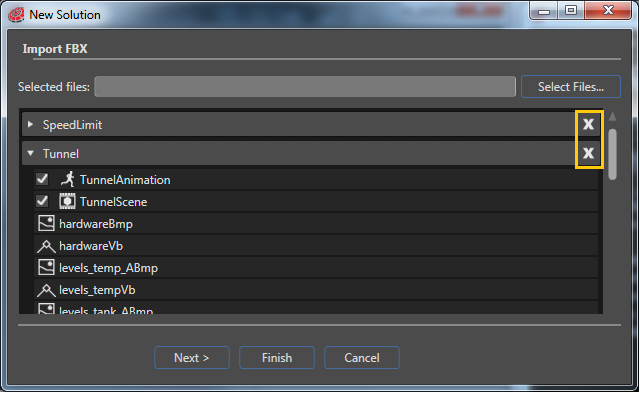
In the ImportView of the "New Solution Wizard", it is now possible to delete selected items before they are imported.

<div class="contents" id="bkmrk-see-also%3A-new-soluti"><div class="contents"><div class="textblock"><div drawio-diagram="2978"><img src="https://doc316en.candera.eu/uploads/images/drawio/2023-03/drawing-7-1677743956.png" alt=""/></div>

<dl class="see"><dt>**See also:**</dt><dd>- <span style="color: rgb(230, 126, 35);">[New Solution Wizard](https://doc316en.candera.eu/link/39#bkmrk-page-title)</span> in SceneComposer User Manual

</dd></dl>---

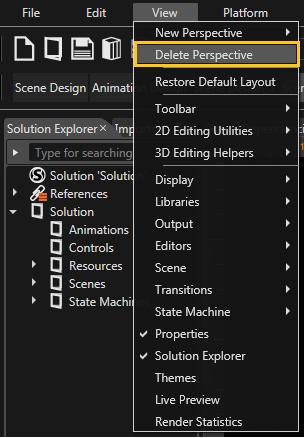
</div></div></div>#### Delete Perspective

The option "Delete Current Perspective" inside "View-&gt;New Perspective" is available (at the same level with "New Perspective").

<div class="contents" id="bkmrk-see-also%3A-perspectiv"><div class="contents"><div class="textblock"><div drawio-diagram="2979"><img src="https://doc316en.candera.eu/uploads/images/drawio/2023-03/drawing-7-1677743986.png" alt=""/></div>

<dl class="see"><dt>**See also:**</dt><dd>- <span style="color: rgb(230, 126, 35);">[Perspective Support](https://doc316en.candera.eu/link/9#bkmrk-perspective-support)</span> in SceneComposer User Manual

</dd></dl>---

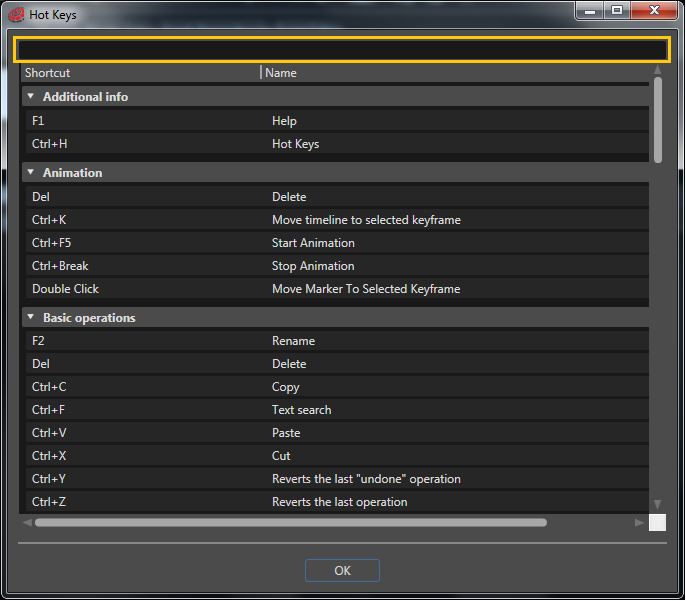
</div></div></div>#### Search Option for Hot-Keys Panel

Due to the huge number of available hot-keys (shortcuts), it could be difficult to find a specific hot-key. In order to solve this issue, a search option was made available in the upper side of the Hot Key panel ("Help" &gt; "Hot Keys").

<div class="contents" id="bkmrk-see-also%3A-shortcut-c"><div class="contents"><div class="textblock"><div drawio-diagram="2980"><img src="https://doc316en.candera.eu/uploads/images/drawio/2023-03/drawing-7-1677744016.png" alt=""/></div>

<dl class="see"><dt>**See also:**</dt><dd>- <span style="color: rgb(230, 126, 35);">[Shortcut Customization](https://doc316en.candera.eu/link/96#bkmrk-page-title)</span> in SceneComposer User Manual

</dd></dl>---

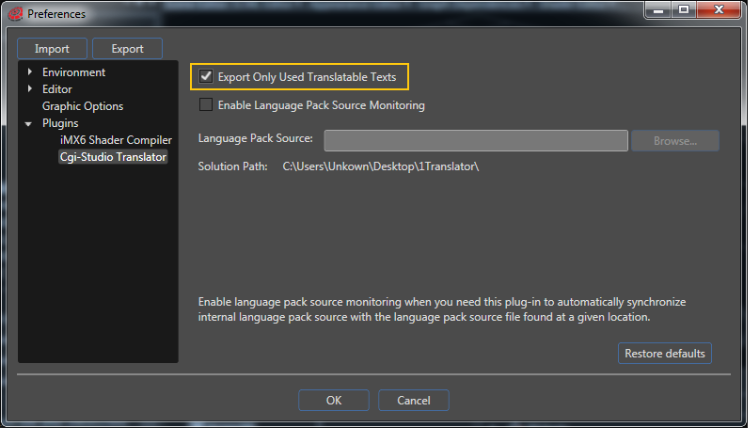
</div></div></div>#### Export Only Used Translatable Texts

In the previous versions of SC, the unreferenced text ids were not exported into the asset. To allow the export of all the text ids even if they are not used, a special option was added. Entitled "Export Only Used Translatable Texts" this option is available as a check box in the "File" &gt; "Preferences" &gt; "Plugins" &gt; "Cgi-Studio Translator" panel.

<div class="contents" id="bkmrk-"><div class="contents"><div class="textblock"><div drawio-diagram="2981"><img src="https://doc316en.candera.eu/uploads/images/drawio/2023-03/drawing-7-1677744043.png" alt=""/></div>

</div></div></div>If the option is used there will be exported just the referenced text ids. If the option is left as default, all the text ids will be exported into the asset.

<p class="callout info">The plugin does not work in order to receive the notifications if the "Enable Plugin Notification" is not used when the asset is generated.</p>

<div class="contents" id="bkmrk--0"><div class="contents"><div class="textblock">---

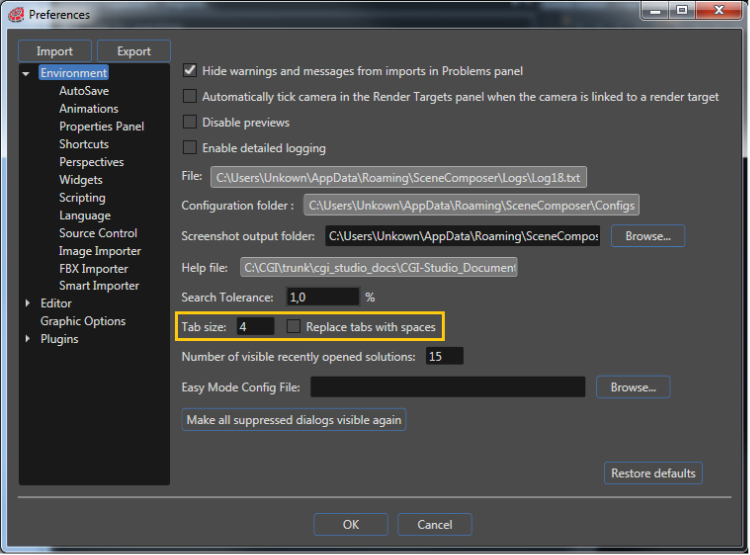
</div></div></div>#### Tab Size Configuration

Tab size configuration was added for the Shader Editor panel ("View" &gt; "Editors" &gt; "Shader Editor"). The user can change the tab size and decide if tabs should be changed to spaces from "File" &gt; "Preferences" &gt; "Environment". (Mantis issue 3724)

<div class="contents" id="bkmrk-see-also%3A-tab-option"><div class="contents"><div class="textblock"><div drawio-diagram="2982"><img src="https://doc316en.candera.eu/uploads/images/drawio/2023-03/drawing-7-1677744079.png" alt=""/></div>

<dl class="see"><dt>**See also:**</dt><dd>- <span style="color: rgb(230, 126, 35);">[Tab Options](https://doc316en.candera.eu/link/92#bkmrk-tab-options)</span> in SceneComposer User Manual

</dd></dl>---

</div></div></div>#### FTC Command Wildcard Support

If there are many files (i.e. images) which must be imported, an improvement - wildcard support - can help us to import them simultaneously. For instance, if in a folder we have many graphic files named "img1.png", "img2.png", "img3.png" ..., and if it is necessary to import all of them we can do this by specifying through the wildcard (\*) that we need to import simultaneously the files which respect the rule "img\*.png".

To use the FTCCmd extension for wildcard image import with option to set bitmap attributes, following option is available:

```
FTCCmd ... /BitmapProfile <bitmap_profile_full_name>
```

<div class="contents" id="bkmrk-see-also%3A-ftccmd-ope"><div class="contents"><div class="textblock"><div class="fragment">  
</div><dl class="see"><dt>**See also:**</dt><dd>- <span style="color: rgb(230, 126, 35);">[FTCCmd Operation Mode Import](https://doc316en.candera.eu/link/178#bkmrk-ftccmd-operation-mod-0)</span> in SceneComposer User Manual

</dd></dl>---

</div></div></div>#### Composites with Widgets

Created composites will include widgets with the observation that the widgets will be included only if are binded to a node from the created composite.

<div class="contents" id="bkmrk--1"><div class="contents"><div class="textblock">---

</div></div></div>#### Minor Improvements

<div class="contents" id="bkmrk-check%2Funcheck-licens"><div class="textblock">- **Check/Uncheck Licenses.** The possibility to check/uncheck all licences was added.

- **Buttons Highlighted.** The "New Solution Dialog" wizard and the "Change Platform" wizard have a button highlighted in order to suggest the action performed by pressing the Enter key.

- **New Tooltip.** The tooltip for the "Revert" button in SCML Editor was modified to "Discard changes".

- **Time Displayed.** Now, the "Output" panel also displays the time of any given message.

- **Screen Space Management.** In order to improve the screen space, the "Close" button ("X") has become visible only for the selected panels.

- **Zoom Buttons.** The zoom buttons in "Animation Curve Editor" were replaced for better visibility.

- **New Options in Scene Editor.** The possibility to Delete, Copy and Paste was added in Scene Editor through context menu commands and keyboard.

- **Reorganizing Multiple Selected Elements.** When reorganizing multiple selected elements, the focus will be kept on all elements that were multi-selected.

- **New Shortcuts.** New key shortcuts were added for the tree panels. CTRL + A selects all the visible elements and SHIFT + Home / End selects all the elements which are in visible level from the selected item to the beginning / end.

- **Just One Animation.** The same animated property isn't allowed to be added for the same object in an animation more than one time, on the same channel (Mantis 3722).

- **New Commands Added.** Export All and Clear commands are available in the context menu in CanderaLoggingView (Mantis 4593).

- **Activate Animation.** Double click on an AnimationNode from an AnimationGroup will activate the corresponding animation (Mantis 5049).

- **Rearrange the Perspectives.** The user has the possibility to rearrange the perspectives through drag and drop.

- **Text Search in Shader Editor.** A new option was added in the Text Search panel, for search only in the ShaderEditor (Mantis 4637).

- **Launcher Improvements.** SCLauncher horizontal scroll bar is now hidden. Vertical scrollbar is always visible and active. All checked requirements are now shown and the text has been reformatted (Mantis 2820).
</div></div>---