# Vertex Geometry Builder

#### <a class="anchor" id="bkmrk--153"></a>Description

The [Candera::VertexGeometryBuilder](http://dev.doc.cgistudio.atcgistudio.at/APILINK/class_candera_1_1_vertex_geometry_builder.html "The VertexGeometryBuilder helps effectively build VertexGeometry objects.") class helps effectively build [Candera::VertexGeometry](http://dev.doc.cgistudio.atcgistudio.at/APILINK/class_candera_1_1_vertex_geometry.html "The VertexGeometry holds all vertex data of a mesh. VertexGeometry may be used also for multiple Vert...") objects.

<div class="contents" id="bkmrk-vertexgeometrybuilde"></div>#### **Procedural Geometry** 

##### <a class="anchor" id="bkmrk--156"></a>Example: Wireframe Cube with LineList

First example shows how to generate a wireframe cube using a [Candera::LineList](http://dev.doc.cgistudio.atcgistudio.at/APILINK/class_candera_1_1_line_list.html "The LineList represents a list of lines (segments). It can be used to store a wireframe, a list of connected vertices, or just a list of isolated segments. A generic LineList instance can be created by the static method LineList::Create. A wireframe LineList can be created out of a Mesh by the static helper function Math3D::CreateLineListFromMesh.") object.

The vertex geometry will be generated procedurally using a [Candera::VertexGeometryBuilder](http://dev.doc.cgistudio.atcgistudio.at/APILINK/class_candera_1_1_vertex_geometry_builder.html "The VertexGeometryBuilder helps effectively build VertexGeometry objects.") object (e.g. *m\_builder*).

##### <a class="anchor" id="bkmrk--157"></a>Vertex Element Format: Position and Color

At the beginning we have to specify what kind of information will be set in the vertices. Of course we need information about the position and, optionally, for an improved visual effect, we could also add color information.

```
    // Set the data type to be used: position & color
    m_builder.SetVertexElementFormat(VertexGeometry::Position, 0, VertexGeometry::Float32_3);
    m_builder.SetVertexElementFormat(<a class="code" href="http://dev.doc.cgistudio.atcgistudio.at/APILINK/group___behaviors_control.html#ggae7abc816df647d0ecbc280480fefb788a6d1d4da086e381cb2c5a5ce6a2513ebd">VertexGeometry::Color</a>, 0, VertexGeometry::Float32_4);
```

##### <a class="anchor" id="bkmrk--158"></a>Vertex Data: Position

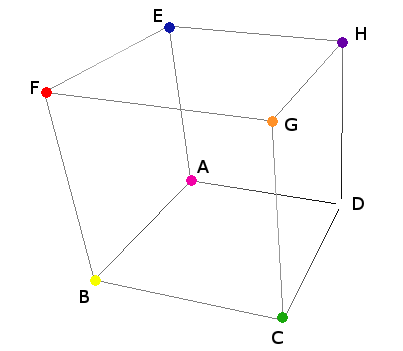
The position information for the vertices is obtained from the array *c\_cubeData* which, in fact, stores the coordinates of the points A and G. The coordinates for the rest of the vertices are obtained relatively to this points (e.g. F(X<sub>A</sub>, Y<sub>G</sub>, Z<sub>G</sub>) or D(X<sub>G</sub>, Y<sub>A</sub>, Z<sub>A</sub>)

<div drawio-diagram="1968"><img src="https://doc316en.candera.eu/uploads/images/drawio/2023-02/drawing-4-1676882299.png" alt=""/></div>

```
// Coordinates for the points A & G
static const Float c_cubeData[2][3] = {
    {-1.0F, -1.0F, -1.0F },
    {1.0F, 1.0F, 1.0F }
};
```

##### <a class="anchor" id="bkmrk--160"></a>VertexGeometryBuilder: Set Vertex Elements

Because the LineType property of the LineList object will be set to LineType::Lines, the vertex buffer will have to contain a pair of vertices for each line of the cube: 2 vertices/line \* 12 lines = 24 vertices.

```
    // Set the position & color information for each vertex
    // Line segment AD
    m_builder.SetVertexElement(VertexGeometry::Position, 0, c_cubeData[0][0], c_cubeData[0][1], c_cubeData[0][2]); // A
    m_builder.SetVertexElement(<a class="code" href="http://dev.doc.cgistudio.atcgistudio.at/APILINK/group___behaviors_control.html#ggae7abc816df647d0ecbc280480fefb788a6d1d4da086e381cb2c5a5ce6a2513ebd">VertexGeometry::Color</a>, 0, 1.F, 0.F, 1.F, 1.F); // magenta
    // Increment the vertex cursor
    m_builder.IncrementVertexCursor();
    m_builder.SetVertexElement(VertexGeometry::Position, 0, c_cubeData[1][0], c_cubeData[0][1], c_cubeData[0][2]); // D
    m_builder.SetVertexElement(<a class="code" href="http://dev.doc.cgistudio.atcgistudio.at/APILINK/group___behaviors_control.html#ggae7abc816df647d0ecbc280480fefb788a6d1d4da086e381cb2c5a5ce6a2513ebd">VertexGeometry::Color</a>, 0, 1.F, 1.F, 1.F, 1.F); // white
    m_builder.IncrementVertexCursor();
    // Line segment AB
    m_builder.SetVertexElement(VertexGeometry::Position, 0, c_cubeData[0][0], c_cubeData[0][1], c_cubeData[0][2]); // A
    m_builder.SetVertexElement(<a class="code" href="http://dev.doc.cgistudio.atcgistudio.at/APILINK/group___behaviors_control.html#ggae7abc816df647d0ecbc280480fefb788a6d1d4da086e381cb2c5a5ce6a2513ebd">VertexGeometry::Color</a>, 0, 1.F, 0.F, 1.F, 1.F); // magenta
    m_builder.IncrementVertexCursor();
    m_builder.SetVertexElement(VertexGeometry::Position, 0, c_cubeData[0][0], c_cubeData[0][1], c_cubeData[1][2]); // B
    m_builder.SetVertexElement(<a class="code" href="http://dev.doc.cgistudio.atcgistudio.at/APILINK/group___behaviors_control.html#ggae7abc816df647d0ecbc280480fefb788a6d1d4da086e381cb2c5a5ce6a2513ebd">VertexGeometry::Color</a>, 0, 1.F, 1.F, 0.F, 1.F); // yellow
    // ...
```

##### <a class="anchor" id="bkmrk--161"></a>Create Vertex Buffer

Create a [Candera::VertexBuffer](http://dev.doc.cgistudio.atcgistudio.at/APILINK/class_candera_1_1_vertex_buffer.html "The VertexBuffer encapsulates the attributes of an uploaded VertexGeometry. It holds the actual handl...") object and attach to it the vertex geometry obtained from the [Candera::VertexGeometryBuilder](http://dev.doc.cgistudio.atcgistudio.at/APILINK/class_candera_1_1_vertex_geometry_builder.html "The VertexGeometryBuilder helps effectively build VertexGeometry objects."):

```
    VertexGeometry* vertexGeom = m_builder.GetVertexGeometry();
    SharedPointer<VertexBuffer> vertexBuffer = <a class="code" href="http://dev.doc.cgistudio.atcgistudio.at/APILINK/group___c_o_u_r_i_e_r___v_i_s_u_a_l_i_z_a_t_i_o_n.html#ggaf0e93dc4242f607c3c8d13dafd036af9aaabfa5309af24986d3111a092449f857">VertexBuffer::Create</a>();
    static_cast<void>(vertexBuffer->SetVertexGeometry(vertexGeom, VertexBuffer::VertexGeometryDisposer::Dispose));
    vertexBuffer->SetPrimitiveType(VertexBuffer::Lines);
```

##### <a class="anchor" id="bkmrk--162"></a>Create LineList using the Vertex Buffer

Attach the vertex buffer to LineList object:

```
    // Create and configure the line list object
    m_lineList = <a class="code" href="http://dev.doc.cgistudio.atcgistudio.at/APILINK/group___c_o_u_r_i_e_r___v_i_s_u_a_l_i_z_a_t_i_o_n.html#ggaf0e93dc4242f607c3c8d13dafd036af9aaabfa5309af24986d3111a092449f857">LineList::Create</a>();
    m_lineList->SetAppearance(<a class="code" href="http://dev.doc.cgistudio.atcgistudio.at/APILINK/group___c_o_u_r_i_e_r___v_i_s_u_a_l_i_z_a_t_i_o_n.html#ggaf0e93dc4242f607c3c8d13dafd036af9aaabfa5309af24986d3111a092449f857">Appearance::Create</a>());
    m_lineList->GetAppearance()->SetMaterial(<a class="code" href="http://dev.doc.cgistudio.atcgistudio.at/APILINK/group___c_o_u_r_i_e_r___v_i_s_u_a_l_i_z_a_t_i_o_n.html#ggaf0e93dc4242f607c3c8d13dafd036af9aaabfa5309af24986d3111a092449f857">Material::Create</a>());
    m_lineList->GetAppearance()->GetMaterial()->SetEmissive(<a class="code" href="http://dev.doc.cgistudio.atcgistudio.at/APILINK/group___behaviors_control.html#ggae7abc816df647d0ecbc280480fefb788a6d1d4da086e381cb2c5a5ce6a2513ebd">Color</a>(1.0F, 1.0F, 0.0F));
    m_lineList->GetAppearance()->SetShader(m_shaderLightMaterial);
    m_lineList->SetLineType(LineList::Lines);
    m_lineList->SetWidth(1.0);
    m_lineList->SetIntersectionTestEnabled(false);
    m_lineList->SetVertexBuffer(vertexBuffer);
    m_lineList->SetScopeMask(ScopeMask(false));
    static_cast<void>(m_lineList->SetScopeEnabled(1, true));
    m_lineList->SetRenderingEnabled(true);
    m_lineList->SetName("Wireframe");
    static_cast<void>(m_lineList->Upload());
```

##### <a class="anchor" id="bkmrk--163"></a>Wireframe Cube Result

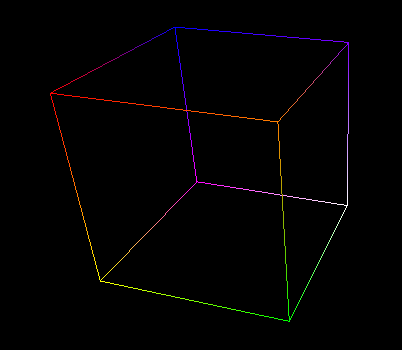
The image below shows the resulting wireframe cube:

<div drawio-diagram="1970"><img src="https://doc316en.candera.eu/uploads/images/drawio/2023-02/drawing-4-1676882342.png" alt=""/></div>

<div class="contents" id="bkmrk--22"><div class="contents"><div class="textblock">  
</div></div></div><div class="contents" id="bkmrk-for-an-easier-manipu"><div class="textblock"><dl class="note"><dd><p class="callout info">For an easier manipulation of the widget in SceneComposer all the shaders are hardcoded in the source file and then created by the widget at the initialization time.</p>

<p class="callout info">Alternatively obtain shaders from [Candera::AssetProvider](http://dev.doc.cgistudio.atcgistudio.at/APILINK/class_candera_1_1_asset_provider.html "Abstract class providing methods for retrieving objects.") (e.g. GetAssetProvider()-&gt;GetShader("...")) in case the application uses an asset library.</p>

</dd></dl></div></div>####   
**Indexed Geometry**   


##### <a class="anchor" id="bkmrk--165"></a>Example: Solid Cube from one Triangle Strip

The next example will show how to create a solid cube from one triangle strip using a [Candera::Mesh](http://dev.doc.cgistudio.atcgistudio.at/APILINK/class_candera_1_1_mesh.html "The class Mesh represents a three-dimensional rigid body object defined by polygons. The Mesh's polygonal surface is defined by its VertexBuffer. Each Mesh must have exactly one Appearance set, in order to specify how the Mesh geometry is rendered.") object. In this case the cube is determined by only 14 vertices which have to be ordered in a special way.

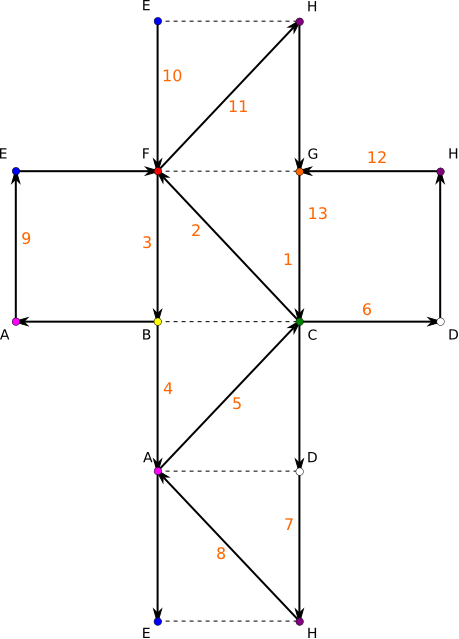
The figure below presents a cube unfolded and a possible solution of ordering the vertices:

<div drawio-diagram="1971"><img src="https://doc316en.candera.eu/uploads/images/drawio/2023-02/drawing-4-1676882414.png" alt=""/></div>

<div class="contents" id="bkmrk--24"><div class="contents"><div class="textblock">  
</div></div></div>##### <a class="anchor" id="bkmrk--167"></a>Indexed Vertex Sequence

The vertex sequence is stored in the *c\_index\_order* array, encoding the order:

<div class="contents" id="bkmrk-g-%3Ec-%3Ef-%3Eb-%3Ea-%3Ec-%3Ed-"><div class="contents"><div class="textblock">- **G-&gt;C-&gt;F-&gt;B-&gt;A-&gt;C-&gt;D-&gt;H-&gt;A-&gt;E-&gt;F-&gt;H-&gt;G-&gt;C**.

</div></div></div>Each array element represents an offset it the vertex buffer.

```
// The vertex sequence - triangle strip
static const UInt16 c_index_order[] = { 12, 11, 7, 3, 0, 11, 1, 17, 0, 5, 7, 17, 12, 11 };
```

The vertex geometry builder object used in the previous example has already 24 vertices set with position and color information. Because only 14 vertices out of 24 are needed in this case and, also, because their sequence has to be different, an index buffer is added:

```
    // Change the order of the vertices using indexes
    for (Int index = 0; index < 14; index++) {
        // Define the value of the index
        m_builder.SetIndexElement(c_index_order[index]);
        // Increment the index cursor
        m_builder.IncrementIndexCursor();
    }
```

##### <a class="anchor" id="bkmrk--168"></a>Create TriangleStrip Vertex Buffer

<a class="anchor" id="bkmrk--169"></a>Create the vertex buffer using the geometry from the builder:

```
    VertexGeometry* vertexGeom = m_builder.GetVertexGeometry();
    SharedPointer<VertexBuffer> vertexBuffer = <a class="code" href="http://dev.doc.cgistudio.atcgistudio.at/APILINK/group___c_o_u_r_i_e_r___v_i_s_u_a_l_i_z_a_t_i_o_n.html#ggaf0e93dc4242f607c3c8d13dafd036af9aaabfa5309af24986d3111a092449f857">VertexBuffer::Create</a>();
    static_cast<void>(vertexBuffer->SetVertexGeometry(vertexGeom, VertexBuffer::VertexGeometryDisposer::Dispose));
    vertexBuffer->SetPrimitiveType(VertexBuffer::TriangleStrip);
```

##### <a class="anchor" id="bkmrk--170"></a>Create Mesh using the Vertex Buffer

<a class="anchor" id="bkmrk--171"></a>Configure mesh and attach the vertex buffer:

```
    m_mesh = <a class="code" href="http://dev.doc.cgistudio.atcgistudio.at/APILINK/group___c_o_u_r_i_e_r___v_i_s_u_a_l_i_z_a_t_i_o_n.html#ggaf0e93dc4242f607c3c8d13dafd036af9aaabfa5309af24986d3111a092449f857">Mesh::Create</a>();
    m_mesh->SetVertexBuffer(vertexBuffer);
    m_mesh->SetAppearance(appearance);
    m_mesh->SetRenderingEnabled(false);
    m_mesh->SetName("SolidNonTextured");
    static_cast<void>(m_mesh->Upload());
```

##### <a class="anchor" id="bkmrk--172"></a>Solid Cube Result

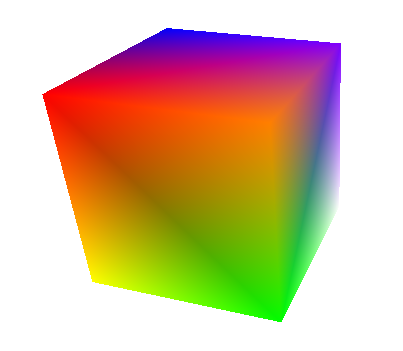
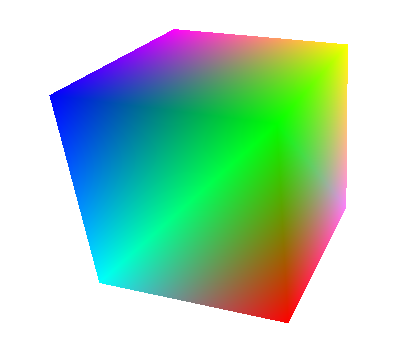
The image below shows the resulting solid cube:

<div drawio-diagram="1972"><img src="https://doc316en.candera.eu/uploads/images/drawio/2023-02/drawing-4-1676882451.png" alt=""/></div>

<div class="contents" id="bkmrk--26"></div>#### **Remove &amp; Add Vertex Elements**   


##### <a class="anchor" id="bkmrk--174"></a>Example: Textured Cube

In this example the vertex geometry builder object will be used to generate the vertex geometry for a textured cube.

Adding texture to a mesh requires that its vertices should contain specific information like *normal* and *texture coordinate*. Also, the *color* information is no longer needed so it can be removed:

```
    // Vertex Elements Manipulation
    // Remove color data associated to the vertices
    m_builder.RemoveVertexElement(<a class="code" href="http://dev.doc.cgistudio.atcgistudio.at/APILINK/group___behaviors_control.html#ggae7abc816df647d0ecbc280480fefb788a6d1d4da086e381cb2c5a5ce6a2513ebd">VertexGeometry::Color</a>,0);
    // Add data type to be used: texture coordinate & normal
    m_builder.SetVertexElementFormat(VertexGeometry::TextureCoordinate, 0, VertexGeometry::Float32_2);
    m_builder.SetVertexElementFormat(<a class="code" href="http://dev.doc.cgistudio.atcgistudio.at/APILINK/group___c_o_u_r_i_e_r___m_e_s_s_a_g_i_n_g.html#gga12eb807cc34f92845cb1483cd7e7fb07a35ab3707105aae81f65484ffd603264b">VertexGeometry::Normal</a>, 0, VertexGeometry::Float32_3);
```

##### <a class="anchor" id="bkmrk--175"></a>Vertex Data: Normals and Texture Coordinates

After adding the new data types for the vertices it is time to add the corresponding information. First, add normals for vertices:

```
    // Move the cursor to the first vertex
    m_builder.SetVertexCursor();
    for (UInt32 i = 0; i < m_builder.GetVertexCount(); i++ )
    {
        m_builder.SetVertexElement(<a class="code" href="http://dev.doc.cgistudio.atcgistudio.at/APILINK/group___c_o_u_r_i_e_r___m_e_s_s_a_g_i_n_g.html#gga12eb807cc34f92845cb1483cd7e7fb07a35ab3707105aae81f65484ffd603264b">VertexGeometry::Normal</a>, 0, 0.0F, 0.0F, 1.0F);
        m_builder.IncrementVertexCursor();
    }
```

In order to map the UV texture coordinate values correctly, the cube faces should be drawn using 4 vertices per face, so, in this case, all 24 vertices will be used. Of course, the vertex order has to be adjusted.

The new vertex order is stored in the *c\_indexDataTexturedCube* array.

```
// Vertex order - textured cube
static const UInt16 c_indexDataTexturedCube[24] = {
    1,17,0,5,
    2,6,3,7,
    9,8,11,12,
    13,14,19,21,
    15,23,16,22,
    4,10,20,18
};
```

Now, reorder the vertices:

```
    // Overwrite the index buffer
    // Move the cursor to the first index
    m_builder.SetIndexCursor();
    for (UInt32 i = 0; i < m_builder.GetVertexCount(); i++ )
    {
        // Define the value of the index
        m_builder.SetIndexElement(c_indexDataTexturedCube[i]);
        m_builder.IncrementIndexCursor();
    }
```

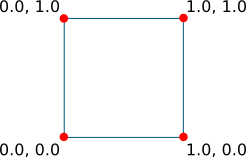
The vertices of each face of the cube should be set with texture coordinate information as shown below:

<div drawio-diagram="1973"><img src="https://doc316en.candera.eu/uploads/images/drawio/2023-02/drawing-4-1676882513.png" alt=""/></div>

<div class="contents" id="bkmrk--28"><div class="contents"><div class="textblock">  
</div></div></div>Set the texture coordinates for vertices:

```
    Int idx = 0;
    for (Int nb_of_faces = 0; nb_of_faces<6; nb_of_faces++) {
        for (Int u=0; u<=1; u++) {
            for (Int v=0; v<=1; v++) {
                //Set the position of the vertex cursor
                m_builder.SetVertexCursor(c_indexDataTexturedCube[idx]);
                m_builder.SetVertexElement(VertexGeometry::TextureCoordinate, 0, static_cast<Float>(u), static_cast<Float>(v));
                idx++;
            }
        }
    }
```

The vertex buffer is created and configured in the same way as in the <span style="color: rgb(230, 126, 35);">[previous example](#bkmrk-indexed-geometry%C2%A0)</span>.

The mesh setup is also similar but, unlike the <span style="color: rgb(230, 126, 35);">[solid cube](#bkmrk-solid-cube-result)</span>, the textured cube appearance has to be set with a texture and a texture shader.

##### <a class="anchor" id="bkmrk--177"></a>Textured Cube Result

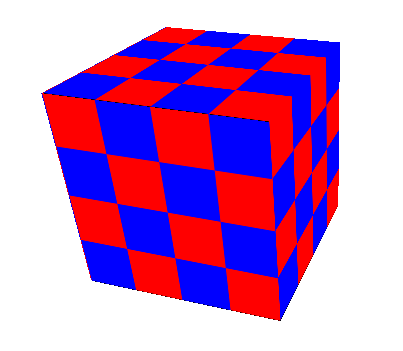
Here is the final result:

<div drawio-diagram="1974"><img src="https://doc316en.candera.eu/uploads/images/drawio/2023-02/drawing-4-1676882532.png" alt=""/></div>

#### **Range Data Usage**   


##### <a class="anchor" id="bkmrk--179"></a>Example: Solid Cube using Range Data

This example will show how to create a solid cube as in the <span style="color: rgb(230, 126, 35);">[second example](#bkmrk-indexed-geometry%C2%A0)</span> but using range data.

First, all existing data from the vertex geometry builder is removed.

```
    // Clear all data stored by the builder
    m_builder.Clear();
```

The vertex data is taken from the two buffers *c\_positionData* and *c\_colorData*.

```
static const Float c_positionData[8][3] = {
    { -1.0F, 1.0F, 1.0F},
    { 1.0F, 1.0F, 1.0F},
    { -1.0F, -1.0F, 1.0F},
    { 1.0F, -1.0F, 1.0F},
    { -1.0F, 1.0F, -1.0F},
    { 1.0F, 1.0F, -1.0F},
    { -1.0F, -1.0F, -1.0F},
    { 1.0F, -1.0F, -1.0F}
};

static const Float c_colorData[8][4] = {
    { 0.0F, 0.0F, 1.0F, 1.0F},
    { 0.0F, 1.0F, 0.0F, 1.0F},
    { 0.0F, 1.0F, 1.0F, 1.0F},
    { 1.0F, 0.0F, 0.0F, 1.0F},
    { 1.0F, 0.0F, 1.0F, 1.0F},
    { 1.0F, 1.0F, 0.0F, 1.0F},
    { 1.0F, 1.0F, 1.0F, 1.0F},
    { 1.0F, 0.5F, 1.0F, 1.0F}
};
```

The vertex sequence is taken from the array *c\_indexData*.

```
// Range data index
static const UInt16 c_indexData[] = {3, 2, 1, 0, 4, 2, 6, 3, 7, 1, 5, 4, 7, 6 };
```

Use the methods [Candera::VertexGeometryBuilder::SetVertexElementRange](http://dev.doc.cgistudio.atcgistudio.at/APILINK/class_candera_1_1_vertex_geometry_builder.html#a262ac223bfe93c8e42571f0771cfd3fb) and [Candera::VertexGeometryBuilder::SetIndexElementRange](http://dev.doc.cgistudio.atcgistudio.at/APILINK/class_candera_1_1_vertex_geometry_builder.html#a37e18ba1d6f49c484d4dc172e123b136) to add the required information.

```
    // Add position, color and an index from range data
    // Splice values to the position buffer starting with the first vertex
    static_cast<void>(m_builder.SetVertexElementRange(VertexGeometry::Position, 0, 0, VertexGeometry::Float32_3,
        8, 3*sizeof(Float), c_positionData ));
    // Splice values to the color buffer starting with the first vertex
    static_cast<void>(m_builder.SetVertexElementRange(<a class="code" href="http://dev.doc.cgistudio.atcgistudio.at/APILINK/group___behaviors_control.html#ggae7abc816df647d0ecbc280480fefb788a6d1d4da086e381cb2c5a5ce6a2513ebd">VertexGeometry::Color</a>, 0, 0, VertexGeometry::Float32_4,
        8, 4*sizeof(Float), c_colorData ));

    // Splice values to the index buffer starting with the first index
    static_cast<void>(m_builder.SetIndexElementRange(0, sizeof(c_indexData)/sizeof(UInt16),c_indexData));
```

<span style="color: rgb(0, 0, 0);">The vertex buffer configuration and the mesh setup</span> are identical with the ones from the [second example](#bkmrk-create-mesh-using-th).

Here is the final result:

<div drawio-diagram="1975"><img src="https://doc316en.candera.eu/uploads/images/drawio/2023-02/drawing-4-1676882596.png" alt=""/></div>

<div class="contents" id="bkmrk--32"><div class="textblock">  
</div></div>#### **Concatenate Geometries**   


##### <a class="anchor" id="bkmrk--181"></a>VertexGeometryBuilder::SpliceGeometry

In some cases it might be useful to concatenate two vertex geometries. This can be done by using the [Candera::VertexGeometryBuilder::SpliceGeometry](http://dev.doc.cgistudio.atcgistudio.at/APILINK/class_candera_1_1_vertex_geometry_builder.html#ad0ce8d747bc1d48d32622282ab0731c8) method as shown below:

```
    m_builder.SpliceGeometry(0, 0, vertexGeometry1);
    m_builder.SpliceGeometry(vertexGeometry1->GetVertexCount(), vertexGeometry1->GetIndexCount(), vertexGeometry2);
    vertexGeometry1cat2 = builder.GetGeometry();
```