# Using Candera TextEngine to draw Text

#### <a class="anchor" id="bkmrk--35"></a>Description

The simplest way to draw text with <span style="color: rgb(230, 126, 35);">[Candera](http://dev.doc.cgistudio.at/APILINK/namespace_candera.html "[DataBinding_RefTypeSample]")</span> is using a TextNode2D, a 3D text widget from CGI Studio Widget Library, or the 2D TextBrush effect. Refer to:

<div class="contents" id="bkmrk-candera%3A%3Atextnode2d-"><div class="contents"><div class="textblock">- <span style="color: rgb(230, 126, 35);">[Candera::TextNode2D](http://dev.doc.cgistudio.at/APILINK/class_candera_1_1_text_node2_d.html)</span>
- <span style="color: rgb(230, 126, 35);">[Candera::TextBrush](http://dev.doc.cgistudio.at/APILINK/class_candera_1_1_text_brush.html)</span>

</div></div></div>To learn about how to use <span style="color: rgb(230, 126, 35);">[Candera::TextNode2D](http://dev.doc.cgistudio.at/APILINK/class_candera_1_1_text_node2_d.html)</span>, please refer to the following section:

<div class="contents" id="bkmrk-using-candera%3A%3Atextn"><div class="contents"><div class="textblock">- <span style="color: rgb(230, 126, 35);">[Using Candera::TextNode2D](http://dev.doc.cgistudio.at/APILINK/_p_i_d__a_p_p_d_e_v_t_u_t_chapter_05_01_03_00.html)</span>

</div></div></div>To learn about details, how to use the <span style="color: rgb(230, 126, 35);">[<span style="vertical-align: inherit;"><span style="vertical-align: inherit;">Candera</span></span>](http://dev.doc.cgistudio.at/APILINK/namespace_candera.html "[DataBinding_RefTypeSample]")</span> TextEngine interface directly, refer to the following chapters.

#### Using **Candera::TextNode2D**   


##### <a class="anchor" id="bkmrk--38"></a>Overview

TextNode2D represents a RenderNode specialized for fast text rendering.

Text and style have to be provided. In addition, it requires a BitmapBrush effect for rendering and a <span style="color: rgb(230, 126, 35);">[Candera::TextNodeRenderer](http://dev.doc.cgistudio.at/APILINK/class_candera_1_1_text_node_renderer.html "Base class for text to Image2D generation strategies.")</span> object used for generating the images, which will be then rendered by the associated BitmapBrush effect.

There are four <span style="color: rgb(230, 126, 35);">[Candera::TextNodeRenderer](http://dev.doc.cgistudio.at/APILINK/class_candera_1_1_text_node_renderer.html "Base class for text to Image2D generation strategies.")</span> implementations available, each corresponding to one CacheType option from the existing <span style="color: rgb(230, 126, 35);">[Candera::TextBrush](http://dev.doc.cgistudio.at/APILINK/class_candera_1_1_text_brush.html "Output alpha only glyph data. A color may be specified, which is applied to the color channels...")</span> rendering concept (Bitmap, Surface, Glyph and Glyph Cache).

Text layouting is supported by attaching a <span style="color: rgb(230, 126, 35);">[Candera::TextNode2DLayouter](http://dev.doc.cgistudio.at/APILINK/class_candera_1_1_text_node2_d_layouter.html "Base Layouter for TextNode2D nodes.")</span> to the node. It is responsible for arranging and truncating the associated text of a <span style="color: rgb(230, 126, 35);">[Candera::TextNode2D](http://dev.doc.cgistudio.at/APILINK/class_candera_1_1_text_node2_d.html "TextNode2D is a RenderNode that renders text using the attached BitmapBrush effect.")</span>. The default layouter implements both horizontal and vertical truncation.

**<a class="anchor" id="bkmrk--39"></a>Renderer**

<span style="color: rgb(230, 126, 35);">[Candera::TextNodeRenderer](http://dev.doc.cgistudio.at/APILINK/class_candera_1_1_text_node_renderer.html "Base class for text to Image2D generation strategies.")</span> object is used for generating the correct images from provided text.

The level cache strategies which apply for a <span style="color: rgb(230, 126, 35);">[Candera::TextNode2D](http://dev.doc.cgistudio.at/APILINK/class_candera_1_1_text_node2_d.html "TextNode2D is a RenderNode that renders text using the attached BitmapBrush effect.")</span> are described below:

<div class="contents" id="bkmrk-bitmap%3A-very-large-m"><div class="contents"><div class="textblock">- Bitmap: very large memory footprint, very large update times, small render time
- Surface: large video memory footprint, large update times, small render time
- Glyph (former NoCache): small memory footprint, small update times, very large render time.
- GlyphCache: small memory footprint, small update times, medium render time
- GlyphAtlas: small (but global) video memory footprint, small update times, small render time.

</div></div></div><div class="contents" id="bkmrk-choose-the-appropria"><div class="contents"><div class="textblock"><dl class="note"><dd><p class="callout info">Choose the appropriate cache for a balance in performance. It is recommended to use either Bitmap or Surface rendering type when static texts are used, while for dynamic texts, GlyphCache is recommended.</p>

</dd></dl></div></div></div><a class="anchor" id="bkmrk--40"></a>**Associated Effect**

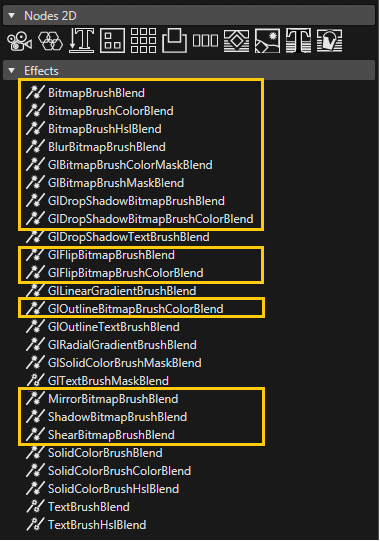
Please consider that only BitmapBrush type effects apply to a <span style="color: rgb(230, 126, 35);">[Candera::TextNode2D](http://dev.doc.cgistudio.at/APILINK/class_candera_1_1_text_node2_d.html "TextNode2D is a RenderNode that renders text using the attached BitmapBrush effect.")</span>. In case other effects are used nothing will be rendered. The text appearance can be altered by the type of effect chosen, either by modifying the in-place effects (color, mask, HSL transformations, etc.) or by changing blending effects.

List of BitmapBrush effects which can be used are described below:

<div class="contents" id="bkmrk-candera%3A%3Abitmapbrush"><div class="contents"><div class="textblock">- <span style="color: rgb(230, 126, 35);">[Candera::BitmapBrushBlend](http://dev.doc.cgistudio.at/APILINK/class_candera_1_1_bitmap_brush_blend.html "This effect outputs a bitmap image, and blend it with the store buffer. Same as chaining (BitmapBrush...")</span>: Outputs a bitmap image, and blend it with the store buffer.
- <span style="color: rgb(230, 126, 35);">[Candera::BitmapBrushColorBlend](http://dev.doc.cgistudio.at/APILINK/class_candera_1_1_bitmap_brush_color_blend.html "Output a bitmap image, modulate the color, and blend it with the store buffer. Same as chaining (Bitm...")</span>: Output a bitmap image, modulate the color, and blend it with the store buffer.
- <span style="color: rgb(230, 126, 35);">[Candera::BitmapBrushColorMaskBlend](http://dev.doc.cgistudio.at/APILINK/class_candera_1_1_bitmap_brush_color_mask_blend.html "Output a bitmap image, apply an alpha mask, and blend it with the store buffer. Same as chaining (Bit...")</span>: Output a bitmap image, modulate the color, apply an alpha mask, and blend it with the store buffer.
- <span style="color: rgb(230, 126, 35);">[Candera::BitmapBrushHslBlend](http://dev.doc.cgistudio.at/APILINK/class_candera_1_1_bitmap_brush_hsl_blend.html "Output a bitmap image, apply a HSL transformation, and blend it with the store buffer. Same as chaining (BitmapBrush + HslCorrectionEffect + BlendEffect)")</span>: Output a bitmap image, apply a HSL transformation, and blend it with the store buffer.
- <span style="color: rgb(230, 126, 35);">[Candera::BitmapBrushMaskBlend](http://dev.doc.cgistudio.at/APILINK/class_candera_1_1_bitmap_brush_mask_blend.html "Output a bitmap image, apply an alpha mask, and blend it with the store buffer. Same as chaining (Bit...")</span>: Output a bitmap image, apply an alpha mask, and blend it with the store buffer.
- <span style="color: rgb(230, 126, 35);">[Candera::BlurBitmapBrushBlend](http://dev.doc.cgistudio.at/APILINK/class_candera_1_1_blur_bitmap_brush_blend.html "Output a blurred and alpha blended bitmap image. The blur effect is created by applying a gaussean fi...")</span>: Output a blurred and alpha blended bitmap image.
- <span style="color: rgb(230, 126, 35);">[Candera::MirrorBitmapBrushBlend](http://dev.doc.cgistudio.at/APILINK/class_candera_1_1_mirror_bitmap_brush_blend.html "Output includes the bitmap image and it's reflection.")</span>: Output includes the bitmap image and it's reflection.
- <span style="color: rgb(230, 126, 35);">[Candera::ShadowBitmapBrushBlend](http://dev.doc.cgistudio.at/APILINK/class_candera_1_1_shadow_bitmap_brush_blend.html "Output a shadowed or glowing bitmap image, both shadow/glow and image alpha blended.")</span>: Output a shadowed or glowing bitmap image, both shadow/glow and image alpha blended.
- <span style="color: rgb(230, 126, 35);">[Candera::ShearBitmapBrushBlend](http://dev.doc.cgistudio.at/APILINK/class_candera_1_1_shear_bitmap_brush_blend.html "Draws a sheared image. The ShearAngleX and the ShearAngleY can be modified.")</span>: Output a sheared image from the original one.

</div></div></div><div class="contents" id="bkmrk-not-all-bitmapbrush-"><div class="contents"><div class="textblock"><dl class="note"><dd><p class="callout info">Not all BitmapBrush effects have the *Color* property available. Default color for a TextNode2D is white.</p>

</dd></dl></div></div></div>**<a class="anchor" id="bkmrk--41"></a>Layouter**

<span style="color: rgb(230, 126, 35);">[Candera::TextNode2DLayouter](http://dev.doc.cgistudio.at/APILINK/class_candera_1_1_text_node2_d_layouter.html "Base Layouter for TextNode2D nodes.")</span> is responsible for arranging and truncating the text associated to a <span style="color: rgb(230, 126, 35);">[Candera::TextNode2D](http://dev.doc.cgistudio.at/APILINK/class_candera_1_1_text_node2_d.html "TextNode2D is a RenderNode that renders text using the attached BitmapBrush effect.")</span>. Candera::DefaultTextNode2DLayouter, derived from <span style="color: rgb(230, 126, 35);">[Candera::TextNode2DLayouter](http://dev.doc.cgistudio.at/APILINK/class_candera_1_1_text_node2_d_layouter.html "Base Layouter for TextNode2D nodes."),</span> is used for text truncation. More details are provided in the following section.

##### <a class="anchor" id="bkmrk--42"></a>Candera::TextNode2D Guidelines

The minimum necessary steps needed in order to render a TextNode2D are:

<div class="contents" id="bkmrk-create-a-textnode2d-"><div class="contents"><div class="textblock">- Create a TextNode2D instance
- Set a Text: Text to be rendered.
- Set a Style: Style object to be used for rendering.
- Define a TextNodeRenderer: TextNodeRenderer used for generating the correct images from provided text.
- Attach a BitmapBrush effect: The associated BitmapBrush effect is responsible for rendering the generated images.

</div></div></div>**<a class="anchor" id="bkmrk--43"></a>Define node and effect**

Define a <span style="color: rgb(230, 126, 35);">[Candera::TextNode2D](http://dev.doc.cgistudio.at/APILINK/class_candera_1_1_text_node2_d.html "TextNode2D is a RenderNode that renders text using the attached BitmapBrush effect.")</span> and the associated BitmapBrush effect:

```
    TextNode2D* m_textNode;
    BitmapBrushColorBlend::SharedPointer m_textNodeEffect;
```

<a class="anchor" id="bkmrk--44"></a>**Create node and effect**

Create an instance of <span style="color: rgb(230, 126, 35);">[Candera::TextNode2D](http://dev.doc.cgistudio.at/APILINK/class_candera_1_1_text_node2_d.html "TextNode2D is a RenderNode that renders text using the attached BitmapBrush effect.")</span> class by using <span style="color: rgb(230, 126, 35);">[Candera::TextNode2D::Create()](http://dev.doc.cgistudio.at/APILINK/class_candera_1_1_text_node2_d.html#a1cdd55af76829cedf2b997c3b683fba6)</span> method:

```
    m_textNode = <a class="code" href="http://dev.doc.cgistudio.at/APILINK/group___c_o_u_r_i_e_r___v_i_s_u_a_l_i_z_a_t_i_o_n.html#ggaf0e93dc4242f607c3c8d13dafd036af9aaabfa5309af24986d3111a092449f857">TextNode2D::Create</a>();
```

In similar way create the BitmapBrush effect and add this effect to the newly created <span style="color: rgb(230, 126, 35);">[Candera::TextNode2D](http://dev.doc.cgistudio.at/APILINK/class_candera_1_1_text_node2_d.html "TextNode2D is a RenderNode that renders text using the attached BitmapBrush effect.")</span>:

```
    m_textNodeEffect = <a class="code" href="http://dev.doc.cgistudio.at/APILINK/group___c_o_u_r_i_e_r___v_i_s_u_a_l_i_z_a_t_i_o_n.html#ggaf0e93dc4242f607c3c8d13dafd036af9aaabfa5309af24986d3111a092449f857">BitmapBrushColorBlend::Create</a>();
    m_textNode->AddEffect(m_textNodeEffect.GetPointerToSharedInstance());
```

**<a class="anchor" id="bkmrk--45"></a>Set Text**

Use <span style="color: rgb(230, 126, 35);">[Candera::TextNode2D::SetText()](http://dev.doc.cgistudio.at/APILINK/class_candera_1_1_text_node2_d.html#adef00994b263330963370625276321df)</span> to specify the text to be rendered:

```
    m_textNode->SetText("TextNode2D");

```

<a class="anchor" id="bkmrk--46"></a>**Set Style**

Use <span style="color: rgb(230, 126, 35);">[Candera::TextNode2D::SetText()](http://dev.doc.cgistudio.at/APILINK/class_candera_1_1_text_node2_d.html#adef00994b263330963370625276321df)</span> to specify the style object:

```
    m_textNode->SetText("TextNode2D");
```

**<a class="anchor" id="bkmrk--47"></a>Renderer**

Create and set a <span style="color: rgb(230, 126, 35);">[Candera::TextNodeRenderer](http://dev.doc.cgistudio.at/APILINK/class_candera_1_1_text_node_renderer.html "Base class for text to Image2D generation strategies.")</span> to <span style="color: rgb(230, 126, 35);">[Candera::TextNode2D](http://dev.doc.cgistudio.at/APILINK/class_candera_1_1_text_node2_d.html "TextNode2D is a RenderNode that renders text using the attached BitmapBrush effect.")</span> using <span style="color: rgb(230, 126, 35);">[Candera::TextNode2D::SetTextNodeRenderer()](http://dev.doc.cgistudio.at/APILINK/class_candera_1_1_text_node2_d.html#a0ad27fc9e0d2948efb3181b0585357aa)</span> method:

```
    m_textNode->SetTextNodeRenderer(&GlyphCacheTextNodeRenderer::GetInstance());
```

<a class="anchor" id="bkmrk--48"></a>**Add to Scene**

Finally, add the textNode directly to a <span style="color: rgb(230, 126, 35);">[Candera::Scene2D](http://dev.doc.cgistudio.at/APILINK/class_candera_1_1_scene2_d.html "The class Scene2D represents a top level scene graph node. Multiple scenes are allowed. A scene can not be part of any other scene.")</span> or a <span style="color: rgb(230, 126, 35);">[Candera::Group2D](http://dev.doc.cgistudio.at/APILINK/class_candera_1_1_group2_d.html "The class Group2D is a scene graph node that stores a set of nodes as its children. The parent-child relationship between groups and nodes is bidirectional. Whereas a group can hold a group of nodes, a node can at most have one parent at a time. Cycles are prohibited. Changing the groups transformation or alpha value affects the children nodes of the group.")</span>:

```
    m_textNodeGroup->AddChild(m_textNode);
```

##### <a class="anchor" id="bkmrk--49"></a>Candera::TextNode2D Properties

**<a class="anchor" id="bkmrk--50"></a>Text Color**

Changing the color of a <span style="color: rgb(230, 126, 35);">[Candera::TextNode2D](http://dev.doc.cgistudio.at/APILINK/class_candera_1_1_text_node2_d.html "TextNode2D is a RenderNode that renders text using the attached BitmapBrush effect.")</span> is done through the associated BitmapBrush effect. Depending on the effect use, not all BitmapBrush effects expose a color property. In this case, the rendered text will be white.

```
    m_textNodeEffect->GetColorEffect().Color().Set(<a class="code" href="http://dev.doc.cgistudio.at/APILINK/group___behaviors_control.html#ggae7abc816df647d0ecbc280480fefb788a6d1d4da086e381cb2c5a5ce6a2513ebd">Color</a>(0.0f, 0.0f, 0.0f, 1.0f));
```

<a class="anchor" id="bkmrk--51"></a>**Text Alignment**

Text alignment is realized through the layouter properties of the <span style="color: rgb(230, 126, 35);">[Candera::TextNode2D](http://dev.doc.cgistudio.at/APILINK/class_candera_1_1_text_node2_d.html "TextNode2D is a RenderNode that renders text using the attached BitmapBrush effect.")</span>, meaning that the position inside a layouter, as well as text position inside the <span style="color: rgb(230, 126, 35);">[Candera::TextNode2D](http://dev.doc.cgistudio.at/APILINK/class_candera_1_1_text_node2_d.html "TextNode2D is a RenderNode that renders text using the attached BitmapBrush effect.")</span> will now be changed by the same Candera::TextNode2DLayouter::SetHorizontalAlignment() and Candera::TextNode2DLayouter::SetHorizontalAlignment() methods the layouter. In case it in necessary to have a different text position than the provided layouting options, it is possible to nest <span style="color: rgb(230, 126, 35);">[Candera::TextNode2D](http://dev.doc.cgistudio.at/APILINK/class_candera_1_1_text_node2_d.html "TextNode2D is a RenderNode that renders text using the attached BitmapBrush effect.")</span> and set different alignment values for the inner TextNode.

```
    TextNode2DLayouter::SetHorizontalAlignment(*m_textNode, Candera::HLeft);
    TextNode2DLayouter::SetVerticalAlignment(*m_textNode, Candera::VTop);
```

**<a class="anchor" id="bkmrk--52"></a>Truncation**

<span style="color: rgb(230, 126, 35);">[Candera::TextNode2D](http://dev.doc.cgistudio.at/APILINK/class_candera_1_1_text_node2_d.html "TextNode2D is a RenderNode that renders text using the attached BitmapBrush effect.")</span> provides only one truncation type - in case truncation is needed, the text gets cut and trailing ellipsis are added to fit the space. Truncation is not supported by default. For this, the Candera::DefaultTextNode2DLayouter needs to be attached to <span style="color: rgb(230, 126, 35);">[Candera::TextNode2D](http://dev.doc.cgistudio.at/APILINK/class_candera_1_1_text_node2_d.html "TextNode2D is a RenderNode that renders text using the attached BitmapBrush effect.")</span> (see snippet below) and the text will be automatically truncated whenever the size of the text no longer fits in the specified *Layout Size* property of <span style="color: rgb(230, 126, 35);">[Candera::TextNode2D](http://dev.doc.cgistudio.at/APILINK/class_candera_1_1_text_node2_d.html "TextNode2D is a RenderNode that renders text using the attached BitmapBrush effect.")</span>. Bounding rectangle size is not taken in account when performing text truncations.

```
    m_textNode->SetLayouter(&TextNode2DLayouter::GetDefault());
```

**<a class="anchor" id="bkmrk--53"></a>Multiline Support**

Multiline layouting is enabled by default for a TextNode2D. This property can be enabled/disabled using Candera::TextNode2DLayouter::SetMultiLineEnabled() method.

<a class="anchor" id="bkmrk--54"></a>**Wordwrap Support**

Wordwrap is not enabled by default for a TextNode2D. This property can be enabled/disabled using Candera::TextNode2DLayouter::SetWordWrapEnabled() method.

<a class="anchor" id="bkmrk--55"></a>**Text Height**

Glyph based height computation is still done, but it is not used for laying out. The rectangle in which the text is laid out, if Size is (-1;-1), will be the one measured with old TextBrushConstantHeight option. The TextBrushActualHeight is always used for retrieving the bounding rectangle of the node, but it is also possible to retrieve the layout rectangle of the node too (see information about text length calculation below).

**<a class="anchor" id="bkmrk--56"></a>Text Length**

The following methods are provided for retrieving the size of the rendered text:

<div class="contents" id="bkmrk-getting-the-layoutin"><div class="contents"><div class="contents"><div class="textblock">- Getting the layouting text box (measured with constant height, cursor to cursor from left to right): 
    - <span style="color: rgb(230, 126, 35);">[Candera::TextNode2D::GetLayoutTextRectangle()](http://dev.doc.cgistudio.at/APILINK/class_candera_1_1_text_node2_d.html#a08ea9bb95c74eaba7f7ef28132f35384)</span>
- Getting the bounding text box (glyph limits vertically and horizontally): 
    - <span style="color: rgb(230, 126, 35);">[Candera::TextNode2D::GetBoundingTextRectangle()](http://dev.doc.cgistudio.at/APILINK/class_candera_1_1_text_node2_d.html#abddbeaa8f2683469d4a8d117777a2e63)</span>
    - <span style="color: rgb(230, 126, 35);">[Candera::Node2D::GetComputedBoundingRectangle()](http://dev.doc.cgistudio.at/APILINK/class_candera_1_1_node2_d.html#a47334bfe51bb9a7289994087195f3fb4)</span>

</div></div></div></div>##### <a class="anchor" id="bkmrk--57"></a>Candera::TextNode2D in SceneComposer

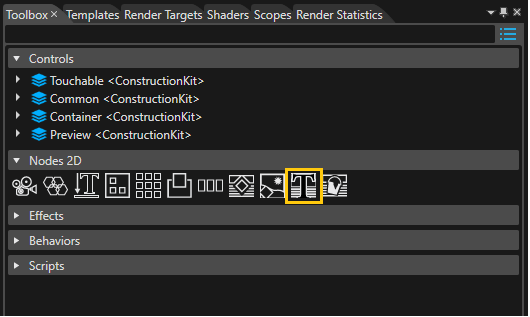
The new TextNode2D is located in the Toolbox panel. In order to add a text to the scene, drag a TextNode from the panel to a Scene2D node.

<div drawio-diagram="2222"><img src="https://doc316en.candera.eu/uploads/images/drawio/2023-02/drawing-4-1677045059.png" alt=""/></div>

<div class="contents" id="bkmrk--8"><div class="contents"><div class="textblock">  
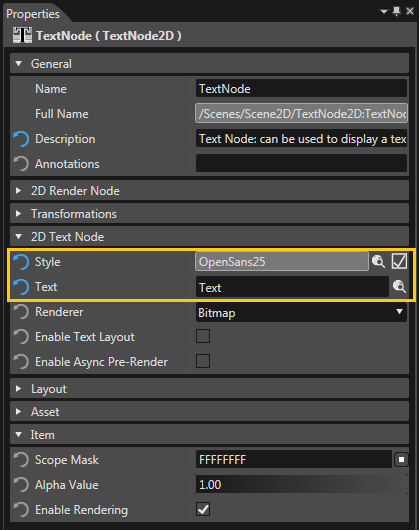
</div></div></div>From the Properties panel of the TextNode, configure the necessary properties for rendering: *Text*, *Style*.

<div drawio-diagram="2223"><img src="https://doc316en.candera.eu/uploads/images/drawio/2023-02/drawing-4-1677045072.png" alt=""/></div>

<div class="contents" id="bkmrk--10"><div class="contents"><div class="textblock">  
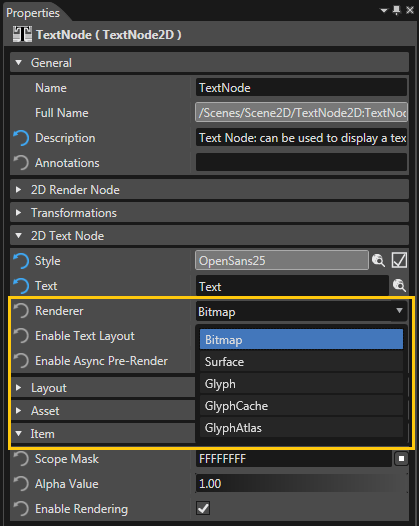
</div></div></div><span style="color: rgb(230, 126, 35);">[Candera::TextNodeRenderer](http://dev.doc.cgistudio.at/APILINK/class_candera_1_1_text_node_renderer.html "Base class for text to Image2D generation strategies.")</span> type of <span style="color: rgb(230, 126, 35);">[Candera::TextNode2D](http://dev.doc.cgistudio.at/APILINK/class_candera_1_1_text_node2_d.html "TextNode2D is a RenderNode that renders text using the attached BitmapBrush effect.")</span> can be changed using the *Renderer* property. Default value in SceneComposer is Bitmap.

<div drawio-diagram="2224"><img src="https://doc316en.candera.eu/uploads/images/drawio/2023-02/drawing-4-1677045090.png" alt=""/></div>

<div class="contents" id="bkmrk--12"><div class="contents"><div class="textblock">  
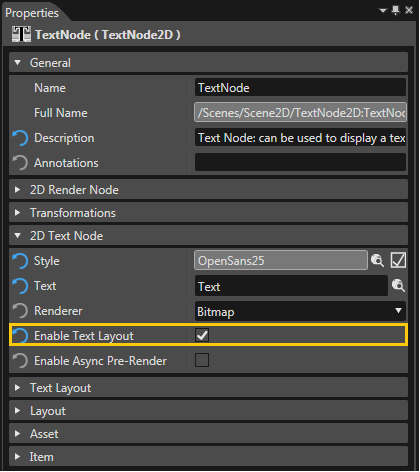
</div></div></div>Candera::DefaultTextNode2DLayouter is attached by checking *Enable Text Layout*. Additional layouter properties are exposed in the Properties Panel:

<div class="contents" id="bkmrk-multi-line-%28enabled-"><div class="contents"><div class="textblock">- Multi line (enabled by default)
- Word wrap (disabled by default)

</div></div></div><div class="contents" id="bkmrk-for-truncation-to-oc"><div class="contents"><div class="contents"><div class="textblock"><dl class="note"><dd><p class="callout info">For truncation to occur, *Enable Text Layout* property needs to be enabled.</p>

</dd></dl></div></div></div></div><div drawio-diagram="2225"><img src="https://doc316en.candera.eu/uploads/images/drawio/2023-02/drawing-4-1677045120.png" alt=""/></div>

<div class="contents" id="bkmrk--14"><div class="contents"><div class="textblock">  
</div></div></div>When a TextNode2D is created, a <span style="color: rgb(230, 126, 35);">[Candera::BitmapBrushColorBlend](http://dev.doc.cgistudio.at/APILINK/class_candera_1_1_bitmap_brush_color_blend.html "Output a bitmap image, modulate the color, and blend it with the store buffer. Same as chaining (Bitm...")</span> is automatically associated with the node, which is used for changing text color only. Any BitmapBrush effect present in the list of effects from Toolbox Panel can be used for text rendering. The visual appearance of the text will be affected depending on the type of effect chosen.

<div drawio-diagram="2226"><img src="https://doc316en.candera.eu/uploads/images/drawio/2023-02/drawing-4-1677045137.png" alt=""/></div>

<div class="textblock" id="bkmrk--16"></div><div class="contents" id="bkmrk-back-to-the-menu"></div>#### **TextEngine Render Interface** 

##### <a class="anchor" id="bkmrk--63"></a>Overview: Render Interface

The main interface to render text is the method

<div class="contents" id="bkmrk-candera%3A%3Atextrenderi"><div class="contents"><div class="textblock">- <span style="color: rgb(230, 126, 35);">[Candera::TextRendering::TextRenderer::Render(TextRenderContext &amp;context, const LayoutingOptions &amp;layoutingOptions, const ShapingOptions &amp;shapingOptions, const TextProperties &amp;textProperties) const](http://dev.doc.cgistudio.at/APILINK/class_candera_1_1_text_rendering_1_1_text_renderer.html#a6be555dcc044fcaabc261963e8be08af)</span>

</div><div class="textblock"><dl class="note"><dd><p class="callout info">Compare this interface also with the functional steps introduced in chapter <span style="color: rgb(230, 126, 35);">[Fonts and Styles](https://doc316en.candera.eu/books/candera/page/fonts-and-styles)</span>.</p>

</dd></dl></div></div></div>##### <a class="anchor" id="bkmrk--64"></a>Text Render Context

A <span style="color: rgb(230, 126, 35);">[Candera::TextRendering::TextRenderContext](http://dev.doc.cgistudio.at/APILINK/class_candera_1_1_text_rendering_1_1_text_render_context.html "Defines an abstract render context and target for text rendering.")</span> is required to define a target for text rendering i.e. where to render the text to.

##### <a class="anchor" id="bkmrk--65"></a>Configure Bitmap as Target for Text Rendering

A Candera::TextRendering::BitmapTextRenderContext can be used to draw text into a bitmap. So first of all the bitmap which shall be drawn needs to be defined with

<div class="contents" id="bkmrk-the-candera%3A%3Atextren"><div class="contents"><div class="contents"><div class="textblock">- the Candera::TextRendering::BitmapTextRenderContext::SetBitmap() method to assign a bitmap to render to,
- the Candera::TextRendering::BitmapTextRenderContext::SetPenColor() method to define the text color
- the Candera::TextRendering::BitmapTextRenderContext::SetClipRect() method to set a clipping rectangle for the text.

<div class="fragment">  
</div></div></div></div></div>```
    BitmapTextRenderContext bmpRenderContext;
    static_cast<void>(bmpRenderContext.SetBitmap(m_bitmap));
    bmpRenderContext.SetPenColor(m_color);

```

##### <a class="anchor" id="bkmrk--66"></a>Layouting Options

The <span style="color: rgb(230, 126, 35);">[Candera::TextRendering::LayoutingOptions](http://dev.doc.cgistudio.at/APILINK/class_candera_1_1_text_rendering_1_1_layouting_options.html "This class is used for describing the layout of the text.")</span> define the layout of the rendered text with

<div class="contents" id="bkmrk-the-candera%3A%3Atextren-1"><div class="contents"><div class="textblock">- the <span style="color: rgb(230, 126, 35);">[Candera::TextRendering::LayoutingOptions::SetHorizontalAlignment()](http://dev.doc.cgistudio.at/APILINK/class_candera_1_1_text_rendering_1_1_layouting_options.html#aca3a3a56bc40d02a854e92568ab57c73)</span> and <span style="color: rgb(230, 126, 35);">[Candera::TextRendering::LayoutingOptions::SetVerticalAlignment()](http://dev.doc.cgistudio.at/APILINK/class_candera_1_1_text_rendering_1_1_layouting_options.html#a43bb290d70933b2474899028257689fc)</span> methods to specify the text alignment,
- the <span style="color: rgb(230, 126, 35);">[Candera::TextRendering::LayoutingOptions::SetMultilineTextEnabled()](http://dev.doc.cgistudio.at/APILINK/class_candera_1_1_text_rendering_1_1_layouting_options.html#aec9e287bc7225d26991516c177ea89c7)</span> method to toggle multi line and single line layout.
- the <span style="color: rgb(230, 126, 35);">[Candera::TextRendering::LayoutingOptions::SetLineSpacing()](http://dev.doc.cgistudio.at/APILINK/class_candera_1_1_text_rendering_1_1_layouting_options.html#a7336d9c7332603afc9db5e2d06762727)</span> method to modify the space between lines of multi line text.
- the <span style="color: rgb(230, 126, 35);">[Candera::TextRendering::LayoutingOptions::SetWordWrapEnabled()](http://dev.doc.cgistudio.at/APILINK/class_candera_1_1_text_rendering_1_1_layouting_options.html#a5ec96665e072fd3f6afc6cf11ca8f44b)</span> method to enable automatic word wrap for multi line text.

<dl class="see"><dt>**See also:**</dt><dd><span style="color: rgb(230, 126, 35);">[Candera::TextRendering::LayoutingOptions](http://dev.doc.cgistudio.at/APILINK/class_candera_1_1_text_rendering_1_1_layouting_options.html "This class is used for describing the layout of the text.")</span> for further options.</dd></dl></div></div></div>##### <a class="anchor" id="bkmrk--67"></a>Shaping Options

The [Candera::TextRendering::LayoutingOptions](http://dev.doc.cgistudio.at/APILINK/class_candera_1_1_text_rendering_1_1_layouting_options.html "This class is used for describing the layout of the text.") define how the text shall be transformed from logical to display presentation. The usage of one of the constructors is recommended:

<div class="contents" id="bkmrk-candera%3A%3Atextrenderi-0"><div class="contents"><div class="textblock">- Candera::TextRendering::ShapingOptions::ShapingOptions(const StylePtr &amp;style)
- Candera::TextRendering::ShapingOptions::ShapingOptions(const StylePtr &amp;style, const CulturePtr &amp;culture)

</div></div></div>##### <a class="anchor" id="bkmrk--68"></a>Text Properties

The <span style="color: rgb(230, 126, 35);">[Candera::TextRendering::TextProperties](http://dev.doc.cgistudio.at/APILINK/class_candera_1_1_text_rendering_1_1_text_properties.html "Defines the means to retrieve the text for rendering.")</span> simply define the text itself which shall be rendered.

<div class="contents" id="bkmrk-see-also%3A-the-constr"><div class="textblock"><dl class="see"><dt>**See also:**</dt><dd>the constructor <span style="color: rgb(230, 126, 35);">[Candera::TextRendering::TextProperties::TextProperties(const TChar \*text, TextLength length)](http://dev.doc.cgistudio.at/APILINK/class_candera_1_1_text_rendering_1_1_text_properties.html#ae2f8fb01e773ce9f188eb6e82bae0ef9)</span>.</dd></dl></div></div>#### **Font Metrics and Text Sizes** 

##### <a class="anchor" id="bkmrk--69"></a>Font Size

In <span style="color: rgb(230, 126, 35);">[Candera](http://dev.doc.cgistudio.at/APILINK/namespace_candera.html "[DataBinding_RefTypeSample]")</span> the font size (respectively the font height) has to be provided in pixel size. Note that in several word processing programs, like *Microsoft Word*, fonts are defined in point size. The conversion between pixel size and point size is calculated as follows (see [FreeType Glyph Conventions](http://www.freetype.org/freetype2/docs/glyphs/glyphs-2.html)):

<div class="contents" id="bkmrk-pixel_size-%3D-point_s"><div class="contents"><div class="textblock">- pixel\_size = point\_size \* resolution / 72

</div></div></div>*Microsoft Windows* e.g. defines for historical reasons a default resolution of 96 PPI (DPI). A font in *Microsoft Word* with defined point size 18 has the same height as the font defined in <span style="color: rgb(230, 126, 35);">[Candera](http://dev.doc.cgistudio.at/APILINK/namespace_candera.html "[DataBinding_RefTypeSample]")</span> with pixel size 24 (24 = 18 \* 96/72).

##### <a class="anchor" id="bkmrk--70"></a>Font Metrics

For a font, static font metrics are provided describing font ascender, descender values in device pixel, the font line height and the maximum vertical advance of a font character: <span style="color: rgb(230, 126, 35);">[Candera::TextRendering::Font::GetMetrics()](http://dev.doc.cgistudio.at/APILINK/class_candera_1_1_text_rendering_1_1_font.html#a33baf13f579a0a849652c52b0fd97062)</span>

```
    TextRendering::Metrics metrics;
    if (!m_font.GetMetrics(metrics)) {
        return false;
    }

```

##### <a class="anchor" id="bkmrk--71"></a>Text Bounds

Further, the text bounds (width, height, etc.) of a given string can be retrieved by calling *GetTextRectangle* method of <span style="color: rgb(230, 126, 35);">[Candera::TextRendering::GlyphTextMeasureContext](http://dev.doc.cgistudio.at/APILINK/class_candera_1_1_text_rendering_1_1_glyph_text_measure_context.html "GlyphTextMeasureContext is used to measure the glyph bitmaps extents.")</span> or <span style="color: rgb(230, 126, 35);">[Candera::TextRendering::CursorTextMeasureContext](http://dev.doc.cgistudio.at/APILINK/class_candera_1_1_text_rendering_1_1_cursor_text_measure_context.html "CursorTextMeasureContext is used to measure the movement of the text cursor.")</span>.

<span style="color: rgb(230, 126, 35);">[Candera::TextRendering::GlyphTextMeasureContext](http://dev.doc.cgistudio.at/APILINK/class_candera_1_1_text_rendering_1_1_glyph_text_measure_context.html "GlyphTextMeasureContext is used to measure the glyph bitmaps extents.")</span> builds a rectangle corresponding to the smallest surface covered by all the glyph bitmaps. The position of this rectangle( represented by (left, top) coordinates) can be offset from the text position. Therefore, when rendering the text, the Layouting Options should be constructed using the inverse of this offset.

<span style="color: rgb(230, 126, 35);">[Candera::TextRendering::CursorTextMeasureContext](http://dev.doc.cgistudio.at/APILINK/class_candera_1_1_text_rendering_1_1_cursor_text_measure_context.html "CursorTextMeasureContext is used to measure the movement of the text cursor.")</span> builds a rectangle corresponding to the whole surface swept by the cursor when moving while processing the text. The cursor is considered to be a segment of length equal to the style height. This rectangle does not usually have an offset and it contains the final advancement of the cursor.

```
    GlyphTextMeasureContext glyphContext;
    static_cast<void>(textRenderer.Render(glyphContext, LayoutingOptions(), ShapingOptions(m_style), TextProperties(m_text)));
    TextRect textBound = glyphContext.GetTextRectangle();
    mTextStartPos.SetX(-textBound.GetPosition().GetX());
    mTextStartPos.SetY(-textBound.GetPosition().GetY());
    Int16 textWidth = textBound.GetWidth();
    Int16 textHeight = textBound.GetHeight();
```

```
    static_cast<void>(textRenderer.Render(bmpRenderContext, LayoutingOptions(mTextStartPos), ShapingOptions(m_style), TextProperties(m_text)));

```

The Layouting Options describe the layout of the text. The Shaping Options define how the text is shaped (ligatures, text direction, ..) and they also contain the style.

####   
**Simple Text Rendering** 

##### <a class="anchor" id="bkmrk--72"></a>Rendering Simple Text

The <span style="color: rgb(230, 126, 35);">[Candera::TextRendering::TextRenderer](http://dev.doc.cgistudio.at/APILINK/class_candera_1_1_text_rendering_1_1_text_renderer.html "TextRenderer is the core Candera function for rendering text.")</span> provides the core function to render text.

For simple text rendering the <span style="color: rgb(230, 126, 35);">[Candera::TextRendering::TextRenderer::Render()](http://dev.doc.cgistudio.at/APILINK/class_candera_1_1_text_rendering_1_1_text_renderer.html#a6be555dcc044fcaabc261963e8be08af)</span> method is called. Besides the actual text (type TChar\*) and the BitmapTextRenderContext as target, layouting and shaping can be specified.

```
    static_cast<void>(textRenderer.Render(bmpRenderContext, LayoutingOptions(mTextStartPos), ShapingOptions(m_style), TextProperties(m_text)));

```

Finally the image has to be updated to apply the changes.

```
    bool success = m_textureImage->Update();

```

####   
**Character-Glyph Position Mapping** 

##### <a class="anchor" id="bkmrk--73"></a>Overview

<span style="color: rgb(230, 126, 35);">[Candera](http://dev.doc.cgistudio.at/APILINK/namespace_candera.html "[DataBinding_RefTypeSample]")</span> text engine provides an interface which allows to map positions in character string to positions in glyph string. This feature can be useful for applications and widgets in order to perform various operations depending on the character position like, for instance, highlighting text.

##### <a class="anchor" id="bkmrk--74"></a>Example

For the convenience, we choose to improve the TextTextureWidget with this highlighting feature. The widget will highlight the text by rendering in red all the glyphs corresponding to the characters having the index in the interval *m\_start* and *m\_end*.

The character position information is accessible in the Blit method of the <span style="color: rgb(230, 126, 35);">[Candera::BitmapTextRenderContext](http://dev.doc.cgistudio.at/APILINK/class_candera_1_1_bitmap_text_render_context.html "Implements a TextRenderContext for Bitmaps.")</span> class. Consequently, this class should be derived and the Blit method overwritten as follows:

```
class BitmapTextRenderContextSelection : public BitmapTextRenderContext
{      
public:   
    BitmapTextRenderContextSelection(Int selectionStart, Int selectionEnd, <a class="code" href="http://dev.doc.cgistudio.at/APILINK/group___behaviors_control.html#ggae7abc816df647d0ecbc280480fefb788a6d1d4da086e381cb2c5a5ce6a2513ebd">Color</a> color) : m_start(selectionStart), m_end(selectionEnd), m_color(color) {}
    virtual void Blit(Int16 x, Int16 y, const GlyphBitmap& glyph);
private:
    typedef BitmapTextRenderContext Base;

    <a class="code" href="http://dev.doc.cgistudio.at/APILINK/group___behaviors_control.html#ggae7abc816df647d0ecbc280480fefb788a6d1d4da086e381cb2c5a5ce6a2513ebd">Color</a> ComputeColorForCharPosition(<a class="code" href="http://dev.doc.cgistudio.at/APILINK/group___candera_text_engine.html#gae7c07cf8f5b0200e470e2a728895b9de" title="Type used to specify the position of a character within a text buffer.">TextPosition</a> position);
    Int m_start;
    Int m_end;
    <a class="code" href="http://dev.doc.cgistudio.at/APILINK/group___behaviors_control.html#ggae7abc816df647d0ecbc280480fefb788a6d1d4da086e381cb2c5a5ce6a2513ebd">Color</a> m_color;
};

void BitmapTextRenderContextSelection::Blit(Int16 x, Int16 y, const GlyphBitmap& glyph){

    SetPenColor(ComputeColorForCharPosition(glyph.characterPosition));
    Base::Blit(x, y, glyph);
}

<a class="code" href="http://dev.doc.cgistudio.at/APILINK/group___behaviors_control.html#ggae7abc816df647d0ecbc280480fefb788a6d1d4da086e381cb2c5a5ce6a2513ebd">Color</a> BitmapTextRenderContextSelection::ComputeColorForCharPosition(<a class="code" href="http://dev.doc.cgistudio.at/APILINK/group___candera_text_engine.html#gae7c07cf8f5b0200e470e2a728895b9de" title="Type used to specify the position of a character within a text buffer.">TextPosition</a> position){
    if(position >= m_start && position <= m_end){
        return <a class="code" href="http://dev.doc.cgistudio.at/APILINK/group___behaviors_control.html#ggae7abc816df647d0ecbc280480fefb788a6d1d4da086e381cb2c5a5ce6a2513ebd">Color</a>(255,0,0);
    } else {
        return m_color;
    }
}
```

In TextTextureWidget::UpdateTextureImage(), use the newly created class instead of <span style="color: rgb(230, 126, 35);">[Candera::BitmapTextRenderContext](http://dev.doc.cgistudio.at/APILINK/class_candera_1_1_bitmap_text_render_context.html "Implements a TextRenderContext for Bitmaps.")</span>:

```
    BitmapTextRenderContextSelection bmpRenderContext(m_selectionStart, m_selectionEnd, GetTextColorPrv());
```

####   
**Shortening Support For Bidirectional Text** 

##### <a class="anchor" id="bkmrk--75"></a>Feature Overview

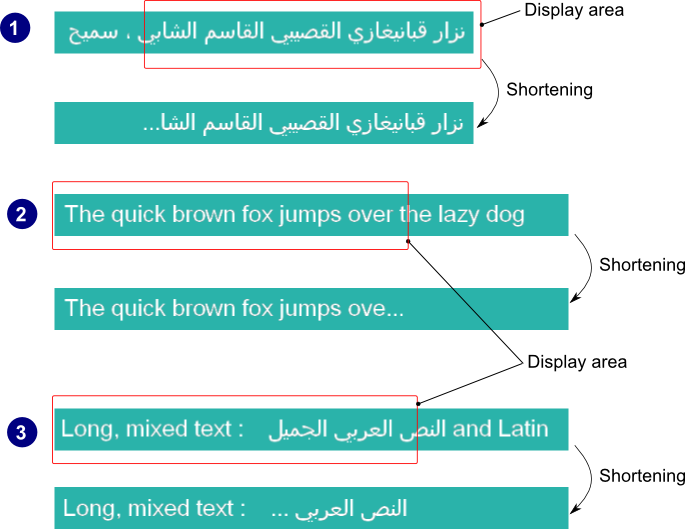
This feature ensures that the bidirectional text shall be shortened whenever it does not fit into its designated display area. The algorithm which does the shortening can deal with different levels of embedding of right-to-left text in left-to-right text and vice versa. Depending on the text direction of the last chunk, the shortening string is inserted after the last fitting text segment, on the left or on the right end.

You can take advantage of this feature by using one of the following, depending on the type of scene being rendered:

<div class="contents" id="bkmrk-scene-type-node-name"><div class="contents"><div class="textblock"><table border="1" style="width: 76.5432%;"><tbody><tr align="center"><th style="padding: 5px; width: 34.8762%;">Scene type</th><th style="width: 32.6109%;">Node name</th><th style="width: 32.6206%;">Widget name</th></tr><tr><td align="center" style="width: 34.8762%;">2D</td><td style="padding: 5px; width: 32.6109%;">[<span style="color: rgb(230, 126, 35);">Candera::TextNode2D</span>](http://dev.doc.cgistudio.at/APILINK/class_candera_1_1_text_node2_d.html "TextNode2D is a RenderNode that renders text using the attached BitmapBrush effect.")</td><td class="align-center" style="padding: 5px; width: 32.6206%;">-</td></tr><tr><td align="center" style="width: 34.8762%;">3D</td><td style="padding: 5px; width: 32.6109%;">-</td><td class="align-center" style="padding: 5px; width: 32.6206%;">TextTextureWidget</td></tr></tbody></table>

</div></div></div>##### <a class="anchor" id="bkmrk--76"></a>Truncation using TextNode2D

This feature is active only when the node parameter *Enable Text Layout* is enabled. The text will be automatically truncated whenever its size no longer fits in the specified *Size* property of the node. TextNode2D provides only one truncation method, by cutting text and adding trailing ellipsis to fit the space.

##### <a class="anchor" id="bkmrk--77"></a>Truncation using TextTextureWidget

This feature is active only when the widget parameter *Truncation method* is set to the **Text** value. The character(s) used for visual feedback of text shortening is configurable by setting the *Truncation text* property of the 3D widget.

##### <a class="anchor" id="bkmrk--78"></a>Examples

The image below exemplifies three scenarios :

<div class="contents" id="bkmrk-shortening-of-the-ri"><div class="contents"><div class="textblock">1. Shortening of the right-to-left text (Arabic)
2. Shortening of the left-to-right text (Latin)
3. Shortening of right-to-left text embedded in left-to-right text (left-to-right and right-to-left)

</div></div></div><div drawio-diagram="2227"><img src="https://doc316en.candera.eu/uploads/images/drawio/2023-02/drawing-4-1677045787.png" alt=""/></div>

<div class="contents" id="bkmrk--23"><div class="textblock">  
</div></div>####   
**Font Hinting** 

##### <a class="anchor" id="bkmrk--80"></a>Overview

Font hinting is the use of mathematical instructions to adjust the display of an outline font so that it lines up with a rasterized grid. This is done by interpolating the pixels in order to more clearly render the font. At low screen resolutions, hinting is critical for producing clear, legible text. It can be accompanied by antialiasing and (on liquid crystal displays) subpixel rendering for further clarity.

<div class="contents" id="bkmrk-the-hinting-applies-"><div class="contents"><div class="textblock"><dl class="note"><dt></dt><dd><p class="callout info">The hinting applies only to **outline** fonts so the bitmap fonts and the stroke fonts will not be affected by this feature.</p>

</dd></dl></div></div></div>Hints are usually created in a font editor during the typeface design process and embedded in the font. In general, there are three possible ways to hint a glyph:

<div class="contents" id="bkmrk-the-font-contains-hi"><div class="contents"><div class="textblock">- The font contains hints to guide the rasterizer, telling it which shapes of the glyphs need special consideration. The hinting logic is partly in the font and partly in the rasterizer.
- The font contains exact instructions (also called bytecode) on how to move the points of its outlines, depending on the resolution of the output device, and which intentionally distort the (outline) shape to produce a well-rasterized result. The hinting logic is in the font; ideally, all rasterizers simply process these instructions to get the same result on all platforms.
- The font gets auto-hinted (at run-time). The hinting logic is completely in the rasterizer. No hints in the font are used or needed; instead, the rasterizer scans and analyzes the glyphs to apply corrections by itself.

</div></div></div>##### <a class="anchor" id="bkmrk--81"></a>Enabling Hinting

The hinting can be enabled or disabled by the means of the method <span style="color: rgb(230, 126, 35);">[Candera::TextRendering::Font::SetHintingEnabled()](http://dev.doc.cgistudio.at/APILINK/class_candera_1_1_text_rendering_1_1_font.html#aebfdc5b60e4ddafa35065c5d33bc9ce9)</span>. When hinting is disabled, the glyphs may appear blurred, as you can see below. The text was rendered with a small size font (9px) and then zoomed in:

<div drawio-diagram="2228"><img src="https://doc316en.candera.eu/uploads/images/drawio/2023-02/drawing-4-1677045859.png" alt=""/></div>

<div class="contents" id="bkmrk--27"><div class="contents"><div class="textblock">  
</div></div></div>##### <a class="anchor" id="bkmrk--83"></a>Enabling AutoHint

The usage of the automatic hinter of the font driver can be controlled by calling the method <span style="color: rgb(230, 126, 35);">[Candera::TextRendering::Font::SetAutohintEnabled()](http://dev.doc.cgistudio.at/APILINK/class_candera_1_1_text_rendering_1_1_font.html#ab9e5ba935a28985ec47c1fe290dcbfff)</span>. When the automatic hinter is disabled either the native hinter of the font is used either the hinting is disabled (zoomed in image):

<div drawio-diagram="2229"><img src="https://doc316en.candera.eu/uploads/images/drawio/2023-02/drawing-4-1677045895.png" alt=""/></div>

<div class="contents" id="bkmrk--29"><div class="contents"><div class="textblock">  
</div></div></div>##### <a class="anchor" id="bkmrk--85"></a>Enabling Force AutoHint

If a given font driver doesn't provide its own hinter, the auto-hinter is used by default. If a format-specific hinter is provided, it is still possible to use the auto-hinter by enabling it using the method <span style="color: rgb(230, 126, 35);">[Candera::TextRendering::Font::SetForceAutohintEnabled()](http://dev.doc.cgistudio.at/APILINK/class_candera_1_1_text_rendering_1_1_font.html#af57b8dbdaca17b1bd51c87fcdebfa3da)</span>.

##### <a class="anchor" id="bkmrk--86"></a>Hinting Mode

The driver autohinter can be configured by calling the <span style="color: rgb(230, 126, 35);">[Candera::TextRendering::Font::SetHintingMode()](http://dev.doc.cgistudio.at/APILINK/class_candera_1_1_text_rendering_1_1_font.html#a9a768ce930fff71ed1fc6398e4a15e95)</span> method with one of the following parameters(hinting algorithms):

<div class="contents" id="bkmrk-glyphhinter%3A%3Anormal-"><div class="contents"><div class="textblock">- GlyphHinter::Normal : normal hinting, optimized for standard gray-level rendering  
    <div drawio-diagram="2230"><img src="https://doc316en.candera.eu/uploads/images/drawio/2023-02/drawing-4-1677045933.png" alt=""/></div>

- GlyphHinter::Light : applies less corrections than normal hinting for better performance  
    <div drawio-diagram="2231"><img src="https://doc316en.candera.eu/uploads/images/drawio/2023-02/drawing-4-1677045994.png" alt=""/></div>
- GlyphHinter::Monochrome : appropriate for monochrome rendering  
    <div drawio-diagram="2232"><img src="https://doc316en.candera.eu/uploads/images/drawio/2023-02/drawing-4-1677046010.png" alt=""/></div>

- GlyphHinter::Lcd : appropriate for horizontally decimated LCD displays  
    <div drawio-diagram="2233"><img src="https://doc316en.candera.eu/uploads/images/drawio/2023-02/drawing-4-1677046031.png" alt=""/></div>

- GlyphHinter::VerticalLcd : appropriate for vertically decimated LCD displays  
    <div drawio-diagram="2234"><img src="https://doc316en.candera.eu/uploads/images/drawio/2023-02/drawing-4-1677046060.png" alt=""/></div>

</div></div></div><div class="contents" id="bkmrk-all-modes-except-gly"><div class="contents"><div class="textblock"><dl class="note"><dd><p class="callout info">All modes except GlyphHinter::Monochrome use 256 levels of opacity.</p>

</dd></dl></div></div></div>##### <a class="anchor" id="bkmrk--92"></a>Code Example

```
    m_font1.SetHintingMode(GlyphHinter::Monochrome);
    m_font2.SetHintingMode(GlyphHinter::Light);
```

##### <a class="anchor" id="bkmrk--93"></a>Glyph Bitmap Format

The output type of the glyph rendering process can be configured by calling the method <span style="color: rgb(230, 126, 35);">[Candera::TextRendering::Font::SetRequestedGlyphFormat()](http://dev.doc.cgistudio.at/APILINK/class_candera_1_1_text_rendering_1_1_font.html#a92c945ce5945b332320c3e68dee77e75)</span> with one of the following render modes as parameters:

<div class="contents" id="bkmrk-glyphbitmap%3A%3Aunknown"><div class="contents"><div class="textblock">- GlyphBitmap::Unknown : format is unspecified
- GlyphBitmap::Monochrome : correspond to 1-bit bitmaps (two levels of opacity)
- GlyphBitmap::Lcd : format use with horizontally decimated RGB or BGR sub-pixel LCD displays
- GlyphBitmap::VerticalLcd : format use with vertically decimated LCD displays
- GlyphBitmap::Grayscale : format is grayscale, one byte per pixel; this is the default render mode

</div></div></div>Each of the render modes above correspond to a specific type of scanline conversion performed on the outline.

##### <a class="anchor" id="bkmrk--94"></a>Code Example

```
    m_font1.SetRequestedGlyphFormat(GlyphBitmap::VerticalLcd);
    m_font2.SetRequestedGlyphFormat(GlyphBitmap::Grayscale);
```

##### <a class="anchor" id="bkmrk--95"></a>Monochrome Render Mode

The monochrome render mode removes anti-aliasing because it's using only two levels of opacity and gives clearer appearance for small size fonts (no blurring). Please see below a comparison between monochrome and grayscale render modes:

<div drawio-diagram="2235"><img src="https://doc316en.candera.eu/uploads/images/drawio/2023-02/drawing-4-1677046185.png" alt=""/></div>

<div drawio-diagram="2236"><img src="https://doc316en.candera.eu/uploads/images/drawio/2023-02/drawing-4-1677046236.png" alt=""/></div>

An another advantage of using this render mode is the smaller memory footprint for glyphs because of 1bit format.