# Using asynchronous text rendering

#### <a class="anchor" id="bkmrk--16"></a>Description

The Candera engine provides asynchronous text rendering to improve the handling of time-consuming text processing. The focus is not to improve performance but to improve resource handling.

Asynchronous text rendering requires knowledge of how text nodes work.

General information of how to use <span style="color: rgb(230, 126, 35);">[Candera::TextNode2D](http://dev.doc.cgistudio.at/APILINK/class_candera_1_1_text_node2_d.html "TextNode2D is a RenderNode that renders text using the attached BitmapBrush effect.")</span> can be found in the following section:

<div class="contents" id="bkmrk-using-candera%3A%3Atextn"><div class="contents"><div class="textblock">- <span style="color: rgb(230, 126, 35);">[Using Candera::TextNode2D](https://doc316en.candera.eu/link/480#bkmrk-using-candera%3A%3Atextn-1)</span>

</div></div></div>Asynchronous text rendering requires further knowledge of which steps are necessary to display a text. Please refer to the following section:

<div class="contents" id="bkmrk-text-rendering---use"><div class="contents"><div class="textblock">- <span style="color: rgb(230, 126, 35);">[Text rendering - Useful knowledge](#bkmrk-text-rendering---use-1)</span>

</div></div></div>Based on the knowledge about the TextNode2D and CanvasText, the following chapters describe how asynchronous text rendering works. Further, these chapters explain how to customize the asynchronous text rendering and which restrictions should be considered when using this feature. The documentation focuses mainly on <span style="color: rgb(230, 126, 35);">[Candera::TextNode2D](http://dev.doc.cgistudio.at/APILINK/class_candera_1_1_text_node2_d.html "TextNode2D is a RenderNode that renders text using the attached BitmapBrush effect.")</span>. The concepts described inside these chapters are applicable to <span style="color: rgb(230, 126, 35);">[Candera::CanvasText](http://dev.doc.cgistudio.at/APILINK/class_candera_1_1_canvas_text.html "CanvasText represents a text node within a 3D Canvas object.")</span>, too.


#### **Text rendering - Useful knowledge** 

##### <a class="anchor" id="bkmrk--18"></a>TextNode2D – text render process

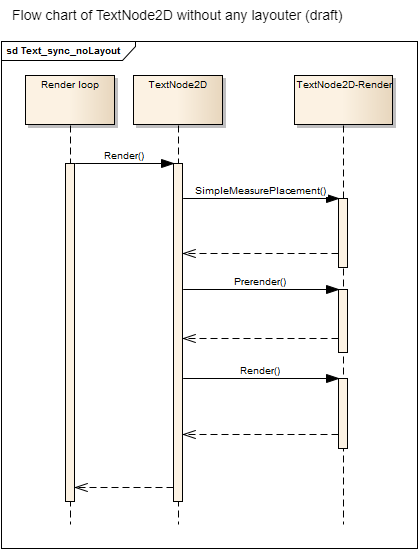
A text uses three steps in its render process:

<div class="contents" id="bkmrk-measurement-and-plac"><div class="contents"><div class="textblock">1. Measurement and placement
2. Prerendering – Prepares the render device for the text (if necessary)
3. Render – Actual visible output

</div></div></div>All of these steps have to be fulfilled to come to a visible result. Using a TextNode2D has three different ways to update its text and therefore three different ways to approach the final result. The main difference lies in providing information and handling the three process steps:

<div class="contents" id="bkmrk-first-case%3A-no-layou"><div class="contents"><div class="textblock">- <span style="color: rgb(230, 126, 35);">[First case: No layout usage](https://doc316en.candera.eu/link/482#bkmrk-first-case%3A-no-layou-0)</span>
- <span style="color: rgb(230, 126, 35);">[Second case: Layout process but no TextNode2D layouter](https://doc316en.candera.eu/link/482#bkmrk-second-case%3A-layout-)</span>
- <span style="color: rgb(230, 126, 35);">[Third case: Layout process with TextNode2D layouter](https://doc316en.candera.eu/link/482#bkmrk-third-case%3A-layout-p)</span>

</div></div></div>##### <a class="anchor" id="bkmrk--19"></a>First case: No layout usage

<span style="color: rgb(230, 126, 35);">[Candera::TextNode2D](http://dev.doc.cgistudio.at/APILINK/class_candera_1_1_text_node2_d.html "TextNode2D is a RenderNode that renders text using the attached BitmapBrush effect.")</span> has no real layout information. There is also no layout in which the <span style="color: rgb(230, 126, 35);">[Candera::TextNode2D](http://dev.doc.cgistudio.at/APILINK/class_candera_1_1_text_node2_d.html "TextNode2D is a RenderNode that renders text using the attached BitmapBrush effect.")</span> is integrated. Therefore, trigger the render process for text render process is enough. The text is not bound to an area and has no relationship other than the visible layer to any other node in the scene graph.

Pro:

<div class="contents" id="bkmrk-lightweight-version-"><div class="contents"><div class="textblock">- Lightweight version of text and Candera.
- Simple text can be shown without much effort.

</div></div></div>Contra:

<div class="contents" id="bkmrk-most-of-text-placeme"><div class="contents"><div class="textblock">- Most of text placement features are disabled.
- No arrangement exists.

</div></div></div><div drawio-diagram="2248"><img src="https://doc316en.candera.eu/uploads/images/drawio/2023-02/drawing-4-1677046993.png" alt=""/></div>

<div class="contents" id="bkmrk--0"><div class="contents"><div class="textblock">  
</div></div></div>##### <a class="anchor" id="bkmrk--21"></a>Second case: Layout process but no TextNode2D layouter

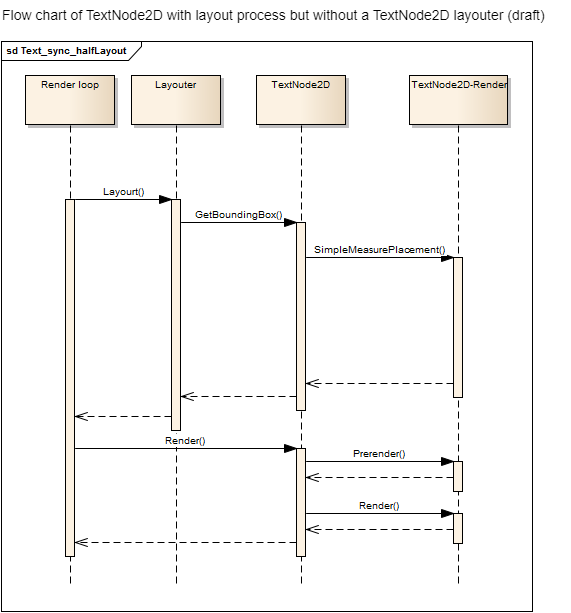
<span style="color: rgb(230, 126, 35);">[Candera::TextNode2D](http://dev.doc.cgistudio.at/APILINK/class_candera_1_1_text_node2_d.html "TextNode2D is a RenderNode that renders text using the attached BitmapBrush effect.")</span> has no real layout information. However, it is arranged within a layout (e.g. GridLayout). This implies that <span style="color: rgb(230, 126, 35);">[Candera::TextNode2D](http://dev.doc.cgistudio.at/APILINK/class_candera_1_1_text_node2_d.html "TextNode2D is a RenderNode that renders text using the attached BitmapBrush effect.")</span> has to provide actual layout results to arrange the text within the layout area. Therefore, the layout process has to start the text render process beforehand. The text render process has to complete the first step (measurement and placement) when the layout process evaluates the bounding box of the text. The layout process has no influence on the size of the bounding box. It only receives the information of the bounding box and can place all the other nodes around the text. The actual handling of this information is defined by the used layouter.

Pro:

<div class="contents" id="bkmrk-lightweight-version--0"><div class="contents"><div class="textblock">- Lightweight version of text with advantages of an arrangement of scene graph nodes.
- Switching between first and second case is normally without major issues.

</div></div></div>Contra:

<div class="contents" id="bkmrk-the-text-placement-c"><div class="contents"><div class="contents"><div class="textblock">- The text placement cannot be influenced by the layout process.
- TextNode2D itself cannot distinguish between first case and second case.

</div></div></div></div><div drawio-diagram="2246"><img src="https://doc316en.candera.eu/uploads/images/drawio/2023-02/drawing-4-1677046938.png" alt=""/></div>

<div class="contents" id="bkmrk--2"><div class="contents"><div class="textblock">  
</div></div></div>##### <a class="anchor" id="bkmrk--23"></a>Third case: Layout process with TextNode2D layouter

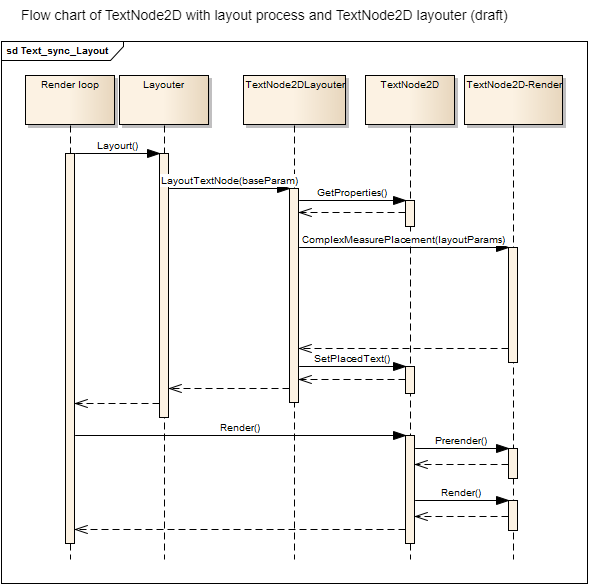
<span style="color: rgb(230, 126, 35);">[Candera::TextNode2D](http://dev.doc.cgistudio.at/APILINK/class_candera_1_1_text_node2_d.html "TextNode2D is a RenderNode that renders text using the attached BitmapBrush effect.")</span> provides layout information. Additionally, the general layout process can influence the way text is displayed, too. The layout process can propose a maximum area in which the text has to fit. This has a direct impact on the placement. The text itself provides the layout process a bounding box which were actually used by it.

Pro:

<div class="contents" id="bkmrk-full-feature-set-for"><div class="contents"><div class="textblock">- Full feature set for text placement integrated in the scene graph arrangements.

</div></div></div>Contra:

<div class="contents" id="bkmrk-heavyweight-version-"><div class="contents"><div class="textblock">- Heavyweight version of text; more calculations have to be done.
- An attached layouter expects using the layouter.

</div></div></div><div class="contents" id="bkmrk-when-a-layouter-is-a"><div class="contents"><div class="textblock"><dl class="note"><dd><p class="callout info">When a layouter is attached, it has to be used as it replaces the default behavior with a complex one. However, the information has to be provided by triggering the layout process otherwise it misses most of the information. This implies that other usages are wrong and lead to undefined or unwanted behavior.</p>

</dd></dl></div></div></div><div drawio-diagram="2244"><img src="https://doc316en.candera.eu/uploads/images/drawio/2023-02/drawing-4-1677046891.png" alt=""/></div>

<div class="contents" id="bkmrk-transformations-like"><div class="contents"><div class="textblock"><dl class="note"><dd><p class="callout info">Transformations like scale and rotation are applied after the text has been rendered. This means that you cannot use scaling to produce narrow or wide text, because the visual layout would be altered (right-aligned text will not be aligned any more after scaling). In this case, import a scaled font instead.</p>

</dd></dl></div></div></div>##### <a class="anchor" id="bkmrk--25"></a>CanvasText – text render process

<span style="color: rgb(230, 126, 35);">[Candera::CanvasText](http://dev.doc.cgistudio.at/APILINK/class_candera_1_1_canvas_text.html "CanvasText represents a text node within a 3D Canvas object.")</span> uses the third approach of <span style="color: rgb(230, 126, 35);">[Candera::TextNode2D](http://dev.doc.cgistudio.at/APILINK/class_candera_1_1_text_node2_d.html "TextNode2D is a RenderNode that renders text using the attached BitmapBrush effect.")</span>:

<div class="contents" id="bkmrk-third-case%3A-layout-p-0"><div class="contents"><div class="textblock">- <span style="color: rgb(230, 126, 35);">[Third case: Layout process with TextNode2D layouter](#bkmrk-third-case%3A-layout-p)</span>

</div></div></div>All other approaches have been removed from <span style="color: rgb(230, 126, 35);">[<span style="vertical-align: inherit;"><span style="vertical-align: inherit;">Candera::CanvasText</span></span>](http://dev.doc.cgistudio.at/APILINK/class_candera_1_1_canvas_text.html "CanvasText は、3D Canvas オブジェクト内のテキスト ノードを表します。")</span> to reduce the complexity of processing. Another difference to <span style="color: rgb(230, 126, 35);">[Candera::TextNode2D](http://dev.doc.cgistudio.at/APILINK/class_candera_1_1_text_node2_d.html "TextNode2D is a RenderNode that renders text using the attached BitmapBrush effect.")</span> is the actual Render() part. Whilst the <span style="color: rgb(230, 126, 35);">[Candera::TextNode2D](http://dev.doc.cgistudio.at/APILINK/class_candera_1_1_text_node2_d.html "TextNode2D is a RenderNode that renders text using the attached BitmapBrush effect.")</span> calls the Render() on each node, <span style="color: rgb(230, 126, 35);">[<span style="vertical-align: inherit;"><span style="vertical-align: inherit;">Candera::CanvasText</span></span>](http://dev.doc.cgistudio.at/APILINK/class_candera_1_1_canvas_text.html "CanvasText は、3D Canvas オブジェクト内のテキスト ノードを表します。")</span> renders it in a batched form by collecting texts with equal render settings and drawing them with a single draw call. <span style="color: rgb(230, 126, 35);">[<span style="vertical-align: inherit;"><span style="vertical-align: inherit;">Candera::CanvasText</span></span>](http://dev.doc.cgistudio.at/APILINK/class_candera_1_1_canvas_text.html "CanvasText は、3D Canvas オブジェクト内のテキスト ノードを表します。")</span> uses GlyphAtlas.

Please note also the following restriction when using asynchronous text processing:

<div class="contents" id="bkmrk-cache-type-restricti"><div class="textblock">- <span style="color: rgb(230, 126, 35);">[Cache type restrictions](#bkmrk-cache-type-restricti-0)</span>

</div></div>####   
**Asynchronous text rendering** 

Asynchronous text rendering is a feature introduced to move text render steps to an own thread or render slot. To be precise only the first of the three render steps can be handled asynchronously. All the other steps are possibly bound to GPU or has to extend the complexity of how to receive the desired output for both framework and user application.

##### <a class="anchor" id="bkmrk--26"></a>Asynchronous text rendering – Worker thread

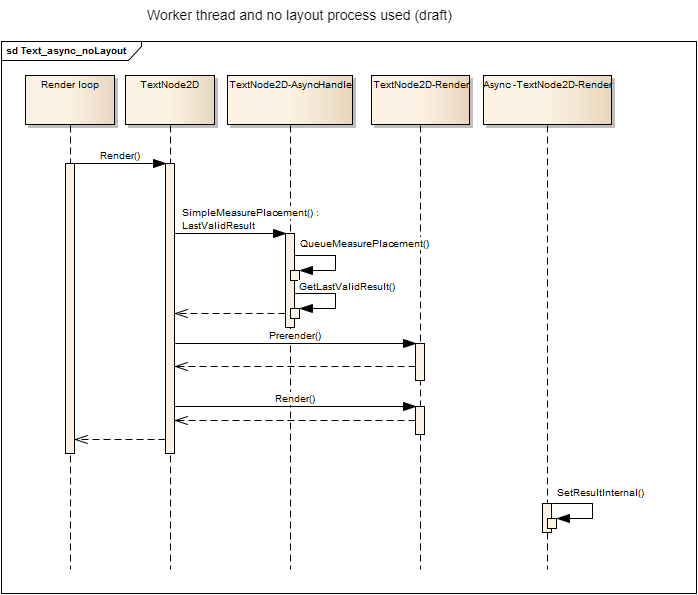
The default way of asynchronous text rendering is the usage of a worker thread. The render loop delegates the first step, Measurement and Placement, to a worker thread. Every delegate is placed in a queue and ready for processing. Using a worker thread has its main advantage in not blocking the render loop. The render loop itself will not block until the text has been measured and placed. The disadvantage of this approach is that there is no control over the execution moment and result arrival time. It can happen after a single render cycle but also after an undefined amount of cycles.

The next figure shows in a draft how the measure and placement process has been replaced when asynchronous text rendering is used. For simplicity only the way without a layouter is used. All other ways do replace the measurement and placement process with the same approach in their flow chart.

The function which actually triggers the asynchronous process has to be triggered twice. One time to queue the process and a second time to retrieve the result. In this flow chart sample the Render-method has to be called twice. The second call has to be done when the asynchronous process has actually finished.

<div drawio-diagram="2250"><img src="https://doc316en.candera.eu/uploads/images/drawio/2023-02/drawing-4-1677047084.png" alt=""/></div>

<div class="contents" id="bkmrk--5"><div class="contents"><div class="textblock">  
</div></div></div>##### <a class="anchor" id="bkmrk--28"></a>Asynchronous text rendering - Single threaded

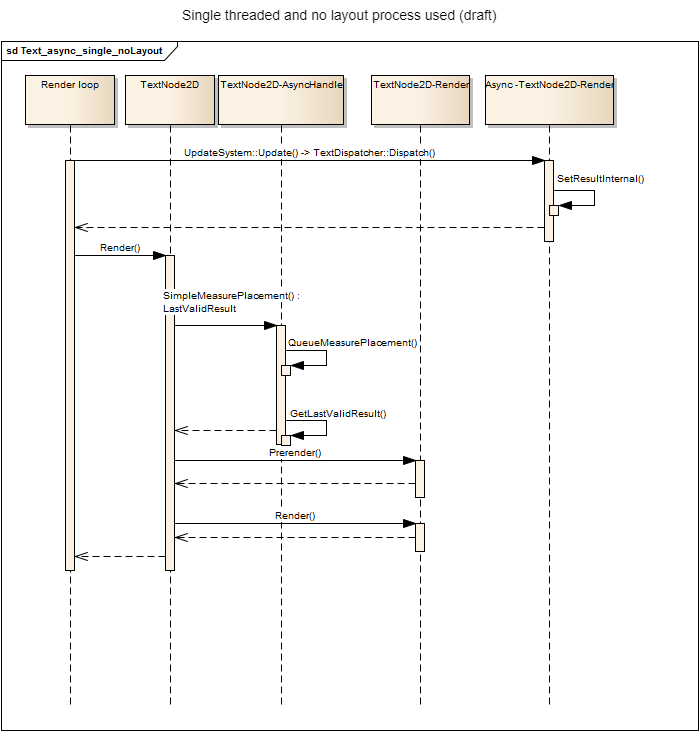
Asynchronous does not mean the work load has to be done by another thread. It can also be done by the same thread at another point in time. The main disadvantage of the single threaded version is that the render loop thread is still handling the text. However, this time it does not have to handle every text in a single render cycle. The amount of texts which will be rendered in a cycle can be determined.

This implies that two factors are given: Text/cycle and text to handle. Based on this information the amount of cycles needed to calculate all texts can be estimated. The duration of each cycle cannot be determined, though.

<div drawio-diagram="2252"><img src="https://doc316en.candera.eu/uploads/images/drawio/2023-02/drawing-4-1677047132.png" alt=""/></div>

<div class="contents" id="bkmrk--7"></div>####   
**Synchronization methods** 

##### <a class="anchor" id="bkmrk--30"></a>Text-Synchronization

With the introduction of asynchronous text rendering a way to synchronize all text nodes have to be provided. The basic idea is to visually update all asynchronous texts at the same render cycle. It should prevent text popping up randomly. Another aspect is to decrease layout processes. When a layouter is attached to a <span style="color: rgb(230, 126, 35);">[Candera::TextNode2D](http://dev.doc.cgistudio.at/APILINK/class_candera_1_1_text_node2_d.html "TextNode2D is a RenderNode that renders text using the attached BitmapBrush effect.")</span>, the layout process will evaluate the size of a <span style="color: rgb(230, 126, 35);">[Candera::TextNode2D](http://dev.doc.cgistudio.at/APILINK/class_candera_1_1_text_node2_d.html "TextNode2D is a RenderNode that renders text using the attached BitmapBrush effect.")</span>. This also means the layout process starts the asynchronous text rendering if necessary. When the layout process starts the process, it should not wait for the result as this results in the same blocking issue as before.

The layouter uses the old information and text which is still valid as long as the asynchronous text rendering is not done yet. Rerunning the layout process will check whether the new text is valid yet or not. If not, it will continue using the old information. If the new text is valid now, it will update the text. The same procedure happens without a layouter attached. However, the part of starting and collecting the results is done by the render call itself. In short an asynchronous text rendering has to be started and the result has to be received in a minimum of two calls. It depends on the usage of layout procedures who the caller really is.

This section describes the possibilities of synchronization:

<div class="contents" id="bkmrk-text-synchronization-0"><div class="contents"><div class="textblock">- <span style="color: rgb(230, 126, 35);">[Text-Synchronization – Default synchronization](https://doc316en.candera.eu/link/482#bkmrk-text-synchronization-1)</span>
    - <span style="color: rgb(52, 73, 94);">Lifecycle</span>
    - <span style="color: rgb(52, 73, 94);">Synchronization - flow</span>
    - <span style="color: rgb(52, 73, 94);">Synchronization - Restrictions</span>

- [<span style="color: rgb(230, 126, 35);">Text-Synchronization – Custom implementation</span>](https://doc316en.candera.eu/link/482#bkmrk-text-synchronization-2)
    - <span style="color: rgb(52, 73, 94);">A new synchronization group</span>
    - <span style="color: rgb(52, 73, 94);">Additional trigger objects</span>
    - <span style="color: rgb(52, 73, 94);">Implementation of an own synchronization</span>

</div></div></div>##### <a class="anchor" id="bkmrk--31"></a>Text-Synchronization – Default synchronization

The default synchronization is kept as simple as possible. This section describes the lifecycle of the validation and how does the synchronization works including its flaws.

##### <a class="anchor" id="bkmrk--32"></a>Lifecycle

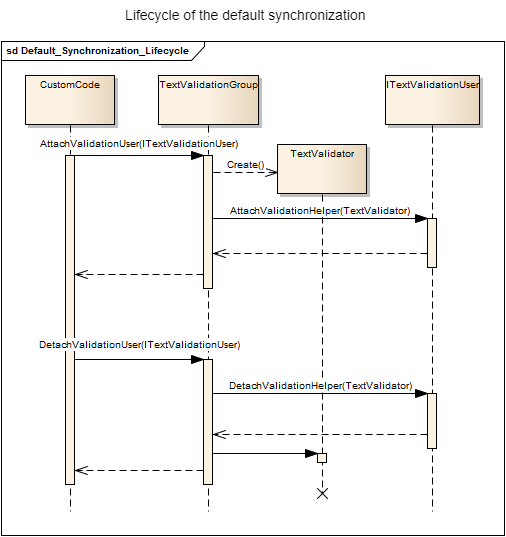
Every object which has to be synchronized implements the interface <span style="color: rgb(230, 126, 35);">[Candera::TextRendering::ITextValidationUser](http://dev.doc.cgistudio.at/APILINK/class_candera_1_1_text_rendering_1_1_i_text_validation_user.html "ITextValidationUser is an interface for a user which will be attached to a TextValidator.")</span>, e.g. TextNode2D. In the next step this object has to be attached to a <span style="color: rgb(230, 126, 35);">[Candera::TextRendering::TextValidationGroup](http://dev.doc.cgistudio.at/APILINK/class_candera_1_1_text_rendering_1_1_text_validation_group.html)</span>. The default group is a singleton instance. The <span style="color: rgb(230, 126, 35);">[Candera::TextRendering::TextValidationGroup](http://dev.doc.cgistudio.at/APILINK/class_candera_1_1_text_rendering_1_1_text_validation_group.html)</span> creates a specific validator and attaches it to the object. Detaching the validator is comparable to this process.

<div drawio-diagram="2257"><img src="https://doc316en.candera.eu/uploads/images/drawio/2023-02/drawing-4-1677047325.png" alt=""/></div>

<div class="contents" id="bkmrk--9"><div class="contents"><div class="textblock">  
</div></div></div>##### <a class="anchor" id="bkmrk--34"></a>Synchronization - flow

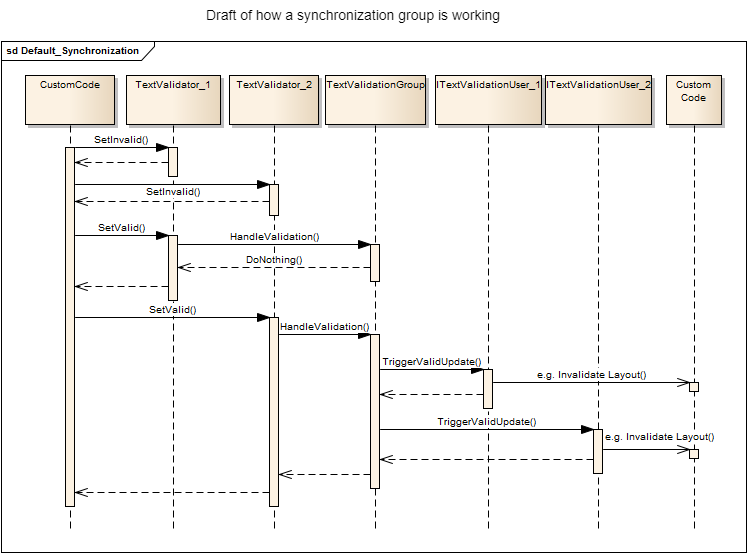
The object can be invalidated at any time by calling the invalidation method of the <span style="color: rgb(230, 126, 35);">[Candera::TextRendering::TextValidator](http://dev.doc.cgistudio.at/APILINK/class_candera_1_1_text_rendering_1_1_text_validator.html "TextValidator is the actual Validator of an 'ITextValidationUser'.")</span>. Every time an invalidated object changes it state to validate, the <span style="color: rgb(230, 126, 35);">[Candera::TextRendering::TextValidator](http://dev.doc.cgistudio.at/APILINK/class_candera_1_1_text_rendering_1_1_text_validator.html "TextValidator is the actual Validator of an 'ITextValidationUser'.")</span> notifies the group of its validation change. If all objects of the group are valid now, all update methods of these objects will be called.

<div drawio-diagram="2258"><img src="https://doc316en.candera.eu/uploads/images/drawio/2023-02/drawing-4-1677047365.png" alt=""/></div>

<div class="contents" id="bkmrk--11"><div class="contents"><div class="textblock">  
</div></div></div>In case of the <span style="color: rgb(230, 126, 35);">[Candera::TextNode2D](http://dev.doc.cgistudio.at/APILINK/class_candera_1_1_text_node2_d.html "TextNode2D is a RenderNode that renders text using the attached BitmapBrush effect.")</span> with an attached layouter, the layout of the scene in which the <span style="color: rgb(230, 126, 35);">[Candera::TextNode2D](http://dev.doc.cgistudio.at/APILINK/class_candera_1_1_text_node2_d.html "TextNode2D is a RenderNode that renders text using the attached BitmapBrush effect.")</span> lies will be invalidated. If there is layout process used at all (disabled Candera layout functionality) nothing will be done in the update method. However, the render method itself can handle this case when it is newly called. The issue here is that it is not explicitly specified who will trigger the render. Both render and layout mechanisms of will check whether the whole group is valid or not. Only in case that the whole group is valid, the text will be updated. If the layout is triggered by another object despite the fact that the group is not valid, the text will not be updated.

<div class="contents" id="bkmrk-candera%3A%3Atextnode2d--2"><div class="contents"><div class="textblock"><dl class="note"><dt></dt><dd><p class="callout info"><span style="color: rgb(230, 126, 35);">[Candera::TextNode2D](http://dev.doc.cgistudio.at/APILINK/class_candera_1_1_text_node2_d.html "TextNode2D is a RenderNode that renders text using the attached BitmapBrush effect.")</span> attaches itself to the <span style="color: rgb(230, 126, 35);">[Candera::TextRendering::TextValidationGroup](http://dev.doc.cgistudio.at/APILINK/class_candera_1_1_text_rendering_1_1_text_validation_group.html)</span> singleton instance per default. To exclude it from the synchronization group it has to be explicitly detached first.</p>

</dd></dl></div></div></div>##### <a class="anchor" id="bkmrk--36"></a>Synchronization - Restrictions

The default synchronization is as lightweight as possible and still provides the feature that all texts in the group have to be valid until the text can be visibly updated. Due to the variety of combinations a text can be used, it is not a universal solution for synchronization. Therefore in some cases it is not as practical as it should be.

A <span style="color: rgb(230, 126, 35);">[Candera::TextNode2D](http://dev.doc.cgistudio.at/APILINK/class_candera_1_1_text_node2_d.html "TextNode2D is a RenderNode that renders text using the attached BitmapBrush effect.")</span> can be synchronous or asynchronous or switch between both cases at runtime. Therefore it is not advisable per default to attach/detach the TextNode2D to the group when the asynchronous flag changes. Pending requests are one of the major issues here.

A synchronous <span style="color: rgb(230, 126, 35);">[Candera::TextNode2D](http://dev.doc.cgistudio.at/APILINK/class_candera_1_1_text_node2_d.html "TextNode2D is a RenderNode that renders text using the attached BitmapBrush effect.")</span> has to be synchronous. This implies when the text has been changed the text has to be visible in the first render cycle afterwards. So it becomes deterministic that the text is truly displayed. Using the synchronization groups on these nodes is opposing this determinism. The node is attached to the group but it is always in the valid state. The node will be ignored completely by the default synchronization.

Another critical restriction is the update rate of a text. This is an issue that happens even without a synchronization but will be intensified by it. In short, every time a text changes, it invalidates the group. When the invalidation rate is higher than the overall text render process of the whole group needs to render, text which should have been shown will never occur. If two texts are invalidating itself in a higher rate, it can also happen that whole group is always in an invalid state. The group itself has a mechanism to count already finished texts and is therefore able to update the text based on the fact that the group is valid or has pending valid texts which are not displayed yet. Based on this information it can recognize a valid group even if one of the texts already changed back to invalid due to setting a new text. However this is not a guarantee that the texts will be updated correctly.

Because of the simplicity of the synchronization it cannot link text updates to each other. For example changing all texts at once to another language is working. There is only one issue with already pending text changes. It is not possible to generally specify which text changes are related to each other and have to be changed at the same time.

Not every use case of a customer can be satisfied by a single way of synchronization. One way produce other side effects than another.

Therefore, own synchronizations can be implemented or used.

##### <a class="anchor" id="bkmrk--37"></a>Text-Synchronization – Custom implementation

The customization of the synchronization has several levels of complexity and several different goals.

<div class="contents" id="bkmrk-changing-the-way-of-"><div class="contents"><div class="textblock"><dl class="note"><dt></dt><dd><p class="callout info">Changing the way of synchronization during runtime should only be done, when the affected text object (e.g. <span style="color: rgb(230, 126, 35);">[Candera::TextNode2D](http://dev.doc.cgistudio.at/APILINK/class_candera_1_1_text_node2_d.html "TextNode2D is a RenderNode that renders text using the attached BitmapBrush effect.")</span>) has no pending text changes – as this can have unexpected side effects.</p>

</dd></dl></div></div></div>##### <a class="anchor" id="bkmrk--38"></a>A new synchronization group

The simplest customization is an additional synchronization group. As default, all TextNode2Ds are attached to the singleton instance of the <span style="color: rgb(230, 126, 35);">[Candera::TextRendering::TextValidationGroup](http://dev.doc.cgistudio.at/APILINK/class_candera_1_1_text_rendering_1_1_text_validation_group.html)</span>. It is possible to create an additional instance of this class in custom code. Now two steps have to be done to correctly bind a <span style="color: rgb(230, 126, 35);">[Candera::TextNode2D](http://dev.doc.cgistudio.at/APILINK/class_candera_1_1_text_node2_d.html "TextNode2D is a RenderNode that renders text using the attached BitmapBrush effect.")</span> to the new group.   
First, detach the <span style="color: rgb(230, 126, 35);">[Candera::TextNode2D](http://dev.doc.cgistudio.at/APILINK/class_candera_1_1_text_node2_d.html "TextNode2D is a RenderNode that renders text using the attached BitmapBrush effect.")</span> from its old group by using the Detach-method of the old <span style="color: rgb(230, 126, 35);">[Candera::TextRendering::TextValidationGroup](http://dev.doc.cgistudio.at/APILINK/class_candera_1_1_text_rendering_1_1_text_validation_group.html)</span>.   
Second, attach the <span style="color: rgb(230, 126, 35);">[Candera::TextNode2D](http://dev.doc.cgistudio.at/APILINK/class_candera_1_1_text_node2_d.html "TextNode2D is a RenderNode that renders text using the attached BitmapBrush effect.")</span> to the new group by using the Attach-method of the new <span style="color: rgb(230, 126, 35);">[Candera::TextRendering::TextValidationGroup](http://dev.doc.cgistudio.at/APILINK/class_candera_1_1_text_rendering_1_1_text_validation_group.html)</span>.

##### <a class="anchor" id="bkmrk--39"></a>Additional trigger objects

A common issue is that setting the underlying scene layout of a <span style="color: rgb(230, 126, 35);">[Candera::TextNode2D](http://dev.doc.cgistudio.at/APILINK/class_candera_1_1_text_node2_d.html "TextNode2D is a RenderNode that renders text using the attached BitmapBrush effect.") </span>to invalid is not enough to trigger the actual render cycle. For example a render wake-up mechanism needs a trigger to wake up and start the render cycle, too.

The <span style="color: rgb(230, 126, 35);">[Candera::TextNode2D](http://dev.doc.cgistudio.at/APILINK/class_candera_1_1_text_node2_d.html "TextNode2D is a RenderNode that renders text using the attached BitmapBrush effect.")</span> itself does not know which additional trigger are needed because this depends on the given application.

An extension of this would be to update nodes within the scene graph as soon as the group is valid. A simple use case is to set a new scene visible only when all texts in the new scene are valid or a control pops up only when its text in it is valid.

To accomplish this the specified object which is responsible for these calls has to implement the interface <span style="color: rgb(230, 126, 35);">[Candera::TextRendering::ITextValidationUser](http://dev.doc.cgistudio.at/APILINK/class_candera_1_1_text_rendering_1_1_i_text_validation_user.html "ITextValidationUser is an interface for a user which will be attached to a TextValidator.")</span>. The object can be attached to the <span style="color: rgb(230, 126, 35);">[Candera::TextRendering::TextValidationGroup](http://dev.doc.cgistudio.at/APILINK/class_candera_1_1_text_rendering_1_1_text_validation_group.html)</span> equal to the described life cycle of the default synchronization. The <span style="color: rgb(230, 126, 35);">[Candera::TextRendering::ITextValidationUser::TriggerValidUpdate()](http://dev.doc.cgistudio.at/APILINK/class_candera_1_1_text_rendering_1_1_i_text_validation_user.html#a2004739a33469f3d5c579900faecd6aa)</span>-method in it will be called as soon as the whole group is valid and the custom code can be executed. Additionally, the object receives an own <span style="color: rgb(230, 126, 35);">[Candera::TextRendering::TextValidator](http://dev.doc.cgistudio.at/APILINK/class_candera_1_1_text_rendering_1_1_text_validator.html "TextValidator is the actual Validator of an 'ITextValidationUser'.")</span> which can influence the time when a group is valid or when the <span style="color: rgb(230, 126, 35);">[Candera::TextRendering::ITextValidationUser::TriggerValidUpdate()](http://dev.doc.cgistudio.at/APILINK/class_candera_1_1_text_rendering_1_1_i_text_validation_user.html#a2004739a33469f3d5c579900faecd6aa)</span> on all objects in the whole group has to be additionally called.

##### <a class="anchor" id="bkmrk--40"></a>Implementation of an own synchronization

The most customized solution is to write an own synchronization mechanism.

There are two important interfaces for an own implementation:

<div class="contents" id="bkmrk-candera%3A%3Atextrenderi"><div class="contents"><div class="textblock">- <span style="color: rgb(230, 126, 35);">[Candera::TextRendering::ITextValidationUser](http://dev.doc.cgistudio.at/APILINK/class_candera_1_1_text_rendering_1_1_i_text_validation_user.html "ITextValidationUser is an interface for a user which will be attached to a TextValidator.")</span> implemented by <span style="color: rgb(230, 126, 35);">[Candera::TextNode2D](http://dev.doc.cgistudio.at/APILINK/class_candera_1_1_text_node2_d.html "TextNode2D is a RenderNode that renders text using the attached BitmapBrush effect.")</span>,
- <span style="color: rgb(230, 126, 35);">[FeatStd::ValidationHelperBase](http://dev.doc.cgistudio.at/APILINK/class_feat_std_1_1_validation_helper_base.html "ValidationHelperBase is a base class to generate a defined interface for validation handling...")</span> to be implemented

</div></div></div><span style="color: rgb(230, 126, 35);">[Candera::TextRendering::ITextValidationUser](http://dev.doc.cgistudio.at/APILINK/class_candera_1_1_text_rendering_1_1_i_text_validation_user.html "ITextValidationUser is an interface for a user which will be attached to a TextValidator.")</span> is the interface which provides the <span style="color: rgb(230, 126, 35);">[Candera::TextNode2D](http://dev.doc.cgistudio.at/APILINK/class_candera_1_1_text_node2_d.html "TextNode2D is a RenderNode that renders text using the attached BitmapBrush effect.")</span> with any validation method. It correctly attaches and detaches such a validation method. And <span style="color: rgb(230, 126, 35);">[Candera::TextRendering::ITextValidationUser::TriggerValidUpdate()](http://dev.doc.cgistudio.at/APILINK/class_candera_1_1_text_rendering_1_1_i_text_validation_user.html#a2004739a33469f3d5c579900faecd6aa)</span> invalidates the scene layout of the <span style="color: rgb(230, 126, 35);">[Candera::TextNode2D](http://dev.doc.cgistudio.at/APILINK/class_candera_1_1_text_node2_d.html "TextNode2D is a RenderNode that renders text using the attached BitmapBrush effect.")</span>. The interface <span style="color: rgb(230, 126, 35);">[FeatStd::ValidationHelperBase](http://dev.doc.cgistudio.at/APILINK/class_feat_std_1_1_validation_helper_base.html "ValidationHelperBase is a base class to generate a defined interface for validation handling...")</span> provides functionality to validate and invalidate the object. It is a custom implementation how it will work. There is only one restriction here. A synchronously used TextNode2D will always ignore the valid state of the custom implementation. It will call the validate and invalidate methods, though. A <span style="color: rgb(230, 126, 35);">[Candera::TextNode2D](http://dev.doc.cgistudio.at/APILINK/class_candera_1_1_text_node2_d.html "TextNode2D is a RenderNode that renders text using the attached BitmapBrush effect.")</span> calls the functions as following:

<div class="contents" id="bkmrk-candera%3A%3Atextnode2d--3"><div class="textblock">- <span style="color: rgb(230, 126, 35);">[Candera::TextNode2D](http://dev.doc.cgistudio.at/APILINK/class_candera_1_1_text_node2_d.html "TextNode2D is a RenderNode that renders text using the attached BitmapBrush effect.")</span> starts measure and place: SetInvalid()
- <span style="color: rgb(230, 126, 35);">[Candera::TextNode2D](http://dev.doc.cgistudio.at/APILINK/class_candera_1_1_text_node2_d.html "TextNode2D is a RenderNode that renders text using the attached BitmapBrush effect.")</span> finishes measure and place: SetValid()
- <span style="color: rgb(230, 126, 35);">[Candera::TextNode2D](http://dev.doc.cgistudio.at/APILINK/class_candera_1_1_text_node2_d.html "TextNode2D is a RenderNode that renders text using the attached BitmapBrush effect.")</span> checks if it can handle the result: IsValid() (only asynchronous nodes)
- <span style="color: rgb(230, 126, 35);">[Candera::TextNode2D](http://dev.doc.cgistudio.at/APILINK/class_candera_1_1_text_node2_d.html "TextNode2D is a RenderNode that renders text using the attached BitmapBrush effect.")</span> has handled the result (ready for display): ConfirmValidHandled()
</div></div>####   
**Configuration possibilities** 

##### <a class="anchor" id="bkmrk--41"></a>General setup and configuration possibilities

This section describes how to configure the asynchronous text rendering.

##### <a class="anchor" id="bkmrk--42"></a>Asynchronous TextNode2D and CanvasText

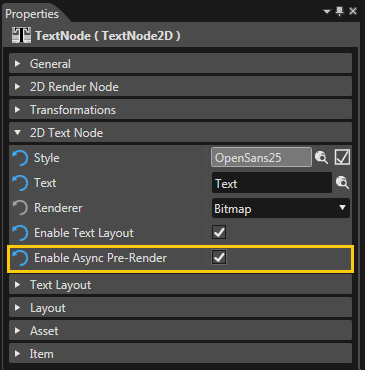
Enabling the asynchronous text rendering is something that has to be done on each <span style="color: rgb(230, 126, 35);">[Candera::TextNode2D](http://dev.doc.cgistudio.at/APILINK/class_candera_1_1_text_node2_d.html "TextNode2D is a RenderNode that renders text using the attached BitmapBrush effect.")</span> or <span style="color: rgb(230, 126, 35);">[Candera::CanvasText](http://dev.doc.cgistudio.at/APILINK/class_candera_1_1_canvas_text.html "CanvasText represents a text node within a 3D Canvas object.")</span>. This can be done within the SceneComposer:

<div drawio-diagram="2261"><img src="https://doc316en.candera.eu/uploads/images/drawio/2023-02/drawing-4-1677047433.png" alt=""/></div>

<div class="contents" id="bkmrk--13"><div class="contents"><div class="textblock">  
</div></div></div>Or in code itself:

```
void SetAsyncPreRenderEnabled(bool enabled);
bool IsAsyncPreRenderEnabled() const;
```

Example usage:

```
TextNode2D node; 
node.SetAsyncPreRenderEnabled(true);   //Enables async rendering 
node.IsAsyncPreRenderEnabled();        //returns true
node.SetAsyncPreRenderEnabled(false);  //Disables async rendering 
node.IsAsyncPreRenderEnabled();        //returns false
```

The flag in SceneComposer and code can be equally configured in <span style="color: rgb(230, 126, 35);">[Candera::CanvasText](http://dev.doc.cgistudio.at/APILINK/class_candera_1_1_canvas_text.html "CanvasText represents a text node within a 3D Canvas object.")</span>.

##### <a class="anchor" id="bkmrk--44"></a>Asynchronous dispatching methods

CMake provides a flag to choose between the worker thread solution and the single threaded version. When the flag is enabled a worker thread is used. The flag is enabled by default. If threading is not available or thread safety is disabled, the code will fall back to the single threaded version ignoring this flag. The flag is system wide. It counts for all asynchronous TextNode2D. This can also be defined programmatically, whereas there are no thread safety checks.

<div drawio-diagram="2262"><img src="https://doc316en.candera.eu/uploads/images/drawio/2023-02/drawing-4-1677047461.png" alt=""/></div>

<div class="contents" id="bkmrk--15"><div class="contents"><div class="textblock">  
</div></div></div>##### <a class="anchor" id="bkmrk--46"></a>Dispatcher settings

The TextRenderDispatcher contains a settings object which can be retrieved by calling:

```
class <a class="code" href="http://dev.doc.cgistudio.at/APILINK/class_candera_1_1_text_rendering_1_1_text_render_dispatcher_1_1_text_render_settings.html" title="TextRenderSettings are settings which have direct influence on the textRendering process Current sett...">Candera::TextRendering::TextRenderDispatcher::TextRenderSettings</a>{…};

<a class="code" href="http://dev.doc.cgistudio.at/APILINK/class_candera_1_1_text_rendering_1_1_text_render_dispatcher.html#a827ca0d37f90c634b24e4f6c3188d574">Candera::TextRendering:: TextRenderDispatcher::GetTextRenderSettings</a>();
```

To programmatically change the asynchronous dispatching method use the function of settings:

```
#include <Candera/TextEngine/Async/ AsyncTextRenderDispatcher.h>
#include <Candera/TextEngine/Async/ ThreadingTextRenderDispatcher.h>

void SetDefaultTextRenderer(<a class="code" href="http://dev.doc.cgistudio.at/APILINK/class_candera_1_1_text_rendering_1_1_text_renderer.html" title="TextRenderer is the core Candera function for rendering text.">Candera::TextRendering::TextRenderer</a> * val);
```

If the single threaded version is used, the amount of processed text per DispatchNext can be set:

```
void SetAsyncLoopCount(UInt8 const val);
```

####   
**Restrictions**   


This section describes issues which should be kept in mind when using the asynchronous feature.

##### <a class="anchor" id="bkmrk--47"></a>Performance improvements

The main idea behind asynchronous text rendering is not to improve the performance of text rendering but to improve the performance of the render loop itself. Even if a second cycle through the render loop is necessary to display the results. The second cycle is mandatory as the first cycle only adds the text render call into a queue. The first cycle uses the old result to handle the text.

Using a worker thread and having a minimum of dual core processor is mandatory to gain an actual performance improvement as the worker thread can be handled by the second core.

##### <a class="anchor" id="bkmrk--48"></a>High frequency changes

The most mandatory restriction is the update interval of an asynchronous text. Changing the text faster than the text engine can handle will definitely break the determinism of a system. Three different approaches can be outlined for handling fast updated texts. The first approach is to visibly show every text change. It is deterministic to see every text. Even if they are only visible for a single frame and it is not deterministic when the text is shown. The second approach is overriding the old queued text with the new one. The determinism of seeing every text has been lost. However, rendering a text which is already outdated before the render process started is a performance drop which will not occur. The third solution is to render these texts synchronously.

Currently available are the second and the third approach. This decision is based on the possible use cases.

The first use case is an alternating text, e.g. frame rate, clock time. Basically such a text type has three things in common. First, it changes its content all the time in a specified time interval. The logic behind the text is already broken when the update is visible the first time after a single frame and the second time after six frames. Second, the texts are usually short texts. A high frequency alternation of a long text is most probably an issue in the usability. Third, if the frequency is high enough to outrun itself and the text is alternating all the time, the queue will stack up indefinitely. There is no time to show all queued text until new texts arrive. The visual text itself becomes more and more outdated. The length of the text would increase the change of queuing text even more.

Therefore, it is recommended for cyclic alternation to render them synchronously. Short texts will not affect the render loop itself that much. And long texts should be reconsidered and checked against its reasonableness.

The second use case is to have occasionally a fast switch between texts, e.g. a text will be shown, but a user input already triggered the next text update. In this case the text can have any length. The main difference is that the text update does not queue indefinitely and there is most probably not a hard time interval deadline. In this case asynchronous text rendering can be used but rendering both texts can also impact the user experience. In most cases these will be noticeable in long texts. So there will be a visible delay until the outdated text is displayed and another visible delay until the new text is displayed.

Therefore, the asynchronous approach overrides the old text with the new one as soon as possible. If the old text is already rendering, the old text will be displayed. If the old text have not even started rendering, the old text will be replaced. If the old text and the new text both are already rendered and the render loop had no time to show the old text, the new text will be shown. In this case it would be most likely that the old text has only a visibility time of a single frame.

##### <a class="anchor" id="bkmrk--49"></a>Destruction of a TextNode2D

Destroying a TextNode2D while the attached text is being rendered can lead to undefined behavior.

##### <a class="anchor" id="bkmrk--50"></a>Layout process calls

Using an asynchronous approach means that there a functionality which starts the asynchronous process and another one which handles the result of the process. Based on the synchronization the check for a valid result can be solved by polling until a result is available.

If the synchronization is done properly for a given use case, no polling will be needed.

However, the asynchronous process requires layout information to start. And the layout process requires the result to place the text node and depending nodes. Therefore, it is required to run the layout process twice now. Two calls are the minimum requirement. If the text has not been finished until the second call, more calls are necessary as this is equal to polling for results.

##### <a class="anchor" id="bkmrk--51"></a>Cache type restrictions

Some cache types are GPU context bound. Therefore, the upload of rasterized glyphs has to happen in the correct context. Using a worker thread cannot guarantee the upload at the correct location. This might require an additional rasterization and upload per glyph within the render thread. Expected cache types to have these issues are SurfaceCache and GlyphAtlas. <span style="color: rgb(230, 126, 35);">[Candera::CanvasText](http://dev.doc.cgistudio.at/APILINK/class_candera_1_1_canvas_text.html "CanvasText represents a text node within a 3D Canvas object.")</span> uses primarily GlyphAtlas. A shared context and the non-threading method is preferred in this case.