# Startup and Asset Management

<div class="contents" id="bkmrk-startup-and-asset-ma"><div class="textblock">  
</div></div>##### <a class="anchor" id="bkmrk--6"></a>Description

This tutorial leads through all required steps to initialize and prepare a [Candera](http://dev.doc.cgistudio.at/APILINK/namespace_candera.html "[DataBinding_RefTypeSample]") application for loading a SceneComposer generated asset and accessing content provided by the asset.

##### **Initializing AssetLoader and Animations** 

##### <a class="anchor" id="bkmrk--8"></a>AssetLoader

For loading assets and accessing content, the application needs to create an instance of an [Candera::AssetProvider](http://dev.doc.cgistudio.at/APILINK/class_candera_1_1_asset_provider.html "Abstract class providing methods for retrieving objects.") and [Candera::ContentLoader](http://dev.doc.cgistudio.at/APILINK/class_candera_1_1_content_loader.html "Encapsulates routines for scene content handling.") to have them available for later usage.

```
    m_contentLoader = &ContentLoader::GetInstance();
    m_contentLoader->Init(&m_assetProvider);
```

##### <a class="anchor" id="bkmrk--9"></a>Animations

If Animations are used in the scene, a time dispatcher for dispatching world time to animation players needs to be constructed during initialization.

```
    m_animationDispatcher = <a class="code" href="http://dev.doc.cgistudio.at/APILINK/group___c_o_u_r_i_e_r___v_i_s_u_a_l_i_z_a_t_i_o_n.html#ggaf0e93dc4242f607c3c8d13dafd036af9aaabfa5309af24986d3111a092449f857">Animation::AnimationTimeDispatcher::Create</a>();
    UpdateSystem* updateSystem = EntitySystem::Get<UpdateSystem>();
    if (0 != updateSystem) {
        UpdateSystem::Handle animationUpdateComponent = updateSystem->CreateComponent();
        CANDERA_SUPPRESS_LINT_FOR_SYMBOL(1025, <a class="code" href="http://dev.doc.cgistudio.at/APILINK/class_candera_1_1_update_delegate.html#a9ff6d96eea27c57976d9df5590993ab2">Candera::UpdateDelegate::UpdateWithMilliseconds</a>, "False positive because the template arguments match.")
        UpdateSystem::Delegate animationUpdateDelegate = UpdateSystem::Delegate::UpdateWithMilliseconds<Animation::AnimationTimeDispatcher,
            &Animation::AnimationTimeDispatcher::Update>();
        result = updateSystem->SetComponentUpdateDelegate(animationUpdateComponent, animationUpdateDelegate) && result;
        result = updateSystem->AttachComponent(animationUpdateComponent, m_animationDispatcher.GetPointerToSharedInstance()) && result;
    }

#ifdef CANDERA_TRANSITIONS_ENABLED
    if (0 != m_transitionStrategy) {
        m_transitionStrategy->SetAnimationTimeDispatcher(m_animationDispatcher);
    }
#endif

```

#####   
**Initializing 3D DefaultRenderMode** 

##### <a class="anchor" id="bkmrk--10"></a>3D DefaultRenderMode

The default render mode is kind of a "global" render mode which is applied to all Nodes within a 3D [Candera::Scene](http://dev.doc.cgistudio.at/APILINK/class_candera_1_1_scene.html "The class Scene represents a top level scene graph node. Multiple Scenes are allowed. A Scene can not be part of any other Scene. To render a Scene, at least one Camera must be part of this Scene and the Camera must have rendering enabled. A Scene can have more than one Camera. Note: Lights added to a Scene apply for that Scene only and do not affect 3D objects in any other Scene.") which have no separate [Candera::RenderMode](http://dev.doc.cgistudio.at/APILINK/class_candera_1_1_render_mode.html "The class RenderMode is an Appearance component that encapsulates polygon-level and per-fragment comp...") set. Further, if a [Candera::Node](http://dev.doc.cgistudio.at/APILINK/class_candera_1_1_node.html "The class Node is an abstract base class for all scene graph nodes. Each Node defines a local coordin...") has its own RenderMode set, still dedicated components can be derived from Candera::DefaultRenderMode - like e.g. CullMode - if the "inheritance bit" in the Node's associated RenderMode is set to true.

<div class="contents" id="bkmrk-if-rendermode-is-def"><div class="contents"><div class="textblock"><dl class="note"><dd><p class="callout info">If RenderMode is defined for a [Candera::Camera](http://dev.doc.cgistudio.at/APILINK/class_candera_1_1_camera.html "A Camera provides Modelview and Projection matrices. Camera is a Transformable.* The eye point is set..."), the RenderMode of the camera replaces the DefaultRenderMode, temporarily during the camera's render pass.</p>

</dd></dl></div></div></div>The DefaultRenderMode can be created and manipulated as follows:

```
    /* To overwrite the default render mode as specified
       in scene composer you can create your own render mode.
       This would have to be set via Renderer::SetDefaultRenderMode(renderMode);
     */
    <a class="code" href="http://dev.doc.cgistudio.at/APILINK/class_feat_std_1_1_memory_management_1_1_shared_pointer.html" title="An intrusive reference-counting smart pointer. If you want your class to be managed by SharedPointer ...">Candera::MemoryManagement::SharedPointer<RenderMode></a> renderMode = <a class="code" href="http://dev.doc.cgistudio.at/APILINK/group___c_o_u_r_i_e_r___v_i_s_u_a_l_i_z_a_t_i_o_n.html#ggaf0e93dc4242f607c3c8d13dafd036af9aaabfa5309af24986d3111a092449f857">RenderMode::Create</a>();
    renderMode->SetWinding(RenderMode::CounterClockWise);
    renderMode->SetCulling(RenderMode::BackFaceCulling);
    renderMode->SetDepthWriteEnabled(true);
    renderMode->SetDepthTestEnabled(true);
```

##### <a class="anchor" id="bkmrk--11"></a>Apply DefaultRenderMode

<div class="contents" id="bkmrk-in-scenecomposer-the"><div class="textblock">- In SceneComposer the default render mode can be configured in configuration menu - see <span style="color: rgb(230, 126, 35);">[Render Mode](https://doc316en.candera.eu/link/132#bkmrk-render-mode)</span> in SceneComposer User Manual
- In [Candera](http://dev.doc.cgistudio.at/APILINK/namespace_candera.html "[DataBinding_RefTypeSample]"), use the interface [Candera::Renderer::SetDefaultRenderMode](http://dev.doc.cgistudio.at/APILINK/class_candera_1_1_renderer.html#a1fb82af52c979cf80cb24102cdf8bc1a).

</div></div><div class="contents" id="bkmrk-when-initializing-an"><div class="textblock"><dl class="note"><dd><p class="callout info">When initializing an asset the default render mode in [Candera](http://dev.doc.cgistudio.at/APILINK/namespace_candera.html "[DataBinding_RefTypeSample]") will be replaced by the values from the asset!</p>

</dd></dl></div></div>#####   
**Loading an Asset** 

##### <a class="anchor" id="bkmrk--12"></a>Initializing AssetProvider

To initialize [Candera::AssetProvider](http://dev.doc.cgistudio.at/APILINK/class_candera_1_1_asset_provider.html "Abstract class providing methods for retrieving objects.") either a [Candera::AssetRepository](http://dev.doc.cgistudio.at/APILINK/class_candera_1_1_asset_repository.html "Abstract class providing methods to read asset (e.g. from file, from flash)") or [Candera::AssetConfig](http://dev.doc.cgistudio.at/APILINK/class_candera_1_1_asset_config.html "Asset configuration that encapsulates various asset repositories Custom AssetConfig classes can be de...") has to be specified.

##### <a class="anchor" id="bkmrk--13"></a>AssetRepository

[Candera::AssetRepository](http://dev.doc.cgistudio.at/APILINK/class_candera_1_1_asset_repository.html "Abstract class providing methods to read asset (e.g. from file, from flash)") is an abstraction of the actual location of the asset. Currently following implementations are available:

<div class="contents" id="bkmrk-candera%3A%3Afileassetre"><div class="contents"><div class="textblock">- [Candera::FileAssetRepository](http://dev.doc.cgistudio.at/APILINK/class_candera_1_1_file_asset_repository.html "Class providing methods to read asset from file.") for assets in file system
- [Candera::MemoryAssetRepository](http://dev.doc.cgistudio.a/APILINK/class_candera_1_1_memory_asset_repository.html "Class providing methods to read asset from memory(e.g. from flash memory)") for assets in memory, e.g. flash memory.

</div></div></div>Custom AssetRepository implementations are possible.

##### <a class="anchor" id="bkmrk--14"></a>AssetConfig

[Candera::AssetConfig](http://dev.doc.cgistudio.at/APILINK/class_candera_1_1_asset_config.html "Asset configuration that encapsulates various asset repositories Custom AssetConfig classes can be de...") allows to specify multiple AssetRepository instances, typically for assets that are split with asset shaper and accessed on different locations. The application has to derive from the abstract [Candera::AssetConfig](http://dev.doc.cgistudio.at/APILINK/class_candera_1_1_asset_config.html "Asset configuration that encapsulates various asset repositories Custom AssetConfig classes can be de...") to create an AssetConfig that supports the AssetRepository instances according to the specific needs. This AssetConfig can then be used to initialize [Candera::AssetProvider](http://dev.doc.cgistudio.at/APILINK/class_candera_1_1_asset_provider.html "Abstract class providing methods for retrieving objects."):

```
    FEATSTD_LOG_INFO("- Initializing asset provider ...");

    static UInt32 validationFlags =
        AssetValidation::Flag<CffVersionAttribute, ErrorLevel>() |
        AssetValidation::Flag<FractionalNumberRepresentationAttribute, ErrorLevel>() |
        AssetValidation::Flag<PlatformNameAttribute, ErrorLevel>();

    if (!m_assetProvider.Initialize(&m_assetConfig, validationFlags)) {
        m_loadError = "Error: Asset initialization and validation failed!";
        FEATSTD_LOG_ERROR("%s\n", m_loadError);
        return false;
    }
```

##### <a class="anchor" id="bkmrk--15"></a>Creating a FileAssetRepository

Before loading an asset from a file, ensure that the file exists at the given path. Then a [Candera::FileAssetRepository](http://dev.doc.cgistudio.at/APILINK/class_candera_1_1_file_asset_repository.html "Class providing methods to read asset from file.") can be created using the file path:

```
    FileAssetRepository* repo = CANDERA_NEW(FileAssetRepository)(fileName);
    FEATSTD_DEBUG_ASSERT(repo != 0);
```

If this operation succeeds, the asset repository can be added to an [Candera::AssetConfig](http://dev.doc.cgistudio.at/APILINK/class_candera_1_1_asset_config.html "Asset configuration that encapsulates various asset repositories Custom AssetConfig classes can be de...") or specified directly to initialize [Candera::AssetProvider](http://dev.doc.cgistudio.at/APILINK/class_candera_1_1_asset_provider.html "Abstract class providing methods for retrieving objects.").

##### <a class="anchor" id="bkmrk--16"></a>Creating a MemoryAssetRepository

To create a [Candera::MemoryAssetRepository](http://dev.doc.cgistudio.at/APILINK/class_candera_1_1_memory_asset_repository.html "Class providing methods to read asset from memory(e.g. from flash memory)") the start address, where the asset can be found (e.g. the address in flash memory) has to be specified.

```
    MemoryAssetRepository* repo = CANDERA_NEW(MemoryAssetRepository)(startMemoryAddress);
    FEATSTD_DEBUG_ASSERT(repo != 0);
```

If this operation succeeds, the asset repository can be added to an [Candera::AssetConfig](http://dev.doc.cgistudio.at/APILINK/class_candera_1_1_asset_config.html "Asset configuration that encapsulates various asset repositories Custom AssetConfig classes can be de...") or specified directly to initialize [Candera::AssetProvider](http://dev.doc.cgistudio.at/APILINK/class_candera_1_1_asset_provider.html "Abstract class providing methods for retrieving objects.").

##### <a class="anchor" id="bkmrk--17"></a>Retrieving AssetDescriptor

After initializing the [Candera::AssetRepository](http://dev.doc.cgistudio.at/APILINK/class_candera_1_1_asset_repository.html "Abstract class providing methods to read asset (e.g. from file, from flash)"), the [Candera::AssetDescriptor](http://dev.doc.cgistudio.at/APILINK/class_candera_1_1_asset_descriptor.html "Descriptor of the loaded asset.") can be retrieved:

```
    const AssetDescriptor& assetDescriptor = m_assetProvider.GetAssetDescriptor();
```

The AssetDescriptor contains information about the asset library file and Candera::AssetNamesList lists of all scenes, animations, displays etc. can be queried.

##### <a class="anchor" id="bkmrk--18"></a>Create Displays and Render Targets

It is recommended to check if the asset contains at least one configured display, otherwise no display content will be visible in the application.

```
    if (assetDescriptor.GetAssetObjectCount(<a class="code" href="http://dev.doc.cgistudio.at/APILINK/group___asset_loader_base.html#gga55cedfecc49c10372c78ba9f8e779cc2a5eca0f4ed5db21a32c999a5c29481f0b" title="Library for Display objects.">DisplayLib</a>) == 0) {
        m_loadError = "Error: Missing elements.\n Please make sure that there are at least one display and at least one display render target and the cameras are attached to the corresponding render targets.";
        m_assetProvider.Finalize();
        return false;
    }
```

Next, the displays configured in the assets are created:

```
    Int displayId = -1;
    bool result = true;

    const AssetDescriptor& assetDescriptor = m_assetProvider.GetAssetDescriptor();

    Display* display = 0;
    Int displayWidth = -1;
    Int displayHeight = -1;
    for (AssetDescriptor::AssetIdIterator displayList = assetDescriptor.GetAssetIdIterator(<a class="code" href="http://dev.doc.cgistudio.at/APILINK/group___asset_loader_base.html#gga55cedfecc49c10372c78ba9f8e779cc2a5eca0f4ed5db21a32c999a5c29481f0b" title="Library for Display objects.">DisplayLib</a>); displayList.IsValid(); ++displayList) {

        displayId = m_assetProvider.GetDisplayDataById(*displayList, displayWidth, displayHeight);

        //check if already created before and destroy
        display = DevicePackageInterface::GetDisplay(displayId);
        if(display != 0) {
            DevicePackageInterface::DestroyDisplay(display);
        }
        display = DevicePackageInterface::CreateDisplay(displayId);
        if (display == 0) {
            FEATSTD_LOG_ERROR("Could not create display.\n");
            result = false;
        }
        static_cast<void>(m_displays.Add(display));

        // Load display meta information
        if (result) {
            if (!m_assetProvider.LoadDisplayProperties(*displayList)) {
                FEATSTD_LOG_INFO("- Loading of display properties failed");
            }
        }
        // Upload display if required
        if (result && upload) {
            Display::CommonSettings settings;
            settings.height = displayHeight;
            settings.width = displayWidth;
            if (!display->Upload(settings)) {
                FEATSTD_LOG_ERROR("Could not upload display.\n");
                result = false;
            }
        }
        // For simulation displays, set AutoKick disabled
        if ((display != 0)
            && (display->ToSimulatedDisplay() != 0)) {
                display->ToSimulatedDisplay()->SetAutoKickEnabled(false);
                FEATSTD_LOG_INFO("- AutoKick disabled");
        }
#ifdef FEATSTD_OS_WIN32
        //AppEnvironment::GetInstance().SetWindowPointer(display);
#endif
    }
    return result;
```

Here is an example how all render targets/layers can be read out of the asset file for further usage (like uploading, swapping, finalizing):

```
    GraphicDeviceUnit* gdu = 0;
    const AssetDescriptor& assetDescriptor = m_assetProvider.GetAssetDescriptor();
    Int rtCount = assetDescriptor.GetAssetObjectCount(<a class="code" href="http://dev.doc.cgistudio.at/APILINK/group___asset_loader_base.html#gga55cedfecc49c10372c78ba9f8e779cc2aca83dfd2fadc647ba24d09369d0a48cd" title="Library for GraphicDeviceUnit objects.">RenderTargetLib</a>);
    FEATSTD_UNUSED(rtCount);
    FEATSTD_LOG_INFO("Render target lib count = %d", rtCount);

#if (defined(CANDERA_3D_ENABLED) && defined(CGIAPP_STATISTICS_OVERLAY_ENABLED))
    static bool isRenderStatisticOverlayAttached = false;
#endif

    for (AssetDescriptor::RenderTargetIdIterator gduList = assetDescriptor.GetRenderTargetIdIterator(); gduList.IsValid(); ++gduList) {
        gdu = m_assetProvider.GetGraphicDeviceUnitById(*gduList);
        if (gdu != 0) {
            const Char* gduName = m_assetProvider.GetGraphicDeviceUnitById(*gduList)->GetName();
            FEATSTD_UNUSED(gduName);

#if (defined(CANDERA_3D_ENABLED) && defined(CGIAPP_STATISTICS_OVERLAY_ENABLED))
            Candera::DevicePackageDescriptor::UnitCategory unitCategory = DevicePackageDescriptor::GetUnitCategory(gdu->GetUnitType());
            switch (unitCategory) {
                case DevicePackageDescriptor::DisplayTarget3D:
                case DevicePackageDescriptor::DisplayTarget2D:
                case DevicePackageDescriptor::Mixed2D3DDisplayTarget:
                    // attach listener to first valid RT
                    if (!isRenderStatisticOverlayAttached) {
                        Candera::RenderTarget2D* renderTarget = gdu->ToRenderTarget2D();

                        if (0 != renderTarget) {
                            renderTarget->AddEventListener(m_renderTargetEventListener);
                            isRenderStatisticOverlayAttached = true;
                        }
                    }
                    break;
                default:
                    //do nothing;
                    break;

            }
#endif
            FEATSTD_LOG_INFO("GDU name = %s", gduName);
            if (upload) {
                //only upload if specified
                if (gdu->Upload()) {
                    FEATSTD_LOG_INFO("GDU upload sucessful");
                }
                else {
                    FEATSTD_LOG_ERROR("Upload of GDU %s failed\n", gduName);
                }
            }
            static_cast<void>(m_gdus.Add(gdu));
        }
        else {
            FEATSTD_LOG_INFO("GDU null pointer returned");
        }
    }
```

#####   
**Creating 3D Scenes from the Asset** 

##### <a class="anchor" id="bkmrk--19"></a>Getting 3D Scene List

In case that [Candera::AssetProvider](http://dev.doc.cgistudio.at/APILINK/class_candera_1_1_asset_provider.html "Abstract class providing methods for retrieving objects.") has successfully loaded an asset file, 3D scenes part of the asset are constructed like in the following example.

By means of [Candera::AssetDescriptor::GetAssetIdIterator](http://dev.doc.cgistudio.at/APILINK/class_candera_1_1_asset_descriptor.html#a0d22d16a59544b51649d3a67330f5414 "Get an iterator over object AssetIds."), it is possible to retrieve a list of 3D Scenes:

```
    for (AssetDescriptor::AssetIdIterator sceneIdList = assetDescriptor.GetAssetIdIterator(<a class="code" href="http://dev.doc.cgistudio.at/APILINK/group___asset_loader_base.html#gga55cedfecc49c10372c78ba9f8e779cc2a7a7ff493c3fd1c8a500abb4cd35b66da" title="Library for Scene objects.">SceneLib</a>); sceneIdList.IsValid(); ++sceneIdList) {
        static_cast<void>(sceneList.Add(m_assetProvider.GetSceneById(*sceneIdList)->GetScene()->GetName()));
    }
```

##### <a class="anchor" id="bkmrk--20"></a>Loading 3D Scene

The following listing shows how a [Candera::Scene](http://dev.doc.cgistudio.at/APILINK/class_candera_1_1_scene.html "The class Scene represents a top level scene graph node. Multiple Scenes are allowed. A Scene can not be part of any other Scene. To render a Scene, at least one Camera must be part of this Scene and the Camera must have rendering enabled. A Scene can have more than one Camera. Note: Lights added to a Scene apply for that Scene only and do not affect 3D objects in any other Scene.") instance is finally loaded from the asset via Candera::ContentLoader::BuildSceneContext():

```
        // load scene by building the regarding scene context
        ContentLoader::UploadPolicy uploadPolicy = ContentLoader::NoVramUploadPolicy;
        if (upload) {
            uploadPolicy = ContentLoader::DefaultUploadPolicy;
        }

        ContentLoader::BuildState buildState = contentLoader->BuildSceneContextById(sceneId, uploadPolicy);

         // load all packages of the scene without interleaved rendering.
        while (buildState == ContentLoader::MorePackets) {
            buildState = contentLoader->BuildSceneContextById(sceneId, uploadPolicy);
        }
        if (buildState == ContentLoader::Completed) {
            sceneContext = contentLoader->GetSceneContextById(sceneId);
        } else {
            sceneContext = 0;
        }

```

The [Candera::ContentLoader::DefaultUploadPolicy](http://dev.doc.cgistudio.at/APILINK/class_candera_1_1_content_loader.html#aeac726ed65d6cdb88644422ec9c5b0d2a374ada9b6b3da92611ff8e707530b68f "creates scene data in System RAM and uploads the asset data to VRAM") argument of the BuildSceneContext method forces the ContentLoader to create the scene data in the System RAM and to upload the asset data to VRAM. The upload of the asset data to VRAM can be avoided, if necessary, by using the argument [Candera::ContentLoader::NoVramUploadPolicy](http://dev.doc.cgistudio.at/APILINK/class_candera_1_1_content_loader.html#aeac726ed65d6cdb88644422ec9c5b0d2a8646da23e8199f2db5a21b82b1ae1978 "creates scene data in System RAM but does not upload anything to VRAM") instead.

The setting [Candera::DefaultAssetProvider::SetIterativeLoadingEnabled()](http://dev.doc.cgistudio.at/APILINK/class_candera_1_1_default_asset_provider.html#af6120ad7d7ba8ab28074d2778f475eb4 "Enable iterative loading.") allows iterative loading of device objects during calls to Candera::ContentLoader::BuildSceneContext(). In combination with [Candera::ContentLoader::NoVramUploadPolicy](http://dev.doc.cgistudio.at/APILINK/class_candera_1_1_content_loader.html#aeac726ed65d6cdb88644422ec9c5b0d2a8646da23e8199f2db5a21b82b1ae1978 "creates scene data in System RAM but does not upload anything to VRAM") it is possible to load and upload a scene iteratively in background while another scene is rendered.

Further, all 3D Widgets related to the given scene can be retrieved from the SceneContext and configured as required. To support animated widgets, the application needs to provide a [Candera::Animation::AnimationTimeDispatcher](http://dev.doc.cgistudio.at/APILINK/class_candera_1_1_animation_1_1_animation_time_dispatcher.html "Dispatches world time (as received from an application) to a collection of AnmationPlayers.") to its widgets, like this:

```
            Animation::AnimationTimeDispatcher::SharedPointer animationTimeDispatcher = GetAnimationTimeDispatcher();
            WidgetBase* widget = 0;
            for (bool success = sceneContext-><a class="code" href="http://dev.doc.cgistudio.at/APILINK/class_candera_1_1_scene_context_base.html#a40a6e1e8f767f40bacb3e712eac5ad5f">GetFirstWidget</a>(widget);
                success;
                success = sceneContext-><a class="code" href="http://dev.doc.cgistudio.at/APILINK/class_candera_1_1_scene_context_base.html#a53bc9bd82db2703cd05472e253c36781">GetNextWidget</a>(widget)) {
                    if (widget != 0) {
                        widget->SetAnimationTimeDispatcher(animationTimeDispatcher);
                        // Register Controller for all GenericEventWidgets
                        ExampleWidgets::CgiEventWidget* gew = Dynamic_Cast<ExampleWidgets::CgiEventWidget*>(widget);

                        if (gew != 0) {
                        #ifdef USE_STATE_MACHINE
                            // Register Statemachine for Widget Events
                            gew->Register(GenericController::UiEventCallback, 0);
                        #endif
                            // Set input event provider for every widget
                            gew->SetInputEventProvider(GetInputEventProvider());
                        // FEATSTD_LOG_INFO("* ++ widget registered for Input-Events ...\n");
                        }
                    }
            }

            for (TreeIterator<Node> nodeIterator(sceneContext-><a class="code" href="http://dev.doc.cgistudio.at/APILINK/class_candera_1_1_scene_context.html#a895f11e8ee586e4e10649838cfd12dd7">GetScene</a>()); nodeIterator.IsValid(); nodeIterator.Advance(TreeIterator<Node>::AdvanceToDescendant)) {
                CompositeGroup* compositeGroup = Dynamic_Cast<CompositeGroup*>(nodeIterator.GetNode());
                if (compositeGroup != 0) {
                    for (CompositeGroup::WidgetIterator widgetIterator = compositeGroup->GetWidgetIterator(); widgetIterator.IsValid(); ++widgetIterator) {
                        widget = *widgetIterator;
                        widget->SetAnimationTimeDispatcher(animationTimeDispatcher);
                    }
                }
            }
```

#####   
**Creating 2D Scenes from the Asset** 

##### <a class="anchor" id="bkmrk--21"></a>Getting 2D Scene List

It is possible to retrieve a list of 2D Scenes from [Candera::AssetDescriptor](http://dev.doc.cgistudio.at/APILINK/class_candera_1_1_asset_descriptor.html "Descriptor of the loaded asset."):

```
    for (AssetDescriptor::AssetIdIterator scene2DIdList = assetDescriptor.GetAssetIdIterator(<a class="code" href="http://dev.doc.cgistudio.at/APILINK/group___asset_loader_base.html#gga55cedfecc49c10372c78ba9f8e779cc2a4f6db201e8c60780f0d0d639cc0f4647" title="Library for Scene2D objects.">Scene2DLib</a>); scene2DIdList.IsValid(); ++scene2DIdList) {
        static_cast<void>(sceneList.Add(m_assetProvider.GetScene2DById(*scene2DIdList)->GetScene()->GetName()));
    }
```

##### <a class="anchor" id="bkmrk--22"></a>Loading 2D Scene

The following listing shows how a [Candera::Scene2D](http://dev.doc.cgistudio.at/APILINK/class_candera_1_1_scene2_d.html "The class Scene2D represents a top level scene graph node. Multiple scenes are allowed. A scene can not be part of any other scene.") instance is finally loaded from the asset:

```
        // load scene by building the regarding scene context
        ContentLoader::UploadPolicy uploadPolicy = ContentLoader::NoVramUploadPolicy;
        if (upload) {
            uploadPolicy = ContentLoader::DefaultUploadPolicy;
        }

        ContentLoader::BuildState buildState = contentLoader->BuildScene2DContextById(sceneId, uploadPolicy);

        // load all packages of the scene without interleaved rendering.
        while (buildState == ContentLoader::MorePackets) {
            buildState = contentLoader->BuildScene2DContextById(sceneId, uploadPolicy);
        }
        if (buildState == ContentLoader::Completed) {
            sceneContext = contentLoader->GetScene2DContextById(sceneId);
        } else {
            sceneContext = 0;
        }
```

As in the 3D case, the [Candera::ContentLoader::DefaultUploadPolicy](http://dev.doc.cgistudio.at/APILINK/class_candera_1_1_content_loader.html#aeac726ed65d6cdb88644422ec9c5b0d2a374ada9b6b3da92611ff8e707530b68f "creates scene data in System RAM and uploads the asset data to VRAM") argument of the BuildScene2DContext method forces the ContentLoader to create the scene data in the System RAM and to upload the asset data to VRAM. The upload of the asset data to VRAM can be avoided, if necessary, using the argument [Candera::ContentLoader::NoVramUploadPolicy](http://dev.doc.cgistudio.at/APILINK/class_candera_1_1_content_loader.html#aeac726ed65d6cdb88644422ec9c5b0d2a8646da23e8199f2db5a21b82b1ae1978 "creates scene data in System RAM but does not upload anything to VRAM") instead.

The setting [Candera::DefaultAssetProvider::SetIterativeLoadingEnabled()](http://dev.doc.cgistudio.at/APILINK/class_candera_1_1_default_asset_provider.html#af6120ad7d7ba8ab28074d2778f475eb4 "Enable iterative loading.") allows iterative loading of device objects during calls to Candera::ContentLoader::BuildSceneContext(). In combination with [Candera::ContentLoader::NoVramUploadPolicy](http://dev.doc.cgistudio.at/APILINK/class_candera_1_1_content_loader.html#aeac726ed65d6cdb88644422ec9c5b0d2a8646da23e8199f2db5a21b82b1ae1978 "creates scene data in System RAM but does not upload anything to VRAM") it is possible to load and upload a scene iteratively in background while another scene is rendered.

Again, similar to 3D widgets, 2D widgets related to the given scene can be retrieved from the SceneContext. Also in this 2D example the application provides a [Candera::Animation::AnimationTimeDispatcher](http://dev.doc.cgistudio.at/APILINK/class_candera_1_1_animation_1_1_animation_time_dispatcher.html "Dispatches world time (as received from an application) to a collection of AnmationPlayers.") to its 2D widgets:

```
            Animation::AnimationTimeDispatcher::SharedPointer animationTimeDispatcher = GetAnimationTimeDispatcher();
            WidgetBase* widget = 0;
            for (bool success = sceneContext-><a class="code" href="http://dev.doc.cgistudio.at/APILINK/class_candera_1_1_scene_context_base.html#a40a6e1e8f767f40bacb3e712eac5ad5f">GetFirstWidget</a>(widget);
                success;
                success = sceneContext-><a class="code" href="http://dev.doc.cgistudio.at/APILINK/class_candera_1_1_scene_context_base.html#a53bc9bd82db2703cd05472e253c36781">GetNextWidget</a>(widget)) {
                    if (widget != 0) {
                        widget->SetAnimationTimeDispatcher(animationTimeDispatcher);
                        // Register Controller for all GenericEventWidgets
                        ExampleWidgets::CgiEventWidget2D* gew = Dynamic_Cast<ExampleWidgets::CgiEventWidget2D*>(widget);

                        if (gew != 0) {
                        #ifdef USE_STATE_MACHINE
                            // Register Statemachine for Widget Events
                            gew->Register(GenericController::UiEventCallback, 0);
                        #endif
                            // Set input event provider for every widget
                            gew->SetInputEventProvider(GetInputEventProvider());
                        // FEATSTD_LOG_INFO("* ++ widget registered for Input-Events ...\n");
                        }
                    }
            }


            for (TreeIterator<Node2D> nodeIterator(sceneContext-><a class="code" href="http://dev.doc.cgistudio.at/APILINK/class_candera_1_1_scene_context.html#a895f11e8ee586e4e10649838cfd12dd7">GetScene</a>()); nodeIterator.IsValid(); nodeIterator.Advance(TreeIterator<Node2D>::AdvanceToDescendant)) {
                CompositeGroup2D* compositeGroup = Dynamic_Cast<CompositeGroup2D*>(nodeIterator.GetNode());
                if (compositeGroup != 0) {
                    for (CompositeGroup2D::WidgetIterator widgetIterator = compositeGroup->GetWidgetIterator(); widgetIterator.IsValid(); ++widgetIterator) {
                        widget = *widgetIterator;
                        widget->SetAnimationTimeDispatcher(animationTimeDispatcher);
                    }
                }
            }
```

#####   
**Loading Animation an AnimationGroup** 

##### <a class="anchor" id="bkmrk--23"></a>Loading Animation

As can be seen from application initialization, the application already configured a Candera::AnimationTimeDispatcher.

Animations configured in SceneComposer can be loaded from the asset into a Candera::AnimationPlayer and started like following:

```
        Animation::AnimationPlayerBase::SharedPointer animationPlayer = m_assetProvider.GetAnimationById(assetId);
        if (animationPlayer != 0) {
            static_cast<void>(m_animationDispatcher->AddPlayer(animationPlayer));
            if (!m_animationPlayers.Contains(animationPlayer)) {
                static_cast<void>(m_animationPlayers.Add(animationPlayer));
            }
            if (!animationPlayer->Start()) {
                FEATSTD_LOG_ERROR(" ERROR: animation player start failed for'%s\n", animationName);
            }
        }
```

##### <a class="anchor" id="bkmrk--24"></a>Loading AnimationGroup

Candera::AnimationGroup allows to start a hierarchical group of animations as configured in SceneComposer. The steps are similar besides that all children within the group have to be added to the Candera::AnimationTimeDispatcher, so it is advised to iterate through the tree recursively adding each child. The group can then be started at once:

```
        if (animationPlayer->IsTypeOf(Animation::AnimationGroupPlayer::GetTypeId())) {

            Animation::AnimationGroupPlayer::SharedPointer animationGroupPlayer
                = Dynamic_Cast<Animation::AnimationGroupPlayer::SharedPointer>(animationPlayer);
            if (animationGroupPlayer != 0) {
                AddAnimationGroupChildren(animationGroupPlayer,
                    animationGroupPlayer->GetFirstSuccessor(SharedPointer<Animation::AnimationPlayer>(0), Animation::AnimationGroupPlayer::WithPrevious));
                if (!animationGroupPlayer->Start()) {
                    FEATSTD_LOG_ERROR(" ERROR: animation player group start failed for'%s\n", animationName);
                }
            }
```

#####   
**Selecting a Theme** 

##### <a class="anchor" id="bkmrk--25"></a>Retrieving Available Themes

The available themes in the asset can be retrieved via [Candera::AssetDescriptor](http://dev.doc.cgistudio.at/APILINK/class_candera_1_1_asset_descriptor.html "Descriptor of the loaded asset."):

```
    for (AssetDescriptor::AssetIdIterator themeIdList = assetDescriptor.GetAssetIdIterator(<a class="code" href="http://dev.doc.cgistudio.at/APILINK/group___asset_loader_base.html#gga55cedfecc49c10372c78ba9f8e779cc2a6289ca1ce177a643ce6dcff1a70cde04" title="Library for Theme objects.">ThemeLib</a>); themeIdList.IsValid(); ++themeIdList) {
        static_cast<void>(themeList.Add(*themeIdList));
    }
```

##### <a class="anchor" id="bkmrk--26"></a>Selecting a Theme

Afterwards one of the available themes can be set to [Candera::AssetProvider](http://dev.doc.cgistudio.at/APILINK/class_candera_1_1_asset_provider.html "Abstract class providing methods for retrieving objects."):

```
            Candera::Id themeId = AssetProviderFunctions::GetIdByName(&m_assetProvider, <a class="code" href="http://dev.doc.cgistudio.at/APILINK/group___asset_loader_base.html#gga55cedfecc49c10372c78ba9f8e779cc2a6289ca1ce177a643ce6dcff1a70cde04" title="Library for Theme objects.">ThemeLib</a>, themeName);
            m_assetProvider.SetCurrentThemeById(themeId);
```

From now on this theme will be used when loading new scenes.

<div class="contents" id="bkmrk-you-need-to-reload-t"><div class="textblock"><dl class="note"><dd><p class="callout info">You need to reload the scene explicitly when you change the theme!</p>

</dd></dl></div></div>#####   
**Loading User Data** 

User data are raw data of any arbitrary type or format.

A SceneComposer asset can be used as a pass-through for such kind of proprietary data to the application.

Steps required:

<div class="contents" id="bkmrk-import-raw-data-to-t"><div class="contents"><div class="textblock">- Import Raw Data to the SceneComposer solution
- Assign a numerical asset id like "1" to the data item in SceneComposer, optionally assign a symbolic name for this item
- Export the asset (also the symbolic names header file is exported) and load it in the application
- Access the raw data via a ResourceHandle retrieved from [Candera::AssetProvider](http://dev.doc.cgistudio.at/APILINK/class_candera_1_1_asset_provider.html "Abstract class providing methods for retrieving objects.") based on the Asset ID(see below)
<div class="fragment">  
</div></div></div></div>```
    Id jpgId = CDA_LIBRARY_ASSETID(0x01); // Instead, a generated symbolic name could be used
    ResourceHandle resH = m_assetProvider->OpenRawResourceById(jpgId);
    Int32 resSize = m_assetProvider->GetResourceSize(resH);
    const void* dataPointer = m_assetProvider->GetResourceAddress(resH);
    UInt8* buffer = CANDERA_NEW_ARRAY(UInt8, resSize);
    UInt32 readBytes = m_assetProvider->ReadResource(resH, buffer, 0, resSize);
    CANDERA_DEBUG_ASSERT(resSize == readBytes);
    m_assetProvider->CloseResource(resH);   
    //...
    CANDERA_DELETE_ARRAY(buffer);
```

#####   
**Accessing Items via Asset Id** 

##### <a class="anchor" id="bkmrk--27"></a>Item Identification: Asset Id instead of String

All items in a solution have a type and a name which identifies them in their parent container and a full name which uniquely identifies them in the entire solution. For example, a mesh in a scene could have the full name `/Global/Scenes/MyScene/Group:RootNode/Mesh:MyMesh`.

Before CGI-Studio V3.0.0, for accessing items from an application, the `CanderaPath` property displayed the string, which uniquely identified this item in the asset library. For the example above, the same mesh would have been accessed from [Candera](http://dev.doc.cgistudio.at/APILINK/namespace_candera.html "[DataBinding_RefTypeSample]") via the name `/Scene:Global::Scenes::MyScene/Group:RootNode/Mesh:MyMesh`.

To improve asset loading performance, CGI-Studio V3.0.0 introduces numerical Ids for accessing items from asset libraries.

##### <a class="anchor" id="bkmrk--28"></a>Using Asset Ids

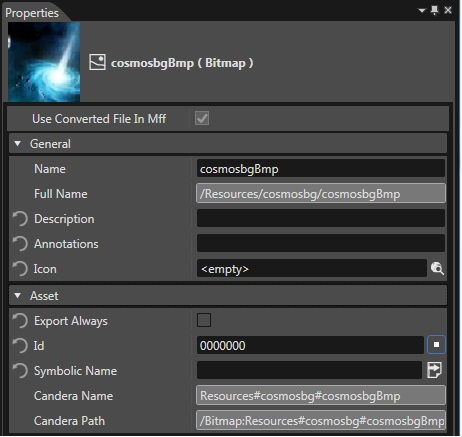
As an example, a bitmap called "cosmosbgBmp" is assigned a symbolic name in a SceneComposer solution:

<div drawio-diagram="1964"><img src="https://doc316en.candera.eu/uploads/images/drawio/2023-02/drawing-4-1676876821.png" alt=""/></div>

The "Id" field in SceneComposer displays by default "0000000". For this default, SceneComposer will generate a hash value for the Id. In case a custom value greater than '0' is entered in this field, the custom value will be generated instead, which is guaranteed to remain the same permanently, while the generated hash value could change over time.

Either during asset export, or explicitly via 'File -&gt; Export Symbolic Names ...' menu, a header file is generated by SceneComposer containing all symbolic names defined in the solution. For the bitmap symbolic names, the export looks like:

```
namespace CgiAssetNames {
    static const Candera::Id cosmosbgBmp = CDA_LIBRARY_ASSETID(0x0U, 0x11008CU);
} //namespace CgiAssetNames
```

To access this bitmap, use the interface [Candera::AssetProvider::GetBitmapById](http://dev.doc.cgistudio.at/APILINK/class_candera_1_1_asset_provider.html#a85e81d0b45b8340905ac5a98920389d5):

```
        Bitmap::SharedPointer bitmap = Base::GetAssetProvider()->GetBitmapById(CgiAssetNames::cosmosbgBmp);
```

Use the same approach for all other assets like displays, render target, nodes, font and raw data, ...

#####   
**Query Candera Compile Switches**   


##### <a class="anchor" id="bkmrk--30"></a>Candera Compile Switches

Note that [Candera](http://dev.doc.cgistudio.at/APILINK/namespace_candera.html "[DataBinding_RefTypeSample]") compile switches are documented in [Candera Configuration](http://dev.doc.cgistudio.at/APILINK/group___config.html).

As an example, in case of DEVICE device, following queries are supported: (DEVICE stands for your device)

```
#if CANDERA_DEVICE==DEVICE
    ...
#endif
```

Similarily:

```
#ifdef CANDERA_DEVICE_DEVICE
    ...
#endif
```