# Planar Shadows

#### <a class="anchor" id="bkmrk--5"></a>Description

This chapter describes the planar shadow technique supported by [Candera](http://dev.doc.cgistudio.at/APILINK/namespace_candera.html "[DataBinding_RefTypeSample]").

#### **Introduction** 

##### <a class="anchor" id="bkmrk--7"></a>Planar Shadows

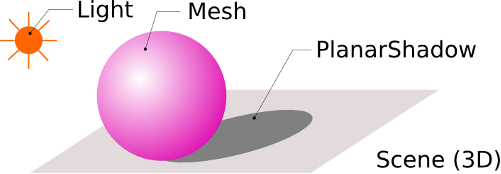
Planar shadows are used to algorithmically simulate flat shadows on planar surfaces.

The shadow effect is obtained using a [Candera::PlanarShadow](http://dev.doc.cgistudio.at/APILINK/class_candera_1_1_planar_shadow.html "PlanarShadow implements a simple technique to simulate shadow casting. Basically a PlanarShadow node ...") object which is drawn using its world transformation matrix multiplied with a projection matrix, that projects its vertices onto a predefined plane with respect to the position of an associated light source.

<div drawio-diagram="2439"><img src="https://doc316en.candera.eu/uploads/images/drawio/2023-02/drawing-4-1677221907.png" alt=""/></div>

<div class="contents" id="bkmrk--0"><div class="textblock">  
</div></div>####   
**Workflow** 

##### <a class="anchor" id="bkmrk--9"></a>Inventory

The figure below shows the basic setup of a scene needed to generate the planar shadow effect.

<div drawio-diagram="2440"><img src="https://doc316en.candera.eu/uploads/images/drawio/2023-02/drawing-4-1677221947.png" alt=""/></div>

<div class="contents" id="bkmrk--2"><div class="contents"><div class="textblock">  
</div></div></div>##### <a class="anchor" id="bkmrk--11"></a>Light

Light should be of type point, spot or directional.

```
    m_light = <a class="code" href="http://dev.doc.cgistudio.at/APILINK/group___c_o_u_r_i_e_r___v_i_s_u_a_l_i_z_a_t_i_o_n.html#ggaf0e93dc4242f607c3c8d13dafd036af9aaabfa5309af24986d3111a092449f857">Light::Create</a>();
    m_light->SetName("Light1");
    m_light->SetType(Light::Point);
    m_light->SetDiffuse(<a class="code" href="http://dev.doc.cgistudio.at/APILINK/group___behaviors_control.html#ggae7abc816df647d0ecbc280480fefb788a6d1d4da086e381cb2c5a5ce6a2513ebd">Color</a>(1.0f, 1.0f, 1.0f));
    m_light->SetSpecular(<a class="code" href="http://dev.doc.cgistudio.at/APILINK/group___behaviors_control.html#ggae7abc816df647d0ecbc280480fefb788a6d1d4da086e381cb2c5a5ce6a2513ebd">Color</a>(0.0f, 0.0f, 0.0f));
    m_light->SetRenderingEnabled(true);
```

##### <a class="anchor" id="bkmrk--12"></a>Shadow Caster

The following objects can be used as shadow caster: [Candera::LineList](http://dev.doc.cgistudio.at/APILINK/class_candera_1_1_line_list.html "The LineList represents a list of lines (segments). It can be used to store a wireframe, a list of connected vertices, or just a list of isolated segments. A generic LineList instance can be created by the static method LineList::Create. A wireframe LineList can be created out of a Mesh by the static helper function Math3D::CreateLineListFromMesh."), [Candera::Billboard](http://dev.doc.cgistudio.at/APILINK/class_candera_1_1_billboard.html "The class Billboard represents a Plane that can align towards camera automatically, according to the alignment type set. Thus, Billboards are quite often used as "imposters" pretending to be a 3D geometry by showing a 2D image that is always facing the camera. In order to relief distinction between Billboard and PointSprite see following comparison: + Billboards support rectangular dimension and non-uniform scale, + Billboards support different rotation techniques (see Alignment), whereas PointSprites are aligned according to CenterEyeAlignment, exclusively. + Billboards take local rotation and scale into account (see class Transformable), whereas PointSprites ignore Transformable parameters others than position. + PointSprites have a performance advantage due to less geometry (one instead of 4 vertices). Overall recommendation: Use PointSprites for spherical shapes like particles, lens flares, sparkles, dust which are screen aligned (see Billboard::CameraUpAlignment). Further, use Billboards for world up oriented clouds, text, or yaw axis aligned trees, and signs, etc. Note: The Billboard - because of absent normals - does not support lighting. Belows sketch depicts the layout of a Billboard. W U:0,V:1 +-----+ U:1,V:1 H | X | Legend: texture coordinates: U,V; Width: W, Height: H, Local Center: X U:0,V:0 +-----+ U:1,V:0.") and [Candera::Mesh](http://dev.doc.cgistudio.at/APILINK/class_candera_1_1_mesh.html "The class Mesh represents a three-dimensional rigid body object defined by polygons. The Mesh's polygonal surface is defined by its VertexBuffer. Each Mesh must have exactly one Appearance set, in order to specify how the Mesh geometry is rendered.").

##### <a class="anchor" id="bkmrk--13"></a>Planar Shadow

The [Candera::PlanarShadow](http://dev.doc.cgistudio.at/APILINK/class_candera_1_1_planar_shadow.html "PlanarShadow implements a simple technique to simulate shadow casting. Basically a PlanarShadow node ...") is the object which actually draws the shadow onto a specified plane. By default, the parent node's vertex buffer is used. Consequently the PlanarShadow node should be attached as child of the shadow caster.

```
    m_shadow = <a class="code" href="http://dev.doc.cgistudio.at/APILINK/group___c_o_u_r_i_e_r___v_i_s_u_a_l_i_z_a_t_i_o_n.html#ggaf0e93dc4242f607c3c8d13dafd036af9aaabfa5309af24986d3111a092449f857">PlanarShadow::Create</a>();
    m_shadow->GetAppearance()->SetShader(m_shaderShadow); // RefTrans_RefUniDiffuseMat
    m_shadow->SetName("Shadow");
    m_shadow->SetPlane(Plane(Vector3(0.0f, 0.0f, 1.0f), 75.0f));
    m_shadow->SetLight(m_light);
    m_current->AddChild(m_shadow); // attach planar shadow to the shadow caster 
```

It's also possible to explicitly provide a dedicated vertex buffer which will be rendered as shadow, see the snippet below:

```
                m_shadow->SetAutoVertexBufferEnabled(false);
                m_shadow->GetVertexBuffer()->Unload();
                m_shadow->SetVertexBuffer(m_meshes[1]->GetVertexBuffer());
                m_shadow->GetVertexBuffer()->Upload();
```

[Candera::PlanarShadow](http://dev.doc.cgistudio.at/APILINK/class_candera_1_1_planar_shadow.html "PlanarShadow implements a simple technique to simulate shadow casting. Basically a PlanarShadow node ...") supports also an optional alignment of the shadow plane to a given node (alignmentNode). If this node it set, the shadow plane's distance and direction are transformed locally according to alignmentNode's transformation matrix. If node is not set, the shadow plane's parameters are not transformed at all. See snipped below to set alignmentNode:

```
                m_shadow->SetAlignmentNode(m_meshes[3]);
```

##### <a class="anchor" id="bkmrk--14"></a>Overlapping Shadows

To avoid double blending of semi transparent shadows stencil buffers can be used. The PlanarShadow's appearance already contains a pre-configured RenderMode with stencil buffers configured to only draw on fragments with a stencil value other than this PlanarShadows unique Id. After drawing, the value gets replaced to the current stencil reference value, such that the stencil test doesn't pass any more on future fragments to write.

<div class="contents" id="bkmrk-to-get-this-mechanis"><div class="contents"><div class="textblock"><dl class="note"><dd><p class="callout info">To get this mechanism running ensure that the camera always clears the stencil buffer to 0 every frame.</p>

<p class="callout info">The GraphicDeviceUnit has to be initialized accordingly to support stencil buffers.</p>

</dd></dl></div></div></div>##### <a class="anchor" id="bkmrk--15"></a>Constraints

<div class="contents" id="bkmrk-only-flat-planar-sur"><div class="textblock">- Only flat planar surfaces are considered as areas to draw the shadow on.
- Every object that intends to cast a shadow, must have a dedicated shadow child node for each light source, as well as for each plane acting as shadow receiver.
- If vertex buffer transformations shall be considered (e.g. morphing meshes or displacement mapping), a dedicated shader has to be implemented for the shadow object.
</div></div>####   
**Example** 

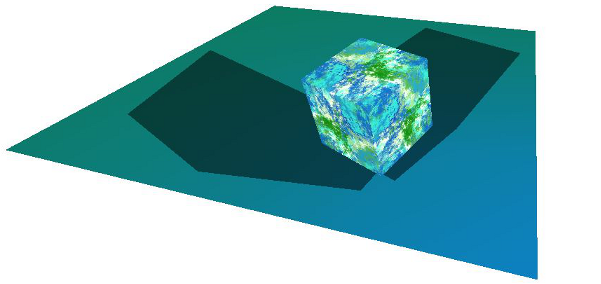
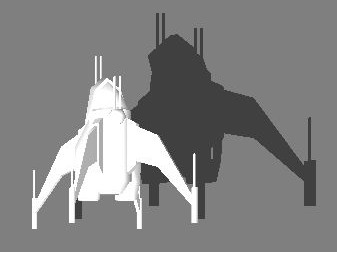
The example shows two planar shadows casts by a cube.

<div drawio-diagram="2441"><img src="https://doc316en.candera.eu/uploads/images/drawio/2023-02/drawing-4-1677222011.png" alt=""/></div>

<div class="contents" id="bkmrk--4"><div class="contents"><div class="textblock">  
</div></div></div>##### <a class="anchor" id="bkmrk--17"></a>Planar Shadow Example in SceneComposer

To experiment with the Planar Shadow in SceneComposer use solution **PlanarShadow** from folder *cgi\_studio\_player/content/Tutorials/08\_SpecialRenderTechniques/Special3DRenderTechniques*.