# Performance Analysis > Introduction

#### <a class="anchor" id="bkmrk--1"></a>Performance Analysis with CGI Analyzer

By enabling the [Candera](http://dev.doc.cgistudio.at/APILINK/namespace_candera.html "[DataBinding_RefTypeSample]") Monitor component (CMake: *FEATSTD\_MONITOR\_ENABLED*), [Candera](http://dev.doc.cgistudio.at/APILINK/namespace_candera.html "[DataBinding_RefTypeSample]") code is instrumented with performance traces, which are evaluated by the CGI Analyzer tool. In addition, also custom instrumentations can be added to applications, which will be visible in CGI Analyzer.

<div drawio-diagram="2317"><img src="https://doc316en.candera.eu/uploads/images/drawio/2023-02/drawing-4-1677055717.png" alt=""/></div>

<div class="contents" id="bkmrk--0"><div class="contents"><div class="textblock"><div class="image">  
</div></div></div></div>#### <a class="anchor" id="bkmrk--3"></a>Offline Analysis

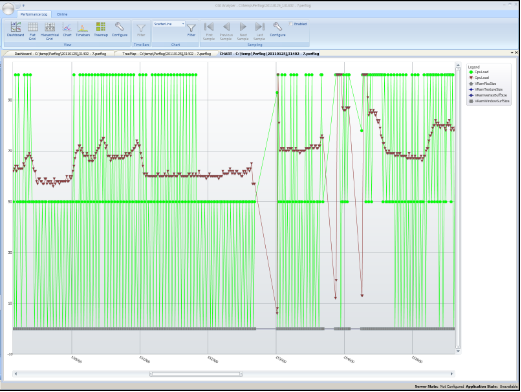
Performance logs are recorded with [Candera](http://dev.doc.cgistudio.at/APILINK/namespace_candera.html "[DataBinding_RefTypeSample]") Monitor and can be evaluated in CGI Analyzer regarding:

<div class="contents" id="bkmrk-frame-rates-cpu%2Fgpu-"><div class="contents"><div class="textblock">- frame rates
- CPU/GPU load
- CPU/GPU memory usage

</div></div></div>#### <a class="anchor" id="bkmrk--4"></a>Online Analysis

With online experiments, performance bottlenecks can be discovered: If framerate goes up after deactivating a dedicated part of the [Candera](http://dev.doc.cgistudio.at/APILINK/namespace_candera.html "[DataBinding_RefTypeSample]") Engine or the rendering pipeline, the bottleneck is located.

Following online experiments are supported:

<div class="contents" id="bkmrk-replace-textures-by-"><div class="contents"><div class="textblock">- Replace textures by 2x2 texture
- Replace fragment shader with a very simple one
- Ignore draw calls

</div></div></div>Besides online experiments, CGI Analyzer Online Analysis supports:

<div class="contents" id="bkmrk-live-display-of-key-"><div class="contents"><div class="textblock">- Live display of key performance indicators (frame rate, CPU load, GPU load), where available
- Computation and transfer of Render Benchmarks from target to host (for multi frequency rendering)
- Online determination of scene graph characteristics (number of vertices, texture sizes, render order)
- Online measurement of render times (for each node on a per-camera base)
- Guards (FPS, unconditional)
</div></div></div>For more information about CGI Analyzer, refer to <span style="color: rgb(230, 126, 35);">[CGI Analyzer User Manual](https://doc316en.candera.eu/books/analyzer)</span>.