# Multi Pass Effects in Candera > Examples for Local 3D Effect Shaders

#### Description

This chapter describes special 3D effect shaders techniques supported by [Candera](http://dev.doc.cgistudio.at/APILINK/namespace_candera.html "[DataBinding_RefTypeSample]").

#### **Fur**

##### Description

This chapter describes how to generate the fur effect using the multipass appearance technique supported by [Candera](http://dev.doc.cgistudio.at/APILINK/namespace_candera.html "[DataBinding_RefTypeSample]").

##### **Introduction** 

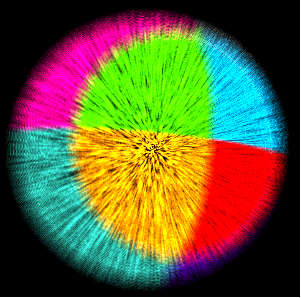
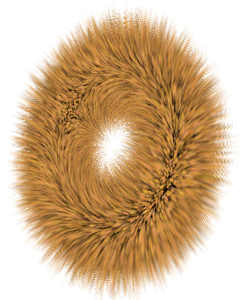
The fur effect is produce by rendering the node multiple times with different appearances which are blended together. Each appearance will use the same combination of noise and color map textures but with different and specific render states. For each appearance the following uniforms will have to be set specifically: <span style="color: rgb(230, 126, 35);">[\[1\]](https://doc316en.candera.eu/link/549#bkmrk-references%C2%A0)</span>

<div class="contents" id="bkmrk-u_colorscale---fur-c"><div class="contents"><div class="textblock">- u\_ColorScale - fur color scale.
- u\_Scale - scale factor to manipulate vertices along normals
- u\_PassIndex - render pass index

</div></div></div><div drawio-diagram="2554"><img src="https://doc316en.candera.eu/uploads/images/drawio/2023-02/drawing-4-1677461268.png" alt=""/></div>

<div class="contents" id="bkmrk--0"></div>##### **Workflow** 

##### <a class="anchor" id="bkmrk--19"></a>Appearances

Because the generation of the fur effect implies that the node has to be rendered multiple times, a special appearance needs to be used: [Candera::MultiPassAppearance](http://dev.doc.cgistudio.at/APILINK/class_candera_1_1_multi_pass_appearance.html "A MultiPassAppearance enables a node to be rendered multiple times with different appearance settings..."). The particularity of this appearance is that it keeps a pointer to the next appearance, defining so a sequence of render passes.

<div class="contents" id="bkmrk-a-nice-fur-effect-is"><div class="contents"><div class="contents"><div class="textblock"><dl class="note"><dd><p class="callout info">A nice fur effect is obtained with at least 10 render passes.</p>

</dd></dl><div class="fragment">  
</div></div></div></div></div>```
    for (int i = 0; i<= 15; i++) {
        m_furAppearances[i] = <a class="code" href="http://dev.doc.cgistudio.at/APILINK/group___c_o_u_r_i_e_r___v_i_s_u_a_l_i_z_a_t_i_o_n.html#ggaf0e93dc4242f607c3c8d13dafd036af9aaabfa5309af24986d3111a092449f857">MultiPassAppearance::Create</a>();
        // Configure the appearances
        // ...
        // End of appearances configuration
        if (i > 0) {
            m_furAppearances[i-1]->SetNextPass(m_furAppearances[i]);
        }
    }
    mesh->SetAppearance(m_furAppearances[0]);
```

##### <a class="anchor" id="bkmrk--20"></a>Shader

The table below presents the vertex and fragment shader needed to generate the fur effect:

<div class="contents" id="bkmrk-vertex-shader-reftra"><div class="contents"><div class="textblock"><table class="doxtable"><tbody><tr><td valign="top">Vertex shader</td><td valign="top">RefTransFur</td></tr><tr><td valign="top">Fragment shader</td><td valign="top">RefUniColorTexFur</td></tr></tbody></table>

</div></div></div>Set this shader for all the appearances:

```
    m_furAppearances[i]->SetShader(m_furShader);      
```

<div class="contents" id="bkmrk-lighting-and-materia"><div class="contents"><div class="textblock"><div class="fragment">  
</div><dl class="note"><dt></dt><dd><p class="callout info">Lighting and material has no influence on the fur effect.</p>

</dd></dl></div></div></div>##### <a class="anchor" id="bkmrk--21"></a>Shader Parameters Setter

Configure the uniforms setter as follows:

```
        m_furSetter[i] = <a class="code" href="http://dev.doc.cgistudio.at/APILINK/group___c_o_u_r_i_e_r___v_i_s_u_a_l_i_z_a_t_i_o_n.html#ggaf0e93dc4242f607c3c8d13dafd036af9aaabfa5309af24986d3111a092449f857">GenericShaderParamSetter::Create</a>();
        m_furSetter[i]->SetModelViewProjectionMatrix4Enabled(true);
        m_furSetter[i]->SetLightActivationEnabled(true);
        m_furSetter[i]->SetMaterialActivationEnabled(true);
        m_furSetter[i]->SetTextureActivationEnabled(true);
```

Prepare the uniforms data:

```
        m_furColorScale[0] = 0.2196f;
        m_furColorScale[1] = 0.2202f;
        m_furColorScale[2] = 0.2202f;
        m_furColorScale[3] = 1.0f;        
        
        if ( i == 0 ) {
            m_furScale = 1.0f;
        } 
        else {
            m_furScale = 0.01f;        
        }        
        m_passIndex[i] = ((Float) i);
```

Set the uniforms using the shader parameter setter:

```
        m_furSetter[i]->SetUniform("u_ColorScale",Shader::FloatVec4,m_furColorScale);
        m_furSetter[i]->SetUniform("u_Scale",Shader::Float,&m_furScale);
        m_furSetter[i]->SetUniform("u_PassIndex",Shader::Float,&m_passIndex[i]);
```

##### <a class="anchor" id="bkmrk--22"></a>Material Configuration

```
        if ( i == 0) {
            m_furAppearances[i]->SetMaterial(<a class="code" href="http://dev.doc.cgistudio.at/APILINK/group___c_o_u_r_i_e_r___v_i_s_u_a_l_i_z_a_t_i_o_n.html#ggaf0e93dc4242f607c3c8d13dafd036af9aaabfa5309af24986d3111a092449f857">Material::Create</a>());
        } 
        else {
            m_furAppearances[i]->SetMaterial(m_furAppearances[0]->GetMaterial());
        }
```

##### <a class="anchor" id="bkmrk--23"></a>Noise texture

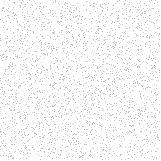
<div drawio-diagram="2556"><img src="https://doc316en.candera.eu/uploads/images/drawio/2023-02/drawing-4-1677461358.png" alt=""/></div>

<div class="contents" id="bkmrk--2"><div class="contents"><div class="textblock">  
</div></div></div>Set the fur appearance noise texture:

```
    m_furAppearances[i]->SetTexture(m_furNoise, 0);
```

##### <a class="anchor" id="bkmrk--25"></a>Color map texture

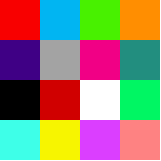
The color map texture is meant to provide a color for the fur.

<div drawio-diagram="2557"><img src="https://doc316en.candera.eu/uploads/images/drawio/2023-02/drawing-4-1677461381.png" alt=""/></div>

<div class="contents" id="bkmrk--4"><div class="contents"><div class="textblock">  
</div></div></div>Set the fur appearance color map texture:

```
    m_furAppearances[i]->SetTexture(m_furColor, 1);
```

##### <a class="anchor" id="bkmrk--27"></a>Render Mode

Set and configure a Render Mode for all transparency layers (appearances 1 to 15).

```
    if (i > 0) {
        m_furAppearances[i]->GetRenderMode()->SetBlendingEnabled(true);
        m_furAppearances[i]->GetRenderMode()->SetBlendMode(RenderMode::SourceAlpha, RenderMode::One, RenderMode::Add);
    }
```

##### **Example** 

Here is exemplified the fur effect applied on sphere:

<div drawio-diagram="2558"><img src="https://doc316en.candera.eu/uploads/images/drawio/2023-02/drawing-4-1677461417.png" alt=""/></div>

<div class="contents" id="bkmrk--6"><div class="contents"><div class="textblock">  
</div></div></div>##### <a class="anchor" id="bkmrk--29"></a>Fur Effect in SceneComposer

To experiment with the fur effect in SceneComposer use solution **ShaderExamples** from folder *cgi\_studio\_player/content/Tutorials/04\_ShaderUsage*.

##### **References** 

<a class="anchor" id="bkmrk--30"></a>\[1\] Image taken from [http://www.xbdev.net/directx3dx/specialX/Fur/index.php](http://www.xbdev.net/directx3dx/specialX/Fur/index.php)

---

#### **Gooch Effect** 

##### Description

This chapter describes how to generate the Gooch effect using the multipass appearance technique supported by [Candera](http://dev.doc.cgistudio.at/APILINK/namespace_candera.html "[DataBinding_RefTypeSample]").

##### **Introduction** 

##### Gooch Effect

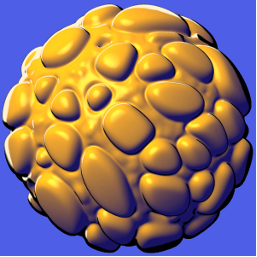
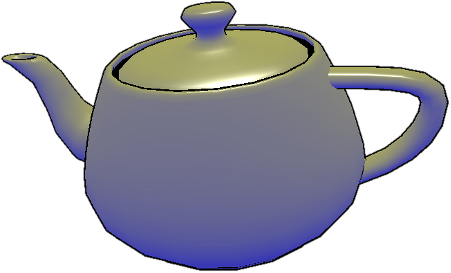
The Gooch effect is a non photorealistic technique which simulates the appearance of technical illustration.

The effect is generated in two render passes. In the first pass the object is drawn in warm - cool colors: all surfaces that are facing toward the light source are drawn in warm colors (red, yellow etc), all surfaces away from the light source are drawn in cool colors (blue, violet etc.). The second render pass draws the silhouette of the object with a fixed color (e.g. black). <span style="color: rgb(230, 126, 35);">[\[1\]](https://doc316en.candera.eu/link/549#bkmrk-references%C2%A0-0)</span>

<div drawio-diagram="2562"><img src="https://doc316en.candera.eu/uploads/images/drawio/2023-02/drawing-4-1677461536.png" alt=""/></div>

<div class="textblock" id="bkmrk--9"></div><div class="textblock" id="bkmrk--10"></div>##### **Workflow** 

##### <a class="anchor" id="bkmrk--35"></a>Inventory

In order to generate the Gooch effect on a node you need:

<div class="contents" id="bkmrk-two-multipassappeara"><div class="contents"><div class="textblock">- Two MultiPassAppearances
- Specific shader for each appearance
- Specific shader parameters setter for each appearance
- Material
- Render Modes

</div></div></div>##### <a class="anchor" id="bkmrk--36"></a>Appearances

The Gooch effect is generated in two render passes so we need two MultiPassAppearances:

```
    m_goochAppearance1 = <a class="code" href="http://dev.doc.cgistudio.at/APILINK/group___c_o_u_r_i_e_r___v_i_s_u_a_l_i_z_a_t_i_o_n.html#ggaf0e93dc4242f607c3c8d13dafd036af9aaabfa5309af24986d3111a092449f857">MultiPassAppearance::Create</a>();
    m_goochAppearance2 = <a class="code" href="http://dev.doc.cgistudio.at/APILINK/group___c_o_u_r_i_e_r___v_i_s_u_a_l_i_z_a_t_i_o_n.html#ggaf0e93dc4242f607c3c8d13dafd036af9aaabfa5309af24986d3111a092449f857">MultiPassAppearance::Create</a>();
    m_goochAppearance1->SetNextPass(m_goochAppearance2);

    m_mesh->SetAppearance(m_goochAppearance1);
```

##### <a class="anchor" id="bkmrk--37"></a>Shader

Each appearance need a specific shader, see table below:

<div class="contents" id="bkmrk-appearance-vertex-sh"><div class="contents"><div class="textblock"><table border="1" cellpadding="5" cellspacing="0" width="500"><tbody><tr bgcolor="#d4d4d4"><th width="34%">Appearance</th><th width="33%">Vertex shader</th><th width="33%">Fragment shader</th></tr><tr><td>m\_goochAppearance1</td><td>RefTransLight1Gooch</td><td>RefGoochShading</td></tr><tr><td>m\_goochAppearance2</td><td>RefTransScale</td><td>RefUniColor</td></tr></tbody></table>

</div></div></div>Set the shader for each appearance:

```
    m_goochAppearance1->SetShader(m_goochPass1Shader);
    m_goochAppearance2->SetShader(m_goochPass2Shader);
```

##### <a class="anchor" id="bkmrk--38"></a>Shader Parameter Setter

The uniform setter will have to be set as follows:

```
    m_goochUniformSetter1 = <a class="code" href="http://dev.doc.cgistudio.at/APILINK/group___c_o_u_r_i_e_r___v_i_s_u_a_l_i_z_a_t_i_o_n.html#ggaf0e93dc4242f607c3c8d13dafd036af9aaabfa5309af24986d3111a092449f857">GenericShaderParamSetter::Create</a>();
    m_goochUniformSetter1->SetMaterialActivationEnabled(true);
    m_goochUniformSetter1->SetLightActivationEnabled(true);
    m_goochUniformSetter1->SetLightsCoordinateSpace(Light::World);
    m_goochUniformSetter1->SetModelViewProjectionMatrix4Enabled(true);
    m_goochUniformSetter1->SetModelMatrix4Enabled(true);
    m_goochUniformSetter1->SetNormalModelMatrix3Enabled(true);
    m_goochUniformSetter1->SetCameraPositionEnabled(true);
    m_goochAppearance1->SetShaderParamSetter(m_goochUniformSetter1);

    m_goochUniformSetter2 = <a class="code" href="http://dev.doc.cgistudio.at/APILINK/group___c_o_u_r_i_e_r___v_i_s_u_a_l_i_z_a_t_i_o_n.html#ggaf0e93dc4242f607c3c8d13dafd036af9aaabfa5309af24986d3111a092449f857">GenericShaderParamSetter::Create</a>();
    m_goochUniformSetter2->SetModelViewProjectionMatrix4Enabled(true); 
    m_goochAppearance2->SetShaderParamSetter(m_goochUniformSetter2);
```

Prepare uniform data:

```
    m_coolDiffuseWeight= 0.25f;
    m_warmDiffuseWeight = 0.5f;
    m_goochScale = 0.1f;

    m_coolColor[0] = 0.0f;
    m_coolColor[1] = 0.0f;
    m_coolColor[2] = 0.55f;
    m_coolColor[3] = 1.0f;

    m_warmColor[0] = 0.3f;
    m_warmColor[1] = 0.3f;
    m_warmColor[2] = 0.0f;
    m_warmColor[3] = 1.0f;

    m_silhouetteColor[0] = 0.0f;
    m_silhouetteColor[1] = 0.0f;
    m_silhouetteColor[2] = 0.0f;
    m_silhouetteColor[3] = 1.0f;
```

Set the uniforms:

```
    m_goochUniformSetter1->SetUniform("u_CoolDiffuseWeight", Shader::Float, &m_coolDiffuseWeight);
    m_goochUniformSetter1->SetUniform("u_WarmDiffuseWeight", Shader::Float, &m_warmDiffuseWeight);
    m_goochUniformSetter1->SetUniform("u_CoolColor", Shader::FloatVec4, m_coolColor);
    m_goochUniformSetter1->SetUniform("u_WarmColor", Shader::FloatVec4, m_warmColor);

    m_goochUniformSetter2->SetUniform("u_Scale", Shader::Float, &m_goochScale);
    m_goochUniformSetter2->SetUniform("u_Color", Shader::FloatVec4, m_silhouetteColor);
```

##### <a class="anchor" id="bkmrk--39"></a>Material Configuration

```
    m_goochAppearance1->SetMaterial(<a class="code" href="http://dev.doc.cgistudio.at/APILINK/group___c_o_u_r_i_e_r___v_i_s_u_a_l_i_z_a_t_i_o_n.html#ggaf0e93dc4242f607c3c8d13dafd036af9aaabfa5309af24986d3111a092449f857">Material::Create</a>());
    m_goochAppearance1->GetMaterial()->SetDiffuse(<a class="code" href="http://dev.doc.cgistudio.at/APILINK/group___behaviors_control.html#ggae7abc816df647d0ecbc280480fefb788a6d1d4da086e381cb2c5a5ce6a2513ebd">Color</a>(0.75f, 0.75f, 0.75f, 1.0f));
    m_goochAppearance1->GetMaterial()->SetAmbient(<a class="code" href="http://dev.doc.cgistudio.at/APILINK/group___behaviors_control.html#ggae7abc816df647d0ecbc280480fefb788a6d1d4da086e381cb2c5a5ce6a2513ebd">Color</a>(0.0f, 0.0f, 0.0f, 0.0f));
    m_goochAppearance1->GetMaterial()->SetSpecular(<a class="code" href="http://dev.doc.cgistudio.at/APILINK/group___behaviors_control.html#ggae7abc816df647d0ecbc280480fefb788a6d1d4da086e381cb2c5a5ce6a2513ebd">Color</a>(1.0f, 1.0f, 1.0f, 1.0f));
    m_goochAppearance1->GetMaterial()->SetSpecularPower(20.0f);

    m_goochAppearance2->SetMaterial(<a class="code" href="http://dev.doc.cgistudio.at/APILINK/group___c_o_u_r_i_e_r___v_i_s_u_a_l_i_z_a_t_i_o_n.html#ggaf0e93dc4242f607c3c8d13dafd036af9aaabfa5309af24986d3111a092449f857">Material::Create</a>());
```

##### <a class="anchor" id="bkmrk--40"></a>Render Mode

```
    m_goochAppearance1->SetRenderMode(<a class="code" href="http://dev.doc.cgistudio.at/APILINK/group___c_o_u_r_i_e_r___v_i_s_u_a_l_i_z_a_t_i_o_n.html#ggaf0e93dc4242f607c3c8d13dafd036af9aaabfa5309af24986d3111a092449f857">RenderMode::Create</a>());
    m_goochAppearance1->GetRenderMode()->SetCulling(RenderMode::BackFaceCulling);
    
    m_goochAppearance2->SetRenderMode(<a class="code" href="http://dev.doc.cgistudio.at/APILINK/group___c_o_u_r_i_e_r___v_i_s_u_a_l_i_z_a_t_i_o_n.html#ggaf0e93dc4242f607c3c8d13dafd036af9aaabfa5309af24986d3111a092449f857">RenderMode::Create</a>());
    m_goochAppearance2->GetRenderMode()->SetCulling(RenderMode::FrontFaceCulling);
```

##### **Example** 

Here is exemplified the Gooch effect:

<div drawio-diagram="2572"><img src="https://doc316en.candera.eu/uploads/images/drawio/2023-02/drawing-4-1677461853.png" alt=""/></div>

<div class="contents" id="bkmrk--12"><div class="contents"><div class="textblock">  
</div></div></div>##### <a class="anchor" id="bkmrk--42"></a>Gooch Effect in SceneComposer

To experiment with the Gooch effect in SceneComposer use solution **ShaderExamples** from folder *cgi\_studio\_player/content/Tutorials/04\_ShaderUsage*.