# Multi Pass Effects in Candera > Examples for Global 3D Effect Shaders

#### <a class="anchor" id="bkmrk--16"></a>Description

This chapter describes how global multi pass effects in [Candera](http://dev.doc.cgistudio.at/APILINK/namespace_candera.html "[DataBinding_RefTypeSample]") can be achieved and special 3D effect shaders techniques supported by [Candera](http://dev.doc.cgistudio.at/APILINK/namespace_candera.html "[DataBinding_RefTypeSample]").

#### **Depth of Field** 

##### <a class="anchor" id="bkmrk--18"></a>Description

This chapter describes how to generate the **Depth of Field** effect using the global multipass appearance technique supported by [Candera](http://dev.doc.cgistudio.at/APILINK/namespace_candera.html "[DataBinding_RefTypeSample]").

##### **Introduction** 

##### <a class="anchor" id="bkmrk--20"></a>Depth of Field

The Depth-of-Field effect simulates the natural blurring of foreground and background scene elements when viewed through a camera lens. The effect firstly separates the scene in Z order and then blurs the foreground and background images according to the values set in the Depth of Field effect parameters. The final image is composited from the processed originals.

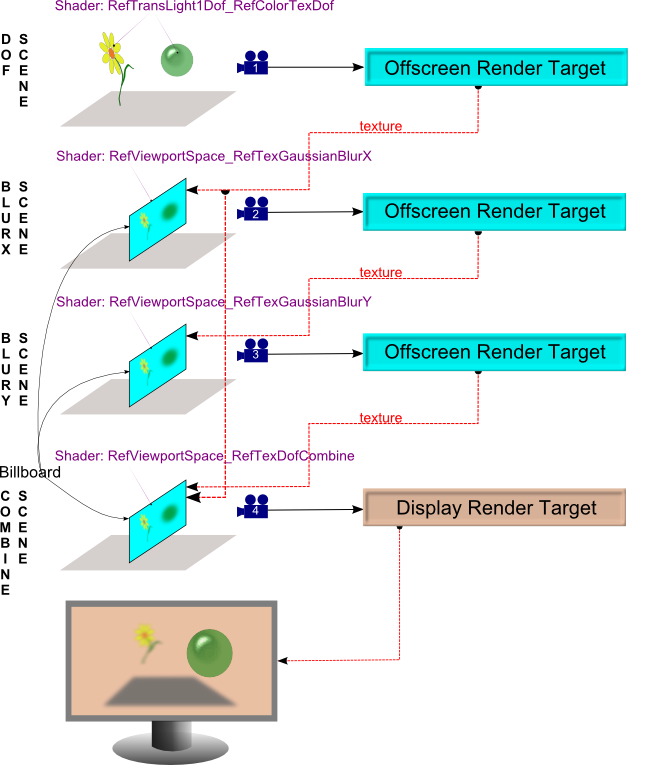
In [Candera](http://dev.doc.cgistudio.at/APILINK/namespace_candera.html "[DataBinding_RefTypeSample]"), the effect is realized using a global multipass technique which implies the rendering in four steps: <span style="color: rgb(230, 126, 35);"><sup>[\[1\]](#bkmrk-references%C2%A0)</sup></span>

<div class="contents" id="bkmrk-render-pass-1---rend"><div class="contents"><div class="textblock">- Render pass 1 - rendering the sharp scene, storing depth values in alpha channel
- Render pass 2 - blurring the result of the first render pass horizontally
- Render pass 3 - blurring the result of the second render pass vertically
- Render pass 4 - combine sharp and blurred picture, using focus-, focus range- and stored depth values, in order to realize the final result

</div></div></div><div drawio-diagram="2573"><img src="https://doc316en.candera.eu/uploads/images/drawio/2023-02/drawing-4-1677462269.png" alt=""/></div>

<div class="contents" id="bkmrk--0"><div class="textblock"></div></div>##### **Workflow** 

##### <a class="anchor" id="bkmrk--22"></a>Scenes

For an easier understanding on how to realize the Depth of Field effect we will use four scenes, each scene will correspond to a rendering step.   
  
First of all, the original main scene is taken and used as a texture on a billboard. The depth values of the images are saved in the alpha value in the offscreen frame buffer. In the second and third steps, the blurring is being done. For reasons of the performance, this step is parted into two steps:  
The resulting billboard of the first workflow step is blurred horizontally using a fragment shader. The resulting image is used as texture input for the next scene, which is subsequently blurred vertically.  
In the final step, the blurred images are combined with the sharp images from the first offscreen render target. The result is rendered as texture on a billboard placed in the final scene. A fourth camera displays the resulting Depth of Field effect applied on the main scene.

<div class="contents" id="bkmrk-the-billboards-shoul"><div class="contents"><div class="textblock"><dl class="note"><dt></dt><dd><p class="callout info">The Billboards should be rendered such that they cover the whole screen</p>

</dd></dl></div></div></div>The technique is also described schematically in the diagram below: <span style="color: rgb(230, 126, 35);"><sup>[\[1\]](#bkmrk-references%C2%A0)</sup></span>

<div drawio-diagram="2574"><img src="https://doc316en.candera.eu/uploads/images/drawio/2023-02/drawing-4-1677462360.png" alt=""/></div>

<div class="contents" id="bkmrk-remember-to-set-a-ca"><div class="contents"><div class="textblock"><dl class="note"><dt></dt><dd><p class="callout info">Remember to set a [Candera::RenderOrder](http://dev.doc.cgistudio.at/APILINK/class_candera_1_1_render_order.html "Defines the order(sequence) in which nodes are rendered. Collaborates with Renderer. Must cover functional correctness (translucent/transparent objects after opaque/solid objects) as well as optimization-related orderings (sorting by state, defining a background bin for rendering without depth checks). Nodes are assigned to bins; all nodes in an "earlier" bin are rendered before all nodes in a "later" bin. Two default bins are defined and must not be deleted. The opaque bin, which is sorted from front to back (DistanceToCameraOrderCriterion), and the transparent bin, which is sorted from back to front (ReverseDistanceToCameraOrderCriterion). If a Node has no specific assignment to a render order bin, it will be automatically assigned by Candera either to opaque or transparent bin, according to its RenderMode::IsAlphaBlendingEnabled setting.") object for each scene.</p>

</dd></dl></div></div></div>The sections below offer you some extra information needed to correctly set up the effect.

##### <a class="anchor" id="bkmrk--24"></a>Offscreen Render Targets

Create and configure all offscreen render targets that shall be used for cameras 1 - 3 as shown below:

```
    m_offscreenRenderTargetDof = Base::CreateGraphicDeviceUnit(DevicePackageDescriptor::OffscreenTarget3D);
    if (m_offscreenRenderTargetDof == 0) {
        return false;
    }

    sprintf(m_rtProperties.m_width, "%d", m_gdu->ToRenderTarget3D()->GetWidth());
    sprintf(m_rtProperties.m_height, "%d", m_gdu->ToRenderTarget3D()->GetHeight());
    sprintf(m_rtProperties.m_colorFormat, "%d", RgbaUnpackedColorFormat);
    sprintf(m_rtProperties.m_depthFormat, "%d", Depth32Format);

    const MetaInfo::GraphicDeviceUnitMetaInfo *meta = DevicePackageDescriptor::GetMetaInformation(m_offscreenRenderTargetDof->GetUnitType());
    meta->LookupItem("Width") && meta->LookupItem("Width")->Set(m_offscreenRenderTargetDof, m_rtProperties.m_width);
    meta->LookupItem("Height") && meta->LookupItem("Height")->Set(m_offscreenRenderTargetDof, m_rtProperties.m_height);
    meta->LookupItem("ColorFormat") && meta->LookupItem("ColorFormat")->Set(m_offscreenRenderTargetDof, m_rtProperties.m_colorFormat);
    meta->LookupItem("DepthFormat") && meta->LookupItem("DepthFormat")->Set(m_offscreenRenderTargetDof, m_rtProperties.m_depthFormat);

#if CANDERA_DEVICE_IMX6
    static_cast<iMX6FrameBufferObject*>(m_offscreenRenderTargetDof)->GetProperties().SetOwner(m_gdu->ToRenderTarget3D());
#endif
    m_offscreenRenderTargetDof->Upload();
```

##### <a class="anchor" id="bkmrk--25"></a>Shader Parameter Setter

The meshes from each scene will use a dedicated shader which will set specific uniforms for each scene. The uniforms needed to be set are:

<div class="contents" id="bkmrk-scaled-depth-value-%28"><div class="contents"><div class="contents"><div class="textblock">- Scaled depth value (u\_depthScale): factor used to scale the depth value
- Circle of confusion (u\_CocScale): factor used to scale the size of circle of confusion
- Focus range (u\_Range): factor used in the computation of the weight of sharpness / blurriness
- Focus (u\_Focus): factor used in the computation of the weight of sharpness / blurriness

<div class="fragment">  
</div></div></div></div></div>```
    // DoF Scene
    m_objectSps = <a class="code" href="http://dev.doc.cgistudio.at/APILINK/group___c_o_u_r_i_e_r___v_i_s_u_a_l_i_z_a_t_i_o_n.html#ggaf0e93dc4242f607c3c8d13dafd036af9aaabfa5309af24986d3111a092449f857">GenericShaderParamSetter::Create</a>();
    m_objectSps->SetLightsCoordinateSpace(Light::Object);
    m_objectSps->SetModelMatrix4Enabled(false);
    m_objectSps->SetNormalModelMatrix3Enabled(false);
    m_objectSps->SetUniform("u_depthScale",Shader::Float, &m_depthScale);

    // Blur Scene vertically
    m_blurXSps = <a class="code" href="http://dev.doc.cgistudio.at/APILINK/group___c_o_u_r_i_e_r___v_i_s_u_a_l_i_z_a_t_i_o_n.html#ggaf0e93dc4242f607c3c8d13dafd036af9aaabfa5309af24986d3111a092449f857">GenericShaderParamSetter::Create</a>();
    m_blurXSps->SetModelViewProjectionMatrix4Enabled(false);
    m_blurXSps->SetUniform("u_blurFactor",Shader::Float, &m_blurFactor);
    m_blurXSps->SetUniform("u_offsetLeft", Shader::Float, &m_viewportLeft);
    m_blurXSps->SetUniform("u_offsetTop", Shader::Float, &m_viewportTop);

    // Blur Scene horizontally
    m_blurYSps = <a class="code" href="http://dev.doc.cgistudio.at/APILINK/group___c_o_u_r_i_e_r___v_i_s_u_a_l_i_z_a_t_i_o_n.html#ggaf0e93dc4242f607c3c8d13dafd036af9aaabfa5309af24986d3111a092449f857">GenericShaderParamSetter::Create</a>();
    m_blurYSps->SetModelViewProjectionMatrix4Enabled(false);
    m_blurYSps->SetUniform("u_blurFactor",Shader::Float, &m_blurFactor);
    m_blurYSps->SetUniform("u_offsetLeft", Shader::Float, &m_viewportLeft);
    m_blurYSps->SetUniform("u_offsetTop", Shader::Float, &m_viewportTop);

    // Combine Scene
    m_dofCombineSps = <a class="code" href="http://dev.doc.cgistudio.at/APILINK/group___c_o_u_r_i_e_r___v_i_s_u_a_l_i_z_a_t_i_o_n.html#ggaf0e93dc4242f607c3c8d13dafd036af9aaabfa5309af24986d3111a092449f857">GenericShaderParamSetter::Create</a>();
    m_dofCombineSps->SetModelViewProjectionMatrix4Enabled(false);
    m_dofCombineSps->SetUniform("u_Range",Shader::Float, &m_range);
    m_dofCombineSps->SetUniform("u_Focus",Shader::Float, &m_focus);
    m_dofCombineSps->SetUniform("u_offsetLeft", Shader::Float, &m_viewportLeft);
    m_dofCombineSps->SetUniform("u_offsetTop", Shader::Float, &m_viewportTop);
```

##### <a class="anchor" id="bkmrk--26"></a>Camera

The cameras from the all three scenes should use perspective projection.

```
    SharedPointer<PerspectiveProjection> perspectiveProjection = <a class="code" href="http://dev.doc.cgistudio.at/APILINK/group___c_o_u_r_i_e_r___v_i_s_u_a_l_i_z_a_t_i_o_n.html#ggaf0e93dc4242f607c3c8d13dafd036af9aaabfa5309af24986d3111a092449f857">PerspectiveProjection::Create</a>();
    perspectiveProjection->SetNearZ(0.001F);
    perspectiveProjection->SetFarZ(100.0F);
    perspectiveProjection->SetFovYDegrees(45.0F);
    perspectiveProjection->SetAspectRatio(static_cast<Float>(dispSettings->width) / static_cast<Float>(dispSettings->height));
```

Set the clear mode for the first two cameras as below:

```
    m_clearMode.SetClearColor(<a class="code" href="http://dev.doc.cgistudio.at/APILINK/group___behaviors_control.html#ggae7abc816df647d0ecbc280480fefb788a6d1d4da086e381cb2c5a5ce6a2513ebd">Color</a>(0.8f,0.8f,0.8f,1.0f));
    m_clearMode.SetColorClearEnabled(true);
    m_clearMode.SetDepthClearEnabled(true);
    m_clearMode.SetClearDepth(1.0f);
```

##### <a class="anchor" id="bkmrk--27"></a>Billboard Textures

This code snippet shows you how to create the textures for the billboards. First create a [Candera::ProxyTextureImage](http://dev.doc.cgistudio.at/APILINK/class_candera_1_1_proxy_texture_image.html "The class ProxyTextureImage provides a TextureImage interface to an externally maintained image sourc..."):

```
    SharedPointer<ProxyTextureImage> proxyTexImgBlurredX = <a class="code" href="http://dev.doc.cgistudio.at/APILINK/group___c_o_u_r_i_e_r___v_i_s_u_a_l_i_z_a_t_i_o_n.html#ggaf0e93dc4242f607c3c8d13dafd036af9aaabfa5309af24986d3111a092449f857">ProxyTextureImage::Create</a>(m_offscreenRenderTargetBlurX->ToImageSource3D());
    SharedPointer<ProxyTextureImage> proxyTexImgBlurredY = <a class="code" href="http://dev.doc.cgistudio.at/APILINK/group___c_o_u_r_i_e_r___v_i_s_u_a_l_i_z_a_t_i_o_n.html#ggaf0e93dc4242f607c3c8d13dafd036af9aaabfa5309af24986d3111a092449f857">ProxyTextureImage::Create</a>(m_offscreenRenderTargetBlurY->ToImageSource3D());
```

Then create and configure the texture:

```
    SharedPointer<Texture> proxyTexBlurredX = <a class="code" href="http://dev.doc.cgistudio.at/APILINK/group___c_o_u_r_i_e_r___v_i_s_u_a_l_i_z_a_t_i_o_n.html#ggaf0e93dc4242f607c3c8d13dafd036af9aaabfa5309af24986d3111a092449f857">Texture::Create</a>();
    proxyTexBlurredX->SetTextureImage(proxyTexImgBlurredX);
    proxyTexBlurredX->SetMipMapFilter(Texture::MipMapNone);
    proxyTexBlurredX->SetMagnificationFilter(Texture::MinMagNearest);
    proxyTexBlurredX->SetMinificationFilter(Texture::MinMagNearest);
    proxyTexBlurredX->SetWrapModeU(Texture::ClampToEdge);
    proxyTexBlurredX->SetWrapModeV(Texture::ClampToEdge);

    SharedPointer<Texture> proxyTexBlurredY = <a class="code" href="http://dev.doc.cgistudio.at/APILINK/group___c_o_u_r_i_e_r___v_i_s_u_a_l_i_z_a_t_i_o_n.html#ggaf0e93dc4242f607c3c8d13dafd036af9aaabfa5309af24986d3111a092449f857">Texture::Create</a>();
    proxyTexBlurredY->SetTextureImage(proxyTexImgBlurredY);
    proxyTexBlurredY->SetMipMapFilter(Texture::MipMapNone);
    proxyTexBlurredY->SetMagnificationFilter(Texture::MinMagNearest);
    proxyTexBlurredY->SetMinificationFilter(Texture::MinMagNearest);
    proxyTexBlurredY->SetWrapModeU(Texture::ClampToEdge);
    proxyTexBlurredY->SetWrapModeV(Texture::ClampToEdge);
```

Repeat these two steps for all textures.

<div class="contents" id="bkmrk-the-billboard-from-t"><div class="contents"><div class="textblock"><dl class="note"><dt></dt><dd><p class="callout info">The billboard from the Combine Scene uses two textures. When you set the textures be sure that the *texture unit* value is set to "0" for the texture corresponding to the camera 1. Analogous, the other texture will have the *texture unit* value set to "1".</p>

</dd></dl></div></div></div>##### <a class="anchor" id="bkmrk--28"></a>Placing Billboards in Scenes

See Shader Usage in [Candera](http://dev.doc.cgistudio.at/APILINK/namespace_candera.html "[DataBinding_RefTypeSample]"): <span style="color: rgb(230, 126, 35);">[Global Multi Pass Effects](https://doc316en.candera.eu/link/476#bkmrk-global-multi-pass-ef)</span>

##### **Example** 

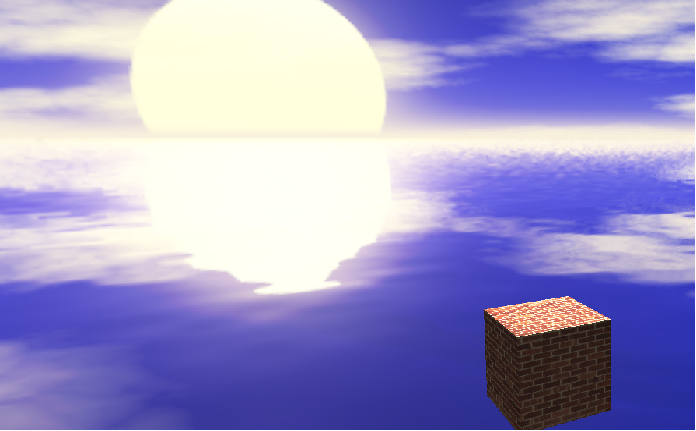
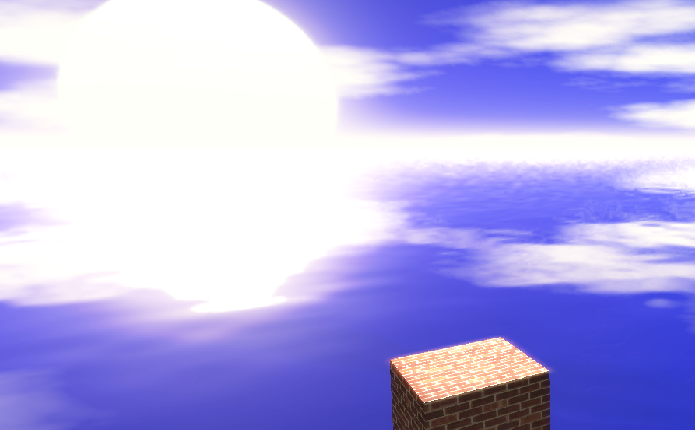
Here is exemplified the **Bloom** effect on a scene.

First image shows the scene without the effect:

<div drawio-diagram="2575"><img src="https://doc316en.candera.eu/uploads/images/drawio/2023-02/drawing-4-1677462432.png" alt=""/></div>

<div class="contents" id="bkmrk--4"><div class="contents"><div class="textblock">  
</div></div></div>Second image shows same scene but with the effect:

<div drawio-diagram="2576"><img src="https://doc316en.candera.eu/uploads/images/drawio/2023-02/drawing-4-1677462450.png" alt=""/></div>

<div class="contents" id="bkmrk--6"></div>##### **References** 

\[1\] [http://www.geeks3d.com/20090710/javascript-depth-of-field-effect](http://www.geeks3d.com/20090710/javascript-depth-of-field-effect)

---

#### **Bloom**   


##### <a class="anchor" id="bkmrk--31"></a>Description

This chapter describes how to generate the **Bloom** effect using the global multipass appearance technique supported by [Candera](http://dev.doc.cgistudio.at/APILINK/namespace_candera.html "[DataBinding_RefTypeSample]").

##### <a class="anchor" id="bkmrk--32"></a>**Introduction** 

##### <a class="anchor" id="bkmrk--33"></a>Bloom

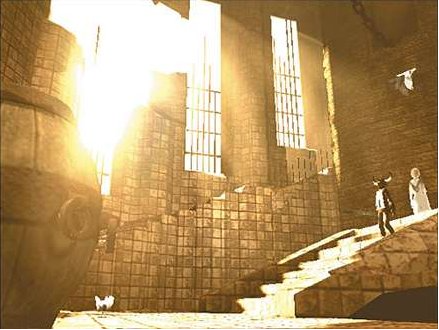
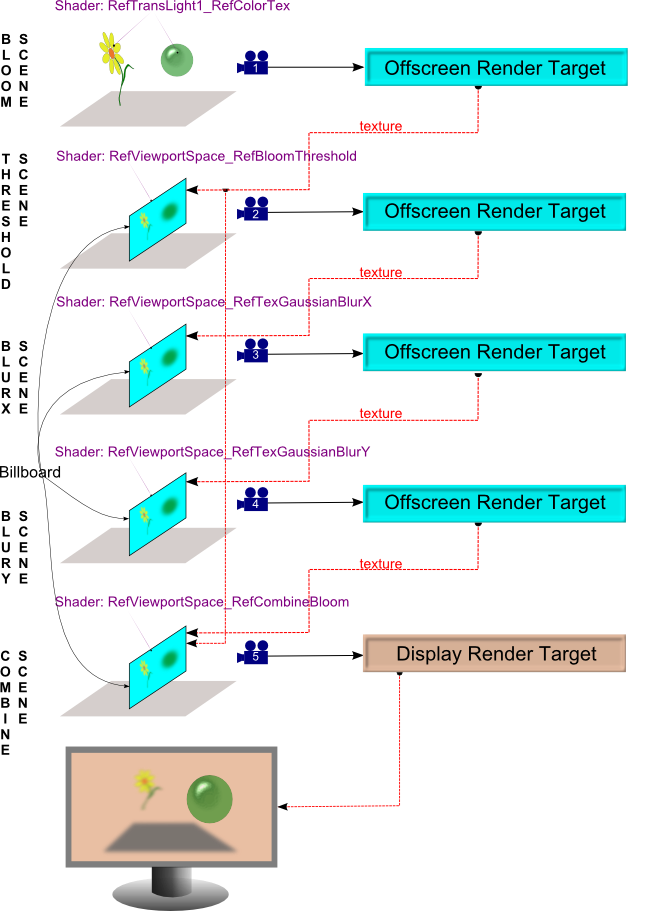
The Bloom-Effect is a shader effect used to simulate the appearance of very bright light. The effect firstly extracts the bright area of an image using a threshold filter. The extracted regions are further blurred in order to realize the simulation of light bleeding over darker regions.

The bloom effect is realized using a global multipass technique which implies the rendering in five steps: <span style="color: rgb(230, 126, 35);"><sup>[\[1\]](#bkmrk-references%C2%A0-0)</sup></span>

<div class="contents" id="bkmrk-render-pass-1---rend-0"><div class="contents"><div class="textblock">- Render pass 1 - rendering the sharp scene
- Render pass 2 - extract bright area using a threshold filter
- Render pass 3 - blurring the result of the second render pass horizontally
- Render pass 4 - blurring the result of the third render pass vertically
- Render pass 5 - combine sharp and blurred picture, using intensity as well as saturation of bloom texture and original scene texture, in order to generate the final result

</div></div></div><div drawio-diagram="2581"><img src="https://doc316en.candera.eu/uploads/images/drawio/2023-02/drawing-4-1677462702.png" alt=""/></div>

<div class="contents" id="bkmrk--9"><div class="textblock">  
</div></div>
##### **Workflow** 

##### <a class="anchor" id="bkmrk--35"></a>Scenes

For an easier understanding on how to realize the Bloom effect we will use five scenes, each scene will correspond to a rendering step.   
  
First of all, the original main scene is taken and used as a texture on a billboard. This billboard is rendered with a special shader that will extract the bright area of the texture using a threshold filter.  
In the second and third steps, the blurring is being done. For reasons of the performance, this step is parted into two steps: The resulting billboard of the first workflow step is rendered with a shader that will blur the images horizontally and these blurred images are rendered as texture on an another billboard placed in the third scene. The billboard of the third scene is then rendered with a shader that will blur the images vertically. This billboard is part of the fourth scene, viewed by a camera which is connected to a fourth offscreen render target.  
In the final step, the images of the blurred, bright area of the scene are combined with the sharp image from the first offscreen render target. The result is rendered as texture on a billboard placed in the final fifth scene. A fifth camera displays the resulting Bloom effect applied on the main scene.

<div class="contents" id="bkmrk-the-billboards-shoul-0"><div class="contents"><div class="textblock"><dl class="note"><dt></dt><dd><p class="callout info">The Billboards should be rendered such that they cover the whole screen</p>

</dd></dl></div></div></div>The technique is also described schematically in the diagram below:

<div drawio-diagram="2585"><img src="https://doc316en.candera.eu/uploads/images/drawio/2023-02/drawing-4-1677462763.png" alt=""/></div>

<div class="contents" id="bkmrk--11"><div class="contents"><div class="textblock">  
</div></div></div><div class="contents" id="bkmrk-remember-to-set-a-ca-0"><div class="contents"><div class="textblock"><dl class="note"><dd><p class="callout info">Remember to set a [Candera::RenderOrder](http://dev.doc.cgistudio.at/APILINK/class_candera_1_1_render_order.html "Defines the order(sequence) in which nodes are rendered. Collaborates with Renderer. Must cover functional correctness (translucent/transparent objects after opaque/solid objects) as well as optimization-related orderings (sorting by state, defining a background bin for rendering without depth checks). Nodes are assigned to bins; all nodes in an "earlier" bin are rendered before all nodes in a "later" bin. Two default bins are defined and must not be deleted. The opaque bin, which is sorted from front to back (DistanceToCameraOrderCriterion), and the transparent bin, which is sorted from back to front (ReverseDistanceToCameraOrderCriterion). If a Node has no specific assignment to a render order bin, it will be automatically assigned by Candera either to opaque or transparent bin, according to its RenderMode::IsAlphaBlendingEnabled setting.") object for each scene.</p>

</dd></dl></div></div></div>The sections below offer you some extra information needed to correctly set up the effect.

##### <a class="anchor" id="bkmrk--37"></a>Shader Parameter Setter

The meshes from each scene will use a dedicated shader which will set specific uniforms for each scene. The uniforms needed to be set are:

<div class="contents" id="bkmrk-bloom-brightness-thr"><div class="contents"><div class="contents"><div class="textblock">- Bloom Brightness Threshold value (u\_brightnessThreshold): brightness threshold value to render the bloom shape. lower = darker parts of the image
- Blur Factor (u\_blurFactor): factor used in the computation of the weight of sharpness / blurriness
- Intensity amount on original scene (u\_originalIntensity): factor used to set the intensity of the original scene texture
- Saturation amount on original scene (u\_originalSaturation): factor used to set the saturation of the original scene texture
- Bloom Intensity (u\_bloomIntensity): bloom intensity factor used in the combining scene
- Bloom Saturation (u\_bloomSaturation): bloom saturation value used in the combining scene

<div class="fragment">  
</div></div></div></div></div>```
    // Sharp Scene
    m_objectSps = <a class="code" href="http://dev.doc.cgistudio.at/APILINK/group___c_o_u_r_i_e_r___v_i_s_u_a_l_i_z_a_t_i_o_n.html#ggaf0e93dc4242f607c3c8d13dafd036af9aaabfa5309af24986d3111a092449f857">GenericShaderParamSetter::Create</a>();
    m_objectSps->SetLightsCoordinateSpace(Light::Object);
    m_objectSps->SetModelMatrix4Enabled(false);
    m_objectSps->SetNormalModelMatrix3Enabled(false);

    // Bloom Threshold Scene
    m_bloomThresholdSps = <a class="code" href="http://dev.doc.cgistudio.at/APILINK/group___c_o_u_r_i_e_r___v_i_s_u_a_l_i_z_a_t_i_o_n.html#ggaf0e93dc4242f607c3c8d13dafd036af9aaabfa5309af24986d3111a092449f857">GenericShaderParamSetter::Create</a>();
    m_bloomThresholdSps->SetModelViewProjectionMatrix4Enabled(false);
    m_bloomThresholdSps->SetUniform("u_brightnessThreshold",Shader::Float, &m_bloomBrightnessThreshold);
    m_bloomThresholdSps->SetUniform("u_offsetLeft", Shader::Float, &m_offsetLeft);
    m_bloomThresholdSps->SetUniform("u_offsetTop", Shader::Float, &m_offsetTop);

    // Blur Scene vertically
    m_bloomBlurXSps = <a class="code" href="http://dev.doc.cgistudio.at/APILINK/group___c_o_u_r_i_e_r___v_i_s_u_a_l_i_z_a_t_i_o_n.html#ggaf0e93dc4242f607c3c8d13dafd036af9aaabfa5309af24986d3111a092449f857">GenericShaderParamSetter::Create</a>();
    m_bloomBlurXSps->SetModelViewProjectionMatrix4Enabled(false);
    m_blurFactor = 1.0F / m_gdu->ToRenderTarget3D()->GetWidth();
    m_bloomBlurXSps->SetUniform("u_blurFactor",Shader::Float, &m_blurFactor);
    m_bloomBlurXSps->SetUniform("u_offsetLeft", Shader::Float, &m_offsetLeft);
    m_bloomBlurXSps->SetUniform("u_offsetTop", Shader::Float, &m_offsetTop);

    // Blur Scene horizontally
    m_bloomBlurYSps = <a class="code" href="http://dev.doc.cgistudio.at/APILINK/group___c_o_u_r_i_e_r___v_i_s_u_a_l_i_z_a_t_i_o_n.html#ggaf0e93dc4242f607c3c8d13dafd036af9aaabfa5309af24986d3111a092449f857">GenericShaderParamSetter::Create</a>();
    m_bloomBlurYSps->SetModelViewProjectionMatrix4Enabled(false);
    m_blurFactor = 1.0F / m_gdu->ToRenderTarget3D()->GetHeight();
    m_bloomBlurYSps->SetUniform("u_blurFactor",Shader::Float, &m_blurFactor);
    m_bloomBlurYSps->SetUniform("u_offsetLeft", Shader::Float, &m_offsetLeft);
    m_bloomBlurYSps->SetUniform("u_offsetTop", Shader::Float, &m_offsetTop);

    // Combine Scene
    m_bloomCombineSps = <a class="code" href="http://dev.doc.cgistudio.at/APILINK/group___c_o_u_r_i_e_r___v_i_s_u_a_l_i_z_a_t_i_o_n.html#ggaf0e93dc4242f607c3c8d13dafd036af9aaabfa5309af24986d3111a092449f857">GenericShaderParamSetter::Create</a>();
    m_bloomCombineSps->SetModelViewProjectionMatrix4Enabled(false);
    m_bloomCombineSps->SetUniform("u_originalIntensity",Shader::Float, &m_originalIntensity);
    m_bloomCombineSps->SetUniform("u_originalSaturation",Shader::Float, &m_originialSaturation);
    m_bloomCombineSps->SetUniform("u_bloomIntensity",Shader::Float, &m_bloomIntensity);
    m_bloomCombineSps->SetUniform("u_bloomSaturation",Shader::Float, &m_bloomSaturation);
    m_bloomCombineSps->SetUniform("u_offsetLeft",Shader::Float, &m_offsetLeft);
    m_bloomCombineSps->SetUniform("u_offsetTop",Shader::Float, &m_offsetTop);
```

##### <a class="anchor" id="bkmrk--38"></a>Camera

The cameras from all the five scenes should use perspective projection.

```
    SharedPointer<PerspectiveProjection> perspectiveProjection = <a class="code" href="http://dev.doc.cgistudio.at/APILINK/group___c_o_u_r_i_e_r___v_i_s_u_a_l_i_z_a_t_i_o_n.html#ggaf0e93dc4242f607c3c8d13dafd036af9aaabfa5309af24986d3111a092449f857">PerspectiveProjection::Create</a>();
    perspectiveProjection->SetNearZ(0.001F);
    perspectiveProjection->SetFarZ(100.0F);
    perspectiveProjection->SetFovYDegrees(45.0F);
    perspectiveProjection->SetAspectRatio(static_cast<Float>(dispSettings->width) / static_cast<Float>(dispSettings->height));
```

Set the clear mode for the cameras as below:

```
    m_clearMode.SetClearColor(<a class="code" href="http://dev.doc.cgistudio.at/APILINK/group___behaviors_control.html#ggae7abc816df647d0ecbc280480fefb788a6d1d4da086e381cb2c5a5ce6a2513ebd">Color</a>(0.8f,0.8f,0.8f,1.0f));
    m_clearMode.SetColorClearEnabled(true);
    m_clearMode.SetDepthClearEnabled(true);
    m_clearMode.SetClearDepth(1.0f);
```

##### <a class="anchor" id="bkmrk--39"></a>Billboard Textures

This code snippet shows you how to create the textures for the billboards. First create a [Candera::ProxyTextureImage](http://dev.doc.cgistudio.at/APILINK/class_candera_1_1_proxy_texture_image.html "The class ProxyTextureImage provides a TextureImage interface to an externally maintained image sourc..."):

```
    SharedPointer<ProxyTextureImage> proxyTexImgBloomThreshold = <a class="code" href="http://dev.doc.cgistudio.at/APILINK/group___c_o_u_r_i_e_r___v_i_s_u_a_l_i_z_a_t_i_o_n.html#ggaf0e93dc4242f607c3c8d13dafd036af9aaabfa5309af24986d3111a092449f857">ProxyTextureImage::Create</a>(m_offscreenRenderTargetThreshold->ToImageSource3D());
    SharedPointer<ProxyTextureImage> proxyTexImgBlurredX = <a class="code" href="http://dev.doc.cgistudio.at/APILINK/group___c_o_u_r_i_e_r___v_i_s_u_a_l_i_z_a_t_i_o_n.html#ggaf0e93dc4242f607c3c8d13dafd036af9aaabfa5309af24986d3111a092449f857">ProxyTextureImage::Create</a>(m_offscreenRenderTargetBlurX->ToImageSource3D());
    SharedPointer<ProxyTextureImage> proxyTexImgBlurredY = <a class="code" href="http://dev.doc.cgistudio.at/APILINK/group___c_o_u_r_i_e_r___v_i_s_u_a_l_i_z_a_t_i_o_n.html#ggaf0e93dc4242f607c3c8d13dafd036af9aaabfa5309af24986d3111a092449f857">ProxyTextureImage::Create</a>(m_offscreenRenderTargetBlurY->ToImageSource3D());
```

Then create and configure the texture:

```
    SharedPointer<Texture> proxyTexBloomThreshold = <a class="code" href="http://dev.doc.cgistudio.at/APILINK/group___c_o_u_r_i_e_r___v_i_s_u_a_l_i_z_a_t_i_o_n.html#ggaf0e93dc4242f607c3c8d13dafd036af9aaabfa5309af24986d3111a092449f857">Texture::Create</a>();
    proxyTexBloomThreshold->SetTextureImage(proxyTexImgBloomThreshold);
    proxyTexBloomThreshold->SetMipMapFilter(Texture::MipMapNone);
    proxyTexBloomThreshold->SetMagnificationFilter(Texture::MinMagNearest);
    proxyTexBloomThreshold->SetMinificationFilter(Texture::MinMagNearest);
    proxyTexBloomThreshold->SetWrapModeU(Texture::ClampToEdge);
    proxyTexBloomThreshold->SetWrapModeV(Texture::ClampToEdge);

    SharedPointer<Texture> proxyTexBlurredX = <a class="code" href="http://dev.doc.cgistudio.at/APILINK/group___c_o_u_r_i_e_r___v_i_s_u_a_l_i_z_a_t_i_o_n.html#ggaf0e93dc4242f607c3c8d13dafd036af9aaabfa5309af24986d3111a092449f857">Texture::Create</a>();
    proxyTexBlurredX->SetTextureImage(proxyTexImgBlurredX);
    proxyTexBlurredX->SetMipMapFilter(Texture::MipMapNone);
    proxyTexBlurredX->SetMagnificationFilter(Texture::MinMagNearest);
    proxyTexBlurredX->SetMinificationFilter(Texture::MinMagNearest);
    proxyTexBlurredX->SetWrapModeU(Texture::ClampToEdge);
    proxyTexBlurredX->SetWrapModeV(Texture::ClampToEdge);

    SharedPointer<Texture> proxyTexBlurredY = <a class="code" href="http://dev.doc.cgistudio.at/APILINK/group___c_o_u_r_i_e_r___v_i_s_u_a_l_i_z_a_t_i_o_n.html#ggaf0e93dc4242f607c3c8d13dafd036af9aaabfa5309af24986d3111a092449f857">Texture::Create</a>();
    proxyTexBlurredY->SetTextureImage(proxyTexImgBlurredY);
    proxyTexBlurredY->SetMipMapFilter(Texture::MipMapNone);
    proxyTexBlurredY->SetMagnificationFilter(Texture::MinMagNearest);
    proxyTexBlurredY->SetMinificationFilter(Texture::MinMagNearest);
    proxyTexBlurredY->SetWrapModeU(Texture::ClampToEdge);
    proxyTexBlurredY->SetWrapModeV(Texture::ClampToEdge);
```

<div class="contents" id="bkmrk-the-billboard-from-t-0"><div class="contents"><div class="textblock"><div class="fragment">  
</div><dl class="note"><dt></dt><dd><p class="callout info">The billboard from the Combine Scene uses two textures. When you set the textures be sure that the *texture unit* value is set to "0" for the texture corresponding to the camera 1. Analogous, the other texture will have the *texture unit* value set to "1".</p>

</dd></dl></div></div></div>##### <a class="anchor" id="bkmrk--40"></a>Placing Billboards in Scenes

See Shader Usage in [Candera](http://dev.doc.cgistudio.at/APILINK/namespace_candera.html "[DataBinding_RefTypeSample]"): [Global Multi Pass Effects](https://doc316en.candera.eu/link/476#bkmrk-global-multi-pass-ef)

##### **Example** 

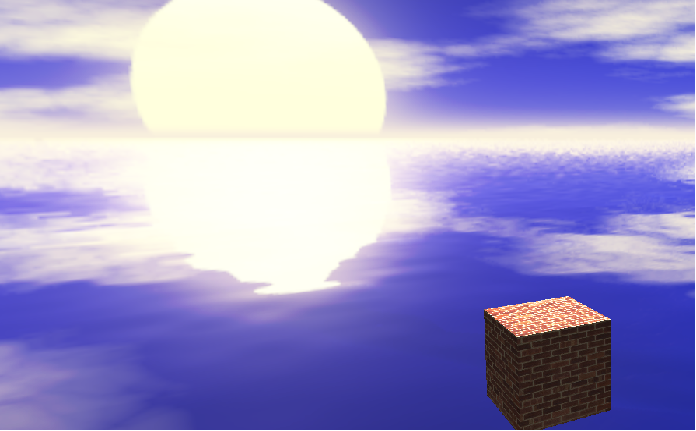
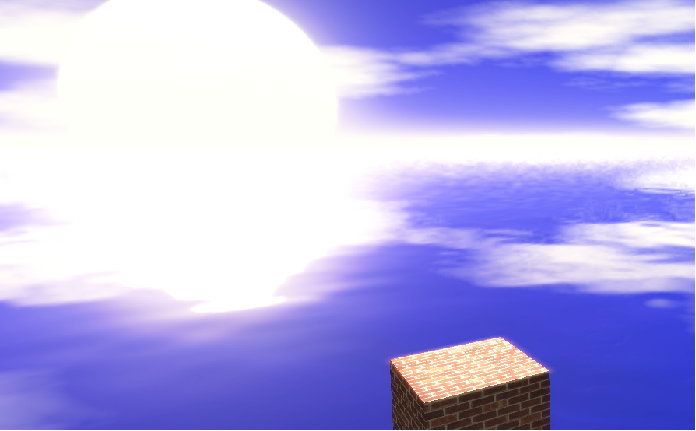
Here is exemplified the **Bloom** effect on a scene.

First image shows the scene without the effect:

<div drawio-diagram="2587"><img src="https://doc316en.candera.eu/uploads/images/drawio/2023-02/drawing-4-1677462810.png" alt=""/></div>

<div class="contents" id="bkmrk--13"><div class="contents"><div class="textblock">  
</div></div></div>Second image shows same scene but with the effect:

<div drawio-diagram="2589"><img src="https://doc316en.candera.eu/uploads/images/drawio/2023-02/drawing-4-1677462819.png" alt=""/></div>

<div class="contents" id="bkmrk--15"><div class="contents"><div class="textblock">  
</div></div></div>