# Introduction

#### <a class="anchor" id="bkmrk--3"></a>Multi-Language Support

Preparing an application to perform in multiple locales requires the CGI Studio license "Globalization" and in terms of <span style="color: rgb(230, 126, 35);">[Candera](http://dev.doc.cgistudio.at/APILINK/namespace_candera.html "[DataBinding_RefTypeSample]")</span> build settings to enable the CMake feature switch "CANDERA\_GLOBALIZATION\_ENABLED".

Preparing an application to perform in a specific locale requires the following workflow:

<div class="contents" id="bkmrk-application-developm"><div class="contents"><div class="textblock">- **Application Development**
    - Create Master Language Pack Source (either directly in SceneComposer or by importing from an external tool)
    - Will be automatically added as binary to the asset library on asset export from SceneComposer
- **Production**
    - Remove Master Language Pack Source from asset library
    - Create Language Pack Source for each language
    - Append Language Pack for each language to the asset library
</div></div></div>#### <a class="anchor" id="bkmrk--4"></a>Language Pack Source Format

In general, a Language Pack Source file

<div class="contents" id="bkmrk-has-the-file-extensi"><div class="contents"><div class="textblock">- has the file extension '*.lps*'
- is a proprietary file format: Zipped XML files in a predefined structure
- contains texts associated to a specific culture

</div></div></div>#### <a class="anchor" id="bkmrk--5"></a>Master Language Pack Source

The Master Language Pack Source file is a design-time artifact not to be kept at production time. It defines all available translatable texts in an artificial Master Language (locale 00).

Extracting the content of a Master Language Pack Source .lps file shows following content:

<div class="contents" id="bkmrk-cultures.xml-%3Clps%3Acu"><div class="contents"><div class="textblock">- Cultures.xml ```
      <lps:Culture <a class="code" href="http://dev.doc.cgistudio.at/APILINK/group___behaviors_mixed_reality.html#gga70813433b87d1347efaf56d755a186c1aa161dba378f926eef1e116dd38c4b6c6">Name</a>="Master Language" Locale="00" <a class="code" href="http://dev.doc.cgistudio.at/APILINK/group___candera_globalization_culture.html#ga90fa968dd49d865078ad4b0f1860caf2">TextDirection</a>="LeftToRight" />
    ```
- LanguagePack\_00.xml: Lists all unique Text-IDs with related default text representation, a translation hint and a maximum text length for the Locale="00"
- Partitions.xml
- Preamble.xml

</div></div></div>#### <a class="anchor" id="bkmrk--6"></a>Cultures

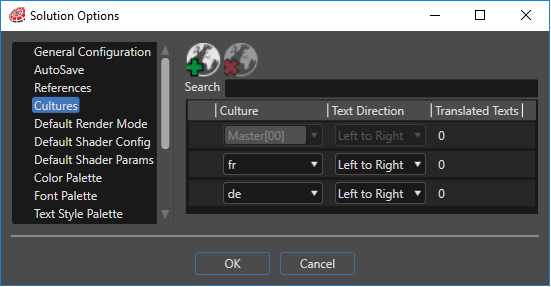
SceneComposer cultures are defined in the "Cultures" panel accesible either via *File-&gt;Solution Options* menu:

<div drawio-diagram="2194"><img src="https://doc316en.candera.eu/uploads/images/drawio/2023-02/drawing-4-1677034464.png" alt=""/></div>

<div class="contents" id="bkmrk--0"><div class="contents"><div class="textblock">  
</div></div></div>either via toolbar:

<div drawio-diagram="2196"><img src="https://doc316en.candera.eu/uploads/images/drawio/2023-02/drawing-4-1677034485.png" alt=""/></div>

<div class="contents" id="bkmrk--2"><div class="contents"><div class="textblock">  
</div></div></div>The default culture for a solution is defined in the 'General Configuration' panel as explained <span style="color: rgb(230, 126, 35);">[here](https://doc316en.candera.eu/link/49#bkmrk-culture-setting)</span>.

#### <a class="anchor" id="bkmrk--9"></a>Multi Language Pack Source

A Multi Language Pack Source provides translations for all translatable texts as defined in the Master Language Pack Source. All supported languages can be combined into a single .lps file, or be separated in single .lps files per language.

The culture definitions in language pack source files should syntactically match the culture definitions in SceneComposer to make the default culture setting of a solution work at application runtime. Example matching to the SceneComposer culture definitions above:

```
  <lps:Culture Name="German" Locale="de_DE" <a class="code" href="http://dev.doc.cgistudio.at/APILINK/group___candera_globalization_culture.html#ga90fa968dd49d865078ad4b0f1860caf2">TextDirection</a>="LeftToRight" />
  <lps:Culture Name="French" Locale="fr_FR" <a class="code" href="http://dev.doc.cgistudio.at/APILINK/group___candera_globalization_culture.html#ga90fa968dd49d865078ad4b0f1860caf2">TextDirection</a>="LeftToRight" />  
```

In case the default language is not set or not present in the asset, the first culture available in the asset will be used as fallback.

#### <a class="anchor" id="bkmrk--10"></a>Appending Language Packs to Assets

Language Pack Source files are compiled into a binary format and appended to asset libraries

<div class="contents" id="bkmrk-by-means-of-scenecom"><div class="contents"><div class="textblock">- by means of <span style="color: rgb(230, 126, 35);">[SceneComposer Translator Plugin](https://doc316en.candera.eu/books/scene-design/chapter/scenecomposer-translator-plugin "SceneComposer Translator Plugin")</span> after asset export (Note: Enable "Plugin Notification" to make this work!)
- by means of <span style="color: rgb(230, 126, 35);">[Managing Language Packs using AssetTool](https://doc316en.candera.eu/books/candera/page/managing-language-packs-using-assettool "Managing Language Packs using AssetTool")</span> to remove the master language pack from and to append multi language packs to an asset.

</div></div></div>#### <a class="anchor" id="bkmrk--11"></a>More Details

More details on the globalization workflow are provided here:

<div class="contents" id="bkmrk-scenecomposer-transl"><div class="textblock">- <span style="color: rgb(230, 126, 35);">[SceneComposer Translator Plugin](https://doc316en.candera.eu/books/candera/page/scenecomposer-translator-plugin)</span>
- <span style="color: rgb(230, 126, 35);">[Managing Language Packs using AssetTool](https://doc316en.candera.eu/books/candera/page/managing-language-packs-using-assettool)</span>
- <span style="color: rgb(230, 126, 35);">[Using Globalization in Applications](https://doc316en.candera.eu/books/candera/page/using-globalization-in-applications)</span>

</div></div>