# 2D Scenes and Nodes
##### Scene Graph
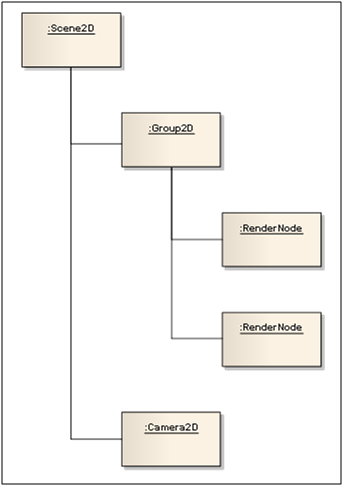
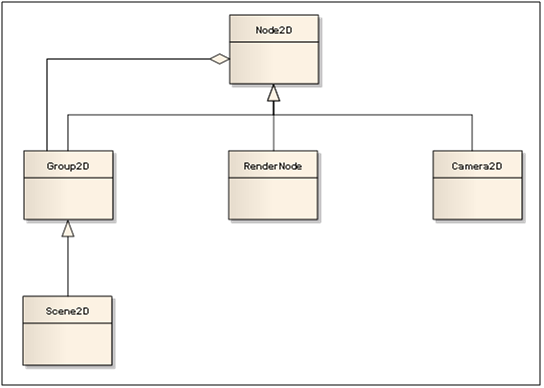
The 2D scene graph is a tree structure which organizes nodes of type [Candera::Node2D](http://dev.doc.cgistudio.at/APILINK/class_candera_1_1_node2_d.html "The class Node2D is an abstract base class for all 2D scene graph nodes."). The root of each scene graph has to be a node of type [Candera::Scene2D](http://dev.doc.cgistudio.at/APILINK/class_candera_1_1_scene2_d.html "The class Scene2D represents a top level scene graph node. Multiple scenes are allowed. A scene can not be part of any other scene."). All nodes of type [Candera::Node2D](http://dev.doc.cgistudio.at/APILINK/class_candera_1_1_node2_d.html "The class Node2D is an abstract base class for all 2D scene graph nodes.") can hold sub nodes added by [Candera::Node2D::AddChild()](http://dev.doc.cgistudio.at/APILINK/class_candera_1_1_node2_d.html#aab2f0ab0ad5f608eca8042341612af8a).
Nodes of type [Candera::RenderNode](http://dev.doc.cgistudio.at/APILINK/class_candera_1_1_render_node.html "RenderNode is a 2D node that links to an effect chain. Therefore this is the only type of 2D node whi...") are representing content which has to be rendered to the target, e.g. text or a bitmap. At least one node of type [Candera::Camera2D](http://dev.doc.cgistudio.at/APILINK/class_candera_1_1_camera2_d.html "A camera defines the view to the scene. At least one Camera2D has to be added to a 2D scene graph and...") which is the link to the render target (e.g. a display) has to be part of the scene graph.
##### RenderNode
Only nodes of type RenderNode are considered during rendering. Each render node requires a list of effects (effect chain) which implements the visual representation of that node. Each render node has a depth value as parameter which defines the order of rendering (z-order). Higher value means background, lower value means foreground.
##### Transformations
The functionality to define the local coordinate system is derived from [Candera::Transformable2D](http://dev.doc.cgistudio.at/APILINK/class_candera_1_1_transformable2_d.html "Defines common methods for manipulating node and texture transformations in local coordinate space (o...") and consists of following components:
- position,
- rotation,
- scale,
- and the pivot offset.
This information is always relative to its parent node. Changing one of these parameters affects the presentation of all child nodes. If for example a node is rotated, all child nodes are rotated accordingly. Each nodes rotation, translation (position) and scale values are combined in one transformation matrix which is multiplied with the parent nodes transformation matrix.