# 2D Alpha Mask Effect

#### <a class="anchor" id="bkmrk--2"></a>Description

This chapter briefly describes how to use the 2D alpha mask effect.

<div class="contents" id="bkmrk-ensure-that-this-eff"><div class="contents"><div class="textblock"><dl class="note"><dt></dt><dd><p class="callout info">Ensure that this effect is supported by the device platform in use.</p>

</dd></dl></div></div></div>#### **Configure a 2D Alpha Mask Effect** 

##### <a class="anchor" id="bkmrk--4"></a>Alpha Mask Effect

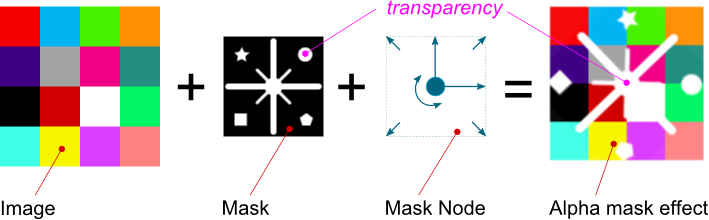
The alpha mask effect creates the appearance of partial or full transparency of an image by using the information from the alpha channel of a mask.

This appearance can be applied to a node by using one of the following effects:

<div class="contents" id="bkmrk-glbitmapbrushmaskble"><div class="contents"><div class="textblock">- [GlBitmapBrushMaskBlend](http://dev.doc.cgistudio.at/APILINK/class_candera_1_1_gl_bitmap_brush_mask_blend.html "Output a bitmap image, apply an alpha mask, and blend it with the store buffer. Same as chaining (Bit...")
- [GlBitmapBrushColorMaskBlend](http://dev.doc.cgistudio.at/APILINK/class_candera_1_1_gl_bitmap_brush_color_mask_blend.html "Output a bitmap image, apply an alpha mask, and blend it with the store buffer. Same as chaining (Bit...")

</div></div></div>##### <a class="anchor" id="bkmrk--5"></a>Configuration

Following properties can be configured:

##### <a class="anchor" id="bkmrk--6"></a>Image

Represents the image attached to the effect.

##### <a class="anchor" id="bkmrk--7"></a>Mask

It's the image used as mask. Only the alpha channel of the mask is used.

##### <a class="anchor" id="bkmrk--8"></a>Mask Node

It's the node used to control the transformation of the mask (position, rotation and scaling). If set to 0 the transformation of the current node is used.

##### <a class="anchor" id="bkmrk--9"></a>Effect Example

The image below presents an alpha mask effect example. The mask node is rotated 45 degrees, the pivot offset is set to (-50;-50) and scaled to (1.5;1.5).

<div drawio-diagram="2684"><img src="https://doc316en.candera.eu/uploads/images/drawio/2023-02/drawing-4-1677467438.png" alt=""/></div>

<div class="contents" id="bkmrk--0"><div class="contents"><div class="textblock">  
</div></div></div>Refer to <span style="color: rgb(230, 126, 35);">[SceneComposer User Manual](https://doc316en.candera.eu/books/scene-design/page/effects)</span> about how to configure an alpha mask effect in a 2D scene.

#### **Modify 2D Alpha Mask Effect Properties** 

##### <a class="anchor" id="bkmrk--11"></a>Set Effect Properties

```
//create effect
bitmap_maskBlend = <a class="code" href="http://dev.doc.cgistudio.at/APILINK/group___c_o_u_r_i_e_r___v_i_s_u_a_l_i_z_a_t_i_o_n.html#ggaf0e93dc4242f607c3c8d13dafd036af9aaabfa5309af24986d3111a092449f857">GlBitmapBrushMaskBlend::Create</a>();

//set image property
bitmap_maskBlend->GetBitmapBrush().Image().Set(m_image.GetPointerToSharedInstance());

//set mask property
SharedPointer<BitmapImage2D> maskBitImage = <a class="code" href="http://dev.doc.cgistudio.at/APILINK/class_candera_1_1_bitmap_image2_d.html#af16cef9df35df365f94fe89a810197c6">BitmapImage2D::Create</a>();
maskBitImage->SetBitmap(mask_bitmap);
maskBitImage->Upload();
GlMaskEffect& maskEffect = bitmap_maskBlend->GetMaskEffect();
maskEffect.Mask() = maskBitImage.GetPointerToSharedInstance();

//set mask node
RenderNode* maskNode = <a class="code" href="http://dev.doc.cgistudio.at/APILINK/class_candera_1_1_render_node.html#a86b21db92fab0635be7bdfcaf423ca4b">RenderNode::Create</a>();
maskNode->SetPosition(400.f, 30.f);
maskNode->SetScale(0.2f, 0.2f);
maskNode->SetPosition(m_bitmapNode5->GetPosition() + Vector2(8, 8));
maskEffect.MaskNode() = maskNode;

bitmap_maskBlend->Update();

//attach effect to the node
node = <a class="code" href="http://dev.doc.cgistudio.at/APILINK/class_candera_1_1_render_node.html#a86b21db92fab0635be7bdfcaf423ca4b">RenderNode::Create</a>();
node->AddEffect(bitmap_maskBlend.GetPointerToSharedInstance());
```