# Tutorial for Text Rendering

# Introduction

Text Rendering involves both the handling of Unicode standards regarding character encoding as well as the generation and rendering of the glyphs. The sub-chapters here explain the basic principles.

####   
**Character Encodings**

character encoding system consists of a code that pairs each character from a given repertoire with something else such as a bit pattern, sequence of natural numbers, octets, or electrical pulses (Source: Wikipedia).

Unicode is the most important standard for character encodings and defines (among other things) the mapping of a character to a Unicode code point (bit pattern):

<div class="contents" id="bkmrk-fixed-length-encodin"><div class="contents"><div class="textblock">- Fixed length encodings of code points (ASCII, UCS2, UCS4 etc).
- Variable length encoding of code points (UTF-8, UTF-16, UTF-32)
- Chinese GB18030 is the only relevant other encoding standard

</div></div></div>All texts which are rendered within the TextEngine have to be of type TChar\*. Text in TChar\* have to be encoded in UTF-8. UTF-8 uses a varying number of TChars to encode one glyph. E.g. a UTF-8 encoded string with special characters: "&amp;auml&amp;Auml&amp;ouml&amp;Ouml&amp;uuml&amp;Uuml&amp;szlig&amp;#8364" consists of 8 glyphs but of 17 bytes because several of these special characters are encoded in more than one byte.

The methods <span style="color: rgb(230, 126, 35);">[FeatStd::String::GetCharCount()](http://dev.doc.cgistudio.at/APILINK/class_feat_std_1_1_string.html#a664debb9d7058c47f4d4e1687e83ae0f)</span> and <span style="color: rgb(230, 126, 35);">[FeatStd::String::GetCodePointCount()](http://dev.doc.cgistudio.at/APILINK/class_feat_std_1_1_string.html#a3ddbc24da69094a85d8c6ff870284e5a)</span> can be used to get the numbers as explained in the example above. An instance of <span style="color: rgb(230, 126, 35);">[FeatStd::String](http://dev.doc.cgistudio.at/APILINK/class_feat_std_1_1_string.html)</span> class can be constructed with TChar\* by the constructor <span style="color: rgb(230, 126, 35);">[FeatStd::String::String(const TChar \*)](http://dev.doc.cgistudio.at/APILINK/class_feat_std_1_1_string.html#a2b5ab81b2f9de953b42677a508146831)</span>.

<div class="contents" id="bkmrk-char-data-type-must-"><div class="textblock"><dl class="note"><dt></dt><dd><p class="callout info">Char data type must not be used for I18N text and always maps to ASCII.</p>

</dd></dl></div></div>#### **Complex Script Languages**

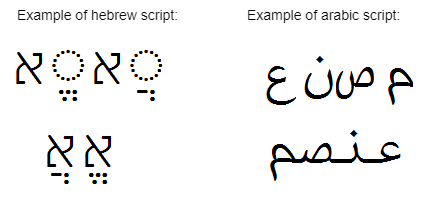
A complex script is a writing system which requires complex transformation of glyphs like substitution and positioning. Examples of such writing systems are arabic, hebrew and thai. Complex transformations include

<div class="contents" id="bkmrk-bi-directional-order"><div class="contents"><div class="textblock">- bi-directional ordering of characters,
- contextual shaping which means that displayed glyphs depend on the surrounding code points in the text - displayed glyphs can have different shapes depending on their position in a word or can be combined to ligatures,
- combining characters where several characters are combined into one shape

</div></div></div><div drawio-diagram="2191"><img src="https://doc316en.candera.eu/uploads/images/drawio/2023-02/drawing-4-1677033945.png" alt=""/></div>

Above the characters as they are written and below as they are displayed.

#### **Text Rendering - Functional Steps**

Text Rendering involves the following functional steps:

1. Glyph Rendering
2. Shaping
3. Layouting

##### **1. Glyph Rendering**

Takes a single code point and font metrics to render the according glyph. The Freetype font engine for example takes a code point and outputs a 8 bit alpha.

<div class="contents" id="bkmrk--0"><div class="contents"></div></div>##### **2. Shaping**

Shaping is the transformation from logical to display presentation of a text. The Shaping process is responsible for considering complex scripts. The Shaping process is applied on paragraph level.

##### <a class="anchor" id="bkmrk--4"></a>GPOS/GSUB Tables

OpenType fonts may include GSUB (glyph substitution) and GPOS (glyph positioning) tables.

The GSUB table contains (among other things)

<div class="contents" id="bkmrk-ligature-substitutio"><div class="contents"><div class="textblock">- Ligature substitution (replace multiple code points with single code point)
- Contextual substitution (alternative presentation of the glyph depending on his context) If no GSUB table is available, the standard substitutions defined by Unicode apply (eg. mandatory set of Arabic ligatures).

</div></div></div>The GPOS table contains (among other things)

<div class="contents" id="bkmrk-glyph-placement-adju"><div class="contents"><div class="contents"><div class="textblock">- glyph placement
- adjustment of marks
- kerning
- attachment points for combining characters

</div></div></div></div><a class="anchor" id="bkmrk--5" style="font-size: 1.4em; font-weight: 400; background-color: rgb(255, 255, 255);"></a><span style="color: rgb(34, 34, 34); font-size: 1.4em; font-weight: 400;">Shaping Libraries</span>

<div class="contents" id="bkmrk-feat-complexscript-l"><div class="contents"><div class="textblock">- FEAT ComplexScript library does shaping for Arabic language
- FreeBidi - functional equivalent to FEAT ComplexScript
- Harfbuzz - Arabic + many other scripts

</div></div></div>A <span style="color: rgb(230, 126, 35);">[Candera](http://dev.doc.cgistudio.at/APILINK/namespace_candera.html "[DataBinding_RefTypeSample]")</span> feature define is available in CMake to select between the 3rd party software components *ComplexScriptLib* and *HarfBuzz* for text shaping.

#####   


##### **3. Layouting**

Layout text that has been shaped. Typical operations:

<div class="contents" id="bkmrk-line-breaking-word-b"><div class="textblock">- Line breaking
- Word breaking
- Text alignment (horizontal and vertical)

</div></div>

# Fonts and Styles

#### <a class="anchor" id="bkmrk--7"></a>Description

This section contains information about how to use fonts and styles.

#### **Accessing Fonts** 

##### <a class="anchor" id="bkmrk--9"></a>SceneComposer: Import Fonts

For using fonts, first of all the fonts which shall be used need to be imported into the SceneComposer solution.

<div class="contents" id="bkmrk-the-font-will-only-b"><div class="contents"><div class="textblock"><dl class="note"><dt><p class="callout info">The font will only be available in the finally generated asset, if:   
- it is either used in any scene (as part of a style which is used in a widget style property for example)   
- or the "Always include in asset" flag is enabled in the font resource.</p>

</dt></dl></div></div></div>**See also:**

<div class="contents" id="bkmrk-import-fonts-in-scen"><div class="contents"><div class="contents"><div class="textblock">- <span style="color: rgb(230, 126, 35);">[How to Import Resources](https://doc316en.candera.eu/books/import-of-resources/page/how-to-import-resources)</span> in SceneComposer User Manual

</div></div></div></div>##### <a class="anchor" id="bkmrk--10"></a>Initializing FontEngine

Next, the application needs to create a <span style="color: rgb(230, 126, 35);">[Candera::TextRendering::FontEngine](http://dev.doc.cgistudio.at/APILINK/struct_candera_1_1_text_rendering_1_1_font_engine.html)</span> instance and initialize it for using the <span style="color: rgb(230, 126, 35);">[Candera::AssetFontStore](http://dev.doc.cgistudio.at/APILINK/class_candera_1_1_asset_font_store.html "implements a font store for the asset library this is the default font store Candera will use to retr...")</span>. AssetFontStore will access the font part of the loaded asset and provide it to the TextEngine.

```
    static AssetFontStore s_fontStore;

    result = result &
&
<a class="code" href="http://dev.doc.cgistudio.at/APILINK/struct_candera_1_1_text_rendering_1_1_font_engine.html#a9a4b6b6f60139c0a62683ef1f60f55fd">Candera::TextRendering::FontEngine::Instance</a>().Init(&
s_fontStore);

```

<div class="contents" id="bkmrk-"><div class="contents"><div class="textblock"><div class="fragment">  
</div></div></div></div>##### <a class="anchor" id="bkmrk--11"></a>Using a Font

The easiest way to use a font is to setup the font as part of a <span style="color: rgb(230, 126, 35);">[Candera::TextRendering::Style](http://dev.doc.cgistudio.at/APILINK/class_candera_1_1_text_rendering_1_1_style.html "Defines a text style.")</span> and use the style as a widget property within SceneComposer. This allows to specify the FontFamily and the FontSize via SceneComposer GUI. FontSize has to be specified in pixel size (see <span style="color: rgb(230, 126, 35);">[Font Metrics and Text Sizes](https://doc316en.candera.eu/link/480#bkmrk-font-metrics-and-tex)</span>). In case the application needs to switch the font dynamically, at runtime, setup the font and create a style:

```
    Font font;

    font.Setup("openSans", 20);

    m_style = <a class="code" href="http://dev.doc.cgistudio.at/APILINK/group___c_o_u_r_i_e_r___v_i_s_u_a_l_i_z_a_t_i_o_n.html#ggaf0e93dc4242f607c3c8d13dafd036af9aaabfa5309af24986d3111a092449f857">SharedStyle::Create</a>();

    m_style->
SetDefaultFont(font);

```

<div class="contents" id="bkmrk--0"><div class="contents"><div class="textblock"><div class="fragment">  
</div></div></div></div>##### <a class="anchor" id="bkmrk--12"></a>Access to AssetFontStore

Include FontFaceName and FontFaceSize Property in the header file of the widget.

```
// Add Property
            CdaProperty(FontFaceName, const Candera::Char*, GetFontName, SetFontName)
                CdaDescription("Font Face <a class="code" href="http://dev.doc.cgistudio.at/APILINK/group___behaviors_mixed_reality.html#gga70813433b87d1347efaf56d755a186c1aa161dba378f926eef1e116dd38c4b6c6">Name</a> for the text (used only if \"Use <a class="code" href="http://dev.doc.cgistudio.at/APILINK/group___behaviors_control.html#ggae7abc816df647d0ecbc280480fefb788a595c025970839adf97b121009ea58dfc">Text</a> Font Property\" is disabled).")
                CdaCategory("Accessing Fonts from FontEngine")
            <a class="code" href="http://dev.doc.cgistudio.at/APILINK/group___meta_info.html#ga119bef57449bd05d8b3c40d7d514e375">CdaPropertyEnd</a>()

            CdaProperty(FontFaceSize, Candera::UInt16, GetFontSize, SetFontSize)
                CdaDescription("Font Face Size for the text (used only if \"Use <a class="code" href="http://dev.doc.cgistudio.at/APILINK/group___behaviors_control.html#ggae7abc816df647d0ecbc280480fefb788a595c025970839adf97b121009ea58dfc">Text</a> Font Property\" is disabled).")
                CdaCategory("Accessing Fonts from FontEngine")
            <a class="code" href="http://dev.doc.cgistudio.at/APILINK/group___meta_info.html#ga119bef57449bd05d8b3c40d7d514e375">CdaPropertyEnd</a>()
// end add Property
```

<div class="contents" id="bkmrk-the-fontfacename-pro"><div class="contents"><div class="textblock"><dl class="warning"><dd><p class="callout warning">The FontFaceName property must be set with a valid [Candera](http://dev.doc.cgistudio.at/APILINK/namespace_candera.html "[DataBinding_RefTypeSample]") path. Keep in mind that, unlike paths generated by the Font dialog where the; the "/" character, the [Candera](http://dev.doc.cgistudio.at/APILINK/namespace_candera.html "[DataBinding_RefTypeSample]") paths use "#" as delimiter.</p>

</dd></dl></div></div></div>Also, do not forget to initialize member variables in the constructor, otherw; e SceneComposer will not be able to work with the widget.

```
SimpleTextWidget::SimpleTextWidget() :
    m_text(0),
    m_style(SharedStyle::<a class="code" href="http://dev.doc.cgistudio.at/APILINK/group___c_o_u_r_i_e_r___v_i_s_u_a_l_i_z_a_t_i_o_n.html#ggaf0e93dc4242f607c3c8d13dafd036af9aaabfa5309af24986d3111a092449f857">Create</a>()),
    m_color(),
    m_shader(0),
    m_fontName(0),
    m_fontSize(12),
    m_bb(0),
    m_bitmap(0),
    m_bitmapPixels(0),
    m_defautScaleVector(1.0,1.0,1.0),
    m_useTextFont(true),
    m_;
UpdateRequired(true),
    mTextStartPos(0, 0)
{
}
```

Setup the font as described below.

```
        static Font f;
        if (f.Setup(m_fontName, static_cast<Candera::Int16>(m_fontSize))) {
            m_font = f;
        }
```

And update the style used for rendering:

```
    m_style->SetDefaultFont(m_font);
```

##### <a class="anchor" id="bkmrk--13"></a>AssetFontStore Load Strategies

AssetFontStore supports two font load strategies:

<div class="contents" id="bkmrk-preloadstrategy%3A-ent"><div class="contents"><div class="textblock">- <span style="color: rgb(230, 126, 35);">[PreloadStrategy](http://dev.doc.cgistudio.at/APILINK/class_candera_1_1_asset_font_store_1_1_load_strategy_selector.html#a3c06cdd0709312d8b0ac60035c9a3b62aad010b9a2098e4e40ff1f0be8f31ba4b)</span>: entire fonts are loaded into memory once and font data; accessed from there by Text <span style="color: rgb(0, 0, 0);">Engine.</span>
- <span style="color: rgb(230, 126, 35);">[OnRequestLoadStrategy](http://dev.doc.cgistudio.at/APILINK/class_candera_1_1_asset_font_store_1_1_load_strategy_selector.html#a3c06cdd0709312d8b0ac60035c9a3b62abddf5927381d24532b5a902fda7d33f3)</span>: small font portions are streamed directly from the asset repository when Freetype (or indirectly Harfbuzz) needs them.

</div></div></div>Use <span style="color: rgb(230, 126, 35);">[SetDefaultFontLoadStrategy](http://dev.doc.cgistudio.at/APILINK/class_candera_1_1_default_load_strategy_selector.html#a340dda8ac0dfb937a3d77d68817bfd48)</span> to select one of these load strategies.

Use <span style="color: rgb(230, 126, 35);">[SetDefaultFontLoadStrategyExceptionL; t](http://dev.doc.cgistudio.at/APILINK/class_candera_1_1_default_load_strategy_selector.html#ac9e45f0d804d98677032b463b50b3513)</span> to exclude a l; t of fonts from the selected font load strategy.

Example:

```
    // Load fonts with OnRequestLoadStrategy
    selector.SetDefaultFontLoadStrategy(<a class="code" href="http://dev.doc.cgistudio.at/APILINK/class_candera_1_1_asset_font_store_1_1_load_strategy_selector.html#a3c06cdd0709312d8b0ac60035c9a3b62abddf5927381d24532b5a902fda7d33f3" title="Do not load anything in memory, but read/copy data into smaller temporary buffers as requested by Fre...">Candera::AssetFontStore::LoadStrategySelector::OnRequestLoadStrategy</a>);
    // "Bitstream Vera Sans" font shall be loaded with PreloadStrategy:
    const Char* g_fontName[2] = { "ConstructionKit##ConstructionKit#Resources#Fonts#Bitstream Vera Sans", 0 };
    selector.SetDefaultFontLoadStrategyExceptionL;
t(g_fontName);
    fontStore.SetLoadStrategySelector(&selector);
```

<div class="contents" id="bkmrk-courier-applications"><div class="textblock"><dl class="note"><dd><p class="callout info"><span style="color: rgb(230, 126, 35);">[Courier](http://dev.doc.cgistudio.at/APILINK/namespace_courier.html)</span> applications can use <span style="color: rgb(230, 126, 35);">[Courier::ViewHandler::SetFontStoreProviderCallback](http://dev.doc.cgistudio.at/APILINK/class_courier_1_1_view_handler.html#a7747f74f80b57fd376b13f942d927009)</span> to provide specific settings for the <span style="color: rgb(230, 126, 35);">[Candera::AssetFontStore](http://dev.doc.cgistudio.at/APILINK/class_candera_1_1_asset_font_store.html "implements a font store for the asset library this is the default font store Candera will use to retr...")</span> in use.</p>

</dd></dl></div></div>#### **Text Style: A Composition of Fonts** 

##### <a class="anchor" id="bkmrk--14"></a>Text Style: Introduction

A Style can be seen as a composition of fonts.

Basically for a range of glyphs a proper font can be specified (also called *style entry*). Beside the style entries a style also cons; ts of a default font and a base style.

<div class="contents" id="bkmrk-the-style-entries-ar"><div class="contents"><div class="textblock">- The style entries are parsed from the first to the last style entry until a code point range that contains the input code point; found.
- All glyphs which do not match to one of the specified *style entry* range are rendered with the default font.
- The same parsing order; applied to code points which match to a range of a style entry, but the font does not contain a glyph for th; code point
- Each style can use another style as base style, which allows an arbitrary complex composition of fonts.

</div></div></div>The **TextRenderingSolution** provided in the content folder of *cgi\_studio\_player* gives an example how text features can be applied in SceneComposer.

<div class="contents" id="bkmrk-see-also%3A-text-style"><div class="textblock"><dl class="see"><dt>**See also:**</dt><dd>- <span style="color: rgb(230, 126, 35);">[Text Style Palette](https://doc316en.candera.eu/books/solution-handling/page/text-style-palette "Text Style Palette")</span> in SceneComposer User Manual
- [Candera::TextRendering::Style](http://dev.doc.cgistudio.at/APILINK/class_candera_1_1_text_rendering_1_1_style.html "Defines a text style.") in <span style="color: rgb(230, 126, 35);">[Candera](http://dev.doc.cgistudio.at/APILINK/namespace_candera.html "[DataBinding_RefTypeSample]")</span> API

</dd></dl></div></div>#### **Text Style: Example** 

##### <a class="anchor" id="bkmrk--15"></a>Example

Use **TextRenderingSolution** provided in the content folder of *cgi\_studio\_player* to see how text features can be applied in SceneComposer.

<div drawio-diagram="2221"><img src="https://doc316en.candera.eu/uploads/images/drawio/2023-02/drawing-4-1677044019.png" alt=""/></div>

<div class="contents" id="bkmrk--3"><div class="contents"><div class="textblock">  
</div></div></div>  
Select *Scene2D\_StyleExample* of the solution, which gives just a brief overview of text features and how they look like. It cons; ts of

<div class="contents" id="bkmrk-a-candera%3A%3Atextnode2"><div class="contents"><div class="textblock">- a <span style="color: rgb(230, 126, 35);">[Candera::TextNode2D](http://dev.doc.cgistudio.at/APILINK/class_candera_1_1_text_node2_d.html "TextNode2D is a RenderNode that renders text using the attached BitmapBrush effect.")</span>.
- Fonts for the text node are defined in a style *Mystyle*.

</div></div></div>Lets consider the configured style *MyStyle* set in the TextNode2D's style property:

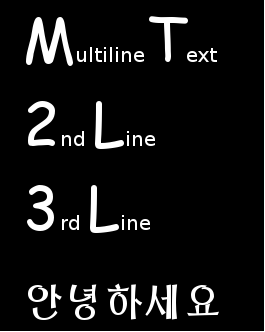
<div class="contents" id="bkmrk-the-default-font-pro"><div class="contents"><div class="textblock">- The **Default Font** property is set with predefined *DefaultFont* (Vera size 20)
- No **Base Style**, therefore for this field *Empty*, is defined

</div></div></div>Expanding the Children panel shows the defined style entries. The example style consists of three style entries.

<div class="contents" id="bkmrk-entry-0-defines-the-"><div class="contents"><div class="textblock">- **Entry 0** defines the font *BigLetter* (Comic size 60) for all glyphs in the code point range from 65 to 90. These upper and lower bounds represent the glyph range 'A' (65) - 'Z' (90) in decimal representation. In the example therefore all upper case letters are rendered with font *BigLetter*.
- **Entry 1** defines font *BigLetter* for numbers '0'(48) - '9'(57).
- **Entry 2** defines font *Korean* (UnBom size 40) for Korean glyphs. Code points for asian glyphs are in range 44032 - 55215 (in decimal representation). So using styles, glyphs from different cultures can be rendered without changing the font/style settings.

</div></div></div>In case of this example all lower case letters do not have a proper style entry and the default font is taken to render.

<div class="contents" id="bkmrk-if-the-code-ranges-o"><div class="textblock"><dl class="note"><dt></dt><dd><p class="callout info">If the code ranges of different style entries overlap, the style entry with the higher number has priority (e.g. font in entry 2 has higher priority than font in entry 1).</p>

</dd></dl></div></div>#### **Bitmap Font Engine**   


##### <a class="anchor" id="bkmrk--17"></a>Overview

A bitmap font is essentially an image file which consists of several characters images and a header that depicts the size and location of each character inside the image. Each bitmap font might contain several fonts - mainly one font face with multiple sizes. One advantage of utilizing bitmap fonts is that the rendering to the screen requires very little resources and since each character is represented as a sub-texture, they can be reused without requiring additional memory on the GPU.

##### <a class="anchor" id="bkmrk--18"></a>CMake configuration

In order to be able to use the bitmap font engine the <span style="color: rgb(230, 126, 35);">[Candera](http://dev.doc.cgistudio.at/APILINK/namespace_candera.html "[DataBinding_RefTypeSample]")</span> CMake project should be configured as follows:

<div class="contents" id="bkmrk-candera_fontengine-s"><div class="contents"><div class="textblock">- CANDERA\_FONTENGINE should be set to *"Bitmap Font"*
- CANDERA\_BITMAPFONT\_FACE\_SIZE\_COUNT\_MAX represents the number of font sizes supported. Default value is set to 6.
- CANDERA\_BITMAPFONT\_GLYPH\_CACHE\_SIZE represents the size of the buffer to cache glyph bitmaps. By default the value is set to 24\*24\*100.

</div></div></div><div class="contents" id="bkmrk-candera_textshaper-s"><div class="contents"><div class="textblock"><dl class="note"><dd><p class="callout info">CANDERA\_TEXTSHAPER should be set to *"NoShaping"* or *"ComplexScriptLib"* because Harbuzz Text Shaper cannot be used with BitmapFont.</p>

</dd></dl></div></div></div>##### <a class="anchor" id="bkmrk--19"></a>Font Setup

This font engine uses a proprietary format to describe glyph bitmaps and glyph meta info. In order to use a bitmap font, provide an implementation for <span style="color: rgb(230, 126, 35);">[Candera::TextRendering::FontStore](http://dev.doc.cgistudio.at/APILINK/class_candera_1_1_text_rendering_1_1_font_store.html "FontStore is an abstract interface to retrieve font data The font store defines unique descriptor id ...")</span>.

Bitmap fonts require memory mapped assets. So, when the faces are loaded in be sure the storageType is set correctly:

```
    TextRendering::FontResourceDescriptor descriptor.storageType = TextRendering::FontResourceDescriptor::MemoryResource;
```

##### <a class="anchor" id="bkmrk--20"></a>Generating Bitmap Fonts

The following steps need to be considered:

1\. Install Bitmap Font Generator from [http://www.angelcode.com/products/bmfont](http://www.angelcode.com/products/bmfont)

2\. Open the application. From the **Options** menu:

<div class="contents" id="bkmrk-choose-font-settings"><div class="contents"><div class="textblock">- Choose **Font Settings**. Set as needed the settings for *"Font"*, *"Add font file"*, *"Size"* etc.

- Configure the **Export Options**. Set *"Font descriptor"* to *"XML"* and Textures to *"png - Portable Network Graphics"*

</div></div></div>3\. From the right panel of the main window select the needed subsets of glyphs.

4\. Export the font by choosing *"Save bitmap font as ..."* from the **Options** menu.

Please see <span style="color: rgb(230, 126, 35);">[Import Fonts](https://doc316en.candera.eu/link/1101#bkmrk-image%2C-font%2C-shader%2C-1)</span> for details about the importing of bitmap fonts in SceneComposer.

<div class="contents" id="bkmrk-a-bitmap-font-should"><div class="textblock"><dl class="note"><dd><p class="callout info">A bitmap font should be used at its native pixel size. However, they are scalable because of the use of bitmaps, but only scaling down is recommended. In case of up scaling, the visual quality will be reduced. Including separate font sizes for bitmap fonts is possible in order to achieve the best looking results.</p>

</dd></dl></div></div>

# Using Candera TextEngine to draw Text

#### <a class="anchor" id="bkmrk--35"></a>Description

The simplest way to draw text with <span style="color: rgb(230, 126, 35);">[Candera](http://dev.doc.cgistudio.at/APILINK/namespace_candera.html "[DataBinding_RefTypeSample]")</span> is using a TextNode2D, a 3D text widget from CGI Studio Widget Library, or the 2D TextBrush effect. Refer to:

<div class="contents" id="bkmrk-candera%3A%3Atextnode2d-"><div class="contents"><div class="textblock">- <span style="color: rgb(230, 126, 35);">[Candera::TextNode2D](http://dev.doc.cgistudio.at/APILINK/class_candera_1_1_text_node2_d.html)</span>
- <span style="color: rgb(230, 126, 35);">[Candera::TextBrush](http://dev.doc.cgistudio.at/APILINK/class_candera_1_1_text_brush.html)</span>

</div></div></div>To learn about how to use <span style="color: rgb(230, 126, 35);">[Candera::TextNode2D](http://dev.doc.cgistudio.at/APILINK/class_candera_1_1_text_node2_d.html)</span>, please refer to the following section:

<div class="contents" id="bkmrk-using-candera%3A%3Atextn"><div class="contents"><div class="textblock">- <span style="color: rgb(230, 126, 35);">[Using Candera::TextNode2D](http://dev.doc.cgistudio.at/APILINK/_p_i_d__a_p_p_d_e_v_t_u_t_chapter_05_01_03_00.html)</span>

</div></div></div>To learn about details, how to use the <span style="color: rgb(230, 126, 35);">[<span style="vertical-align: inherit;"><span style="vertical-align: inherit;">Candera</span></span>](http://dev.doc.cgistudio.at/APILINK/namespace_candera.html "[DataBinding_RefTypeSample]")</span> TextEngine interface directly, refer to the following chapters.

#### Using **Candera::TextNode2D**   


##### <a class="anchor" id="bkmrk--38"></a>Overview

TextNode2D represents a RenderNode specialized for fast text rendering.

Text and style have to be provided. In addition, it requires a BitmapBrush effect for rendering and a <span style="color: rgb(230, 126, 35);">[Candera::TextNodeRenderer](http://dev.doc.cgistudio.at/APILINK/class_candera_1_1_text_node_renderer.html "Base class for text to Image2D generation strategies.")</span> object used for generating the images, which will be then rendered by the associated BitmapBrush effect.

There are four <span style="color: rgb(230, 126, 35);">[Candera::TextNodeRenderer](http://dev.doc.cgistudio.at/APILINK/class_candera_1_1_text_node_renderer.html "Base class for text to Image2D generation strategies.")</span> implementations available, each corresponding to one CacheType option from the existing <span style="color: rgb(230, 126, 35);">[Candera::TextBrush](http://dev.doc.cgistudio.at/APILINK/class_candera_1_1_text_brush.html "Output alpha only glyph data. A color may be specified, which is applied to the color channels...")</span> rendering concept (Bitmap, Surface, Glyph and Glyph Cache).

Text layouting is supported by attaching a <span style="color: rgb(230, 126, 35);">[Candera::TextNode2DLayouter](http://dev.doc.cgistudio.at/APILINK/class_candera_1_1_text_node2_d_layouter.html "Base Layouter for TextNode2D nodes.")</span> to the node. It is responsible for arranging and truncating the associated text of a <span style="color: rgb(230, 126, 35);">[Candera::TextNode2D](http://dev.doc.cgistudio.at/APILINK/class_candera_1_1_text_node2_d.html "TextNode2D is a RenderNode that renders text using the attached BitmapBrush effect.")</span>. The default layouter implements both horizontal and vertical truncation.

**<a class="anchor" id="bkmrk--39"></a>Renderer**

<span style="color: rgb(230, 126, 35);">[Candera::TextNodeRenderer](http://dev.doc.cgistudio.at/APILINK/class_candera_1_1_text_node_renderer.html "Base class for text to Image2D generation strategies.")</span> object is used for generating the correct images from provided text.

The level cache strategies which apply for a <span style="color: rgb(230, 126, 35);">[Candera::TextNode2D](http://dev.doc.cgistudio.at/APILINK/class_candera_1_1_text_node2_d.html "TextNode2D is a RenderNode that renders text using the attached BitmapBrush effect.")</span> are described below:

<div class="contents" id="bkmrk-bitmap%3A-very-large-m"><div class="contents"><div class="textblock">- Bitmap: very large memory footprint, very large update times, small render time
- Surface: large video memory footprint, large update times, small render time
- Glyph (former NoCache): small memory footprint, small update times, very large render time.
- GlyphCache: small memory footprint, small update times, medium render time
- GlyphAtlas: small (but global) video memory footprint, small update times, small render time.

</div></div></div><div class="contents" id="bkmrk-choose-the-appropria"><div class="contents"><div class="textblock"><dl class="note"><dd><p class="callout info">Choose the appropriate cache for a balance in performance. It is recommended to use either Bitmap or Surface rendering type when static texts are used, while for dynamic texts, GlyphCache is recommended.</p>

</dd></dl></div></div></div><a class="anchor" id="bkmrk--40"></a>**Associated Effect**

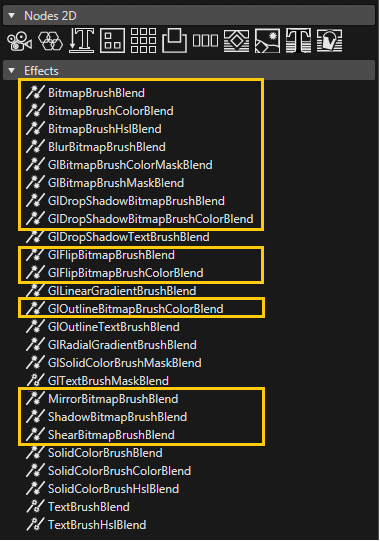
Please consider that only BitmapBrush type effects apply to a <span style="color: rgb(230, 126, 35);">[Candera::TextNode2D](http://dev.doc.cgistudio.at/APILINK/class_candera_1_1_text_node2_d.html "TextNode2D is a RenderNode that renders text using the attached BitmapBrush effect.")</span>. In case other effects are used nothing will be rendered. The text appearance can be altered by the type of effect chosen, either by modifying the in-place effects (color, mask, HSL transformations, etc.) or by changing blending effects.

List of BitmapBrush effects which can be used are described below:

<div class="contents" id="bkmrk-candera%3A%3Abitmapbrush"><div class="contents"><div class="textblock">- <span style="color: rgb(230, 126, 35);">[Candera::BitmapBrushBlend](http://dev.doc.cgistudio.at/APILINK/class_candera_1_1_bitmap_brush_blend.html "This effect outputs a bitmap image, and blend it with the store buffer. Same as chaining (BitmapBrush...")</span>: Outputs a bitmap image, and blend it with the store buffer.
- <span style="color: rgb(230, 126, 35);">[Candera::BitmapBrushColorBlend](http://dev.doc.cgistudio.at/APILINK/class_candera_1_1_bitmap_brush_color_blend.html "Output a bitmap image, modulate the color, and blend it with the store buffer. Same as chaining (Bitm...")</span>: Output a bitmap image, modulate the color, and blend it with the store buffer.
- <span style="color: rgb(230, 126, 35);">[Candera::BitmapBrushColorMaskBlend](http://dev.doc.cgistudio.at/APILINK/class_candera_1_1_bitmap_brush_color_mask_blend.html "Output a bitmap image, apply an alpha mask, and blend it with the store buffer. Same as chaining (Bit...")</span>: Output a bitmap image, modulate the color, apply an alpha mask, and blend it with the store buffer.
- <span style="color: rgb(230, 126, 35);">[Candera::BitmapBrushHslBlend](http://dev.doc.cgistudio.at/APILINK/class_candera_1_1_bitmap_brush_hsl_blend.html "Output a bitmap image, apply a HSL transformation, and blend it with the store buffer. Same as chaining (BitmapBrush + HslCorrectionEffect + BlendEffect)")</span>: Output a bitmap image, apply a HSL transformation, and blend it with the store buffer.
- <span style="color: rgb(230, 126, 35);">[Candera::BitmapBrushMaskBlend](http://dev.doc.cgistudio.at/APILINK/class_candera_1_1_bitmap_brush_mask_blend.html "Output a bitmap image, apply an alpha mask, and blend it with the store buffer. Same as chaining (Bit...")</span>: Output a bitmap image, apply an alpha mask, and blend it with the store buffer.
- <span style="color: rgb(230, 126, 35);">[Candera::BlurBitmapBrushBlend](http://dev.doc.cgistudio.at/APILINK/class_candera_1_1_blur_bitmap_brush_blend.html "Output a blurred and alpha blended bitmap image. The blur effect is created by applying a gaussean fi...")</span>: Output a blurred and alpha blended bitmap image.
- <span style="color: rgb(230, 126, 35);">[Candera::MirrorBitmapBrushBlend](http://dev.doc.cgistudio.at/APILINK/class_candera_1_1_mirror_bitmap_brush_blend.html "Output includes the bitmap image and it's reflection.")</span>: Output includes the bitmap image and it's reflection.
- <span style="color: rgb(230, 126, 35);">[Candera::ShadowBitmapBrushBlend](http://dev.doc.cgistudio.at/APILINK/class_candera_1_1_shadow_bitmap_brush_blend.html "Output a shadowed or glowing bitmap image, both shadow/glow and image alpha blended.")</span>: Output a shadowed or glowing bitmap image, both shadow/glow and image alpha blended.
- <span style="color: rgb(230, 126, 35);">[Candera::ShearBitmapBrushBlend](http://dev.doc.cgistudio.at/APILINK/class_candera_1_1_shear_bitmap_brush_blend.html "Draws a sheared image. The ShearAngleX and the ShearAngleY can be modified.")</span>: Output a sheared image from the original one.

</div></div></div><div class="contents" id="bkmrk-not-all-bitmapbrush-"><div class="contents"><div class="textblock"><dl class="note"><dd><p class="callout info">Not all BitmapBrush effects have the *Color* property available. Default color for a TextNode2D is white.</p>

</dd></dl></div></div></div>**<a class="anchor" id="bkmrk--41"></a>Layouter**

<span style="color: rgb(230, 126, 35);">[Candera::TextNode2DLayouter](http://dev.doc.cgistudio.at/APILINK/class_candera_1_1_text_node2_d_layouter.html "Base Layouter for TextNode2D nodes.")</span> is responsible for arranging and truncating the text associated to a <span style="color: rgb(230, 126, 35);">[Candera::TextNode2D](http://dev.doc.cgistudio.at/APILINK/class_candera_1_1_text_node2_d.html "TextNode2D is a RenderNode that renders text using the attached BitmapBrush effect.")</span>. Candera::DefaultTextNode2DLayouter, derived from <span style="color: rgb(230, 126, 35);">[Candera::TextNode2DLayouter](http://dev.doc.cgistudio.at/APILINK/class_candera_1_1_text_node2_d_layouter.html "Base Layouter for TextNode2D nodes."),</span> is used for text truncation. More details are provided in the following section.

##### <a class="anchor" id="bkmrk--42"></a>Candera::TextNode2D Guidelines

The minimum necessary steps needed in order to render a TextNode2D are:

<div class="contents" id="bkmrk-create-a-textnode2d-"><div class="contents"><div class="textblock">- Create a TextNode2D instance
- Set a Text: Text to be rendered.
- Set a Style: Style object to be used for rendering.
- Define a TextNodeRenderer: TextNodeRenderer used for generating the correct images from provided text.
- Attach a BitmapBrush effect: The associated BitmapBrush effect is responsible for rendering the generated images.

</div></div></div>**<a class="anchor" id="bkmrk--43"></a>Define node and effect**

Define a <span style="color: rgb(230, 126, 35);">[Candera::TextNode2D](http://dev.doc.cgistudio.at/APILINK/class_candera_1_1_text_node2_d.html "TextNode2D is a RenderNode that renders text using the attached BitmapBrush effect.")</span> and the associated BitmapBrush effect:

```
    TextNode2D* m_textNode;
    BitmapBrushColorBlend::SharedPointer m_textNodeEffect;
```

<a class="anchor" id="bkmrk--44"></a>**Create node and effect**

Create an instance of <span style="color: rgb(230, 126, 35);">[Candera::TextNode2D](http://dev.doc.cgistudio.at/APILINK/class_candera_1_1_text_node2_d.html "TextNode2D is a RenderNode that renders text using the attached BitmapBrush effect.")</span> class by using <span style="color: rgb(230, 126, 35);">[Candera::TextNode2D::Create()](http://dev.doc.cgistudio.at/APILINK/class_candera_1_1_text_node2_d.html#a1cdd55af76829cedf2b997c3b683fba6)</span> method:

```
    m_textNode = <a class="code" href="http://dev.doc.cgistudio.at/APILINK/group___c_o_u_r_i_e_r___v_i_s_u_a_l_i_z_a_t_i_o_n.html#ggaf0e93dc4242f607c3c8d13dafd036af9aaabfa5309af24986d3111a092449f857">TextNode2D::Create</a>();
```

In similar way create the BitmapBrush effect and add this effect to the newly created <span style="color: rgb(230, 126, 35);">[Candera::TextNode2D](http://dev.doc.cgistudio.at/APILINK/class_candera_1_1_text_node2_d.html "TextNode2D is a RenderNode that renders text using the attached BitmapBrush effect.")</span>:

```
    m_textNodeEffect = <a class="code" href="http://dev.doc.cgistudio.at/APILINK/group___c_o_u_r_i_e_r___v_i_s_u_a_l_i_z_a_t_i_o_n.html#ggaf0e93dc4242f607c3c8d13dafd036af9aaabfa5309af24986d3111a092449f857">BitmapBrushColorBlend::Create</a>();
    m_textNode->AddEffect(m_textNodeEffect.GetPointerToSharedInstance());
```

**<a class="anchor" id="bkmrk--45"></a>Set Text**

Use <span style="color: rgb(230, 126, 35);">[Candera::TextNode2D::SetText()](http://dev.doc.cgistudio.at/APILINK/class_candera_1_1_text_node2_d.html#adef00994b263330963370625276321df)</span> to specify the text to be rendered:

```
    m_textNode->SetText("TextNode2D");

```

<a class="anchor" id="bkmrk--46"></a>**Set Style**

Use <span style="color: rgb(230, 126, 35);">[Candera::TextNode2D::SetText()](http://dev.doc.cgistudio.at/APILINK/class_candera_1_1_text_node2_d.html#adef00994b263330963370625276321df)</span> to specify the style object:

```
    m_textNode->SetText("TextNode2D");
```

**<a class="anchor" id="bkmrk--47"></a>Renderer**

Create and set a <span style="color: rgb(230, 126, 35);">[Candera::TextNodeRenderer](http://dev.doc.cgistudio.at/APILINK/class_candera_1_1_text_node_renderer.html "Base class for text to Image2D generation strategies.")</span> to <span style="color: rgb(230, 126, 35);">[Candera::TextNode2D](http://dev.doc.cgistudio.at/APILINK/class_candera_1_1_text_node2_d.html "TextNode2D is a RenderNode that renders text using the attached BitmapBrush effect.")</span> using <span style="color: rgb(230, 126, 35);">[Candera::TextNode2D::SetTextNodeRenderer()](http://dev.doc.cgistudio.at/APILINK/class_candera_1_1_text_node2_d.html#a0ad27fc9e0d2948efb3181b0585357aa)</span> method:

```
    m_textNode->SetTextNodeRenderer(&GlyphCacheTextNodeRenderer::GetInstance());
```

<a class="anchor" id="bkmrk--48"></a>**Add to Scene**

Finally, add the textNode directly to a <span style="color: rgb(230, 126, 35);">[Candera::Scene2D](http://dev.doc.cgistudio.at/APILINK/class_candera_1_1_scene2_d.html "The class Scene2D represents a top level scene graph node. Multiple scenes are allowed. A scene can not be part of any other scene.")</span> or a <span style="color: rgb(230, 126, 35);">[Candera::Group2D](http://dev.doc.cgistudio.at/APILINK/class_candera_1_1_group2_d.html "The class Group2D is a scene graph node that stores a set of nodes as its children. The parent-child relationship between groups and nodes is bidirectional. Whereas a group can hold a group of nodes, a node can at most have one parent at a time. Cycles are prohibited. Changing the groups transformation or alpha value affects the children nodes of the group.")</span>:

```
    m_textNodeGroup->AddChild(m_textNode);
```

##### <a class="anchor" id="bkmrk--49"></a>Candera::TextNode2D Properties

**<a class="anchor" id="bkmrk--50"></a>Text Color**

Changing the color of a <span style="color: rgb(230, 126, 35);">[Candera::TextNode2D](http://dev.doc.cgistudio.at/APILINK/class_candera_1_1_text_node2_d.html "TextNode2D is a RenderNode that renders text using the attached BitmapBrush effect.")</span> is done through the associated BitmapBrush effect. Depending on the effect use, not all BitmapBrush effects expose a color property. In this case, the rendered text will be white.

```
    m_textNodeEffect->GetColorEffect().Color().Set(<a class="code" href="http://dev.doc.cgistudio.at/APILINK/group___behaviors_control.html#ggae7abc816df647d0ecbc280480fefb788a6d1d4da086e381cb2c5a5ce6a2513ebd">Color</a>(0.0f, 0.0f, 0.0f, 1.0f));
```

<a class="anchor" id="bkmrk--51"></a>**Text Alignment**

Text alignment is realized through the layouter properties of the <span style="color: rgb(230, 126, 35);">[Candera::TextNode2D](http://dev.doc.cgistudio.at/APILINK/class_candera_1_1_text_node2_d.html "TextNode2D is a RenderNode that renders text using the attached BitmapBrush effect.")</span>, meaning that the position inside a layouter, as well as text position inside the <span style="color: rgb(230, 126, 35);">[Candera::TextNode2D](http://dev.doc.cgistudio.at/APILINK/class_candera_1_1_text_node2_d.html "TextNode2D is a RenderNode that renders text using the attached BitmapBrush effect.")</span> will now be changed by the same Candera::TextNode2DLayouter::SetHorizontalAlignment() and Candera::TextNode2DLayouter::SetHorizontalAlignment() methods the layouter. In case it in necessary to have a different text position than the provided layouting options, it is possible to nest <span style="color: rgb(230, 126, 35);">[Candera::TextNode2D](http://dev.doc.cgistudio.at/APILINK/class_candera_1_1_text_node2_d.html "TextNode2D is a RenderNode that renders text using the attached BitmapBrush effect.")</span> and set different alignment values for the inner TextNode.

```
    TextNode2DLayouter::SetHorizontalAlignment(*m_textNode, Candera::HLeft);
    TextNode2DLayouter::SetVerticalAlignment(*m_textNode, Candera::VTop);
```

**<a class="anchor" id="bkmrk--52"></a>Truncation**

<span style="color: rgb(230, 126, 35);">[Candera::TextNode2D](http://dev.doc.cgistudio.at/APILINK/class_candera_1_1_text_node2_d.html "TextNode2D is a RenderNode that renders text using the attached BitmapBrush effect.")</span> provides only one truncation type - in case truncation is needed, the text gets cut and trailing ellipsis are added to fit the space. Truncation is not supported by default. For this, the Candera::DefaultTextNode2DLayouter needs to be attached to <span style="color: rgb(230, 126, 35);">[Candera::TextNode2D](http://dev.doc.cgistudio.at/APILINK/class_candera_1_1_text_node2_d.html "TextNode2D is a RenderNode that renders text using the attached BitmapBrush effect.")</span> (see snippet below) and the text will be automatically truncated whenever the size of the text no longer fits in the specified *Layout Size* property of <span style="color: rgb(230, 126, 35);">[Candera::TextNode2D](http://dev.doc.cgistudio.at/APILINK/class_candera_1_1_text_node2_d.html "TextNode2D is a RenderNode that renders text using the attached BitmapBrush effect.")</span>. Bounding rectangle size is not taken in account when performing text truncations.

```
    m_textNode->SetLayouter(&TextNode2DLayouter::GetDefault());
```

**<a class="anchor" id="bkmrk--53"></a>Multiline Support**

Multiline layouting is enabled by default for a TextNode2D. This property can be enabled/disabled using Candera::TextNode2DLayouter::SetMultiLineEnabled() method.

<a class="anchor" id="bkmrk--54"></a>**Wordwrap Support**

Wordwrap is not enabled by default for a TextNode2D. This property can be enabled/disabled using Candera::TextNode2DLayouter::SetWordWrapEnabled() method.

<a class="anchor" id="bkmrk--55"></a>**Text Height**

Glyph based height computation is still done, but it is not used for laying out. The rectangle in which the text is laid out, if Size is (-1;-1), will be the one measured with old TextBrushConstantHeight option. The TextBrushActualHeight is always used for retrieving the bounding rectangle of the node, but it is also possible to retrieve the layout rectangle of the node too (see information about text length calculation below).

**<a class="anchor" id="bkmrk--56"></a>Text Length**

The following methods are provided for retrieving the size of the rendered text:

<div class="contents" id="bkmrk-getting-the-layoutin"><div class="contents"><div class="contents"><div class="textblock">- Getting the layouting text box (measured with constant height, cursor to cursor from left to right): 
    - <span style="color: rgb(230, 126, 35);">[Candera::TextNode2D::GetLayoutTextRectangle()](http://dev.doc.cgistudio.at/APILINK/class_candera_1_1_text_node2_d.html#a08ea9bb95c74eaba7f7ef28132f35384)</span>
- Getting the bounding text box (glyph limits vertically and horizontally): 
    - <span style="color: rgb(230, 126, 35);">[Candera::TextNode2D::GetBoundingTextRectangle()](http://dev.doc.cgistudio.at/APILINK/class_candera_1_1_text_node2_d.html#abddbeaa8f2683469d4a8d117777a2e63)</span>
    - <span style="color: rgb(230, 126, 35);">[Candera::Node2D::GetComputedBoundingRectangle()](http://dev.doc.cgistudio.at/APILINK/class_candera_1_1_node2_d.html#a47334bfe51bb9a7289994087195f3fb4)</span>

</div></div></div></div>##### <a class="anchor" id="bkmrk--57"></a>Candera::TextNode2D in SceneComposer

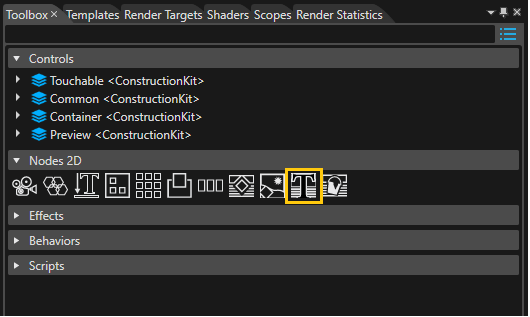
The new TextNode2D is located in the Toolbox panel. In order to add a text to the scene, drag a TextNode from the panel to a Scene2D node.

<div drawio-diagram="2222"><img src="https://doc316en.candera.eu/uploads/images/drawio/2023-02/drawing-4-1677045059.png" alt=""/></div>

<div class="contents" id="bkmrk--8"><div class="contents"><div class="textblock">  
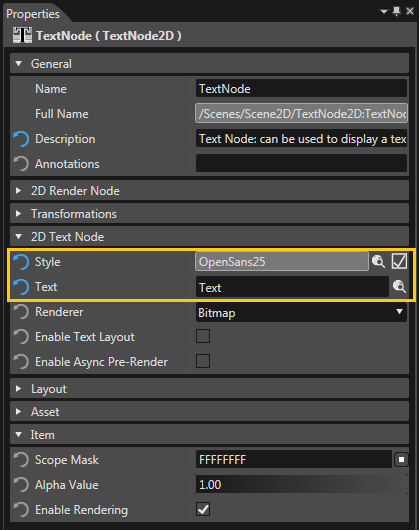
</div></div></div>From the Properties panel of the TextNode, configure the necessary properties for rendering: *Text*, *Style*.

<div drawio-diagram="2223"><img src="https://doc316en.candera.eu/uploads/images/drawio/2023-02/drawing-4-1677045072.png" alt=""/></div>

<div class="contents" id="bkmrk--10"><div class="contents"><div class="textblock">  
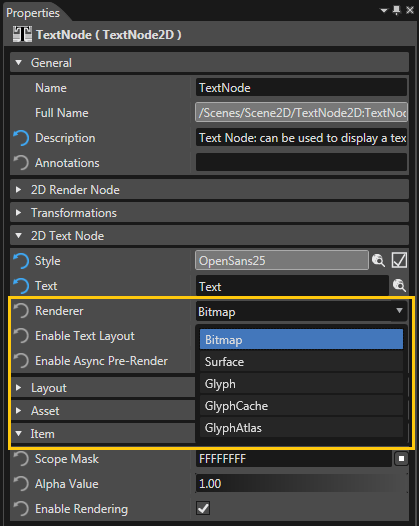
</div></div></div><span style="color: rgb(230, 126, 35);">[Candera::TextNodeRenderer](http://dev.doc.cgistudio.at/APILINK/class_candera_1_1_text_node_renderer.html "Base class for text to Image2D generation strategies.")</span> type of <span style="color: rgb(230, 126, 35);">[Candera::TextNode2D](http://dev.doc.cgistudio.at/APILINK/class_candera_1_1_text_node2_d.html "TextNode2D is a RenderNode that renders text using the attached BitmapBrush effect.")</span> can be changed using the *Renderer* property. Default value in SceneComposer is Bitmap.

<div drawio-diagram="2224"><img src="https://doc316en.candera.eu/uploads/images/drawio/2023-02/drawing-4-1677045090.png" alt=""/></div>

<div class="contents" id="bkmrk--12"><div class="contents"><div class="textblock">  
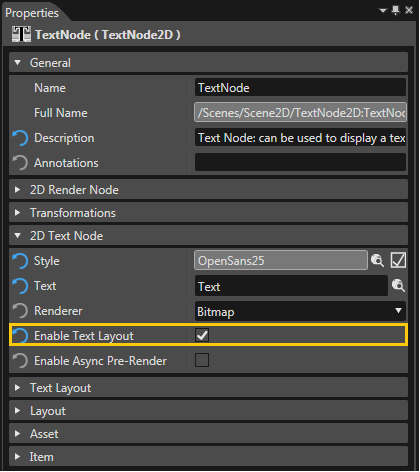
</div></div></div>Candera::DefaultTextNode2DLayouter is attached by checking *Enable Text Layout*. Additional layouter properties are exposed in the Properties Panel:

<div class="contents" id="bkmrk-multi-line-%28enabled-"><div class="contents"><div class="textblock">- Multi line (enabled by default)
- Word wrap (disabled by default)

</div></div></div><div class="contents" id="bkmrk-for-truncation-to-oc"><div class="contents"><div class="contents"><div class="textblock"><dl class="note"><dd><p class="callout info">For truncation to occur, *Enable Text Layout* property needs to be enabled.</p>

</dd></dl></div></div></div></div><div drawio-diagram="2225"><img src="https://doc316en.candera.eu/uploads/images/drawio/2023-02/drawing-4-1677045120.png" alt=""/></div>

<div class="contents" id="bkmrk--14"><div class="contents"><div class="textblock">  
</div></div></div>When a TextNode2D is created, a <span style="color: rgb(230, 126, 35);">[Candera::BitmapBrushColorBlend](http://dev.doc.cgistudio.at/APILINK/class_candera_1_1_bitmap_brush_color_blend.html "Output a bitmap image, modulate the color, and blend it with the store buffer. Same as chaining (Bitm...")</span> is automatically associated with the node, which is used for changing text color only. Any BitmapBrush effect present in the list of effects from Toolbox Panel can be used for text rendering. The visual appearance of the text will be affected depending on the type of effect chosen.

<div drawio-diagram="2226"><img src="https://doc316en.candera.eu/uploads/images/drawio/2023-02/drawing-4-1677045137.png" alt=""/></div>

<div class="textblock" id="bkmrk--16"></div><div class="contents" id="bkmrk-back-to-the-menu"></div>#### **TextEngine Render Interface** 

##### <a class="anchor" id="bkmrk--63"></a>Overview: Render Interface

The main interface to render text is the method

<div class="contents" id="bkmrk-candera%3A%3Atextrenderi"><div class="contents"><div class="textblock">- <span style="color: rgb(230, 126, 35);">[Candera::TextRendering::TextRenderer::Render(TextRenderContext &amp;context, const LayoutingOptions &amp;layoutingOptions, const ShapingOptions &amp;shapingOptions, const TextProperties &amp;textProperties) const](http://dev.doc.cgistudio.at/APILINK/class_candera_1_1_text_rendering_1_1_text_renderer.html#a6be555dcc044fcaabc261963e8be08af)</span>

</div><div class="textblock"><dl class="note"><dd><p class="callout info">Compare this interface also with the functional steps introduced in chapter <span style="color: rgb(230, 126, 35);">[Fonts and Styles](https://doc316en.candera.eu/books/candera/page/fonts-and-styles)</span>.</p>

</dd></dl></div></div></div>##### <a class="anchor" id="bkmrk--64"></a>Text Render Context

A <span style="color: rgb(230, 126, 35);">[Candera::TextRendering::TextRenderContext](http://dev.doc.cgistudio.at/APILINK/class_candera_1_1_text_rendering_1_1_text_render_context.html "Defines an abstract render context and target for text rendering.")</span> is required to define a target for text rendering i.e. where to render the text to.

##### <a class="anchor" id="bkmrk--65"></a>Configure Bitmap as Target for Text Rendering

A Candera::TextRendering::BitmapTextRenderContext can be used to draw text into a bitmap. So first of all the bitmap which shall be drawn needs to be defined with

<div class="contents" id="bkmrk-the-candera%3A%3Atextren"><div class="contents"><div class="contents"><div class="textblock">- the Candera::TextRendering::BitmapTextRenderContext::SetBitmap() method to assign a bitmap to render to,
- the Candera::TextRendering::BitmapTextRenderContext::SetPenColor() method to define the text color
- the Candera::TextRendering::BitmapTextRenderContext::SetClipRect() method to set a clipping rectangle for the text.

<div class="fragment">  
</div></div></div></div></div>```
    BitmapTextRenderContext bmpRenderContext;
    static_cast<void>(bmpRenderContext.SetBitmap(m_bitmap));
    bmpRenderContext.SetPenColor(m_color);

```

##### <a class="anchor" id="bkmrk--66"></a>Layouting Options

The <span style="color: rgb(230, 126, 35);">[Candera::TextRendering::LayoutingOptions](http://dev.doc.cgistudio.at/APILINK/class_candera_1_1_text_rendering_1_1_layouting_options.html "This class is used for describing the layout of the text.")</span> define the layout of the rendered text with

<div class="contents" id="bkmrk-the-candera%3A%3Atextren-1"><div class="contents"><div class="textblock">- the <span style="color: rgb(230, 126, 35);">[Candera::TextRendering::LayoutingOptions::SetHorizontalAlignment()](http://dev.doc.cgistudio.at/APILINK/class_candera_1_1_text_rendering_1_1_layouting_options.html#aca3a3a56bc40d02a854e92568ab57c73)</span> and <span style="color: rgb(230, 126, 35);">[Candera::TextRendering::LayoutingOptions::SetVerticalAlignment()](http://dev.doc.cgistudio.at/APILINK/class_candera_1_1_text_rendering_1_1_layouting_options.html#a43bb290d70933b2474899028257689fc)</span> methods to specify the text alignment,
- the <span style="color: rgb(230, 126, 35);">[Candera::TextRendering::LayoutingOptions::SetMultilineTextEnabled()](http://dev.doc.cgistudio.at/APILINK/class_candera_1_1_text_rendering_1_1_layouting_options.html#aec9e287bc7225d26991516c177ea89c7)</span> method to toggle multi line and single line layout.
- the <span style="color: rgb(230, 126, 35);">[Candera::TextRendering::LayoutingOptions::SetLineSpacing()](http://dev.doc.cgistudio.at/APILINK/class_candera_1_1_text_rendering_1_1_layouting_options.html#a7336d9c7332603afc9db5e2d06762727)</span> method to modify the space between lines of multi line text.
- the <span style="color: rgb(230, 126, 35);">[Candera::TextRendering::LayoutingOptions::SetWordWrapEnabled()](http://dev.doc.cgistudio.at/APILINK/class_candera_1_1_text_rendering_1_1_layouting_options.html#a5ec96665e072fd3f6afc6cf11ca8f44b)</span> method to enable automatic word wrap for multi line text.

<dl class="see"><dt>**See also:**</dt><dd><span style="color: rgb(230, 126, 35);">[Candera::TextRendering::LayoutingOptions](http://dev.doc.cgistudio.at/APILINK/class_candera_1_1_text_rendering_1_1_layouting_options.html "This class is used for describing the layout of the text.")</span> for further options.</dd></dl></div></div></div>##### <a class="anchor" id="bkmrk--67"></a>Shaping Options

The [Candera::TextRendering::LayoutingOptions](http://dev.doc.cgistudio.at/APILINK/class_candera_1_1_text_rendering_1_1_layouting_options.html "This class is used for describing the layout of the text.") define how the text shall be transformed from logical to display presentation. The usage of one of the constructors is recommended:

<div class="contents" id="bkmrk-candera%3A%3Atextrenderi-0"><div class="contents"><div class="textblock">- Candera::TextRendering::ShapingOptions::ShapingOptions(const StylePtr &amp;style)
- Candera::TextRendering::ShapingOptions::ShapingOptions(const StylePtr &amp;style, const CulturePtr &amp;culture)

</div></div></div>##### <a class="anchor" id="bkmrk--68"></a>Text Properties

The <span style="color: rgb(230, 126, 35);">[Candera::TextRendering::TextProperties](http://dev.doc.cgistudio.at/APILINK/class_candera_1_1_text_rendering_1_1_text_properties.html "Defines the means to retrieve the text for rendering.")</span> simply define the text itself which shall be rendered.

<div class="contents" id="bkmrk-see-also%3A-the-constr"><div class="textblock"><dl class="see"><dt>**See also:**</dt><dd>the constructor <span style="color: rgb(230, 126, 35);">[Candera::TextRendering::TextProperties::TextProperties(const TChar \*text, TextLength length)](http://dev.doc.cgistudio.at/APILINK/class_candera_1_1_text_rendering_1_1_text_properties.html#ae2f8fb01e773ce9f188eb6e82bae0ef9)</span>.</dd></dl></div></div>#### **Font Metrics and Text Sizes** 

##### <a class="anchor" id="bkmrk--69"></a>Font Size

In <span style="color: rgb(230, 126, 35);">[Candera](http://dev.doc.cgistudio.at/APILINK/namespace_candera.html "[DataBinding_RefTypeSample]")</span> the font size (respectively the font height) has to be provided in pixel size. Note that in several word processing programs, like *Microsoft Word*, fonts are defined in point size. The conversion between pixel size and point size is calculated as follows (see [FreeType Glyph Conventions](http://www.freetype.org/freetype2/docs/glyphs/glyphs-2.html)):

<div class="contents" id="bkmrk-pixel_size-%3D-point_s"><div class="contents"><div class="textblock">- pixel\_size = point\_size \* resolution / 72

</div></div></div>*Microsoft Windows* e.g. defines for historical reasons a default resolution of 96 PPI (DPI). A font in *Microsoft Word* with defined point size 18 has the same height as the font defined in <span style="color: rgb(230, 126, 35);">[Candera](http://dev.doc.cgistudio.at/APILINK/namespace_candera.html "[DataBinding_RefTypeSample]")</span> with pixel size 24 (24 = 18 \* 96/72).

##### <a class="anchor" id="bkmrk--70"></a>Font Metrics

For a font, static font metrics are provided describing font ascender, descender values in device pixel, the font line height and the maximum vertical advance of a font character: <span style="color: rgb(230, 126, 35);">[Candera::TextRendering::Font::GetMetrics()](http://dev.doc.cgistudio.at/APILINK/class_candera_1_1_text_rendering_1_1_font.html#a33baf13f579a0a849652c52b0fd97062)</span>

```
    TextRendering::Metrics metrics;
    if (!m_font.GetMetrics(metrics)) {
        return false;
    }

```

##### <a class="anchor" id="bkmrk--71"></a>Text Bounds

Further, the text bounds (width, height, etc.) of a given string can be retrieved by calling *GetTextRectangle* method of <span style="color: rgb(230, 126, 35);">[Candera::TextRendering::GlyphTextMeasureContext](http://dev.doc.cgistudio.at/APILINK/class_candera_1_1_text_rendering_1_1_glyph_text_measure_context.html "GlyphTextMeasureContext is used to measure the glyph bitmaps extents.")</span> or <span style="color: rgb(230, 126, 35);">[Candera::TextRendering::CursorTextMeasureContext](http://dev.doc.cgistudio.at/APILINK/class_candera_1_1_text_rendering_1_1_cursor_text_measure_context.html "CursorTextMeasureContext is used to measure the movement of the text cursor.")</span>.

<span style="color: rgb(230, 126, 35);">[Candera::TextRendering::GlyphTextMeasureContext](http://dev.doc.cgistudio.at/APILINK/class_candera_1_1_text_rendering_1_1_glyph_text_measure_context.html "GlyphTextMeasureContext is used to measure the glyph bitmaps extents.")</span> builds a rectangle corresponding to the smallest surface covered by all the glyph bitmaps. The position of this rectangle( represented by (left, top) coordinates) can be offset from the text position. Therefore, when rendering the text, the Layouting Options should be constructed using the inverse of this offset.

<span style="color: rgb(230, 126, 35);">[Candera::TextRendering::CursorTextMeasureContext](http://dev.doc.cgistudio.at/APILINK/class_candera_1_1_text_rendering_1_1_cursor_text_measure_context.html "CursorTextMeasureContext is used to measure the movement of the text cursor.")</span> builds a rectangle corresponding to the whole surface swept by the cursor when moving while processing the text. The cursor is considered to be a segment of length equal to the style height. This rectangle does not usually have an offset and it contains the final advancement of the cursor.

```
    GlyphTextMeasureContext glyphContext;
    static_cast<void>(textRenderer.Render(glyphContext, LayoutingOptions(), ShapingOptions(m_style), TextProperties(m_text)));
    TextRect textBound = glyphContext.GetTextRectangle();
    mTextStartPos.SetX(-textBound.GetPosition().GetX());
    mTextStartPos.SetY(-textBound.GetPosition().GetY());
    Int16 textWidth = textBound.GetWidth();
    Int16 textHeight = textBound.GetHeight();
```

```
    static_cast<void>(textRenderer.Render(bmpRenderContext, LayoutingOptions(mTextStartPos), ShapingOptions(m_style), TextProperties(m_text)));

```

The Layouting Options describe the layout of the text. The Shaping Options define how the text is shaped (ligatures, text direction, ..) and they also contain the style.

####   
**Simple Text Rendering** 

##### <a class="anchor" id="bkmrk--72"></a>Rendering Simple Text

The <span style="color: rgb(230, 126, 35);">[Candera::TextRendering::TextRenderer](http://dev.doc.cgistudio.at/APILINK/class_candera_1_1_text_rendering_1_1_text_renderer.html "TextRenderer is the core Candera function for rendering text.")</span> provides the core function to render text.

For simple text rendering the <span style="color: rgb(230, 126, 35);">[Candera::TextRendering::TextRenderer::Render()](http://dev.doc.cgistudio.at/APILINK/class_candera_1_1_text_rendering_1_1_text_renderer.html#a6be555dcc044fcaabc261963e8be08af)</span> method is called. Besides the actual text (type TChar\*) and the BitmapTextRenderContext as target, layouting and shaping can be specified.

```
    static_cast<void>(textRenderer.Render(bmpRenderContext, LayoutingOptions(mTextStartPos), ShapingOptions(m_style), TextProperties(m_text)));

```

Finally the image has to be updated to apply the changes.

```
    bool success = m_textureImage->Update();

```

####   
**Character-Glyph Position Mapping** 

##### <a class="anchor" id="bkmrk--73"></a>Overview

<span style="color: rgb(230, 126, 35);">[Candera](http://dev.doc.cgistudio.at/APILINK/namespace_candera.html "[DataBinding_RefTypeSample]")</span> text engine provides an interface which allows to map positions in character string to positions in glyph string. This feature can be useful for applications and widgets in order to perform various operations depending on the character position like, for instance, highlighting text.

##### <a class="anchor" id="bkmrk--74"></a>Example

For the convenience, we choose to improve the TextTextureWidget with this highlighting feature. The widget will highlight the text by rendering in red all the glyphs corresponding to the characters having the index in the interval *m\_start* and *m\_end*.

The character position information is accessible in the Blit method of the <span style="color: rgb(230, 126, 35);">[Candera::BitmapTextRenderContext](http://dev.doc.cgistudio.at/APILINK/class_candera_1_1_bitmap_text_render_context.html "Implements a TextRenderContext for Bitmaps.")</span> class. Consequently, this class should be derived and the Blit method overwritten as follows:

```
class BitmapTextRenderContextSelection : public BitmapTextRenderContext
{      
public:   
    BitmapTextRenderContextSelection(Int selectionStart, Int selectionEnd, <a class="code" href="http://dev.doc.cgistudio.at/APILINK/group___behaviors_control.html#ggae7abc816df647d0ecbc280480fefb788a6d1d4da086e381cb2c5a5ce6a2513ebd">Color</a> color) : m_start(selectionStart), m_end(selectionEnd), m_color(color) {}
    virtual void Blit(Int16 x, Int16 y, const GlyphBitmap& glyph);
private:
    typedef BitmapTextRenderContext Base;

    <a class="code" href="http://dev.doc.cgistudio.at/APILINK/group___behaviors_control.html#ggae7abc816df647d0ecbc280480fefb788a6d1d4da086e381cb2c5a5ce6a2513ebd">Color</a> ComputeColorForCharPosition(<a class="code" href="http://dev.doc.cgistudio.at/APILINK/group___candera_text_engine.html#gae7c07cf8f5b0200e470e2a728895b9de" title="Type used to specify the position of a character within a text buffer.">TextPosition</a> position);
    Int m_start;
    Int m_end;
    <a class="code" href="http://dev.doc.cgistudio.at/APILINK/group___behaviors_control.html#ggae7abc816df647d0ecbc280480fefb788a6d1d4da086e381cb2c5a5ce6a2513ebd">Color</a> m_color;
};

void BitmapTextRenderContextSelection::Blit(Int16 x, Int16 y, const GlyphBitmap& glyph){

    SetPenColor(ComputeColorForCharPosition(glyph.characterPosition));
    Base::Blit(x, y, glyph);
}

<a class="code" href="http://dev.doc.cgistudio.at/APILINK/group___behaviors_control.html#ggae7abc816df647d0ecbc280480fefb788a6d1d4da086e381cb2c5a5ce6a2513ebd">Color</a> BitmapTextRenderContextSelection::ComputeColorForCharPosition(<a class="code" href="http://dev.doc.cgistudio.at/APILINK/group___candera_text_engine.html#gae7c07cf8f5b0200e470e2a728895b9de" title="Type used to specify the position of a character within a text buffer.">TextPosition</a> position){
    if(position >= m_start && position <= m_end){
        return <a class="code" href="http://dev.doc.cgistudio.at/APILINK/group___behaviors_control.html#ggae7abc816df647d0ecbc280480fefb788a6d1d4da086e381cb2c5a5ce6a2513ebd">Color</a>(255,0,0);
    } else {
        return m_color;
    }
}
```

In TextTextureWidget::UpdateTextureImage(), use the newly created class instead of <span style="color: rgb(230, 126, 35);">[Candera::BitmapTextRenderContext](http://dev.doc.cgistudio.at/APILINK/class_candera_1_1_bitmap_text_render_context.html "Implements a TextRenderContext for Bitmaps.")</span>:

```
    BitmapTextRenderContextSelection bmpRenderContext(m_selectionStart, m_selectionEnd, GetTextColorPrv());
```

####   
**Shortening Support For Bidirectional Text** 

##### <a class="anchor" id="bkmrk--75"></a>Feature Overview

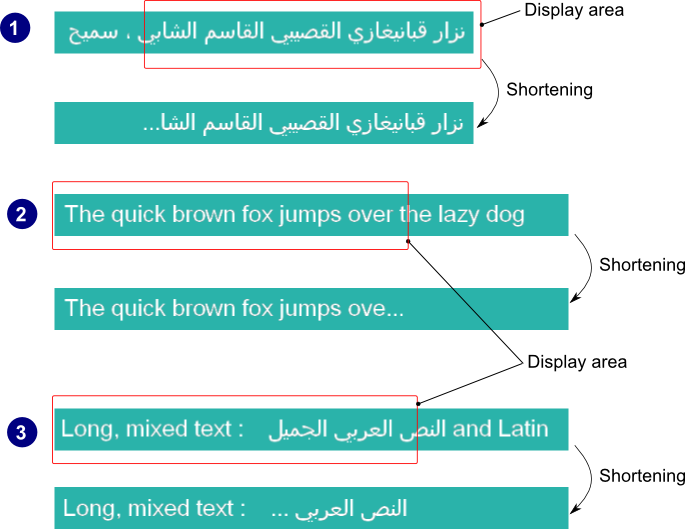
This feature ensures that the bidirectional text shall be shortened whenever it does not fit into its designated display area. The algorithm which does the shortening can deal with different levels of embedding of right-to-left text in left-to-right text and vice versa. Depending on the text direction of the last chunk, the shortening string is inserted after the last fitting text segment, on the left or on the right end.

You can take advantage of this feature by using one of the following, depending on the type of scene being rendered:

<div class="contents" id="bkmrk-scene-type-node-name"><div class="contents"><div class="textblock"><table border="1" style="width: 76.5432%;"><tbody><tr align="center"><th style="padding: 5px; width: 34.8762%;">Scene type</th><th style="width: 32.6109%;">Node name</th><th style="width: 32.6206%;">Widget name</th></tr><tr><td align="center" style="width: 34.8762%;">2D</td><td style="padding: 5px; width: 32.6109%;">[<span style="color: rgb(230, 126, 35);">Candera::TextNode2D</span>](http://dev.doc.cgistudio.at/APILINK/class_candera_1_1_text_node2_d.html "TextNode2D is a RenderNode that renders text using the attached BitmapBrush effect.")</td><td class="align-center" style="padding: 5px; width: 32.6206%;">-</td></tr><tr><td align="center" style="width: 34.8762%;">3D</td><td style="padding: 5px; width: 32.6109%;">-</td><td class="align-center" style="padding: 5px; width: 32.6206%;">TextTextureWidget</td></tr></tbody></table>

</div></div></div>##### <a class="anchor" id="bkmrk--76"></a>Truncation using TextNode2D

This feature is active only when the node parameter *Enable Text Layout* is enabled. The text will be automatically truncated whenever its size no longer fits in the specified *Size* property of the node. TextNode2D provides only one truncation method, by cutting text and adding trailing ellipsis to fit the space.

##### <a class="anchor" id="bkmrk--77"></a>Truncation using TextTextureWidget

This feature is active only when the widget parameter *Truncation method* is set to the **Text** value. The character(s) used for visual feedback of text shortening is configurable by setting the *Truncation text* property of the 3D widget.

##### <a class="anchor" id="bkmrk--78"></a>Examples

The image below exemplifies three scenarios :

<div class="contents" id="bkmrk-shortening-of-the-ri"><div class="contents"><div class="textblock">1. Shortening of the right-to-left text (Arabic)
2. Shortening of the left-to-right text (Latin)
3. Shortening of right-to-left text embedded in left-to-right text (left-to-right and right-to-left)

</div></div></div><div drawio-diagram="2227"><img src="https://doc316en.candera.eu/uploads/images/drawio/2023-02/drawing-4-1677045787.png" alt=""/></div>

<div class="contents" id="bkmrk--23"><div class="textblock">  
</div></div>####   
**Font Hinting** 

##### <a class="anchor" id="bkmrk--80"></a>Overview

Font hinting is the use of mathematical instructions to adjust the display of an outline font so that it lines up with a rasterized grid. This is done by interpolating the pixels in order to more clearly render the font. At low screen resolutions, hinting is critical for producing clear, legible text. It can be accompanied by antialiasing and (on liquid crystal displays) subpixel rendering for further clarity.

<div class="contents" id="bkmrk-the-hinting-applies-"><div class="contents"><div class="textblock"><dl class="note"><dt></dt><dd><p class="callout info">The hinting applies only to **outline** fonts so the bitmap fonts and the stroke fonts will not be affected by this feature.</p>

</dd></dl></div></div></div>Hints are usually created in a font editor during the typeface design process and embedded in the font. In general, there are three possible ways to hint a glyph:

<div class="contents" id="bkmrk-the-font-contains-hi"><div class="contents"><div class="textblock">- The font contains hints to guide the rasterizer, telling it which shapes of the glyphs need special consideration. The hinting logic is partly in the font and partly in the rasterizer.
- The font contains exact instructions (also called bytecode) on how to move the points of its outlines, depending on the resolution of the output device, and which intentionally distort the (outline) shape to produce a well-rasterized result. The hinting logic is in the font; ideally, all rasterizers simply process these instructions to get the same result on all platforms.
- The font gets auto-hinted (at run-time). The hinting logic is completely in the rasterizer. No hints in the font are used or needed; instead, the rasterizer scans and analyzes the glyphs to apply corrections by itself.

</div></div></div>##### <a class="anchor" id="bkmrk--81"></a>Enabling Hinting

The hinting can be enabled or disabled by the means of the method <span style="color: rgb(230, 126, 35);">[Candera::TextRendering::Font::SetHintingEnabled()](http://dev.doc.cgistudio.at/APILINK/class_candera_1_1_text_rendering_1_1_font.html#aebfdc5b60e4ddafa35065c5d33bc9ce9)</span>. When hinting is disabled, the glyphs may appear blurred, as you can see below. The text was rendered with a small size font (9px) and then zoomed in:

<div drawio-diagram="2228"><img src="https://doc316en.candera.eu/uploads/images/drawio/2023-02/drawing-4-1677045859.png" alt=""/></div>

<div class="contents" id="bkmrk--27"><div class="contents"><div class="textblock">  
</div></div></div>##### <a class="anchor" id="bkmrk--83"></a>Enabling AutoHint

The usage of the automatic hinter of the font driver can be controlled by calling the method <span style="color: rgb(230, 126, 35);">[Candera::TextRendering::Font::SetAutohintEnabled()](http://dev.doc.cgistudio.at/APILINK/class_candera_1_1_text_rendering_1_1_font.html#ab9e5ba935a28985ec47c1fe290dcbfff)</span>. When the automatic hinter is disabled either the native hinter of the font is used either the hinting is disabled (zoomed in image):

<div drawio-diagram="2229"><img src="https://doc316en.candera.eu/uploads/images/drawio/2023-02/drawing-4-1677045895.png" alt=""/></div>

<div class="contents" id="bkmrk--29"><div class="contents"><div class="textblock">  
</div></div></div>##### <a class="anchor" id="bkmrk--85"></a>Enabling Force AutoHint

If a given font driver doesn't provide its own hinter, the auto-hinter is used by default. If a format-specific hinter is provided, it is still possible to use the auto-hinter by enabling it using the method <span style="color: rgb(230, 126, 35);">[Candera::TextRendering::Font::SetForceAutohintEnabled()](http://dev.doc.cgistudio.at/APILINK/class_candera_1_1_text_rendering_1_1_font.html#af57b8dbdaca17b1bd51c87fcdebfa3da)</span>.

##### <a class="anchor" id="bkmrk--86"></a>Hinting Mode

The driver autohinter can be configured by calling the <span style="color: rgb(230, 126, 35);">[Candera::TextRendering::Font::SetHintingMode()](http://dev.doc.cgistudio.at/APILINK/class_candera_1_1_text_rendering_1_1_font.html#a9a768ce930fff71ed1fc6398e4a15e95)</span> method with one of the following parameters(hinting algorithms):

<div class="contents" id="bkmrk-glyphhinter%3A%3Anormal-"><div class="contents"><div class="textblock">- GlyphHinter::Normal : normal hinting, optimized for standard gray-level rendering  
    <div drawio-diagram="2230"><img src="https://doc316en.candera.eu/uploads/images/drawio/2023-02/drawing-4-1677045933.png" alt=""/></div>

- GlyphHinter::Light : applies less corrections than normal hinting for better performance  
    <div drawio-diagram="2231"><img src="https://doc316en.candera.eu/uploads/images/drawio/2023-02/drawing-4-1677045994.png" alt=""/></div>
- GlyphHinter::Monochrome : appropriate for monochrome rendering  
    <div drawio-diagram="2232"><img src="https://doc316en.candera.eu/uploads/images/drawio/2023-02/drawing-4-1677046010.png" alt=""/></div>

- GlyphHinter::Lcd : appropriate for horizontally decimated LCD displays  
    <div drawio-diagram="2233"><img src="https://doc316en.candera.eu/uploads/images/drawio/2023-02/drawing-4-1677046031.png" alt=""/></div>

- GlyphHinter::VerticalLcd : appropriate for vertically decimated LCD displays  
    <div drawio-diagram="2234"><img src="https://doc316en.candera.eu/uploads/images/drawio/2023-02/drawing-4-1677046060.png" alt=""/></div>

</div></div></div><div class="contents" id="bkmrk-all-modes-except-gly"><div class="contents"><div class="textblock"><dl class="note"><dd><p class="callout info">All modes except GlyphHinter::Monochrome use 256 levels of opacity.</p>

</dd></dl></div></div></div>##### <a class="anchor" id="bkmrk--92"></a>Code Example

```
    m_font1.SetHintingMode(GlyphHinter::Monochrome);
    m_font2.SetHintingMode(GlyphHinter::Light);
```

##### <a class="anchor" id="bkmrk--93"></a>Glyph Bitmap Format

The output type of the glyph rendering process can be configured by calling the method <span style="color: rgb(230, 126, 35);">[Candera::TextRendering::Font::SetRequestedGlyphFormat()](http://dev.doc.cgistudio.at/APILINK/class_candera_1_1_text_rendering_1_1_font.html#a92c945ce5945b332320c3e68dee77e75)</span> with one of the following render modes as parameters:

<div class="contents" id="bkmrk-glyphbitmap%3A%3Aunknown"><div class="contents"><div class="textblock">- GlyphBitmap::Unknown : format is unspecified
- GlyphBitmap::Monochrome : correspond to 1-bit bitmaps (two levels of opacity)
- GlyphBitmap::Lcd : format use with horizontally decimated RGB or BGR sub-pixel LCD displays
- GlyphBitmap::VerticalLcd : format use with vertically decimated LCD displays
- GlyphBitmap::Grayscale : format is grayscale, one byte per pixel; this is the default render mode

</div></div></div>Each of the render modes above correspond to a specific type of scanline conversion performed on the outline.

##### <a class="anchor" id="bkmrk--94"></a>Code Example

```
    m_font1.SetRequestedGlyphFormat(GlyphBitmap::VerticalLcd);
    m_font2.SetRequestedGlyphFormat(GlyphBitmap::Grayscale);
```

##### <a class="anchor" id="bkmrk--95"></a>Monochrome Render Mode

The monochrome render mode removes anti-aliasing because it's using only two levels of opacity and gives clearer appearance for small size fonts (no blurring). Please see below a comparison between monochrome and grayscale render modes:

<div drawio-diagram="2235"><img src="https://doc316en.candera.eu/uploads/images/drawio/2023-02/drawing-4-1677046185.png" alt=""/></div>

<div drawio-diagram="2236"><img src="https://doc316en.candera.eu/uploads/images/drawio/2023-02/drawing-4-1677046236.png" alt=""/></div>

An another advantage of using this render mode is the smaller memory footprint for glyphs because of 1bit format.

# Using asynchronous text rendering

#### <a class="anchor" id="bkmrk--16"></a>Description

The Candera engine provides asynchronous text rendering to improve the handling of time-consuming text processing. The focus is not to improve performance but to improve resource handling.

Asynchronous text rendering requires knowledge of how text nodes work.

General information of how to use <span style="color: rgb(230, 126, 35);">[Candera::TextNode2D](http://dev.doc.cgistudio.at/APILINK/class_candera_1_1_text_node2_d.html "TextNode2D is a RenderNode that renders text using the attached BitmapBrush effect.")</span> can be found in the following section:

<div class="contents" id="bkmrk-using-candera%3A%3Atextn"><div class="contents"><div class="textblock">- <span style="color: rgb(230, 126, 35);">[Using Candera::TextNode2D](https://doc316en.candera.eu/link/480#bkmrk-using-candera%3A%3Atextn-1)</span>

</div></div></div>Asynchronous text rendering requires further knowledge of which steps are necessary to display a text. Please refer to the following section:

<div class="contents" id="bkmrk-text-rendering---use"><div class="contents"><div class="textblock">- <span style="color: rgb(230, 126, 35);">[Text rendering - Useful knowledge](#bkmrk-text-rendering---use-1)</span>

</div></div></div>Based on the knowledge about the TextNode2D and CanvasText, the following chapters describe how asynchronous text rendering works. Further, these chapters explain how to customize the asynchronous text rendering and which restrictions should be considered when using this feature. The documentation focuses mainly on <span style="color: rgb(230, 126, 35);">[Candera::TextNode2D](http://dev.doc.cgistudio.at/APILINK/class_candera_1_1_text_node2_d.html "TextNode2D is a RenderNode that renders text using the attached BitmapBrush effect.")</span>. The concepts described inside these chapters are applicable to <span style="color: rgb(230, 126, 35);">[Candera::CanvasText](http://dev.doc.cgistudio.at/APILINK/class_candera_1_1_canvas_text.html "CanvasText represents a text node within a 3D Canvas object.")</span>, too.


#### **Text rendering - Useful knowledge** 

##### <a class="anchor" id="bkmrk--18"></a>TextNode2D – text render process

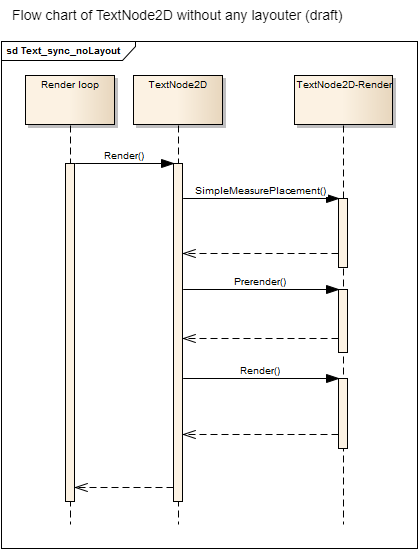
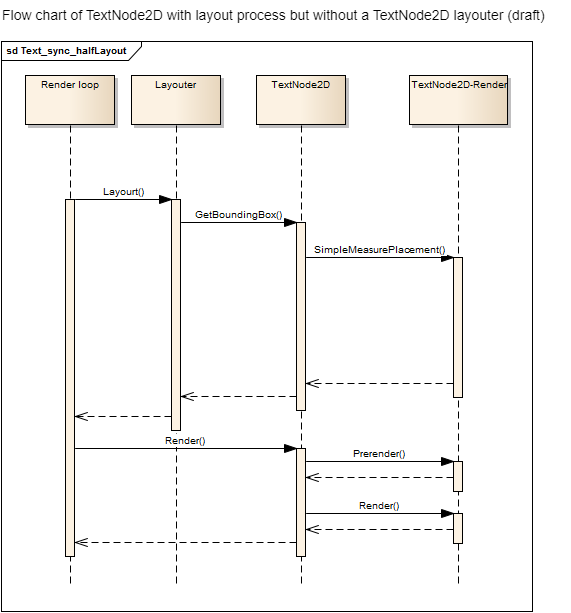
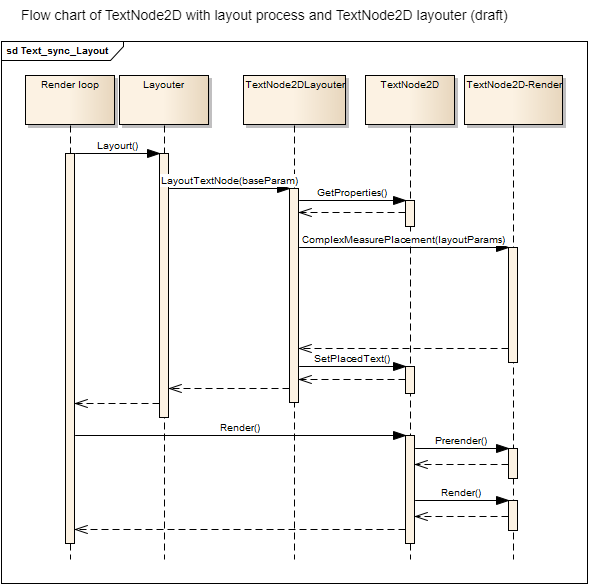
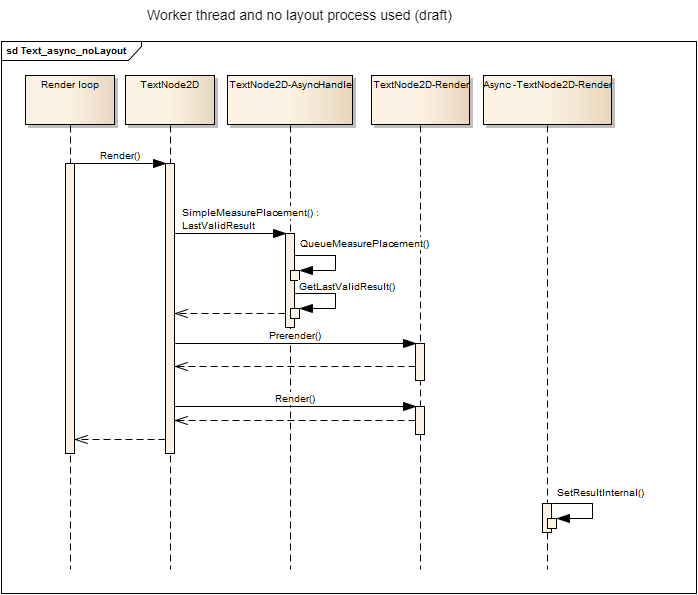
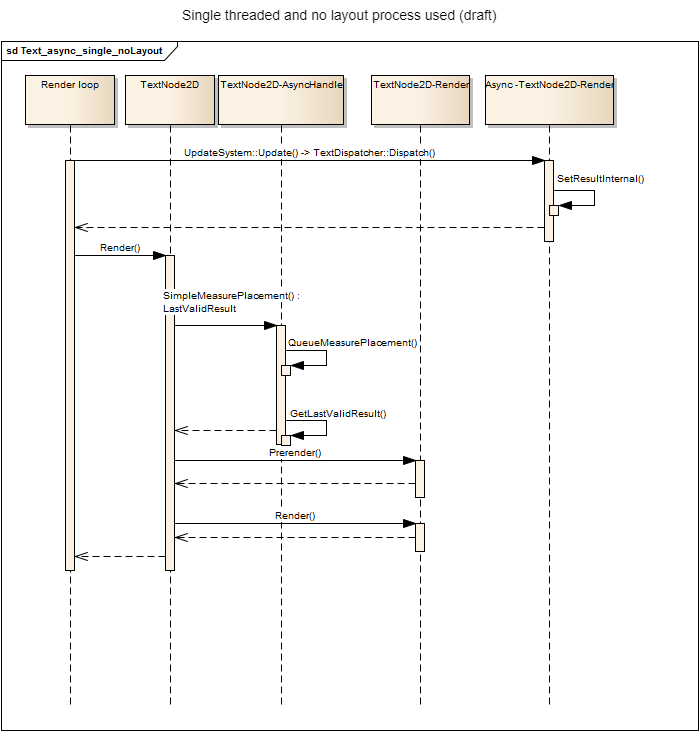
A text uses three steps in its render process:

<div class="contents" id="bkmrk-measurement-and-plac"><div class="contents"><div class="textblock">1. Measurement and placement
2. Prerendering – Prepares the render device for the text (if necessary)
3. Render – Actual visible output

</div></div></div>All of these steps have to be fulfilled to come to a visible result. Using a TextNode2D has three different ways to update its text and therefore three different ways to approach the final result. The main difference lies in providing information and handling the three process steps:

<div class="contents" id="bkmrk-first-case%3A-no-layou"><div class="contents"><div class="textblock">- <span style="color: rgb(230, 126, 35);">[First case: No layout usage](https://doc316en.candera.eu/link/482#bkmrk-first-case%3A-no-layou-0)</span>
- <span style="color: rgb(230, 126, 35);">[Second case: Layout process but no TextNode2D layouter](https://doc316en.candera.eu/link/482#bkmrk-second-case%3A-layout-)</span>
- <span style="color: rgb(230, 126, 35);">[Third case: Layout process with TextNode2D layouter](https://doc316en.candera.eu/link/482#bkmrk-third-case%3A-layout-p)</span>

</div></div></div>##### <a class="anchor" id="bkmrk--19"></a>First case: No layout usage

<span style="color: rgb(230, 126, 35);">[Candera::TextNode2D](http://dev.doc.cgistudio.at/APILINK/class_candera_1_1_text_node2_d.html "TextNode2D is a RenderNode that renders text using the attached BitmapBrush effect.")</span> has no real layout information. There is also no layout in which the <span style="color: rgb(230, 126, 35);">[Candera::TextNode2D](http://dev.doc.cgistudio.at/APILINK/class_candera_1_1_text_node2_d.html "TextNode2D is a RenderNode that renders text using the attached BitmapBrush effect.")</span> is integrated. Therefore, trigger the render process for text render process is enough. The text is not bound to an area and has no relationship other than the visible layer to any other node in the scene graph.

Pro:

<div class="contents" id="bkmrk-lightweight-version-"><div class="contents"><div class="textblock">- Lightweight version of text and Candera.
- Simple text can be shown without much effort.

</div></div></div>Contra:

<div class="contents" id="bkmrk-most-of-text-placeme"><div class="contents"><div class="textblock">- Most of text placement features are disabled.
- No arrangement exists.

</div></div></div><div drawio-diagram="2248"><img src="https://doc316en.candera.eu/uploads/images/drawio/2023-02/drawing-4-1677046993.png" alt=""/></div>

<div class="contents" id="bkmrk--0"><div class="contents"><div class="textblock">  
</div></div></div>##### <a class="anchor" id="bkmrk--21"></a>Second case: Layout process but no TextNode2D layouter

<span style="color: rgb(230, 126, 35);">[Candera::TextNode2D](http://dev.doc.cgistudio.at/APILINK/class_candera_1_1_text_node2_d.html "TextNode2D is a RenderNode that renders text using the attached BitmapBrush effect.")</span> has no real layout information. However, it is arranged within a layout (e.g. GridLayout). This implies that <span style="color: rgb(230, 126, 35);">[Candera::TextNode2D](http://dev.doc.cgistudio.at/APILINK/class_candera_1_1_text_node2_d.html "TextNode2D is a RenderNode that renders text using the attached BitmapBrush effect.")</span> has to provide actual layout results to arrange the text within the layout area. Therefore, the layout process has to start the text render process beforehand. The text render process has to complete the first step (measurement and placement) when the layout process evaluates the bounding box of the text. The layout process has no influence on the size of the bounding box. It only receives the information of the bounding box and can place all the other nodes around the text. The actual handling of this information is defined by the used layouter.

Pro:

<div class="contents" id="bkmrk-lightweight-version--0"><div class="contents"><div class="textblock">- Lightweight version of text with advantages of an arrangement of scene graph nodes.
- Switching between first and second case is normally without major issues.

</div></div></div>Contra:

<div class="contents" id="bkmrk-the-text-placement-c"><div class="contents"><div class="contents"><div class="textblock">- The text placement cannot be influenced by the layout process.
- TextNode2D itself cannot distinguish between first case and second case.

</div></div></div></div><div drawio-diagram="2246"><img src="https://doc316en.candera.eu/uploads/images/drawio/2023-02/drawing-4-1677046938.png" alt=""/></div>

<div class="contents" id="bkmrk--2"><div class="contents"><div class="textblock">  
</div></div></div>##### <a class="anchor" id="bkmrk--23"></a>Third case: Layout process with TextNode2D layouter

<span style="color: rgb(230, 126, 35);">[Candera::TextNode2D](http://dev.doc.cgistudio.at/APILINK/class_candera_1_1_text_node2_d.html "TextNode2D is a RenderNode that renders text using the attached BitmapBrush effect.")</span> provides layout information. Additionally, the general layout process can influence the way text is displayed, too. The layout process can propose a maximum area in which the text has to fit. This has a direct impact on the placement. The text itself provides the layout process a bounding box which were actually used by it.

Pro:

<div class="contents" id="bkmrk-full-feature-set-for"><div class="contents"><div class="textblock">- Full feature set for text placement integrated in the scene graph arrangements.

</div></div></div>Contra:

<div class="contents" id="bkmrk-heavyweight-version-"><div class="contents"><div class="textblock">- Heavyweight version of text; more calculations have to be done.
- An attached layouter expects using the layouter.

</div></div></div><div class="contents" id="bkmrk-when-a-layouter-is-a"><div class="contents"><div class="textblock"><dl class="note"><dd><p class="callout info">When a layouter is attached, it has to be used as it replaces the default behavior with a complex one. However, the information has to be provided by triggering the layout process otherwise it misses most of the information. This implies that other usages are wrong and lead to undefined or unwanted behavior.</p>

</dd></dl></div></div></div><div drawio-diagram="2244"><img src="https://doc316en.candera.eu/uploads/images/drawio/2023-02/drawing-4-1677046891.png" alt=""/></div>

<div class="contents" id="bkmrk-transformations-like"><div class="contents"><div class="textblock"><dl class="note"><dd><p class="callout info">Transformations like scale and rotation are applied after the text has been rendered. This means that you cannot use scaling to produce narrow or wide text, because the visual layout would be altered (right-aligned text will not be aligned any more after scaling). In this case, import a scaled font instead.</p>

</dd></dl></div></div></div>##### <a class="anchor" id="bkmrk--25"></a>CanvasText – text render process

<span style="color: rgb(230, 126, 35);">[Candera::CanvasText](http://dev.doc.cgistudio.at/APILINK/class_candera_1_1_canvas_text.html "CanvasText represents a text node within a 3D Canvas object.")</span> uses the third approach of <span style="color: rgb(230, 126, 35);">[Candera::TextNode2D](http://dev.doc.cgistudio.at/APILINK/class_candera_1_1_text_node2_d.html "TextNode2D is a RenderNode that renders text using the attached BitmapBrush effect.")</span>:

<div class="contents" id="bkmrk-third-case%3A-layout-p-0"><div class="contents"><div class="textblock">- <span style="color: rgb(230, 126, 35);">[Third case: Layout process with TextNode2D layouter](#bkmrk-third-case%3A-layout-p)</span>

</div></div></div>All other approaches have been removed from <span style="color: rgb(230, 126, 35);">[<span style="vertical-align: inherit;"><span style="vertical-align: inherit;">Candera::CanvasText</span></span>](http://dev.doc.cgistudio.at/APILINK/class_candera_1_1_canvas_text.html "CanvasText は、3D Canvas オブジェクト内のテキスト ノードを表します。")</span> to reduce the complexity of processing. Another difference to <span style="color: rgb(230, 126, 35);">[Candera::TextNode2D](http://dev.doc.cgistudio.at/APILINK/class_candera_1_1_text_node2_d.html "TextNode2D is a RenderNode that renders text using the attached BitmapBrush effect.")</span> is the actual Render() part. Whilst the <span style="color: rgb(230, 126, 35);">[Candera::TextNode2D](http://dev.doc.cgistudio.at/APILINK/class_candera_1_1_text_node2_d.html "TextNode2D is a RenderNode that renders text using the attached BitmapBrush effect.")</span> calls the Render() on each node, <span style="color: rgb(230, 126, 35);">[<span style="vertical-align: inherit;"><span style="vertical-align: inherit;">Candera::CanvasText</span></span>](http://dev.doc.cgistudio.at/APILINK/class_candera_1_1_canvas_text.html "CanvasText は、3D Canvas オブジェクト内のテキスト ノードを表します。")</span> renders it in a batched form by collecting texts with equal render settings and drawing them with a single draw call. <span style="color: rgb(230, 126, 35);">[<span style="vertical-align: inherit;"><span style="vertical-align: inherit;">Candera::CanvasText</span></span>](http://dev.doc.cgistudio.at/APILINK/class_candera_1_1_canvas_text.html "CanvasText は、3D Canvas オブジェクト内のテキスト ノードを表します。")</span> uses GlyphAtlas.

Please note also the following restriction when using asynchronous text processing:

<div class="contents" id="bkmrk-cache-type-restricti"><div class="textblock">- <span style="color: rgb(230, 126, 35);">[Cache type restrictions](#bkmrk-cache-type-restricti-0)</span>

</div></div>####   
**Asynchronous text rendering** 

Asynchronous text rendering is a feature introduced to move text render steps to an own thread or render slot. To be precise only the first of the three render steps can be handled asynchronously. All the other steps are possibly bound to GPU or has to extend the complexity of how to receive the desired output for both framework and user application.

##### <a class="anchor" id="bkmrk--26"></a>Asynchronous text rendering – Worker thread

The default way of asynchronous text rendering is the usage of a worker thread. The render loop delegates the first step, Measurement and Placement, to a worker thread. Every delegate is placed in a queue and ready for processing. Using a worker thread has its main advantage in not blocking the render loop. The render loop itself will not block until the text has been measured and placed. The disadvantage of this approach is that there is no control over the execution moment and result arrival time. It can happen after a single render cycle but also after an undefined amount of cycles.

The next figure shows in a draft how the measure and placement process has been replaced when asynchronous text rendering is used. For simplicity only the way without a layouter is used. All other ways do replace the measurement and placement process with the same approach in their flow chart.

The function which actually triggers the asynchronous process has to be triggered twice. One time to queue the process and a second time to retrieve the result. In this flow chart sample the Render-method has to be called twice. The second call has to be done when the asynchronous process has actually finished.

<div drawio-diagram="2250"><img src="https://doc316en.candera.eu/uploads/images/drawio/2023-02/drawing-4-1677047084.png" alt=""/></div>

<div class="contents" id="bkmrk--5"><div class="contents"><div class="textblock">  
</div></div></div>##### <a class="anchor" id="bkmrk--28"></a>Asynchronous text rendering - Single threaded

Asynchronous does not mean the work load has to be done by another thread. It can also be done by the same thread at another point in time. The main disadvantage of the single threaded version is that the render loop thread is still handling the text. However, this time it does not have to handle every text in a single render cycle. The amount of texts which will be rendered in a cycle can be determined.

This implies that two factors are given: Text/cycle and text to handle. Based on this information the amount of cycles needed to calculate all texts can be estimated. The duration of each cycle cannot be determined, though.

<div drawio-diagram="2252"><img src="https://doc316en.candera.eu/uploads/images/drawio/2023-02/drawing-4-1677047132.png" alt=""/></div>

<div class="contents" id="bkmrk--7"></div>####   
**Synchronization methods** 

##### <a class="anchor" id="bkmrk--30"></a>Text-Synchronization

With the introduction of asynchronous text rendering a way to synchronize all text nodes have to be provided. The basic idea is to visually update all asynchronous texts at the same render cycle. It should prevent text popping up randomly. Another aspect is to decrease layout processes. When a layouter is attached to a <span style="color: rgb(230, 126, 35);">[Candera::TextNode2D](http://dev.doc.cgistudio.at/APILINK/class_candera_1_1_text_node2_d.html "TextNode2D is a RenderNode that renders text using the attached BitmapBrush effect.")</span>, the layout process will evaluate the size of a <span style="color: rgb(230, 126, 35);">[Candera::TextNode2D](http://dev.doc.cgistudio.at/APILINK/class_candera_1_1_text_node2_d.html "TextNode2D is a RenderNode that renders text using the attached BitmapBrush effect.")</span>. This also means the layout process starts the asynchronous text rendering if necessary. When the layout process starts the process, it should not wait for the result as this results in the same blocking issue as before.

The layouter uses the old information and text which is still valid as long as the asynchronous text rendering is not done yet. Rerunning the layout process will check whether the new text is valid yet or not. If not, it will continue using the old information. If the new text is valid now, it will update the text. The same procedure happens without a layouter attached. However, the part of starting and collecting the results is done by the render call itself. In short an asynchronous text rendering has to be started and the result has to be received in a minimum of two calls. It depends on the usage of layout procedures who the caller really is.

This section describes the possibilities of synchronization:

<div class="contents" id="bkmrk-text-synchronization-0"><div class="contents"><div class="textblock">- <span style="color: rgb(230, 126, 35);">[Text-Synchronization – Default synchronization](https://doc316en.candera.eu/link/482#bkmrk-text-synchronization-1)</span>
    - <span style="color: rgb(52, 73, 94);">Lifecycle</span>
    - <span style="color: rgb(52, 73, 94);">Synchronization - flow</span>
    - <span style="color: rgb(52, 73, 94);">Synchronization - Restrictions</span>

- [<span style="color: rgb(230, 126, 35);">Text-Synchronization – Custom implementation</span>](https://doc316en.candera.eu/link/482#bkmrk-text-synchronization-2)
    - <span style="color: rgb(52, 73, 94);">A new synchronization group</span>
    - <span style="color: rgb(52, 73, 94);">Additional trigger objects</span>
    - <span style="color: rgb(52, 73, 94);">Implementation of an own synchronization</span>

</div></div></div>##### <a class="anchor" id="bkmrk--31"></a>Text-Synchronization – Default synchronization

The default synchronization is kept as simple as possible. This section describes the lifecycle of the validation and how does the synchronization works including its flaws.

##### <a class="anchor" id="bkmrk--32"></a>Lifecycle

Every object which has to be synchronized implements the interface <span style="color: rgb(230, 126, 35);">[Candera::TextRendering::ITextValidationUser](http://dev.doc.cgistudio.at/APILINK/class_candera_1_1_text_rendering_1_1_i_text_validation_user.html "ITextValidationUser is an interface for a user which will be attached to a TextValidator.")</span>, e.g. TextNode2D. In the next step this object has to be attached to a <span style="color: rgb(230, 126, 35);">[Candera::TextRendering::TextValidationGroup](http://dev.doc.cgistudio.at/APILINK/class_candera_1_1_text_rendering_1_1_text_validation_group.html)</span>. The default group is a singleton instance. The <span style="color: rgb(230, 126, 35);">[Candera::TextRendering::TextValidationGroup](http://dev.doc.cgistudio.at/APILINK/class_candera_1_1_text_rendering_1_1_text_validation_group.html)</span> creates a specific validator and attaches it to the object. Detaching the validator is comparable to this process.

<div drawio-diagram="2257"><img src="https://doc316en.candera.eu/uploads/images/drawio/2023-02/drawing-4-1677047325.png" alt=""/></div>

<div class="contents" id="bkmrk--9"><div class="contents"><div class="textblock">  
</div></div></div>##### <a class="anchor" id="bkmrk--34"></a>Synchronization - flow

The object can be invalidated at any time by calling the invalidation method of the <span style="color: rgb(230, 126, 35);">[Candera::TextRendering::TextValidator](http://dev.doc.cgistudio.at/APILINK/class_candera_1_1_text_rendering_1_1_text_validator.html "TextValidator is the actual Validator of an 'ITextValidationUser'.")</span>. Every time an invalidated object changes it state to validate, the <span style="color: rgb(230, 126, 35);">[Candera::TextRendering::TextValidator](http://dev.doc.cgistudio.at/APILINK/class_candera_1_1_text_rendering_1_1_text_validator.html "TextValidator is the actual Validator of an 'ITextValidationUser'.")</span> notifies the group of its validation change. If all objects of the group are valid now, all update methods of these objects will be called.

<div drawio-diagram="2258"><img src="https://doc316en.candera.eu/uploads/images/drawio/2023-02/drawing-4-1677047365.png" alt=""/></div>

<div class="contents" id="bkmrk--11"><div class="contents"><div class="textblock">  
</div></div></div>In case of the <span style="color: rgb(230, 126, 35);">[Candera::TextNode2D](http://dev.doc.cgistudio.at/APILINK/class_candera_1_1_text_node2_d.html "TextNode2D is a RenderNode that renders text using the attached BitmapBrush effect.")</span> with an attached layouter, the layout of the scene in which the <span style="color: rgb(230, 126, 35);">[Candera::TextNode2D](http://dev.doc.cgistudio.at/APILINK/class_candera_1_1_text_node2_d.html "TextNode2D is a RenderNode that renders text using the attached BitmapBrush effect.")</span> lies will be invalidated. If there is layout process used at all (disabled Candera layout functionality) nothing will be done in the update method. However, the render method itself can handle this case when it is newly called. The issue here is that it is not explicitly specified who will trigger the render. Both render and layout mechanisms of will check whether the whole group is valid or not. Only in case that the whole group is valid, the text will be updated. If the layout is triggered by another object despite the fact that the group is not valid, the text will not be updated.

<div class="contents" id="bkmrk-candera%3A%3Atextnode2d--2"><div class="contents"><div class="textblock"><dl class="note"><dt></dt><dd><p class="callout info"><span style="color: rgb(230, 126, 35);">[Candera::TextNode2D](http://dev.doc.cgistudio.at/APILINK/class_candera_1_1_text_node2_d.html "TextNode2D is a RenderNode that renders text using the attached BitmapBrush effect.")</span> attaches itself to the <span style="color: rgb(230, 126, 35);">[Candera::TextRendering::TextValidationGroup](http://dev.doc.cgistudio.at/APILINK/class_candera_1_1_text_rendering_1_1_text_validation_group.html)</span> singleton instance per default. To exclude it from the synchronization group it has to be explicitly detached first.</p>

</dd></dl></div></div></div>##### <a class="anchor" id="bkmrk--36"></a>Synchronization - Restrictions

The default synchronization is as lightweight as possible and still provides the feature that all texts in the group have to be valid until the text can be visibly updated. Due to the variety of combinations a text can be used, it is not a universal solution for synchronization. Therefore in some cases it is not as practical as it should be.

A <span style="color: rgb(230, 126, 35);">[Candera::TextNode2D](http://dev.doc.cgistudio.at/APILINK/class_candera_1_1_text_node2_d.html "TextNode2D is a RenderNode that renders text using the attached BitmapBrush effect.")</span> can be synchronous or asynchronous or switch between both cases at runtime. Therefore it is not advisable per default to attach/detach the TextNode2D to the group when the asynchronous flag changes. Pending requests are one of the major issues here.

A synchronous <span style="color: rgb(230, 126, 35);">[Candera::TextNode2D](http://dev.doc.cgistudio.at/APILINK/class_candera_1_1_text_node2_d.html "TextNode2D is a RenderNode that renders text using the attached BitmapBrush effect.")</span> has to be synchronous. This implies when the text has been changed the text has to be visible in the first render cycle afterwards. So it becomes deterministic that the text is truly displayed. Using the synchronization groups on these nodes is opposing this determinism. The node is attached to the group but it is always in the valid state. The node will be ignored completely by the default synchronization.

Another critical restriction is the update rate of a text. This is an issue that happens even without a synchronization but will be intensified by it. In short, every time a text changes, it invalidates the group. When the invalidation rate is higher than the overall text render process of the whole group needs to render, text which should have been shown will never occur. If two texts are invalidating itself in a higher rate, it can also happen that whole group is always in an invalid state. The group itself has a mechanism to count already finished texts and is therefore able to update the text based on the fact that the group is valid or has pending valid texts which are not displayed yet. Based on this information it can recognize a valid group even if one of the texts already changed back to invalid due to setting a new text. However this is not a guarantee that the texts will be updated correctly.

Because of the simplicity of the synchronization it cannot link text updates to each other. For example changing all texts at once to another language is working. There is only one issue with already pending text changes. It is not possible to generally specify which text changes are related to each other and have to be changed at the same time.

Not every use case of a customer can be satisfied by a single way of synchronization. One way produce other side effects than another.

Therefore, own synchronizations can be implemented or used.

##### <a class="anchor" id="bkmrk--37"></a>Text-Synchronization – Custom implementation

The customization of the synchronization has several levels of complexity and several different goals.

<div class="contents" id="bkmrk-changing-the-way-of-"><div class="contents"><div class="textblock"><dl class="note"><dt></dt><dd><p class="callout info">Changing the way of synchronization during runtime should only be done, when the affected text object (e.g. <span style="color: rgb(230, 126, 35);">[Candera::TextNode2D](http://dev.doc.cgistudio.at/APILINK/class_candera_1_1_text_node2_d.html "TextNode2D is a RenderNode that renders text using the attached BitmapBrush effect.")</span>) has no pending text changes – as this can have unexpected side effects.</p>

</dd></dl></div></div></div>##### <a class="anchor" id="bkmrk--38"></a>A new synchronization group

The simplest customization is an additional synchronization group. As default, all TextNode2Ds are attached to the singleton instance of the <span style="color: rgb(230, 126, 35);">[Candera::TextRendering::TextValidationGroup](http://dev.doc.cgistudio.at/APILINK/class_candera_1_1_text_rendering_1_1_text_validation_group.html)</span>. It is possible to create an additional instance of this class in custom code. Now two steps have to be done to correctly bind a <span style="color: rgb(230, 126, 35);">[Candera::TextNode2D](http://dev.doc.cgistudio.at/APILINK/class_candera_1_1_text_node2_d.html "TextNode2D is a RenderNode that renders text using the attached BitmapBrush effect.")</span> to the new group.   
First, detach the <span style="color: rgb(230, 126, 35);">[Candera::TextNode2D](http://dev.doc.cgistudio.at/APILINK/class_candera_1_1_text_node2_d.html "TextNode2D is a RenderNode that renders text using the attached BitmapBrush effect.")</span> from its old group by using the Detach-method of the old <span style="color: rgb(230, 126, 35);">[Candera::TextRendering::TextValidationGroup](http://dev.doc.cgistudio.at/APILINK/class_candera_1_1_text_rendering_1_1_text_validation_group.html)</span>.   
Second, attach the <span style="color: rgb(230, 126, 35);">[Candera::TextNode2D](http://dev.doc.cgistudio.at/APILINK/class_candera_1_1_text_node2_d.html "TextNode2D is a RenderNode that renders text using the attached BitmapBrush effect.")</span> to the new group by using the Attach-method of the new <span style="color: rgb(230, 126, 35);">[Candera::TextRendering::TextValidationGroup](http://dev.doc.cgistudio.at/APILINK/class_candera_1_1_text_rendering_1_1_text_validation_group.html)</span>.

##### <a class="anchor" id="bkmrk--39"></a>Additional trigger objects

A common issue is that setting the underlying scene layout of a <span style="color: rgb(230, 126, 35);">[Candera::TextNode2D](http://dev.doc.cgistudio.at/APILINK/class_candera_1_1_text_node2_d.html "TextNode2D is a RenderNode that renders text using the attached BitmapBrush effect.") </span>to invalid is not enough to trigger the actual render cycle. For example a render wake-up mechanism needs a trigger to wake up and start the render cycle, too.

The <span style="color: rgb(230, 126, 35);">[Candera::TextNode2D](http://dev.doc.cgistudio.at/APILINK/class_candera_1_1_text_node2_d.html "TextNode2D is a RenderNode that renders text using the attached BitmapBrush effect.")</span> itself does not know which additional trigger are needed because this depends on the given application.

An extension of this would be to update nodes within the scene graph as soon as the group is valid. A simple use case is to set a new scene visible only when all texts in the new scene are valid or a control pops up only when its text in it is valid.

To accomplish this the specified object which is responsible for these calls has to implement the interface <span style="color: rgb(230, 126, 35);">[Candera::TextRendering::ITextValidationUser](http://dev.doc.cgistudio.at/APILINK/class_candera_1_1_text_rendering_1_1_i_text_validation_user.html "ITextValidationUser is an interface for a user which will be attached to a TextValidator.")</span>. The object can be attached to the <span style="color: rgb(230, 126, 35);">[Candera::TextRendering::TextValidationGroup](http://dev.doc.cgistudio.at/APILINK/class_candera_1_1_text_rendering_1_1_text_validation_group.html)</span> equal to the described life cycle of the default synchronization. The <span style="color: rgb(230, 126, 35);">[Candera::TextRendering::ITextValidationUser::TriggerValidUpdate()](http://dev.doc.cgistudio.at/APILINK/class_candera_1_1_text_rendering_1_1_i_text_validation_user.html#a2004739a33469f3d5c579900faecd6aa)</span>-method in it will be called as soon as the whole group is valid and the custom code can be executed. Additionally, the object receives an own <span style="color: rgb(230, 126, 35);">[Candera::TextRendering::TextValidator](http://dev.doc.cgistudio.at/APILINK/class_candera_1_1_text_rendering_1_1_text_validator.html "TextValidator is the actual Validator of an 'ITextValidationUser'.")</span> which can influence the time when a group is valid or when the <span style="color: rgb(230, 126, 35);">[Candera::TextRendering::ITextValidationUser::TriggerValidUpdate()](http://dev.doc.cgistudio.at/APILINK/class_candera_1_1_text_rendering_1_1_i_text_validation_user.html#a2004739a33469f3d5c579900faecd6aa)</span> on all objects in the whole group has to be additionally called.

##### <a class="anchor" id="bkmrk--40"></a>Implementation of an own synchronization

The most customized solution is to write an own synchronization mechanism.

There are two important interfaces for an own implementation:

<div class="contents" id="bkmrk-candera%3A%3Atextrenderi"><div class="contents"><div class="textblock">- <span style="color: rgb(230, 126, 35);">[Candera::TextRendering::ITextValidationUser](http://dev.doc.cgistudio.at/APILINK/class_candera_1_1_text_rendering_1_1_i_text_validation_user.html "ITextValidationUser is an interface for a user which will be attached to a TextValidator.")</span> implemented by <span style="color: rgb(230, 126, 35);">[Candera::TextNode2D](http://dev.doc.cgistudio.at/APILINK/class_candera_1_1_text_node2_d.html "TextNode2D is a RenderNode that renders text using the attached BitmapBrush effect.")</span>,
- <span style="color: rgb(230, 126, 35);">[FeatStd::ValidationHelperBase](http://dev.doc.cgistudio.at/APILINK/class_feat_std_1_1_validation_helper_base.html "ValidationHelperBase is a base class to generate a defined interface for validation handling...")</span> to be implemented

</div></div></div><span style="color: rgb(230, 126, 35);">[Candera::TextRendering::ITextValidationUser](http://dev.doc.cgistudio.at/APILINK/class_candera_1_1_text_rendering_1_1_i_text_validation_user.html "ITextValidationUser is an interface for a user which will be attached to a TextValidator.")</span> is the interface which provides the <span style="color: rgb(230, 126, 35);">[Candera::TextNode2D](http://dev.doc.cgistudio.at/APILINK/class_candera_1_1_text_node2_d.html "TextNode2D is a RenderNode that renders text using the attached BitmapBrush effect.")</span> with any validation method. It correctly attaches and detaches such a validation method. And <span style="color: rgb(230, 126, 35);">[Candera::TextRendering::ITextValidationUser::TriggerValidUpdate()](http://dev.doc.cgistudio.at/APILINK/class_candera_1_1_text_rendering_1_1_i_text_validation_user.html#a2004739a33469f3d5c579900faecd6aa)</span> invalidates the scene layout of the <span style="color: rgb(230, 126, 35);">[Candera::TextNode2D](http://dev.doc.cgistudio.at/APILINK/class_candera_1_1_text_node2_d.html "TextNode2D is a RenderNode that renders text using the attached BitmapBrush effect.")</span>. The interface <span style="color: rgb(230, 126, 35);">[FeatStd::ValidationHelperBase](http://dev.doc.cgistudio.at/APILINK/class_feat_std_1_1_validation_helper_base.html "ValidationHelperBase is a base class to generate a defined interface for validation handling...")</span> provides functionality to validate and invalidate the object. It is a custom implementation how it will work. There is only one restriction here. A synchronously used TextNode2D will always ignore the valid state of the custom implementation. It will call the validate and invalidate methods, though. A <span style="color: rgb(230, 126, 35);">[Candera::TextNode2D](http://dev.doc.cgistudio.at/APILINK/class_candera_1_1_text_node2_d.html "TextNode2D is a RenderNode that renders text using the attached BitmapBrush effect.")</span> calls the functions as following:

<div class="contents" id="bkmrk-candera%3A%3Atextnode2d--3"><div class="textblock">- <span style="color: rgb(230, 126, 35);">[Candera::TextNode2D](http://dev.doc.cgistudio.at/APILINK/class_candera_1_1_text_node2_d.html "TextNode2D is a RenderNode that renders text using the attached BitmapBrush effect.")</span> starts measure and place: SetInvalid()
- <span style="color: rgb(230, 126, 35);">[Candera::TextNode2D](http://dev.doc.cgistudio.at/APILINK/class_candera_1_1_text_node2_d.html "TextNode2D is a RenderNode that renders text using the attached BitmapBrush effect.")</span> finishes measure and place: SetValid()
- <span style="color: rgb(230, 126, 35);">[Candera::TextNode2D](http://dev.doc.cgistudio.at/APILINK/class_candera_1_1_text_node2_d.html "TextNode2D is a RenderNode that renders text using the attached BitmapBrush effect.")</span> checks if it can handle the result: IsValid() (only asynchronous nodes)
- <span style="color: rgb(230, 126, 35);">[Candera::TextNode2D](http://dev.doc.cgistudio.at/APILINK/class_candera_1_1_text_node2_d.html "TextNode2D is a RenderNode that renders text using the attached BitmapBrush effect.")</span> has handled the result (ready for display): ConfirmValidHandled()

</div></div>####   
**Configuration possibilities** 

##### <a class="anchor" id="bkmrk--41"></a>General setup and configuration possibilities

This section describes how to configure the asynchronous text rendering.

##### <a class="anchor" id="bkmrk--42"></a>Asynchronous TextNode2D and CanvasText

Enabling the asynchronous text rendering is something that has to be done on each <span style="color: rgb(230, 126, 35);">[Candera::TextNode2D](http://dev.doc.cgistudio.at/APILINK/class_candera_1_1_text_node2_d.html "TextNode2D is a RenderNode that renders text using the attached BitmapBrush effect.")</span> or <span style="color: rgb(230, 126, 35);">[Candera::CanvasText](http://dev.doc.cgistudio.at/APILINK/class_candera_1_1_canvas_text.html "CanvasText represents a text node within a 3D Canvas object.")</span>. This can be done within the SceneComposer:

<div drawio-diagram="2261"><img src="https://doc316en.candera.eu/uploads/images/drawio/2023-02/drawing-4-1677047433.png" alt=""/></div>

<div class="contents" id="bkmrk--13"><div class="contents"><div class="textblock">  
</div></div></div>Or in code itself:

```
void SetAsyncPreRenderEnabled(bool enabled);
bool IsAsyncPreRenderEnabled() const;
```

Example usage:

```
TextNode2D node; 
node.SetAsyncPreRenderEnabled(true);   //Enables async rendering 
node.IsAsyncPreRenderEnabled();        //returns true
node.SetAsyncPreRenderEnabled(false);  //Disables async rendering 
node.IsAsyncPreRenderEnabled();        //returns false
```

The flag in SceneComposer and code can be equally configured in <span style="color: rgb(230, 126, 35);">[Candera::CanvasText](http://dev.doc.cgistudio.at/APILINK/class_candera_1_1_canvas_text.html "CanvasText represents a text node within a 3D Canvas object.")</span>.

##### <a class="anchor" id="bkmrk--44"></a>Asynchronous dispatching methods

CMake provides a flag to choose between the worker thread solution and the single threaded version. When the flag is enabled a worker thread is used. The flag is enabled by default. If threading is not available or thread safety is disabled, the code will fall back to the single threaded version ignoring this flag. The flag is system wide. It counts for all asynchronous TextNode2D. This can also be defined programmatically, whereas there are no thread safety checks.

<div drawio-diagram="2262"><img src="https://doc316en.candera.eu/uploads/images/drawio/2023-02/drawing-4-1677047461.png" alt=""/></div>

<div class="contents" id="bkmrk--15"><div class="contents"><div class="textblock">  
</div></div></div>##### <a class="anchor" id="bkmrk--46"></a>Dispatcher settings

The TextRenderDispatcher contains a settings object which can be retrieved by calling:

```
class <a class="code" href="http://dev.doc.cgistudio.at/APILINK/class_candera_1_1_text_rendering_1_1_text_render_dispatcher_1_1_text_render_settings.html" title="TextRenderSettings are settings which have direct influence on the textRendering process Current sett...">Candera::TextRendering::TextRenderDispatcher::TextRenderSettings</a>{…};

<a class="code" href="http://dev.doc.cgistudio.at/APILINK/class_candera_1_1_text_rendering_1_1_text_render_dispatcher.html#a827ca0d37f90c634b24e4f6c3188d574">Candera::TextRendering:: TextRenderDispatcher::GetTextRenderSettings</a>();
```

To programmatically change the asynchronous dispatching method use the function of settings:

```
#include <Candera/TextEngine/Async/ AsyncTextRenderDispatcher.h>
#include <Candera/TextEngine/Async/ ThreadingTextRenderDispatcher.h>

void SetDefaultTextRenderer(<a class="code" href="http://dev.doc.cgistudio.at/APILINK/class_candera_1_1_text_rendering_1_1_text_renderer.html" title="TextRenderer is the core Candera function for rendering text.">Candera::TextRendering::TextRenderer</a> * val);
```

If the single threaded version is used, the amount of processed text per DispatchNext can be set:

```
void SetAsyncLoopCount(UInt8 const val);
```

####   
**Restrictions**   


This section describes issues which should be kept in mind when using the asynchronous feature.

##### <a class="anchor" id="bkmrk--47"></a>Performance improvements

The main idea behind asynchronous text rendering is not to improve the performance of text rendering but to improve the performance of the render loop itself. Even if a second cycle through the render loop is necessary to display the results. The second cycle is mandatory as the first cycle only adds the text render call into a queue. The first cycle uses the old result to handle the text.

Using a worker thread and having a minimum of dual core processor is mandatory to gain an actual performance improvement as the worker thread can be handled by the second core.

##### <a class="anchor" id="bkmrk--48"></a>High frequency changes

The most mandatory restriction is the update interval of an asynchronous text. Changing the text faster than the text engine can handle will definitely break the determinism of a system. Three different approaches can be outlined for handling fast updated texts. The first approach is to visibly show every text change. It is deterministic to see every text. Even if they are only visible for a single frame and it is not deterministic when the text is shown. The second approach is overriding the old queued text with the new one. The determinism of seeing every text has been lost. However, rendering a text which is already outdated before the render process started is a performance drop which will not occur. The third solution is to render these texts synchronously.

Currently available are the second and the third approach. This decision is based on the possible use cases.

The first use case is an alternating text, e.g. frame rate, clock time. Basically such a text type has three things in common. First, it changes its content all the time in a specified time interval. The logic behind the text is already broken when the update is visible the first time after a single frame and the second time after six frames. Second, the texts are usually short texts. A high frequency alternation of a long text is most probably an issue in the usability. Third, if the frequency is high enough to outrun itself and the text is alternating all the time, the queue will stack up indefinitely. There is no time to show all queued text until new texts arrive. The visual text itself becomes more and more outdated. The length of the text would increase the change of queuing text even more.

Therefore, it is recommended for cyclic alternation to render them synchronously. Short texts will not affect the render loop itself that much. And long texts should be reconsidered and checked against its reasonableness.

The second use case is to have occasionally a fast switch between texts, e.g. a text will be shown, but a user input already triggered the next text update. In this case the text can have any length. The main difference is that the text update does not queue indefinitely and there is most probably not a hard time interval deadline. In this case asynchronous text rendering can be used but rendering both texts can also impact the user experience. In most cases these will be noticeable in long texts. So there will be a visible delay until the outdated text is displayed and another visible delay until the new text is displayed.

Therefore, the asynchronous approach overrides the old text with the new one as soon as possible. If the old text is already rendering, the old text will be displayed. If the old text have not even started rendering, the old text will be replaced. If the old text and the new text both are already rendered and the render loop had no time to show the old text, the new text will be shown. In this case it would be most likely that the old text has only a visibility time of a single frame.

##### <a class="anchor" id="bkmrk--49"></a>Destruction of a TextNode2D

Destroying a TextNode2D while the attached text is being rendered can lead to undefined behavior.

##### <a class="anchor" id="bkmrk--50"></a>Layout process calls

Using an asynchronous approach means that there a functionality which starts the asynchronous process and another one which handles the result of the process. Based on the synchronization the check for a valid result can be solved by polling until a result is available.

If the synchronization is done properly for a given use case, no polling will be needed.

However, the asynchronous process requires layout information to start. And the layout process requires the result to place the text node and depending nodes. Therefore, it is required to run the layout process twice now. Two calls are the minimum requirement. If the text has not been finished until the second call, more calls are necessary as this is equal to polling for results.

##### <a class="anchor" id="bkmrk--51"></a>Cache type restrictions

Some cache types are GPU context bound. Therefore, the upload of rasterized glyphs has to happen in the correct context. Using a worker thread cannot guarantee the upload at the correct location. This might require an additional rasterization and upload per glyph within the render thread. Expected cache types to have these issues are SurfaceCache and GlyphAtlas. <span style="color: rgb(230, 126, 35);">[Candera::CanvasText](http://dev.doc.cgistudio.at/APILINK/class_candera_1_1_canvas_text.html "CanvasText represents a text node within a 3D Canvas object.")</span> uses primarily GlyphAtlas. A shared context and the non-threading method is preferred in this case.

# Text rendering: Caching/rendering systems

#### <a class="anchor" id="bkmrk-"></a>Description

The rasterization of a glyph is a very costly operation. Paired with shaping and positioning algorithms, it becomes even more expensive. One strategy to counter this is a caching and rendering mechanism. A cache is a storage type which maps a key to a specific representation of a value. The transformation of the rasterization into the value of a cache entry might differ from cache type to cache type. Based on the difference an optimal render strategy has to be internally selected. This is the reason why the text renderer and the caching system are strongly related.

<span style="color: rgb(230, 126, 35);">[Candera](http://dev.doc.cgistudio.at/APILINK/namespace_candera.html "[DataBinding_RefTypeSample]")</span> supports different caching and rendering systems with different backgrounds and goals.

#### <a class="anchor" id="bkmrk--1"></a>No Caching

The easiest form is to cache nothing. This strategy has very little performance but requires the least memory. Its strategy is to retrieve a rasterized glyph, blit it to the display and free all the memory content. This is a strategy which is only advised to use on very low end devices. Otherwise it is not recommended.

#### <a class="anchor" id="bkmrk--2"></a>Bitmap Cache

Bitmap caching is a strategy to store all the glyphs of a single text within a bitmap. When the text or its properties changes, the bitmap has to be generated. This bitmap will be uploaded and stays uploaded. Every time the visual area of the text becomes invalidated but the text has not been changed, it will rerender the bitmap but not generate it newly. The bitmap is generated with a software blit and therefore generates CPU load.

#### <a class="anchor" id="bkmrk--3"></a>Glyph Atlas

The glyph atlas is an uploaded texture which contains all cached glyphs. If a glyph is not available there, the texture will be updated by adding the rasterized glyph. A text change requires only an update of a vertex buffer which references the glyphs within the atlas. Therefore, glyphs do not have to be uploaded anymore as soon as they are in the cache. The glyph atlas has a learning curve to fill up the glyph atlas. This solution is a GPU load solution.

#### <a class="anchor" id="bkmrk--4"></a>Glyph Cache

The glyph cache stores the rasterized glyphs. Which then will be uploaded and rendered in every render call. This is typically a performance bottleneck but useful for very specific use cases. It is not recommended to use glyph cache in common use cases.

#### <a class="anchor" id="bkmrk--5"></a>Surface Cache

The surface cache uses the same glyph storage mechanism as glyph cache but renders it similar to the bitmap cache. However, surface cache does this on GPU side whilst bitmap cache does it on CPU side. A change within a text leads to a draw call for every single glyph. If the new text requires a larger area to display the text, a new FBO will be created. FBO creation is an expensive operation. This cache is made for specific hardware devics. It has more drawbacks than advantages in common use cases.

#### <a class="anchor" id="bkmrk--6"></a>Cache Usages

This section describes where the cache types are available and what are recommended usages.

TextNode2D:

<div class="contents" id="bkmrk-bitmap-glyph-atlas-s"><div class="contents"><div class="textblock">- Bitmap
- Glyph atlas
- Surface cache (Freetype only)
- Glyph/No cache (Freetype only)
- Glyph cache (Freetype only)

</div></div></div>TextBrush:

<div class="contents" id="bkmrk-bitmap-glyph-atlas-n"><div class="contents"><div class="textblock">- Bitmap
- Glyph atlas
- No cache (Freetype only)
- Glyph cache (Freetype only)
- Surface cache (Freetype only)

</div></div></div>CanvasText:

<div class="contents" id="bkmrk-glyph-atlas-1"><div class="contents"><div class="textblock">- Glyph atlas

</div></div></div>The recommended usages are bitmap cache as CPU solution and glyph atlas as GPU solution. The usage depends on the given project. All other cache types are written for specific use cases (e.g. specific devices).