# Tutorial for Lua-Scripting

Description  
  
This tutorial gives an overview of what Lua-Scripting is and shows how to create and use your own scripts.  
See Introduction to Candera Lua Scripts and Candera Lua Reference Manual for in-depth information.

# Overview

This chapter gives and overview of Lua-Scripting.

#### <a class="anchor" id="bkmrk--1"></a>What is Lua-Scripting?

Lua-Scripting is an extension of the base scripting system binding Lua to [Candera](http://dev.doc.cgistudio.at/APILINK/namespace_candera.html "[DataBinding_RefTypeSample]"). It gives you the opportunity to manipulate graphical objects using the [Candera](http://dev.doc.cgistudio.at/APILINK/namespace_candera.html "[DataBinding_RefTypeSample]") engine API.

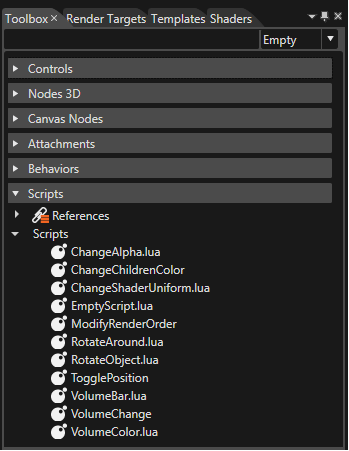
Compared to Behaviors there are no predefined Lua-Scripts but however they offer an easy and fast way to define your own mechanics and functions. Although there are many advantages you nearly have to write them from the scratch. To learn the basics follow this step by step tutorial to see how to create, write and use them. Furthermore there is a Sample Solution called Lua-Scripting where you can click through several sample scripts for reading, learning or copying useful snippets of the code. You can find them in the Toolbox under the category called Scripts:

<div drawio-diagram="2074"><img src="https://doc316en.candera.eu/uploads/images/drawio/2023-02/drawing-4-1676957493.png" alt=""/></div>

<div class="contents" id="bkmrk--0"><div class="textblock">  
</div></div>

# Create an own Script

This chapter provides an explanation of how a new Lua-Script can be created to make it ready to be usable in the SceneComposer.

#### <a class="anchor" id="bkmrk--3"></a>How to create a new Script.

In difference to a Widget or a Behavior Lua-Scripts are completely generated in the SceneComposer by one simple step:

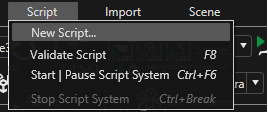
Click "Script" in the menu...

<div drawio-diagram="2075"><img src="https://doc316en.candera.eu/uploads/images/drawio/2023-02/drawing-4-1676957601.png" alt=""/></div>

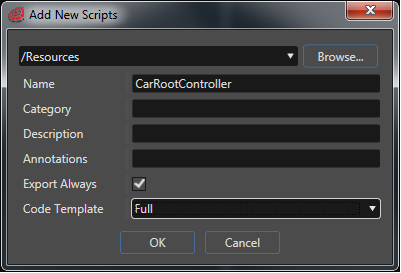
<div class="contents" id="bkmrk--0"><div class="contents"><div class="textblock"></div></div></div>... and chose "New Script". Browse for the desired folder and define where to save the new script. Name the script "CarRootController". This will be our root node script which controls other scripts. For the code template we recommend to choose "Full" to see all the predefined Callback-Functions.

<div drawio-diagram="2076"><img src="https://doc316en.candera.eu/uploads/images/drawio/2023-02/drawing-4-1676957619.png" alt=""/></div>

<div class="contents" id="bkmrk--2"><div class="contents"><div class="textblock"></div></div></div>Now you will find your new script in the Toolbox under Scripts. To apply it to the desired node just drag and drop the script from the Toolbox to your node. (For the tutorial example apply it to the root node of the car)

# Lua Introduction

#### <a class="anchor" id="bkmrk--12"></a>Callback Functions

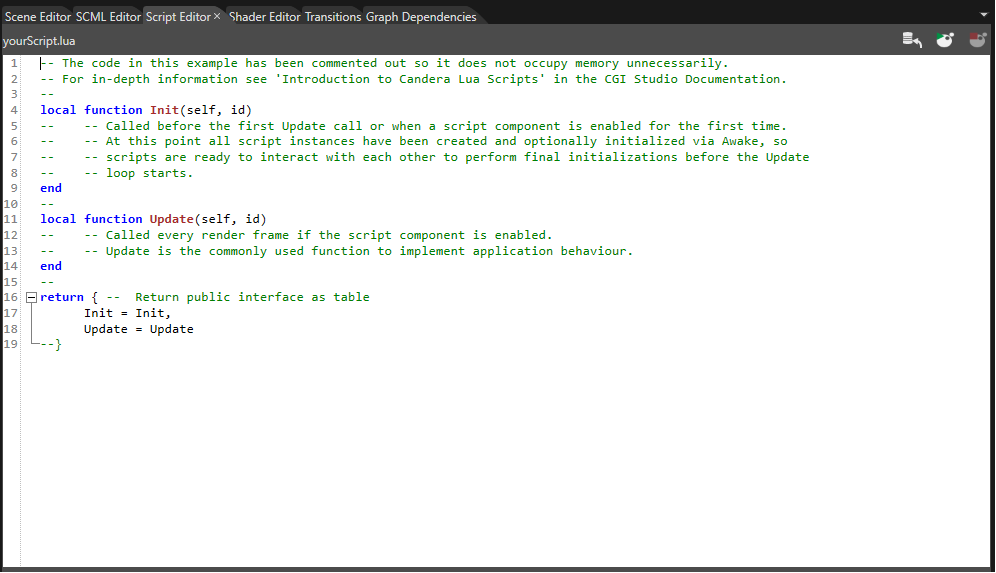
If you open your script in the Script Editor you can see that there are already the most important lines of code. These are the so called callback functions which are called by [Candera](http://dev.doc.cgistudio.at/APILINK/namespace_candera.html "[DataBinding_RefTypeSample]").

<div drawio-diagram="2077"><img src="https://doc316en.candera.eu/uploads/images/drawio/2023-02/drawing-4-1676957696.png" alt=""/></div>

<div class="contents" id="bkmrk--0"><div class="contents"><div class="textblock">  
</div></div></div>#### <a class="anchor" id="bkmrk--14"></a>Init(self, id)

The Init function gets called before the first Update call or when a script component is enabled for the first time. At this point all script instances have been created and optionally initialized via Awake, so scripts are ready to interact with each other to perform final initializations before the Update loop starts.

#### <a class="anchor" id="bkmrk--15"></a>Update(self, id)

Called every render frame if the script component is enabled. Update is the commonly used function to implement application behavior.

**Note:** if you use one of the callback functions or if you want to make an own function public then don't forget to add them to the public table! (see next paragraph)

#### <a class="anchor" id="bkmrk--16"></a>return{}

It returns the public interface as table. Variables that have been exposed via the public interface table, and are either of type integer, float, string, or boolean, are automatically displayed in SceneComposer's GUI. In the SceneComposer this variables can be edited and are saved/loaded with the scene. Functions in the return section are not displayed in SceneComposer's GUI but they are public and can get called by another script or by [Candera](http://dev.doc.cgistudio.at/APILINK/namespace_candera.html "[DataBinding_RefTypeSample]") (see "Callback Functions").

<div drawio-diagram="2078"><img src="https://doc316en.candera.eu/uploads/images/drawio/2023-02/drawing-4-1676957709.png" alt=""/></div>

<div class="contents" id="bkmrk--5"><div class="contents"><div class="textblock">  
</div></div></div>To provide access to variables of the public table of the instance, the table is passed in the function parameter 'self' in all functions that are being called by Candera's script system. So if you define a variable in the public table you can use it in any functions of this script via "self.yourVariable".

#### <a class="anchor" id="bkmrk--18"></a>Save and Start a Script

To validate your script press %&lt;F8%&gt; or choose "Script" - "Validate Script" from the menu.

When the script has been validated and there are no errors, you can press the start button to start the execution of the script system and stop it with the second button.

<div drawio-diagram="2079"><img src="https://doc316en.candera.eu/uploads/images/drawio/2023-02/drawing-4-1676957751.png" alt=""/></div>

<div class="contents" id="bkmrk--8"><div class="contents"><div class="textblock">  
</div></div></div>#### <a class="anchor" id="bkmrk--20"></a>Candera Logging

<div drawio-diagram="2080"><img src="https://doc316en.candera.eu/uploads/images/drawio/2023-02/drawing-4-1676957810.png" alt=""/></div>

<div class="contents" id="bkmrk--11"><div class="contents"><div class="textblock">  
</div></div></div>  
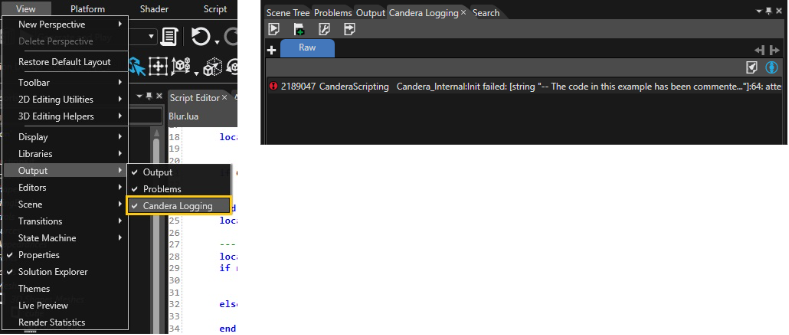
To check whether your script crashes during runtime or not you can see errors or further information in the [Candera](http://dev.doc.cgistudio.at/APILINK/namespace_candera.html "[DataBinding_RefTypeSample]") Logging panel. If this panel is not activated go to View -&gt; Output -&gt; and check [Candera](http://dev.doc.cgistudio.at/APILINK/namespace_candera.html "[DataBinding_RefTypeSample]") Logging

<p class="callout info">**Tip:** [Candera](http://dev.doc.cgistudio.at/APILINK/namespace_candera.html "[DataBinding_RefTypeSample]") Logging is also very useful to test individual parts of your code like if-cases or loops via:</p>

```
Candera.LogInfo(message)
```

# Id Handling

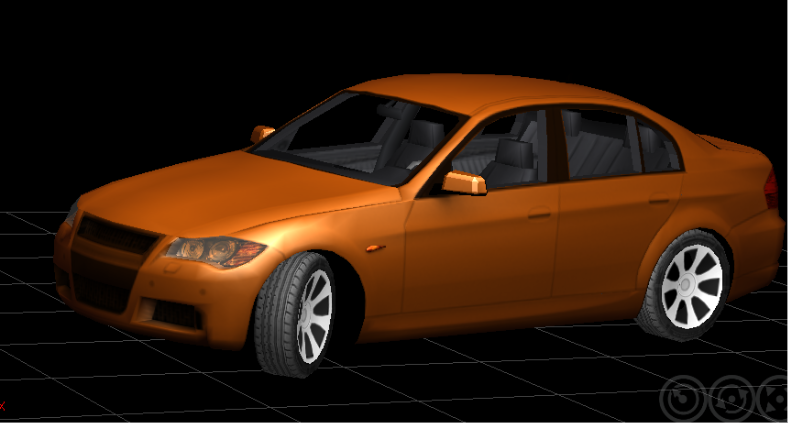
This chapter explains how to get access to other nodes via the id of their attached script. Therefore, create a new Scene Composer solution using the "3D Getting started" template, which includes a 3D model of a car.

To start it's important to know that there are two functions that are fundamental to get access to other nodes:
<div class="contents" id="bkmrk-candera.getscriptids"><div class="contents"><div class="textblock">- **Candera.GetScriptIds(id)** returns all ids of script components that are attached to the same node as 'id'.
- **Candera.GetChildScriptIds(id)** returns all ids of script components that are attached to any node in the subtree of the node identified by 'id'.

</div></div></div>Once you have the id of the child nodes you can get the script itself with:

<div class="contents" id="bkmrk-candera.idtoscriptco"><div class="contents"><div class="textblock">- **Candera.IdToScriptComponent(scriptId)** returns the public table of the script identified by 'scriptId'

</div></div></div>The first goal is to rotate all four wheels in the same speed and to rotate the front wheels according to the steering lock.

<div drawio-diagram="2081"><img src="https://doc316en.candera.eu/uploads/images/drawio/2023-02/drawing-4-1676958053.png" alt=""/></div>

<div class="contents" id="bkmrk--0"><div class="contents"><div class="textblock">  
</div></div></div>Therefore it is necessary that a script from the root node of the car communicates with all four wheels. But as we have already learned it's absolutely necessary that each node we want to find also has a script component. So before we start to get access to the child nodes we equip all four wheels with a script. As front wheels and back wheels have different behaviors (steering lock) create two different scripts called "Wheel\_back" and "Wheel\_front":

#### <a class="anchor" id="bkmrk--5"></a>Wheel\_back Script:

Get the current rotation of the wheel and set the new rotation with a modified x-value. In this case we add the 'rotationSpeed' value from the public table to the current x-rotation. Afterwards the public value 'rotationSpeed' will get set by the root script.

```
    local function Update(self, id)
        local pitch, yaw, roll =Candera.GetRotation(id)                                
        Candera.SetRotation(id,  pitch+self.rotationSpeed, yaw, roll) 
    end
    
    return { 
      <a class="code" href="http://dev.doc.cgistudio.at/APILINK/namespace_courier.html#a2e6f80d7ef7c7a120595f3d56e6f4246">Init</a> = <a class="code" href="http://dev.doc.cgistudio.at/APILINK/namespace_courier.html#a2e6f80d7ef7c7a120595f3d56e6f4246">Init</a>,
      Update = Update,
      GetName = GetName, 
      rotationSpeed =0.0
    }
```

To enable the root script to identify the wheel scripts it's also important that the wheel scripts get a value which contains a proper name. This value must not get changed by SceneComposer's GUI so we enable the access with a public function called GetName():

```
    local scriptName = "Wheel_back"
    local function GetName()
        return scriptName
    end
```

(don't forget to add the function to the public table: GetName = GetName, )

#### <a class="anchor" id="bkmrk--6"></a>Wheel\_front Script:

Just repeat the same steps for the front wheel with a modification in the update concerning the z-rotation which gets set to the steering lock angle.

```
    local function Update(self, id)
        local pitch, yaw, roll =Candera.GetRotation(id) 
        Candera.SetRotation(id,  pitch+self.rotationSpeed, yaw, self.steerLock) 
    end
    
    return { 
      <a class="code" href="http://dev.doc.cgistudio.at/APILINK/namespace_courier.html#a2e6f80d7ef7c7a120595f3d56e6f4246">Init</a> = <a class="code" href="http://dev.doc.cgistudio.at/APILINK/namespace_courier.html#a2e6f80d7ef7c7a120595f3d56e6f4246">Init</a>,
      Update = Update,
      GetName = GetName, 
      rotationSpeed =0.0,
      steerLock =0.0
    }
```

The GetName functions is nearly the same except a different value for the name (Wheel\_front).

The next step is to drag and drop the scripts to the proper nodes.

Now we can concentrate on the root node:

#### <a class="anchor" id="bkmrk--7"></a>CarRootController Script:

Switch back to the root script called "CarRootController". The first thing we have to do is to get the id of every script component which is attached to any child of the root and store it to a local variable which we will need later:

```
    local frontWheelScripts={}
    local backWheelsScripts={}
    local childIds = {}
    local function <a class="code" href="http://dev.doc.cgistudio.at/APILINK/namespace_courier.html#a2e6f80d7ef7c7a120595f3d56e6f4246">Init</a>(self, id)
        childIds = Candera.GetChildScriptIds(id)
    end
```

Now it's possible to iterate through the array "childIds" (also in the **Init-Function**) to get their scripts and to look for a special script via its name. But to be able to call their GetName function and to use the scripts afterwards in the Update-Function we first have to get access to the scripts public table via Candera.IdToScriptComponent\[childId\]. Now as you have the script you can call the GetName function to search for the desired script name. Then insert each of them to a local array which got defined above the Init-Function (shown in the previous paragraph).

```
    for i, childId in ipairs(childIds) do
        local script = Candera.IdToScriptComponent[childId]
        
        if script and script.GetName() == "Wheel_front"  then
                      
            table.insert(frontWheelScripts, script)
            --table.insert(value, array) inserts the element in the last position of the array
            
        elseif script and script.GetName() == "Wheel_back" then
            table.insert(backWheelsScripts, script)
            
        end    
        
    end
```

Now we have access to each wheel script so we can also change their public values. Therefore scroll down to the **Update-Function** where you can iterate through the scripts and change the rotationSpeed and for the front wheels also the steer lock.

```
    local function Update(self, id)
        for i, frontWheelScript in ipairs(frontWheelScripts) do
            frontWheelScript.rotationSpeed = self.rotationSpeed
            frontWheelScript.steerLock = self.steerLock
        end
         
        for i, backWheelScript in ipairs(backWheelsScripts) do
            backWheelScript.rotationSpeed = self.rotationSpeed
        end
    
    end 
```

Be sure that every node has its proper script and set the rotationSpeed and the steerLock of the root node to a proper value (20;30). If you start the execution of the script system the wheels will rotate.

<p class="callout info">**Tip:** Also check the Sample Solution for further information and scripts.</p>

# Communication between Children

#### <a class="anchor" id="bkmrk--6"></a>How to find siblings

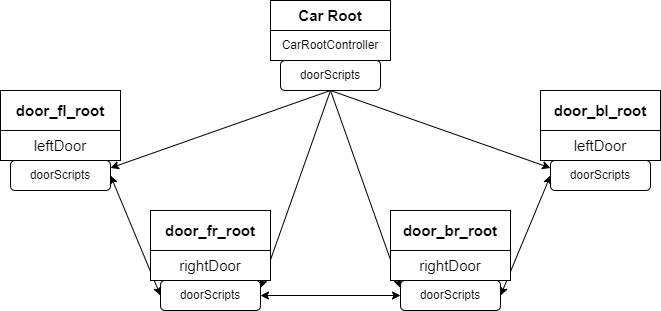
This chapter explains how to get access to sibling nodes via the id of their attached script. Because there is yet no direct way to get the ids of sibling nodes you have to use a workaround. The recommended way is to use a script on a root node which tells its child nodes the ids or even the scripts of their siblings. The diagram beneath shows the car node in the center. Its script "CarRootController" finds the door scripts of its childnodes and pass them in form of an array to the scripts of its child nodes. Now each door node has access to the other door nodes.
<div drawio-diagram="2083"><img src="https://doc316en.candera.eu/uploads/images/drawio/2023-02/drawing-4-1676958460.png" alt=""/></div>

<div class="contents" id="bkmrk--0"><div class="contents"><div class="textblock">  
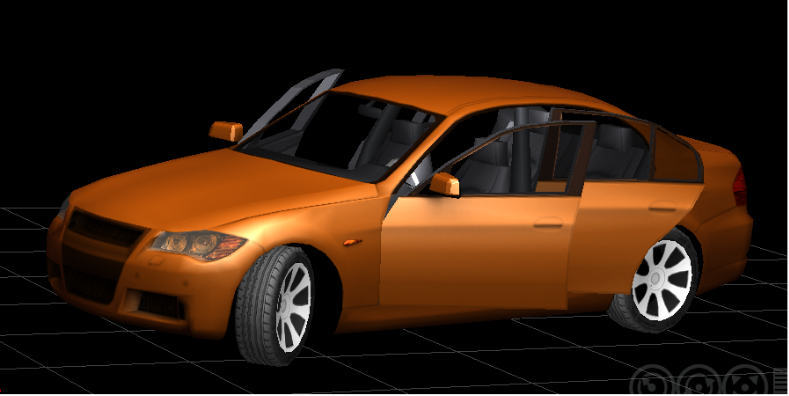
</div></div></div>The following example is for the doors of the car. If one of them gets opened the other doors should get opened too.

<div drawio-diagram="2084"><img src="https://doc316en.candera.eu/uploads/images/drawio/2023-02/drawing-4-1676958488.png" alt=""/></div>

<div class="contents" id="bkmrk--2"><div class="contents"><div class="textblock">  
</div></div></div>#### <a class="anchor" id="bkmrk--9"></a>Door Scripts

Therefore each door script has to know the other door scripts. So first attach a new script called "leftDoor" to the left doors and a new script called "rightDoor" to the right doors. The scripts will be nearly the same except the rotation value (a left door has to rotate in the opposite direction of a right door). As in the other example "Id Handling" the first step is to implement a name variable and a GetName() function so the parent node can identify them:

```
    local scriptName = "door"
    local function GetName()
        return scriptName
    end
```

<p class="callout info">**Tip:** Don't forget to add the new function to the public table! (see next step)</p>

Next we need a public boolean which tells the script that the door should get opened. Afterwards this public value 'openDoor' will get modified by another door script.

```
    return { 

        <a class="code" href="http://dev.doc.cgistudio.at/APILINK/namespace_courier.html#a2e6f80d7ef7c7a120595f3d56e6f4246">Init</a> = <a class="code" href="http://dev.doc.cgistudio.at/APILINK/namespace_courier.html#a2e6f80d7ef7c7a120595f3d56e6f4246">Init</a>,
        Update = Update,        
        GetName = GetName,      
        openDoor = false,       
    }
```

Now switch to the **Update-Function** to add following lines of code:

```
local function Update(self, id)
    if self.openDoor == true then
        -- get the current x- and z-rotation of the door and change the y-rotation to a proper value
        local pitch, yaw, roll = Candera.GetRotation(id)                                
        Candera.SetRotation(id,  pitch, yaw, -30)
            
        -- now iterate over the array with the other door scripts stored in the public variable doorScripts 
        --and change their openDoor boolean to true so they can get opened
        for i, otherDoorScript in ipairs(self.doorScripts) do
            
            otherDoorScript.openDoor = true 
                             
        end
                    
      end
end
```

However yet the public array doorScripts will be nil as a root node has to find all door scripts and save them to the public array of each script. Therefore add a new array called doorScripts to the public table...

```
    return { 

        <a class="code" href="http://dev.doc.cgistudio.at/APILINK/namespace_courier.html#a2e6f80d7ef7c7a120595f3d56e6f4246">Init</a> = <a class="code" href="http://dev.doc.cgistudio.at/APILINK/namespace_courier.html#a2e6f80d7ef7c7a120595f3d56e6f4246">Init</a>,
        Update = Update,        
        GetName = GetName,      
        openDoor = false,
        doorScripts ={}
    }
```

<p class="callout info">Lua uses 'nil' as a kind non-value, to represent the absence of a useful value.</p>

#### <a class="anchor" id="bkmrk--10"></a>Root Script

... and switch to the CarRootController script to the **Init-Function** . To find the door scripts iterate over the array childIds, get the script of each id and store it to a array. Therefore add a local array called "doorScripts" to your CarRootController script.

When all the door scripts are found iterate over the doorScripts array and store the local array of door scripts to the doorScripts array of each script:

```
    for i, childId in ipairs(childIds) do
        local script = Candera.IdToScriptComponent[childId]
                  
        if script and script.GetName() == "door"  then
                      
            table.insert(doorScripts, script)
            
        end    
    end
       
    for i, doorScript in ipairs(doorScripts) do      
        doorScript.doorScripts = doorScripts              
    end
```

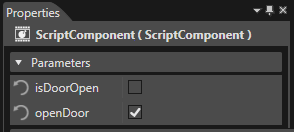
<p class="callout info">Don't forget to set the openDoor value in the properties panel to true at least for one door script to test if the other doors will get opened.</p>

<div class="contents" id="bkmrk--4"><div class="contents"><div class="textblock"><div drawio-diagram="2082"><img src="https://doc316en.candera.eu/uploads/images/drawio/2023-02/drawing-4-1676958413.png" alt=""/></div>

</div></div></div>#### <a class="anchor" id="bkmrk--12"></a>Global Variables

Another way to communicate between two sibling scripts is to use global variables. In Lua variables are automatically global if you declare them without an access modifier. But we would recommend you to set variables with a root script as explained above.

# OnEnable() and OnDisable()

#### <a class="anchor" id="bkmrk-"></a>How to use OnEnable() and OnDisable()

As in this example the root node script "CarRootController" controls nearly all of the other scripts it would be advisable to disable all the child scripts in case of a disabled root script. Therefore use the OnDisable() function of the "CarRootController" script:

You already stored all child ids to the local array childIds so you just need to iterate over this array to disable all other scripts. Therefore we use the callback function OnDisable() which gets called by [Candera](http://dev.doc.cgistudio.at/APILINK/namespace_candera.html "[DataBinding_RefTypeSample]") automatically when disabling this script.

```
    local function OnDisable(self, id) 

        for i, scriptId in ipairs(childIds) do 
            Candera.SetEnabled(scriptId, false)     
        end
    end
```

If the root script gets enabled the child scripts have to get enabled too. Therefore use the OnEnable() function:

```
    local function OnEnable(self, id)
   
        for i, scriptId in ipairs(childIds) do
            Candera.SetEnabled(scriptId, true)
        end
   
        -- toggle the rotation angle of the wheels each time it got enabled
        self.steerLock= self.steerLock*-1
   
    end
```

<p class="callout info">**Tip:** don't forget to add the callback functions **OnDisable()** and **OnEnable()** to the public table so they can get called by [Candera](http://dev.doc.cgistudio.at/APILINK/namespace_candera.html "[DataBinding_RefTypeSample]").</p>

If you start the execution of the script system and disable the CarRootController script during runtime also the wheels should stop rotating. Furthermore if you enable the CarRootController again, the wheels start rotating and the steering lock switches.

# Set Priority of Lua-Scripts

#### <a class="anchor" id="bkmrk--3"></a>Script Priority

Another useful feature of Lua-Scripting is the priority. It defines in which order the scripts get called (f.e. the Update or the Init). To test this feature in its simplest way create four cubes and equip them with the same script called "SimpleLogInfo".

```
    local function <a class="code" href="http://dev.doc.cgistudio.at/APILINK/namespace_courier.html#a2e6f80d7ef7c7a120595f3d56e6f4246">Init</a>(self, id)
        Candera.LogInfo(self.logString)
    end

    return { 
        <a class="code" href="http://dev.doc.cgistudio.at/APILINK/namespace_courier.html#a2e6f80d7ef7c7a120595f3d56e6f4246">Init</a> = <a class="code" href="http://dev.doc.cgistudio.at/APILINK/namespace_courier.html#a2e6f80d7ef7c7a120595f3d56e6f4246">Init</a>,    
        logString = "logString"
    }
```

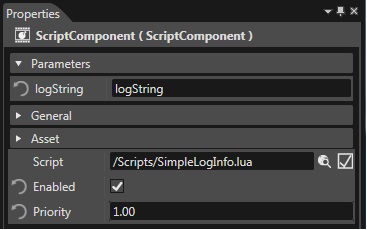
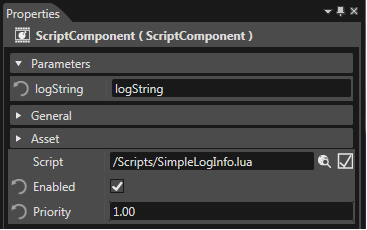
This script allows to enter an output string in the public table which will get written in the CanderaLogging panel. Now apply the script to each of the cubes and enter a proper log info to the public value "logString" in the Properties panel. The next step is to assign a priority value to each instance of the script:
<div drawio-diagram="2085"><img src="https://doc316en.candera.eu/uploads/images/drawio/2023-02/drawing-4-1676958567.png" alt=""/></div>

<div class="contents" id="bkmrk--0"><div class="contents"><div class="textblock">  
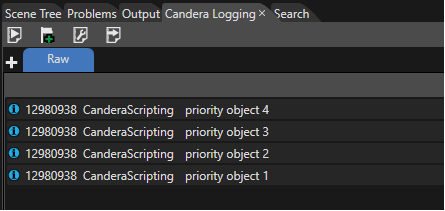
</div></div></div>Now if you start the execution of the script system you can read the log strings in the order according to their priority. (open the CanderaLogging as explained in "Lua Introduction")

<div drawio-diagram="2086"><img src="https://doc316en.candera.eu/uploads/images/drawio/2023-02/drawing-4-1676958585.png" alt=""/></div>

<div class="contents" id="bkmrk--2"><div class="contents"><div class="textblock">  
</div></div></div><p class="callout info">**Tip:** for ordering script execution you can also use call-back functions. F.e. LateUpdate(self, id) is called every render frame after all Update callbacks.</p>