# Manage Animations
#### Animation List
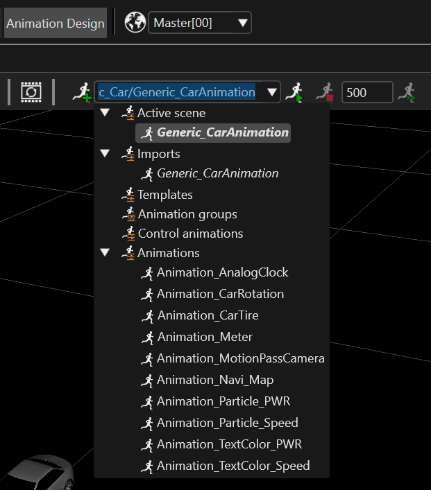
All the animations from the solution are listed in the Animation List. Selecting an animation from the list displays it in the "Scene Render" panel of the main view of the application, when it is started.
If toolbar does not have the animation icons described below, to display them please select the "Animation Design" from the menu bar.
"Animation List" in Toolbar
Different types of animations:
- **User-defined animations** can be created either as empty animations or based on an imported or template animation.
- **Imported animations** are imported from FBX files. They are read-only and listed in italic in the "Imports" section of the Animation List.
- **Template animations** are animations saved as a template. They are listed in the "Templates" section of the Animation List.
- **Local animations** are animations inside a control.
---
#### Delete or Rename an Animation
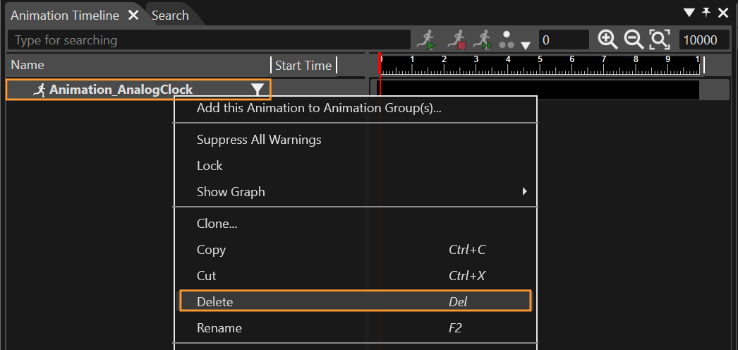
**Delete** an animation via context menu in the "Animation Timeline", "Animation Values" or "Solution explorer" panel.
Context Menu "Delete" in Animation Timeline
**Rename** the currently selected animation via context menu in the "Animation Timeline", "Animation Values" or "Solution explorer" panel.
---