# OpenGL Multi Texture Brush Blend

### GlMultiTextureBrushBlend

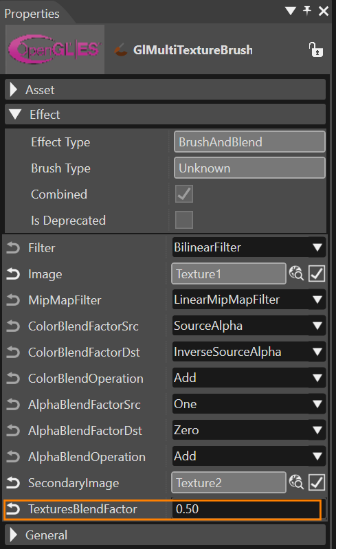
This effect allows to define two textures. These two textures are blended using a blend factor.

<div drawio-diagram="6224"><img src="https://doc316en.candera.eu/uploads/images/drawio/2024-06/drawing-5-1718371745.png" alt=""/></div>

#### Image and Secondary Image  


Here you can define the first image.

<div drawio-diagram="6226"><img src="https://doc316en.candera.eu/uploads/images/drawio/2024-06/drawing-5-1718371951.png" alt=""/></div>

The second image can be configured with the property "SecondaryImage".

<div drawio-diagram="6227"><img src="https://doc316en.candera.eu/uploads/images/drawio/2024-06/drawing-5-1718371969.png" alt=""/></div>


#### Blend Factor

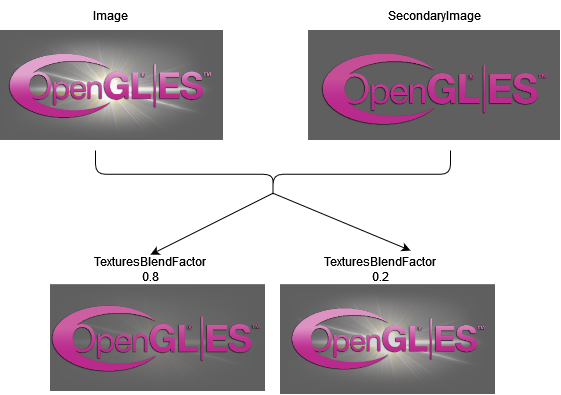
The given images will be blended according to the TexturesBlendFactor.

<div drawio-diagram="6229"><img src="https://doc316en.candera.eu/uploads/images/drawio/2024-06/drawing-5-1718372312.png" alt=""/></div>

The value of the TexturesBlendFactor ranges between \[0...1\].

E.g. 0.2 would be 20% of Image and 80% of Secondary Image.

<div drawio-diagram="6230"><img src="https://doc316en.candera.eu/uploads/images/drawio/2024-06/drawing-5-1718373035.png" alt=""/></div>

<p class="callout info">This OpenGL effect demonstrates the usage of the <span style="color: rgb(230, 126, 35);">[API for 2D Effects on 3D Devices](https://doc316en.candera.eu/books/2d-effects/page/custom-shader-for-2d-effects-on-3d-devices)<span style="color: rgb(52, 73, 94);">.</span>  
<span style="color: rgb(52, 73, 94);">Detailed basic information on this effect can be found </span>[here](https://doc316en.candera.eu/link/1188#bkmrk-glmultitexturebrushb)<span style="color: rgb(52, 73, 94);">.</span>  
</span></p>