# Blending

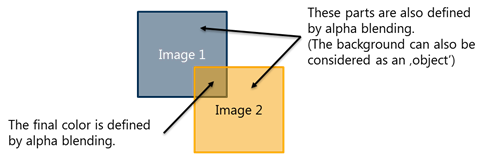
<a class="anchor" id="bkmrk--6"></a>Alpha Blending is the process of combining the pixel data of multiple overlapping objects to a single pixel with a final color and alpha value.

<div class="contents" id="bkmrk-"><div class="contents"><div class="textblock"><div class="image"><div drawio-diagram="2820"><img src="https://doc316en.candera.eu/uploads/images/drawio/2023-02/drawing-4-1677552833.png" alt=""/></div>

</div></div></div></div>#### <a class="anchor" id="bkmrk--8"></a>Blend Factor

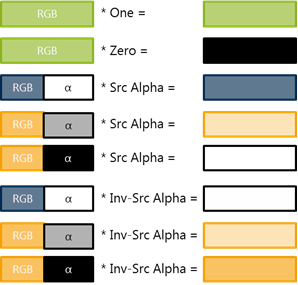
Here is an example on the different blend factors using alpha blending:

<div drawio-diagram="2819"><img src="https://doc316en.candera.eu/uploads/images/drawio/2023-02/drawing-4-1677552811.png" alt=""/></div>

<p class="callout info">Alpha is 1.0 (white) for non-transparent pixels and 0.0 (black) for transparent pixels.</p>

#### <a class="anchor" id="bkmrk--10"></a>Blend Operation

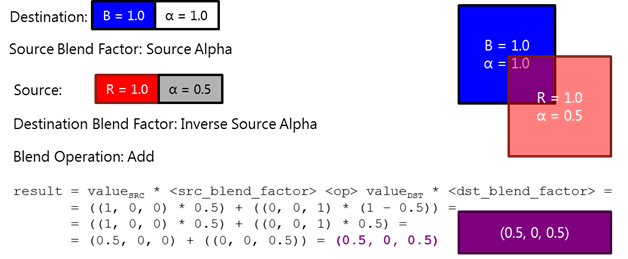
The blend operation specifies how the destination and source pixel values are combined. Here is an example blending 50% red on opaque blue:
<div drawio-diagram="2818"><img src="https://doc316en.candera.eu/uploads/images/drawio/2023-02/drawing-4-1677552792.png" alt=""/></div>

<div class="contents" id="bkmrk--2"><div class="contents"><div class="textblock"><div class="image">  
</div></div></div></div>#### <a class="anchor" id="bkmrk--12"></a>Blend Problems

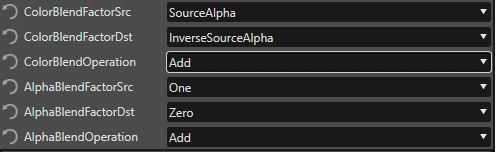
The default values used for blending are set to the following configuration:

<div class="contents" id="bkmrk--3"><div class="contents"><div class="textblock"><div class="image"><div drawio-diagram="2817"><img src="https://doc316en.candera.eu/uploads/images/drawio/2023-02/drawing-4-1677552782.png" alt=""/></div>

</div></div></div></div>The default values ensure maximum performance when no layer blending is needed or no objects with transparency on the same layer are overlapping. The reason is that the Destination Alpha is multiplied with 0 (ignored) and the Source Alpha is used instead. This means the transparency of the last drawn item is used. The default Color Blend Values are fine for all common cases.

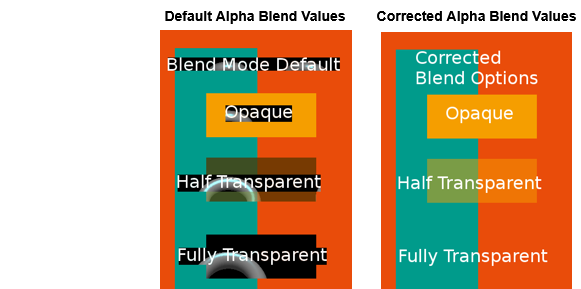
In the following example, a partially transparent 2D scene on one layer is rendered over a 3D scene of another layer.

<div class="contents" id="bkmrk--4"><div class="contents"><div class="textblock"><div class="image"><div drawio-diagram="8635"><img src="https://doc316en.candera.eu/uploads/images/drawio/2025-10/drawing-5-1760709992.png" alt=""/></div>

</div></div></div></div><table border="1" id="bkmrk-%C2%A0-default-alpha-blen" style="border-collapse: collapse; width: 646px; height: 342.467px;"><tbody><tr style="height: 31.2667px;"><td class="align-center" style="background-color: rgb(35, 111, 161); width: 163.9px; height: 31.2667px;"> </td><td class="align-center" style="background-color: rgb(35, 111, 161); width: 235.933px; height: 31.2667px;"><span style="color: rgb(255, 255, 255);">**Default Alpha Blend Values**</span></td><td class="align-center" style="background-color: rgb(35, 111, 161); width: 245.5px; height: 31.2667px;"><span style="color: rgb(255, 255, 255);">**Corrected Alpha Blend Values**</span></td></tr><tr style="height: 29.4667px;"><td style="background-color: rgb(53, 152, 219); width: 163.9px; height: 29.4667px;">**<span style="color: rgb(255, 255, 255);">Configuration</span>**</td><td style="width: 235.933px; height: 29.4667px;">  
</td><td style="width: 245.5px; height: 29.4667px;">  
</td></tr><tr style="height: 29.4667px;"><td style="background-color: rgb(53, 152, 219); width: 163.9px; height: 29.4667px;"><span style="color: rgb(255, 255, 255);">Alpha Blend Factor Src</span></td><td style="width: 235.933px; height: 29.4667px;">One</td><td style="width: 245.5px; height: 29.4667px;">InverseDestAlpha</td></tr><tr style="height: 29.4667px;"><td style="background-color: rgb(53, 152, 219); width: 163.9px; height: 29.4667px;"><span style="color: rgb(255, 255, 255);">Alpha Blend Factor Dst</span></td><td style="width: 235.933px; height: 29.4667px;">Zero</td><td style="width: 245.5px; height: 29.4667px;">One</td></tr><tr style="height: 29.4667px;"><td style="background-color: rgb(53, 152, 219); width: 163.9px; height: 29.4667px;"><span style="color: rgb(255, 255, 255);">Alpha Blend Operation</span></td><td style="width: 235.933px; height: 29.4667px;">Addd</td><td style="width: 245.5px; height: 29.4667px;">Add</td></tr><tr style="height: 63.0667px;"><td style="background-color: rgb(53, 152, 219); width: 163.9px; height: 63.0667px;">**<span style="color: rgb(255, 255, 255);">Problem caused by</span>**</td><td style="width: 235.933px; height: 63.0667px;">\- Scene using layers

\- Overlapping objects with transparency

</td><td style="width: 245.5px; height: 63.0667px;">  
</td></tr><tr style="height: 130.267px;"><td style="background-color: rgb(53, 152, 219); width: 163.9px; height: 130.267px;">**<span style="color: rgb(255, 255, 255);">Reason</span>**</td><td style="width: 235.933px; height: 130.267px;">Destination Alpha is multiplied with 0 (ignored), and the source Alpha is used instead. Therefore, the transparency of the last drawn item is used and the background layer with the 3D scene is partially visible.</td><td style="width: 245.5px; height: 130.267px;">With the corrected Alpha Blend vales, the transparency of the SolidColorNodes is applied as intended and the background layer is not visible.</td></tr></tbody></table>

<p class="callout info">Alpha blending is disabled by default. Blending should not be enabled unless really necessary. Unnecessarily enabling blending will lead to a performance loss. When using images with alpha information, blending can be enabled in the Solutions Options dialog: “File – Solution Options… - Default Render Mode – Enable Blending”</p>

<div class="contents" id="bkmrk--5"><div class="contents"><div class="textblock"><div class="image">  
</div></div></div></div>